
Introduction
If you are evaluating Datto, you are probably looking for more than a simple backup tool. You need a platform that can protect business data, reduce downtime, manage endpoints, and help IT teams respond faster when something breaks.
Datto is an MSP-focused IT management and business continuity platform that combines backup and disaster recovery, remote monitoring and management, SaaS protection, endpoint security, and automation. It is especially popular among Managed Service Providers (MSPs), but it can also be relevant for internal IT teams that need strong backup and recovery capabilities.
The company was founded in 2007 and became widely known for its backup and disaster recovery technology. In 2022, Datto was acquired by Kaseya, which means the platform now sits inside the broader Kaseya ecosystem. This matters because Datto is no longer just a standalone backup vendor. It is part of a larger IT operations stack that includes RMM, PSA, security, cloud backup, and automation.
Why Datto Still Matters for IT Teams in 2026
IT environments are more distributed than ever. You may be supporting remote employees, Microsoft 365 accounts, cloud workloads, endpoint devices, identity systems, and on-premises infrastructure at the same time.
Datto is designed for this reality. Its strongest value is not one isolated feature. It is the way it brings together backup, recovery, endpoint management, SaaS data protection, and cyber resilience into one MSP-friendly ecosystem.
That said, Datto is not the right fit for every business. It is powerful, but it is also more partner-led and quote-based than many self-service SaaS tools. If you want transparent public pricing or a lightweight backup product, you may prefer an alternative such as Veeam, Axcient, NinjaOne, or N-able.
This Datto review will help you understand where the platform performs well, where it may feel limited, and whether it is the right choice for your IT service model.
Quick Overview
| Category | Datto Review Summary |
| Best For | MSPs and IT teams that need backup, RMM, SaaS protection, and cyber resilience |
| Strongest Area | Business continuity and disaster recovery |
| Main Limitation | Quote-based pricing and a stronger fit for MSP-led environments |
| Top Alternatives | NinjaOne, Veeam, Axcient, ConnectWise, N-able, Atera |
| Recommendation | Best for teams that want integrated backup, recovery, endpoint management, and security workflows |
Software Specification
Core Features of Datto
Datto is best understood as a product ecosystem rather than one single application. Depending on your needs, you may use Datto for backup appliances, direct-to-cloud recovery, RMM, SaaS backup, endpoint detection, or identity backup.
For MSPs, this is the main advantage. You can manage several layers of protection from one vendor ecosystem instead of stitching together separate backup, monitoring, and security tools.
Backup and Disaster Recovery with Datto SIRIS
Datto SIRIS is the platform’s flagship business continuity and disaster recovery solution. It is designed to protect servers, virtual machines, and business-critical workloads through image-based backup, local recovery, and cloud disaster recovery.
The latest generation, Datto SIRIS 6, keeps the platform focused on fast recovery and ransomware resilience. For MSPs, the value is clear: when a client’s system fails, you can restore operations quickly instead of waiting for a traditional backup restore process to finish.
- Image-based backup: Protects full systems, not only individual files.
- Instant virtualization: Lets you run a backup as a live system during recovery.
- Hybrid recovery: Supports local recovery and cloud-based disaster recovery.
- Cloud Deletion Defense: Adds protection against accidental or malicious backup deletion.
Why it matters: If downtime affects revenue, service delivery, or client trust, Datto’s BCDR capabilities can reduce recovery time and give your IT team a more practical failover path.
Datto Endpoint Backup with Disaster Recovery
Datto also offers direct-to-cloud backup and disaster recovery options for workloads that do not require a physical appliance. This is useful when your clients have distributed environments, smaller sites, or workloads that need protection without deploying additional hardware.
This gives MSPs more flexibility. You can still protect servers and endpoints, but you are not always forced into the same appliance-based model for every client environment.
Datto RMM for Remote Monitoring and Endpoint Management
Datto RMM helps MSPs and IT teams monitor endpoints, automate patching, deploy scripts, and support users remotely. It is built for multi-tenant environments, which makes it especially useful when you manage several clients from one platform.
- Endpoint monitoring: Tracks device health, alerts, and performance issues.
- Patch management: Helps keep operating systems and applications updated.
- Automation jobs: Reduces repetitive work through scripts and policies.
- Remote access: Allows technicians to troubleshoot devices without being on-site.
Recent Datto RMM updates also include Kaseya Intelligence-powered features, such as Activity Log Insights. This helps technicians interact with activity data using natural language prompts and review information like patching, job deployments, remote sessions, and technician actions more efficiently.
Datto SaaS Protection for Microsoft 365 and Google Workspace
Many businesses assume Microsoft 365 and Google Workspace automatically protect all data from deletion, ransomware, or user mistakes. In reality, SaaS backup is still important if you need reliable recovery for email, files, shared drives, and collaboration data.
Datto SaaS Protection helps MSPs protect cloud productivity environments, including Microsoft 365 and Google Workspace. It is especially useful for recovering deleted emails, files, folders, and user data that may not be recoverable through native retention alone.
Datto Backup for Microsoft Entra ID
One of the more important newer additions is Datto Backup for Microsoft Entra ID, formerly Azure AD. This protects identity and directory data, which has become a critical part of business continuity.
If identity infrastructure is misconfigured, deleted, or compromised, users may lose access to Microsoft 365, Azure resources, and key business applications. Backing up Entra ID helps MSPs restore directory objects and reduce operational disruption after identity-related incidents.
Cybersecurity and Ransomware Recovery
Datto’s security value is closely connected to recovery. It is not only about detecting threats. It is about giving your team a clean restore path when a ransomware event, endpoint compromise, or destructive change occurs.
- Ransomware detection: Helps identify suspicious backup behavior.
- Rollback options: Supports recovery to a cleaner restore point.
- Endpoint Detection and Response: Adds endpoint threat visibility and response capabilities.
- Managed SOC options: Can support teams that need 24/7 security monitoring.
Bottom line: Datto is strongest when you need backup, monitoring, and security to work together. It is less compelling if you only need a basic file backup tool.
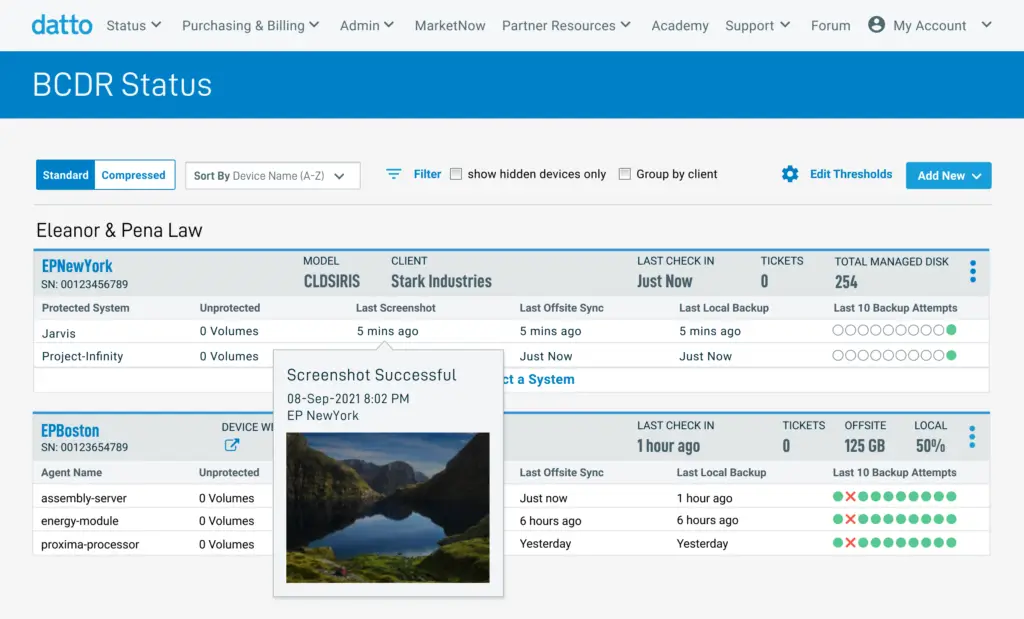
Datto Product Ecosystem
| Datto Product | Main Use Case | Best For |
| Datto SIRIS | Business continuity and disaster recovery | MSPs and IT teams needing rapid recovery |
| Datto ALTO | Entry-level BCDR appliance | Smaller environments with simpler recovery needs |
| Datto Endpoint Backup | Direct-to-cloud backup and recovery | Distributed workloads and remote environments |
| Datto RMM | Remote monitoring, patching, and endpoint management | MSPs managing multiple clients and devices |
| Datto SaaS Protection | Microsoft 365 and Google Workspace backup | Teams protecting cloud productivity data |
| Datto Backup for Microsoft Entra ID | Identity and directory backup | Businesses needing resilient Microsoft identity recovery |
| Datto EDR | Endpoint threat detection and response | Teams that need stronger endpoint security workflows |
Pros and Cons
Benefits of Using Datto
Positive
✅ Strong BCDR Capabilities
✅ Good Fit for MSPs
✅ Multi-Tenant RMM
✅ SaaS and Identity Backup
Negative
❌ Quote-Based Pricing
❌ Learning Curve
❌ MSP-Focused Structure
❌ Hardware Required for Some Solutions
Choosing an IT management platform is not only about features. You need to know how the system behaves when backups fail, endpoints go offline, patches break, or ransomware hits a client environment.
Datto performs well in scenarios where uptime, recovery, and centralized service delivery are priorities. Still, it has limitations you should consider before committing.
Pros
Strong Backup and Disaster Recovery
Datto’s biggest advantage is its BCDR depth. SIRIS, ALTO, and Endpoint Backup give you several ways to protect workloads, recover systems, and support business continuity.
Why it matters: If you support clients with strict uptime expectations, Datto gives you a more complete recovery toolkit than basic cloud backup products.
Built for MSP Workflows
Datto is designed around the way MSPs operate. Multi-client management, recurring revenue models, backup reporting, remote endpoint support, and integration with PSA tools all support managed service delivery.
Why it matters: You can manage protection and support across many clients without building every workflow manually.
Useful Automation and RMM Capabilities
Datto RMM helps technicians automate patching, run scripts, monitor endpoints, and respond to issues remotely. This is useful when your team needs to reduce manual work across many devices.
Why it matters: Better automation can lower ticket volume and help your team focus on higher-value IT work.
Stronger Coverage for SaaS and Identity Data
With Datto SaaS Protection and Datto Backup for Microsoft Entra ID, the platform covers more than traditional server backup. This is increasingly important as more business operations depend on Microsoft 365, Google Workspace, and cloud identity systems.
Why it matters: Your recovery strategy should include user accounts, email, files, and directory data, not only servers.
Cons
Pricing Is Not Fully Transparent
Datto pricing is generally quote-based and partner-focused. That makes it harder to compare costs quickly against tools with public monthly pricing.
What to consider: Before choosing Datto, ask for a detailed quote that separates appliance costs, cloud retention, endpoint licenses, SaaS backup, support, and contract terms.
Learning Curve for Advanced Features
Datto is powerful, but the setup can be complex. Backup policies, failover testing, RMM automation, patch rules, and security workflows require technical planning.
What to consider: If your team is new to MSP-grade BCDR and RMM, expect onboarding time.
Better Fit for MSPs Than Small Internal IT Teams
Datto can work for internal IT, but the platform is clearly shaped around MSP needs. Smaller teams that only need simple backup or remote access may find it more than they need.
What to consider: If you only manage one small environment, compare Datto with simpler backup and endpoint management tools.
Some Solutions Depend on Datto Hardware
Datto SIRIS and ALTO are appliance-based solutions. This can be a strength for turnkey recovery, but it may limit flexibility for teams that prefer software-only backup with their own storage infrastructure.
What to consider: If you want full control over storage, deployment, and infrastructure design, compare Datto with Veeam, Acronis, or Axcient.
User Experience
User Interface and Operational Simplicity
Datto’s user experience is built for technicians who need to move quickly between monitoring, backup status, patching, alerts, and recovery tasks. The interface is more operational than decorative, which is exactly what many MSPs need.
Dashboard and Navigation
The dashboard gives you centralized visibility into protected devices, backup status, alerts, and client environments. For MSPs, the multi-tenant structure is useful because you can move between clients without managing separate systems.
The interface is not always as minimal as newer RMM tools, but it is practical once configured correctly.
Backup and Recovery Experience
Datto’s recovery workflow is one of its strongest usability points. You can check backup health, review recovery points, and initiate restores from the management interface.
For disaster recovery planning, this is important. A backup product is only useful if your team can confidently restore data under pressure.
RMM and Automation Experience
Datto RMM gives technicians tools for patching, scripting, remote support, and monitoring. The platform is strong for teams that invest time in policies and automation.
Newer Kaseya Intelligence features also add more AI-assisted analysis across activity logs and device data, helping technicians review operational context faster.
User Experience Considerations
| Area | Datto Experience | What to Watch |
| Dashboard | Centralized view for backups, endpoints, alerts, and clients | Can feel dense for new users |
| Backup Recovery | Strong restore workflows and fast recovery options | Requires proper backup policy setup |
| RMM | Good automation, patching, scripting, and remote access | Best results require technician training |
| Reporting | Useful for MSP client visibility and service reviews | May need customization for each client |
| Security Workflows | Works well when combined with Datto EDR and backup recovery | Not a full replacement for a complete security stack |
Overall: Datto is not the simplest tool in the market, but it is efficient for MSPs and IT teams that need practical control over backup, RMM, and recovery operations.

Pricing and Plans
How much does Datto cost?
Datto does not publish simple self-service pricing for most of its core products. Pricing is usually quote-based and depends on the product, number of endpoints, backup storage, appliance requirements, retention needs, and partner agreement.
This makes Datto harder to compare against tools with public per-user or per-device pricing. However, it also reflects the way Datto is sold: primarily through MSP-focused pricing models and customizable partner agreements.
What Affects Datto Pricing?
- Product selection: SIRIS, ALTO, RMM, SaaS Protection, EDR, and Entra ID backup are priced differently.
- Backup capacity: Storage needs and retention requirements can affect total cost.
- Deployment model: Appliance-based BCDR can involve different costs than direct-to-cloud backup.
- Number of endpoints: RMM, endpoint backup, and security pricing may scale by device or user.
- Contract terms: MSP agreements may vary by commitment level and service bundle.
Is Datto Expensive?
Datto is usually not positioned as the cheapest option. It is better evaluated as a business continuity and MSP service delivery platform, not as a low-cost backup utility.
If you only need basic file backup, Datto may be more than you need. If you need fast recovery, client reporting, RMM, SaaS protection, and ransomware recovery, the value becomes easier to justify.
Pricing tip: Ask Datto or your MSP partner for a detailed quote that includes appliance costs, cloud storage, retention, support, SaaS backup, endpoint security, and any onboarding fees.
Trust and Data Protection
Datto Security and Compliance
Security is one of the most important parts of any Datto review because backup systems are a major target during ransomware attacks. If attackers can delete or encrypt backups, recovery becomes much harder.
Datto’s security approach combines backup resilience, access controls, ransomware detection, and recovery workflows. Its cloud architecture and data center compliance claims should also be reviewed by businesses with strict regulatory requirements.
Key Security Capabilities
- Cloud Deletion Defense: Helps protect backup data from accidental or malicious deletion.
- Encrypted backup replication: Supports safer transfer and storage of backup data.
- Role-based access controls: Helps limit sensitive actions to authorized users.
- Ransomware recovery: Helps restore clean recovery points after an attack.
- SaaS and identity backup: Protects critical Microsoft 365, Google Workspace, and Entra ID data.
For compliance-sensitive environments, confirm Datto’s current certification scope, data residency options, retention configuration, and security controls directly with Datto or your MSP partner.
Datto vs. Alternatives
How It Compares to Competitors
Datto competes across several categories, which makes comparison tricky. You may compare it as a BCDR platform, an RMM tool, a SaaS backup product, or a broader MSP ecosystem.
For most buyers, the right comparison depends on the main problem you are solving.
Datto vs. Veeam
Veeam is a strong option for enterprise backup, virtualized environments, and teams that want software-based flexibility. It often appeals to organizations with mature infrastructure teams and existing storage strategies.
Datto is usually a better fit for MSPs that want a turnkey BCDR model with integrated cloud recovery, client reporting, and managed service workflows.
Datto vs. NinjaOne
NinjaOne is often easier to use for RMM-first teams. It provides strong endpoint management, patching, automation, and remote support.
Datto is stronger if backup and disaster recovery are central to your service offering. NinjaOne may be the better fit if you mainly need clean endpoint management and do not need Datto’s appliance-based BCDR depth.
Datto vs. Axcient
Axcient is a strong Datto alternative for MSPs that want business continuity and disaster recovery with a cloud-first approach. It may appeal to teams that want a different BCDR model or prefer not to rely as heavily on Datto appliances.
Datto remains stronger when you want a broader ecosystem that includes RMM, SaaS backup, EDR, and Kaseya integrations.
Datto vs. ConnectWise
ConnectWise is one of the most established MSP platforms, especially for PSA, RMM, automation, and service operations. It can be powerful, but it may also require more configuration and process maturity.
Datto is often easier to justify when backup and recovery are the main priority. ConnectWise may be better for MSPs that want deeper service management workflows and broader operational customization.
Full Comparison Table
| Feature | Datto | NinjaOne | Veeam | Axcient | ConnectWise |
| Best For | MSPs needing BCDR, RMM, and cyber resilience | RMM-first IT teams and MSPs | Enterprise backup and recovery | Cloud-first BCDR for MSPs | MSP service operations and automation |
| Backup and Disaster Recovery | Very strong | Moderate | Very strong | Very strong | Limited natively |
| RMM | Strong | Very strong | Limited | Limited | Strong |
| SaaS Backup | Strong | Limited | Available through Veeam products | Available through related solutions | Depends on configuration |
| Pricing Transparency | Quote-based | Quote-based | Varies by product | Quote-based | Quote-based |
| Main Advantage | Integrated MSP-focused recovery ecosystem | Clean endpoint management experience | Infrastructure flexibility | Cloud-first recovery model | Deep MSP operational workflows |
| Main Limitation | Can feel too MSP-focused for small internal teams | Less BCDR depth than Datto | Requires more infrastructure planning | Less broad than Datto’s full ecosystem | Can have a steeper learning curve |
Connected IT Workflows
Datto Integrations
Datto integrates best within the Kaseya and MSP ecosystem. This is especially useful if your team already uses KaseyaOne, Autotask PSA, or other Kaseya tools.
Common Datto Integration Categories
- PSA and service management: Autotask PSA, ConnectWise Manage, and ticketing workflows.
- Cloud platforms: Microsoft 365, Google Workspace, Microsoft Azure, and Microsoft Entra ID.
- Security tools: Datto EDR, managed SOC services, and endpoint protection workflows.
- RMM and automation: Datto RMM, Kaseya tools, scripts, policies, and alerts.
- Reporting: Backup reports, client health data, and MSP service review materials.
The main advantage is operational consistency. The more Datto and Kaseya products you use, the more connected the workflows become. The tradeoff is potential vendor lock-in, especially if you prefer a more open stack with different vendors for backup, RMM, PSA, and security.
Best Fit
Who Should Use Datto?
Datto is best for teams that view backup and recovery as a core part of IT service delivery.
Datto Is a Strong Fit If You:
- Run an MSP and need scalable backup, RMM, and security workflows.
- Need fast recovery for servers, endpoints, SaaS apps, and identity data.
- Support clients with strict uptime or compliance expectations.
- Already use Kaseya, Autotask, or other MSP-focused tools.
- Want a managed BCDR platform rather than building your own recovery stack.
Consider a Datto Alternative If You:
- Need transparent public pricing before speaking to sales.
- Only need basic cloud backup for a small team.
- Prefer software-only backup with your own infrastructure.
- Do not need MSP-focused workflows or multi-tenant management.
- Want a lighter RMM-first product with a simpler learning curve.
Conclusion
Final Thoughts
⭐ Overall Rating: 7.4/10
Datto remains one of the stronger platforms for MSPs that need business continuity, disaster recovery, endpoint management, SaaS backup, and security recovery workflows in one ecosystem.
Its strongest area is BCDR. If your clients cannot afford long downtime, Datto SIRIS, Endpoint Backup, SaaS Protection, and Entra ID backup give you a broad recovery strategy across servers, endpoints, cloud productivity data, and identity systems.
However, Datto is not the most transparent or lightweight option. Pricing is quote-based, some solutions depend on dedicated appliances, and the platform is more naturally suited to MSPs than very small internal IT teams.
Choose Datto if:
✅ You need strong backup and disaster recovery.
✅ You manage multiple clients, endpoints, or business locations.
✅ You want RMM, SaaS backup, identity backup, and recovery workflows in one ecosystem.
✅ You already use or plan to use Kaseya and Autotask tools.
Consider alternatives if:
⛔ You need a low-cost backup product.
⛔ You want fully transparent monthly pricing.
⛔ You prefer software-only infrastructure control.
⛔ You only need basic endpoint monitoring or simple file backup.
Overall, Datto is a strong option for MSPs and IT teams that care about resilience, recovery speed, and centralized service delivery. It is less ideal for buyers who want a simple, low-cost, self-service backup tool.
Have more questions?
Frequently Asked Questions
What is Datto used for?
Datto is used for backup and disaster recovery, remote monitoring and management, SaaS data protection, endpoint security, and IT automation. It is mainly built for MSPs and IT teams that need to protect client environments and recover quickly from outages or cyber incidents.
Is Datto owned by Kaseya?
Yes. Datto was acquired by Kaseya in 2022. The platform still operates under the Datto brand, but many products now connect more closely with the broader Kaseya ecosystem, including RMM, PSA, security, and cyber resilience tools.
What is Datto SIRIS?
Datto SIRIS is a business continuity and disaster recovery solution. It protects servers and workloads with image-based backups, local recovery, cloud replication, and instant virtualization to help businesses recover faster after downtime or data loss.
How does Datto protect against ransomware?
Datto helps protect against ransomware through backup monitoring, ransomware detection, rollback options, Cloud Deletion Defense, and recovery workflows. Its main value is helping IT teams restore clean data after an attack rather than relying only on prevention.
Does Datto publish pricing?
Datto does not publish simple self-service pricing for most core products. Pricing is usually quote-based and depends on the selected products, backup capacity, endpoint count, appliance requirements, retention needs, and partner agreement.
Is Datto good for MSPs?
Yes. Datto is one of the stronger options for MSPs because it supports multi-client management, backup reporting, remote monitoring, SaaS protection, and recovery workflows. It is especially useful for MSPs that sell business continuity and managed security services.
Does Datto back up Microsoft 365?
Yes. Datto SaaS Protection supports Microsoft 365 backup, including data such as Exchange, OneDrive, SharePoint, and Teams, depending on the configuration. This helps businesses recover data deleted by users, sync issues, or malicious activity.
What is Datto Backup for Microsoft Entra ID?
Datto Backup for Microsoft Entra ID is a cloud-based backup solution for Microsoft identity and directory data. It helps MSPs and IT teams restore critical identity objects and reduce disruption when directory data is deleted, changed, or compromised.
What are the best Datto alternatives?
The best alternatives depend on your priority. NinjaOne is strong for RMM, Veeam is strong for enterprise backup, Axcient is a strong BCDR alternative for MSPs, ConnectWise is strong for MSP operations, and N-able can be useful for cloud-first backup and monitoring.
Is Datto suitable for small businesses?
Datto can be suitable for small businesses when they need strong backup and recovery through an MSP. However, very small teams that only need basic file backup may find Datto more advanced and more expensive than simpler alternatives.