
Introduction
monday service is an AI-first service management platform built to help teams manage requests from intake and triage to resolution, reporting, and continuous improvement. While many people first think of monday.com as a work management platform, monday service is designed specifically for service operations, including IT service management, employee support, HR requests, facilities service, procurement, finance, legal, and internal operations.
The strongest appeal of monday service is that it brings ticketing, automation, AI assistance, dashboards, customer portals, and cross-team workflows into one visual workspace. Instead of forcing your team into a rigid ITSM system, it gives you a flexible service desk environment that can be shaped around how your team already works. If you are comparing broader ITSM platforms, you can also review our best ITSM software guide to see how monday service compares with other leading tools.
From a buyer’s perspective, monday service is best understood as a modern alternative to traditional service desk software. It may not be the deepest ITIL-heavy platform for very complex enterprise IT environments, but it is one of the more practical options for teams that want faster implementation, stronger usability, and more control over workflows without depending heavily on admins or developers.
In this monday service review, we will look at its core features, AI capabilities, ticket management, Customer Portal, integrations, user experience, pricing, security, and best-fit use cases. You can also visit the official monday service page for the latest product details.
Quick Review Summary
monday service at a Glance
If you need a fast summary, monday service is best for teams that want service management without the complexity of a traditional enterprise ITSM implementation. It gives you strong ticket visibility, automation, AI-assisted workflows, and flexible dashboards in a platform that feels approachable for technical and non-technical users.
| Review Category | monday service Assessment |
| Best for | IT, HR, operations, facilities, finance, legal, and internal service teams |
| Main strength | Flexible service workflows with AI, automation, and visual dashboards |
| Main limitation | Not as deep as enterprise ITSM platforms for complex ITIL-heavy environments |
| Ease of use | Excellent for teams that want a visual, low-code service desk |
| Pricing model | Standard, Pro, and Enterprise plans with seat-based pricing |
Who is monday service best for?
monday service is best for teams that want a modern service desk that is easy to configure, simple to monitor, and flexible enough to support more than IT. If your organization already uses monday.com, the learning curve is even lower because monday service follows the same visual workspace logic.
It is especially useful for teams that manage repeated requests, such as password resets, software access, equipment issues, onboarding requests, HR questions, procurement approvals, and facilities support. These workflows benefit from structured intake forms, automated routing, SLA tracking, and AI-supported ticket handling.
Who should consider a different platform?
If your company needs a highly mature ITIL environment with advanced CMDB depth, complex change management, and heavily governed enterprise IT workflows, monday service may feel lighter than tools like Jira Service Management. It is better suited for teams that prioritize usability, workflow flexibility, and fast rollout over deep traditional ITSM complexity.
Software Specification
Core Features of monday service
monday service includes the essential building blocks you would expect from a service management platform, but its real value comes from how those features connect. Ticket intake, email communication, AI triage, automation, SLA tracking, dashboards, and portals all sit inside the same workspace, which helps reduce context switching for agents and managers.
1. Ticket Management
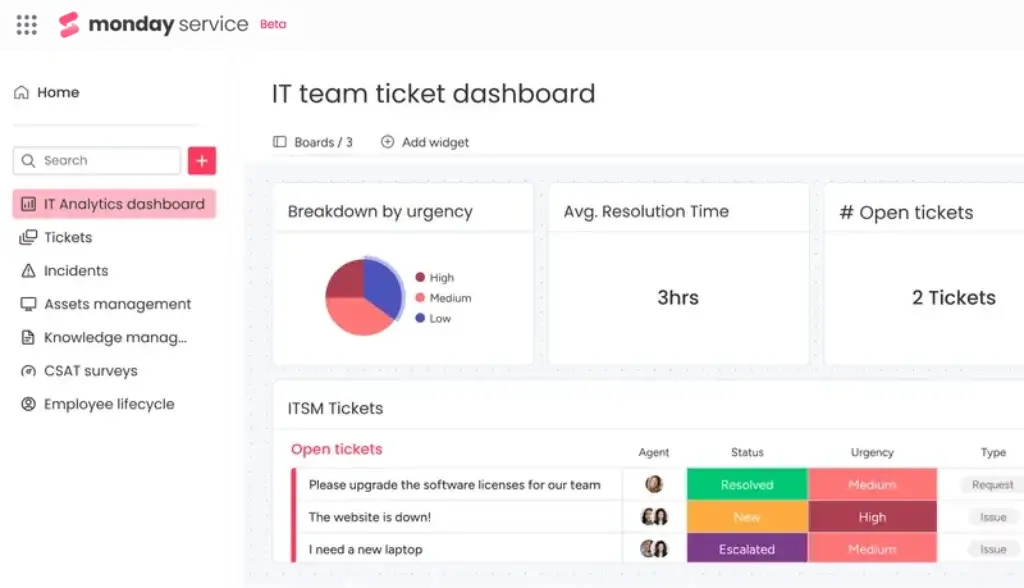
The Tickets board is the center of monday service. Each item on the board represents a ticket, and your team can manage the full request lifecycle from one place. Tickets can be categorized, prioritized, assigned, updated, escalated, and resolved with clear status tracking.
What makes the ticketing experience useful is the amount of context available inside each request. Agents can see communication history, ticket details, participants, status, urgency, owner, and related information without jumping between several disconnected tools.
monday service also supports automated ticket movement between groups based on status. For example, a ticket can move from open to waiting for response, then to resolved when the status changes. This helps keep the board clean and gives managers a more reliable view of active work.
2. Service Channels and Ticket Intake
monday service allows requests to come in from multiple channels, including email, WorkForms, and monday Inbox. This is important because most service desks do not receive requests from one single source. Employees may send an email, submit a form, or interact with a portal depending on the type of request.
Email-based intake is especially valuable for IT and internal support teams because requesters can continue using a familiar communication channel while agents still manage everything inside monday service. Teams can also preserve conversation context, reply directly from the ticket, and keep relevant participants included in the communication.
For structured requests, WorkForms are useful because they help you collect the right information upfront. For example, an IT access request can include fields for system name, urgency, manager approval, employee department, and business reason. This reduces back-and-forth communication and improves first-response quality.
3. AI Service Workforce and monday sidekick
AI is now one of the most important parts of monday service. The platform is positioned as an AI-first service management solution, and its AI capabilities are designed to help teams reduce repetitive work while improving response quality.
At the ticket level, monday sidekick can help summarize the issue, draft replies, recommend next steps, and find similar resolved tickets. This can be useful when agents need to understand a request quickly or when a new team member needs guidance on how a similar issue was solved in the past.
At the board level, AI can help teams understand workload, identify SLA risks, and monitor service performance. This turns AI into more than a writing assistant. It becomes a service operations layer that helps teams move from reactive ticket handling to more proactive service management.
4. AI Ticket Triage and Smart Assignment
Ticket triage is one of the areas where AI can create immediate value. Instead of manually reviewing every request, monday service can help classify, prioritize, and route tickets based on available context. This is particularly useful for teams with shared inboxes, mixed request types, or high request volume.
Smart assignment can help distribute tickets to the right agent or team. When used correctly, this improves response time and reduces the risk of urgent issues sitting in the wrong queue. It also helps managers avoid uneven workloads across agents.
5. Customer Portal and Self-Service
The Customer Portal gives employees, customers, or internal requesters a central place to submit requests, track ticket progress, and find helpful information. This is a major improvement over email-only support because requesters can see what they submitted and follow the status without sending repeated follow-up messages.
The portal can include request forms, helpful articles, external links, and a personal “My Tickets” view. This gives users a clearer support experience and gives service teams a more structured way to manage demand.
For internal IT and employee support, the Customer Portal can work as a self-service front door. You can route different request types to the right workflow, reduce duplicate questions, and guide users toward the correct service path.
6. SLA Tracking
SLA tracking helps teams understand whether they are responding and resolving requests within the expected timeframe. monday service includes SLA monitoring so managers can see which tickets are within target, at risk, breached, or paused.
This is important for IT service teams because SLA performance is often one of the main indicators of service quality. It also helps managers act earlier. Instead of discovering a problem after a deadline was missed, they can identify at-risk tickets and rebalance work before the SLA is breached.
7. Incident Management and Escalation
monday service supports incident escalation for issues that need more urgent attention. Teams can separate standard service requests from incidents, link related tickets, assign owners, and track resolution progress from a dedicated incident workflow.
This is useful when multiple users report the same problem, such as a website outage, software failure, or access issue. Instead of treating every ticket as a separate problem, the team can connect related requests to a larger incident and manage the response more efficiently.
For teams that need post-incident learning, the ability to keep related tickets, owners, status, and timelines in one place can support better follow-up and process improvement.
8. Dashboards and Reporting
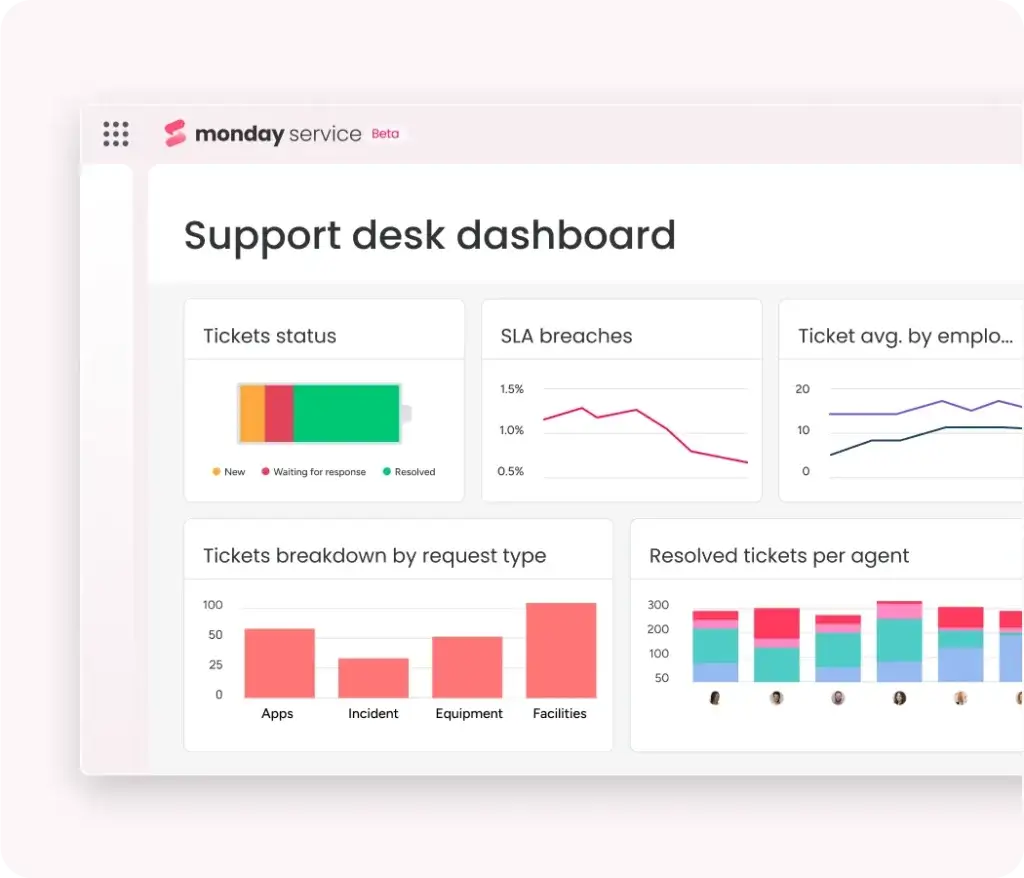
Dashboards are one of monday service’s strongest usability features. You can build views that show open tickets, ticket status, SLA performance, resolution time, request categories, workload by agent, and other service metrics.
These dashboards are helpful for both daily operations and management reporting. Agents can use them to understand what needs attention, while service leaders can use them to identify bottlenecks, recurring request types, and workload issues.
9. Automations and Workflow Builder
monday service uses no-code automation to reduce manual work. You can create automations for ticket assignment, notifications, status updates, reminders, escalations, and handoffs between teams.
This is one of the reasons monday service works well for teams outside of IT. HR, facilities, legal, procurement, and finance teams can all build service workflows without needing a developer. The result is a platform that can support multiple departments while still keeping work visible and organized.
10. Integrations and Connected Workflows
monday service connects with popular tools such as Gmail, Outlook, Slack, Microsoft Teams, Zoom, Jira, and other business applications through native integrations and API-based options. These integrations help teams keep service requests connected to the systems where work already happens.
For example, an IT team can receive requests through email, collaborate in Slack or Microsoft Teams, connect technical work to Jira, and report service performance in monday dashboards. This flexibility makes monday service useful for organizations that want a service desk without isolating support work from the rest of the business.
Pros and Cons
Benefits of Using monday service
Positive
✅ Flexible service workflows
✅ Strong AI and automation features
✅ Easy-to-use visual interface
✅ Great for cross-department support
Negative
❌ Less mature for complex ITIL use cases
❌ Pricing can rise with seat count
❌ Setup requires workflow planning
❌ Advanced features may need training
Pros
- Flexible service workflows:
monday service gives your team a high level of control over boards, forms, automations, dashboards, and request workflows. This makes it suitable for IT, HR, operations, facilities, legal, finance, and other internal service teams. - Strong AI and automation features:
AI ticket triage, monday sidekick, smart assignment, summaries, suggested replies, and no-code automations can reduce repetitive work and help agents resolve requests faster. - Easy-to-use visual interface:
The platform is easier to understand than many traditional ITSM tools. Boards, color-coded statuses, dashboards, and drag-and-drop customization make adoption smoother for mixed technical and non-technical teams. - Great for cross-department support:
monday service is not limited to IT. You can use it for HR requests, equipment issues, procurement support, legal intake, facilities tasks, onboarding requests, and general employee service management.
Cons
- Less mature for complex ITIL use cases:
monday service is flexible, but it may not replace a highly mature enterprise ITSM platform for organizations that need advanced ITIL processes, deep CMDB functionality, and complex change governance. - Pricing can rise with seat count:
Because monday service uses seat-based pricing, costs can increase quickly as your service team grows. You should calculate pricing based on active agents and required feature depth. - Setup requires workflow planning:
The flexibility is valuable, but it also means you need to define request types, SLAs, routing rules, forms, and dashboards carefully. Without structure, boards can become messy. - Advanced features may need training:
Basic ticket management is easy to learn, but advanced automations, AI workflows, multi-board dashboards, and integrations may require onboarding and internal process design.
Benefits of Using monday service
The main benefit of monday service is that it gives your organization a more connected way to manage service operations. Instead of handling support through scattered emails, spreadsheets, chat messages, and disconnected tools, your team can centralize requests and track them through structured workflows.
1. Faster Request Handling
monday service helps teams respond faster by automating intake, triage, assignment, status updates, and escalation steps. This reduces the amount of time agents spend sorting requests manually and gives them more time to solve the actual issue.
2. Better Visibility for Managers
Dashboards make it easier to understand service workload, ticket status, SLA risks, and team performance. This gives managers the data they need to identify bottlenecks and improve processes.
3. Better Experience for Requesters
The Customer Portal gives requesters a more transparent experience. Instead of wondering whether their email was received, they can submit a request, track progress, and access helpful resources from one central place.
4. Stronger Cross-Department Collaboration
Many service requests involve more than one team. For example, an onboarding request may require HR, IT, finance, and facilities. monday service allows teams to coordinate those handoffs in one workflow, which helps reduce delays and duplicated work.
5. Integrations and Compatibility
monday service works well when connected with the rest of your software stack. It can support workflows connected to email, chat tools, collaboration apps, development platforms, and other business systems. This makes it a practical option for organizations that already use multiple SaaS tools and want to improve operational visibility.
6. More Proactive Service Management
The combination of AI, SLA tracking, dashboards, and automations helps teams move from reactive support to proactive service operations. Instead of simply responding to tickets as they arrive, managers can identify recurring issues, monitor risks, and improve workflows over time.
User Experience
User Interface and Operational Simplicity
monday service has one of the more approachable interfaces in the service management software category. It uses the same visual board-based structure that many monday.com users already know, which makes it easier to understand than traditional service desk platforms that rely on dense menus and admin-heavy configuration.
Visual Ticket Management
Tickets are displayed in a board format with columns for status, urgency, owner, SLA, category, source, and other details. This gives agents a quick operational view of what needs attention and helps managers understand workload without building reports from scratch.
Customizable Views
You can create views for different roles, teams, or workflows. For example, agents can focus on open tickets, managers can monitor SLA risks, and department leaders can review request trends. This makes the platform more practical for teams that want tailored visibility without creating separate systems.
Low-Code Configuration
monday service is highly configurable, but it does not require deep technical knowledge for most common setup tasks. Teams can customize boards, forms, columns, statuses, automations, dashboards, and portals through a visual interface.
Agent Experience
The agent experience is clean and efficient. Agents can review the ticket, see the conversation, respond to the requester, update status, assign ownership, and use AI assistance from the same work area. This helps reduce the number of clicks needed to resolve a ticket.
Requester Experience
Requesters benefit from a more structured experience through the Customer Portal and request forms. Instead of sending unclear email requests, they can choose the right request type, provide required details, and track updates through the portal.
Mobile Access
monday.com also supports mobile access, which can be useful for quick updates, status checks, and notifications. However, advanced setup, dashboard building, and automation configuration are still better handled on desktop.
Pricing and Plans
How much does monday service cost?
monday service pricing is based on plan level, billing term, region, and seat count. The platform currently offers Standard, Pro, and Enterprise plans. Because pricing can vary by location and billing selection, you should always confirm the latest pricing on the official monday service pricing page.
The key point is that monday service does not follow the same entry-level structure as monday work management. It is a dedicated service product, and its plans are built around service operations, ticket management, AI, portals, dashboards, and enterprise controls.
| Plan | Price | Best For | Notable Features |
| Standard | $31 per seat/month, billed annually | Teams starting with structured service management | Unlimited tickets, email and WorkForms intake, AI credits, AI Ticket Triage, service dashboards |
| Pro | $45 per seat/month, billed annually | Growing teams that need stronger automation and reporting | Dynamic auto-responses, more AI ticket triage capacity, Customer Portal access, broader dashboards |
| Enterprise | Custom pricing | Larger organizations with advanced governance needs | Enterprise support, advanced analytics, unlimited Customer Portal users, advanced security, governance, and compliance options |
Standard Plan
The Standard plan is designed for teams that want to automate service processes and streamline communication. It is a practical starting point if your team needs ticket intake, structured request handling, AI support, and basic service visibility.
This plan is most relevant for small and mid-sized service teams that are moving away from shared inboxes, spreadsheets, or basic task boards. It gives you the foundation for a real service desk without forcing you into an overly complex system.
Pro Plan
The Pro plan is better for teams that need broader service operations visibility. It adds stronger analytics, more advanced automation capacity, and more portal-related functionality. If your team manages multiple request types, departments, or service queues, Pro is likely the more realistic plan.
For many growing teams, Pro will be the better fit because it supports more complete service management rather than basic ticket handling only.
Enterprise Plan
The Enterprise plan is built for larger organizations that need advanced security, governance, support, analytics, permissions, and compliance capabilities. It is also the better option for companies managing service across several departments or business units.
Enterprise is also where monday service becomes more suitable for regulated environments or organizations with more formal governance needs.
Is monday service good value for money?
monday service offers good value if your team wants a visual, flexible, AI-supported service management platform that can support several departments. The value is strongest when you use it beyond basic ticketing, especially if you build automations, dashboards, forms, and portal workflows.
However, if you only need a simple help desk for a small team, the pricing may feel high compared with lighter customer support tools. The value depends on whether you use the broader workflow and automation layer.
Security and Compliance
Security and Compliance in monday service
monday service includes security and governance features that help organizations manage sensitive service data. This matters because service desks often handle employee information, access requests, system issues, internal approvals, and other operational details that should not be visible to everyone.
Data Protection and Access Control
Admins can use permissions and access controls to manage who can view, edit, and manage different boards, workspaces, dashboards, and workflows. This helps prevent sensitive tickets from being exposed to the wrong users.
Enterprise Governance
Enterprise customers can access more advanced governance features, which may include stronger permissions, administrative controls, analytics, and compliance-oriented capabilities. This is important for larger organizations that need to standardize service management across multiple departments.
Compliance Considerations
monday.com publicly highlights enterprise-grade security, privacy, governance, and compliance support. If your organization has specific compliance requirements, such as HIPAA, GDPR, or SOC 2 related concerns, you should verify the exact availability of these controls for your selected plan and region before purchasing.
AI Governance
AI features can be powerful, but they also require governance. Teams should define which users can access AI features, how AI-generated responses are reviewed, and what types of data should be included in ticket workflows. For sensitive service desks, human review should remain part of the process.
Software Comparison
monday service Alternatives
monday service is a strong option, but it is not the only service management platform worth considering. The right choice depends on how mature your ITSM processes are, which tools your team already uses, and whether you prioritize flexibility, ITIL depth, customer support, or enterprise governance.
| Alternative | Best For | How It Compares to monday service |
| Freshservice | IT teams that want a traditional ITSM platform with strong IT service features | More ITSM-focused out of the box, but less flexible for non-IT workflows |
| Jira Service Management | Development and IT teams already using Atlassian tools | Stronger for DevOps and technical workflows, but less approachable for business teams |
| Zendesk | Customer support and external help desk teams | Stronger for customer service, while monday service is better for internal service workflows |
| SolarWinds Service Desk | IT teams that need IT asset and service desk features | More IT-oriented, while monday service offers broader work and service flexibility |
monday service vs traditional ITSM tools
Traditional ITSM tools are often built around formal IT processes first. monday service takes a more flexible approach. It gives you ticketing, SLAs, incidents, dashboards, AI, and workflows, but it presents them in a more visual and adaptable workspace.
This makes monday service a better choice for teams that want modern service operations without the heavy administrative burden. It is especially strong when service management needs to extend beyond IT into HR, operations, facilities, finance, and legal.
However, if your organization already has mature ITIL processes, deep configuration management requirements, and complex change advisory workflows, a more traditional ITSM platform may still be a better long-term fit.
Conclusion
Final thoughts
⭐ Overall Rating: 9.5/10
monday service is one of the more practical service management platforms for teams that want structure without unnecessary complexity. It combines ticket management, AI assistance, Customer Portal functionality, SLA tracking, incident escalation, dashboards, and workflow automation in a workspace that is easier to adopt than many traditional ITSM systems.
The platform is especially strong for organizations that already use monday.com or want to manage service requests across several departments. IT, HR, operations, facilities, legal, finance, and procurement teams can all benefit from the same flexible service management foundation.
Its main limitation is depth. monday service is not the best choice if you need a highly mature, ITIL-heavy platform with deep enterprise configuration management. But for teams that want fast implementation, strong usability, AI-supported ticket handling, and service workflows that can be customized without heavy technical overhead, it is a strong option.
Our recommendation:
We recommend monday service for growing teams that want a visual, flexible, AI-powered service desk that can support both IT and business service operations. It is a particularly good fit if your company values ease of use, automation, and cross-department collaboration more than traditional ITSM complexity.
If your team is still comparing options, review monday service alongside Freshservice, Jira Service Management, and our full ITSM software comparison before making a final decision.
Frequently Asked Questions
Have more questions?
What is monday service?
monday service is an AI-first service management platform built on the monday.com ecosystem. It helps teams manage requests, tickets, incidents, SLAs, portals, automations, and service reporting from one connected workspace.
Is monday service an ITSM tool?
Yes. monday service can be used as an ITSM and service desk platform, especially for ticket management, SLA tracking, incident escalation, employee support, and internal service workflows. It is more flexible and visual than many traditional ITSM tools.
Who is monday service best for?
monday service is best for IT, HR, operations, facilities, finance, legal, and internal support teams that want a flexible service management platform with AI, automation, portals, and dashboards.
Does monday service include AI features?
Yes. monday service includes AI features such as AI Ticket Triage, monday sidekick, smart assignment, ticket summaries, suggested replies, recommended next steps, and similar resolved ticket suggestions.
How does monday service handle tickets?
monday service manages tickets through a dedicated Tickets board. Each ticket can include status, urgency, owner, SLA details, communication history, requester information, and related context. Tickets can also be routed and updated with automations.
Does monday service have a Customer Portal?
Yes. monday service includes a Customer Portal where requesters can submit tickets, track their requests, access helpful resources, and view updates through a centralized self-service experience.
Can monday service track SLAs?
Yes. monday service supports SLA tracking so teams can monitor whether tickets are within target, at risk, breached, or paused. This helps managers protect response and resolution commitments.
What integrations does monday service support?
monday service can connect with tools such as Gmail, Outlook, Slack, Microsoft Teams, Zoom, Jira, and other business applications through native integrations, automation options, and API-based connections.
How much does monday service cost?
monday service offers Standard, Pro, and Enterprise plans. Pricing depends on region, billing term, seat count, and selected plan. You should check the official monday service pricing page for the latest rates before purchasing.
What are the best monday service alternatives?
The best monday service alternatives include Freshservice, Jira Service Management, Zendesk, SolarWinds Service Desk, and SysAid. monday service is usually stronger for flexible, visual, cross-department service workflows, while traditional ITSM tools may be deeper for complex ITIL environments.