
Introduction
PostEverywhere is an AI-powered social media management platform built for creators, founders, small businesses, agencies, and lean marketing teams that want to publish consistently without managing every social channel manually.
The platform focuses on a simple but valuable promise: create content once, adapt it for each platform, schedule it in advance, and manage your social presence from one dashboard. In this PostEverywhere review, you’ll see how the tool works, where it performs best, where it may feel limited, and whether it is the right social media scheduler for your workflow in 2026.
PostEverywhere is especially relevant if your team struggles with content distribution. Many businesses already have ideas, blog posts, videos, offers, and product updates, but they lose momentum when they need to reshape that content for LinkedIn, Instagram, TikTok, YouTube, X, Facebook, Threads, Pinterest, Bluesky, Discord, and Telegram.
That is the problem PostEverywhere tries to solve. It combines scheduling, AI content creation, a visual calendar, bulk posting, analytics, workspaces, and developer-friendly automation into one platform.
Key Features
PostEverywhere Software Specification
PostEverywhere is designed around content distribution efficiency. Instead of switching between platforms, rewriting captions manually, uploading the same asset multiple times, and checking performance in separate dashboards, you can centralize most of that workflow in one place.
The product is not only a basic scheduler. Its strongest differentiation is the combination of AI-assisted content creation, multi-platform scheduling, workspaces, bulk publishing, analytics, and developer options. That makes it more interesting than a simple queue-based posting tool.
Multi-Platform Publishing
PostEverywhere supports publishing across a wide range of social and community platforms. That matters because many businesses now need to distribute content beyond the traditional Facebook, Instagram, LinkedIn, and X stack.
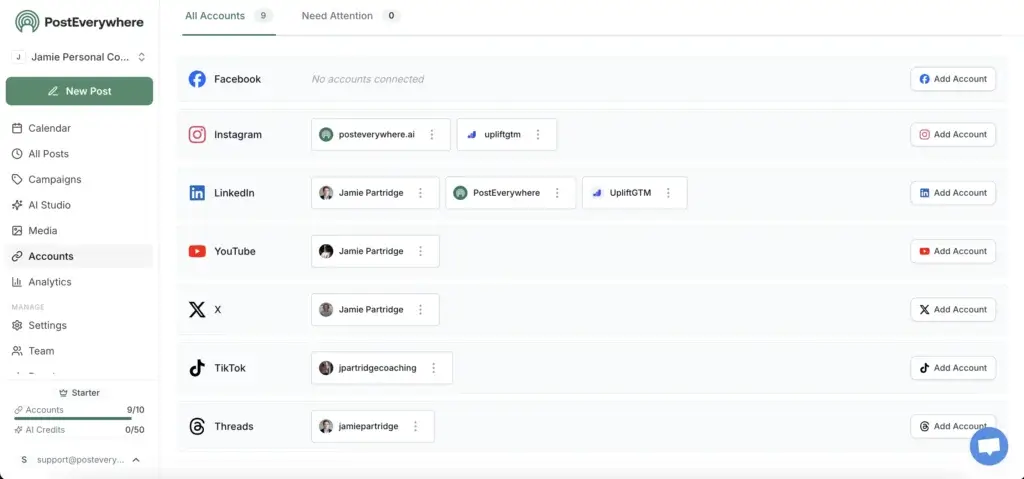
The platform supports major networks such as Instagram, LinkedIn, TikTok, Facebook, X, YouTube, Threads, Bluesky, Telegram, Discord, and Pinterest. This broad coverage makes it useful for content creators, B2B marketers, agencies, and community-led brands that need to maintain presence across several channels.
- Cross-platform publishing: Publish to multiple social channels from one dashboard.
- Platform-specific formatting: Adapt posts to different audience expectations and format rules.
- Multi-account posting: Manage several accounts without logging into each platform separately.
- Short-form video support: Schedule content for Reels, TikToks, and YouTube Shorts.
- Community platform coverage: Useful if Discord or Telegram is part of your audience strategy.
Visual Content Calendar
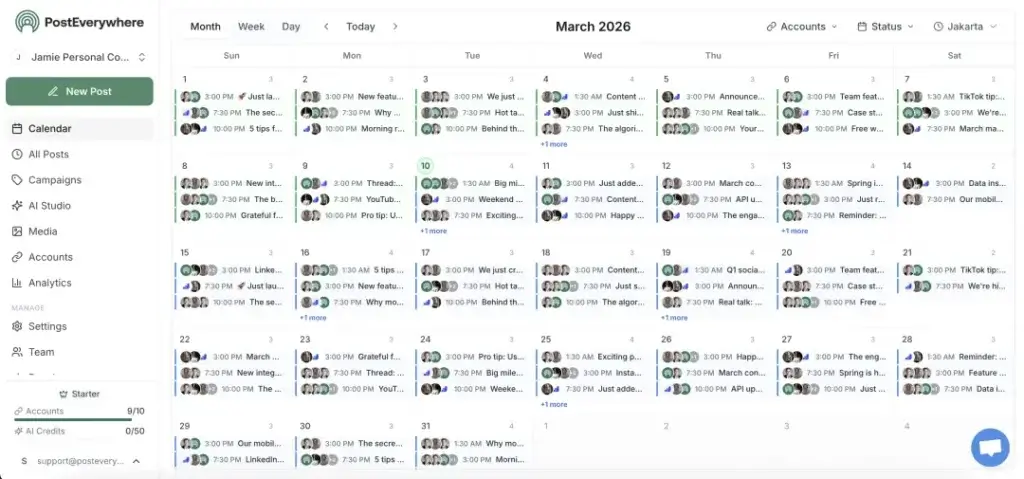
The content calendar is one of the most important parts of PostEverywhere because it gives you a clear view of what is planned, where content is going, and when each post is scheduled.
This is especially helpful if you manage campaigns, launches, recurring content themes, or multiple clients. A visual calendar makes it easier to catch gaps in your publishing schedule and avoid overloading one platform while neglecting another.
- Calendar planning: Organize posts by date, platform, and campaign.
- Drag-and-drop workflow: Adjust schedules quickly as priorities change.
- Campaign visibility: Keep product launches, promotions, and content themes organized.
- Content consistency: Maintain a steady cadence without last-minute posting.
AI Content Studio
PostEverywhere’s AI Content Studio is one of the main reasons to consider the platform. It helps you generate captions, images, videos, and platform-ready content variations.
This is useful if your team already has strategic direction but needs help turning ideas into publishable assets faster. You can use AI to overcome blank-page friction, repurpose existing material, and create more platform-native versions of the same message.
- AI captions: Generate captions that fit different social platforms.
- AI image generation: Create visuals from text prompts.
- AI video generation: Produce short-form video assets for social distribution.
- Brand voice support: Create copy that better matches your tone and content style.
- Content repurposing: Turn one idea into multiple post formats.
Bulk Scheduling and CSV Uploads
Bulk scheduling is valuable when you plan content in batches. Instead of creating every post manually inside the platform, you can prepare a group of posts and upload them together.
This can be a major time-saver for agencies, affiliate marketers, content teams, and founders who prefer batching their social media work once or twice per week. It also helps if you build your content calendar in spreadsheets before moving it into a publishing tool.
- CSV bulk upload: Import many posts into the scheduler at once.
- Batch workflows: Plan weeks of content in fewer sessions.
- Queue management: Keep content moving without rebuilding your schedule daily.
- Evergreen reuse: Recycle useful content when relevant.
API, SDK, and AI Agent Workflows
One of PostEverywhere’s more advanced strengths is that it is not only built for marketers using a dashboard. It also offers developer-friendly options, including API access, an SDK, and MCP support for AI agent workflows.
This gives PostEverywhere more long-term flexibility than many lightweight scheduling tools. For example, a technical team could connect social publishing to internal tools, campaign triggers, product updates, content workflows, or AI-assisted automation.
- REST API: Automate social publishing programmatically.
- Node.js SDK: Useful for teams that want developer-ready implementation.
- MCP support: Connect compatible AI agents into publishing workflows.
- Automation potential: Trigger content distribution from other systems.
Analytics and Performance Tracking
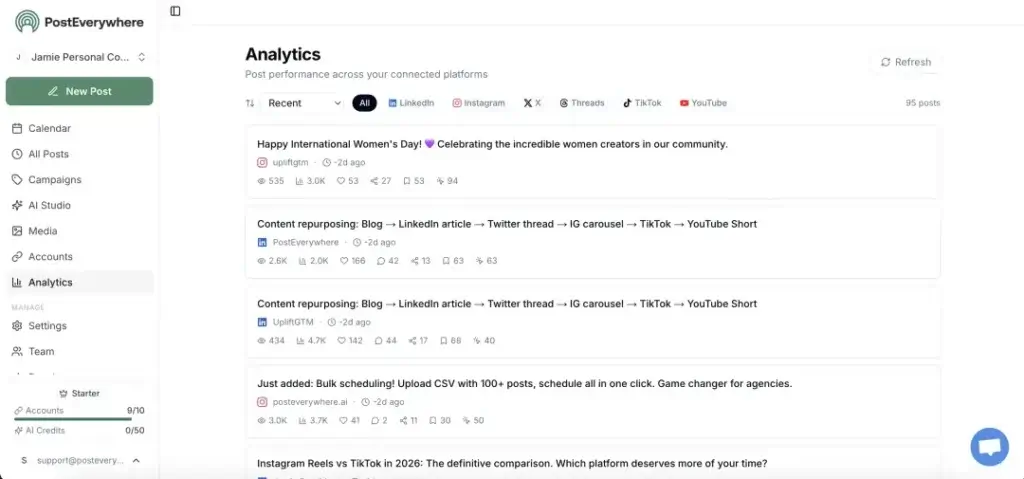
PostEverywhere includes analytics to help you understand what is working across your connected platforms. This is important because social scheduling without measurement often turns into activity without strategy.
You can track engagement, reach, impressions, follower growth, and content performance from a single dashboard. You can also use performance insights to identify stronger post types, better publishing times, and channels that deserve more attention.
- Cross-platform analytics: Review performance across connected social profiles.
- Engagement tracking: Monitor how audiences respond to different post types.
- Follower growth: Track growth trends over time.
- Best-time guidance: Use audience activity signals to improve scheduling.
- Content insights: Repeat what works instead of guessing.
Pros and Cons
Benefits and Limitations of PostEverywhere
Positive
✅ Strong multi-platform coverage
✅ AI captions, images, and videos
✅ Unlimited posts on every plan
✅ API access included
✅ Good value for creators and teams
Negative
❌ No permanent free plan
❌ Card required for free trial
❌ Newer public review footprint
❌ Not a full enterprise social suite
❌ AI credits may limit heavy creative use
PostEverywhere is a strong option if your main goal is to save time on social media distribution. It gives you a practical combination of planning, AI creation, publishing, analytics, and automation without forcing you into an enterprise-level social media suite.
However, it is not the best choice for every organization. If you need deep social listening, advanced customer engagement inboxes, complex compliance workflows, or a mature marketplace of integrations, tools like Sprout Social, Hootsuite, or enterprise-focused platforms may be more appropriate.
✅ Pros
- Strong multi-platform coverage: PostEverywhere supports a broad set of social and community channels.
- AI content tools: You can generate captions, images, and short-form video assets in one workflow.
- Unlimited posts: Every paid plan includes unlimited scheduled posts and drafts.
- Useful for batch planning: CSV upload and bulk scheduling help you plan content at scale.
- Developer-friendly: API, SDK, and MCP support make it more flexible than many lightweight schedulers.
❌ Cons
- No permanent free plan: You can test the product, but there is no ongoing free tier.
- Card required for trial: The 7-day trial requires a credit card, which may reduce low-friction testing.
- Newer review footprint: There is less long-term third-party validation than you get with established tools.
- Not enterprise-first: It does not appear built primarily for complex social governance or listening-heavy workflows.
- AI credits matter: Heavy image and video generation may require a higher plan.
User Experience
User Interface and Experience
Onboarding and Setup
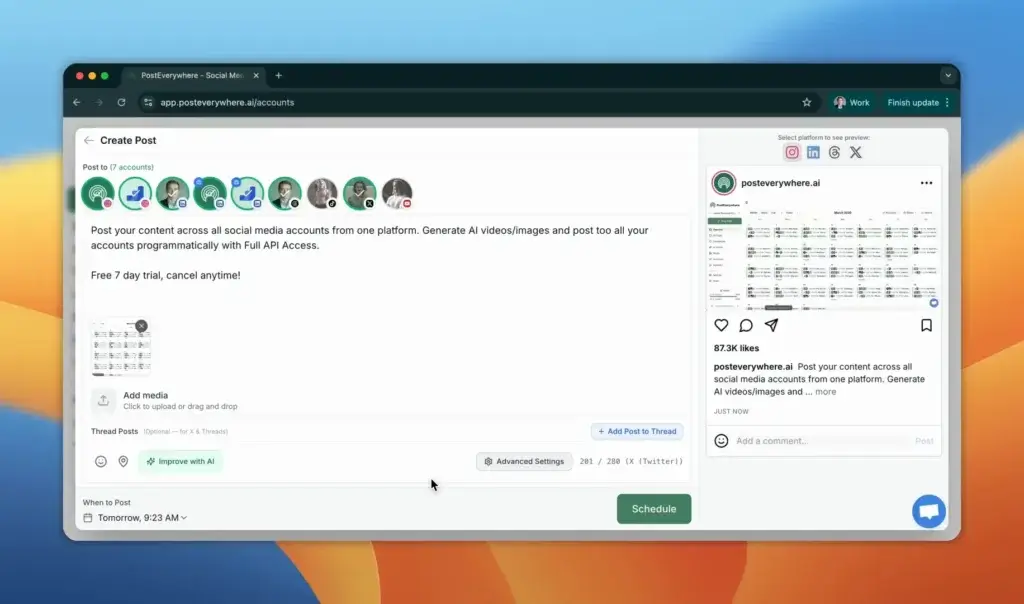
PostEverywhere appears built for a quick setup process. The core onboarding flow is straightforward: create your account, connect social profiles, set up your workspace, create or import content, and start scheduling.
This matters because many social media management platforms become complicated before you publish your first post. PostEverywhere feels more focused on reducing friction for people who want to move from idea to scheduled post quickly.
The 7-day free trial gives you a chance to test the workflow before paying. However, the trial does require a credit card, so you should evaluate the platform intentionally during that trial window.
Interface and Navigation
The interface is built around the activities most social media users repeat every week: creating content, scheduling posts, reviewing the calendar, managing accounts, and checking performance.
For creators and small teams, that simplicity is a strength. You do not need to navigate a heavy enterprise system just to schedule a campaign across LinkedIn, X, Instagram, TikTok, and YouTube.
For larger social teams, the same simplicity may feel limiting. If your workflow depends on complex approval paths, social listening, moderation queues, legal review, and detailed permissions by region or brand, you may need a more mature enterprise social platform.
Team Collaboration and Workspaces
PostEverywhere includes workspaces, which makes it useful for users managing multiple brands, clients, or content initiatives. This is important for agencies because client separation is often non-negotiable.
The Starter plan includes 1 workspace, Growth includes 5 workspaces, and Pro includes 20 workspaces. That gives freelancers and small agencies room to scale without immediately moving into a custom enterprise contract.
Team member limits also scale by plan. Starter is best for individuals, Growth is better for small creator teams or freelancers with help, and Pro is the more realistic option for agencies or internal marketing teams.
Support and Learning Resources
PostEverywhere provides a help center, product resources, how-to guides, and free tools. That is a positive sign for users who want to learn workflows independently.
Still, because PostEverywhere has a smaller public review footprint than older tools, I would recommend testing support responsiveness during the trial. Ask a real support question, check documentation quality, and confirm that the workflow matches your needs before relying on it for client-facing campaigns.
Pricing and Plans
How Much Does PostEverywhere Cost?
PostEverywhere uses simple public pricing. There are three main plans: Starter, Growth, and Pro. All plans include unlimited scheduled posts and drafts, AI Content Studio access, content calendar, bulk scheduling, API access, and a 7-day free trial.
The main differences are the number of social accounts, workspaces, team members, AI credits, and support level. This makes the pricing model easy to understand because you are mostly paying for scale.
| Plan | Best For | Key Limits and Features |
| Starter – $19/month | Individuals and solo creators | 10 social accounts, unlimited posts, 1 team member, 1 workspace, AI Content Studio, calendar, bulk scheduling, API access, 50 AI credits/month |
| Growth – $39/month | Creators and small teams scaling content | 25 social accounts, unlimited posts, 3 team members, 5 workspaces, AI Content Studio, calendar, bulk scheduling, API access, 500 AI credits/month |
| Pro – $79/month | Teams, agencies, and multi-brand workflows | 40 social accounts, unlimited posts, 10 team members, 20 workspaces, AI Content Studio, calendar, bulk scheduling, API access, 2,000 AI credits/month |
Annual billing offers savings compared with monthly billing. There is no permanent free plan, but each plan includes a 7-day free trial. You need to add a card to start the trial, and the plan activates automatically after the trial unless you cancel.
Is PostEverywhere good value?
Yes, PostEverywhere offers strong value if you need multi-platform scheduling and AI content creation in the same tool. The Starter plan is attractive for solo creators because it includes unlimited posts, 10 social accounts, bulk scheduling, and API access at a low monthly price.
The Growth plan is likely the best fit for most serious content creators, consultants, and small teams because it increases AI credits, workspaces, team members, and account limits. The Pro plan is the better option for agencies or brands managing several client accounts.
My view is that PostEverywhere is priced competitively for its feature set. The main question is not whether the platform is affordable, but whether you will actually use the AI credits, bulk scheduling, and multi-account workflow enough to justify replacing simpler tools.
Use Cases & Suitable Users
Who Should Use PostEverywhere?
PostEverywhere is best for users who care more about speed, consistency, and content distribution than deep enterprise social management.
Creators and Solopreneurs
PostEverywhere is a strong fit if you create content for yourself and want to be visible across several platforms. You can create one piece of content, adapt it for different networks, and schedule it without rebuilding the same post manually.
This is especially useful for creators publishing across LinkedIn, X, Instagram, TikTok, YouTube Shorts, Threads, and Pinterest. Instead of treating each platform as a separate task, you can manage content distribution as one workflow.
Small Businesses
Small businesses often need social media consistency but do not have a dedicated social media team. PostEverywhere can help by reducing the manual work involved in posting across multiple channels.
For example, a small ecommerce brand could schedule product updates, educational posts, customer stories, short videos, and campaign content from one calendar. A local service business could use it to maintain a consistent presence across Facebook, Instagram, LinkedIn, and Google-adjacent content workflows.
Agencies and Freelancers
Agencies and freelancers will benefit most from the workspace structure, bulk scheduling, and multi-account support. These features make it easier to separate clients and manage recurring posting workflows.
The Pro plan is the most relevant plan for this audience because it includes 20 workspaces, 10 team members, 40 social accounts, and higher AI credit limits. This gives smaller agencies a more affordable path than enterprise social suites.
B2B Marketing Teams
B2B teams can use PostEverywhere to repurpose blog posts, webinars, product updates, podcast clips, founder insights, and customer stories into platform-specific social posts.
The API and automation options are especially interesting for B2B SaaS teams. If your team wants to connect publishing to content operations, CRM signals, internal dashboards, or AI agents, PostEverywhere has more technical flexibility than many basic social schedulers.
Who should not use PostEverywhere?
PostEverywhere is less suitable for organizations that need a full enterprise social command center. If your requirements include advanced social listening, sentiment monitoring, crisis management, complex governance, or large-scale customer service workflows, it may not be enough on its own.
It may also be more than you need if you only post to one or two channels and do not care about AI content generation, bulk scheduling, or automation.
Comparison with Alternatives
How PostEverywhere Compares to Alternatives
PostEverywhere competes in a crowded social media management market. The right alternative depends on whether you prioritize simplicity, analytics, engagement, client management, content recycling, or enterprise governance.
PostEverywhere vs Buffer
Buffer is one of the easiest social media scheduling tools to recommend for beginners. It has a clean interface, a generous free plan, and a mature product experience.
PostEverywhere is stronger if you want broader AI creation inside the same workflow, more emphasis on bulk publishing, API access on all plans, and support for more multi-account distribution use cases.
Choose Buffer if you want proven simplicity and a free starting point. Choose PostEverywhere if you want AI-assisted creation, multi-platform publishing, and developer-friendly automation at a competitive price.
PostEverywhere vs Hootsuite
Hootsuite is more mature and better suited for established teams that need broader social media operations, permissions, monitoring, and enterprise-style workflows.
PostEverywhere is lighter, more affordable, and more focused on fast content creation and distribution. It is not trying to be a full enterprise social suite, which is actually part of its appeal for creators and smaller teams.
Choose Hootsuite if you need a mature, enterprise-ready system. Choose PostEverywhere if your priority is speed, AI creation, and multi-channel scheduling without enterprise pricing.
PostEverywhere vs Sprout Social
Sprout Social is stronger for teams that care deeply about analytics, engagement workflows, social listening, reporting, and customer-facing social operations.
PostEverywhere is better if you do not need Sprout’s depth and want a more affordable publishing-focused system. It gives you scheduling, AI creation, analytics, and automation, but it does not match Sprout’s enterprise-grade reporting and engagement depth.
Choose Sprout Social if social is a major customer communication and analytics function. Choose PostEverywhere if social is primarily a content distribution channel.
PostEverywhere vs SocialBee
SocialBee is known for content categories, evergreen scheduling, and organized content recycling. It is a strong choice if your strategy depends on repeating evergreen content in structured queues.
PostEverywhere feels more AI and automation-oriented. It is more appealing if you want to generate captions, images, and videos, publish across a broad channel mix, and connect publishing to API-based workflows.
Choose SocialBee if content recycling is your top priority. Choose PostEverywhere if you want AI-assisted creation and broader automation.
PostEverywhere vs Later
Later is especially strong for visual-first brands, Instagram planning, TikTok workflows, and creator-style visual content calendars.
PostEverywhere has broader positioning. It is better if you want to distribute across visual, professional, short-form video, and community platforms from one place.
Choose Later if Instagram and visual planning are your center of gravity. Choose PostEverywhere if you want broader multi-platform scheduling and AI content creation.
Best Use Tips
Tips and Best Practices for Using PostEverywhere
To get the most value from PostEverywhere, treat it as a content distribution system, not just a scheduling calendar. The more structured your workflow is, the more useful the platform becomes.
- Start with content pillars: Define 3 to 5 recurring themes before filling the calendar.
- Create once, adapt per platform: Use AI to reshape posts for different channels instead of publishing identical copy everywhere.
- Batch your scheduling: Use bulk uploads and calendar planning to schedule content in weekly or monthly sessions.
- Use workspaces carefully: Separate clients, brands, or business units from the start.
- Monitor AI credit usage: Track how quickly image and video generation uses your monthly credits.
- Review analytics monthly: Identify which platforms, formats, and topics deserve more attention.
- Test support during the trial: Ask a real question before committing to long-term client workflows.
- Use API access strategically: Connect publishing to internal workflows if your team has technical resources.
The biggest mistake is using PostEverywhere only as a place to dump random posts. You will get better results if you use it to support a structured publishing system with clear topics, platform rules, and performance reviews.
Conclusion
Final Thoughts
⭐ Overall Rating: 8.5/10
PostEverywhere is a strong social media scheduling tool for creators, small businesses, agencies, and marketing teams that want to publish consistently across multiple platforms without wasting hours on manual posting.
Its best features are multi-platform publishing, AI-assisted content creation, unlimited scheduled posts, visual calendar planning, bulk scheduling, analytics, workspaces, and API access. That combination makes it more flexible than many basic schedulers and more affordable than many enterprise social media platforms.
The main limitations are also clear. There is no permanent free plan, the free trial requires a card, and the public review footprint is still smaller than older social media management tools. It is also not the best fit for enterprise teams that need deep listening, moderation, governance, and advanced social care workflows.
My recommendation is straightforward: PostEverywhere is worth considering if your biggest social media challenge is creating, adapting, scheduling, and distributing content across many platforms. It is less compelling if you mainly need advanced engagement management or enterprise reporting.
For creators, founders, small agencies, and lean marketing teams, PostEverywhere is one of the more interesting AI-first social media schedulers to evaluate in 2026.
Frequently Asked Questions
Have more questions?
What is PostEverywhere?
PostEverywhere is an AI-powered social media management platform that helps you create, schedule, publish, and analyze content across multiple social media platforms from one dashboard.
What is PostEverywhere used for?
PostEverywhere is used for social media scheduling, cross-platform publishing, AI caption generation, AI image and video creation, bulk scheduling, content calendar planning, and performance tracking.
Which platforms does PostEverywhere support?
PostEverywhere supports major platforms such as Instagram, LinkedIn, TikTok, Facebook, X, YouTube, Threads, Bluesky, Telegram, Discord, and Pinterest.
Does PostEverywhere have AI tools?
Yes. PostEverywhere includes an AI Content Studio for generating captions, images, videos, and platform-ready content variations.
Does PostEverywhere offer a free plan?
No. PostEverywhere does not offer a permanent free plan, but it does offer a 7-day free trial on its paid plans.
How much does PostEverywhere cost?
PostEverywhere pricing starts at $19 per month for Starter, $39 per month for Growth, and $79 per month for Pro when billed monthly. Annual billing may reduce the effective monthly cost.
Is PostEverywhere good for agencies?
Yes. PostEverywhere can work well for agencies because it offers workspaces, team members, bulk scheduling, multiple social accounts, and higher AI credit limits on its larger plans.
Does PostEverywhere include analytics?
Yes. PostEverywhere includes analytics for tracking engagement, reach, impressions, follower growth, posting performance, and best-time recommendations across connected platforms.
Does PostEverywhere offer API access?
Yes. PostEverywhere includes API access on its paid plans, along with developer-friendly options such as an SDK and MCP support for AI agent workflows.
Who is PostEverywhere best for?
PostEverywhere is best for creators, founders, small businesses, agencies, and lean marketing teams that want AI-assisted social media creation and multi-platform scheduling without enterprise-level complexity.