
Introduction
Creating product tutorials, onboarding videos, and internal SOPs is often more time-consuming than the workflow itself. You record the screen, write the script, edit mistakes, add callouts, export the file, upload it, and then repeat the process every time the interface changes.
Guideless.AI tries to remove much of that manual work. Instead of asking you to become a video editor, it captures your clicks in the browser and turns them into a polished AI-narrated guide that can be shared, embedded, or exported.
In this Guideless.AI review, you’ll learn what the platform does, how it works, how much it costs, where it performs well, and where it still feels limited compared with tools like Loom, Scribe, Tango, and Guidde.
What Is Guideless.AI?
Guideless.AI is an AI documentation and video guide platform built for teams that need to explain software workflows quickly. It is especially useful for product teams, customer success teams, support teams, operations teams, agencies, and SaaS companies that frequently create tutorials or process documentation.
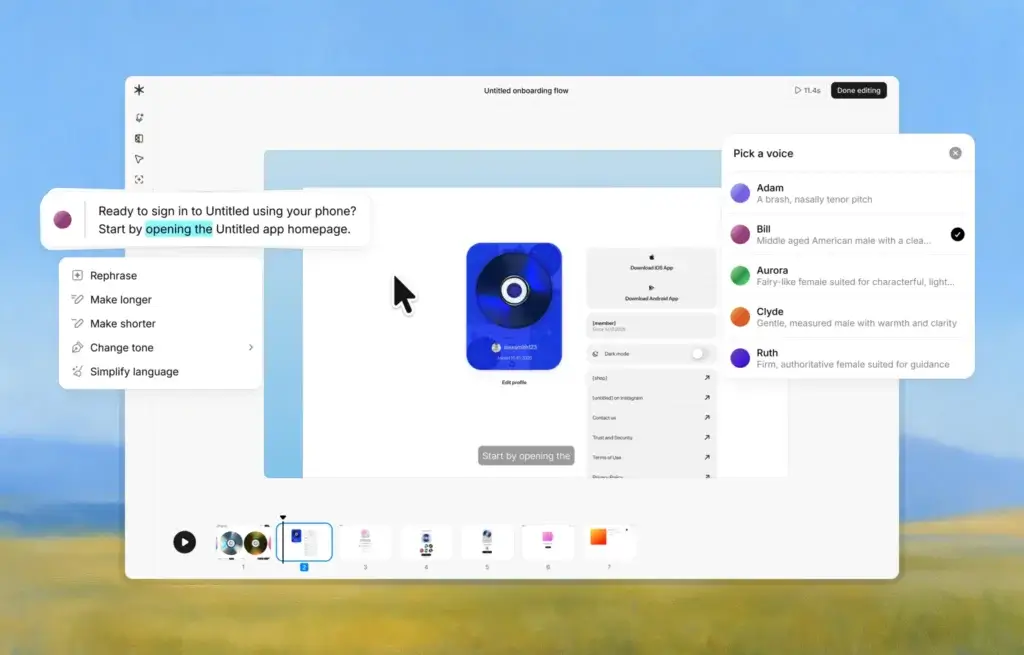
The platform works by capturing your click-through workflow in a browser. Once you finish the process, Guideless automatically builds a structured guide with a script, captions, smart zooms, UI highlights, and AI-generated voice narration.
That makes it different from a traditional screen recorder. With Loom, for example, you usually record yourself explaining a workflow in real time. With Guideless.AI, the focus is more structured: you click through the workflow, then the AI turns those steps into a clean, reusable guide.
This approach is valuable when your goal is not just quick communication, but repeatable education. You can use it for customer onboarding, feature launch walkthroughs, help center content, internal training, sales enablement, and standard operating procedures.
Key Features
How Guideless.AI Works
Guideless.AI follows a simple capture, generate, edit, and share workflow. You install the browser extension, walk through the process you want to document, and let the platform turn your actions into a guided video.
The main benefit is speed. Instead of writing a help article from scratch or recording multiple takes of a tutorial, you can capture the real workflow once and refine the generated output afterward.
Browser-Based Workflow Capture
Guideless.AI is designed around browser workflows. That makes it a strong fit for SaaS products, admin dashboards, internal web apps, CRMs, project management tools, help desks, and other web-based systems.
You click through the process naturally, and Guideless records the key steps. This is useful because most software tutorials do not need a long unedited screen recording. They need a clear sequence of steps that shows the viewer exactly what to do.
For example, you could create a guide showing how to invite a new team member, configure a dashboard, approve an invoice, create a support macro, update a CRM pipeline, or publish a product update.
AI-Generated Scripts and Narration
Once the workflow is captured, Guideless.AI writes a structured script from the recorded steps. This is one of the platform’s most important features because it removes the blank-page problem that usually slows down documentation.
The script can then be paired with AI voice narration. This gives your guide a more professional feel than a silent screenshot tutorial, while saving you from recording your own voice or hiring a voiceover artist.
You can also refine the script, adjust wording, reorder steps, and polish the flow before publishing. This is important because AI-generated content is useful, but it still benefits from human review, especially for customer-facing training.
Captions, Smart Zooms, and UI Highlights
Guideless.AI also adds visual clarity through captions, zooms, and highlights. These details matter because viewers often watch product tutorials quickly, sometimes without sound, and need to understand where to click without pausing repeatedly.
Smart zooms help focus attention on the relevant part of the screen. Captions make the guide easier to follow. Highlights and callouts reduce confusion when the interface is busy or the workflow includes several similar buttons or menu items.
This makes Guideless.AI more polished than a raw screen recording, especially for onboarding flows and help center materials where consistency matters.
Branding and Editing
Guideless.AI lets you edit your guides after capture. You can adjust the generated text, refine the flow, and apply brand styling so the final output feels more professional.
This is useful for SaaS companies and agencies that share guides with customers. A guide with clean narration, consistent colors, and structured steps usually feels more trustworthy than a quick unedited recording.
For internal documentation, branding may be less critical. Still, the ability to edit and update guides helps you keep training materials aligned with changing workflows.
Sharing, Embedding, and MP4 Export
After creating a guide, you can share it with a link, embed it in documentation, or export it as an MP4 on the paid plan. This flexibility is important because different teams distribute training content in different places.
Customer success teams may embed guides in help centers. Product marketing teams may use MP4 exports in launch enablement. Operations teams may share internal SOPs inside Notion, Confluence, ClickUp, or a company wiki.
The ability to update a guide without re-recording the entire workflow is also useful. Software interfaces change often, and static documentation can become outdated quickly.
Product Capabilities
Guideless.AI Features in Detail
Guideless.AI is not trying to be a full learning management system, knowledge base, or video editing suite. Its value comes from doing one workflow very well: turning software processes into easy-to-share guides.
AI-Narrated Product Walkthroughs
The strongest use case for Guideless.AI is product walkthrough creation. If your team ships new features frequently, you need a fast way to explain what changed and how users should interact with the updated workflow.
Instead of sending a long written release note, you can create a short narrated walkthrough that shows the feature directly inside the product. This can help users understand new functionality faster and reduce repetitive questions after a release.
Internal SOPs and Process Documentation
Guideless.AI is also useful for internal SOPs. Many teams rely on informal knowledge that lives in Slack messages, calls, or one person’s memory. That becomes risky when employees leave, teams grow, or processes become more complex.
With Guideless.AI, you can document recurring workflows like lead qualification, invoice approval, QA review, customer onboarding, dashboard setup, or campaign publishing.
The advantage is that the output is visual and repeatable. New employees do not need to interpret a long checklist alone. They can watch the workflow and follow the same steps.
Customer Education and Support Deflection
Support teams often answer the same “how do I do this?” questions every week. Guideless.AI can help you turn those recurring questions into short guides that customers can watch at their own pace.
This is especially valuable for software products with complex settings, admin permissions, workflow builders, reports, integrations, or multi-step setup processes.
A well-placed guide can reduce support tickets, improve onboarding, and help customers reach value faster. It also gives your support team a reusable asset instead of forcing them to explain the same workflow manually.
Sales Enablement and Product Demos
Sales teams can use Guideless.AI to create lightweight product demos for specific workflows. This is not a replacement for a live demo in every case, but it can help sales reps explain repeatable processes clearly.
For example, a rep could share a short guide showing how a dashboard is created, how an approval process works, or how a report is generated. This is useful after a sales call when a buyer wants to show the workflow to other stakeholders.
Analytics and Insights
The Pro plan includes insights, which help you understand how guides are being consumed. For teams that create customer-facing education, this can be valuable because it shows whether people are actually engaging with your materials.
Analytics can help you identify guides that need improvement, workflows that are confusing, or topics that deserve better placement inside your help center.
Guideless.AI is not a deep product analytics platform, but its guide-level insights are useful enough for improving enablement content over time.
Use Cases and Fit
Who Should Use Guideless.AI?
Guideless.AI is best for teams that regularly explain software workflows. If your product or internal process changes often, the platform can save time and improve consistency.
- SaaS product teams: Create feature walkthroughs, release guides, and customer education videos.
- Customer success teams: Build onboarding guides for new users and accounts.
- Support teams: Turn repetitive support questions into self-service video answers.
- Operations teams: Document internal SOPs for web-based tools and workflows.
- Agencies: Create client training guides for dashboards, reports, and software handoffs.
- Sales teams: Share short workflow demos after calls to reinforce product value.
Guideless.AI is less suitable if you mainly need webcam-based async communication, advanced video editing, interactive product demos with branching logic, or desktop app documentation. In those cases, tools like Loom, Arcade, Supademo, Guidde, or Scribe may be better depending on your workflow.
Best Fit: Fast-Moving SaaS Teams
Guideless.AI is particularly strong for SaaS teams because SaaS products change constantly. Screens, labels, menus, and workflows evolve with every release. That makes documentation a moving target.
When your product team ships a new feature, Guideless.AI can help you create a clear walkthrough without sending the task to a video editor or waiting for a long enablement cycle.
Good Fit: Internal Knowledge Management
For internal teams, Guideless.AI can reduce dependency on tribal knowledge. Instead of explaining a workflow in a meeting, you can capture it once and turn it into a reusable guide.
This is useful when onboarding new employees, documenting admin workflows, training freelancers, or standardizing processes across departments.
Limited Fit: Highly Custom Video Production
Guideless.AI is not the right tool if you need cinematic video editing, complex animations, multi-camera recordings, or advanced post-production effects.
Its strength is structured software education, not creative video production. If your goal is a polished marketing video with motion graphics and brand storytelling, you may still need a dedicated video editor or a more advanced production workflow.
Strengths and Limitations
Guideless.AI Pros and Cons
Positive
✅ Fast AI guide creation
✅ Natural AI narration
✅ Helpful for SaaS onboarding
✅ Share, embed, and export options
Negative
❌ Limited free plan
❌ Built mainly for browser workflows
❌ Not a full video editor
❌ Fewer enterprise controls than mature platforms
✅ Pros
- Very fast way to create software walkthroughs from browser-based workflows.
- AI narration reduces the need for manual voice recording.
- Captions, zooms, and highlights make guides easier to follow.
- Useful for customer onboarding, support, SOPs, and product launches.
- Pro plan includes unlimited guides and MP4 exports.
- Free plan lets you test the core workflow before paying.
- Better structure than a raw screen recording for repeatable training.
- Simple product direction makes it easier to adopt than bloated platforms.
❌ Cons
- The free plan is limited to up to 3 guides.
- It is mainly focused on web-based workflows, not desktop applications.
- It does not replace a full video editing platform.
- Teams needing advanced permissions, governance, or LMS features may need more mature tools.
- It may not be ideal for casual async video messages where Loom is faster.
- Analytics are useful, but not as deep as dedicated product analytics tools.
Overall, Guideless.AI is strongest when you need clear, reusable, AI-narrated workflow guides. It is less compelling when you need open-ended screen recording, creative editing, or complex enterprise knowledge management.
Pricing
Guideless.AI Plans and Value
Guideless.AI keeps pricing simple. As of 2026, there are two main plans: Free and Pro. The Free plan is designed for testing the product, while the Pro plan is designed for creators and teams that need to produce guides regularly.
| Plan | Price | Best For | Main Features |
| Free | $0/month | Testing Guideless.AI | Up to 3 guides, share anywhere, AI narration, AI voices |
| Pro | $29/month per user, billed annually | Individuals and teams creating guides regularly | Unlimited guides, insights, unlimited AI narration, unlimited AI voiceover, no watermark, MP4 exports |
Free Plan
The Free plan is useful if you want to understand how Guideless.AI works before committing. You can create up to 3 guides, use AI narration, access AI voices, and share your guides.
This is enough for evaluating the capture and generation process. However, it is not enough for an active support, product, or operations team that needs to build a full documentation library.
Pro Plan
The Pro plan costs $29 per month per user when billed annually. It unlocks unlimited guides, insights, unlimited AI narration, unlimited AI voiceover, no watermark, and MP4 exports.
This is the plan most serious users will need. If you create customer-facing guides, internal SOPs, or enablement materials every month, the unlimited guide creation and export options are the main reasons to upgrade.
Is Guideless.AI Good Value?
Guideless.AI is good value if it replaces manual video editing, repeated support explanations, or slow documentation workflows. A single clear guide can save time across support, onboarding, and internal training.
However, the value depends on how often you create guides. If you only need occasional screen recordings, a free or low-cost tool may be enough. If you regularly publish workflow documentation, Guideless.AI becomes easier to justify.
Comparison
Guideless.AI vs Alternatives
Guideless.AI sits between several categories. It is part screen recorder, part documentation tool, and part AI video guide generator. To evaluate it properly, you should compare it based on the kind of content you want to create.
| Tool | Best For | Main Strength | Limitation |
| Guideless.AI | AI-narrated workflow guides | Turns browser clicks into structured narrated guides | Less suited for casual webcam videos or desktop workflows |
| Loom | Async video communication | Fast screen and webcam recording | Less structured for reusable SOPs |
| Scribe | Step-by-step written documentation | Creates clean process docs from clicks | Less focused on narrated video output |
| Tango | Process documentation and training | Good for step-by-step workflow guides | Video narration is not the core strength |
| Guidde | AI video documentation at scale | More mature video documentation platform | May feel more complex depending on team needs |
Guideless.AI vs Loom
Loom is better for quick async updates, team communication, and informal explanations. You press record, talk through your point, and send the link.
Guideless.AI is better when the output needs to be repeatable and structured. If you are creating a customer onboarding guide or SOP, Guideless.AI’s AI script, narration, captions, and highlights can produce a cleaner educational asset.
Guideless.AI vs Scribe
Scribe is strong for screenshot-based step documentation. It is a good fit when readers prefer written guides with images and instructions.
Guideless.AI is better when you want a video-style guide with voice narration. For many SaaS workflows, video can reduce ambiguity because users see the movement, timing, and interface context.
Guideless.AI vs Tango
Tango is another strong process documentation tool. It is helpful for creating step-by-step guides from workflows and can be useful for internal operations and enablement.
Guideless.AI feels more focused on AI-narrated video output. If your team wants guides that look and sound like polished walkthroughs, Guideless.AI may be more aligned with that goal.
Guideless.AI vs Guidde
Guidde is one of the closer alternatives because it also focuses on AI-powered video documentation. It may be more suitable for larger teams that need a deeper documentation platform, more governance, and broader team workflows.
Guideless.AI is attractive if you want a simpler and more focused experience. It is easier to understand, with a clean free plan and one main paid plan.
Ease of Use
User Interface and Experience
Guideless.AI is built around a simple workflow, which is one of its biggest advantages. You do not need to understand video timelines, audio layers, transitions, or manual caption editing to create a useful guide.
The experience is closer to documenting a workflow than editing a video. You perform the process, review what the AI generated, refine the content, and publish.
Setup and Onboarding
Getting started should be straightforward for most users. Since the product is browser-based, the main setup step is installing the Chrome extension and choosing a workflow to capture.
The best way to evaluate the tool is to start with a short workflow. For example, document how to create a new project, invite a teammate, generate a report, or configure a basic setting.
Editing Experience
The editing experience is designed for practical refinement rather than advanced production. You can improve the generated script, adjust steps, and polish the guide before sharing it.
This is important because an AI-generated first draft is not always perfect. The best guides still need a human review to ensure terminology, sequence, and customer-facing language are accurate.
Learning Curve
The learning curve is relatively low if you already know the workflow you want to document. The main challenge is not using Guideless.AI itself, but deciding which processes are worth turning into guides.
For best results, focus on high-frequency workflows first. These are the tasks that customers, employees, or partners repeatedly ask about.
Data and Workflow Fit
Security, Privacy, and Practical Considerations
Because Guideless.AI captures browser workflows, you should be thoughtful about what you record. Avoid capturing sensitive customer data, private financial information, passwords, tokens, or internal fields that should not appear in training content.
For public customer guides, use demo accounts whenever possible. For internal SOPs, review the guide carefully before sharing it across the team.
Guideless.AI is most practical when your workflows happen inside web apps. If your team needs to document desktop software, mobile apps, local environments, or highly sensitive systems, you should test the product carefully before building your documentation workflow around it.
Best Practices for Better Guides
- Keep each guide focused on one specific workflow.
- Use a clean demo account instead of real customer data.
- Review every AI-generated script before publishing.
- Keep guides short enough for users to complete in one sitting.
- Update guides whenever the product interface changes.
- Place guides near the workflow they explain, such as help centers or onboarding emails.
Used correctly, Guideless.AI can become part of your product education system. Used carelessly, it can create outdated or overly broad guides that users ignore. The difference is usually editorial discipline.
Conclusion
Final Thoughts
Guideless.AI is a strong option for teams that need to create software walkthroughs faster. Its biggest advantage is that it turns browser clicks into structured, AI-narrated guides without forcing you into a traditional video editing workflow.
It is especially useful for SaaS companies, customer success teams, support teams, product teams, and agencies that need to explain workflows repeatedly. If you are building onboarding content, support documentation, release walkthroughs, or internal SOPs, Guideless.AI can save meaningful time.
The main limitation is scope. Guideless.AI is not a full video editor, LMS, knowledge base, or enterprise documentation suite. It is a focused tool for creating polished workflow guides from browser activity.
For most teams, that focus is a strength. If your current documentation process is slow, inconsistent, or too dependent on manual video editing, Guideless.AI is worth testing. The Free plan gives you enough room to evaluate the core workflow, while the Pro plan makes sense once you need unlimited guides, MP4 exports, and insights.
Frequently Asked Questions
Have more questions
What is Guideless.AI?
Guideless.AI is an AI documentation and video guide tool that turns browser-based workflows into structured, AI-narrated software guides. It helps teams create product walkthroughs, SOPs, onboarding guides, and support tutorials faster.
How does Guideless.AI work?
Guideless.AI works by capturing your clicks in a browser workflow. After capture, it generates a script, adds AI narration, creates captions, applies zooms and highlights, and lets you share, embed, or export the guide depending on your plan.
Is Guideless.AI free?
Yes. Guideless.AI offers a Free plan that includes up to 3 guides, sharing, AI narration, and AI voices. The paid Pro plan is designed for users who need unlimited guides, insights, no watermark, and MP4 exports.
How much does Guideless.AI cost?
Guideless.AI has a Free plan at $0 per month and a Pro plan at $29 per month per user when billed annually. The Pro plan includes unlimited guides, insights, unlimited AI narration, unlimited AI voiceover, no watermark, and MP4 exports.
Who should use Guideless.AI?
Guideless.AI is best for SaaS product teams, customer success teams, support teams, operations teams, agencies, and sales teams that need to explain web-based software workflows through clear video guides.
Can Guideless.AI replace Loom?
Guideless.AI can replace Loom for structured product tutorials and workflow guides, but not for every use case. Loom is better for quick async video messages, while Guideless.AI is better for repeatable AI-narrated software walkthroughs.
Is Guideless.AI better than Scribe?
Guideless.AI is better if you want narrated video-style guides. Scribe is better if your team prefers written step-by-step documentation with screenshots. The better choice depends on whether your audience learns better through video or text.
Can I export Guideless.AI guides as MP4 files?
Yes. MP4 exports are included in the Pro plan. This is useful when you want to upload guides to a knowledge base, LMS, customer portal, sales deck, or internal training library.
Does Guideless.AI work with any website?
Guideless.AI is designed to work directly in the browser and supports most web-based tools and internal apps. If your workflow happens inside a desktop app or mobile app, you should test whether Guideless.AI fits your documentation needs.
Is Guideless.AI worth it?
Guideless.AI is worth it if your team regularly creates software tutorials, onboarding materials, SOPs, or support guides. It is less necessary if you only need occasional screen recordings or highly customized video production.