
Introduction
If you are looking for an affordable way to track work hours, manage billable time, and understand where your team’s time goes, this updated TMetric review will help you decide whether it is the right time tracking software for you in 2026.
TMetric is a time tracking platform built for freelancers, agencies, consultants, software teams, service businesses, and growing companies that need more than a simple stopwatch. It combines time tracking, project budgets, billable rates, invoicing, team timesheets, attendance tracking, app and website monitoring, payroll-related reporting, and time-off management.
What makes TMetric interesting is its balance between affordability and functionality. While tools like Toggl Track focus strongly on privacy-first tracking and Harvest leans heavily into invoicing, TMetric tries to cover a wider operational workflow: track time, manage projects, monitor team activity, calculate costs, and turn tracked hours into invoices.
That broader scope can be useful if you want one tool for time tracking, billing, timesheets, attendance, and team visibility. However, it also means TMetric may feel more administrative than lighter tools if all you need is personal productivity tracking.
If you manage billable projects, client work, software development, marketing services, support teams, or a small remote workforce, TMetric is a strong option to consider. If you want a purely trust-based tool with no screenshots or activity monitoring, Toggl Track or Harvest may feel more aligned with your culture.
Quick Overview
What Is TMetric?
TMetric is a time tracking and productivity management platform that helps you record work hours, organize time by project and client, monitor team activity, manage timesheets, calculate billable amounts, and generate reports for billing or internal analysis.
At a basic level, TMetric works as a timer. You start tracking time, assign the entry to a project or task, and later review the results in reports. But the platform becomes more useful when you add billable rates, project budgets, expenses, invoices, attendance rules, and team dashboards.
This makes TMetric more than a personal time tracker. It can support project-based work, professional services, software development, agency retainers, consulting engagements, support operations, and small business workforce management.
TMetric Overview and Core Purpose
TMetric is designed to answer several practical business questions:
- How much time did your team spend on each project?
- Which hours are billable and which are internal?
- Are projects staying within budget?
- Which clients or tasks consume the most time?
- Are timesheets complete and ready for approval?
- Can tracked time be used for invoices or payroll reports?
That makes it useful for teams that need time data for more than productivity. You can use it for billing, cost control, project estimates, workforce planning, client reporting, and operational visibility.
Supported Platforms: Web, Desktop, Mobile, and Browser Extensions
TMetric works across the main platforms most teams need. You can use the web app for reports and admin work, desktop apps for daily tracking, mobile apps for time entry away from your desk, and browser extensions to track time from other work tools.
- Web app: Best for reports, dashboards, workspace setup, budgets, invoices, and admin controls
- Desktop apps: Available for Windows, macOS, and Linux
- Mobile apps: Available for iOS and Android
- Browser extensions: Useful for tracking time from supported web apps
- Calendar integrations: Available with Google Calendar and Outlook on paid plans
This makes TMetric practical for distributed teams because people can track time from the environment they already use.
How TMetric Works
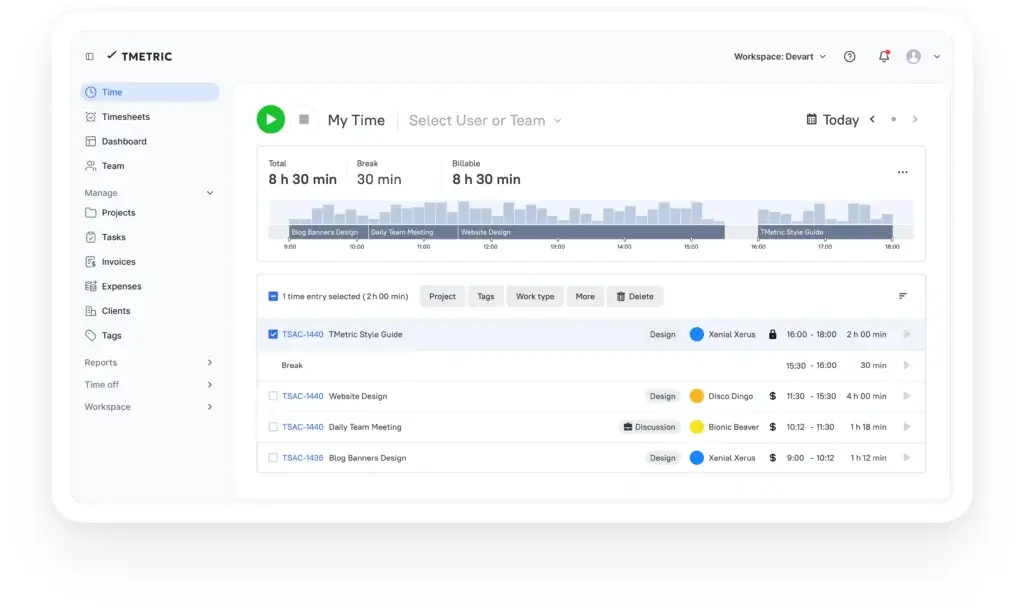
TMetric starts with time entries. You can track work with a timer, add manual entries, use desktop tracking, track offline, and organize time by client, project, task, tag, and billable status.
From there, you can turn time data into reports, invoices, payroll-related summaries, budget analysis, and team productivity insights.
The setup can stay simple for solo users, but it can also become more structured for teams that need approvals, permissions, time-off tracking, screenshots, app and website usage reports, or integration with project management tools.
TMetric Features
What You Actually Get
TMetric includes the core features you would expect from time tracking software, but it also adds several business-oriented tools that make it useful for teams managing projects, clients, payroll, and operational accountability.
Below are the most important TMetric features to evaluate in 2026.
Time Tracking, Manual Entries, and Offline Mode
TMetric gives you multiple ways to capture work time. You can start a timer, add time manually, edit entries, track offline from the desktop app, and organize each entry with projects, tasks, tags, and billable status.
- Timer tracking: Start and stop work sessions in real time
- Manual entries: Add or correct time when needed
- Offline mode: Continue tracking when your connection drops
- Bulk edits: Adjust multiple time entries more efficiently
- Tags: Categorize work by activity type, location, milestone, or status
- Idle detection: Clean up time when you step away from your computer
This flexibility is important because real work rarely fits perfectly into one timer flow. TMetric gives you enough control to correct your records without making tracking feel overly rigid.
Projects, Clients, Tasks, Budgets, and Billable Rates
TMetric is especially useful for project-based work. You can create clients, projects, tasks, budgets, billable rates, and cost structures, then use reports to see how work is progressing financially.
This is where TMetric becomes valuable for agencies, consultants, software teams, accountants, legal professionals, support departments, and service businesses.
- Clients and projects: Organize tracked time around customer work
- Tasks: Break larger projects into manageable work items
- Billable rates: Track revenue by client, project, or team member
- Project budgets: Compare tracked hours with planned budgets
- Budget alerts: Identify projects that may exceed limits
- Expenses: Add costs that need to be billed or reviewed
If your team regularly asks whether a project is profitable, TMetric gives you a more structured answer than a spreadsheet.
Reports and Analytics
TMetric’s reporting tools help you analyze time by project, task, client, user, team, date range, and billable status. You can use this data for client billing, internal productivity reviews, team workload analysis, and project planning.
The platform supports summary reports, detailed reports, activity reports, app and site usage reports on higher plans, and exportable reports for stakeholders.
- Project reports: See time, costs, and revenue by project
- Task reports: Understand where detailed work time goes
- Team reports: Review tracked hours by person or team
- Activity reports: Analyze productivity patterns
- Export options: Share data in formats suitable for billing or analysis
- Client access: Let clients view project reports on higher plans
For client-facing teams, these reports can reduce disputes because billing is supported by clearer time data. For internal teams, they can reveal where capacity is being used.
Timesheets, Approvals, and Attendance Tracking
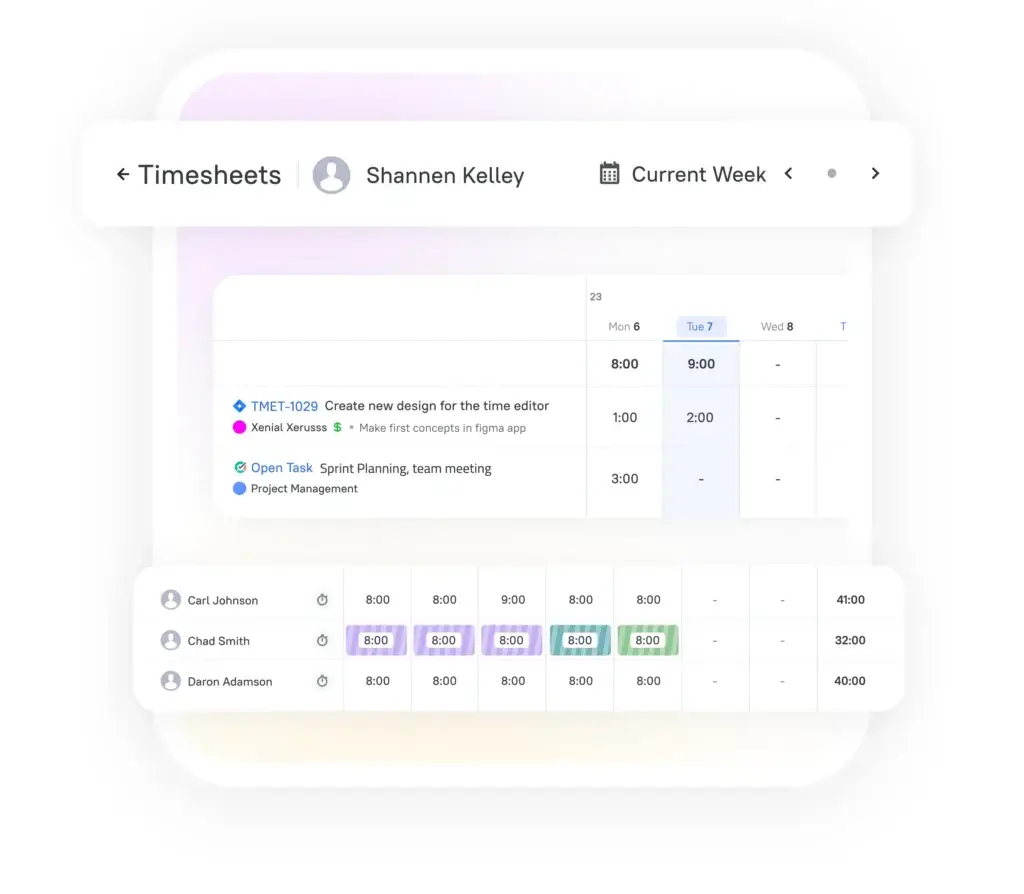
TMetric includes team timesheets and attendance-related features, which makes it more suitable for businesses that need structured work records.
Managers can review tracked hours, see timesheet status, check team availability, and use the data for payroll preparation or internal attendance analysis.
This does not make TMetric a full HR or payroll platform. However, it gives small and mid-sized teams a practical bridge between time tracking, attendance records, and payroll-ready summaries.
Billing, Invoicing, and Expenses
TMetric is a strong option if you need to move from tracked time to client billing. You can set billable rates, track expenses, apply time rounding, and create invoices from tracked work.
This is particularly helpful for service teams that charge by the hour or need to justify retainers with detailed time reports.
TMetric is not a complete accounting system, but it can reduce the manual work between time tracking and invoicing. For deeper accounting, you may still want to connect or pair it with tools like QuickBooks, Xero, FreshBooks, or your existing finance stack.
App and Website Monitoring, Screenshots, and Activity Tracking
One of the biggest differences between TMetric and tools like Toggl Track is that TMetric includes more workforce visibility features on higher plans.
The Business plan includes app and site monitoring, screenshot capturing, activity tracking for teams, and related productivity reports. This can be useful if you manage distributed teams and need stronger accountability.
However, this is also where buyers need to be careful. Monitoring features can help with transparency, but they should be implemented clearly, legally, and respectfully. Teams should know what is tracked, why it is tracked, who can see the data, and how it will be used.
Integrations and Workflow Connections
TMetric supports timer buttons in 50+ web apps and integrates with popular tools used by software, marketing, service, and operations teams.
Notable integrations include Jira, Redmine, GitLab, ClickUp, QuickBooks, Google Calendar, Outlook Calendar, and browser-based time tracking from supported work apps.
This matters because time tracking adoption improves when users can start timers from the tools where work already happens. If people need to constantly switch tabs to track time, accuracy usually drops.
User Experience
What It Feels Like to Use TMetric
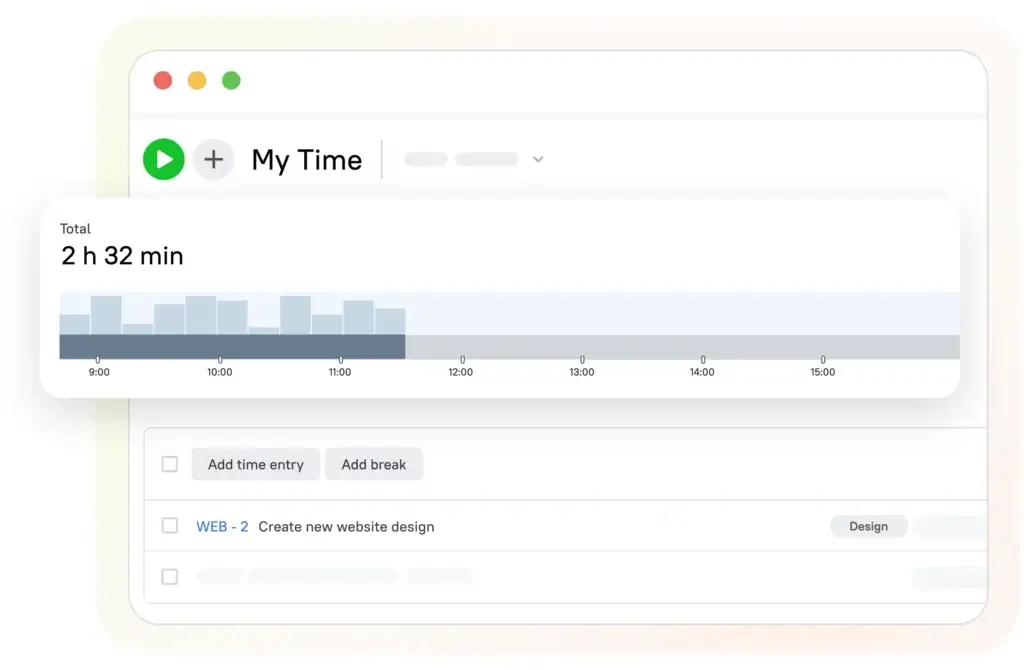
TMetric is relatively easy to use, especially for a tool that includes time tracking, billing, team management, and attendance features. The core timer workflow is simple, while the admin and reporting areas give managers more control.
It does not feel as minimalist as Toggl Track, but it also gives you more operational depth. That tradeoff is important when deciding whether TMetric fits your team.
Clean Time Tracking Workflow
The main time tracking workflow is straightforward. You choose what you are working on, assign it to a project or task, mark it as billable if needed, and start the timer.
You can also add time manually, edit previous entries, and use tags to add more context. This makes TMetric useful for people who switch between client work, internal meetings, admin, research, and project delivery throughout the day.
More Structure Than Basic Time Trackers
TMetric gives you more structure than many lightweight trackers. You can manage clients, budgets, invoices, expenses, attendance records, time-off requests, screenshots, app usage, permissions, and integrations.
That is a benefit if your business needs visibility and control. It can be a drawback if you only want a personal productivity timer with minimal setup.
Desktop and Mobile Experience
The desktop app is useful for continuous tracking, activity monitoring, offline tracking, and idle detection. The mobile app helps users record time when they are away from their computer.
For managers, the web app is the most important part of the experience because that is where reporting, billing, team dashboards, budgets, and admin settings become more useful.
Customization and Admin Controls
TMetric gives workspace owners and managers useful administrative controls. Depending on the plan, you can manage permissions, required fields, timesheet locking, team tracking rules, and monitoring settings.
- Set required fields for cleaner time entries
- Use timesheet locking to reduce retroactive changes
- Control who can edit time entries
- Use teams to organize departments or work groups
- Apply budgets and rates for better cost visibility
This makes TMetric a better fit for teams that need clean data, not just individual time logs.
Pros and Cons
Real-World Advantages and Limitations
TMetric is a capable time tracking platform with strong value for teams that need billing, timesheets, project budgets, and workforce visibility. Its biggest limitation is that it may feel too monitoring-focused for teams that want a purely trust-based approach.
Positive
✅ Affordable paid plans
✅ Strong billable time tracking
✅ Built-in invoicing
✅ Team timesheets and approvals
Negative
❌ Screenshots may not fit every culture
❌ Best team features require Business
❌ Not a full accounting platform
❌ Monitoring setup requires careful communication
Pros: Where TMetric Performs Best
TMetric offers strong value for the price. Compared with many time tracking tools, TMetric gives you a broad feature set at relatively affordable pricing, especially if you need more than basic timer functionality.
It is useful for billable work. Billable rates, project budgets, expenses, reports, and invoicing make TMetric a practical option for agencies, consultants, developers, accountants, lawyers, and service teams.
It supports more operational workflows. TMetric covers timesheets, attendance, time off, team dashboards, app usage, screenshots, and payroll-related summaries. This makes it more useful for managers than simple time trackers.
It integrates with common work tools. Timer buttons in 50+ web apps and integrations with tools like Jira, Redmine, ClickUp, GitLab, QuickBooks, Google Calendar, and Outlook help TMetric fit into existing workflows.
It works well for small and growing teams. The Free plan can work for very small teams, while Professional and Business add the features needed for client work, project control, and team oversight.
Cons: Where TMetric Falls Short
TMetric is not the cleanest option for pure simplicity. If you want the most lightweight and privacy-first time tracker, Toggl Track may feel easier and less administrative.
Monitoring features can be sensitive. Screenshots, app usage tracking, and activity reports can be useful, but they require clear policies. Without transparency, these features can reduce trust.
Advanced team functionality requires the Business plan. If you need time off, team timesheets, app and site monitoring, screenshots, activity tracking, QuickBooks time sync, or advanced integrations, the Business plan is usually the plan to evaluate.
It does not replace full project management software. TMetric includes task management and project budgets, but it is not a replacement for ClickUp, Asana, monday.com, Jira, or a full work management platform.
Pricing
Plans, Costs, and Value in 2026
TMetric offers four main plans: Free, Professional, Business, and Enterprise. The Free plan is useful for individuals and very small teams, while Professional and Business unlock the features most client-facing teams will need.
As of this update, TMetric’s official pricing lists Professional from $5.83 per seat/month on annual billing or $7 per seat/month on monthly billing. Business is listed from $7.50 per seat/month on annual billing or $9 per seat/month on monthly billing. Enterprise uses custom pricing.
TMetric Pricing Overview
| Plan | Price | Best For | Key Features |
| Free | $0 for up to 2 seats | Individuals and very small teams | Unlimited time tracking, unlimited clients and projects, exportable reports, timer button in 50+ web apps, web, mobile, desktop apps, and API access |
| Professional | From $5.83/user/month annually or $7/user/month monthly | Freelancers, consultants, and small service teams | Billable rates, expenses, project budgets, alerts, time rounding, client invoicing, calendar sync, task management, and imports |
| Business | From $7.50/user/month annually or $9/user/month monthly | Growing teams that need workforce visibility | Time off, team timesheets, app and site monitoring, screenshots, activity tracking, QuickBooks time sync, Jira, Redmine, and ClickUp integrations |
| Enterprise | Custom pricing | Larger organizations | Custom features, priority support, secure deployment options, advanced integrations, and volume discounts |
TMetric also offers a 14-day free trial, which makes it easier to test the platform before choosing a paid plan.
The main pricing decision is between Professional and Business. Professional is enough if you mainly need billing, budgets, expenses, calendar sync, and invoicing. Business is better if you need team timesheets, activity monitoring, screenshots, time off, QuickBooks time sync, or advanced project management integrations.
Which TMetric Plan Should You Choose?
Choose Free if you are tracking time for yourself or a very small team and only need core tracking, projects, clients, reports, and integrations.
Choose Professional if you bill clients, manage budgets, track expenses, create invoices, or need calendar sync for a more complete service workflow.
Choose Business if you manage a team and need timesheets, time off, activity tracking, screenshots, app usage reports, QuickBooks time sync, or advanced integrations.
Choose Enterprise if your organization needs custom deployment, volume pricing, priority support, or tailored integrations.
Is TMetric Good Value for Money?
TMetric is good value if you want a time tracking tool that includes billing, reporting, timesheets, attendance, and monitoring features without paying enterprise-level prices.
It is especially competitive for teams that would otherwise need separate tools for time tracking, invoicing, attendance, and basic workforce visibility.
However, if you only need a clean timer and simple reports, TMetric may offer more functionality than you need. In that case, Toggl Track, Clockify, or Harvest may be easier to evaluate depending on your priorities.
Security and Privacy
Security, Privacy, and Team Monitoring
Security and privacy matter when you introduce time tracking software, especially if you manage employees, contractors, client work, or sensitive project data.
TMetric positions itself as a business-ready platform with secure cloud and on-premise deployment options for larger teams, role-based access controls, GDPR compliance, and regular data audits.
That said, TMetric is not a purely privacy-first tool in the same way as Toggl Track. It includes optional workforce monitoring features on higher plans, including screenshots, app and site monitoring, and activity tracking.
Monitoring Features Require Clear Policies
TMetric’s monitoring features can be valuable for distributed teams, outsourcing companies, support departments, and businesses that need stronger accountability.
However, they should not be enabled casually. If you use screenshots or activity tracking, you should explain what is tracked, when tracking happens, why it is needed, who can access the data, and how long the data is retained.
This is not only a compliance issue. It is also a trust issue. Time tracking works best when employees understand the purpose and see the tool as a business system, not as hidden surveillance.
Role-Based Access and Enterprise Controls
For larger teams, role-based access controls help limit who can view reports, manage settings, and access team data. Enterprise options may also support more tailored deployment requirements.
If you are evaluating TMetric for a larger organization, review the latest security documentation, data processing terms, and deployment options before buying.
TMetric vs Alternatives
How It Compares With Toggl Track, Hubstaff, Clockify, and Harvest
TMetric sits between lightweight time trackers and heavier employee monitoring platforms. It is more operational than Toggl Track and Harvest, more affordable than many advanced platforms, and less field-workforce-focused than Hubstaff.
Here is how TMetric compares with popular alternatives.
Feature Comparison Overview
| Feature | TMetric | Toggl Track | Hubstaff | Clockify | Harvest |
| Best For | Teams needing time tracking, billing, timesheets, and workforce visibility | Privacy-first freelancers, agencies, and knowledge teams | Remote teams and field teams needing monitoring | Budget-conscious teams needing broad time tracking | Client billing and invoicing workflows |
| Free Plan | Yes, up to 2 seats | Yes | Limited free option | Yes | Yes |
| Invoicing | Yes | Available | Available on paid plans | Available on paid plans | Strong native invoicing |
| Project Budgets | Yes | Yes on paid plans | Yes | Yes | Yes |
| Screenshots | Yes, Business plan | No | Yes | Available depending on setup | No |
| Time Off | Yes, Business plan | No | Yes on some plans | Available on some plans | No |
| Best Strength | Affordable all-around time and team tracking | Simplicity and trust-based tracking | Workforce monitoring and field controls | Generous free time tracking | Billing and client invoicing |
TMetric vs Toggl Track
Toggl Track is cleaner, more privacy-first, and easier to adopt if your team dislikes monitoring. It avoids screenshots and heavy employee surveillance, which makes it a better fit for trust-based knowledge teams.
TMetric is better if you want a wider set of business features, including invoicing, timesheets, attendance, time off, app usage monitoring, screenshots, and more structured workforce reporting.
Choose Toggl Track if adoption, simplicity, and privacy are your top priorities. Choose TMetric if you want stronger admin controls and more business functionality at a lower entry price.
👉🏼 Read the Full Toggl Track review here
TMetric vs Hubstaff
Hubstaff is stronger for companies that need GPS tracking, workforce monitoring, scheduling, payroll workflows, screenshots, and field team visibility.
TMetric is a better fit if your work is more project-based and client-facing, especially if you care about budget tracking, invoicing, timesheets, and affordable team management.
Choose Hubstaff if you need location tracking and advanced workforce control. Choose TMetric if you need project time tracking with billing, reports, and moderate monitoring.
👉🏼 Read Full Hubstaff review here or visit Hubstaff
TMetric vs Clockify
Clockify is one of the strongest options for teams that want a generous free time tracking platform.
TMetric is better if you want a more compact paid upgrade path with invoicing, budgets, timesheets, activity tracking, screenshots, and time-off features.
Choose Clockify if you want broad free tracking for a larger group. Choose TMetric if you need stronger business workflows at an affordable paid price.
TMetric vs Harvest
Harvest is excellent for client billing, invoicing, and simple time tracking. It is polished, easy to understand, and well suited for agencies and freelancers who want a billing-first workflow.
TMetric gives you more operational features, including activity tracking, screenshots, time off, attendance, and team management. It is less elegant than Harvest for pure invoicing, but broader for team oversight.
Choose Harvest if invoicing is your main priority. Choose TMetric if you want time tracking, billing, attendance, and workforce visibility in one platform.
Best Use Cases
Who Should Use TMetric?
TMetric is best for users who need time tracking connected to business workflows. It is not just for measuring personal productivity. It is better suited for teams that need project reports, billable hours, budgets, invoices, timesheets, and team visibility.
Best for Agencies and Client Service Teams
TMetric is a strong fit for marketing agencies, software agencies, design studios, consulting firms, and other service businesses that need to track billable and non-billable time.
You can organize time by client and project, apply billable rates, monitor project budgets, and generate reports that support client communication and invoicing.
Best for Software Development and Technical Teams
TMetric can work well for developers and technical teams because it integrates with tools like Jira, Redmine, GitLab, and ClickUp.
This allows teams to connect time tracking with technical work items, project estimates, support tasks, and sprint-related analysis.
Best for Small Businesses That Need Timesheets
Small businesses can use TMetric to replace manual timesheets, fragmented time logs, and spreadsheet-based tracking.
The Business plan is especially relevant if you need team timesheets, time-off tracking, attendance visibility, activity reporting, and payroll-related summaries.
Best for Managers Who Need Workforce Visibility
If you manage remote employees, contractors, or distributed teams, TMetric can give you more visibility into how work hours are used.
Its monitoring features make it more suitable for teams that need accountability, but they should be used with transparency and clear expectations.
Not Ideal for Pure Privacy-First Tracking
TMetric is not the best choice if your priority is strict privacy-first time tracking with no screenshots, app monitoring, or activity reporting.
In that case, Toggl Track or Harvest may feel more aligned with a trust-based work culture.
Setup Tips and Best Practices
How to Get the Most Out of TMetric
TMetric can be simple, but it becomes more valuable when your workspace is structured properly. A thoughtful setup will help you create cleaner reports, better invoices, and more reliable team data.
1. Build a Clear Client and Project Structure
Start by creating clients and projects in a way that reflects how you actually bill and manage work.
- Create a client for each customer or internal department
- Create projects for active workstreams
- Use tasks when you need more detailed reporting
- Use tags for cross-project categories like meetings or support
A clean structure makes reports easier to read and reduces confusion for your team.
2. Set Billable Rates Before Tracking Starts
If you use TMetric for client billing, set billable rates early. This helps prevent manual corrections later.
You should also decide whether rates are applied by workspace, project, client, or team member depending on how your pricing model works.
3. Use Budgets and Alerts for Project Control
Project budgets are one of TMetric’s most useful business features. Use them to compare planned hours against actual tracked work.
This can help you catch scope creep before a project becomes unprofitable.
4. Define Monitoring Rules Clearly
If you plan to use screenshots, app usage tracking, or activity reports, write a clear internal policy first.
Your team should understand what is tracked, when it is tracked, and how the information will be used. This protects trust and reduces resistance.
5. Review Reports Weekly
Time tracking becomes valuable when you review the data regularly. Set a weekly routine to review tracked hours, budget progress, billable percentages, and team workload.
This turns TMetric from a passive timer into a decision-making tool.
6. Connect TMetric With Your Work Tools
Use integrations and browser timer buttons to reduce friction. The easier tracking becomes, the more accurate your data will be.
- Connect calendar tools if meetings matter to your workflow
- Use Jira, Redmine, GitLab, or ClickUp integrations for technical work
- Use QuickBooks time sync if finance workflows require it
- Install browser extensions for faster daily tracking
Your goal is simple: make time tracking happen where work already happens.
Conclusion
Final Thoughts – Is TMetric Worth It in 2026?
⭐ Overall Rating: 8.9/10
TMetric is worth it if you want affordable time tracking software that goes beyond simple timers. It is especially useful for service businesses, agencies, consultants, software teams, and small companies that need time tracking, reports, budgets, invoicing, timesheets, attendance, and team visibility in one place.
Its biggest strengths are value for money, billable time tracking, project budgets, invoicing, timesheets, integrations, and workforce management features. It gives managers more control than many lightweight time trackers without jumping into expensive enterprise software.
Its main limitation is cultural fit. If your team strongly prefers privacy-first tracking with no screenshots or activity monitoring, TMetric may feel too managerial. In that case, Toggl Track or Harvest may be a better option.
Final Recommendation
Choose TMetric if you want affordable time tracking with project budgets, billable rates, invoices, timesheets, attendance, and optional team monitoring.
Choose another tool if you want the simplest possible timer, a purely privacy-first approach, advanced field workforce GPS tracking, or a full project management platform.
For agencies, consultants, software teams, and small businesses, TMetric is one of the stronger value-focused time tracking tools available in 2026.
Frequently Asked Questions
Have more questions?
What is TMetric used for?
TMetric is used for time tracking, project reporting, billable hours, invoicing, timesheets, attendance tracking, time-off management, and team productivity visibility. It is commonly used by agencies, consultants, software teams, freelancers, and service businesses.
Is TMetric free?
Yes. TMetric offers a Free plan for up to 2 seats. The Free plan includes unlimited time tracking, unlimited clients and projects, exportable reports, timer buttons in 50+ web apps, web, mobile, desktop apps, and API access.
How much does TMetric cost?
TMetric has a Free plan, a Professional plan starting from $5.83 per user per month on annual billing or $7 monthly, a Business plan starting from $7.50 per user per month on annual billing or $9 monthly, and custom Enterprise pricing. Always check the official pricing page before buying because prices can change.
Is TMetric good for freelancers?
Yes. TMetric is a good option for freelancers who need to track billable hours, manage multiple clients, set project budgets, create reports, and generate invoices. Solo users who only need a very simple timer may also compare it with Toggl Track or Clockify.
Is TMetric good for teams?
Yes. TMetric is useful for teams that need time tracking, project budgets, team dashboards, timesheets, attendance tracking, time off, activity reports, and optional monitoring features like screenshots on the Business plan.
Does TMetric take screenshots?
Yes. TMetric includes screenshot capturing on the Business plan. This can be useful for workforce visibility, but it should be implemented with clear communication, transparent policies, and attention to local privacy and employment rules.
Does TMetric have invoicing?
Yes. TMetric supports client invoicing, billable rates, expenses, time rounding, and project budgets on paid plans. It can help service teams turn tracked time into invoices, although it does not replace a full accounting system.
Does TMetric integrate with Jira and ClickUp?
Yes. TMetric supports advanced integrations with tools like Jira, Redmine, and ClickUp on the Business plan. It also supports timer buttons in 50+ web apps and integrations with tools such as QuickBooks, Google Calendar, Outlook, and GitLab.
What are the best TMetric alternatives?
The best TMetric alternatives include Toggl Track for privacy-first time tracking, Clockify for budget-conscious teams, Harvest for invoicing, and Hubstaff for workforce monitoring and GPS tracking. The best choice depends on whether you prioritize simplicity, billing, monitoring, or price.
Is TMetric worth it in 2026?
TMetric is worth it if you need affordable time tracking with project budgets, billable rates, invoicing, timesheets, attendance tracking, time off, and optional team monitoring. It is less suitable if you want a purely privacy-first tracker with no screenshots or activity monitoring.