
Introduction
MindMap AI is one of the more interesting mind mapping tools to watch in 2026, mainly because it is built around AI-assisted idea structuring rather than traditional manual diagramming. Instead of asking you to start with a blank canvas and build every branch yourself, it focuses on turning messy inputs into editable mind maps quickly. That makes it especially relevant if your workflow includes research notes, meeting takeaways, PDFs, audio, or long blocks of text that need structure before they become action.
In this MindMap AI review, you will get a practical look at what the tool does well, where it still has limits, how its pricing works, and which types of users are most likely to benefit from it. If your main goal is faster brainstorming, AI-assisted summarization, and easier visual organization, MindMap AI has a strong case. If you need advanced enterprise whiteboarding or heavy-duty technical diagramming, there are still situations where alternatives may fit better.
What is MindMap AI? 🧠
MindMap AI is a web-based mind mapping platform designed to help you generate, edit, and organize mind maps with AI support. The core idea is simple: you bring in a prompt, document, note set, or other source material, and the software turns it into a structured visual map that you can continue refining manually.
What makes it stand out is that the product is not limited to plain text prompts. MindMap AI supports content-to-map workflows from text, PDFs, images, audio, video, Markdown, and CSV, which gives it a wider intake range than many classic mind mapping tools. It also supports AI-assisted expansion, summarization, reorganizing, and co-editing, so the tool feels more like an active thinking partner than a static diagram editor.
Why MindMap AI matters in 2026
The value of AI mind mapping is not just speed. It is also about lowering the friction between information capture and structured thinking. In practice, many professionals do not struggle with generating ideas, they struggle with organizing them fast enough to make decisions, write plans, or communicate clearly with stakeholders.
MindMap AI addresses that gap well. Its positioning is strongest when you need to go from content overload to a clearer structure. For marketers, students, consultants, project planners, and content teams, that can save meaningful time. In my view, that is where MindMap AI is most compelling. It is less about replacing deep planning tools and more about accelerating the messy front end of thinking.
Software Specification
Core Features of MindMap AI
AI Thinking Mode and structured map generation 🚀
One of the most notable parts of MindMap AI’s positioning is its AI Thinking Mode. According to the company, this mode is designed to understand context, hierarchy, and relationships before generating a map, rather than just producing random branches. In plain terms, that means the tool is trying to build cleaner first drafts that feel closer to how you would logically organize a subject yourself.
In use, this is most valuable when you are starting from dense information. You can input a topic and quickly get a structure to react to, rather than spending your first ten minutes deciding what the parent branches should be. That makes MindMap AI better suited to “first-structure” work than many classic mind map tools that depend almost entirely on manual construction.
Multi-format input support
This is where MindMap AI has a real advantage over simpler mind map makers. The product supports turning text, PDFs, images, audio, video, Markdown, and CSV into mind maps. That expands its usefulness well beyond brainstorming. You can use it for study notes, internal documents, research summaries, content planning, or turning resource-heavy inputs into a visual structure.
For SEO and content teams, this is especially practical. You can take rough notes, article research, or a source document and use MindMap AI to build an outline faster. It is one of the better examples of AI being used for preprocessing ideas rather than only generating surface-level copy.
AI co-editing and refinement tools
MindMap AI is not only about generating the first version of a map. The product also emphasizes continuous editing with AI assistance. You can expand ideas, summarize branches, reorganize structure, add arrows, and continue shaping the map manually. That balance matters because fully automated mind maps are rarely perfect on the first pass.
I see this as one of the product’s biggest strengths. A lot of AI tools are good at the first draft and weak at refinement. MindMap AI appears to understand that what users actually need is a fast draft plus enough control to make the output useful.
Export, customization, and navigation tools
MindMap AI supports exports in PNG, SVG, PDF, CSV, and Markdown, which is a strong range for both visual sharing and workflow handoff. That means you are not locked into the platform if you need to move content into documentation, presentations, or other planning systems.
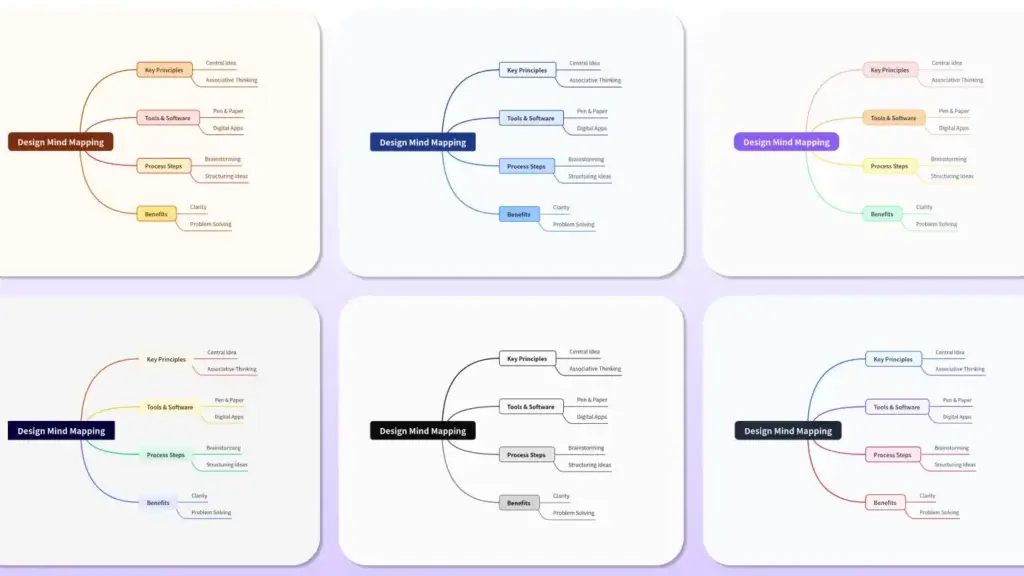
On the editing side, the platform includes theme selection, layout options, zoom controls, node collapse and expand, undo and redo, retry, keyboard shortcuts, and general canvas navigation. These features may sound basic, but they matter because they determine whether a tool feels usable once your map grows beyond a simple sketch.
Mobile access and browser extensions 📱
MindMap AI is available as a web app, and its public site also points to iOS and Android apps, plus Chrome and Edge extensions. That gives it better accessibility than desktop-only mind mapping software and makes it easier to use across devices.
That said, if your ideal setup is a fully native desktop experience with reliable offline work, MindMap AI is not the obvious first choice. It is much more of a web-first, cloud-first product.
Pros and Cons
Advantages and Disadvantages
Positive
✅ Strong multi-format AI input support
✅ Fast first-draft mind map generation
✅ Useful export options for real workflows
✅ Accessible free plan and flexible pricing
Negative
❌ Best fit is mind mapping, not full whiteboarding
❌ Web-first approach will not suit every user
❌ AI credits matter, so heavy users need to watch plan value
❌ Less ideal if you want traditional offline desktop software
Pros
✅ Strong multi-format AI input support
This is the feature that gives MindMap AI real differentiation. Many mind mapping tools help you draw. Fewer help you convert text, PDFs, images, audio, video, Markdown, and CSV into a usable map. If your work starts with raw content rather than a blank creative session, this matters a lot.
✅ Fast first-draft mind map generation
MindMap AI is built to reduce setup friction. You can move from idea or document to structured branches quickly, which makes it valuable for brainstorming, research organization, content planning, and studying. It is one of the clearer productivity wins in the AI mapping category.
✅ Useful export options for real workflows
Exports in PNG, SVG, PDF, CSV, and Markdown make the tool easier to fit into broader workflows. That is important if you need to turn your maps into documents, shareables, or editable text-based assets later.
✅ Accessible free plan and flexible pricing
The free tier includes 50 monthly AI credits and does not require a credit card to get started. On top of that, users can choose between subscription plans and one-time lifetime plans, which is a more flexible commercial model than many SaaS tools offer.
Cons
❌ Best fit is mind mapping, not full visual collaboration
MindMap AI is strongest when you want AI-driven mind maps. It is not trying to be a broad visual collaboration suite in the same way Miro or Whimsical do. If your team needs whiteboards, workshops, process diagrams, and broad ideation canvases in one place, you may outgrow it.
❌ Web-first approach will not suit every user
The platform is accessible and convenient, but users who strongly prefer native desktop software may lean toward Xmind or other desktop-first tools. That is not a fatal weakness, but it does affect the audience fit.
❌ AI credits influence long-term value
MindMap AI’s plans are built around AI credits, so heavy users need to compare expected usage against plan limits. The tool can be affordable, but the best plan depends less on team size and more on how often you want the AI to do the initial thinking and restructuring work.

Hands-On Experience
User Experience and Performance
Ease of use and onboarding
MindMap AI’s value proposition is easy to understand, which helps onboarding. You are not dealing with a complex workspace full of unrelated features. The product is focused, and that usually leads to a faster time to value. If you already know what a mind map is, you can get started quickly.
The interface also appears to be designed around reducing clutter. Between layout controls, zoom, node collapse, shortcuts, and theme selection, the tool gives you enough control without burying the experience under too many menus. For newer users, that is a real advantage over software that tries to do everything at once.
Who the product feels best for 🎯
MindMap AI feels best suited to solo professionals, students, researchers, marketers, content strategists, and planners who want AI to accelerate structure. It is particularly attractive if you regularly turn documents or notes into outlines, roadmaps, topic clusters, study maps, or planning trees.
It is less obviously tailored to large synchronous collaboration use cases. That does not make it weak, it just makes it focused. In my opinion, that focus is actually one of its strengths. It knows what job it is trying to do.
Pricing
Pricing and Plan Options
| Plan | Price | Best For | What Stands Out |
| Free | $0 | Light personal use | 50 monthly AI credits, manual mapping, no credit card required |
| Basic | $4.99/month billed yearly or $9.99/month billed monthly | Regular individual users | Lower-cost paid entry point for more AI-powered work |
| Pro | $7.99/month billed yearly or $14.99/month billed monthly | Power users | Higher monthly AI allowance and more advanced AI usage |
| Lifetime Lite | $157 one-time | Users avoiding subscriptions | Lifetime access model |
| Lifetime Plus | $237 one-time | Frequent long-term users | More generous lifetime tier |
| Lifetime Ultimate | $399 one-time | Heavy individual usage | Top lifetime option |
Is MindMap AI pricing competitive? 💰
The pricing structure is more flexible than average. You get a free tier, entry-level paid subscriptions, higher-tier subscriptions, and lifetime plans. That alone makes the product easier to recommend, because different users prefer very different buying models.
For many users, the main decision will come down to whether the AI features become part of your regular workflow. If you only want occasional AI help, the free plan may be enough to test real value before paying. If you use mind mapping frequently for study, research, planning, or content work, the paid tiers make more sense. The existence of lifetime plans is also notable, because it appeals to users who dislike recurring SaaS costs.
Student discount and academic fit
MindMap AI also offers a student discount, with the company advertising more than 70% off student pricing. Verified students can access discounted versions of the Basic and Pro plans, making the tool more accessible for note-taking, revision, and breaking down complex subjects.
That academic angle fits the product well. Converting lecture notes, reading materials, and study resources into structured visual maps is one of the clearest use cases for the platform.
Security and Compliance
Security and Privacy
Privacy positioning and data handling 🛡️
MindMap AI’s public messaging around privacy is stronger than what you see from some smaller AI tools. The site states that user mind maps and uploaded files are not used to train public or shared AI models. It also states that users can view, export, or delete their account data, and that the company does not sell, rent, or trade personal data or mind maps to advertisers or third parties.
That is an important trust signal, especially for users uploading notes, research material, or internal planning assets. The company’s privacy policy identifies the business entity as 3axislabs Inc., which adds a bit more transparency than anonymous product sites that give very little company information.
What I would still verify before a large team rollout
For solo users and smaller teams, the available privacy messaging may be enough. For larger organizations, I would still verify deeper security, compliance, and procurement requirements directly with the vendor before a wider rollout. The public site gives useful assurances, but enterprise buyers usually need more formal documentation before adoption.
Compare with Others
MindMap AI vs Alternatives
MindMap AI vs Xmind
Xmind remains a strong option if you want a more traditional mind mapping experience with desktop software roots and polished presentation-oriented map creation. Its paid plans start lower than many business tools, and it also includes AI features in newer plans. However, MindMap AI has a stronger AI-first identity and broader content-to-map positioning, especially if you want to feed in PDFs, media, and mixed source formats rather than just build maps manually.
MindMap AI vs Miro
Miro is the better fit for teams that need collaborative whiteboards, workshops, and broader visual work management. It is more of an innovation workspace than a dedicated mind mapping product. MindMap AI is the better fit if your main goal is faster AI-powered mind mapping rather than a huge collaborative canvas with many non-mind-map workflows.
MindMap AI vs MindMeister or Whimsical
MindMeister stays attractive for collaborative online mind mapping, while Whimsical is often stronger for lightweight product thinking, diagrams, and collaborative planning. MindMap AI wins when AI-assisted structure generation is the main priority. If you care most about collaborative diagrams or mixed visual documentation, the others may have a broader team appeal.
My overall take is this: MindMap AI is strongest when you want AI to do more of the early structural work. It is not trying to be every kind of visual tool, and that focus makes it easier to recommend for the right use case.
Conclusion
Final Thoughts: Is MindMap AI Worth It?
Who should use MindMap AI?
MindMap AI is worth considering if you want a faster way to move from information to structure. It is especially useful for students, researchers, marketers, consultants, content teams, and solo professionals who regularly turn notes or source materials into frameworks, outlines, and visual plans.
If you are choosing between traditional mind mapping and AI-assisted mind mapping, MindMap AI makes a strong case for the second category. It is focused, reasonably priced, and built around a real productivity problem.
My final take on MindMap AI in 2026
MindMap AI is not the best tool for every visual workflow, but it does not need to be. What it does well is help you build structured mind maps faster, using AI in a way that feels genuinely useful rather than decorative. The multi-format input support, export flexibility, free plan, and lifetime pricing all strengthen its appeal.
If your priority is AI-assisted brainstorming and turning raw material into organized thinking, MindMap AI is one of the more compelling tools in this category right now. If your needs are broader than mind mapping, compare it closely with Miro, MindMeister, Whimsical, or Xmind before deciding.
Have more questions?
Frequently Asked Questions (FAQs)
What is MindMap AI used for?
MindMap AI is used for brainstorming, visual planning, study mapping, research organization, and turning source material such as text, PDFs, images, audio, video, Markdown, or CSV into structured mind maps.
Does MindMap AI have a free plan?
Yes. MindMap AI offers a free plan with 50 monthly AI credits and no credit card required to get started.
Can MindMap AI convert files into mind maps?
Yes. It supports content-to-map workflows from multiple input types, including text, PDFs, images, audio, video, Markdown, and CSV.
Which export formats does MindMap AI support?
You can export maps in PNG, SVG, PDF, CSV, and Markdown formats.
Does MindMap AI support multiple languages?
Yes. The company states that the platform supports mind mapping in more than 25 languages.
Is there a mobile app for MindMap AI?
Yes. The public site links to iOS and Android apps, alongside the web app and browser extensions.
Does MindMap AI offer lifetime pricing?
Yes. In addition to monthly and annual plans, MindMap AI offers one-time lifetime tiers such as Lite, Plus, and Ultimate.
Is MindMap AI good for students?
Yes. It is a strong fit for students who want to turn notes and reading materials into visual study structures, and it also offers a student discount.
Is MindMap AI better than Xmind?
That depends on your needs. MindMap AI is stronger for AI-assisted structure generation and mixed-format input. Xmind is stronger if you prefer a more traditional desktop-oriented mind mapping experience.
Is MindMap AI secure?
The company states that private mind maps and uploaded files are not used to train public or shared AI models, and that users can view, export, or delete their data. Larger organizations should still verify enterprise requirements directly with the vendor.