Introduction
Todoist is one of the most recognizable names in the to-do list app market, and for good reason. It combines a clean interface with strong task management fundamentals, making it a compelling choice for individuals, freelancers, and small teams that want to stay organized without moving into a heavier project management platform.
In this Todoist review, I look at where the software performs especially well, where it still feels limited, and who will get the most value from it. If you are still comparing options, you can also explore our guide to the best to-do list apps to see how Todoist stacks up against other leading tools in the category.
My short take is simple: Todoist remains one of the best choices if you want fast, low-friction task management with smart natural language input, useful calendar functionality, and enough collaboration for real work. It is less ideal if you need advanced workload management, built-in time tracking, or highly customizable project reporting.
Software specification
Core Features of Todoist
Todoist works best when you want structure without complexity. It gives you enough depth to manage real work, but it stays focused on tasks rather than trying to become a full operating system for every team process.
1. Smart Quick Add and Natural Language Input
One of Todoist’s strongest features is how quickly you can capture work. You can type something like “Send proposal next Tuesday at 10am p1” and the app interprets the date, time, and priority automatically. That saves time every single day, especially if you add tasks on the fly.
2. Projects, Sections, Sub-tasks, and Priorities
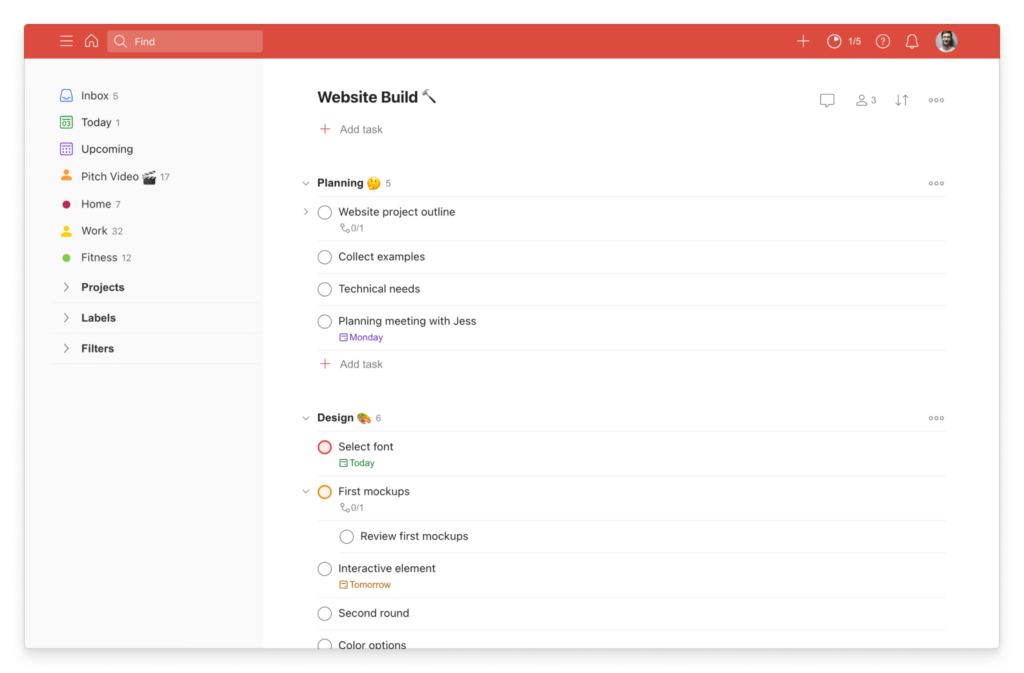
Todoist gives you a flexible structure for organizing work. You can create projects for major areas of responsibility, divide them into sections, and break larger work into sub-tasks. Priority levels help surface urgent items, while this overall hierarchy keeps your task list from becoming a flat, overwhelming backlog.
3. Recurring Tasks, Reminders, and Durations
Recurring tasks are one of Todoist’s biggest strengths. The software handles repeating routines very well, whether you are planning weekly meetings, monthly reporting, or personal habits. On paid plans, you also get custom reminders and task duration, which makes the app more useful for schedule-based planning.
4. Calendar Layout and Calendar Integration
Todoist has improved meaningfully here. It now offers a dedicated calendar layout, and its calendar integration lets you see Google Calendar or Outlook Calendar events alongside your tasks. For users who like time-blocking or need a more visual weekly view, this makes Todoist much more competitive than older reviews may suggest.
5. Deadlines for Hard Due Dates
This is an important newer capability. Todoist now distinguishes between a date, which is when you plan to work on something, and a deadline, which is the hard cutoff. That sounds like a small detail, but it adds clarity for client deliverables, launches, approvals, and other work where “scheduled” is not the same as “must be done by.”
6. Todoist Assist and Ramble
Todoist has also expanded its AI layer. Todoist Assist helps with things like building filters and creating tasks from emails, while Ramble is designed for faster spoken capture. These additions are useful, but they are best viewed as workflow accelerators rather than the core reason to choose the platform.
Where Todoist still feels limited
For all its strengths, Todoist still has clear boundaries. It does not have native time tracking, and it does not support true start dates that hide tasks until a future start point. That means it is excellent for task execution, but less ideal for users who want deeper workload planning or a more advanced project timeline model.
Pros and Cons
Advantages and Disadvantages
Positive
✅ Excellent natural language task capture
✅ Clean interface with very low friction
✅ Strong recurring task and reminder system
✅ Useful calendar view and integrations
Negatives
❌ No native time tracking
❌ No true start dates
❌ Lighter team management than full PM tools
❌ Some advanced workflow depth requires paid plans
Todoist’s strengths are very clear. It is quick, polished, and easy to trust for daily execution. The trade-off is that it stays intentionally focused. If you want a lightweight but capable task manager, that focus is a benefit. If you want dashboards, workload balancing, built-in time tracking, and deep process design, it may feel too narrow.
What Todoist does especially well
- Fast capture: It is one of the best apps in this category for getting tasks out of your head and into a structured system quickly.
- Routine management: Recurring tasks, reminders, and natural language dates make it highly effective for repeatable personal and work routines.
- Clarity: The interface stays focused, which makes the app easier to stick with over time.
- Practical planning: Calendar layout, deadlines, and integrations make it more useful for real work than a basic personal to-do list app.
Where competitors may do better
- Time tracking: If that is essential, you will likely need a different tool or an added integration.
- Complex team workflows: Platforms like ClickUp, Asana, or monday.com go further for teams that need more process control.
- Hidden future work: Users who rely heavily on start dates may find Todoist’s approach limiting.
- Advanced customization: Power users may want more reporting and interface flexibility than Todoist currently offers.
Integrations and Compatibility
Benefits of Using Todoist
The biggest benefit of Todoist is that it reduces friction. That may sound simple, but it is what separates tools people actually use from tools they admire for a week and then abandon. Todoist helps you capture tasks quickly, organize them without much setup, and return to the right work without feeling lost in the interface.
It improves personal productivity without overcomplicating your system
Todoist is especially good for people who want a reliable daily command center. The app supports recurring tasks, priorities, labels, filters, and reminders, but it still feels approachable. That balance is one of its best selling points. You can start simple and gradually build a more sophisticated setup as your workflow grows.
It works well for freelancers and small teams
Todoist is not just for solo use. Shared projects, comments, task assignments, team workspaces, and team permissions give it enough collaboration for many real-world business scenarios. For client work, internal operating tasks, and small team execution, it often provides the right amount of structure without the overhead of a broader work management suite.
Its integrations make it more useful in day-to-day work
Todoist connects with email, calendar, browser, and productivity tools, which helps it fit naturally into an existing work stack. The calendar integration is especially important because it brings Google Calendar or Outlook Calendar events into Todoist’s Today and Upcoming views, while also allowing time-blocked tasks to sync back to your calendar.
That said, there is an important limitation to know: you can only connect one calendar provider at a time. For many users that will be fine, but if you work across multiple calendar ecosystems, it is worth knowing upfront.
Cross-platform support is a real strength
Todoist is available across web, desktop, and mobile, and the experience is consistently strong. That matters because a to-do list app fails quickly if it feels better on one device than another. Here, Todoist performs well. You can capture something on mobile, refine it on desktop, and keep moving without a break in flow.
Who gets the most value from these benefits
If you are an individual professional, freelancer, student, or manager who wants a cleaner task system, Todoist is easy to recommend. If you are running a larger team with more complex process needs, the benefits are still real, but you may eventually want something with deeper reporting, resource planning, or operational controls.
User Experience
User Interface and Operational Simplicity
Todoist’s interface is one of the main reasons the platform has stayed relevant for so long. It feels intentionally designed to help you focus on execution rather than on managing the tool itself.
Minimalist, but not empty
Some task apps are minimal because they are limited. Todoist is minimal because it is disciplined. The layout is clean, the visual hierarchy is strong, and the software rarely gets in your way. Projects, filters, labels, and views are all easy to access, but they do not overwhelm the main task experience.
Very low learning curve
Todoist is one of the easier platforms in this space to adopt. New users can begin with simple lists and deadlines, while experienced users can layer on sections, filters, and labels later. That makes it appealing for users who want a tool they can grow into rather than study before using.
Calendar and board views improve flexibility
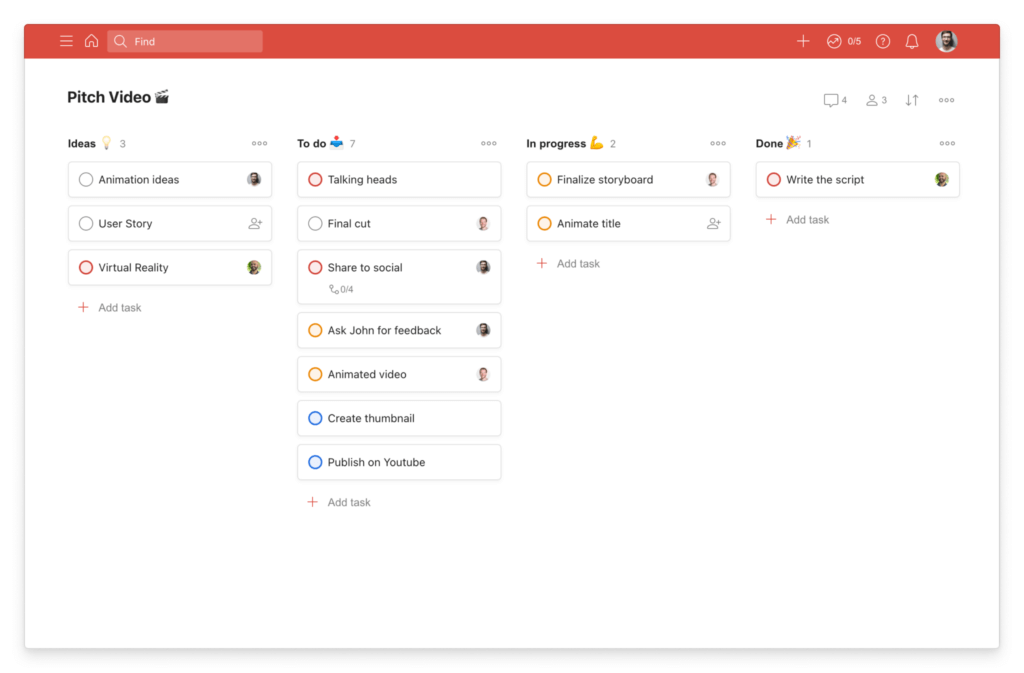
The addition of calendar layout makes the product feel more complete for schedule-oriented users, while board layout offers a more visual workflow for projects with stages. Those options help Todoist appeal to different planning styles without losing its core simplicity.
Mobile experience stays strong
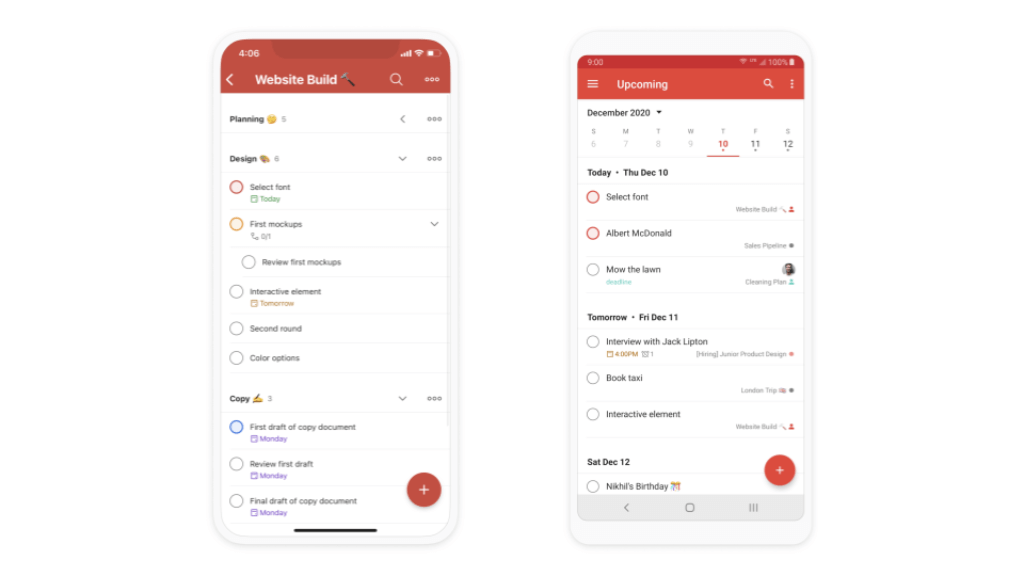
Todoist works particularly well on mobile, which matters because task capture often happens away from your desk. The app is fast, the interface feels consistent, and it is easy to add, reschedule, complete, or review tasks in seconds. That reliability is a major part of its long-term appeal.
Where the experience still falls short
The trade-off of simplicity is that some advanced users may want more. Filter logic can take time to master, deep customization is limited compared with some competitors, and users coming from heavier project management tools may feel the interface is too task-centric for broader operational planning.
Pricing and Plans
How much does Todoist cost?
Todoist currently offers three plans: Beginner, Pro, and Business. The structure is straightforward, and the gap between tiers makes sense. Most users will know fairly quickly which one fits their needs.
Beginner
The Beginner plan is the free entry point and is stronger than many free tiers in this category. You get up to 5 personal projects, Smart Quick Add, task reminders, list and board layouts, 3 filter views, 1 week of activity history, integrations with email and calendar tools, and Ramble.
This plan is best for personal use, casual productivity, and anyone who wants to test the platform before committing. For light use, it is genuinely useful. For serious workflow design, it will feel limited relatively quickly.
Pro
Pro is the plan most individual professionals should consider. It expands the platform meaningfully with up to 300 personal projects, calendar layout, task duration, custom reminders, 150 filter views, full reporting history, Task Assist, deadlines, and unlimited Ramble.
If you use Todoist for real work rather than occasional personal task tracking, this is usually the best-value tier. It unlocks the features that make the product feel complete, especially calendar planning, stronger filtering, and better control over deadlines and reminders.
Business
Business adds the team layer. You get everything in Pro for each member, plus a shared team workspace, up to 500 team projects, calendar layout for team projects, granular team activity logs, shared templates, team project folders, team roles and permissions, and centralized billing.
This plan is best for small to mid-sized teams that want task collaboration without moving into a more complicated enterprise work management product. It is especially useful if your team values simplicity and execution more than complex portfolio reporting.
Which plan should you choose?
- Choose Beginner if you want a reliable free to-do list app for personal planning.
- Choose Pro if you manage ongoing work, client deliverables, routines, or schedule-based planning.
- Choose Business if you need shared workspaces, permissions, centralized billing, and a team-focused setup.
| Plan | Pricing | What You Get | Best For |
| Beginner | Free | 5 personal projects, Smart Quick Add, reminders, list and board layouts, 3 filter views, integrations, Ramble | Personal use and testing the platform |
| Pro | Paid individual plan | 300 personal projects, calendar layout, task duration, custom reminders, 150 filter views, deadlines, Task Assist, unlimited Ramble | Professionals, freelancers, advanced individual productivity |
| Business | Paid team plan | Shared team workspace, 500 team projects, team calendar layout, activity logs, folders, roles, permissions, centralized billing | Teams that want structured collaboration without heavy complexity |
Todoist Alternatives
Compare with other tools
If Todoist does not feel like the perfect fit, there are several strong alternatives worth considering. The right choice depends on whether you want a lightweight personal planner, a more visual work management platform, a power-user Apple app, or an all-in-one workspace for teams. Todoist stands out for its clean design, natural language task capture, recurring due dates, calendar view, and focused task management experience. Still, tools like Any.do, monday.com, OmniFocus, and ClickUp can be better picks depending on your workflow.
Todoist vs Any.do
Any.do is the closest alternative here if you are mainly comparing personal productivity apps. Like Todoist, it combines tasks, reminders, recurring planning, and calendar functionality in a lightweight interface. Any.do also leans heavily into day planning and consumer-friendly convenience, including features such as WhatsApp task capture, widgets, and smart assistant support. Todoist is the stronger option if you want better task structuring, cleaner project organization, and a more mature productivity workflow. Any.do is a better fit if you want a more lifestyle-oriented planner that blends tasks and calendar management in a very approachable way.
Todoist vs monday.com
monday.com is the better choice if your needs go well beyond personal task management. It is built for team coordination, workflow customization, dashboards, automations, and broader work execution across departments. Todoist is far lighter and easier to adopt, which is exactly why many individuals and small teams prefer it. If you want a focused to-do list app with low friction, Todoist is the better pick. If you need a scalable work management platform with automations, dashboards, and more operational depth, monday.com has the advantage.
Todoist vs OmniFocus
OmniFocus is the strongest alternative for Apple users who want more control, deeper customization, and a workflow built around structured productivity. OmniFocus emphasizes projects, tagging, forecasting, and advanced organization, making it a stronger fit for power users and dedicated GTD followers. Todoist is the better choice for most people because it is easier to learn, faster to use, and available across more platforms. OmniFocus is the better option if you are fully invested in Apple devices and want a more advanced productivity system than a typical to-do list app.
Todoist vs ClickUp
ClickUp is a much broader platform. It combines tasks, docs, goals, and multiple views in one workspace, which makes it attractive for teams that want to centralize work in a single system. Todoist is more focused and substantially less overwhelming. If your main goal is to manage tasks clearly and consistently, Todoist is usually the better experience. If you want a larger collaborative platform that brings together tasks, documentation, and team workflows, ClickUp offers more depth, but it also comes with more complexity.
Which alternative should you choose?
- Choose Any.do if you want a simple personal planner with strong calendar and reminder features.
- Choose monday.com if you need advanced team workflows, dashboards, and automations.
- Choose OmniFocus if you are an Apple power user who wants deeper control and forecasting tools.
- Choose ClickUp if you want an all-in-one work platform with tasks, docs, and broader team collaboration.
- Choose Todoist if you want the best balance of simplicity, speed, and structured task management.
If you want the shortest recommendation, Todoist remains the best fit for most users who want a dedicated task manager rather than a full work operating system. But for the right use case, each of these alternatives can be the better choice. You can read the full breakdowns in our Any.do review, monday.com review, OmniFocus review, and ClickUp review.
Security and Compliance
Enhanced Security Features in Todoist
Security is an area where you want precise information, not vague marketing language. Todoist presents a solid security profile for a task management platform, especially for individual users and business teams that want a mainstream SaaS product with clear documentation.
Encryption in transit and at rest
Todoist states that user data is sent using TLS 1.2 and 1.3 secure channels. It also says projects, tasks, comments, account information, payment information, and uploaded files are encrypted at rest. For most users, that covers the core baseline they expect from a modern productivity platform.
Account protection and authentication
Todoist supports email and password authentication as well as Google login through OAuth 2.0. The company states that passwords are stored with unique salts, which adds another layer of account protection. Business accounts also benefit from admin controls that allow oversight of billing, users, and sharing settings.
Backups and reliability
Todoist says user data is automatically backed up on AWS with multiple redundant copies. It also offers automatic in-app backups on a daily basis, which is a practical benefit if you want additional confidence in data recovery.
Business readiness and compliance signals
For business buyers, Todoist highlights enterprise-grade security with SOC 2 Type II certification. The company also points users to its trust center for compliance information and references global privacy regulations such as GDPR. That does not make it an enterprise operations platform, but it does strengthen confidence for business use.
What to keep in mind
Todoist has a credible security foundation, but it is still a productivity app rather than a highly specialized compliance platform. For most small and mid-sized use cases, that will be more than sufficient. If you are in a heavily regulated environment with unusually strict internal requirements, you should still review its trust documentation directly before rolling it out broadly.
Conclusion
Final thoughts
Todoist continues to be one of the strongest pure task management tools on the market. Its biggest advantage is not that it does everything. It is that it does the most important things very well. Capturing tasks is fast, organizing work is easy, recurring planning is strong, and the interface stays clear enough to encourage daily use.
The product also feels more capable now than many older reviews suggest. Calendar layout, deadlines, Todoist Assist, and stronger calendar integrations have made it more competitive for users who want structure and planning without moving into a heavier platform.
Who I think should choose Todoist
- Individuals who want a serious to-do list app that stays simple enough to use every day.
- Freelancers and professionals managing multiple projects, deadlines, and recurring responsibilities.
- Small teams that need collaboration, shared workspaces, and accountability without a steep learning curve.
Who may want an alternative
- Users who need native time tracking or more advanced productivity analytics.
- Teams that require complex reporting, workload balancing, or more customizable operational workflows.
- People who rely heavily on start dates and deeper project planning logic.
Have more questions?
Frequently Asked Questions
Is Todoist worth paying for?
Yes, for many users the Pro plan is where Todoist becomes much more powerful. Calendar layout, deadlines, custom reminders, more filter views, and advanced planning features make it a stronger tool for serious personal productivity and professional use.
What is the difference between Todoist Beginner and Pro?
Beginner is the free plan for lighter personal use, while Pro unlocks more projects, calendar layout, task duration, custom reminders, deadlines, Task Assist, expanded filter views, and fuller reporting history.
Does Todoist have a calendar view?
Yes. Todoist now includes a calendar layout on paid plans, giving you a more visual way to plan tasks and see upcoming work across your week or month.
Does Todoist work with Google Calendar and Outlook?
Yes. Todoist can integrate with Google Calendar and Outlook Calendar so you can see events alongside tasks and sync time-blocked tasks to your calendar. One limitation is that you can only connect one calendar provider at a time.
Does Todoist support deadlines?
Yes. Todoist now supports deadlines on paid plans. This helps separate the day you plan to work on a task from the actual hard cutoff date by which the task must be completed.
Is Todoist good for teams?
Yes, especially for small and mid-sized teams that want clean task collaboration. Business adds shared workspaces, team projects, activity logs, folders, permissions, and centralized billing.
Does Todoist have time tracking?
No, Todoist does not include native time tracking. If time tracking is essential to your workflow, you may need an integration or a different tool.
Does Todoist support start dates?
Not in the traditional sense. Todoist does not offer true start dates that hide tasks until a future date, so users who rely heavily on start-date workflows may find this limiting.
Is Todoist better than TickTick?
That depends on your workflow. Todoist is generally stronger for users who want a cleaner interface and straightforward task management, while TickTick may appeal more to users who want more built-in features in one app.
Who should use Todoist?
Todoist is best for individuals, freelancers, professionals, and smaller teams that want a focused task management app with strong recurring task support, fast capture, and a clean user experience.