Introduction
Any.do is no longer just a basic to-do list app. In 2026, it sits in an interesting position between a lightweight personal task manager and a broader planning platform for families and small teams. It combines tasks, reminders, calendar management, shared spaces, and workflow boards in one clean interface, which is exactly why it continues to stand out in a crowded market.
Why read this review?
If you are trying to decide whether this tool is worth your time and money, this review will help you understand where it performs well, where it falls short, and who should choose it over alternatives. If you are still comparing your options, you can also review our guide to the best to-do list apps for a broader look at the category.
What makes this platform appealing is its balance. It is easier to learn than many project management tools, but more capable than a simple checklist app. You can manage personal tasks, recurring reminders, grocery lists, family coordination, and even shared team boards without moving into a much heavier system. That makes it especially attractive if you want structure and visibility without the complexity that comes with tools built for large-scale project operations.
That said, it is not the right fit for everyone. If your priority is deep workflow automation, advanced reporting, or enterprise-grade project management, there are stronger options on the market. But if you want a polished app that helps you capture tasks fast, plan your day clearly, and collaborate in a more approachable way, this review will show you why it remains a serious contender.
Software specification
Core Features of Any.do
One of the strongest aspects of this app is that it combines personal planning and lightweight work management in a way that feels approachable. The feature set is broader than many users expect, especially once you move beyond the free plan.
Task management with a clear daily focus
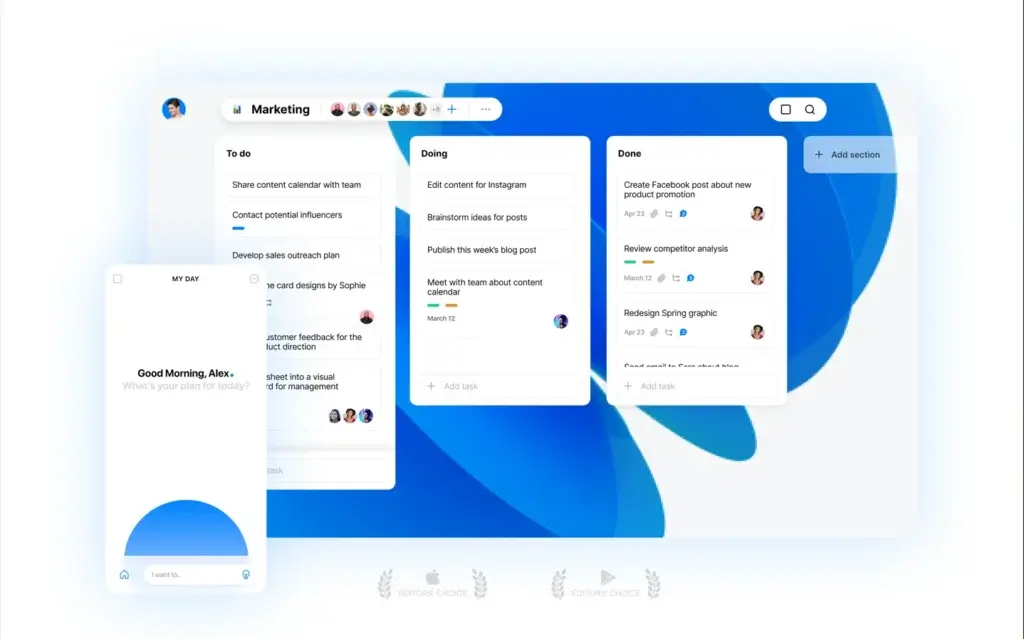
The foundation is still task management, but it is handled in a polished and flexible way. You can create lists, add notes, attach files, set due dates, apply reminders, and break work into subtasks. The My Day experience is especially useful because it helps you narrow attention to what actually matters today instead of staring at one endless backlog.
- My Day: Pull only the tasks you want to focus on right now.
- Subtasks and notes: Add more detail without cluttering the main task list.
- Recurring reminders: Ideal for habits, admin work, and repeat responsibilities.
Calendar and task planning in one place
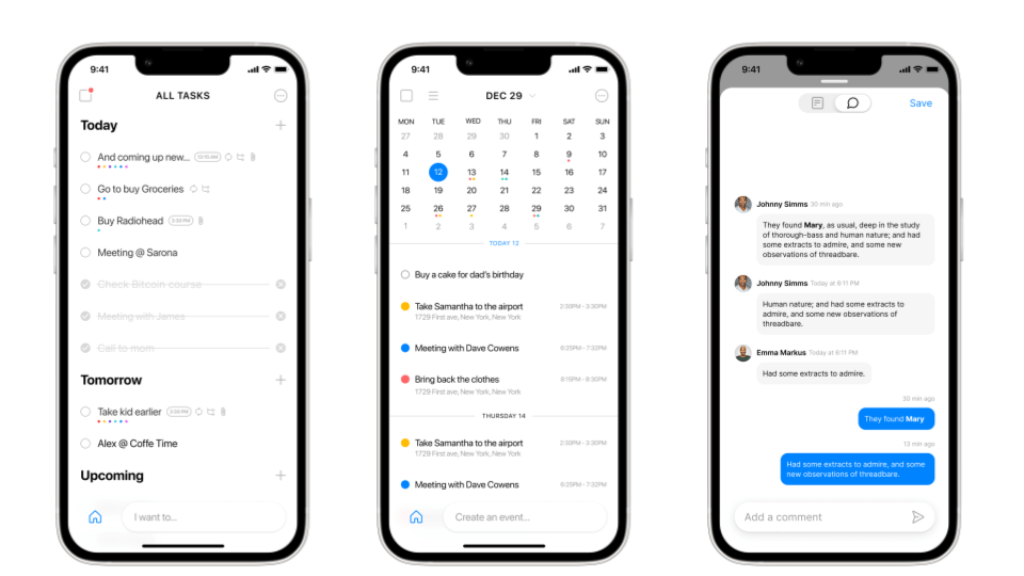
This is one of the reasons the platform remains popular. You are not forced to jump between a task app and a separate calendar view to understand your day. Tasks and calendar events can sit side by side, making it easier to plan realistically and avoid overcommitting.
- Calendar integration: Useful for seeing meetings and to-dos together.
- Day planning: Helps you assign work to the right time windows.
- Less context switching: You spend less time moving between tools.
Reminders that go beyond the basics
Many to-do apps offer reminders, but this one goes further with advanced recurring reminders, location reminders on mobile, and WhatsApp-based reminders on paid plans. That makes it particularly effective if you rely on nudges rather than just lists.
- One-time reminders: Great for straightforward deadlines.
- Advanced recurring reminders: Better for routines and repeating commitments.
- Location reminders: Useful for errands and on-the-go actions.
Shared spaces for family and teamwork
This is where the product has evolved the most. It now supports shared spaces and boards for households and work teams, giving it more collaborative value than many people still assume. Family users can coordinate groceries, tasks, and shared responsibilities, while teams can manage workflows across boards.
- Family Space: Built for shared home planning with up to four members.
- Workspace: Designed for team collaboration with unlimited members and boards.
- Assignments and shared boards: Better visibility into who owns what.
Boards, views, and workflow flexibility
If you only think of this product as a list app, this is the section that changes that view. Workspace users can manage project boards, use templates, and organize work visually. This gives it more credibility for small business use, especially for teams that want structure without adopting a more complex project management platform.
- Board-based project planning: Helpful for shared workflows and ongoing projects.
- Templates: Faster setup for recurring work.
- Gantt and other work views: Adds more planning depth for teams.
AI and smart convenience features
The platform also leans into convenience with AI-generated lists and subtasks on paid plans, plus integrations that let you create and manage tasks through tools like WhatsApp, Gmail, and ChatGPT. These are not gimmicks. For the right user, they reduce friction and make it easier to capture tasks before they disappear.
Why these features matter: The product works best when you want one system for reminders, planning, and lightweight collaboration. It is especially strong for users who value speed, simplicity, and cross-device consistency more than deep operational complexity.
Pros and Cons
Advantages and Disadvantages
Positive
✅ Clean and easy to learn
✅ Strong reminders and daily planning
✅ Useful calendar integration
✅ Better collaboration than many expect
Negatives
❌ Best features sit behind paid plans
❌ Not ideal for advanced project operations
❌ Free plan is quite limited for collaboration
❌ Customization is still lighter than top PM tools
Any.do succeeds because it removes friction. It is quick to understand, visually clean, and practical for real life. You can move from capturing a thought to scheduling a reminder or sharing a task with very little effort. For personal productivity, that simplicity is a major strength.
✅ Pros
- Excellent usability: The interface is polished, uncluttered, and easy for almost anyone to adopt quickly.
- Strong reminder system: Advanced recurring reminders, location reminders, and WhatsApp options make it more actionable than many list-based competitors.
- Useful calendar experience: Combining tasks and events helps you plan realistically, not just collect to-dos.
- Flexible for different users: It works for personal planning, family coordination, and lightweight team workflows.
- Good cross-platform reach: It is available across mobile, desktop, web, browser extensions, and wearables.
❌ Cons
- Paid plans matter: Several of the most valuable features, including advanced reminders and collaboration upgrades, are locked behind paid tiers.
- Not a full PM powerhouse: Small teams can get real value from Workspace, but complex organizations will likely want deeper reporting, automation, and resource management.
- Limited free collaboration: The free tier is fine for personal use, but not strong enough if shared work is your main goal.
- Less flexible than some rivals: Power users may still prefer tools with more filtering, tagging, automation, or workflow customization.
User Experience
User Interface and Operational Simplicity
The user experience is one of the clearest reasons this platform remains relevant. It does not try to impress you with complexity. Instead, it focuses on making everyday planning feel natural, fast, and low-stress.
A clean layout that reduces friction
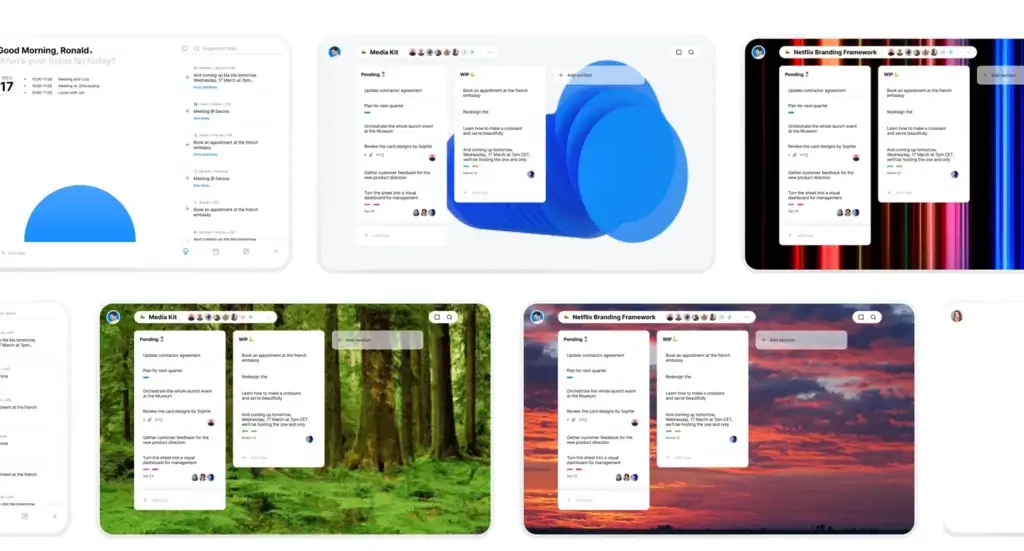
The design is modern without being overdesigned. Menus are easy to understand, tasks are quick to add, and the structure feels intuitive from the start. That matters because a productivity app should not require too much setup before it becomes useful.
- The main views are easy to scan at a glance.
- Adding tasks, dates, and reminders is fast.
- The visual hierarchy keeps the interface calm rather than overwhelming.
Daily planning feels natural
One of the best parts of the experience is how easy it is to move from a general task list into a realistic day plan. Instead of simply dumping work into folders, you can shape a more intentional routine around what needs attention now.
- My Day helps narrow focus.
- Calendar integration gives context to each task.
- Rescheduling items is simple and fast.
Consistency across devices
The experience is consistent whether you are on mobile, desktop, browser, tablet, or smartwatch. That consistency is important because many people use a to-do app as a companion throughout the day, not just at one desk.
- You can capture tasks on mobile and review them later on desktop.
- Automatic syncing keeps your account aligned across devices.
- The design language remains familiar in every environment.
Collaboration without a steep learning curve
Shared boards and spaces add useful teamwork features, but the product still feels approachable. That makes it a good fit for families, freelancers, and smaller teams that want visibility without having to train everyone on a heavier platform.
- Shared boards are easier to understand than more complex PM tools.
- Assignments and updates feel lightweight rather than rigid.
- It is well suited to simple project coordination and recurring shared work.
Where the experience still falls short
The simplicity is a strength, but it can also become a limitation for advanced users. If your workflow depends on heavy customization, deeper analytics, or intricate cross-project planning, the interface may start to feel too restrained compared with more advanced alternatives.
Bottom line on usability: Few tools in this category make planning feel this smooth. For personal productivity and light collaboration, the experience is one of the strongest reasons to choose it.
Pricing and Plans
How much does Any.do cost?
The pricing structure is broader than it used to be. There are now four main plan types: Free, Premium, Family, and Workspace. That is a smart move because the product now serves very different use cases, from solo personal planning to shared household organization and team collaboration.
Free
The Free plan is the best starting point if you want a straightforward personal task manager. You get the core essentials, including personal tasks and lists, My Day, calendar integration, widgets, one-time reminders, basic recurring reminders, smart grocery lists, browser extensions, and access across devices.
- Best for: Individuals managing personal tasks and everyday planning.
- Main limitation: No advanced reminders, no Focus Mode, and no real shared collaboration layer.
Premium
Premium is the strongest plan for solo users who want more control. It adds advanced recurring reminders, location reminders, Focus Mode, unlimited color tags, unlimited notes and files for personal tasks, AI-generated lists and subtasks, WhatsApp personal bot access, and thousands of Zapier integrations.
- Best for: Professionals, freelancers, and power users who manage work and life on their own.
- Pricing note: Official pricing can vary by billing cycle and platform, but the Premium page currently shows annual pricing from $2.99 per month and monthly pricing at $5.99.
Family
Family is one of the more interesting plan additions because it gives the app a real household-use advantage. It includes everything in Premium, plus a shared family space, up to four members, shared grocery boards, and up to four shared projects. Each member still keeps a personal area, so it avoids the feeling of one giant mixed task list.
- Best for: Couples, families, roommates, and small groups coordinating shared responsibilities.
- Pricing: $8.33 per month for 4 members when billed annually.
Workspace
Workspace, sometimes referred to on pricing pages as the Teams plan, is the business-focused tier. It includes everything in Premium plus a collaborative workspace, unlimited project boards, unlimited team members, workflow templates, and admin tools and permissions. This is the version that pushes the product more clearly into the work management category.
- Best for: Small businesses, client-facing teams, agencies, and departments that want shared workflows without a very heavy PM tool.
- Pricing: $4.99 per member per month when billed annually.
Which plan offers the best value?
For most solo users, Premium is the sweet spot because it unlocks the features that make the app genuinely powerful. If your main goal is home coordination, Family is a strong value because it adds meaningful collaboration without charging per member. For work use, Workspace is reasonably priced, but it makes the most sense for lighter operational needs rather than highly complex project environments.
| Plan | Cost | Key Features | Best For |
| Free | $0 | Personal tasks, My Day, calendar integration, basic reminders, widgets | Simple personal planning |
| Premium | From $2.99/month billed annually | Advanced recurring reminders, location reminders, Focus Mode, AI lists, WhatsApp personal bot | Advanced personal productivity |
| Family | $8.33/month for 4 members billed annually | Everything in Premium, plus Family Space, shared grocery boards, shared projects | Households and small shared groups |
| Workspace | $4.99/member/month billed annually | Collaborative workspace, unlimited boards, templates, admin tools, permissions | Small teams and professional collaboration |
Integrations and Compatibility
< class="mt0 mb10 font200" style="color:#111;"> How Any.do Integrates with Other SoftwareCompatibility is one of the product’s major advantages. It is available across mobile, desktop, browsers, tablets, and wearables, and it supports several direct integrations that make task capture and follow-through much easier.
Useful direct integrations
Instead of presenting integrations as a long generic list, it is better to look at what actually matters in day-to-day work. The most useful native connections include Gmail, Siri and Apple Reminders, WhatsApp, Slack, ChatGPT, Zoom, and Zapier. For many users, WhatsApp and Gmail are the standout options because they remove friction from task capture.
- Gmail: Helpful for turning emails into action items.
- WhatsApp: A distinctive feature for turning messages into reminders and tasks.
- Slack and ChatGPT: Useful for team workflows and faster task handling.
Works across the devices people actually use
You can use it on iOS, Android, web, desktop, browser extensions, and smart watches. That breadth matters because productivity systems tend to fail when they are not accessible at the moment you need them.
- Capture on mobile.
- Review and organize on desktop.
- Access quickly through browser tools and wearables.
Best fit for hybrid personal and work use
The integration story is not about overwhelming depth. It is about making the app easier to use as a daily command center. If you want a simple place to connect tasks with messages, emails, schedules, and light collaboration, the compatibility is strong enough to be a real advantage.
Best Any.do Alternatives
Alternative options to consider
If Any.do is not the perfect fit, the good news is that there are several strong alternatives, each with a clearer edge in a specific use case. Some are better for personal productivity, some are much stronger for AI-powered scheduling, and others are more capable for structured team execution. The best choice depends on whether you care most about ease of use, calendar automation, collaboration depth, or workflow customization.
Any.do vs Todoist
Todoist is the most natural alternative if you like the simplicity of Any.do but want more flexibility in how you organize work. Both tools are excellent for personal productivity, recurring tasks, and everyday planning. However, Todoist usually feels stronger for users who want more control over task organization, filters, labels, and structured project views.
Any.do has the advantage if your workflow depends heavily on reminders, calendar visibility, and fast day planning. It also feels more lifestyle-friendly, especially for users balancing personal tasks, errands, and household coordination. Todoist, by contrast, is often the better fit for users who want a slightly more productivity-focused system that can scale from personal planning into more structured team use without becoming too heavy.
Choose Any.do if: you want stronger reminders, calendar-oriented planning, and a more approachable experience for life and work combined.
Choose Todoist if: you want deeper task organization, stronger filtering, and a more flexible productivity setup.
Any.do vs Motion
Motion serves a very different type of user. While Any.do helps you organize tasks and plan your day, Motion is built around AI-driven scheduling. Its core value is automatic prioritization, time blocking, and constant schedule re-optimization when deadlines, meetings, or task priorities change.
This means Motion is often the better option for busy professionals, managers, or founders who live in their calendar and want the tool to tell them exactly what to work on next. Any.do is the better fit if you want a simpler, more affordable, and less opinionated experience. It gives you more manual control and works better for personal tasks, family coordination, and lighter planning routines.
Choose Any.do if: you want simplicity, reminders, and everyday planning without handing your entire schedule to an AI engine.
Choose Motion if: you want automatic time blocking, dynamic rescheduling, and a stronger focus on calendar-based execution.
Any.do vs monday.com
monday.com is the stronger platform for structured work management across teams. It is built for broader business operations, with automations, dashboards, docs, Gantt views, Kanban boards, and more robust customization for departments and cross-functional work. Compared with that, Any.do is much lighter and easier to adopt.
This is less of a head-to-head competition and more of a scale question. If you need a clean tool for personal planning, family coordination, or lightweight shared workflows, Any.do will feel faster and less overwhelming. If your team needs multi-step workflows, reporting, automations, stakeholder visibility, and operational scalability, monday.com is the stronger long-term option.
Choose Any.do if: you want lightweight planning and collaboration without the complexity of a full work management platform.
Choose monday.com if: you need department-level workflow management, reporting, and scalable team operations.
Any.do vs ClickUp
ClickUp is the strongest alternative on this list if your priority is flexibility. It combines tasks, docs, chat, whiteboards, dashboards, and reporting in one highly customizable environment. That makes it much more powerful than Any.do for teams that want to centralize work in a single platform.
The tradeoff is complexity. ClickUp can do far more, but it usually requires more setup and ongoing management. Any.do is easier to learn and easier to maintain, which makes it the better choice for users who want a productivity tool rather than a full operational workspace. If your needs are simple to moderate, that lighter approach can actually be a major advantage.
Choose Any.do if: you value speed, ease of use, and a cleaner experience for personal productivity or lightweight collaboration.
Choose ClickUp if: you want an all-in-one workspace with deep customization, more views, and broader team capabilities.
| Tool | Best For | Main Strength | Best Alternative To Any.do For |
| Todoist | Individuals and small teams | Flexible task organization and productivity structure | Users who want more control over lists, filters, and workflows |
| Motion | Busy professionals and managers | AI scheduling and automatic re-planning | Users who want their calendar to drive task execution |
| monday.com | Teams and departments | Work management, automations, dashboards, and scale | Teams that have outgrown lightweight collaboration |
| ClickUp | Growing teams and power users | All-in-one customization across tasks, docs, chat, and reporting | Users who want a more configurable workspace |
Which alternative is the best?
If you want the closest alternative in spirit, Todoist is usually the best place to start. If you want a major upgrade in AI-driven planning, Motion is the better move. If your needs are shifting toward team execution, reporting, and structured workflows, monday.com and ClickUp are the more appropriate upgrades, with monday.com feeling more business-process oriented and ClickUp feeling more flexible and all-in-one.
In other words, Any.do still makes the most sense when your priority is simplicity with enough depth to handle reminders, calendar planning, and light collaboration. Once your needs move beyond that, these alternatives become much easier to justify.
Security and Compliance
Enhanced Security Features in Any.do
Security and privacy matter more when a to-do app becomes the place where you store deadlines, notes, attachments, and sometimes personal or work-sensitive information. Any.do’s official materials place more emphasis on privacy controls, account ownership, and user rights than on a long enterprise compliance pitch, and that is the right way to frame this section.
Privacy controls and account ownership
Your personal space is private by default. Shared visibility only applies to items you intentionally place in Family or Workspace boards. That is an important distinction because it keeps personal planning separate from collaborative work.
- Private by default: Personal items stay private unless shared.
- User-owned actions: Only the account owner can submit certain deletion requests.
- Clear separation: Shared boards are visible to collaborators, not everything in your account.
GDPR-related data access and deletion
The help center explains that users can request a copy of their data under GDPR guidelines and can also request full data deletion from the servers. Account deletion is permanent, and data deletion requests require ownership verification, which is a good safeguard.
- Data request option: Users can ask for a copy of their data.
- Data deletion process: Permanent removal requires confirmation and account ownership.
- Transparency: The company provides direct access to its privacy policy and support process.
What the privacy policy highlights
The official privacy policy states that the company collects information such as account identifiers, name, location, hashed password, and product usage analytics, and explains why this data is collected, the legal basis that applies for GDPR-protected individuals, and how third parties may be involved for hosting and vendor-related services.
- Policy detail: Clear explanation of collected data and why it is used.
- GDPR language: Legal basis is explicitly referenced for relevant users.
- Retention notice: Data may be retained as required by applicable law.
Security perspective
For most personal users and smaller teams, the privacy and account controls are sufficient and clearly documented. Still, this is not positioned like a heavyweight enterprise compliance platform, so if your organization has very strict procurement requirements, you should validate those separately before rolling it out at scale.
Conclusion
Final thoughts
Any.do remains one of the better choices for users who want a to-do list app that feels polished, modern, and genuinely useful across daily life. It does a very good job of combining reminders, calendar planning, personal task management, and light collaboration without turning the experience into something bulky or difficult to maintain.
Its biggest strength is clarity. You can open it, understand it, and start using it right away. That may sound basic, but it is a major advantage in a category where many tools become too feature-heavy for ordinary daily planning. At the same time, the product has grown enough to support family coordination and smaller team workflows through shared spaces, boards, templates, and integrations.
Is Any.do worth it?
Yes, especially if your priority is simplicity with enough depth to grow. The paid plans are where the app becomes much more compelling, particularly for advanced reminders, better organization, and collaboration. For personal productivity, Premium is usually the most sensible upgrade. For households, Family is one of the most natural plan options in this category. For small teams, Workspace can work well if you need shared visibility without a full project management suite.
Who should choose Any.do?
- Individuals who want an elegant to-do app with strong reminder features.
- Professionals who like seeing tasks and calendar events together.
- Families or roommates who need shared planning without complexity.
- Small teams that want lightweight board-based collaboration.
If you want a broader comparison before deciding, review our guide to the top to-do list apps. If you already know you want to test this platform for yourself, you can explore the official site at Any.do.
Have more questions?
Frequently Asked Questions
Is Any.do really free to use?
Yes. Any.do offers a free plan for personal task management, reminders, calendar integration, widgets, and basic planning. You only need a paid plan if you want advanced reminders, more customization, or shared collaboration features.
What is the difference between Premium and Family?
Premium is built for one person, while Family adds a shared family space, shared grocery boards, and up to four members. It is the better choice if you need collaborative household planning rather than solo productivity.
What is the difference between Family and Workspace?
Family is designed for home coordination and small shared groups, while Workspace is designed for professional collaboration. Workspace supports unlimited members, unlimited boards, templates, and stronger admin controls for team use.
Does Any.do work well for teams?
It can work well for small teams that want simple shared boards, task assignments, and lightweight workflow visibility. It is less suitable for organizations that need advanced reporting, resource planning, or complex automation.
Can Any.do replace a calendar app?
Not completely for every user, but it does a strong job of bringing tasks and calendar events together in one place. That makes day planning much easier, especially if you want to see meetings and action items side by side.
Does Any.do support WhatsApp?
Yes. Paid plans include WhatsApp-based task and reminder options, which is one of the more distinctive features in this category. It can be especially useful if you naturally capture tasks through messages.
Can you use Any.do on desktop and mobile?
Yes. Any.do is available on mobile, desktop, web, browser extensions, tablets, and wearables. Tasks sync across devices so you can capture and manage work wherever it is most convenient.
Is Any.do good for families?
Yes. The Family plan is one of its strongest use cases because it supports a shared family space, grocery planning, and shared projects while still allowing each member to keep their own personal tasks separate.
Is Any.do better than Todoist?
That depends on your priorities. Any.do is often the better choice if you value calendar integration, reminders, and a simpler user experience. Todoist is often stronger for power users who want deeper filtering, labeling, and workflow flexibility.
Who should skip Any.do?
You may want to skip it if you need enterprise-grade project management, advanced automation, or heavy operational reporting. In those cases, a more robust work management platform will usually be a better long-term fit.