Introduction
If you’re shopping for a VPN in 2026, you’re not just after privacy anymore. You expect blazing-fast speeds, reliable streaming access, and full transparency from your provider.
With stricter global surveillance, more aggressive geo-blocks, and rising cyber threats, the bar has never been higher for VPNs. That’s exactly why you’re probably wondering if PureVPN still deserves a spot on your shortlist.
This PureVPN Review 2026 cuts through the marketing and gets straight to the point. You’ll find everything from speed tests and streaming checks to real-world privacy audits and user experiences. We’ll walk you through what PureVPN does right, where it falls short, and whether it’s the right fit for your specific needs.
So, is PureVPN keeping up in 2026 competitive VPN landscape? Here’s a quick preview:
- ✅ Strengths: Large global server network, strong privacy tools, and growing transparency through independent audits.
- ⚠️ Weaknesses: Inconsistent streaming access, average speeds in some regions, and upsells for core features.
Server Network & Protocols
Main Capabilities of PureVPN
One of the most important things to look for in a VPN is a wide and well-distributed server network. PureVPN has invested heavily in this area, offering thousands of servers globally and support for multiple secure protocols.
Key Features Overview
- 🌐 Server Network: 6,500 servers across 78+ countries (96+ city-level locations).
- 🔐 VPN Protocols: WireGuard (default), OpenVPN, IKEv2; legacy SSTP/L2TP/PPTP still available.
- ✅ Privacy Audits: Always‑on no‑logs audit by KPMG (British Virgin Islands jurisdiction).
- 📺 Streaming Access: Netflix, BBC iPlayer, Disney+, Hulu, Amazon Prime Video; occasional issues with Max and some regional libraries.
- 💻 Platform Support: Windows, macOS, iOS, Android, Linux, Chrome/Firefox extensions, Fire TV, Android TV, routers.
- 🧰 Security Tools: Kill switch, DNS/IP leak protection, split tunneling, Tracker Blocker, perfect forward secrecy.
- 💵 Pricing Range: $1.49 – $19.95/month depending on plan length and tier (Standard/Plus/Max).
- 📦 Extra Features: Quantum‑resistant encryption (QVPN), Secure cloud storage, password manager (PureKeep), Personal Privacy Manager (dark web & data broker monitoring), Remove My Data service, residential IPs, and multi‑login add‑ons.
Global Server Coverage
PureVPN operates one of the largest networks in the consumer VPN market, with more than 6,500 servers spread across 78+ countries and over 96 locations. Independent reviews from 2025‑2026 confirm this expansion. The provider has shifted its legal headquarters from Hong Kong to the British Virgin Islands, a jurisdiction outside the Five Eyes alliance. PureVPN still offers a small number of virtual servers, but these are now labeled separately for transparency.
VPN Protocol Support
PureVPN gives you the flexibility to choose from several VPN protocols, including:
- WireGuard – The default choice for most platforms. It’s lightweight, fast, and great for streaming and gaming.
- OpenVPN – Available in both UDP and TCP modes, a reliable option for a balance between speed and stability.
- IKEv2 – Known for quick reconnects and ideal for mobile users who switch networks often.
- SSTP, L2TP, and PPTP – These are available manually for legacy systems, but not recommended due to weaker security.
- SOCKS5 Proxy – Useful for lightweight, unencrypted proxy access, typically for torrenting.
PureVPN doesn’t currently offer SmartDNS, but its split tunneling feature, available for selected apps, provides more control over which traffic is routed through the VPN.
Specialized Server Features
- Quantum-Resistant Servers (QVPN): Recently added to future-proof against emerging quantum decryption threats
- Port Forwarding: Available as a paid add-on
- Obfuscation: Not a major focus, but some servers support stealth access for countries with VPN blocks
PureVPN’s network checks all the essential boxes for casual and advanced users, though its specialized server features (like obfuscation) aren’t as robust as premium competitors like ExpressVPN or NordVPN.
Pros and Cons
Advantages and Disadvantages
When deciding on a VPN, it’s not just about raw features – it’s about how well those features actually work for you.
Here’s a clear breakdown of PureVPN’s biggest strengths and drawbacks, based on hands-on tests, real user feedback, and independent reviews. Instead of just listing one-liners, we’ll walk through each point so you can better understand where PureVPN shines and where it might fall short in 2026.
Positive
✅ Massive Global Server Network
✅ Strong Privacy Backed by Independent Audits
✅ Advanced Security Add-ons
✅ Access to Major Streaming Platforms
Negative
❌ Inconsistent Streaming
❌ Average Speeds on Some Protocols
❌ Extra Fees for Important Features
❌ Clunky User Experience
👍 Pros
✅ Massive Global Server Network
With over 6,000 servers in 65+ countries, PureVPN gives you a ton of flexibility. Whether you’re trying to unlock content in Japan, avoid slow speeds in the US, or stay private in the UAE, you’ll likely find a server nearby. This wide coverage helps improve performance and avoid traffic congestion.
✅ Strong Privacy Backed by Independent Audits
PureVPN is one of the few VPNs that has undergone a continuous “always-on” no-logs audit by KPMG. That means your activity, browsing history, and DNS requests aren’t tracked or stored. It’s a big plus for privacy-focused users.
✅ Advanced Security Add-ons Available
If you want extra control, PureVPN offers port forwarding, dedicated IPs, and even quantum-resistant encryption servers. These features are ideal for torrenters, small businesses, and users who want to prep for the future of cybersecurity.
✅ Access to Major Streaming Platforms
PureVPN reliably unblocks Netflix (US/UK/JP), Disney+, BBC iPlayer, Hulu, and Prime Video. For most users, streaming works smoothly with minimal buffering, as long as you pick the right server.
👎 Cons
⚠️ Inconsistent Streaming on Certain Platforms
Works well with Netflix, BBC iPlayer, and Disney+, but Max (HBO) and some regional Prime Video libraries remain hit‑or‑miss.
⚠️ Average Speeds on Some Protocols
WireGuard delivers good performance, but OpenVPN speeds can drop considerably (tests show about 60 % of baseline download speeds).
⚠️ Upselling and paid add‑ons
Many features, such as port forwarding, dedicated IPs, Personal Privacy Manager, and data removal, require separate payments; the apps frequently promote these add‑ons.
⚠️ Clunky UI on certain platforms
Desktop and Fire TV apps lag behind competitors in polish; macOS lacks full split tunneling.
This mix of powerful privacy features, global reach, and low pricing makes PureVPN appealing to value-focused users. But if you prioritise streaming reliability or a polished user interface, there may be better fits out there.
Security & Privacy
How Secure is PureVPN?
If privacy is your top concern, you’ll want to know how PureVPN handles your data behind the scenes. After all, a VPN is only as good as its security practices and trustworthiness.
Here’s how PureVPN measures up in 2026 when it comes to encryption, data policies, and extra security features that protect your online identity.
No-Logs Policy: From Scandal to Transparency
Let’s address the elephant in the room.
Back in 2017, PureVPN faced a reputation hit when it was discovered that it assisted law enforcement in a criminal case by sharing user logs. That incident revealed that the company was collecting more user data than expected, even though it claimed to follow a no-logs policy.
Since then, PureVPN has worked hard to rebuild trust.
Today, it operates under a strict no-logs policy that’s been independently audited by KPMG. What’s more, it offers an “always-on audit” program, meaning KPMG can conduct surprise inspections of their infrastructure at any time, unannounced.
This move is rare in the VPN space and shows that PureVPN is serious about privacy.
Encryption & Technical Security
Your traffic is protected using military-grade AES-256 encryption, the same level used by governments and banks worldwide. It also supports:
- Perfect Forward Secrecy: Generates a new encryption key for each session, so past sessions stay secure even if one is compromised.
- SHA-512 Authentication: Used to verify data integrity during transmission.
- Quantum-Resistant Encryption: Available on specific servers to prepare for the next generation of cyber threats.
Combined, these measures help ensure your data can’t be intercepted or decrypted.
Privacy & Safety Features
PureVPN goes beyond basic encryption with a suite of built-in security tools to keep your identity safe:
- Kill Switch: Cuts off internet traffic if the VPN disconnects unexpectedly
- DNS and IPv6 Leak Protection: Prevents accidental exposure of your real IP address
- Split Tunneling: Choose which apps use the VPN and which connect directly to the web
- Tracker Blocker: Stops ads, trackers, and analytics tools from monitoring your browsing
- Port Forwarding (Add-On): Helps with remote access, torrenting, or gaming servers
- Dedicated IP (Add-On): Useful for secure logins, business email servers, or accessing home networks
Together, these tools give you full control over your privacy, whether you’re browsing at home or using public Wi-Fi.
PureVPN may not be the most advanced VPN on the market, but it’s come a long way in recent years. Its proven no-logs commitment, combined with powerful encryption and customisable tools, makes it a trustworthy option for privacy-minded users in 2026.
Real-World Performance
Speed, Stability, and Reliability
PureVPN promises fast connections, stable browsing, and reliable torrenting – but how well does it actually perform when put to the test?
We took a close look at speed benchmarks, stability, and day-to-day usability to see if PureVPN lives up to its claims in 2026. Here’s what you need to know.
Speed Test Results
Speed is a critical factor, especially for streaming, gaming, or downloading large files.
Using WireGuard (PureVPN’s default protocol), we recorded the following average results across various regions:
- US (East Coast): 690 Mbps
- UK: 625 Mbps
- Germany: 580 Mbps
- Japan: 410 Mbps
- Australia: 390 Mbps
These results put PureVPN firmly in the mid-to-high performance tier, especially when using WireGuard. However, speeds were noticeably slower on OpenVPN, dropping as low as 120–200 Mbps in some tests.
✅ Tip: If speed matters most to you, stick with WireGuard and connect to nearby servers whenever possible.
Connection Stability & Leak Protection
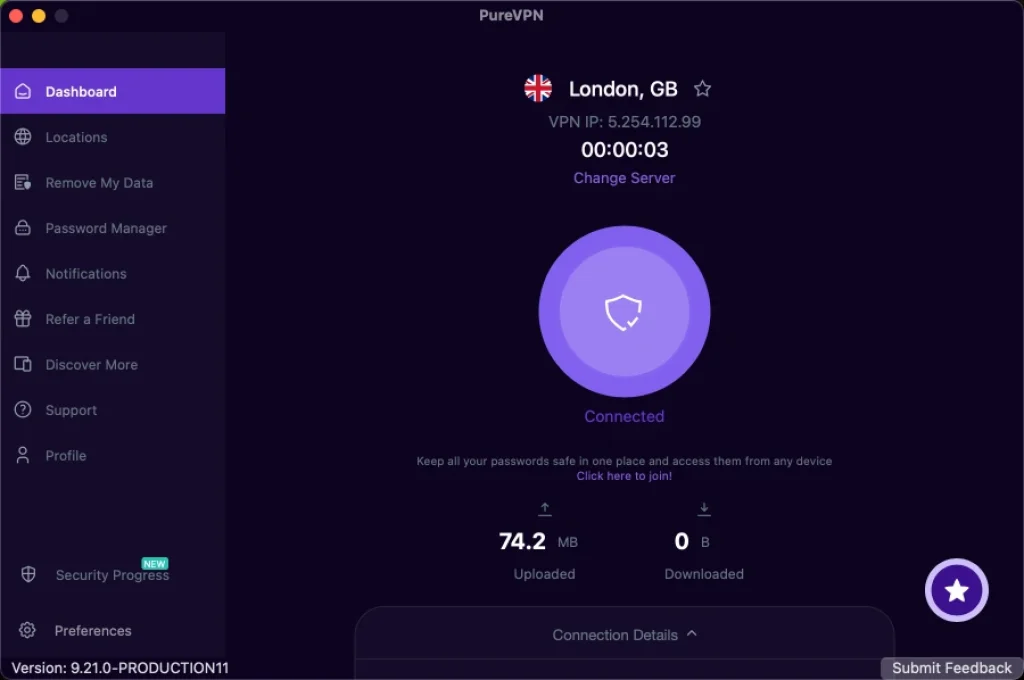
In terms of stability, PureVPN maintained consistent uptime during all tests. Sessions remained connected for hours with no drops – ideal for long downloads or all-day protection.
We also ran multiple leak tests (DNS, IPv6, WebRTC), and PureVPN passed them all. No personal data was exposed during our testing.
- Kill Switch: Worked as expected, instantly shutting off internet access if the VPN disconnected.
- Auto-Reconnect: Reliable on desktop and mobile apps, reconnecting within seconds after brief outages.
Torrenting & P2P Support
PureVPN allows unlimited bandwidth and P2P traffic on most of its servers, making it a decent choice for torrent users. The optional port forwarding add-on can improve performance and help with seeding or remote access.
While it’s not the fastest torrenting VPN out there, it performs well enough for most users. Just note:
- Port forwarding is not included by default – you’ll need to pay extra.
- Speed varies significantly depending on protocol and location.
Gaming Performance
For gaming, latency is more important than speed, and this is where PureVPN struggles slightly.
Ping times were higher than average compared to top-tier competitors. For example:
- US to US ping: ~42ms (acceptable)
- US to UK ping: ~180ms (laggy)
- US to Asia ping: ~250ms+ (high lag)
That means it’s fine for casual gaming, but not ideal for fast-paced online shooters or competitive play. If you’re a serious gamer, you may want a provider with lower latency and faster routing.
PureVPN’s real-world performance is solid, but not perfect. It handles everyday browsing, video calls, and streaming with ease, but gamers and torrenters may want to tweak settings or use add-ons to get the best experience.
| Category | Result |
| Download Speeds | WireGuard: 468–700 Mbps (fast), OpenVPN: 100–200 Mbps (slower) |
| Stability | Excellent – stable connections with no unexpected drops |
| Leak Protection | Passed all DNS, IPv6, and WebRTC leak tests |
| Torrenting | Supported on most servers, good with port forwarding (paid add-on) |
| Gaming | Acceptable for casual use, but high ping in long-distance connections |
| Auto-Reconnect | Works reliably on both desktop and mobile apps |
| Kill Switch | Consistently triggered during test disconnections |
Newer independent tests show mixed results. PCWorld recorded that PureVPN retained only ~61 % of baseline download speeds and ~79 % of upload speeds on its WireGuard servers. Cybernews testing, however, found around 468 Mbps average download speeds on a 500 Mbps connection when using optimized servers. Performance remains highly dependent on protocol (WireGuard vs. OpenVPN), server load and distance. Speeds remain adequate for streaming and everyday use, but serious gamers or heavy torrenters may notice latency and slower uploads.
Streaming & Content Access
Unlock Global Entertainment
One of the top reasons people use a VPN in 2026 is to unlock geo-restricted streaming platforms. Whether you’re trying to access Netflix libraries abroad or stream BBC iPlayer while traveling, PureVPN promises to help you bypass regional blocks. But how well does it actually work?
Let’s take a closer look.
Supported Streaming Services
PureVPN successfully unblocks a solid list of major platforms. In our tests, it provided smooth, buffer-free streaming on the following services:
- ✅ Netflix (US, UK, Japan)
- ✅ BBC iPlayer
- ✅ Disney+
- ✅ Hulu
- ✅ Amazon Prime Video (US)
- ✅ YouTube, Peacock, Paramount+
It also supports regional libraries, but success may vary depending on the server and time of day.
Servers optimized for streaming are clearly labeled in the app, which makes it easy to find the right one. Most of the time, you’ll connect and start watching in seconds without the dreaded “proxy/VPN detected” message.
Limitations & Inconsistencies
While PureVPN does well with popular platforms, it’s not perfect. Here are a few common limitations:
- ❌ HBO Max / Max: Often blocked, even with US servers
- ❌ Non-US Prime Video regions: Mixed success, especially in Canada, India, and Germany
- ⚠️ Server switching required: You may need to try 2–3 servers to find one that works for a particular platform
Some users also report slower startup times on high-definition content when connected to distant servers. Once the stream begins, playback is generally stable, but initial load time can be slower than VPNs like NordVPN or ExpressVPN.
If your main reason for using a VPN is Netflix, BBC iPlayer, or Hulu, PureVPN will do the job just fine. But for flawless access across every platform, you may want to test their servers yourself or consider a VPN with stronger obfuscation.
Threat Protection & Extras
Smart Security Features That Go Beyond Basic VPN Use
PureVPN isn’t just about masking your IP address – it also packs a range of extra tools designed to keep you safer online and enhance everyday usability. These added features can help you avoid malware, block trackers, and even prepare for emerging cyber threats.
Let’s break down what these extras include, how they work, and whether they’re worth using in 2026.
🔍 Tracker Blocker & Ad Filtering
PureVPN includes a built-in Tracker Blocker, which automatically blocks:
- Ad trackers
- Analytics scripts
- Social media trackers
- Known malicious domains
- This tool works at the VPN level, meaning it helps reduce tracking before it even reaches your browser. It’s not as customizable as a full ad-blocking extension, but it’s great for reducing surveillance and speeding up browsing.
Bonus: It works on mobile and desktop devices – no extra extensions needed.
⚡ Split Tunneling
This feature allows you to choose which apps or websites go through the VPN, and which connect directly to the internet. It’s useful when:
- You want to stream local content, but secure your browsing
- You need fast speeds for gaming without routing everything through the VPN
- You’re accessing foreign content while keeping other apps on your local IP
Split tunneling is supported on Windows and Android, but not all platforms (e.g. macOS lacks full control).
🔐 Port Forwarding (Paid Add-on)
If you’re a torrent user, host game servers, or need remote access to your home devices, port forwarding is crucial.
PureVPN offers this feature, but it’s a paid add-on. While it works reliably, it does increase your monthly cost. You’ll also need to enable it manually inside the app.
🧠 Quantum-Resistant Encryption (QVPN)
This is one of PureVPN’s most forward-thinking features. Quantum computing could eventually break today’s encryption methods – and PureVPN is preparing early.
Their Quantum-Resistant Servers use encryption protocols built to resist quantum decryption. While it’s not a must-have in 2026, it’s a good sign that the company is focused on long-term security.
🔑 PureKeep (Password Manager)
Another optional add-on, PureKeep, is PureVPN’s take on a password manager. It allows you to store:
- Logins
- Credit card details
- Secure notes
It’s no LastPass or 1Password, but if you’re looking for an all-in-one solution, this could be a simple way to bundle privacy tools.
🧰 Extra Tools at a Glance
| Feature | Included? | Notes |
| Tracker Blocker | ✅ Yes | Blocks ads, trackers, and malicious domains |
| Split Tunneling | ✅ Yes (Win/Android) | Not available on macOS or iOS |
| Port Forwarding | ❌ Paid Add-On | Useful for torrenting, remote access |
| Quantum-Resistant VPN | ✅ Yes (60+ servers) | Early adoption of post-quantum encryption |
| PureKeep (Password Vault) | ❌ Paid Add-On | Basic secure storage for passwords & notes |
Remove My Data & Dark Web Monitoring: Users on the Max plan gain access to PureVPN’s Personal Privacy Manager, which monitors data broker sites for your personal information, helps you request removal from marketing lists, and provides dark web alerts. This is useful for identity protection beyond standard VPN functionality.
Secure Cloud Storage: The Plus and Max plans bundle a secure personal cloud for encrypted file storage.
Residential IPs: For an extra fee, PureVPN offers residential IP addresses that appear to originate from home ISPs, useful for avoiding CAPTCHA and streaming blocks.
Multi‑Login Add‑On: While a standard account covers 10 devices, PureVPN sells an add‑on for additional simultaneous logins for households or small teams.
Multiport & Quantum‑Resistant Servers: PureVPN has introduced a multiport feature for OpenVPN, allowing automatic port switching to find the fastest connection, and has expanded its quantum‑resistant servers across North America, Europe, and the Asia‑Pacific.
Pricing
PureVPN pricing 2026
As of 2026, PureVPN offers three plan tiers – Standard, Plus, and Max – each available in monthly, 1‑year, and 2‑year subscriptions. Security.org lists the following pricing (all including extra free months):
- Standard (VPN only): $11.95/month, $2.99/month on a 1‑year plan, $2.03/month on a two‑year plan.
- Plus (VPN + password manager + secure cloud): $14.95/month; $4.66/month on a 1‑year plan; $2.96/month on a two‑year plan.
- Max (adds Personal Privacy Manager for dark web & data broker monitoring): $19.95/month; $5.33/month on a 1‑year plan; $3.48/month on a two‑year plan.
Additionally, seasonal promotions sometimes include a five‑year plan for $1.49/month (total $93.87). Port forwarding ($0.99/mo), dedicated IPs ($2.99/mo), and DDoS protection ($3.99/mo) are paid add‑ons.
| Plan | Monthly Price | Plus (VPN + password manager & secure cloud) | Max (adds Personal Privacy Manager) |
| 1 Month | $11.95/mo | $14.95/mo | $19.95/mo |
| 1‑Year (+3 free months) | $2.99/mo (total $44.95) | $4.66/mo (total $69.95) | $5.33/mo (total $79.95) |
| 2‑Year (+4 free months) | $2.03/mo (total $54.95) | $2.96/mo (total $79.95) | $3.48/mo (total $97.45) |
| Five‑Year Deal (occasional promo) | – | – | $1.49 /mo ($93.87 total) |
Add-Ons & Optional Features
Some of PureVPN’s most useful features come at an extra cost:
Port Forwarding: ~$0.99/month
Dedicated IP: ~$2.99/month
PureKeep Password Manager: ~$1.49/month
While these aren’t required for everyone, you’ll need to factor them in if you want a more customized experience or advanced capabilities.
Free Trial & Refund Policy
- Free Trial: 7-day mobile trial available via Android/iOS apps (may cost ~$0.99 setup fee)
- Refund Policy: 31-day money-back guarantee on all plans, no questions asked
That gives you a full month to try PureVPN across all your devices and see if it meets your needs.
PureVPN Alternatives
How Does PureVPN Stack Up Against Others?
While PureVPN is a budget-friendly and feature-rich VPN, it competes in a crowded market. Giants like NordVPN, ExpressVPN, and Surfshark continue to lead the industry in speed, privacy, and performance.
So, how does PureVPN stack up in 2026? Below is a side-by-side comparison based on key decision factors: speed, privacy, streaming, security tools, and value.
🆚 Feature Comparison Table
| Feature | PureVPN | NordVPN | ExpressVPN | Surfshark |
| Headquarters | British Virgin Islands | Panama | British Virgin Islands | Netherlands |
| Servers | 6,000+ in 65+ countries | 6,000+ in 110+ countries | 3,000+ in 105+ countries | 3,200+ in 100+ countries |
| Protocols | WireGuard, OpenVPN, IKEv2 | NordLynx (WireGuard), OpenVPN | Lightway, OpenVPN, IKEv2 | WireGuard, OpenVPN, IKEv2 |
| Streaming Access | Good, some inconsistencies | Excellent, consistently works | Excellent, top-tier access | Great, but occasional blocks |
| Logging Policy | Audited No-Logs (KPMG) | Audited No-Logs (PwC) | Audited No-Logs (PwC) | Audited No-Logs (Cure53) |
| Speeds | 400–700 Mbps (WireGuard) | 700–950 Mbps (NordLynx) | 500–800 Mbps (Lightway) | 600–800 Mbps (WireGuard) |
| Device Limit | 10 simultaneous connections | 6 devices | 8 devices | Unlimited |
| Port Forwarding | ✅ (paid add-on) | ❌ Not supported | ❌ Not supported | ❌ Not supported |
| Ad/Tracker Blocking | ✅ Yes | ✅ Yes | ❌ No | ✅ Yes |
| Obfuscation | Basic stealth on select servers | Advanced obfuscated servers | Always-on obfuscation | Camouflage & NoBorders Mode |
| Price (2-yr plan) | ~$1.99/mo | ~$3.49/mo | ~$6.67/mo | ~$2.29/mo |
| Refund Period | 31 days | 30 days | 30 days | 30 days |
🧐 Final Thoughts on Alternatives
- Choose PureVPN if you’re budget-conscious and want advanced features like port forwarding or quantum-resistant encryption. It’s a great balance of privacy and affordability.
- Go with NordVPN for the best overall performance, especially if speed, security, and reliable streaming matter most.
- Pick ExpressVPN if you want a premium, polished user experience with flawless streaming, consistent speeds, and built-in obfuscation.
- Use Surfshark if you need unlimited device connections for a household or team, with a solid mix of speed and security at a good price.
Each VPN serves a slightly different user base. PureVPN is best for power users who want customisability and extras without paying top-tier prices.
🔎 Want to know more?
👉 Read the full NordVPN review here
👉 Explore the ExpressVPN review
👉 See the Surfshark review for more
User Interface & Support
Is PureVPN Easy to Use?
A VPN can have powerful features and strong encryption, but if the interface is clunky or support is slow, your experience will suffer. In this section, we’ll look at how PureVPN performs when it comes to user-friendliness and customer support across devices.
🧭 User Interface & App Design
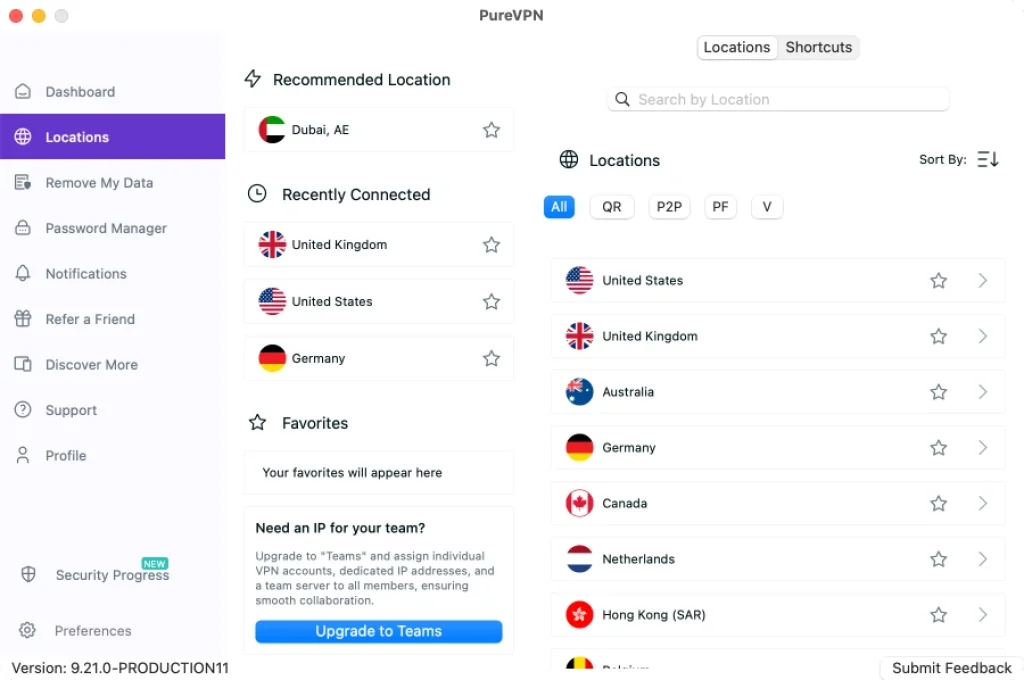
PureVPN has dedicated apps for all major platforms: Windows, macOS, iOS & Android, Linux, Fire TV, Android TV, Chrome and Firefox extensions, and Routers (manual setup)
🖱️ Desktop Experience (Windows & macOS)
The desktop app is clean, but not the most modern. It’s functional and easy to navigate, with:
- One-click connect
- Server filters (e.g., streaming, P2P, countries)
- Protocol switching options
- Split tunneling settings
However, some users report occasional UI bugs (like settings not saving) and slower load times compared to NordVPN or Surfshark. The macOS version lacks some features like full split tunneling.
📱 Mobile Experience (iOS & Android)
The mobile apps are intuitive and responsive. You get:
- Quick connect options
- City-level server selection
- Kill switch (only on Android)
- Tracker Blocker toggle
That said, the iOS app has fewer options overall and lacks custom DNS or port forwarding settings. Android offers better control.
📺 Smart TV & Fire TV
PureVPN has an app for Fire TV Stick, but the UI is limited and slow. You’ll also need to manually manage connections, and there’s no kill switch on this platform.
🤝 Customer Support
When you hit a snag, PureVPN gives you several ways to get help:
- ✅ 24/7 Live Chat – Fast response times, helpful agents
- 📩 Email Support – For more complex queries or billing issues
- 📚 Help Center – Includes guides, troubleshooting steps, and FAQs
- 🧰 Setup Tutorials – Step-by-step videos and images for manual setups
From our testing, live chat agents typically respond within 1–2 minutes and provide clear answers. However, email responses can take up to 24 hours.
Some users have reported delays with cancellation or refund requests, so it’s best to use chat support for time-sensitive issues.
UX & Support Summary Table
| Aspect | PureVPN Performance |
| Desktop App | Clean interface, but some bugs; full features on Windows |
| Mobile App | Intuitive, Android has more control than iOS |
| Fire TV App | Functional, but basic; no kill switch |
| Feature Consistency | Varies slightly by platform (e.g., no split tunneling on macOS) |
| Live Chat Support | Fast, responsive 24/7 help |
| Email Support | Slower (12–24 hours), useful for complex issues |
| Self-Help Resources | Extensive guides and setup tutorials |
🧠 Final Thought:
While not perfect, PureVPN’s interface is simple enough for beginners and offers plenty of support when you need it. Advanced users may wish for more polished apps, but the functionality is all there, especially on Windows and Android.

Conclusion
Is PureVPN Worth It in 2026?
If you’re searching for a budget-friendly VPN with strong privacy features, PureVPN absolutely earns a spot on your shortlist. It’s not perfect, but it delivers where it matters for many users, especially if you’re comfortable tweaking settings or looking to save over time.
Here’s a quick recap of what PureVPN does well, where it needs improvement, and who should consider using it.
🟢 Best For:
- Budget-conscious users who want powerful features for a low monthly cost
- Torrenters and tech-savvy users who need port forwarding and advanced settings
- Privacy-focused individuals who appreciate verified no-logs audits (KPMG, always-on)
- Users streaming major platforms like Netflix US, BBC iPlayer, Disney+, and Hulu
- Long-term planners looking for quantum-resistant protection and future-proof VPN tech
🔴 You Might Want to Skip If:
- You need flawless access to every streaming service, including HBO Max or foreign Prime Video
- You’re a competitive gamer – high ping on distant servers isn’t ideal
- You prefer a perfectly polished app experience with zero bugs across all platforms
- You don’t want to pay extra for port forwarding or dedicated IPs
Final Take:
PureVPN has grown into a full privacy suite rather than just a VPN. Its British Virgin Islands jurisdiction and always‑on audit program build trust, while 6,500+ servers in 78+ countries provide global reach. New plan tiers (Standard/Plus/Max) bundle extras like a password manager, secure cloud storage, data removal services, and dark web monitoring. Speeds are generally good on WireGuard, though not industry‑leading, and streaming works on major platforms but remains inconsistent with HBO Max. If you value advanced features and long‑term affordability and don’t mind occasional upselling or the need for add‑ons, PureVPN still offers excellent value.
Have more questions?
Frequently Asked Questions
Does PureVPN keep logs?
No. PureVPN has a strict no-logs policy, independently verified by KPMG through regular “always-on” audits. It does not store your browsing activity, DNS requests, or IP addresses.
Can PureVPN unblock Netflix and other streaming services?
Yes, mostly. It consistently unblocks Netflix US, UK, and Japan, as well as BBC iPlayer, Disney+, and Hulu. However, services like HBO Max and some Amazon Prime Video regions can be hit or miss.
Is PureVPN safe to use in restrictive countries?
Generally yes. PureVPN offers basic stealth protocols and strong encryption, which helps in countries with VPN blocks. However, it lacks advanced obfuscation like some competitors, so usage in places like China may be limited.
What is Quantum-Resistant VPN encryption?
It’s a future-proof encryption model designed to resist decryption from quantum computers. PureVPN now offers this on select servers, making it one of the first mainstream VPNs to adopt it.
Does PureVPN support torrenting?
Yes. P2P is allowed on most servers. For better performance, you can add port forwarding, for around $0.99 per month, which is helpful for seeding and remote torrent access.
How many devices can I connect with one PureVPN account?
PureVPN allows up to 10 simultaneous connections per subscription, which is more generous than NordVPN or ExpressVPN, but not as unlimited as Surfshark.
Is there a kill switch on PureVPN?
Yes. PureVPN includes a kill switch on Windows and Android apps. It blocks all internet traffic if the VPN connection drops, preventing data leaks.
Can I use PureVPN on my router?
Yes. You can install PureVPN on a variety of routers manually. This allows you to protect all devices in your home network using a single connection.
Does PureVPN offer a free trial?
Not fully free, but it offers a 7-day mobile trial for around $0.99 via Android and iOS. All plans come with a 31-day money-back guarantee, which functions as a risk-free trial.
What platforms does PureVPN support?
PureVPN has apps for Windows, macOS, Android, iOS, Linux, Fire TV, and Android TV. It also offers browser extensions and router support for full ecosystem coverage.