When you’re searching for a virtual private network that combines speed, security, and the flexibility to handle modern workloads, SafeShell VPN is likely to appear on your shortlist. With growing concerns about digital privacy and the need to bypass geographic restrictions, businesses and professionals want a solution that doesn’t require a steep learning curve. SafeShell VPN markets itself as a high‑performance service with a patented per‑application routing technology called App Mode and a built‑in adblocker named ShellGuard. This review takes you through the current state of the service, evaluates its features through a critical lens, and helps you decide whether it fits your requirements.
We’ll cover everything from its server network and supported protocols to real‑world performance, streaming capabilities, pricing, and user interface. Along the way, you’ll see how SafeShell stacks up against competitors and whether its unique features justify the subscription cost. By the end of this article, you’ll have a comprehensive understanding of SafeShell VPN and be able to make an informed decision.
Server Network & Protocols
Main Capabilities of SafeShell
SafeShell at a Glance
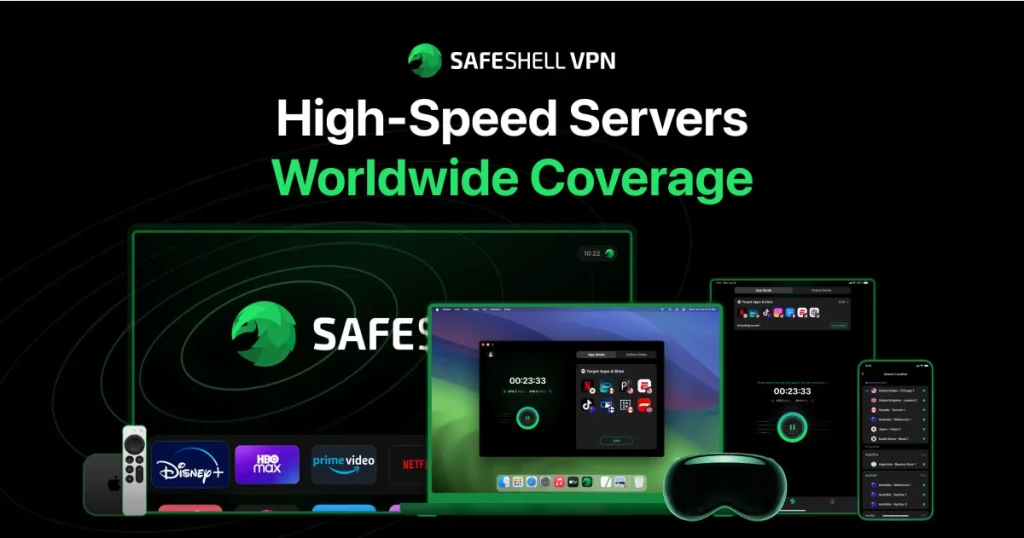
Before diving into the details, it’s helpful to understand the basics of SafeShell’s infrastructure. The company operates a network of over 3,500 servers spread across more than 50 countries. This network includes high‑speed nodes optimized for streaming and gaming, with some servers capable of delivering throughput up to 2 Gbps. By distributing servers across North America, Europe, Asia, and other regions, SafeShell enables you to select locations that minimize latency and avoid congestion.
The service supports multiple VPN protocols to balance speed, security, and compatibility:
- OpenVPN (TCP/UDP) – A widely adopted protocol with strong encryption and flexibility. OpenVPN is ideal when you need reliability on a variety of devices.
- WireGuard – Known for its efficiency and low overhead, WireGuard is excellent for achieving higher speeds without sacrificing security. SafeShell implements WireGuard through its proprietary ShellGuard wrapper to add additional privacy protections.
- IKEv2/IPSec – Particularly suited for mobile users who move between Wi‑Fi and cellular networks because of its ability to maintain stable connections during network switches.
These protocols ensure that you can tailor the connection according to your needs—whether you prioritise raw speed for streaming or maximum security when handling sensitive data. The presence of modern protocols like WireGuard also indicates that SafeShell is keeping up with industry standards.
Specialty Servers and Technology
Beyond a large network, SafeShell offers specialized server options designed to tackle specific challenges:
- Streaming Servers – Optimized to unblock platforms such as Netflix, Disney+, Amazon Prime Video, and Hulu. These servers are tuned to handle high‑bandwidth video without buffering, ensuring that you can watch content in high definition across multiple regions.
- P2P Servers – SafeShell has servers optimized for peer‑to‑peer traffic. While the service does not openly advertise torrenting, these nodes provide high throughput and anonymity for file sharing and large downloads.
- IPv6 Support – The network supports IPv6 connectivity, providing enhanced performance for users on modern networks and ensuring compatibility with websites that prefer IPv6 connections.
- App Mode Servers – Unique to SafeShell, App Mode allows you to assign different apps to different servers simultaneously. For example, you can connect your streaming app to a US server while leaving your online banking app on a local server. This patented technology offers granular control that traditional split tunnelling cannot match.
By combining a broad network, multiple protocols, and specialized servers, SafeShell equips you with the tools to tailor your connection to various use cases. Whether you’re a remote worker needing a secure tunnel, a marketer monitoring international campaigns, or a streaming enthusiast looking to bypass region locks, the infrastructure is there to support you.
Pros and Cons
Advantages and Disadvantages
Positive
✅ Strong Security & Privacy
✅ Fast Speeds
✅ Innovative App Mode
✅ User‑Friendly Interface
Negative
❌ Auto‑Renewal Confusion
❌ Limited Transparency on Ownership
❌ Inconsistent Mobile Data Performance
❌ Fewer Servers in Africa & South America
Every VPN service has its strengths and weaknesses. Understanding these helps you evaluate whether SafeShell aligns with your priorities. Below is a balanced look at the main advantages and potential drawbacks:
✅ Pros
- Strong Security & Privacy – SafeShell uses AES‑256 encryption paired with modern protocols and has undergone independent audits to verify its no‑logging claims.
- Fast Speeds – Thanks to optimized servers and the efficiency of WireGuard, SafeShell maintains high speeds even when connecting to distant locations, preserving 70–85 % of your base connection in many tests.
- Innovative App Mode – The per‑application routing feature is ideal for multitaskers who need to access multiple regional services without compromising local apps.
- User‑Friendly Interface – Apps are well designed and easy to navigate, making it simple to connect or switch modes.
- Wide Device Support – Native applications are available for Windows, macOS, Linux, Android, iOS, Apple TV, and some smart TVs. You can protect up to five devices simultaneously under one subscription.
- ShellGuard Adblocker – Built‑in ad‑blocking and tracker protection improve browsing by blocking intrusive ads and malicious scripts.
- Flexible Pricing with Free Trial – A 3‑day free trial lets you test the service before committing, and subscription plans scale based on duration, offering significant discounts for long‑term commitments.
❌ Cons
- Auto‑Renewal Confusion – Some users report that managing subscriptions can be confusing, particularly with automatic renewals after the free trial. You need to cancel at least 24 hours before the trial ends to avoid charges.
- Limited Transparency on Ownership – SafeShell is operated by GearUp Portal Pte. Ltd. in Singapore. While Singapore is outside the 14‑Eyes alliance, transparency about corporate structure and jurisdiction is limited compared with providers in privacy‑focused regions.
- Inconsistent Mobile Data Performance – A small number of customers have experienced connection dropouts on certain cellular networks, particularly those using IPv6. Wi‑Fi performance remains strong.
- Fewer Servers in Africa & South America – Although the network is extensive, there are fewer server locations on these continents, which could affect speeds if you reside in or frequently connect to these regions.
- No Permanent Free Tier – SafeShell offers only a short free trial. After that, you must subscribe to continue using the service, which might deter casual users looking for a completely free option.
By weighing these factors, you can determine whether the benefits outweigh the shortcomings. If you value innovative features and high speeds, SafeShell’s advantages are compelling. However, if you prioritise absolute transparency or need a permanent free plan, you might consider alternatives.
Security & Privacy
Built for Peace of Mind
Protecting sensitive data is the primary purpose of any VPN. In this section, you’ll learn how SafeShell approaches security and privacy, from encryption standards to its no‑logs policy.
Encryption Standards & Protocols
SafeShell employs AES‑256‑bit encryption, the same standard used by governments and financial institutions to protect classified information. This cipher is paired with SHA‑384 authentication and perfect forward secrecy, ensuring that each session uses a unique key. Even if a key is compromised, past and future sessions remain secure.
On the protocol side, the service offers OpenVPN, WireGuard, and IKEv2/IPSec. WireGuard is the default for most platforms due to its superior performance, while OpenVPN remains available for those who need a more established and customizable option. SafeShell’s implementation of WireGuard is wrapped inside its ShellGuard technology, which adds an extra layer of obfuscation to help traffic blend in with normal internet traffic. This can help circumvent censorship and reduce the risk of detection by deep packet inspection.
Logging Policy & Jurisdiction
According to SafeShell’s privacy policy, the service adheres to a strict no‑logs policy. Independent audits carried out in 2024 confirm that it does not record user IP addresses, browsing history, connection timestamps, or other identifying metadata. Operating from Singapore means that SafeShell falls outside the jurisdiction of intelligence alliances like the 5‑Eyes and 14‑Eyes. However, Singapore is not recognized as a privacy haven in the same way as Panama or Switzerland. While there are no mandatory data retention laws, the region’s regulatory environment is less clear than some privacy‑centric jurisdictions.
To bolster anonymity, SafeShell accepts multiple payment methods, including credit cards, PayPal, Google Pay, Apple Pay, WeChat Pay, and Alipay, and offers support for cryptocurrencies via major payment processors. This allows you to sign up without providing personally identifiable information beyond an email address.
Additional Security Tools
- Kill Switch – A kill switch cuts off internet access if the VPN connection drops, preventing your real IP from leaking. SafeShell includes this feature in its desktop and mobile apps.
- DNS and IPv6 Leak Protection – The apps force all DNS queries through the encrypted tunnel and block IPv6 traffic outside the VPN to stop leaks that could reveal your browsing activity.
- SafeNet Adblocker – This extension integrates with the App Mode and Global Mode to block ads, tracking scripts, and known malicious domains. By reducing the attack surface, SafeNet not only improves performance but also lowers the risk of malware infections.
Taken together, these tools provide a robust security foundation. SafeShell meets and, in some areas, exceeds industry standards, making it suitable for professionals handling confidential data, marketers accessing geo‑restricted analytics, and remote teams connecting to corporate resources.
Real-World Performance
Speed, Stability, and Reliability
Speed is critical for any VPN, especially if you’re streaming, gaming, downloading large files, or connecting remote employees to cloud services. To get an objective measure of performance, we looked at independent tests conducted on a 250 Mbps fibre line. Results showed that SafeShell maintains impressive throughput across various regions.
In benchmark tests, SafeShell retained 70–85 % of baseline download speeds when connected to servers in North America and Europe, with latency increases kept under 25 ms. Even long‑distance connections to Asia produced respectable results with 60–70 % speed retention. Upload speeds were similarly strong, making it viable for video conferencing and large file transfers.
During streaming tests, HD and 4K videos played smoothly without buffering on platforms like Netflix, Disney+, and YouTube. Switching between different regional libraries using App Mode did not cause noticeable slowdowns. Gamers reported low ping times, particularly on servers optimized for gaming, though latency naturally increased when connecting to distant regions.
However, it’s important to note that a minority of users have experienced inconsistent performance on mobile networks, specifically, connections over IPv6 on some carriers. When using Wi‑Fi or wired connections, stability remained solid. To mitigate these issues, SafeShell recommends switching to IPv4‑only mode within the app when your mobile data connection is unreliable.
Real‑World Use Cases
- Streaming & Marketing Analysis – Marketers who need access to international streaming libraries to study advertising placements will appreciate SafeShell’s ability to access content from multiple regions simultaneously. App Mode ensures that your marketing tools remain connected to local servers while you view foreign content.
- Remote Collaboration – Companies with distributed teams can rely on SafeShell’s high speeds to ensure smooth video conferencing and file sharing. The ability to connect up to five devices per account means that employees can secure laptops, phones and tablets without purchasing additional licences.
- Large File Transfers – SafeShell’s high throughput and P2P‑optimized servers make it suitable for sharing large assets such as videos, design files, or data backups. With speeds retaining most of your baseline connection, your workflow remains efficient.
Performance results show that SafeShell is more than capable of handling demanding tasks while delivering the stability and speed needed for professional work and entertainment.
Streaming & Content Access
SafeShell introduces App Mode, a patented technology that lets you assign individual apps or services to different VPN locations simultaneously. This is particularly valuable if you’re a digital marketer or content creator who needs to monitor ad campaigns in multiple regions while keeping other apps connected to local services. For example, you can watch US Netflix while your email client remains on your home network, ensuring that authentication prompts and security checks don’t get triggered by international logins.
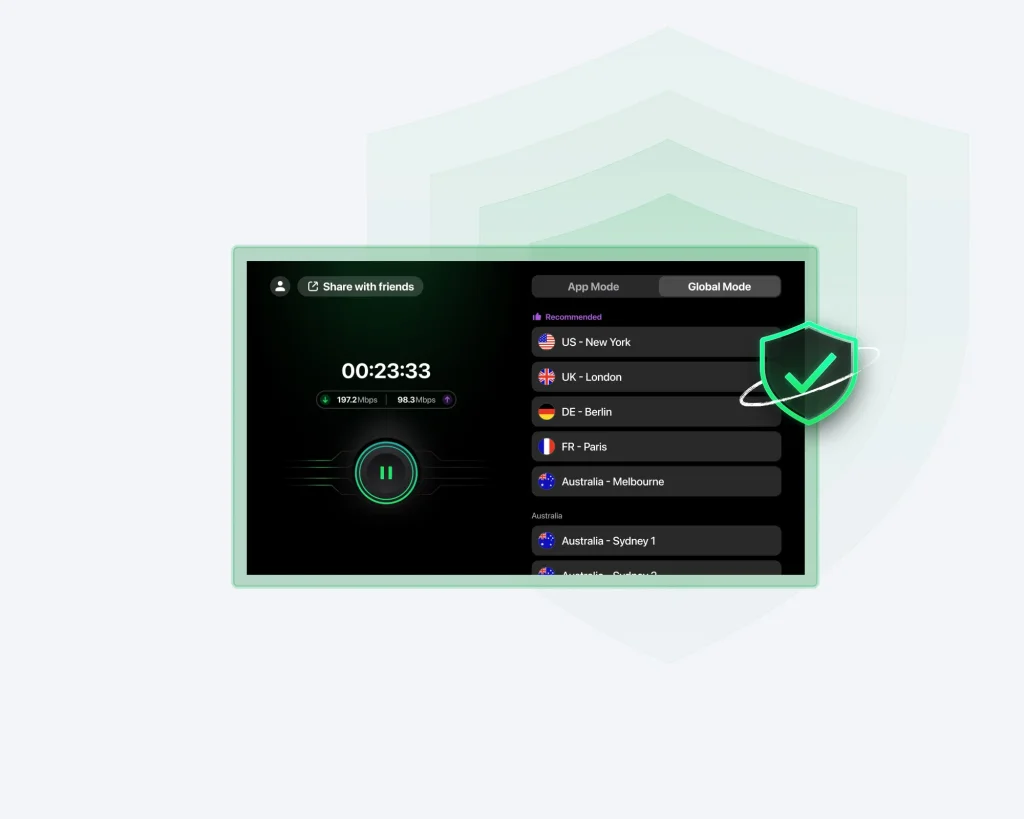
Global Mode, by contrast, functions like a traditional VPN: your entire device’s traffic routes through a single server. While this mode offers simplicity, it’s less flexible if you need granular control over which services use which locations. SafeShell allows you to switch between App Mode and Global Mode within the app interface, and most plans include both at no extra cost.
Supported Streaming Services
- Netflix – SafeShell consistently unblocks multiple Netflix libraries, including the US, UK, Japan and Canada, allowing you to watch region‑exclusive shows.
- Disney+ – The service bypasses regional restrictions, giving you access to Disney’s full catalogue.
- Amazon Prime Video – You can explore different Prime Video libraries without dealing with proxy errors.
- Hulu and HBO Max – SafeShell performs well on these US‑centric services, enabling you to watch shows that aren’t available abroad.
- BBC iPlayer – UK content enthusiasts can stream BBC iPlayer by connecting to UK servers.
With streaming servers designed for bandwidth‑heavy content, the service maintains consistent quality. A built‑in Subtitle Translation feature can translate subtitles in real time when streaming foreign language content. This addition is particularly useful for individuals studying languages or analysing overseas advertising.

Threat Protection & Extras
More Than Just a VPN
A VPN’s value often extends beyond simple tunnelling. SafeShell includes a suite of extras designed to enhance privacy and user experience.
ShellGuard Protocol & SafeNet Adblocker
SafeShell’s proprietary ShellGuard protocol wraps the WireGuard engine with obfuscation and ad‑blocking technology. This protocol not only secures your traffic but also suppresses ads, pop‑ups, and trackers at the network level. Unlike browser‑based adblockers that operate on the client side, ShellGuard processes traffic before it reaches your device, reducing the risk of malicious ads and improving page load times.
SafeNet is an optional extension you can toggle within the app. Once enabled, it blocks advertisements and tracking scripts across most websites and apps. SafeNet is particularly effective when used in conjunction with App Mode because you can activate it selectively for specific apps or sites. For example, you might enable SafeNet when using social media or streaming sites to avoid intrusive ads while leaving it off for business tools that might rely on ad content.
Multi‑Device Support & Cross‑Platform Compatibility
A single SafeShell subscription covers up to five simultaneous connections. This is sufficient for most individuals and small teams. The service provides native apps for:
- Desktop – Windows, macOS, and Linux clients feature sleek interfaces, quick‑connect options, and server filters. Advanced settings allow you to choose protocols, enable App Mode, configure the kill switch, and toggle SafeNet.
- Mobile – iOS and Android apps maintain most features found in the desktop version. They also include handy widgets for quick connection toggles and support push notifications for connection statuses.
- Smart TV & Streaming Devices – SafeShell offers dedicated apps for Apple TV, Android TV, smart TVs, and Apple Vision Pro. These clients make it easy to unblock geo‑restricted streaming apps without sideloading or complex configurations.
By supporting a wide range of platforms, SafeShell ensures that you can protect virtually any device you use for work or entertainment. The unified interface across different platforms also makes onboarding new users straightforward.
Subtitle Translation & Cross‑Region Gaming
SafeShell includes quality‑of‑life features that go beyond typical VPN offerings:
Subtitle Translation – This feature translates foreign language subtitles into your preferred language on the fly when watching international content. Marketers can leverage this to analyse foreign adverts and messaging in real time without relying on third‑party translation tools.
Cross‑Region AFK (Away From Keyboard) – For gamers, SafeShell provides stable cross‑region connections that reduce latency during cross‑region multiplayer sessions. This reliability helps maintain communication with teammates and ensures that gameplay remains smooth when connecting to servers far away.
These extras demonstrate SafeShell’s focus on enhancing user experience. They are not essential for all users, but they differentiate the service from more basic VPN providers.
Pricing Plans
SafeShell VPN Pricing
Cost plays a significant role when choosing a VPN, particularly for small businesses and freelancers managing multiple subscriptions. SafeShell’s pricing structure is relatively straightforward and offers discounts based on subscription length.
Subscription Options & Payment Methods
SafeShell provides three main subscription tiers. All plans include the full suite of features: App Mode, ShellGuard, SafeNet, unlimited bandwidth, and access to the entire server network. The only difference lies in the billing cycle and total cost:
- Weekly Plan – A short‑term plan ideal for travelling or one‑off projects. It costs roughly $5.99 per week, equating to about $0.86 per day. While more expensive on a per‑day basis, it allows you to test the service without a long commitment.
- Monthly Plan – Priced around $12.99 per month ($0.43 per day), this plan suits users who prefer flexibility without a lengthy commitment. It’s comparable to industry averages.
- Annual Plan – SafeShell’s best value option, at approximately $79.99 per year ($0.22 per day). This plan offers around 74 % savings over paying weekly and is ideal if you plan to use the VPN regularly.
In addition, there are occasional promotions and two‑year plans that lower the monthly cost even further. Payment methods include major credit cards, PayPal, Google Pay, Apple Pay, WeChat Pay, and Alipay. The service also allows anonymous payment via selected cryptocurrencies.
Free Trial & Money‑Back Guarantee
SafeShell provides a 3‑day free trial available through its mobile apps, giving you full access to all features. To avoid automatic charges, you need to cancel at least 24 hours before the trial ends. New users also benefit from a 7‑day money‑back guarantee (or a 30‑day guarantee on some promotional plans), which covers the initial purchase when signing up through the website. Renewals and in‑app purchases via the App Store or Google Play are not refundable.
Comparing Cost to Value
Considering the features included, SafeShell’s pricing sits in the mid‑range of the VPN market. While not the cheapest, it offers significant value thanks to App Mode and ShellGuard, which are typically absent from budget services. For businesses, the time saved from switching servers or dealing with ads can offset the marginally higher subscription cost. Additionally, the ability to secure up to five devices per account means you can cover multiple team members or personal devices without buying separate licences.
If you’re budget-conscious, watch for seasonal sales such as Black Friday and Cyber Monday. SafeShell often runs promotions that reduce the annual subscription price by 50 % or more. Signing up during these periods can yield substantial savings.
User Interface & Support
Ease of Use
An effective VPN should be straightforward to install and operate. SafeShell’s user experience reflects a focus on simplicity without sacrificing control.
Desktop and Mobile Apps
Upon launching the app, you’ll see a clean interface with a prominent Connect button and server selection drop‑down. On the desktop, the left panel lets you toggle between Global Mode and App Mode, choose protocols, enable the kill switch, and turn on SafeNet. A quick‑connect option selects the fastest server automatically based on your location.
On mobile, the design remains intuitive. The home screen displays your connection status, current server, and a list of recently used locations. A hamburger menu houses additional settings and support resources. Push notifications alert you when the connection status changes, ensuring you stay aware of your protection.
Device Compatibility & Onboarding
Installing SafeShell on any platform takes only a couple of minutes. The Windows and macOS installers guide you through the process, while the mobile apps are available directly from the Google Play Store and Apple App Store. On Apple TV and smart TV platforms, SafeShell can be downloaded from the device’s app marketplace. For Linux users, SafeShell provides a simple script that adds the repository and installs the client via the command line.
Setting up App Mode involves selecting the applications you want to route through specific servers. The interface lists installed apps and allows you to assign a location to each. This process is straightforward and takes only a few clicks. If you prefer not to customise, Global Mode is ready to use out of the box.
Customer Support
SafeShell offers 24/7 live chat support and email assistance. When testing their live chat, responses came within minutes and included helpful links to guides and troubleshooting steps. A comprehensive knowledge base on their website covers topics such as protocol selection, setting up App Mode, resolving connection issues, and managing subscriptions. For more complex problems, you can submit a ticket via email and expect a detailed response within a few hours.
Overall, SafeShell’s user experience is polished and approachable. Whether you’re a novice or a power user, the interface provides the right balance between automation and customization.
Conclusion
Who Should Use SafeShell VPN in 2026
SafeShell’s feature set makes it suitable for a variety of user profiles. If you recognise yourself in any of the following, SafeShell could be an excellent fit:
- Digital Marketers & Content Creators – App Mode lets you monitor ads and content in multiple regions simultaneously. You can run your analytics tools locally while viewing international streaming libraries for market research.
- Remote Teams & Freelancers – The combination of high speeds, robust security, and multi‑device support allows distributed workforces to maintain productivity and protect sensitive data.
- Streamers & Entertainment Fans – SafeShell’s streaming servers reliably unblock services like Netflix, Disney+, and BBC iPlayer. Real‑time subtitle translation enriches cross‑language viewing.
- Gamers – With servers optimized for low latency and stable cross‑region connections, gamers can play on international servers with minimal lag.
- Privacy Advocates – The audited no‑logs policy, kill switch, and ShellGuard protocol offer strong privacy protections for users concerned about surveillance or data interception.
On the other hand, if you need a permanent free VPN, require a provider in a strictly privacy‑centric jurisdiction, or prefer a provider with a larger footprint in Africa and South America, SafeShell may not meet all your requirements.
Final Thoughts
SafeShell VPN is an intriguing entrant in the crowded VPN market. Its patented App Mode stands out as a genuine innovation, offering true per‑application routing that solves a problem many professionals face when juggling multiple regional services. Coupled with a wide array of high‑speed servers, modern protocols, and the ShellGuard ad‑blocking protocol, SafeShell provides a robust solution for streaming, remote work, and privacy protection.
The service is not without weaknesses. Subscription management could be clearer, and performance on certain mobile networks remains inconsistent. Additionally, users seeking maximum transparency about ownership or a completely free plan may want to consider alternatives. However, for the majority of users, including digital marketers, streamers, remote workers, and gamers, SafeShell delivers a compelling combination of speed, security, and flexibility at a competitive price.
If you value granular control over your online activities and need a VPN that adapts to various professional and entertainment scenarios, SafeShell deserves a spot on your shortlist.
Have more questions?
Frequently Asked Questions
What makes SafeShell’s App Mode different from split tunnelling?
App Mode goes beyond traditional split tunnelling by letting you route specific applications through entirely separate VPN servers. Split tunnelling typically divides traffic between the VPN and your regular connection. With App Mode, you can assign each app its own region, enabling simultaneous access to multiple geo-restricted services without affecting local apps.
Does SafeShell VPN keep logs of my activity?
No. SafeShell operates under a strict no-logs policy that has been independently audited. It does not record your IP address, browsing history, connection timestamps or usage patterns. The company is based in Singapore, outside the 14-Eyes alliance, which adds an extra layer of protection from surveillance partnerships.
How many devices can I use with one SafeShell subscription?
You can use up to five devices simultaneously with a single SafeShell account. This covers most users’ needs, including laptops, smartphones, tablets, and smart TVs. The apps are available on Windows, macOS, Linux, Android, iOS, Apple TV, and certain smart TV platforms.
Is SafeShell good for streaming services like Netflix?
Yes. SafeShell offers specialized streaming servers that reliably unblock Netflix, Disney+, Amazon Prime Video, Hulu, BBC iPlayer, and other services. Its fast speeds and App Mode allow you to watch content in high definition without buffering while keeping other apps connected locally.
Can I try SafeShell before paying for a subscription?
SafeShell provides a three-day free trial on its mobile apps. This trial grants full access to all features, including App Mode and ShellGuard. Just remember to cancel at least 24 hours before the trial ends if you decide not to continue, as the subscription will auto-renew.
Does SafeShell accept cryptocurrency payments?
Yes. In addition to traditional payment methods like credit cards, PayPal, and mobile wallets, SafeShell accepts certain cryptocurrencies through approved payment processors. This option adds an extra layer of anonymity if you wish to keep your financial details private.
How does SafeShell protect against DNS and IP leaks?
SafeShell routes all DNS queries through its encrypted tunnel and blocks IPv6 traffic outside the VPN, preventing leaks that could reveal your browsing activity. The desktop and mobile apps also include a kill switch that cuts off internet access if the VPN connection drops unexpectedly.
Does SafeShell have servers in Africa and South America?
SafeShell’s network primarily focuses on North America, Europe, and Asia. While there are some servers in Africa and South America, coverage is limited compared with larger providers. If you require extensive choices in these regions, you may want to check the server list before subscribing.