
Introduction
McAfee has long been a household name in antivirus protection, but in 2026, it’s no longer just about malware scans and basic firewalls. The platform now offers a comprehensive suite of security tools that serve both individuals and businesses navigating modern digital threats.
Whether you’re trying to secure a personal device, protect your family’s online identity, or safeguard hundreds of endpoints across a distributed workforce, McAfee positions itself as a one-stop solution. With new tools like AI-powered scam detection, identity monitoring, multi-device VPN, and even unlimited device coverage on select plans, it’s clear McAfee has expanded well beyond traditional antivirus.
In this updated McAfee review, you’ll discover:
- 🔐 How McAfee protects you from ransomware, phishing, and evolving cyberattacks
- 🏢 Whether McAfee’s endpoint security solutions are a good fit for your business
- 💸 A breakdown of pricing, including personal, family, and business plans
- 📊 Independent test results from AV-Test and SE Labs
- 📱 Real-world performance across desktop and mobile devices
Whether you’re a solo user or an IT manager, this review will help you decide if McAfee is still a smart investment in 2026.
Overview
McAfee Antivirus Overview
McAfee has been a major player in cybersecurity for more than three decades. What started as traditional antivirus software has evolved into a broader digital protection ecosystem that combines device security, identity protection, privacy tools, and scam prevention.
In 2026, McAfee operates primarily in the consumer and small business security space. Its enterprise division was rebranded under Trellix, but McAfee continues to offer powerful protection for individuals, families, and growing businesses that need centralized security without complex enterprise infrastructure.
Product Line for Personal Use
For individuals and families, McAfee now focuses on its McAfee+ product line, which combines antivirus with identity and privacy tools.
Key personal plans include:
- McAfee+ Individual – Antivirus, VPN, identity monitoring, scam protection
- McAfee+ Family – Protection for multiple users with parental controls
- McAfee Total Protection – Traditional antivirus with added privacy tools
One of the biggest changes in recent years is the introduction of unlimited device coverage on select plans. This allows you to secure all your laptops, smartphones, and tablets under one subscription.
Business and Small Business Protection
If you run a small or mid-sized business, McAfee offers solutions designed for multi-device management and remote workforce security.
Business-focused benefits include:
- Centralized device management
- Endpoint malware and ransomware protection
- Identity and phishing defense
- VPN access for remote teams
- Scalable licensing based on team size
McAfee is particularly well-suited for small businesses without a full security operations team, as it provides layered protection without the complexity of enterprise SIEM platforms.
Device and Platform Compatibility
McAfee supports all major operating systems, making it flexible for both home users and companies with mixed environments:
- Windows 10 and 11
- macOS
- Android
- iOS
This cross-platform coverage ensures your devices remain protected whether you’re working remotely, managing a team, or securing your family’s digital life.
Software Specification
Core Features and Security Tools
McAfee in 2026 is no longer just traditional antivirus software. It combines device protection, identity monitoring, AI-powered scam detection, and privacy tools into a unified security platform for both personal and small business users.
Here’s what you actually get.
Malware and Threat Protection
At its core, McAfee antivirus still delivers strong real-time malware defense. But the protection engine has evolved significantly.
Real-Time Antivirus Protection
McAfee uses signature-based detection combined with machine learning and behavioral analysis. This allows you to block:
- Viruses and Trojans
- Ransomware attacks
- Fileless malware
- Zero-day exploits
- Phishing websites
Independent labs like AV-Test awarded McAfee perfect protection scores in multiple 2025 test cycles, reinforcing its reliability.
For businesses, this means endpoints are monitored continuously. Suspicious activity is isolated before it spreads across your network.
AI-Powered Scam Detection
One of McAfee’s biggest upgrades is its Scam Detector, now included in core plans.
This feature uses AI to analyze:
- Text messages
- Emails
- Social media direct messages
- QR codes
It flags suspicious content in real time, even when no malicious link is present. This is particularly valuable for remote teams and employees who rely heavily on messaging apps.
For business owners, this reduces human error, which remains the number one cause of breaches.
Identity and Privacy Protection
Cybersecurity is no longer just about malware. It’s about protecting your digital identity.
Identity Monitoring and Dark Web Alerts
McAfee monitors the dark web for exposed:
- Email addresses
- Passwords
- Social Security numbers
- Bank details
If your data appears in a breach, you receive immediate alerts. Higher-tier plans include identity restoration support.
For families and small businesses, this adds a layer of financial protection beyond device security.
VPN and Secure Browsing
McAfee includes a built-in VPN in most plans.
You get:
- Encrypted public Wi-Fi protection
- IP masking for privacy
- Secure browsing on remote networks
For remote employees, this helps secure sensitive company data when working from home or public locations.
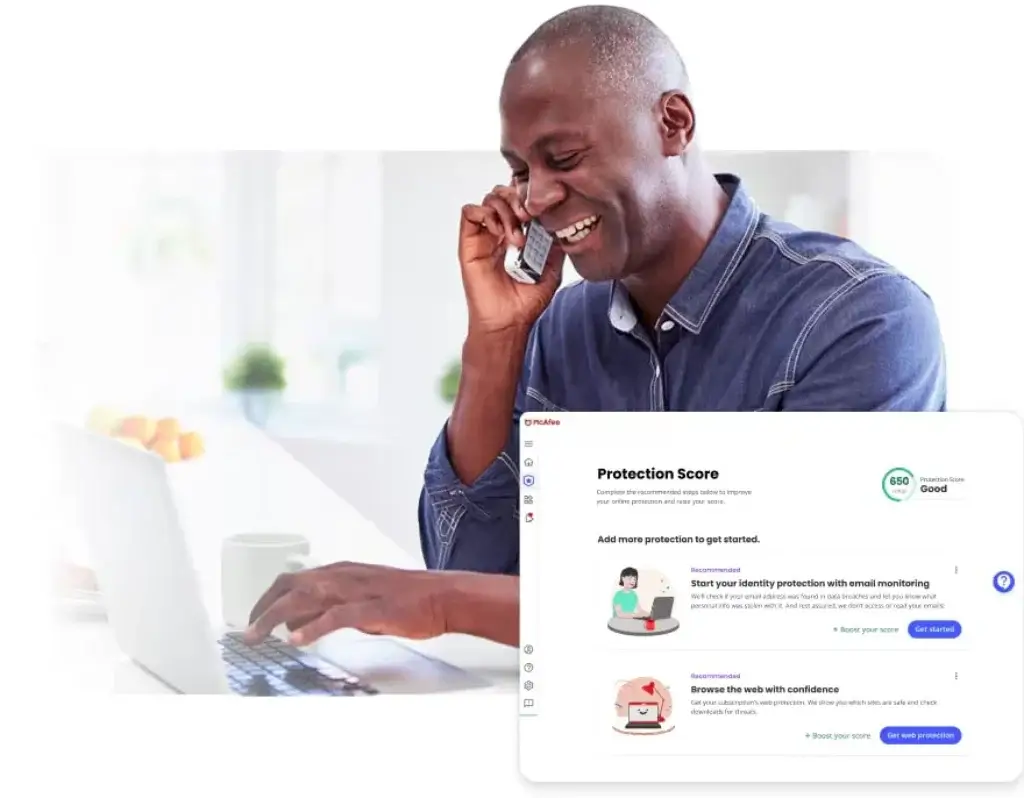
Protection Score Dashboard
McAfee now includes a Protection Score, a visual dashboard that shows how secure your devices and identity are.
It recommends specific actions, such as enabling identity monitoring or securing unused accounts.
This feature is especially helpful for non-technical users and small business owners who want simple guidance instead of complex security reports.
Multi-Device and Unlimited Coverage
Select McAfee+ plans now offer unlimited device protection.
This means you can secure:
- Work laptops
- Employee smartphones
- Personal tablets
- Family devices
For growing businesses, this simplifies license management and budgeting.
Pros and Cons
Advantages and Disadvantages
Positive
✅ Strong malware detection rates
✅ AI-powered scam protection included
✅ Unlimited device coverage available
✅ Integrated identity protection tools
Negatives
❌ Resource-heavy on older devices
❌ Advanced business features are limited
❌ VPN speed varies by region
❌ The interface can feel outdated
Looking at McAfee from a business perspective, here are the key advantages and limitations you should consider:
Pros
✅ Strong malware detection rates
McAfee uses a combination of signature-based scanning, machine learning, and behavioral analysis to detect threats in real time. For businesses, this means reliable protection against both known malware and sophisticated zero-day exploits.
✅ AI-powered scam protection included
Scam Detector adds modern phishing and QR code defense, which many competitors still treat as add-ons.
✅ Unlimited device coverage available
Select plans allow you to protect all devices under one subscription, ideal for families and small teams.
✅ Integrated identity protection tools
Dark web monitoring and identity alerts provide financial and privacy security beyond standard antivirus.
Cons
❌ Resource-heavy on older devices
While recent versions have improved efficiency, McAfee’s background processes can still be CPU-intensive, particularly during full scans. Older systems may experience slowdowns.
❌ Advanced business features are limited
Large enterprises may require more advanced EDR or SIEM integrations not included in consumer-focused plans.
❌ VPN speed varies by region
While secure, VPN performance can fluctuate depending on server load.
❌ The interface can feel outdated
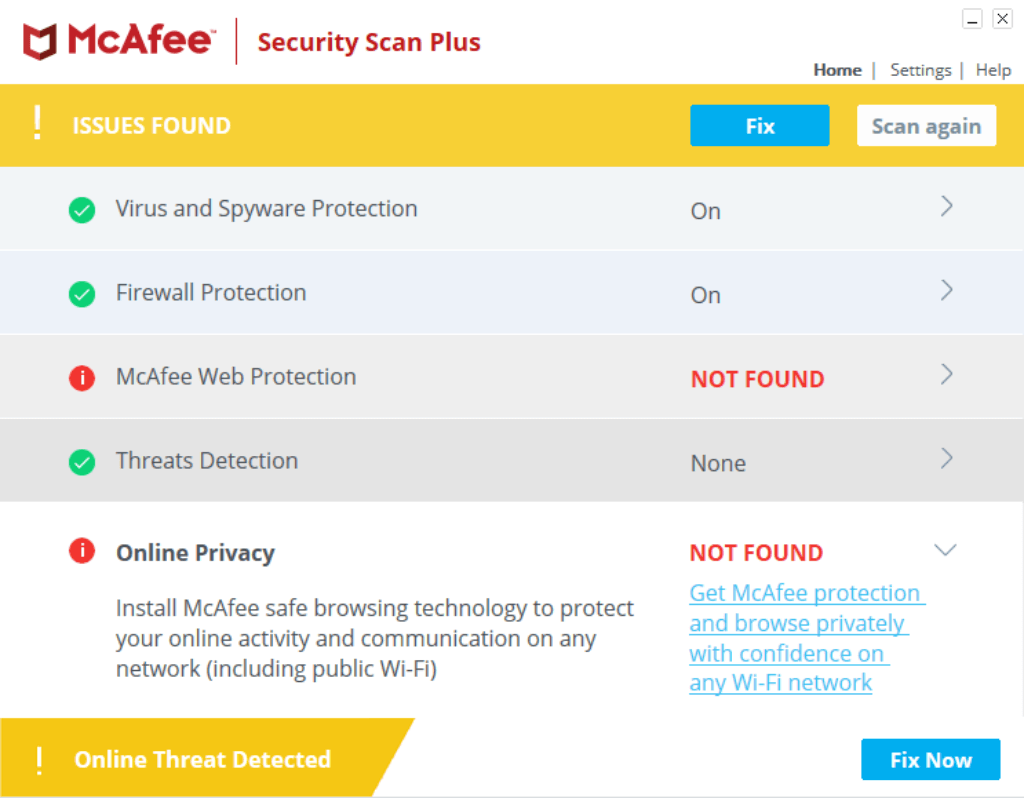
The McAfee dashboard, especially in its on-prem versions, lacks the modern UX seen in competitors. While functional, it may feel clunky for IT teams used to more streamlined tools.
Software Capabilities
Performance and User Experience
When choosing antivirus software in 2026, protection alone is not enough. You need security that runs quietly in the background without disrupting productivity, especially in business environments.
Here’s how McAfee performs under real-world conditions.
System Impact and Resource Usage
McAfee uses a cloud-assisted scanning engine combined with local behavioral monitoring. This hybrid model reduces dependency on heavy signature databases while maintaining strong detection rates.
During Idle Use
- Minimal CPU usage
- Low memory footprint
- No noticeable background lag
For everyday tasks like browsing, video calls, and document editing, performance impact is generally low on modern systems.
During Full System Scans
Full scans are more resource-intensive.
On mid-range devices:
- Temporary CPU spikes
- Moderate disk usage
- Slight slowdown during active scanning
On older hardware, performance dips may be noticeable. For business environments, it’s recommended to schedule deep scans outside working hours.
Compared to competitors like Bitdefender, McAfee is slightly heavier under load, but still within industry norms.
Scan Speed and Threat Response Time
McAfee offers three main scan types:
- Quick Scan – Checks high-risk areas in minutes
- Full Scan – Comprehensive system analysis
- Custom Scan – Targeted file or directory scanning
Quick scans typically complete within 5–10 minutes. Full scans vary depending on system size, but are generally faster after the first run due to file caching.
Threat response is immediate. Suspicious files are quarantined automatically, and behavioral anomalies trigger real-time blocking without requiring manual action.
For businesses, this reduces lateral movement risks in case of attempted ransomware deployment.
User Interface and Dashboard Experience
McAfee’s interface focuses on simplicity rather than advanced technical visualization.
For Personal Users
- Clear security status indicator
- Protection Score dashboard
- Simple toggles for VPN and identity monitoring
- Guided setup recommendations
The Protection Score is particularly helpful. It converts technical risks into actionable steps, making cybersecurity understandable for non-technical users.
For Small Businesses
The dashboard supports:
- Multi-device monitoring
- Alert visibility
- Basic policy controls
- Device-level threat insights
However, larger enterprises may find it less granular than advanced EDR platforms like CrowdStrike or Microsoft Defender for Endpoint.
Overall, usability is strong, though the interface design is slightly less modern than top competitors.
Mobile Experience
McAfee’s mobile app includes:
- Malware scanning (Android)
- Scam detection alerts
- Secure VPN connection
- Identity monitoring notifications
For remote employees, this provides an added security layer on unmanaged mobile devices.
The app is clean and functional, though not as feature-rich as desktop versions.
Lab Results
Independent Test Lab Results
To evaluate how well McAfee protects your business in real-world scenarios, it’s important to look at independent lab results from trusted organizations like AV-Test and AV-Comparatives.
AV-Test Scores 2026
In recent testing by AV-Test, McAfee consistently scored high across three major categories (on Windows 10 Pro):
- Protection: ★★★★☆ (5.5/6)
Strong detection of both widespread and zero-day threats. Slightly lower performance in blocking advanced phishing simulations. - Performance: ★★★★☆ (5.5/6)
Minimal slowdowns during day-to-day tasks, but heavier resource usage during full scans. - Usability: ★★★★★ (6/6)
Very few false positives and excellent handling of legitimate business apps and files.
AV-Comparatives (Real-World Protection Test 2026)
In the latest real-world testing cycle, McAfee achieved:
- 99.7% real-world malware protection rate
- Advanced+ rating
- Low false-positive rate
The product also received recognition for strong phishing URL blocking performance.
This positions McAfee competitively alongside Bitdefender and Norton in consumer-focused protection testing.
SE Labs (AAA Rating 2026)
McAfee earned its 29th consecutive AAA rating from SE Labs.
SE Labs evaluates:
- Attack simulation defense
- Exploit handling
- Real-world infection scenarios
- Detection accuracy
Achieving repeated AAA certifications indicates strong consistency in protection over multiple years.
What This Means for You
Lab tests show that:
- McAfee’s detection rates are top-tier
- False positives are rare
- Performance impact is controlled
- Protection remains consistent year after year
For personal users, this means dependable day-to-day safety.
For small businesses, it provides confidence that endpoints are protected against evolving ransomware and phishing threats.
Pricing
Pricing and Plans
McAfee has simplified its pricing structure in recent years. Instead of offering dozens of confusing tiers, it now focuses on McAfee+ plans that combine antivirus, identity protection, privacy tools, and scam detection.
The biggest upgrade is unlimited device coverage on select plans, which changes the value equation significantly.
Below is a breakdown of the main plans available in 2026.
| Plan | Best For | Starting Price (2026) |
| McAfee+ Essential | Individuals | $39.99/year |
| McAfee+ Premium | Families & Multi-Device Users | $49.99/year |
| McAfee+ Advanced | Identity Protection Focus | $89.99/year |
| McAfee Small Business Security | Small Teams (5–25 Devices) | From $99.99/year |
What You Get with Each Plan
McAfee+ Essential
- Antivirus and real-time malware protection
- Scam Detector (AI-powered)
- Secure VPN
- Protection Score dashboard
Best suited if you want solid device security without advanced identity coverage.
McAfee+ Premium
- All Essential features
- Identity monitoring
- Dark web alerts
- Parental controls
- Unlimited device coverage
This plan offers the best value for families and users with multiple devices.
McAfee+ Advanced
- All Premium features
- Identity theft coverage
- Credit monitoring (region dependent)
- Enhanced identity restoration support
If identity protection is your top concern, this tier adds financial monitoring tools.
McAfee Small Business Security
Designed for small teams that need simple endpoint protection without enterprise complexity.
Includes:
- Multi-device antivirus protection
- Scam and phishing detection
- VPN for remote employees
- Centralized management
- Basic device monitoring
Ideal for small businesses without a dedicated cybersecurity team.
Free Trials and Money-Back Guarantee
McAfee offers:
- 30-day free trial on select plans
- 30-day money-back guarantee
- Automatic renewal (can be disabled in account settings)
For businesses, custom quotes and volume discounts may be available.
Feedbacks
User Feedback and Reviews
Understanding how McAfee performs in real-world business environments is key to making an informed decision. Here’s what users and analysts are saying.
What Business Users Like
👍 Reliable protection
Many IT managers highlight McAfee’s strong malware detection and real-time scanning as dependable. It’s especially praised for catching phishing attempts and ransomware before they spread.
👍 Centralized control
McAfee’s ePolicy Orchestrator (ePO) and MVISION console receive positive reviews for allowing remote monitoring, device management, and policy enforcement across multiple endpoints.
👍 Integration with Windows environments
IT teams that rely on Windows Server or Microsoft 365 say McAfee integrates smoothly, with minimal compatibility issues.
Common Complaints
👎 Performance impact on legacy systems
Some users note slowdowns during full scans on older PCs or devices with limited RAM. This is less of a problem on newer systems.
👎 Complex policy setup
While the management console is powerful, it can be a bit overwhelming for smaller teams without a dedicated IT specialist.
👎 Dated interface
Several reviewers point out that McAfee’s dashboard feels cluttered and not as modern or intuitive as competitors like Bitdefender or Sophos.
Ratings from Trusted Platforms
| Platform | User Rating | Summary |
| G2 | ★★★★☆ (4.2/5) | Reliable endpoint security with strong central management |
| Capterra | ★★★★☆ (4.1/5) | Great for businesses that need layered protection |
| TrustRadius | 7.8/10 | Powerful but can be complex to configure |
McAfee VS. Alternatives
Comparison with Other Antivirus Software
If you’re comparing antivirus software in 2026, you’re likely deciding between McAfee, Bitdefender, Norton, or Avast. All four are established brands with strong protection engines, but they differ in performance impact, identity tools, pricing models, and business suitability.
Here’s how McAfee stacks up.
McAfee vs Bitdefender
Primary keyword target: McAfee vs Bitdefender
Bitdefender is often praised for its lightweight engine and advanced ransomware defense. In lab testing, it consistently ranks at the very top for protection and performance balance.
Where Bitdefender Wins
- Slightly lighter system impact during full scans
- More advanced ransomware remediation tools
- Stronger enterprise-grade EDR options
Where McAfee Wins
- AI-powered Scam Detector included in core plans
- Unlimited device coverage on select plans
- Integrated identity monitoring and dark web alerts
If you want maximum performance efficiency and advanced enterprise controls, Bitdefender (full review here) may be the better fit.
If you prioritize identity protection and multi-device value, McAfee offers stronger bundled benefits.
SEO Verdict:
Bitdefender = Performance-focused users
McAfee = All-in-one protection seekers
McAfee vs Norton
Primary keyword target: McAfee vs Norton
Norton remains one of McAfee’s closest competitors, especially in identity protection and VPN integration.
Where Norton Wins
- More polished user interface
- Slightly better phishing detection consistency
- Strong LifeLock identity integration (in higher plans)
Where McAfee Wins
- Unlimited device protection on premium tiers
- More aggressive AI scam detection coverage
- Competitive first-year pricing
Both products score highly in independent lab tests, so the real difference comes down to usability and plan structure.
If you want a smoother interface and strong brand integration, Norton is attractive (full review here).
If you want broader device coverage and QR code scam detection, McAfee may provide better overall value.
SEO Verdict:
Norton = Refined experience
McAfee = Broader coverage for the price
McAfee vs Avast
Primary keyword target: McAfee vs Avast
Avast is known for offering a strong free antivirus product, which makes it appealing for budget users.
Where Avast Wins
- Generous free version
- Lightweight performance
- Simple setup
Where McAfee Wins
- More comprehensive identity protection
- Advanced scam detection with AI analysis
- Integrated dark web monitoring
- Stronger business plan positioning
Avast is a good entry-level solution. However, if you want layered protection that includes identity monitoring and phishing detection across messaging apps, McAfee is more comprehensive.
For small businesses, McAfee offers clearer centralized control options compared to Avast’s consumer-heavy focus.
SEO Verdict:
Avast = Budget-friendly protection (full review here)
McAfee = More complete security ecosystem
Which Antivirus Is Best for You in 2026?
Here’s a quick breakdown based on your needs:
- Best for maximum performance efficiency → Bitdefender
- Best for interface and brand reputation → Norton
- Best free antivirus → Avast
- Best all-in-one protection with identity tools → McAfee
If you manage multiple devices, care about identity protection, and want built-in AI scam detection, McAfee remains one of the most balanced antivirus solutions in 2026.
Conclusion
Is McAfee Worth It in 2026?
⭐ Overall Rating: 8.7/10
If you’re looking for more than basic antivirus protection, McAfee antivirus delivers one of the most complete security packages available in 2026.
It combines strong malware detection, AI-powered scam prevention, identity monitoring, VPN access, and unlimited device coverage into a single ecosystem. Few competitors bundle this many tools under one subscription.
For personal users, McAfee offers peace of mind. You get protection against ransomware, phishing, QR code scams, and identity theft, all managed through a simple dashboard.
For small businesses, McAfee provides scalable endpoint protection without the complexity of enterprise security platforms. If you don’t have a full-time cybersecurity team, McAfee gives you centralized control and layered protection that’s easy to deploy.
Who Should Choose McAfee?
You should strongly consider McAfee if:
- You want all-in-one protection, not just malware defense
- You manage multiple devices and want unlimited coverage
- Identity monitoring and scam detection are priorities
- You run a small business and need simple endpoint control
- You prefer strong lab-tested protection with consistent certifications
When McAfee Might Not Be the Best Fit
McAfee may not be ideal if:
- You run older hardware and need ultra-light performance
- You require advanced enterprise-grade EDR integrations
- You prefer the most modern user interface available
In those cases, alternatives like Bitdefender or Norton may be worth exploring.
McAfee stands out because it protects more than just your device. It protects your identity, your data, and your digital behavior.
That broader protection strategy makes it one of the strongest overall antivirus solutions in 2026, especially for families, remote workers, and small business teams.
If you’re ready to secure your devices and identity under one subscription, McAfee is absolutely worth considering.
Have more questions?
Frequently Asked Questions
Is McAfee antivirus good for businesses in 2026?
Yes, McAfee antivirus is a strong choice for small and mid-sized businesses. It offers endpoint protection, centralized management, VPN access, and identity monitoring, making it suitable for teams that need reliable security without complex enterprise tools.
Does McAfee slow down your computer?
McAfee can use more system resources during full scans, especially on older devices. However, on modern hardware, its background protection runs smoothly with minimal impact on everyday tasks.
What is McAfee Scam Detector?
McAfee Scam Detector is an AI-powered feature that identifies phishing attempts across emails, text messages, social media, and QR codes. It helps you avoid scams before you click or respond.
Does McAfee offer unlimited device protection?
Yes, McAfee+ Premium and Advanced plans include unlimited device coverage. This allows you to protect multiple laptops, smartphones, and tablets under one subscription.
Is McAfee better than Bitdefender?
McAfee offers more built-in identity protection and scam detection tools, while Bitdefender is known for lighter system performance and advanced ransomware protection. The better choice depends on your priorities.
Does McAfee include a VPN?
Yes, most McAfee plans include a secure VPN that encrypts your internet connection and protects your data when using public Wi-Fi or remote networks.
Can McAfee protect against ransomware?
Yes, McAfee provides real-time ransomware protection using behavioral analysis and machine learning to detect and block suspicious activity before files are encrypted.
Is McAfee suitable for small businesses?
Yes, McAfee is well suited for small businesses. It offers scalable protection, centralized device management, and security tools that are easy to deploy without a dedicated IT team.
What devices does McAfee support?
McAfee supports Windows, macOS, Android, and iOS devices. Some plans also support ChromeOS, allowing you to protect both personal and business devices across platforms.
Does McAfee offer a free trial or money-back guarantee?
Yes, McAfee offers a 30-day free trial on select plans and a 30-day money-back guarantee, allowing you to test the software risk-free before committing.