
Introduction
Choosing the right antivirus software is no longer just about blocking traditional viruses. You need protection that can handle phishing sites, ransomware, malicious downloads, exploit attacks, and the growing number of scams that target you through the browser.
That’s where Malwarebytes comes in.
Founded in 2008, Malwarebytes has become one of the most recognized names in anti-malware and threat remediation. It now offers protection for both individual users and small business teams, with a product lineup that includes device security, scam and ad blocking, VPN access, and lightweight endpoint protection.
In this Malwarebytes review, you’ll get a complete breakdown of:
- How Malwarebytes performs for individual users and families
- Whether Malwarebytes for Teams is strong enough for small businesses and remote teams
- Real-world protection strengths, including phishing and ransomware defense
- Performance impact and usability
- Pricing, plans, and overall value for money in 2026
For personal users, Malwarebytes offers strong real-time protection, browser-based scam blocking, ransomware defense, and privacy-focused bundles that can include VPN and identity-related tools.
For business users, Malwarebytes focuses on simple deployment, centralized management, and protection that does not require a full IT department to manage.
Whether you’re protecting a home laptop or securing devices across a small business, this review will help you decide if Malwarebytes is the right fit.
If you’re still comparing options, you can also explore our full guide to the Best Antivirus Software to see how Malwarebytes compares to competitors like Bitdefender, Norton, and Avast.
Let’s dive into the details.
Overview
Malwarebytes Overview
Malwarebytes has built its name around modern threat protection, especially malware, phishing sites, malicious downloads, and exploit-based attacks. Unlike many traditional antivirus tools that focus heavily on signature-based detection, Malwarebytes emphasizes behavior monitoring, web protection, and fast remediation.
Over the years, the platform has expanded from a malware cleanup utility into a broader multi-layered security product that now includes real-time antivirus protection, Browser Guard, ransomware defense, VPN access in selected plans, and small business security for teams.
Malwarebytes for Personal Use
If you’re protecting home devices, Malwarebytes currently centers its consumer lineup around:
- Standard – Malwarebytes Premium Security plus Browser Guard
- Plus – Adds Privacy VPN to the security bundle
- Ultimate – Adds identity and privacy-oriented tools in supported markets
For individuals and families, Malwarebytes stands out for combining strong anti-malware protection with lightweight performance. It is especially appealing if you care about phishing defense and safe browsing as much as traditional antivirus scanning.
Best for: personal laptops, family devices, remote workers, and users who want a lighter alternative to bulky security suites.
Malwarebytes for Business Use
Malwarebytes for Teams is designed for small businesses that want practical protection without the complexity of enterprise security platforms.
Business plans emphasize:
- Cloud-based management
- Built-in VPN in the Teams offer
- Browser Guard for ad and scam blocking
- Simple deployment for small offices and remote teams
It is positioned more for small teams and growing businesses than for large enterprises with deep SOC requirements.
Best for: SMBs, small offices, hybrid teams, and businesses without a dedicated IT security staff.
Device Compatibility
Malwarebytes supports:
- Windows
- macOS
- Android
- iOS
Some advanced security behaviors still perform best on Windows, but Malwarebytes remains broader than many niche anti-malware tools in terms of cross-platform coverage.
Software Specification
Core Features and Security Tools
Malwarebytes combines anti-malware protection with strong browser-based threat defense and privacy-focused add-ons. The experience is simpler than many traditional antivirus suites, which is part of its appeal.
Let’s break the core features down.
🦠 Malware and Threat Protection
At its core, Malwarebytes provides:
- Real-time malware protection
- Ransomware protection
- Phishing and malicious website blocking
- Behavior-based threat detection
- Exploit and zero-day attack mitigation
For personal users, this creates strong everyday protection against infected downloads, scam pages, and suspicious software behavior.
For business users, it delivers endpoint protection with a simpler learning curve than many enterprise-heavy alternatives.
Malwarebytes’ reputation is particularly strong in malware cleanup and in catching threats that slip through older, more conventional antivirus layers.
🌐 Browser and Scam Protection
This is one of Malwarebytes’ most relevant strengths in 2026.
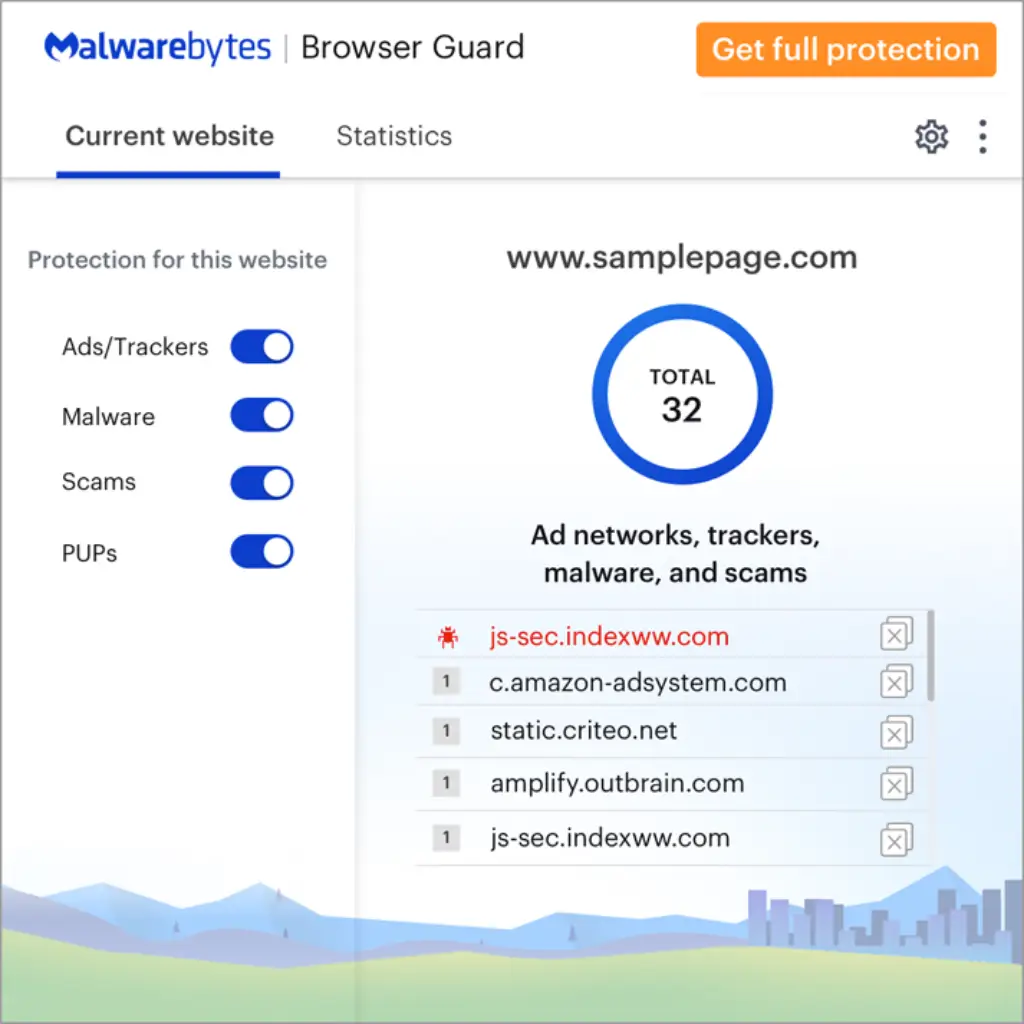
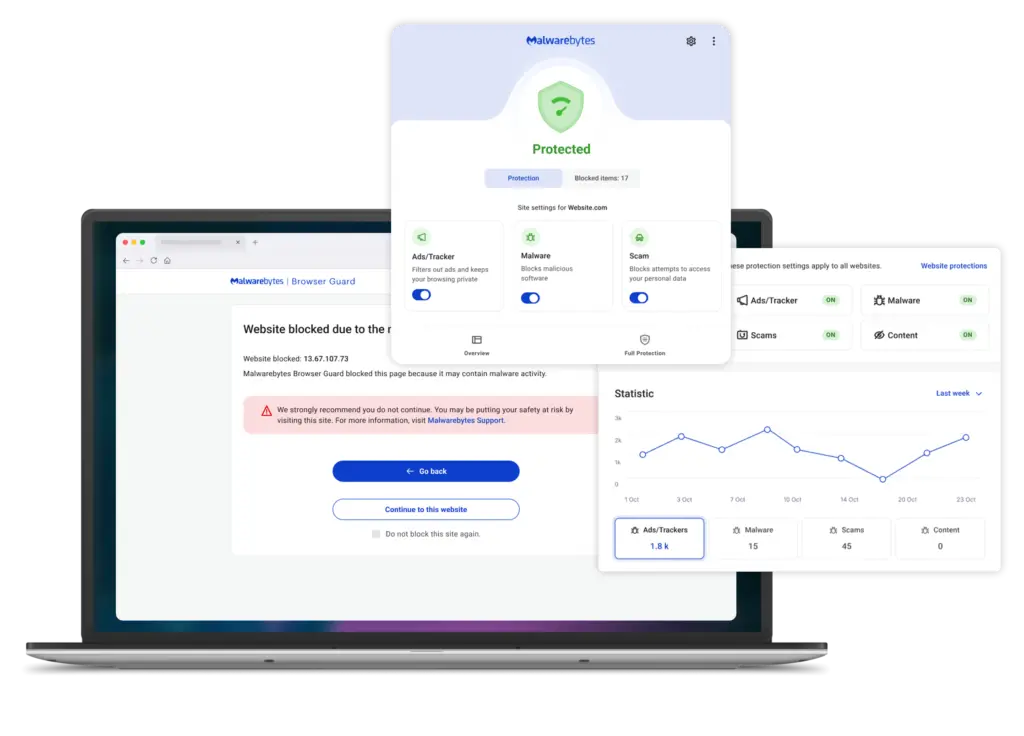
- Browser Guard helps block scams and malicious sites
- Helps reduce exposure to phishing pages
- Blocks many ad-based and scam-based browsing threats
- Adds another layer beyond file scanning alone
If much of your risk comes from browsing, email links, fake pages, and online scams, Malwarebytes is well positioned compared to many antivirus tools that still feel more device-centered than browser-centered.
🔒 Privacy and Identity Features
Depending on the plan, Malwarebytes may also include:
- Privacy VPN
- Browser privacy support
- Identity-related features in higher-tier personal plans
This helps Malwarebytes compete beyond pure antivirus, although its privacy bundle is still more streamlined than the all-in-one identity suites offered by Norton or Aura.
🏢 Business Security Features
Malwarebytes for Teams focuses on making business protection accessible without forcing companies into an enterprise-only model.
Key business features include:
- Cloud-based management
- Endpoint protection for business devices
- Built-in VPN in the Teams offer
- Browser Guard for ad and scam blocking
- Priority support
This makes Malwarebytes especially relevant for:
- Small businesses
- Boutique offices
- Remote and hybrid teams
- Companies that need protection without heavy IT overhead
You get practical security without needing a security specialist to manage the entire stack.
Pros and Cons
Advantages and Disadvantages
Positive
✅ Excellent phishing and scam protection
✅ Lightweight system performance
✅ Strong malware cleanup reputation
✅ Easy setup and simple interface
Negatives
❌ Fewer extra tools than some competitors
❌ VPN is useful, but not the standout feature
❌ Business offer is less enterprise-focused
❌ Some top-tier identity tools are region-dependent
Before choosing an antivirus platform, it’s important to weigh both the benefits and the trade-offs. Here’s how Malwarebytes stacks up:
✅ Pros
1. Excellent phishing and scam protection
Malwarebytes is especially strong when your biggest risk comes from fake pages, malicious links, ad-based scams, and dangerous browsing behavior. Browser Guard adds a meaningful extra layer here.
2. Lightweight system performance
One of Malwarebytes’ biggest advantages is that it generally runs with less friction than bulky all-in-one suites. That makes it attractive for older computers and for users who dislike intrusive security software.
3. Strong malware cleanup reputation
Malwarebytes built its brand on malware detection and remediation, and that reputation still matters. It remains a trusted option when users want something that can detect threats other tools may miss.
4. Easy setup and simple interface
The interface is clean, modern, and easy to understand. It works well for non-technical users and for teams that need straightforward deployment.
❌ Cons
1. Fewer extra tools than some competitors
If you want a massive security suite with parental controls, password management, firewall layers, dark web monitoring, and multiple utility extras in every plan, Malwarebytes may feel lighter than rivals such as Norton.
2. VPN is useful, but not the standout feature
The bundled Privacy VPN is a practical addition, but Malwarebytes is still mainly compelling because of malware and scam protection, not because of advanced VPN features.
3. Business offer is less enterprise-focused
Malwarebytes for Teams is built for simplicity. That’s a strength for small businesses, but larger enterprises may want deeper EDR, SOC integrations, and more advanced policy controls.
4. Some top-tier identity tools are region-dependent
The exact value of the top personal tiers can vary by region, which means the headline feature set may not look identical everywhere.
Software Capabilities
Performance and User Experience
Malwarebytes is known for delivering strong protection without making the device feel heavy. That matters whether you’re securing a personal laptop or deploying it across a small business.
System Impact
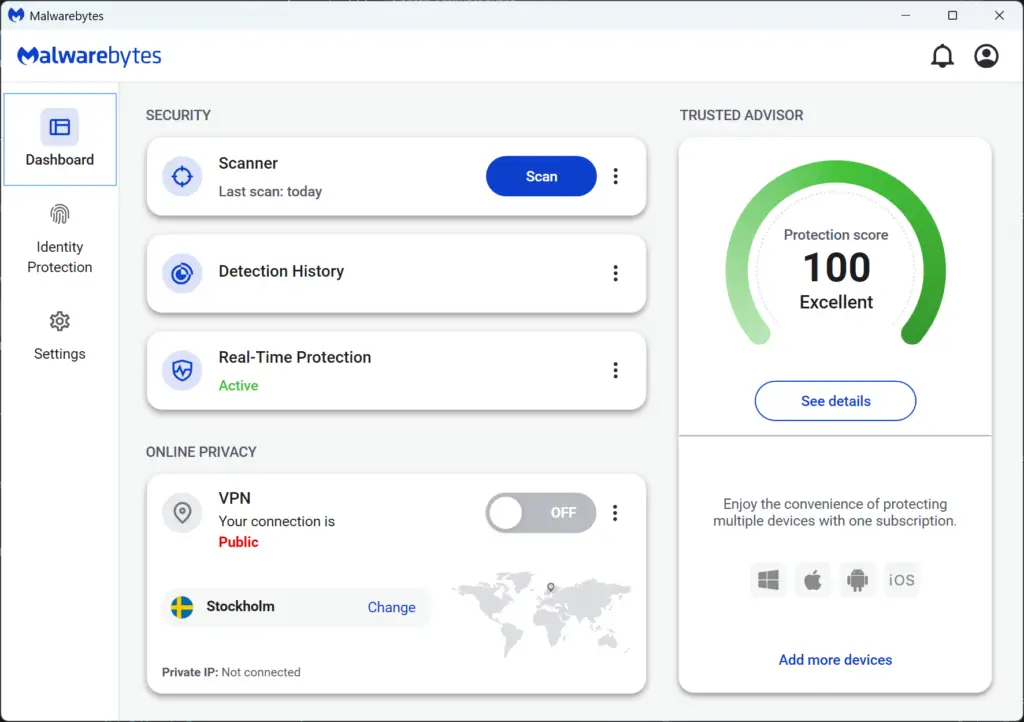
In daily use, Malwarebytes generally runs quietly in the background.
- Low performance drag during real-time protection
- Minimal interruption to everyday tasks
- Comfortable fit for users who want a lighter tool
For personal users, this means smoother browsing and app use.
For businesses, it means employees are less likely to complain that the antivirus is slowing them down.
Scan Speed
Malwarebytes is designed around speed and simplicity, with scan options that are straightforward and easy to trigger.
- Fast threat scans for common risk areas
- Full scans for broader review
- Automatic protection running continuously in paid plans
This contributes to Malwarebytes’ reputation as a convenient set-it-and-forget-it product.
Ease of Setup
Personal Use
Installation takes only a few minutes. The interface is beginner-friendly, and the core protection status is presented clearly so you can quickly see whether your device is secured.
Business Use
Malwarebytes for Teams is aimed directly at small businesses that do not want complex security management. That makes deployment easier than many business security suites.
- Centralized setup
- Practical device protection
- Cloud-first management approach
- No heavy enterprise learning curve
You do not need a deep IT stack to get value from it, which is one of its main commercial strengths.
Mobile Experience
Malwarebytes offers mobile protection for Android and iOS, although mobile features differ by platform.
Features may include:
- Malware and threat protection on supported devices
- Scam and privacy-related safeguards
- A more portable protection experience for users outside the desktop
Mobile coverage is useful, but Malwarebytes remains most compelling on desktop and laptop security.
Lab Results
Independent Test Lab Results
When evaluating antivirus software, third-party lab results help show how a product performs under independent testing. Malwarebytes has a long AV-TEST history, although its most visible recent detailed entries on the manufacturer archive are older than some larger competitors.
AV-Test Results
On the AV-TEST manufacturer page, Malwarebytes Premium has posted a mix of strong results across protection, performance, and usability in multiple Windows tests, with several scores reaching 5.5 to 6 out of 6 in the main categories.
- Protection: Frequently strong, with several results at 5.5 or 6/6
- Performance: Often strong, supporting Malwarebytes’ lightweight reputation
- Usability: Consistently solid, including multiple 6/6 scores
That pattern supports Malwarebytes’ positioning as a practical antivirus choice that balances protection with ease of use.
How to Interpret the Lab Data
Malwarebytes’ lab story is slightly different from some of the biggest traditional antivirus brands. It does not always dominate every benchmarking conversation, but it remains highly relevant because of its strong phishing defense, malware remediation history, and low-friction user experience.
| Category | Malwarebytes Positioning | What It Means |
| Malware protection | Strong | Well suited for everyday consumer and SMB protection |
| Performance | Strong | Good fit for users who want lighter security software |
| Usability | Strong | Clear interface with minimal friction |
Pricing
Pricing and Plans
Malwarebytes divides its offerings into two main categories:
- Personal Use
- Small Business / Teams
The structure is clearer than many antivirus competitors, and the company now emphasizes bundled security around device protection, browser protection, and privacy tools.
Let’s break it down clearly.
Malwarebytes Personal Plans
Malwarebytes currently centers its personal lineup around three tiers, with Browser Guard included in the Standard plan family and VPN added in the Plus tier.
Who is this for?
- Individuals
- Families
- Remote workers
- Users who want light but effective protection
| Plan | Key Features | Best For |
| Standard | Premium Security, Browser Guard | Everyday malware and phishing protection |
| Plus | Everything in Standard plus Privacy VPN | Users who also want secure browsing |
| Ultimate | Highest consumer tier with additional privacy and identity tools | Users who want broader digital protection |
💡 Personal Pricing Overview
- Single-device and multi-device options are available
- Family-oriented options are part of the lineup
- 60-day money-back guarantee is highlighted on Malwarebytes pricing pages
- Promotions may vary by market and season
If you mainly want malware and phishing protection, Standard covers the essentials well. If you also want VPN access, Plus is the more practical upgrade. Ultimate makes the most sense if the added privacy and identity features are available and relevant in your market.
Malwarebytes for Teams
Malwarebytes for Teams is built for sole proprietors, boutique businesses, and small offices. That makes its business positioning more focused than a broad enterprise security stack.
Who is this for?
- Small businesses
- Hybrid teams
- Boutique offices
- Companies without dedicated IT security teams
| Offer | Main Features | Management |
| Malwarebytes for Teams | Endpoint protection, Browser Guard, built-in VPN, priority support | Cloud-based team management |
| ThreatDown (20+ endpoints) | Broader business security path for larger deployments | More advanced business-oriented approach |
Business Pricing Model
Business pricing is positioned around small teams and simplified buying.
- Built for small offices and growing teams
- Cloud-first setup
- 60-day money-back guarantee highlighted
- Simple buying path compared to enterprise-heavy competitors
If your business has more complex needs or larger endpoint counts, Malwarebytes directs you toward ThreatDown for broader coverage.
💡 Is Malwarebytes Worth the Price in 2026?
For personal users:
Malwarebytes offers a good balance between security, performance, and simplicity. It is particularly strong if phishing defense and browser-based threats are top concerns.
For businesses:
It offers small teams a very practical entry point into managed endpoint security without demanding a large IT investment.
It is not the most feature-packed antivirus suite on the market, but it gives you a strong mix of:
- Modern malware protection
- Strong scam and browser protection
- Lightweight performance
- Simple deployment
Feedbacks
User Feedback and Reviews
Malwarebytes has a strong reputation among users who want protection that feels lighter, cleaner, and easier to manage than many traditional antivirus suites. The product is often appreciated for doing the essentials well without adding too much friction.
What Users Like
✅ Lightweight and easy to use
Many users choose Malwarebytes because it feels fast, simple, and less intrusive than larger security suites. The interface is one of its strongest usability advantages.
✅ Strong protection against modern online threats
Phishing sites, malicious pages, exploit attempts, and scam-driven browsing risks are areas where Malwarebytes often stands out in user perception.
✅ Strong brand trust for malware cleanup
Even users who first discovered Malwarebytes years ago as a cleanup tool still associate the product with reliability in removing stubborn threats.
✅ Good fit for small teams
For smaller businesses, Malwarebytes for Teams is attractive because it is easier to understand and buy than larger enterprise security offerings.
Common Complaints
❌ Fewer bundled extras than some competitors
Users comparing Malwarebytes to larger suites sometimes note that it does not include the same volume of extras, especially in lower tiers.
❌ VPN is useful, but not category-leading
While VPN access improves the package, users looking for highly advanced VPN controls may still prefer a dedicated VPN service.
❌ Not the best fit for enterprise-heavy requirements
Larger companies that need advanced EDR, deep reporting, or more complex security controls may outgrow Malwarebytes’ simpler business positioning.
| Platform | General Perception | Common Highlights |
| User reviews and forums | Generally positive | Ease of use, lightweight feel, strong malware reputation |
| Small business buyers | Positive for SMB use | Simple deployment, practical protection |
| Security comparison readers | Mixed but favorable | Great for modern threats, lighter on extras |
Malwarebytes VS. Alternatives
Comparison with Other Antivirus Software
Malwarebytes is a strong option for users who want modern threat protection with a lightweight experience. However, another antivirus provider may be a better fit depending on your priorities.
Here’s how Malwarebytes compares to Norton, Bitdefender, and Avast in 2026.
🟡 Norton – Best for All-in-One Consumer Protection
Norton is the better choice if you want a broader consumer security suite with more built-in identity, privacy, and utility features.
Why Choose Norton Instead of Malwarebytes?
- Broader feature bundle
- Stronger identity-oriented packaging
- More all-in-one suite appeal
- Better choice if you want lots of extras
Malwarebytes is usually lighter and simpler. Norton is more feature-packed.
🔵 Bitdefender – Best for Advanced Security Depth
Bitdefender is a strong alternative if your top priority is maximum security depth and stronger business-grade controls.
Why Choose Bitdefender Instead of Malwarebytes?
- Broader feature set
- Stronger enterprise and SMB depth
- Very competitive lab reputation
- More advanced controls for security-heavy users
Malwarebytes is easier to use and often feels lighter. Bitdefender is stronger if you want more depth and more security layers.
🟠 Avast – Best for Broader Feature Variety
Avast gives you a broader set of tools across free and paid tiers, especially if you want more traditional antivirus packaging and a larger set of features in one ecosystem.
Why Choose Avast Instead of Malwarebytes?
- Broader traditional antivirus suite
- Stronger free-tier familiarity
- More utilities in some plans
- Broader business segmentation
Malwarebytes is usually the cleaner choice if your biggest concern is phishing, browser-based threats, and lightweight protection.
Which Alternative Should You Choose?
Choose Malwarebytes if you want:
- Lightweight protection
- Strong scam and phishing defense
- Simple deployment
- Cleaner usability
Choose Norton if you want:
- More bundled identity and privacy tools
- A fuller all-in-one consumer suite
Choose Bitdefender if you want:
- More advanced security depth
- Stronger business security layers
Choose Avast if you want:
- Broader feature variety
- A more traditional antivirus suite feel
Conclusion
Is Malwarebytes Worth It?
Malwarebytes remains one of the most practical antivirus options on the market in 2026, especially if your priority is modern online threat protection rather than having the biggest possible pile of extra features.
For home users, Malwarebytes offers:
- Strong real-time malware protection
- Excellent phishing and scam blocking
- Lightweight system performance
- Clear, beginner-friendly usability
It is especially compelling if you want something that protects you well without making your system feel heavy or cluttered.
For small businesses, Malwarebytes delivers:
- Cloud-based, practical device protection
- Built-in VPN in the Teams offering
- Browser Guard for scam and ad blocking
- Simpler management than many business security competitors
It is particularly strong for small businesses and hybrid teams that need protection without enterprise-level complexity.
🎯 Who Should Choose Malwarebytes?
You should choose Malwarebytes if:
- You want strong phishing and scam protection
- You prefer lightweight antivirus software
- You value simplicity over feature bloat
- You run a small team and want practical business security
You may want to consider alternatives if:
- You want the biggest all-in-one consumer suite possible
- You need enterprise-grade business security depth
- You care more about identity protection than malware defense
⭐ Overall Rating
Personal Use: 4.4 / 5
Excellent protection against modern threats, strong usability, and very good performance.
Business Use: 4.1 / 5
A very strong fit for small teams, though less compelling for larger enterprises with advanced requirements.
Bottom Line
Malwarebytes is not trying to be the most bloated or most enterprise-heavy security platform on the market. Instead, it focuses on delivering:
- Reliable malware protection
- Strong browser and phishing defense
- Smooth system performance
- Simple, accessible security for home and small business users
If you want a practical antivirus solution that feels lighter, cleaner, and more focused on today’s online risks, Malwarebytes remains a strong choice in 2026.
Have more questions?
Frequently Asked Questions
Is Malwarebytes a real antivirus or just an anti-malware tool?
Malwarebytes is now a full antivirus and real-time protection product, not just a cleanup tool. It still keeps its anti-malware identity, but its paid plans function as ongoing protection rather than one-time removal only.
Is Malwarebytes good for phishing protection?
Yes. Malwarebytes is especially strong in phishing and scam protection, particularly when Browser Guard is part of the setup. This is one of its most relevant advantages in 2026.
Does Malwarebytes include a VPN?
Yes. The Plus tier adds Privacy VPN, and Malwarebytes for Teams also highlights built-in VPN access.
Is Malwarebytes good for small businesses?
Yes. Malwarebytes for Teams is well suited for small businesses, boutique offices, and remote teams that want simple protection without complex deployment or enterprise overhead.
Does Malwarebytes work on Mac?
Yes. It supports macOS, along with Windows, Android, and iOS. Some protection depth may still be stronger on Windows, but Malwarebytes offers broad platform coverage overall.
Does Malwarebytes slow down your computer?
Usually no. One of Malwarebytes’ biggest strengths is its lightweight feel. It is often chosen by users who want protection without noticeable performance drag.
Is Malwarebytes better than Norton?
That depends on what you need. Malwarebytes is lighter and more focused on malware, phishing, and scam protection. Norton is usually better if you want a broader suite with more extra tools.
Is Malwarebytes better than Bitdefender?
Malwarebytes is usually easier and lighter to use. Bitdefender is generally stronger if you want deeper security layers and more advanced business or enterprise-oriented protection.
Does Malwarebytes have a free version?
Malwarebytes is best known today for its paid protection tiers, but it still has a long association with free malware scanning and cleanup. The strongest ongoing protection comes from the paid plans.
Is Malwarebytes worth it in 2026?
Yes, especially if you want strong protection against phishing, scams, malware, and malicious websites in a product that stays relatively light and easy to manage.