
Introduction
If you search for “Windows Defender,” what you’re really looking at in 2026 is a broader Microsoft security stack. The core antivirus engine is now called Microsoft Defender Antivirus, and it lives inside the Windows Security app on Windows 10 and Windows 11. For consumers, Microsoft also offers the Microsoft Defender app through Microsoft 365 subscriptions. For businesses, the lineup expands into Microsoft Defender for Business and Microsoft Defender for Endpoint.
That product sprawl can make the review process confusing. One page talks about Windows Security, another about Defender for Individuals, and another about Defender for Business. So in this review, I’m going to keep things practical and answer the questions that matter most:
- How good is Windows Defender for everyday Windows users?
- Is Microsoft Defender enough on its own, or should you still buy a third-party antivirus?
- What extra value do you get from Microsoft 365 Defender features?
- How strong is Defender for Business if you already run a Microsoft environment?
- How does it compare with Bitdefender, Norton, and Malwarebytes?
The short answer is that Windows Defender has become a serious antivirus product. It is no longer the weak baseline protection people used to dismiss years ago. On modern Windows systems, it offers strong real-time malware protection, SmartScreen phishing defenses, firewall controls, and deep OS-level integration. For many home users, that is enough.
Still, “good enough” is not the same as “best for everyone.” If you want bundled VPN access, more advanced privacy extras, or stronger cross-platform parity, other antivirus suites can still make more sense.
In this Windows Defender review, you’ll see where Microsoft gets it right, where it still falls short, and who should actually rely on it.
Overview
Windows Defender Overview
Microsoft Defender is best understood as three related layers rather than one single product.
Windows Defender for Personal Windows PCs
This is the version most people mean when they say “Windows Defender.” It is built directly into Windows through the Windows Security app and includes:
- Real-time antivirus protection
- SmartScreen phishing and malicious download warnings
- Firewall and network protection
- Device security and account protection controls
- Manual, quick, full, and custom scans
This built-in setup is the strongest part of Microsoft’s consumer security story. You do not need to install anything extra to get baseline protection on a Windows PC.
Microsoft Defender for Individuals and Families
If you subscribe to Microsoft 365 Personal, Family, or Premium, you can also use the Microsoft Defender app. This app adds a cross-device dashboard and identity-focused monitoring features. On Windows specifically, the antivirus and anti-phishing layer still comes from Windows Security, while the Defender app adds identity theft monitoring and unified visibility. On Android and Mac, the Defender app also adds antivirus functionality. On iPhone and iPad, it focuses more on anti-phishing and identity alerts.
Best for: households already paying for Microsoft 365 and wanting one dashboard for device and identity protection.
Microsoft Defender for Business
This is where Defender becomes much more compelling for SMBs. Microsoft Defender for Business is built for organizations with up to 300 users and adds features you do not get from the free Windows protection layer, including endpoint detection and response, attack surface reduction, vulnerability management, and automated investigation and remediation.
Best for: small businesses already using Microsoft 365, especially those that want enterprise-grade protection without buying a separate security stack.
Device Compatibility
The built-in Windows Defender experience is strongest on Windows. The Microsoft Defender ecosystem, however, stretches beyond that.
- Windows 10 and Windows 11
- macOS
- Android
- iOS
- Business coverage across Windows, macOS, Linux, Android, iOS, and more with Defender for Endpoint
If you are a Windows-only user, Defender feels native and lightweight. If you run a mixed-device household or a mixed OS business fleet, Microsoft’s business tools are stronger than its consumer offering.
Software Specification
Core Features and Security Tools
The biggest reason Windows Defender deserves a serious look in 2026 is that it now covers much more than signature-based virus scanning. Microsoft has quietly turned it into a layered security platform.
Malware and Threat Protection
At its core, Microsoft Defender Antivirus delivers always-on real-time protection against viruses, trojans, ransomware, spyware, and other malicious software. It also uses cloud intelligence and behavior monitoring to improve detection of new and emerging threats.
For everyday users, that means Defender is no longer just reactive. It is designed to detect suspicious behavior before a threat fully executes, which is a major reason it performs far better in modern lab tests than its older reputation suggests.
SmartScreen and Anti-Phishing Protection
One of Defender’s most useful strengths is that its protection is not limited to local file scanning. Microsoft Defender SmartScreen helps warn you if a website, app, or download looks malicious or unsafe.
That matters because many current threats begin with fake login pages, malicious downloads, or deceptive prompts rather than classic infected files. If your biggest risk is phishing, scam pages, or fake installer downloads, SmartScreen is one of the most valuable parts of the built-in Windows stack.
Firewall and Network Protection
Windows Security includes Microsoft Defender Firewall, which blocks unwanted inbound traffic and helps secure your device across public and private networks. For many users, this is a major convenience advantage over third-party tools because the firewall is already integrated into Windows and configured by default.
You do not get the same kind of flashy firewall dashboard some premium antivirus suites provide, but you do get a solid and trustworthy network protection layer.
Device Security and Account Protection
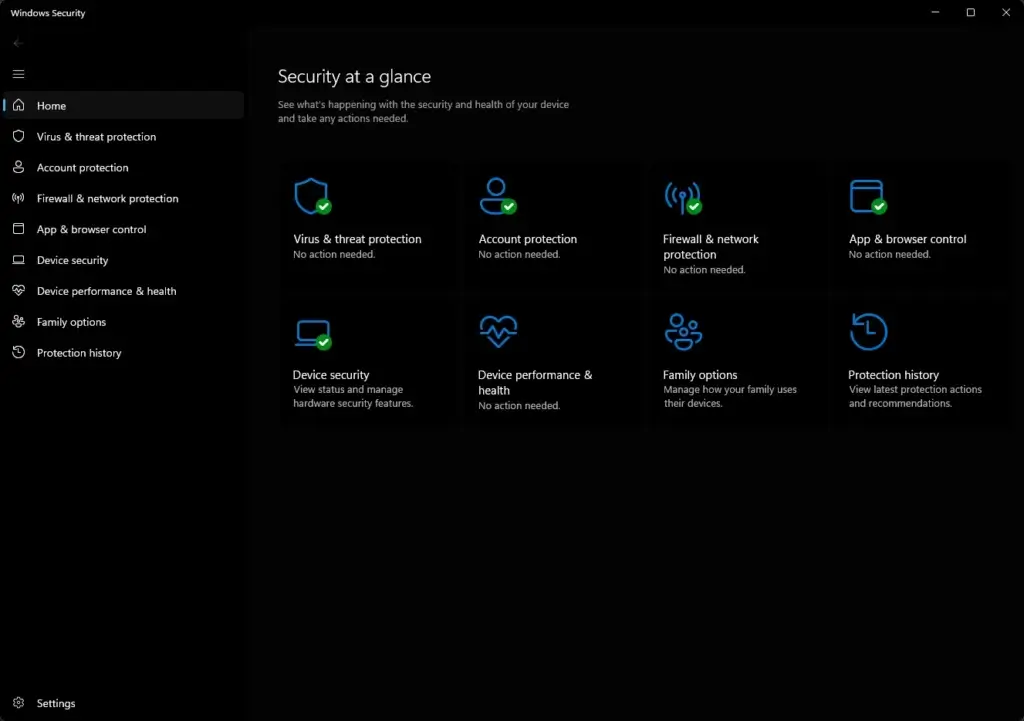
Windows Security also connects Defender with broader Windows security controls. These include device security settings, account protection, app and browser control, and security health visibility from one interface.
That integration is where Microsoft has an edge. Defender is not bolted onto Windows. It is part of the operating system, which means it benefits from tighter integration than many third-party suites can match.
Business Security Features
Defender for Business goes well beyond the free antivirus layer. Microsoft bundles in capabilities that matter for actual IT operations, including:
- Endpoint detection and response
- Attack surface reduction
- Threat and vulnerability management
- Automated investigation and remediation
- Cross-platform device coverage
- Centralized management for up to 300 users
This is the version of Defender that security buyers should take especially seriously. For SMBs already in the Microsoft ecosystem, it is one of the better-value endpoint security offers on the market.

Pros and Cons
Advantages and Disadvantages
Positive
✅ Free on Windows
✅ Strong modern lab results
✅ Excellent Windows integration
✅ Great SMB value in Microsoft 365 environments
Negatives
❌ The naming is still confusing
❌ Consumer extras are lighter
❌ Cross-platform consistency is uneven for consumers
❌ Some identity features are region-limited
Windows Defender is one of the easiest antivirus tools to recommend cautiously. It does many important things very well, but it is not automatically the best choice for every user.
Pros
1. Free on Windows
You do not need to buy, install, or maintain a separate antivirus product to get started. That lowers friction and reduces the chance that users run unprotected devices.
2. Strong modern lab results
Microsoft Defender has matured into a top-tier baseline antivirus product. Independent lab results now consistently place it in serious company, not in the “only better than nothing” tier.
3. Excellent Windows integration
Because Defender is part of the OS, it tends to feel lighter and more seamless than some third-party suites that layer on multiple add-ons and upsell screens.
4. Great SMB value in Microsoft 365 environments
For organizations already using Microsoft 365, Intune, Entra, or other Microsoft security tools, Defender becomes more than antivirus. It becomes part of a unified security posture.
Cons
1. The naming is still confusing
Windows Defender, Windows Security, Microsoft Defender, Defender for Business, and Defender for Endpoint are closely related but not identical. That makes buying and setup less clear than it should be.
2. Consumer extras are lighter than Norton or Bitdefender
If you want bundled VPN, password manager, rich parental controls, or broader privacy tools in one suite, Microsoft’s built-in offering is not as comprehensive.
3. Cross-platform consistency is uneven for consumers
The best Defender experience is still on Windows. Microsoft has improved cross-device support, but the platform story is more cohesive on the business side than on the home side.
4. Some identity features are region-limited
Identity theft and credit monitoring features in Microsoft Defender for Individuals are not universally available, which makes the premium consumer value proposition less consistent internationally.
Software Capabilities
Performance and User Experience
Performance has been one of the biggest changes in the public perception of Windows Defender. Years ago, people often described Microsoft’s built-in protection as something they replaced immediately. In 2026, that thinking is outdated.
System Impact
In practice, Microsoft Defender is usually unobtrusive on modern hardware. Because it is integrated directly into Windows, it avoids some of the extra overhead and clutter associated with third-party antivirus suites.
For most users, the experience is simple: Defender scans quietly in the background, updates automatically, and only interrupts when it needs to surface a real security issue or scan result.
Ease of Use
The Windows Security app is one of Defender’s best strengths. It is clean, easy to navigate, and centralized. From one place, you can check virus protection, firewall settings, browser protection, device security, and protection history.
That makes Defender especially good for non-technical users. It does not try to overwhelm you with dashboards, premium modules, and upgrade prompts. It gives you the essentials clearly.
Setup Experience
For consumers, there is effectively no setup at all because the protection is already present on Windows. That is a meaningful advantage. Good security is only useful when people actually keep it enabled.
For business deployments, the picture is more mixed. Defender for Business and Defender for Endpoint are much more powerful, but they can also become more complex. If your team already understands Microsoft 365 administration, setup feels logical. If not, there can be a learning curve.
Mobile and Cross-Device Experience
The Microsoft Defender app gives you a better multi-device story than the old Windows-only narrative. Still, Microsoft’s consumer cross-platform experience is best described as useful, not class-leading.
It is enough for households already paying for Microsoft 365. It is not the main reason I would choose Defender over a premium consumer competitor if cross-platform parity is your top requirement.
Lab Results
Independent Test Lab Results
This is the section that matters most if you want to judge Defender seriously. Reputation lags reality in antivirus. Microsoft Defender’s older reputation still follows it, but current independent testing paints a much stronger picture.
AV-Test Results
In AV-Test’s consumer Windows 11 testing, Microsoft Defender Antivirus scored 6/6 for Protection, 6/6 for Performance, and 6/6 for Usability. It blocked 100% of the zero-day and widespread malware samples used in that test cycle.
In AV-Test’s enterprise Windows 11 testing, Microsoft Defender Antivirus again posted 6/6 for Protection, 6/6 for Performance, and 6/6 for Usability. That is not a mediocre result dressed up nicely. It is a top-tier result.
AV-Comparatives Results
Microsoft also performed credibly in AV-Comparatives’ summary, where it received three Advanced+ Awards, two Advanced Awards, and one Standard Award. AV-Comparatives also highlighted its simple and unobtrusive interface.
That is important context. Microsoft Defender may not dominate every comparative chart the way the most premium suites sometimes do, but it is clearly operating in the top competitive tier now.
What These Results Mean
My take is simple: Windows Defender is no longer just acceptable because it is free. It is genuinely strong protection for many real users. If you are replacing it, you should do so because you want extra features, better cross-platform tools, or more business controls, not because the core antivirus is weak.
| Test Area | Microsoft Defender | Takeaway |
| Consumer AV-Test | 6/6, 6/6, 6/6 | Excellent baseline home protection |
| Enterprise AV-Test | 6/6, 6/6, 6/6 | Strong business-grade engine |
| AV-Comparatives | 3 Advanced+, 2 Advanced | Consistently competitive results |
Pricing
Pricing and Plans
Microsoft’s pricing depends heavily on which version of Defender you actually mean. This is another place where the branding causes unnecessary confusion.
Windows Defender Antivirus
The built-in Windows antivirus layer is free with Windows 10 and Windows 11. If all you need is core Windows protection, there is no extra charge.
Microsoft Defender for Individuals
The Microsoft Defender app for consumers is included with select Microsoft 365 subscriptions rather than sold as a standalone antivirus. Current public pricing for those plans is:
| Plan | Current Price | Best For |
| Microsoft 365 Personal | $99.99/year | One person already using Microsoft 365 |
| Microsoft 365 Family | $129.99/year | Households with multiple users |
| Microsoft 365 Premium | $199.99/year | Users wanting the higher-tier Microsoft bundle |
If you already subscribe to Microsoft 365, the added Defender app is a useful bonus. If you are buying Microsoft 365 only for Defender, the value equation becomes less obvious compared with a standalone antivirus suite.
Microsoft Defender for Business
For SMBs, Microsoft Defender for Business costs $3.00 per user/month when billed annually. It is also included in Microsoft 365 Business Premium, which is currently listed at $22.00 per user/month annually, or $18.79 per user/month for the no-Teams version.
Microsoft states Defender for Business supports up to 300 users and up to five devices per user, which is a strong value proposition for small organizations that want managed endpoint protection without buying a heavier enterprise suite.
Pricing Opinion
For consumers, Windows Defender is one of the best free antivirus values simply because the built-in protection is already strong. For businesses, Defender for Business is where Microsoft becomes especially competitive. At $3/user/month, it undercuts many standalone endpoint products while still delivering meaningful security capabilities.
Feedbacks
User Feedback and Reviews
User sentiment around Defender tends to follow the same pattern as the product itself: very positive on integration and value, more mixed on complexity and feature depth.
What Users Like
Business reviewers on G2 frequently highlight Defender for Endpoint’s ease of use, real-time protection, and strong integration with the Microsoft ecosystem. That last point matters. If your organization already runs Microsoft 365, Intune, or related Microsoft tools, Defender often feels more natural than a disconnected third-party stack.
Capterra reviewers also tend to praise its integration with Office 365 environments and the sense that it provides reliable threat management without forcing a full security-team-sized overhead.
Common Complaints
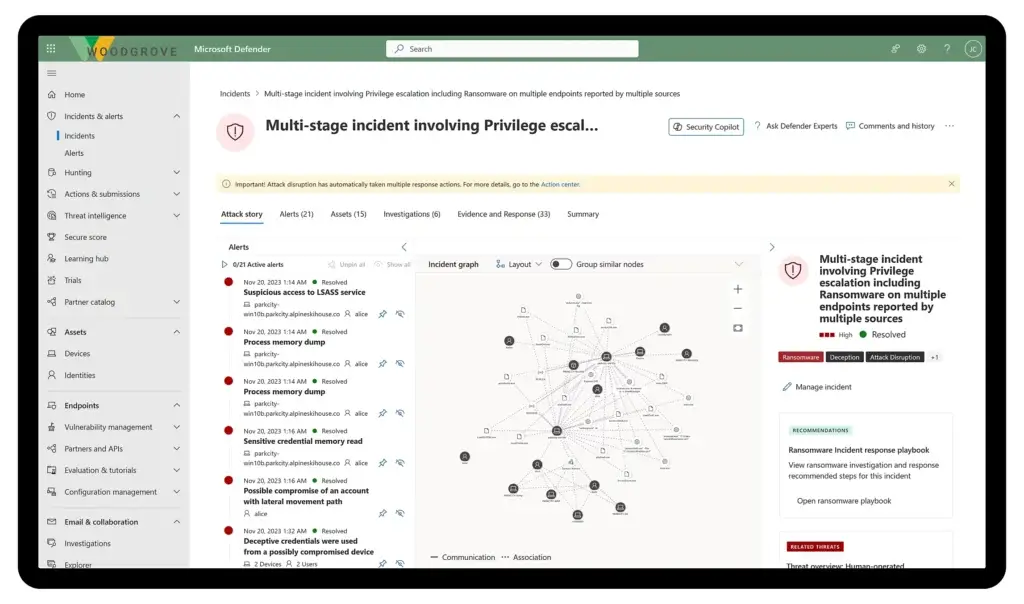
The most common complaints are not about the antivirus engine itself. They are about clarity, administration, and complexity. Some reviewers say setup can feel complicated if you are not already familiar with Microsoft’s ecosystem. Others note that incident alerts and reporting can require extra digging.
That lines up with my view. For home users, Defender is simple. For business users, Defender is powerful, but it becomes more Microsoft-shaped as you go deeper.
Windows Defender vs Alternatives
Comparison with Other Antivirus Software
Windows Defender is easy to recommend, but not always the best fit. The better question is what kind of protection experience you want.
Bitdefender – Best for users who want more security depth
Bitdefender is still the better choice if you want a premium consumer suite with richer controls, stronger extras, and a more security-focused package. Its anti-phishing and multi-layered protection remain excellent, and it generally offers a more complete out-of-the-box premium suite experience.
Choose Bitdefender if you want more than baseline protection. Choose Windows Defender if you want strong free security with no extra friction.
Norton – Best for families wanting an all-in-one suite
Norton usually beats Defender on bundled extras such as VPN access, broader identity protection positioning, and a more consumer-packaged “everything in one subscription” experience.
Choose Norton if you want a richer bundle. Choose Defender if you prefer a simpler, Windows-native setup and do not want extra software clutter.
Malwarebytes – Best for simple supplemental protection
Malwarebytes is attractive for users who care most about simplicity and cleanup. It is often used as a lightweight complement or alternative. Still, Defender has the advantage of being free and tightly integrated into Windows.
If you want the simplest “set it and forget it” built-in option, Defender usually wins on convenience. If you want a more focused anti-malware product with a different philosophy, Malwarebytes can still appeal.
Our recommendation
Choose Windows Defender if:
- You use Windows and want reliable free protection
- You do not need lots of premium extras
- You prefer native Windows integration
- Your business already lives in Microsoft 365
Choose a paid alternative if:
- You want bundled VPN, password manager, or richer privacy tools
- You run a mixed household and want stronger consumer cross-platform parity
- You prefer a more feature-heavy security suite
Conclusion
Is Windows Defender Worth It?
Yes, Windows Defender is worth using in 2026, and I would go further than that. For many Windows users, it is now the smartest default choice.
The reason is not just that it is free. It is that Microsoft Defender Antivirus has matured into a genuinely strong security engine, and Windows Security wraps it in a clean, native interface with SmartScreen, firewall controls, and device-level integration that many users will never need to outgrow.
For consumers, the biggest limitation is not protection quality. It is feature scope. If you want more privacy extras, richer identity tools, or a more polished premium suite across multiple device types, a paid competitor can still be the better product.
For businesses, however, Microsoft Defender for Business is one of the more underrated security buys on the market. At its price point, especially for Microsoft 365 customers, it is hard to ignore.
Who Should Choose Windows Defender?
You should choose Windows Defender if:
- You want a free antivirus that is actually good
- You mainly use Windows PCs
- You prefer built-in security over third-party software clutter
- You run a small business on Microsoft 365 and want strong value
You should consider alternatives if:
- You want a fuller consumer suite with more bundled extras
- You need a more polished cross-platform home experience
- You want a more feature-rich premium package from day one
Overall Rating
Personal Windows Use: 4.5 / 5
Excellent free protection, smart Windows integration, and strong modern lab performance.
Business Use: 4.4 / 5
Very strong value for Microsoft-centric SMBs, with real endpoint security depth at a competitive price.
Bottom Line
Windows Defender is no longer the antivirus you keep only because it is already there. It is a credible, high-quality security product that is good enough for many users and surprisingly compelling for many businesses.
Have more questions?
Frequently Asked Questions
Is Windows Defender good enough for most people?
Yes. For many Windows users, it is good enough. The built-in protection is strong, current lab scores are excellent, and the integration with Windows makes it easy to maintain.
Is Windows Defender free?
Yes. Microsoft Defender Antivirus is built into Windows 10 and Windows 11 at no extra cost. Some broader Microsoft Defender app features require a Microsoft 365 subscription.
Is Windows Defender the same as Microsoft Defender?
Not exactly. “Windows Defender” is the older common name people still use for Microsoft Defender Antivirus inside Windows Security. Microsoft Defender can also refer to the cross-device app for consumers and the business security lineup.
Does Windows Defender slow down your PC?
Usually not in any major way on modern hardware. In current AV-Test evaluations, Microsoft Defender posted strong performance scores, and in daily use it is generally lightweight.
Does Windows Defender protect against phishing?
Yes. SmartScreen and Windows Security help warn against malicious websites, unsafe apps, and suspicious downloads. On some platforms, the Microsoft Defender app also adds anti-phishing features.
Do you still need third-party antivirus with Windows Defender?
Not necessarily. You mainly need a third-party antivirus if you want more premium features, stronger cross-platform coverage, or a more comprehensive consumer suite.
What is Microsoft Defender for Business?
It is Microsoft’s SMB-focused endpoint security product for organizations with up to 300 users. It adds EDR, attack surface reduction, vulnerability management, and automated remediation beyond the free Windows antivirus layer.
How much does Microsoft Defender for Business cost?
Microsoft currently lists Defender for Business at $3.00 per user per month when billed annually. It is also included in Microsoft 365 Business Premium.
Is Microsoft Defender better than Bitdefender or Norton?
It depends on what you want. Defender is better as a free built-in Windows option. Bitdefender and Norton are usually better if you want more premium extras and a broader all-in-one suite.
Should small businesses use Windows Defender?
Small businesses should look beyond the free consumer layer and evaluate Microsoft Defender for Business instead. If they already use Microsoft 365, it is often one of the strongest-value security options available.