
Meta Title: What Is CMDB? Configuration Management Database Guide %currentyear%
Meta Description: Learn what a CMDB is, how it works, key benefits, implementation steps, best practices, and how to choose CMDB software.
Slug: what-is-cmdb
Introduction
Managing IT infrastructure is not just about knowing which devices, applications, and cloud services you own. It is about understanding how those components connect, support business services, and affect each other when something changes.
That is where a Configuration Management Database (CMDB) becomes valuable. A CMDB gives your IT team a structured way to document configuration items, map relationships, analyze service impact, and support better IT service management (ITSM).
If your team manages on-premises systems, SaaS tools, cloud infrastructure, remote endpoints, or a hybrid environment, a CMDB can help you move from reactive troubleshooting to more controlled IT operations. It gives you the context needed to resolve incidents faster, reduce change-related outages, and improve service reliability.
In this guide, you will learn what a CMDB is, how it works, how it supports ITIL and ITSM processes, what features to look for, and how different CMDB and IT management tools compare.
What Is a CMDB? Short Answer
A CMDB, or Configuration Management Database, is a centralized system that stores information about IT assets, also known as configuration items, and the relationships between them.
Instead of showing only a static asset inventory, a CMDB helps you understand how servers, applications, databases, endpoints, cloud resources, users, vendors, and business services depend on each other.
This matters because IT teams rarely manage assets in isolation. A failed server can affect an application. A database change can disrupt a customer portal. A misconfigured firewall rule can impact multiple services. A CMDB helps you see those connections before they become operational problems.
What Is a Configuration Management Database?
A Configuration Management Database is a structured repository that stores information about the components required to deliver IT services. These components are called configuration items, or CIs.
A CI can be almost anything your IT team needs to manage, monitor, support, or control. This can include physical assets, virtual resources, cloud services, applications, documentation, users, contracts, and business services.
The key difference between a CMDB and a simple inventory is context. A device list may tell you that a server exists. A CMDB tells you which application runs on that server, which database it connects to, who owns it, which business service depends on it, and what might happen if it fails.
This makes the CMDB especially useful for incident management, change management, problem management, security audits, compliance checks, and IT operations planning.
What Are Configuration Items?
A configuration item is any component that needs to be tracked because it contributes to an IT service or business process.
Common CI examples include:
- Servers, laptops, desktops, and mobile devices
- Network devices such as firewalls, routers, and switches
- Applications, SaaS platforms, and business systems
- Databases, middleware, APIs, and integrations
- Cloud resources such as virtual machines and storage
- Users, service owners, support groups, and vendors
- Contracts, licenses, warranties, and support agreements
- Business services such as email, payroll, CRM, and customer support
For a CMDB to be useful, each CI should include relevant attributes. These may include name, owner, location, lifecycle status, environment, business criticality, support group, vendor, version, warranty, license, and relationship data.
Why CMDB Relationships Matter
Relationships are what make a CMDB operationally valuable. They show how configuration items depend on one another.
For example, your customer support portal may depend on a web server, database, identity provider, payment gateway, monitoring tool, firewall, and cloud hosting environment. If one of those components changes or fails, the CMDB helps your team understand the possible impact.
With relationship mapping, you can answer questions such as:
- Which services will be affected if this server goes down?
- Which applications depend on this database?
- Who owns this configuration item?
- Which changes were made before the incident began?
- Which systems should be tested before a planned update?
This is where a CMDB becomes more than documentation. It becomes a decision-support layer for your IT team.
CMDB vs IT Asset Management: What Is the Difference?
A CMDB and IT Asset Management (ITAM) are closely related, but they are not the same thing.
ITAM focuses on the financial, contractual, and lifecycle side of assets. A CMDB focuses on service context, configuration details, and relationships.
| Feature | CMDB | IT Asset Management (ITAM) |
| Primary Purpose | Tracks configuration items and their relationships | Tracks asset ownership, lifecycle, and cost |
| Main Focus | Service impact, dependencies, configurations, and change risk | Procurement, contracts, licenses, warranties, and depreciation |
| Typical Users | ITSM, IT operations, service desk, security, and change teams | IT asset managers, procurement, finance, and compliance teams |
| Common Use Cases | Incident management, change management, impact analysis, root cause analysis | Asset inventory, software license management, audits, cost control |
| Data Relationship | Shows how assets connect and support services | Shows who owns assets and where they are in the lifecycle |
The best approach is not to choose one over the other. In a mature IT environment, ITAM and CMDB should work together.
Your ITAM data helps you understand what you own, what it costs, and whether it is compliant. Your CMDB helps you understand how those assets support services, where dependencies exist, and what risks may appear when something changes.
This is especially important if your organization follows ITIL and ITSM frameworks, where accurate configuration data supports better service delivery and operational control.
How Does a CMDB Work?
A CMDB works by collecting data from multiple IT sources, organizing that data into configuration items, mapping relationships, and connecting those records to ITSM workflows.
In practice, your CMDB should not be a manual spreadsheet. Modern IT environments change too quickly. Devices move, cloud services scale, SaaS applications are added, software versions change, and service dependencies shift over time.
A useful CMDB needs automation, governance, and integration.
1. Automated Discovery and Data Collection
The first step is discovering what exists in your environment. CMDB tools can collect data through multiple methods, including:
- Agent-based discovery from endpoints and servers
- Network scanning for connected devices
- Cloud integrations with AWS, Azure, Google Cloud, and SaaS tools
- RMM integrations for endpoint visibility
- ITSM and help desk data from tickets and changes
- Manual imports for contracts, ownership, or business context
Automated discovery helps reduce blind spots. However, automation alone is not enough. You still need data ownership, naming standards, reconciliation rules, and regular quality checks.
2. CI Classification and Data Modeling
Once assets are discovered, they need to be organized into CI classes. A CI class defines what type of item you are tracking and what attributes should be stored.
For example, a laptop may need fields such as serial number, assigned user, operating system, warranty date, and encryption status. A business application may need fields such as service owner, support group, criticality, hosting environment, and dependent systems.
A strong CMDB data model helps your team avoid messy records, duplicate assets, and inconsistent reporting.
3. Relationship Mapping and Impact Analysis
The next layer is relationship mapping. This is where the CMDB connects assets to each other and to the services they support.
For example:
- A server hosts an application
- An application depends on a database
- A database runs on a cloud instance
- A business service depends on multiple applications
- A user group relies on a specific service
When these relationships are mapped, your team can perform impact analysis before approving changes or during active incidents. This helps you reduce risk, prioritize response, and avoid unnecessary downtime.
4. Data Reconciliation and Governance
Most IT teams collect data from many sources. Without governance, the CMDB can quickly become inconsistent.
For example, one tool may call an asset “NYC-LAP-1045,” while another tool may identify it by serial number or hostname. Reconciliation rules help the CMDB determine whether those records refer to the same CI.
Good governance should define:
- Which system is the source of truth for each data field
- Who owns each CI class
- Which fields are required
- How duplicate records are handled
- How often data quality is reviewed
5. Integration with ITSM and IT Operations
A CMDB becomes most useful when it is connected to the workflows your team already uses.
Common integrations include:
- ITSM platforms: Incident, problem, change, request, and service management workflows
- RMM tools: Endpoint monitoring, patching, remote access, and device inventory
- Cloud platforms: Infrastructure, virtual machines, containers, storage, and identity services
- Security tools: Vulnerability scanners, SIEM platforms, and compliance systems
- DevOps tools: CI/CD pipelines, release tracking, and infrastructure-as-code systems
When your CMDB is connected to these systems, it can support faster incident triage, safer change approvals, stronger compliance reporting, and more accurate operational decisions.
✅ Compare ITSM Solutions in Our Full Guide
What Is CMDB in ITIL and ITSM?
In ITSM, a CMDB supports the processes your IT team uses to deliver and maintain services. In ITIL-based environments, configuration data helps teams understand service assets, dependencies, risks, and changes.
A CMDB can support several core ITSM practices:
Incident Management
When an outage or service degradation occurs, your team needs context quickly. A CMDB helps you see which systems are involved, what changed recently, and which services may be affected.
Problem Management
Recurring incidents often have deeper root causes. A CMDB helps you identify patterns across related assets, applications, vendors, or configuration changes.
Change Management
Before approving a change, your team can use the CMDB to understand risk. If a database update affects several critical applications, the change should be reviewed more carefully than a low-risk endpoint update.
Service Management
A CMDB connects technical assets to business services. This helps IT communicate in business terms, not just technical terms.
Instead of saying “Server 14 is down,” your team can say “The payroll service may be affected because one of its dependent servers is unavailable.”
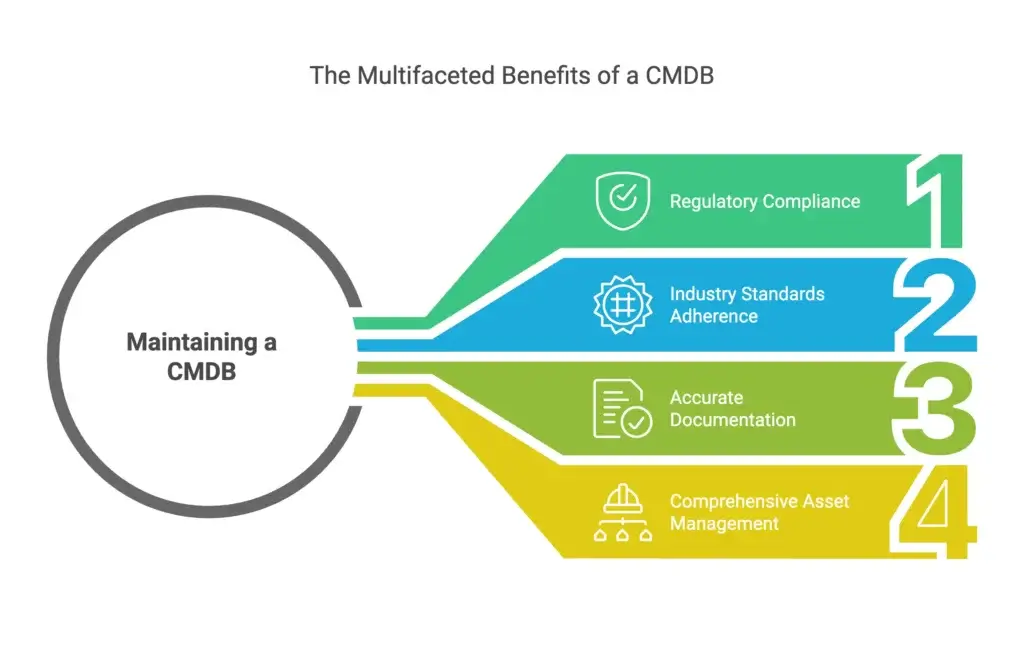
Top Benefits of Using a CMDB
Implementing a CMDB can improve visibility, reduce risk, and help your IT team make better operational decisions. The value comes from connecting asset data with service context.
1. Better Visibility Across Your IT Environment
A CMDB gives your team a clearer view of the systems, services, and dependencies you manage.
- See which assets support critical business services
- Identify unmanaged or poorly documented systems
- Reduce knowledge gaps between IT teams
- Understand ownership and support responsibilities
2. Faster Incident and Problem Resolution
During an incident, time is expensive. A CMDB helps your team understand what is affected, what depends on what, and where to investigate first.
This can reduce the time spent searching for asset details, ownership information, and dependency context. It also helps your team connect incidents to recent changes or known configuration issues.
3. Smarter Change Management
Many outages are caused by poorly planned changes. A CMDB helps your team assess risk before a change is approved.
With accurate CI relationships, you can identify affected services, notify the right stakeholders, schedule changes more carefully, and reduce failed deployments.
4. Stronger Security and Compliance
A CMDB supports security and compliance by helping your team understand what exists, who owns it, and whether it is configured correctly.
- Track unauthorized or unexpected configuration changes
- Identify unmanaged devices and shadow IT assets
- Support audit readiness with documented asset records
- Improve vulnerability prioritization based on business criticality
5. Better Cost Control and Asset Optimization
When your CMDB is connected to ITAM and software license data, you can identify redundant tools, unused licenses, aging hardware, and unnecessary infrastructure.
This helps IT leaders make better budget decisions and reduce waste without weakening service quality.
Key Features to Look for in CMDB Software
The right CMDB software depends on your environment, team maturity, and service management goals. A small IT team may need simple asset visibility and workflow automation, while an enterprise may need deep discovery, service mapping, governance, and advanced integrations.
Automated Discovery
Your CMDB should discover assets across endpoints, servers, cloud platforms, network devices, applications, and SaaS tools. Look for agent-based discovery, network scanning, cloud API integrations, and import options.
Dependency and Relationship Mapping
Relationship mapping is one of the most important CMDB features. It helps your team understand how assets connect and what may be affected during incidents or changes.
CI Customization
Your CMDB should allow custom CI classes, fields, and relationships. This helps you model your real environment instead of forcing your team into a rigid structure.
ITSM Workflow Integration
A CMDB should connect with incidents, service requests, problems, changes, approvals, and knowledge base workflows. This turns configuration data into practical service management context.
Reporting and Dashboards
Dashboards help your team monitor data quality, asset health, ownership, risk, lifecycle status, and service impact.
Security and Access Control
Look for role-based access control, audit logs, change history, permission management, and compliance reporting.
Data Quality and Reconciliation
A CMDB should help prevent duplicate records, outdated data, inconsistent naming, and conflicting information from different discovery sources.
Best CMDB Software Tools to Consider
Not every CMDB tool is built for the same type of IT team. Some platforms focus on enterprise service mapping. Others are better for ITSM workflows, endpoint visibility, infrastructure discovery, or flexible service operations.
For an educational article about CMDBs, it is best to compare tools by use case rather than presenting every tool as the same type of solution.
| Tool Type | Best Fit | Example Tools |
| Enterprise CMDB | Large organizations with complex services, governance, and ITOM needs | ServiceNow, BMC Helix |
| ITSM with CMDB | Teams that want service desk, ITAM, automation, and CMDB together | Freshservice, Jira Service Management, ManageEngine |
| Discovery and Dependency Mapping | Infrastructure-heavy teams that need deep technical discovery | Device42, Virima, Lansweeper |
| Endpoint and IT Asset Visibility | MSPs and IT teams focused on endpoints, devices, and operations | NinjaOne |
| Workflow-Based Service Management | Teams that need flexible workflows, dashboards, and service processes | monday Service |
1. Freshservice
Best for: IT teams that want an ITIL-aligned ITSM platform with CMDB, asset management, automation, and service management workflows.
Freshservice is one of the most natural fits for this article because it connects CMDB functionality directly with ITSM. It is especially relevant for teams that want to manage incidents, changes, assets, contracts, and service requests in one platform.
Freshservice can support automated discovery, CI tracking, relationship mapping, and service-aware workflows. This makes it a strong option for IT teams that want a practical CMDB without building a highly complex enterprise ITOM stack.
Best use case: You want a modern ITSM platform where CMDB data supports service desk, change management, incident management, and asset management.
Visit Freshservice | Read the full Freshservice review
2. NinjaOne
Best for: IT teams and MSPs that need real-time endpoint visibility, IT asset management, configuration control, and RMM-driven operations.
NinjaOne is not positioned in the same way as a traditional enterprise CMDB, but it is highly relevant for teams that need accurate endpoint and IT asset data. It gives IT teams visibility into managed and unmanaged devices, software, lifecycle details, patching, remote support, and automation.
This makes NinjaOne a good fit when your CMDB strategy starts with endpoints, asset visibility, and operational control. It can also support ITSM workflows by syncing asset data with service management platforms.
Best use case: You want endpoint-centric asset visibility and operational automation that can support CMDB or ITSM processes.
Visit NinjaOne | Read the full NinjaOne review
3. monday Service
Best for: IT and business teams that want flexible service workflows, visual dashboards, automation, and connected request management.
monday Service is best positioned as a flexible service management platform rather than a traditional CMDB-first system. It can be useful for teams that want to connect requests, workflows, assets, documentation, approvals, and operational processes in a visual workspace.
This makes monday Service a strong option for organizations that want service management to be easier to configure and more accessible across departments.
Best use case: You want a visual, flexible service management environment where IT inventory and workflow data can connect to service operations.
Visit monday Service | Read the full monday Service review
4. Jira Service Management Assets
Best for: Teams already using Jira, Atlassian tools, DevOps workflows, or agile service management.
Jira Service Management Assets can help teams connect assets and services to requests, incidents, problems, and changes. It is especially useful when IT, DevOps, and engineering teams already work inside the Atlassian ecosystem.
Best use case: You want CMDB-style asset and service context inside Jira-based workflows.
5. Device42
Best for: Infrastructure-heavy environments that need advanced discovery, dependency mapping, and hybrid IT visibility.
Device42 is useful when your biggest challenge is understanding infrastructure relationships across servers, applications, data centers, cloud resources, and network dependencies.
Best use case: You need deep discovery and dependency mapping to improve infrastructure planning, migrations, and service impact analysis.
How to Choose the Right CMDB Tool
Choosing a CMDB tool should start with your operational goals, not the software category. The right platform depends on what you need the CMDB to improve.
Choose Freshservice If You Need ITSM and CMDB Together
Freshservice is a strong fit if your team wants CMDB data connected to tickets, changes, assets, automation, and ITIL-aligned workflows.
Choose NinjaOne If Endpoint Visibility Is Your Starting Point
NinjaOne is a good choice if your main challenge is managing endpoints, devices, patching, configuration data, and IT asset visibility across distributed environments.
Choose monday Service If Flexibility and Workflow Design Matter Most
monday Service is a strong fit if you want service workflows that are easy to customize, visualize, automate, and connect across IT and business teams.
Choose ServiceNow If You Need Enterprise-Grade CMDB Governance
ServiceNow is better suited for large organizations with mature IT operations, service mapping, governance, and complex integrations.
Choose Device42 If Discovery and Dependency Mapping Are the Priority
Device42 is useful when you need detailed infrastructure discovery and dependency visibility across hybrid or data-center-heavy environments.
How to Implement a CMDB in Your Organization
CMDB implementation is not only a software project. It is an IT operations improvement project. The biggest mistake is trying to document everything immediately without clear scope, ownership, or governance.
Step 1: Define Your CMDB Scope
Start with the services and assets that matter most. Do not try to build a perfect CMDB for your entire organization on day one.
Ask questions such as:
- Which business services are most critical?
- Which assets cause the most incidents?
- Which changes carry the most risk?
- Which compliance requirements depend on accurate asset data?
Step 2: Define CI Classes and Required Fields
Before importing data, decide what types of CIs you will track and what fields matter for each CI type.
For example, laptops, servers, applications, cloud resources, and contracts should not all have the same data model.
Step 3: Identify Data Sources
Decide where each type of data should come from. Your endpoint data may come from RMM software. Your cloud data may come from cloud APIs. Your license data may come from ITAM tools. Your ownership data may come from HR or service management records.
Step 4: Automate Discovery
Use automated discovery wherever possible. Manual data entry is slow, inconsistent, and difficult to maintain.
Automated discovery can help you scan networks, identify endpoints, pull software inventory, sync cloud resources, and update asset records continuously.
Step 5: Map Relationships Gradually
Start with the relationships that support your most important use cases. For example, if your goal is better change management, prioritize relationships between applications, servers, databases, and business services.
Step 6: Create Governance Rules
A CMDB needs clear governance to remain accurate. Define who can create, edit, approve, merge, or retire CI records.
You should also define rules for duplicate detection, required fields, naming standards, ownership, and audit frequency.
Step 7: Connect the CMDB to ITSM Workflows
Your CMDB should not sit separately from daily IT work. Connect it to incident, change, problem, request, and asset management workflows.
This is where the CMDB becomes practical. Technicians can see affected CIs inside tickets. Change managers can review impact before approvals. IT leaders can report on service risk and asset health.
CMDB Best Practices
A CMDB delivers long-term value only when it is accurate, trusted, and actively used. These best practices can help you avoid common implementation problems.
Start with Critical Services
Do not try to document every CI immediately. Start with the services where downtime, compliance risk, or operational complexity is highest.
Use Automation, but Keep Human Governance
Discovery tools can collect data, but your team still needs to validate ownership, business criticality, service relationships, and lifecycle status.
Define Ownership for Every CI Class
Every CI type should have an owner. Without ownership, data quality usually declines over time.
Create Clear Naming Standards
Consistent naming helps prevent duplicate records and confusion across tools.
Review Data Health Regularly
Track metrics such as duplicate CIs, missing owners, stale records, incomplete fields, and unmapped relationships.
Connect the CMDB to Real Workflows
If the CMDB is not used in incident, change, problem, and asset workflows, it may become a passive database instead of an operational tool.
Common Challenges in CMDB Implementation
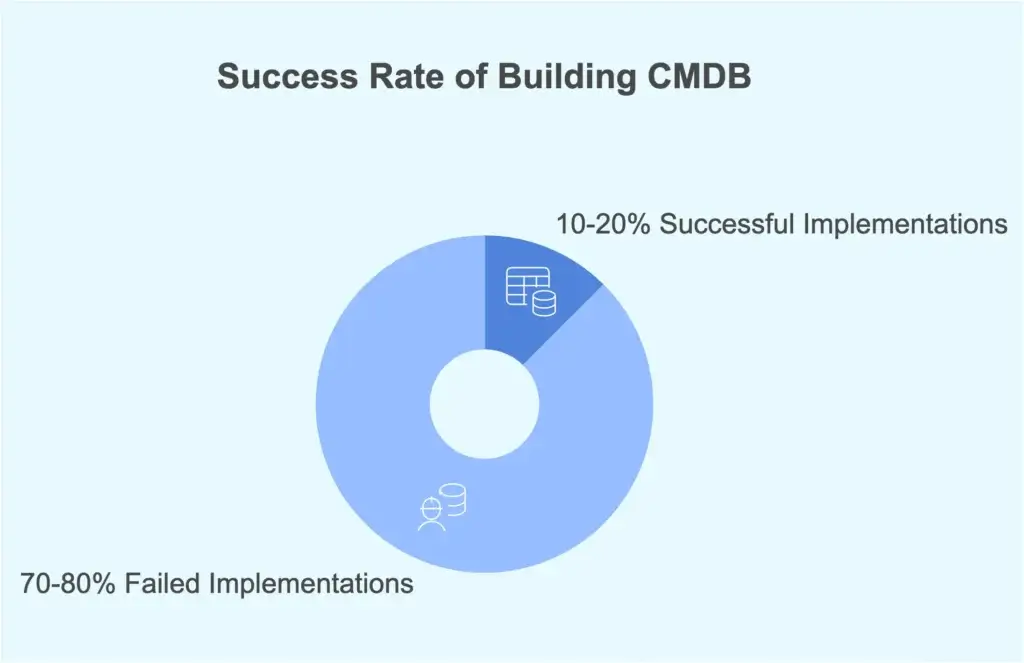
Even with a solid plan, CMDB implementation can face roadblocks. According to Gartner, 70-80% of organizations fail to build a proper CMDB due to challenges like data accuracy and integration issues. Here are the most common challenges and how to solve them.
Challenge #1: Keeping CMDB Data Accurate
Problem: IT environments change constantly. New devices are added, cloud resources are created, applications are updated, and ownership changes over time.
Solution: Use automated discovery, define data owners, and review CMDB data quality regularly.
Challenge #2: Overcomplicating the First Version
Problem: Many teams try to model every asset, dependency, and attribute from the start. This slows implementation and creates unnecessary complexity.
Solution: Start with critical services, then expand gradually as your process matures.
Challenge #3: Poor Relationship Mapping
Problem: A CMDB without relationships is mostly an inventory. It may not help much with impact analysis or change management.
Solution: Prioritize relationships that support incidents, changes, and business service visibility.
Challenge #4: Tool Silos
Problem: IT teams often use separate tools for endpoints, tickets, cloud resources, monitoring, security, and procurement.
Solution: Choose CMDB software with strong integrations and clear reconciliation rules.
Challenge #5: Low Team Adoption
Problem: If technicians do not trust CMDB data, they will avoid using it.
Solution: Make CMDB data visible inside the workflows your team already uses, especially incident and change management.
Challenge #6: Weak Governance
Problem: Without ownership and rules, the CMDB becomes outdated quickly.
Solution: Define who owns each CI class, who approves changes, and how data quality is measured.
CMDB Examples and Use Cases
A CMDB can support many IT operations use cases. The best use cases usually connect configuration data to a business or service outcome.
Incident Impact Analysis
If an application goes down, your CMDB can show which servers, databases, integrations, users, and services may be affected.
Change Risk Assessment
Before approving a change, your team can review dependent systems and determine whether the change needs extra testing, approvals, or communication.
Security and Vulnerability Prioritization
When a vulnerability is discovered, the CMDB can help you understand which affected assets support critical services.
Cloud Migration Planning
Before migrating workloads to the cloud, your team can use CMDB relationships to understand application dependencies and avoid migration surprises.
Software License and Compliance Reviews
When connected to ITAM data, a CMDB can help your team identify installed software, ownership, usage, and compliance risks.
Conclusion
A Configuration Management Database helps your IT team understand what you manage, how it connects, who owns it, and what may be affected when something changes.
For modern IT teams, this visibility is essential. Infrastructure is more distributed, services are more interconnected, and outages can affect users faster than ever. A CMDB gives your team the context needed to manage that complexity with more control.
The most successful CMDBs are not built as static databases. They are built as living systems connected to ITSM, ITAM, RMM, cloud, security, and service workflows.
If you want an ITSM-centered CMDB, Freshservice is one of the strongest options to review. If endpoint visibility and operational automation are your priority, NinjaOne is worth considering. If you need flexible service workflows and visual dashboards, monday Service may be a practical fit.
For a broader comparison, you can also review our full guide to the best ITSM software.
FAQ
What is a CMDB?
A CMDB, or Configuration Management Database, is a centralized system that stores information about IT assets, configuration items, and the relationships between them. It helps IT teams understand service dependencies, assess risk, and manage IT operations more effectively.
What is a CMDB used for?
A CMDB is used for incident management, change management, problem management, asset visibility, compliance support, and service impact analysis. It gives IT teams the context they need to understand how systems connect and what may be affected when something changes.
What does CMDB stand for?
CMDB stands for Configuration Management Database. It is commonly used in ITSM and ITIL environments to track configuration items and their relationships across IT services.
What is a configuration item in a CMDB?
A configuration item, or CI, is any component that needs to be managed to deliver an IT service. Examples include servers, laptops, applications, databases, cloud resources, network devices, contracts, users, and business services.
How is a CMDB different from IT asset management?
IT asset management focuses on asset ownership, lifecycle, cost, contracts, and licenses. A CMDB focuses on configuration details, service relationships, dependencies, and operational impact. The two should work together in a mature IT environment.
Why is relationship mapping important in a CMDB?
Relationship mapping shows how configuration items depend on each other. This helps IT teams understand service impact, troubleshoot incidents faster, assess change risk, and identify affected systems during outages or planned maintenance.
What are the biggest CMDB implementation challenges?
The biggest CMDB implementation challenges include inaccurate data, duplicate records, weak governance, poor relationship mapping, tool silos, and low team adoption. These issues can be reduced with automation, ownership, data standards, and regular quality reviews.
What features should CMDB software include?
CMDB software should include automated discovery, relationship mapping, CI customization, ITSM integration, reporting, access control, audit logs, data reconciliation, and support for cloud, endpoint, and hybrid IT environments.
Which CMDB tool is best for ITSM?
Freshservice is a strong option for teams that want ITSM and CMDB functionality together. ServiceNow is better suited for large enterprises, while Jira Service Management can work well for teams already using Atlassian tools.
Can small businesses use a CMDB?
Yes. Small businesses can use a CMDB if they need better visibility into IT assets, services, and dependencies. Smaller teams should start with critical assets and use simple workflows before expanding into more advanced relationship mapping and governance.