
Introduction
If you run a service-based business, your CRM should do more than store contacts. It should help you capture leads, send polished proposals, manage contracts, collect payments, and keep every client project moving without constant manual work.
That is where HoneyBook stands out. In this HoneyBook review, you will see how the platform works, who it is best for, how much it costs in 2026, and where it fits compared with more traditional CRM tools.
HoneyBook is especially useful if your client journey looks like this: inquiry, consultation, proposal, contract, invoice, payment, and project delivery. If you are a freelancer, consultant, coach, photographer, designer, event professional, or small agency, it can give you a more organized and professional way to manage your business.
Quick Summary
If you want the quick version, HoneyBook is not a classic sales CRM for large sales teams. It is a client relationship platform built around the full service business workflow, from lead capture to payment.
| Category | HoneyBook Details |
| Best For | Freelancers, consultants, coaches, creatives, event professionals, and small service businesses |
| Starting Price | Plans start at $29/month when billed yearly |
| Free Trial | 30-day free trial, no credit card required |
| Core Features | CRM, lead forms, Smart Files, proposals, contracts, invoices, payments, automations, scheduling, and client portal |
| Best Feature | All-in-one client workflow from inquiry to payment |
| Main Limitation | Less suitable for complex B2B sales teams that need forecasting, territories, and advanced pipeline analytics |
Key Features
HoneyBook’s Software Specification
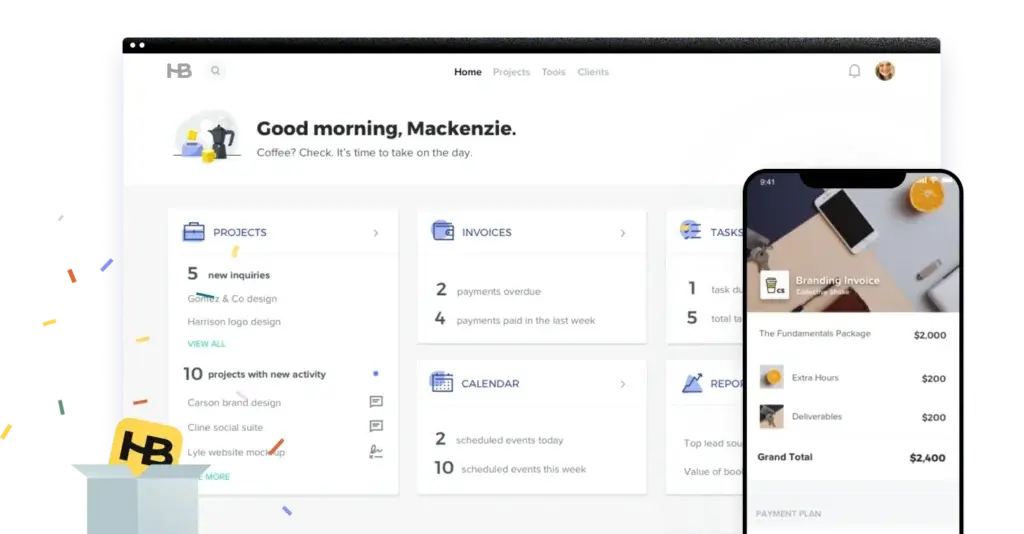
HoneyBook combines CRM, booking, billing, and workflow automation into one workspace. Instead of forcing you to stitch together several tools, it helps you manage the full client journey from one place.
Lead Forms and Contact Forms
Lead capture is one of HoneyBook’s stronger CRM features. You can create forms that collect inquiries from your website, qualify potential clients, and move prospects into your workflow faster.
- Use lead forms to collect inquiries and service requests.
- Capture client details before the first consultation.
- Start a more structured sales process without using a separate form builder.
Client and Project Management
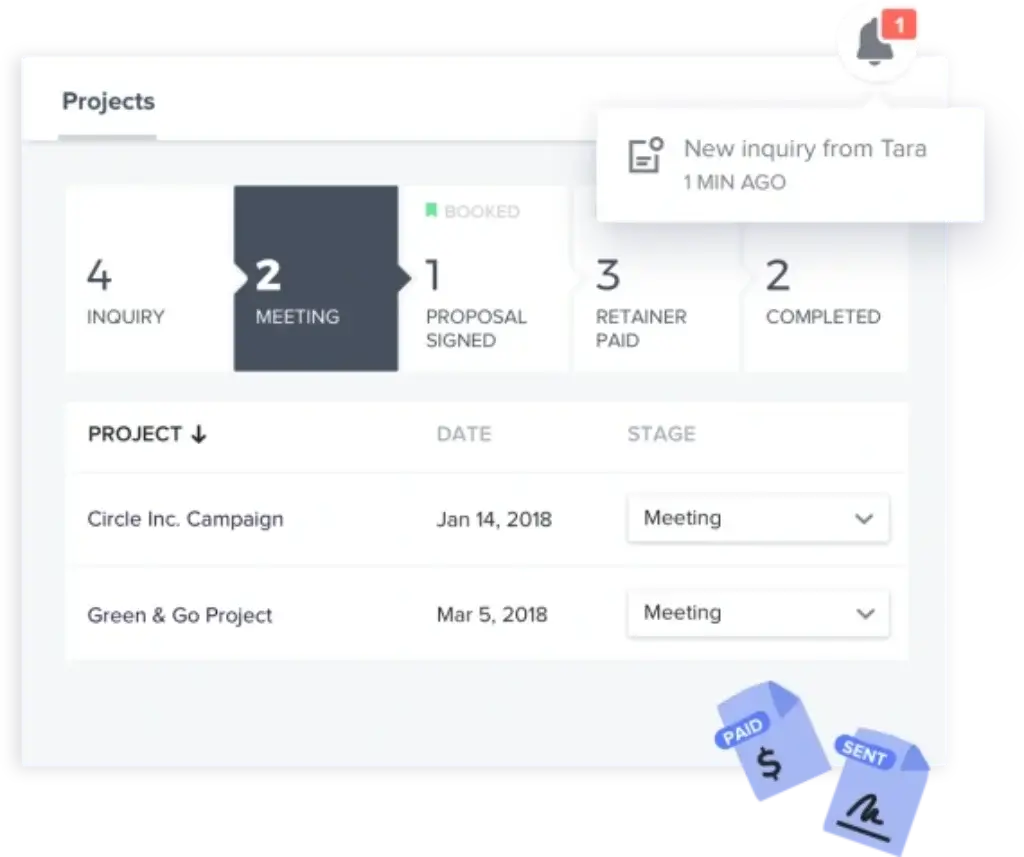
HoneyBook helps you track leads, clients, and active projects in a visual pipeline. This is useful when you need to see which clients are still in inquiry, which ones need a proposal, and which projects are already booked.
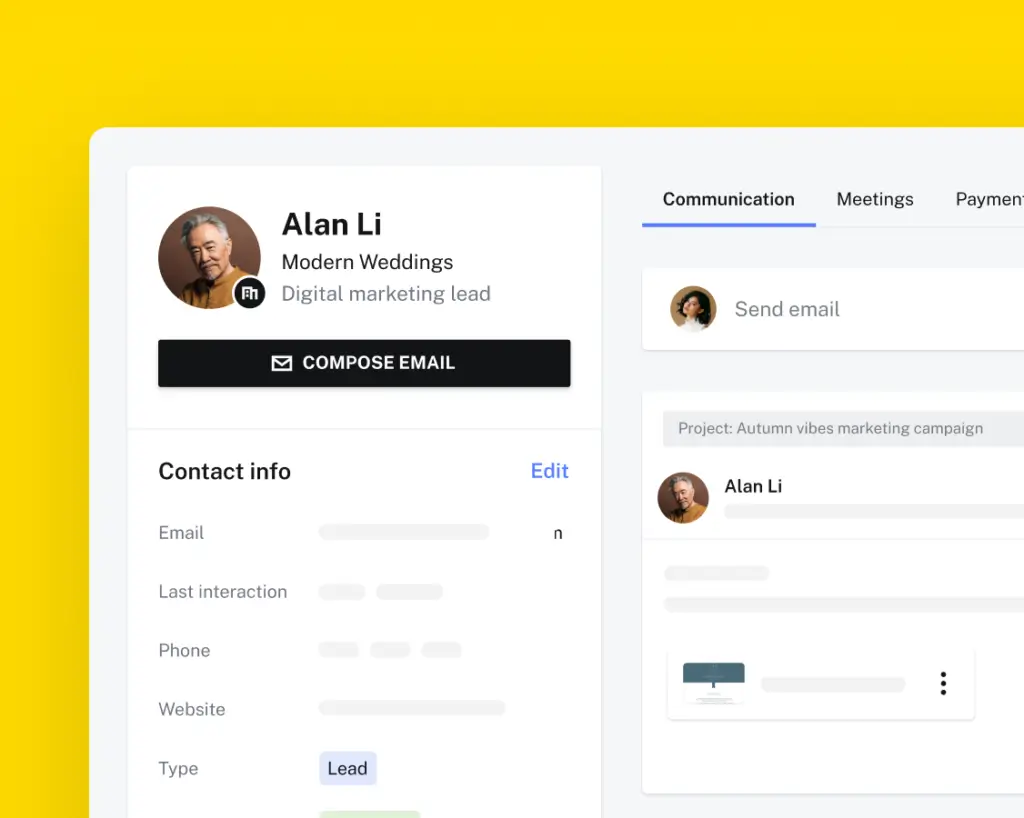
- Track leads, clients, projects, files, tasks, and communication in one place.
- Move projects through stages such as inquiry, proposal, booked, paid, and completed.
- Keep client notes and project details organized without relying on scattered emails.
Scheduling and Calendar
HoneyBook includes scheduling tools that reduce the back-and-forth of booking meetings. This is useful for discovery calls, consultations, project check-ins, and paid sessions.
- Let clients choose meeting times based on your availability.
- Sync scheduling activity with your calendar.
- Use reminders to reduce missed calls and late responses.
Payments and Invoicing
HoneyBook lets you accept online payments by card and ACH bank transfer. You can also create payment schedules, send reminders, and give clients a simpler checkout experience.
- Send invoices and collect payments online.
- Set payment schedules for deposits, milestones, and final balances.
- Track payment activity without switching between tools.
HoneyBook AI
HoneyBook now positions itself as an AI-powered client relationship platform. Its AI features are designed to reduce admin work and help you respond faster without losing your personal tone.
- Generate email drafts based on context, tone, and industry.
- Review project recaps before meetings or deadlines.
- Use AI support to improve daily productivity and client follow-up.
Automations 2.0
HoneyBook’s Automations 2.0 makes the platform more useful than a basic freelancer CRM. You can build workflows with triggers, actions, waits, and conditions, which gives you more control over repetitive client tasks.
- Automate follow-up emails, file delivery, reminders, and project updates.
- Use conditions to create more personalized workflows.
- Reduce manual work across onboarding, booking, invoicing, and follow-up.
Client Portal
The client portal gives your clients one place to access files, messages, invoices, contracts, and project details. This improves the client experience and reduces repeated questions about where things are stored.
- Keep important client documents in one organized space.
- Make your business feel more professional and structured.
- Give clients a self-service experience without building a custom portal.
Integrations
HoneyBook connects with several useful business tools, although its integration ecosystem is not as deep as larger CRM platforms like HubSpot or Salesforce.
- Connect with tools such as QuickBooks Online, Google Calendar, Gmail, Zoom, Calendly, Zapier, Outlook, iCloud, Google Contacts, and Flodesk.
- Use Zapier when you need to connect HoneyBook with more apps.
- Sync financial activity with accounting tools on supported plans.
Smart Files, Proposals, Contracts, and Invoices
Smart Files are one of the main reasons HoneyBook works so well for service businesses. You can combine brochures, questionnaires, service selections, contracts, invoices, and payment steps into one branded client experience.
- Create interactive proposals that include services, pricing, contracts, and payments.
- Let clients review, sign, and pay from the same flow.
- Use templates to avoid rebuilding the same documents for every client.
Key Benefits
Benefits of Using HoneyBook CRM
HoneyBook’s biggest benefit is that it gives your business a reliable client process. Instead of trying to remember who needs a proposal, who has signed, and who still owes money, you can manage the entire client journey in one structured system.
🕒 Save Time with Automation and Templates
You can stop rewriting the same emails, contracts, invoices, and onboarding documents. HoneyBook lets you build repeatable workflows that support your business every time a new client comes in.
- Create reusable templates for proposals, invoices, questionnaires, emails, and contracts.
- Automate follow-ups, reminders, file sending, and task creation.
- Use AI support to draft emails and prepare faster for client work.
🎯 Deliver a More Professional Client Experience
HoneyBook helps you look organized from the first touchpoint. Clients can review your services, sign documents, and pay from a polished branded flow instead of receiving separate links and attachments.
- Send branded proposals and Smart Files that feel modern and easy to use.
- Give clients a clear path from inquiry to booking.
- Use the client portal to keep important files and payments easy to find.
⚡ Get Paid Faster and More Reliably
For many service businesses, cash flow depends on how quickly clients sign and pay. HoneyBook reduces friction by putting proposals, contracts, invoices, and payments closer together.
- Accept card payments and ACH bank transfers.
- Create payment schedules for deposits, retainers, and milestones.
- Use automated reminders to reduce manual payment follow-up.
🧠 Stay Organized as Your Client List Grows
Once you manage more than a few clients at the same time, simple spreadsheets and inbox folders start to break down. HoneyBook gives you a visual place to track what is happening with every client and project.
- See where each project stands in your pipeline.
- Keep client conversations, files, tasks, and payments connected.
- Reduce missed follow-ups and scattered project details.
🚀 Grow Without Creating More Admin Chaos
HoneyBook is not a replacement for strategy, but it gives you the operational structure to support growth. You can create better client experiences without hiring an operations manager too early.
From a CRM expert perspective, HoneyBook is strongest when your customer journey is project-based rather than sales-rep-based. If your workflow is inquiry, proposal, contract, invoice, payment, and delivery, HoneyBook fits naturally. If your workflow is outbound selling, forecasting, territory planning, and account management, a traditional CRM will likely be a better fit.
Pros and Cons
Advantages and Limitations of Using HoneyBook CRM
HoneyBook is strongest when you sell services rather than products. It is built for businesses where every new client needs a clear process, a polished proposal, a signed agreement, and a smooth payment experience.
Positive
✅ Excellent all-in-one workflow for service businesses
✅ Strong proposal, contract, invoice, and payment tools
✅ Easier to use than many traditional CRMs
✅ Useful automation and AI features for admin work
Negative
❌ Not ideal for complex B2B sales teams
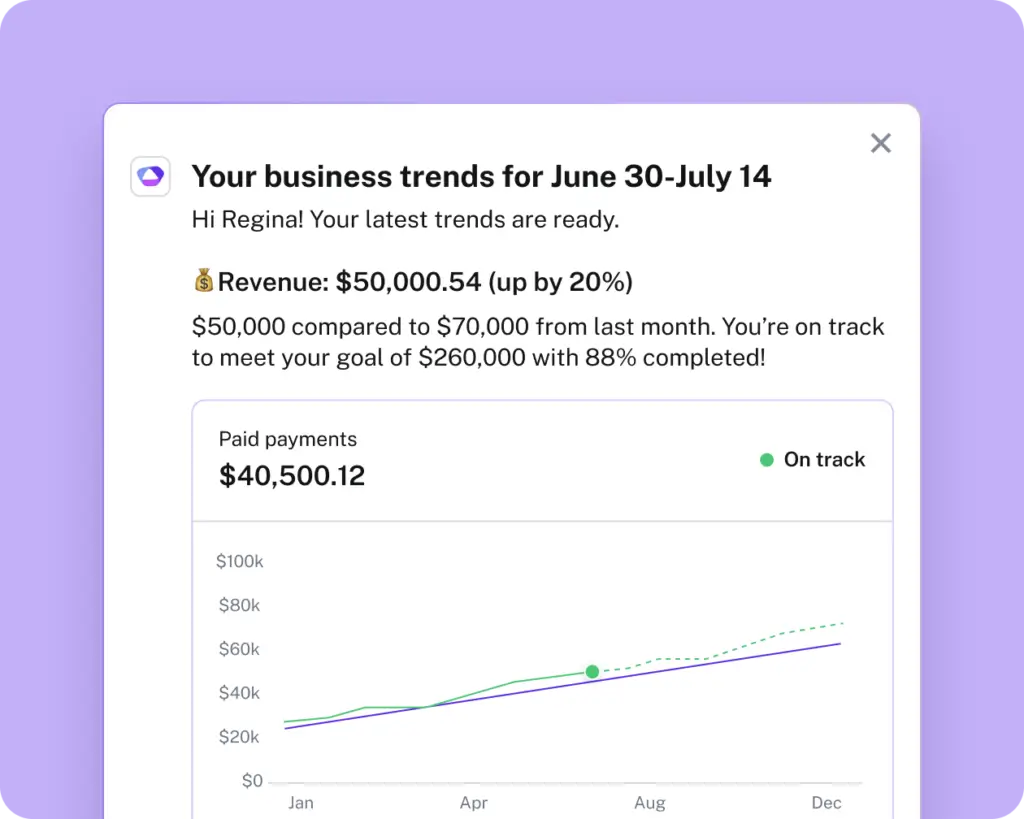
❌ Advanced reporting is limited compared with dedicated CRMs
❌ Some key features require higher-tier plans
❌ Payment processing fees add to the total cost
✅ Pros
- Excellent all-in-one workflow for service businesses
HoneyBook brings client management, proposals, contracts, invoices, payments, scheduling, and automation into one platform. - Strong proposal, contract, invoice, and payment tools
You can move clients from interest to booking without sending them through several disconnected apps. - Easier to use than many traditional CRMs
The interface is clean and simple, which makes it a good fit if you do not want a heavy enterprise CRM setup. - Useful automation and AI features
Automations, templates, reminders, and AI email drafts help reduce repetitive admin work.
❌ Cons
- Not ideal for complex B2B sales teams
HoneyBook is not built for territory management, sales forecasting, lead scoring, or large sales operations. - Advanced reporting is limited compared with dedicated CRMs
You get useful business reports, but not the depth of analytics you would expect from HubSpot, Salesforce, Pipedrive, or monday CRM. - Some key features require higher-tier plans
Automations, QuickBooks Online integration, SMS reminders, and more live lead forms are tied to higher plans. - Payment processing fees add to the total cost
If you process a high volume of payments, card and ACH fees should be part of your cost calculation.
User Experience
User Interface and Experience
HoneyBook feels lighter and more focused than a traditional CRM. Instead of overwhelming you with sales modules, territory settings, and complex dashboards, it gives you the tools you need to manage client work quickly.
🎨 Clean, Visual Layout
The interface is organized around clients, projects, payments, and tasks. You can quickly see what needs attention without digging through multiple menus.
This design works well for service providers who need clarity more than deep CRM customization. If you prefer a simple daily workspace, HoneyBook is easy to understand.
📱 Strong Mobile Experience
HoneyBook’s mobile app is helpful if you work from client locations, events, shoots, meetings, or coworking spaces. You can respond to inquiries, send files, check payment status, and manage client communication from your phone.
- Respond to new leads while you are away from your desk.
- Send proposals, contracts, and invoices faster.
- Check project activity and client updates on the go.
🚀 Easier Setup Than Most CRMs
HoneyBook is easier to set up than many flexible CRM systems. You can start with templates, customize your client workflow, connect basic integrations, and begin sending professional files without a long implementation process.
That said, simplicity has a tradeoff. If you need detailed custom objects, advanced permissions, custom reporting layers, or deep sales operations workflows, you may outgrow HoneyBook.
🤝 Better for Clientflow Than Sales Operations
HoneyBook is best when your CRM needs to support a service workflow. It is less ideal if your main priority is managing sales reps, forecasting revenue, scoring leads, or tracking enterprise accounts.
In practical terms, HoneyBook feels more like a client operations hub than a sales department CRM. For the right user, that is exactly the point.
Business size fit
HoneyBook for Different Business Sizes
HoneyBook is best suited for solo professionals and small service teams. It gives you enough structure to look professional and stay organized without forcing you into a complicated CRM setup.
For larger teams, the fit depends on how complex your sales and delivery process is. A small agency with a simple client workflow may use HoneyBook well, while a larger B2B sales team will likely need a more advanced CRM.
| Business Size | HoneyBook Fit | Best Use Case | Consider Another Tool If… |
| Solo Professionals | ✅ Excellent | Managing clients, proposals, contracts, invoices, and payments | You only need a basic contact database |
| Small Teams | ✅ Strong | Coordinating simple client workflows and shared project activity | You need advanced roles, territories, or sales reporting |
| Growing Agencies | ⚠️ Moderate | Handling service packages, onboarding, client communication, and payment collection | You need deeper project management or delivery tracking |
| Large Sales Teams | ❌ Weak | Not the ideal target audience | You need forecasting, lead scoring, territory management, and sales operations tools |
Pricing and Plans
How Much Does HoneyBook Cost?
HoneyBook now offers three main plans: Starter, Essentials, and Premium. This gives you a clearer path depending on whether you need basic client management, automation, or team-level features.
All plans include unlimited clients and projects, and HoneyBook offers a 30-day free trial with no credit card required. You should still check the official pricing page before buying, because discounts and monthly rates can change.
| Plan | Monthly Price | Yearly Price | Best For | Key Features |
| Starter | $36/month | $29/month billed yearly | Solo professionals starting with client workflows | Unlimited clients and projects, invoices, payments, proposals, contracts, calendar, templates, client portal, basic reports, up to 2 live lead forms, HoneyBook AI |
| Essentials | $50.15/month | $36.75/month billed yearly | Businesses that need automation and accounting sync | Everything in Starter, plus scheduler, automations, QuickBooks Online integration, up to 2 team members, up to 10 live lead forms, SMS reminders, standard reports |
| Premium | $109.65/month | $81.75/month billed yearly | Teams that need more scale and support | Everything in Essentials, plus unlimited team members, priority support, multiple companies, advanced reporting, unlimited live lead forms |
You should also factor in payment processing fees. HoneyBook lists card processing fees starting at 2.7% + 10¢, while ACH bank transfers are 1.5%. If you invoice high-value projects, these fees can affect the real cost of using the platform.
Security and Compliance
Protection for Your Data
When you manage contracts, payments, client details, and business banking information, security matters. HoneyBook includes several safeguards to help protect your account, clients, and payment activity.
- ✅ Secure payment handling: HoneyBook supports online card and ACH payments inside the platform.
- ✅ Business and bank verification: HoneyBook verifies business and banking details to support fraud prevention, payout accuracy, and Know Your Customer requirements.
- ✅ Client portal access: Clients can access project files, invoices, and contracts through a controlled online experience.
- ✅ Account ownership controls: Sensitive banking and business details are tied to account-level permissions.
- ✅ Privacy controls: HoneyBook publishes legal and privacy documentation explaining how it handles business, payment, and transactional data.
- ✅ Security resource: HoneyBook links to a dedicated security resource from its official website footer.
🔐 Bottom line: HoneyBook gives small businesses a safer and more professional way to manage client documents and payments than manual emails, PDFs, and disconnected payment links.
Comparison
HoneyBook Alternatives
HoneyBook is a strong choice for service businesses, but it is not the right CRM for every company. If your needs are more sales-driven, marketing-heavy, or operations-focused, another tool may fit better.
HoneyBook vs. Pipedrive
HoneyBook is better for service booking and client payment workflows. Pipedrive is better if you need a dedicated sales pipeline CRM with deal tracking and sales activity management.
HoneyBook vs. HubSpot
HoneyBook is simpler for freelancers and service providers. HubSpot CRM is stronger for marketing automation, lead nurturing, email campaigns, and larger go-to-market teams.
HoneyBook vs. monday CRM
HoneyBook is better for solo professionals and small service businesses. monday CRM is better for teams that want customizable workflows, broader collaboration, and more flexible pipeline management.
HoneyBook vs. Bonsai
HoneyBook is stronger for client workflows, proposals, booking, and payments. Bonsai can be a good fit for freelancers who want contracts, proposals, time tracking, and finance tools in one place.
If you are still comparing options, review our full guide to the best CRM software to see which platform fits your team size, workflow, and budget.
Conclusion
Final Thoughts
⭐ Overall Rating: 7.5/10
Choosing a CRM like HoneyBook is not just about managing contacts. It is about building a smoother client journey, reducing admin work, and giving your business a more professional operating system from inquiry to payment.
🔍 What You’re Really Getting
Here’s a quick recap of what HoneyBook brings to your business:
- A client-focused CRM for leads, projects, and communication
- Smart Files, proposals, contracts, invoices, and payments in one workflow
- Automation tools that reduce repetitive follow-ups and reminders
- HoneyBook AI for email drafts, project recaps, and productivity support
- A client portal that keeps important documents and payment links organized
- A mobile-friendly experience for managing your business on the go
When used well, HoneyBook becomes more than a CRM. It becomes the central workspace for running a service-based business with less admin friction.
👥 Is It the Right Fit?
HoneyBook is a strong fit if you are a freelancer, consultant, coach, creative professional, event service provider, or small service-based team. It works especially well when your workflow depends on proposals, contracts, scheduling, invoices, and payments.
It is not the best fit if you need complex sales forecasting, lead scoring, call tracking, account management, or enterprise-grade reporting. In that case, you should compare it with tools like HubSpot, Pipedrive, Salesforce, or monday CRM.
🧠 Final Word from a CRM Expert
After reviewing many CRM platforms, I would position HoneyBook as one of the best tools for clientflow management, not as a classic sales CRM. That distinction matters.
If you sell services and want to look more professional, follow up faster, get paid more reliably, and reduce admin work, HoneyBook is a practical and well-focused choice. If you are building a sales department with reps, territories, forecasts, and detailed analytics, choose a more traditional CRM.
Frequently Asked Questions
Have more questions?
What is HoneyBook used for?
HoneyBook is used to manage client relationships, proposals, contracts, invoices, payments, scheduling, automation, and project communication. It is best for service-based businesses that need one platform for the full client journey.
Is HoneyBook a real CRM?
Yes. HoneyBook is a CRM, but it is not a traditional sales CRM for large sales teams. It is better described as a client relationship platform for service businesses, freelancers, consultants, creatives, and small teams.
Who is HoneyBook best for?
HoneyBook is best for freelancers, coaches, consultants, designers, photographers, event professionals, marketers, and small service businesses that manage client projects from inquiry to payment.
How much does HoneyBook cost?
In 2026, HoneyBook plans start at $29/month when billed yearly. The main plans are Starter, Essentials, and Premium. Pricing can change, so it is best to confirm the latest rates on the official HoneyBook pricing page before subscribing.
Does HoneyBook offer a free plan?
HoneyBook does not offer a free forever plan. However, it offers a 30-day free trial with no credit card required, which gives you time to test the platform before choosing a paid plan.
What is included in HoneyBook Starter?
HoneyBook Starter includes unlimited clients and projects, invoices and payments, proposals and contracts, calendar, professional templates, client portal, basic reports, up to 2 live lead forms, and HoneyBook AI.
Does HoneyBook support contracts and invoices?
Yes. HoneyBook lets you create and send contracts, invoices, proposals, and payment schedules. Clients can sign and pay online, which helps reduce delays and manual follow-up.
Does HoneyBook integrate with QuickBooks?
Yes. HoneyBook supports QuickBooks Online integration on higher-tier plans, making it easier to sync client payments and financial activity with your accounting workflow.
Is HoneyBook good for agencies?
HoneyBook can work well for small agencies with simple service workflows. However, agencies that need deep project management, advanced permissions, delivery tracking, or complex sales reporting may need a more flexible CRM or work management platform.
What are the best HoneyBook alternatives?
The best HoneyBook alternatives depend on your needs. Pipedrive is better for sales pipelines, HubSpot is better for marketing and lead nurturing, monday CRM is better for customizable team workflows, and Bonsai or Dubsado may fit freelancers who want different levels of customization.