
Introduction
Choosing the right CRM is not just about storing contacts. It is about helping your sales team manage leads, follow up faster, understand pipeline health, and close more deals without creating unnecessary admin work.
That is where Nutshell CRM stands out.
Nutshell is a sales-focused CRM built for small and midsize B2B teams that want clear pipeline management, email sync, automation, reporting, AI tools, and lead engagement features in one platform. It is simple enough for teams moving away from spreadsheets, but it has enough depth for growing sales organizations that need structure, visibility, and better follow-up habits.
In this Nutshell CRM review for 2026, you will learn where the platform performs well, where it has limitations, how much it costs, and how it compares with alternatives like HubSpot, Pipedrive, and monday CRM.
Here is the short version. Nutshell is a strong option if you want a clean, practical CRM that your team can adopt quickly. It is not the most advanced enterprise CRM, and some growth tools are sold as add-ons, but it offers an excellent balance of usability, sales features, and transparent pricing for SMB sales teams.
| Category | Nutshell CRM Review Summary |
| Best For | Small and midsize B2B sales teams |
| Starting Price | $13/user/month, billed annually |
| Free Trial | 14 days, no credit card required |
| Core Strengths | Pipeline management, email sync, reporting, automation, support |
| Main Limitation | Advanced customization and add-ons can increase total cost |
| Best Alternative | monday CRM for workflow flexibility, HubSpot for marketing automation, Pipedrive for sales pipeline simplicity |
What Is Nutshell CRM?
Nutshell CRM is a customer relationship management platform designed to help B2B sales teams manage contacts, track deals, automate follow-ups, create performance reports, and connect sales activity with marketing and engagement tools.
The platform was founded in Ann Arbor, Michigan, and has been serving sales teams since 2009. Nutshell was acquired by WebFX in 2022, which helped strengthen its positioning as a CRM and email marketing platform for B2B companies that want better revenue visibility.
Nutshell is not trying to be a complex enterprise CRM like Salesforce. Its main advantage is that it gives you the core sales features most SMB teams need, without forcing you to hire a dedicated CRM administrator.
Who Is Nutshell CRM Best For?
Nutshell CRM is best suited for:
- B2B sales teams that need a clean and visual sales pipeline
- Small businesses moving away from spreadsheets
- SMBs that rely heavily on email follow-ups and sales outreach
- Teams that want CRM, forms, landing pages, chat, and reporting in one place
- Companies that value fast onboarding and helpful customer support
It is less ideal if you need deep enterprise customization, advanced multi-department workflows, or a CRM that also works as a complete project management platform. In those cases, tools like monday CRM, Salesforce, or HubSpot may be a better fit depending on your use case.
Key Features
Nutshell CRM Features
Nutshell CRM covers the main areas a growing sales team needs: contact management, pipeline tracking, email engagement, automation, reporting, AI assistance, and integrations. The platform feels practical rather than overloaded, which is one of the reasons many small teams adopt it quickly.
1. Contact and Lead Management
Contact management is one of Nutshell’s strongest core features. You can organize people, companies, leads, communication history, notes, tasks, and related activities in one centralized CRM record.
This is especially useful if your team currently manages contacts across spreadsheets, inboxes, calendars, and notes. Nutshell helps you create a single source of truth for prospects and customers, so sales reps can see the full relationship history before making the next move.
- Centralized contact and company records
- Lead source and attribution tracking
- Activity history for emails, calls, meetings, and notes
- Custom fields to capture business-specific data
- Unlimited CRM contacts and storage on paid plans
2. Visual Sales Pipeline Management
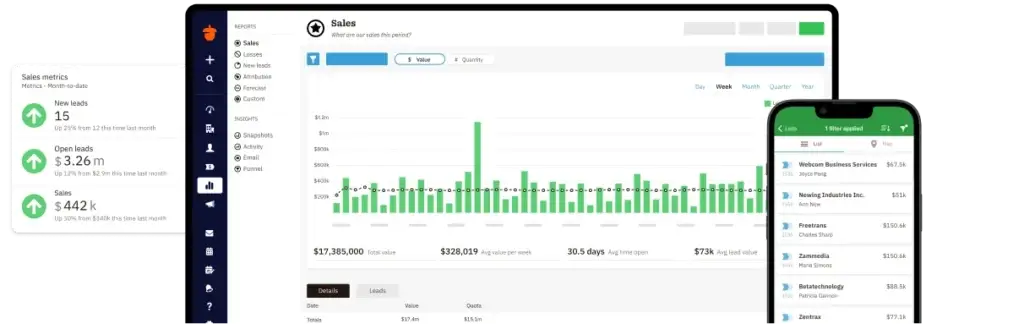
Your pipeline is where Nutshell feels most natural. The platform gives you multiple ways to view and manage deals, including board, list, chart, and map views. That flexibility matters because not every sales team works the same way.
For example, a sales manager may prefer a chart view to analyze pipeline value, while a rep may prefer a board view to move leads from one stage to the next. Territory-based teams may also benefit from map views when location matters.
- Drag-and-drop sales pipeline views
- Custom deal stages and sales processes
- Multiple pipelines on higher-tier plans
- Pipeline goals and stage tracking
- Deal activity visibility across the team
Expert note: Nutshell’s pipeline is one of its best practical advantages. It is easy enough for a new rep to understand quickly, but structured enough for managers to review deal health and sales progress.
3. Email and Calendar Sync
Nutshell works well for teams that live in their inbox. It supports email and calendar sync, allowing you to connect your CRM activity with your everyday sales communication.
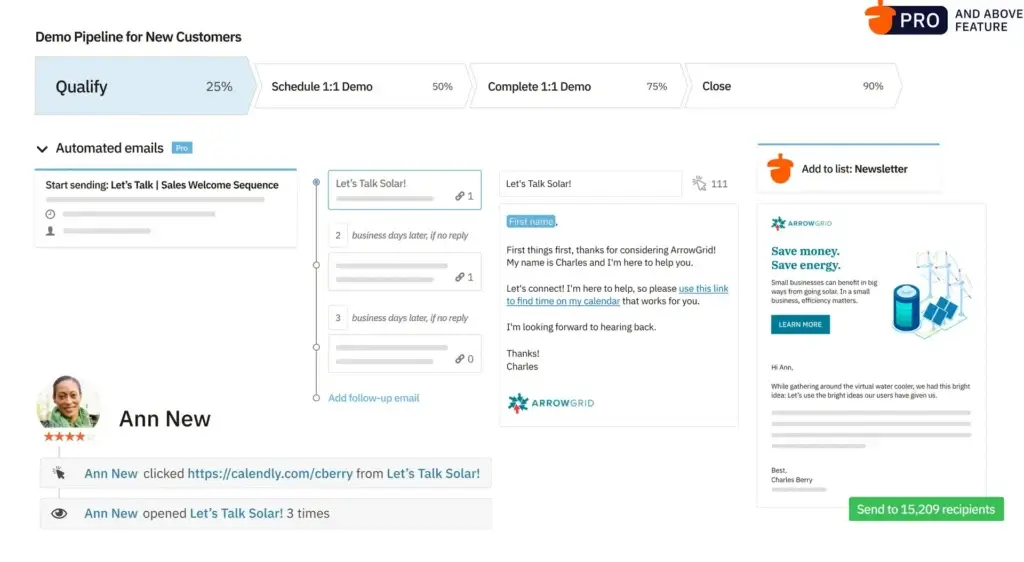
You can log emails, use templates, manage sequences, track engagement, and reduce the manual work involved in follow-ups. This is important because sales teams often fail to adopt CRM tools when they need to duplicate work between the CRM and their inbox.
- Email and calendar sync with common email providers
- Email templates for faster outreach
- Email sequencing and automation on higher plans
- Engagement tracking for sales follow-ups
- Meeting scheduler tools on selected plans
4. Sales Automation
Nutshell includes automation features that help you reduce repetitive work across leads, deals, and follow-ups. You can use automation to assign leads, create tasks, move deals through stages, and trigger reminders based on sales activity.
This is not the deepest automation builder on the market, but it is practical for SMB teams. If you want to automate a straightforward sales process without hiring a technical admin, Nutshell gives you enough control to save time without creating unnecessary complexity.
- Lead assignment rules
- Sales workflow automation
- Task and reminder automation
- Pipeline stage automation
- Hot lead identification on selected plans
5. Reporting, Forecasting, and Sales Analytics
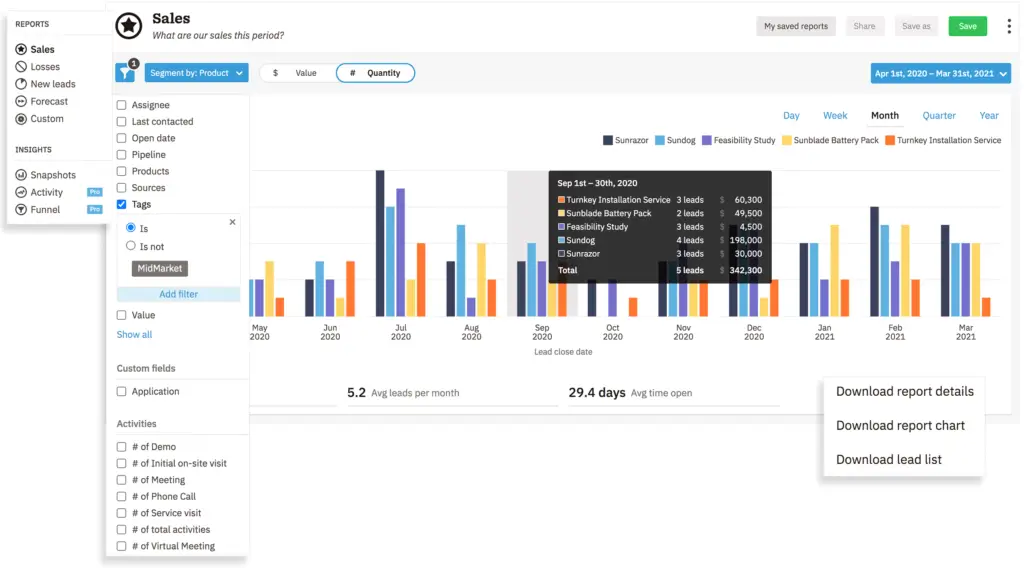
Nutshell gives managers visibility into team activity, pipeline performance, sales quotas, lead sources, and revenue forecasting. This makes it useful for sales leaders who want more than a simple contact database.
The reporting experience is easier to understand than many enterprise CRMs. However, if you need highly complex reporting models, custom revenue operations dashboards, or advanced multi-object analytics, you may outgrow Nutshell and need a more customizable platform.
- Sales activity reports
- Pipeline reports and forecasts
- Lead source and attribution reporting
- Sales quotas and team goals
- Advanced reporting on higher plans
6. AI Features in Nutshell
Nutshell now includes AI capabilities across its plans. The platform separates AI into two practical categories: AI outcomes and AI assists.
AI outcomes are usage-based AI actions that produce a clear result, such as call or meeting summaries, lead research, lead scoring, and campaign generation. AI assists are lighter helpers, such as note transcription, smart reports, and email reply suggestions.
This approach makes Nutshell’s AI practical for sales teams. It is not designed to replace your sales strategy, but it can reduce admin work, speed up research, and help reps write or summarize faster.
- AI meeting and call summarization
- AI lead research and scoring
- AI email campaign generation
- Smart reports and email reply suggestions
- AI chatbot and AI agent marketplace included across plans
7. Forms, Landing Pages, Chat, and Lead Capture
Nutshell has expanded beyond basic CRM features by adding lead capture and engagement tools. You can use forms, landing pages, live chat, and AI chatbot capabilities to turn website visitors into CRM leads.
This is a valuable addition for SMBs that want fewer disconnected tools. Instead of sending form submissions into a spreadsheet or email inbox, you can route leads directly into your CRM and start follow-up workflows sooner.
- Form builder
- Landing pages
- Live web chat
- AI chatbot
- Lead source and attribution tracking
8. Integrations and API
Nutshell integrates with many common sales, marketing, communication, and accounting tools. It also supports Zapier and an API for teams that need to connect Nutshell with other systems.
For most SMBs, this integration coverage will be enough. However, enterprise teams with complex system architecture should review the exact native integrations and API requirements before committing to a plan.
- Google Workspace and Microsoft 365
- Slack
- QuickBooks
- Zapier
- API access on selected plans
9. Quotes, Invoices, and Prospecting Add-ons
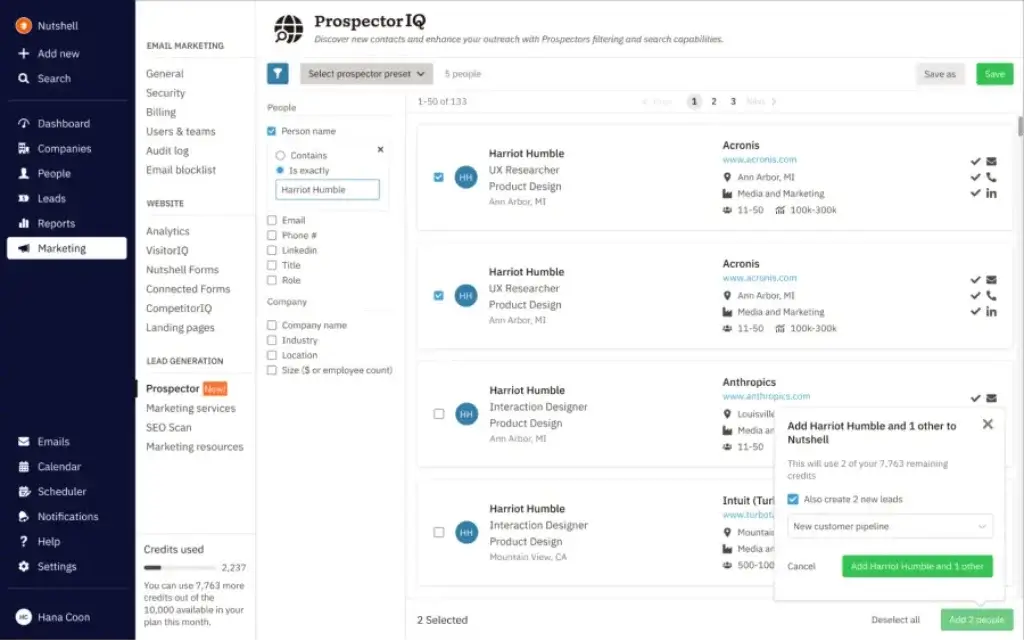
One important update for 2026 is that Nutshell should no longer be described as having no invoicing options at all. Quotes and invoices are available, but they are sold as an add-on rather than being included as a standard core CRM feature.
Nutshell also offers prospecting tools that allow you to search for new leads and add contact information to your CRM. This can be helpful for teams that want prospecting and pipeline management closer together, although the extra cost should be considered when comparing total CRM pricing.
- Quotes and invoices add-on
- ProspectorIQ for lead prospecting
- SMS add-on
- Email marketing add-on
- Engagement add-on for sales outreach
Pros and Cons
Nutshell CRM Pros and Cons
Every CRM has trade-offs. Nutshell is easy to use, fast to adopt, and strong for sales-focused SMBs, but it is not the best fit for every company.
The biggest strength is usability. The biggest limitation is that some advanced functions, such as deeper customization, prospecting, engagement, SMS, email marketing, and quotes or invoices, may require higher plans or add-ons.
Positive
✅ Very easy to use
✅ Fast setup and helpful support
✅ Strong email and calendar sync
✅ Practical sales pipeline views
✅ Useful reporting for SMB sales teams
✅ AI, forms, chat, and landing pages included
Negative
❌ Less customizable than enterprise CRMs
❌ Add-ons can increase total cost
❌ Advanced features are gated by higher plans
❌ Not a full project management platform
❌ Marketing automation is lighter than HubSpot
❌ Phone support is mainly for Enterprise users
Pros of Using Nutshell CRM
1. Very easy to use
Nutshell’s interface is clean and approachable. Sales reps can understand the pipeline, contacts, tasks, and email tools without spending weeks in training.
2. Strong fit for small and midsize sales teams
Nutshell gives SMBs the core CRM structure they need without the complexity of enterprise platforms. This makes it a strong option for teams that want adoption, not just features.
3. Useful email and calendar tools
Email sync, templates, sequences, and calendar visibility help reps manage follow-ups inside the CRM instead of switching between disconnected tools.
4. Good reporting for sales managers
Nutshell includes reporting for activities, pipeline progress, sales quotas, forecasting, and lead sources. This gives managers a clearer view of what is working.
5. Practical AI features
AI meeting summaries, lead research, smart reports, and email suggestions can save time. The AI tools are designed around practical sales productivity rather than abstract automation.
6. Helpful support and onboarding
Nutshell has a strong reputation for support. Free support and data migration during the trial can help teams move into the CRM faster.
Cons of Using Nutshell CRM
1. Add-ons can increase the real cost
The core CRM pricing is transparent, but teams that need email marketing, SMS, prospecting, engagement tools, or quotes and invoices should calculate the total monthly cost before choosing a plan.
2. Less customizable than enterprise CRM platforms
Nutshell is flexible for SMB sales workflows, but it is not as deeply customizable as Salesforce or a work-management-oriented CRM like monday CRM.
3. Not a full project management platform
You can manage tasks and sales activities, but Nutshell is not built to replace a full project management system. If you need client delivery workflows, resource planning, or internal operations tracking, you may need an additional tool.
4. Advanced features sit on higher plans
Features like more custom pipelines, advanced reporting, audit logs, unlimited custom fields, SQL data access, and phone support depend on higher-tier plans.
5. Marketing automation is not as deep as HubSpot
Nutshell has useful marketing and engagement tools, but HubSpot is still stronger if your CRM strategy depends heavily on inbound marketing, complex nurturing workflows, and content-led funnel automation.
Expert Insight
Nutshell works best when you want a sales-first CRM that your team can adopt quickly. It is not the deepest CRM on the market, but it does a strong job balancing usability, pipeline management, reporting, and sales engagement for growing B2B teams.
User Experience
Nutshell CRM User Experience
Nutshell’s user experience is one of the main reasons it remains relevant in a competitive CRM market. It is not built for users who want unlimited customization from day one. It is built for sales teams that want to start tracking leads, deals, emails, and tasks quickly.
The interface is clean, the pipeline is visual, and the main workflows are easy to understand. For a small business or B2B sales team, that can be more valuable than having hundreds of advanced settings that nobody uses.
What Users Usually Like
- Simple CRM setup and fast adoption
- Clear pipeline views for sales teams
- Email sync and templates that reduce admin work
- Helpful customer support
- Good value for small and midsize businesses
What Users May Find Limiting
- Reporting can feel limited for complex sales operations
- Customization is lighter than enterprise CRM platforms
- Some advanced features require higher plans
- Mobile performance may vary depending on workflow
- Add-ons can make pricing less simple at scale
User Feedback Summary
| Review Theme | What It Means for Buyers |
| Ease of use | Good fit if your team needs a CRM they can learn quickly |
| Support | Helpful for teams migrating data or setting up workflows |
| Email tools | Strong for sales teams that rely heavily on email follow-up |
| Reporting | Useful for SMBs, but less ideal for advanced revenue operations |
| Customization | Flexible enough for many sales teams, but not as deep as Salesforce |
Competitor Comparison
Nutshell CRM Alternatives
Nutshell is a strong CRM for SMB sales teams, but it is not always the best choice. The right alternative depends on whether you prioritize customization, marketing automation, pipeline simplicity, or enterprise scalability.
If you want a broader look at the CRM market, you can also read our best CRM software comparison.
| CRM | Best For | Why Choose It Over Nutshell? | Main Trade-Off |
| Nutshell | SMB B2B sales teams | Easy pipeline management, email sync, reporting, and fast adoption | Less advanced customization than enterprise CRM tools |
| monday CRM | Custom sales workflows and work management | More flexible for teams that want CRM plus operational workflows | Requires more setup to get the best results |
| HubSpot CRM | Marketing-led growth teams | Stronger inbound marketing, automation, content, and customer journey tools | Can become expensive as you scale |
| Pipedrive | Deal-focused sales teams | Excellent for visual pipeline management and sales activity tracking | Add-ons may increase the total cost |
| Zoho CRM | Budget-conscious teams needing broad CRM depth | More modules and customization at a competitive price | Interface can feel less polished |
| Salesforce | Enterprise sales operations | Deep customization, governance, reporting, and app ecosystem | Higher cost and more complex implementation |
Nutshell CRM vs HubSpot
Choose Nutshell if your main goal is simple sales pipeline management with strong email tools and fast adoption. Choose HubSpot if marketing automation, lead nurturing, landing pages, content workflows, and broader customer journey management are more important.
Nutshell CRM vs Pipedrive
Nutshell and Pipedrive are both strong options for sales-focused SMBs. Nutshell may be better if you want CRM, email, reporting, forms, chat, and marketing-adjacent features in one platform. Pipedrive may be better if your team wants a highly deal-centric CRM with strong sales activity management.
Nutshell CRM vs monday CRM
Nutshell is better if you want a focused, easy-to-roll-out CRM. monday CRM is better if you need highly customizable workflows, CRM boards, automations, dashboards, and collaboration across sales, operations, and client delivery teams.
Pricing and Plans
How Much Does Nutshell CRM Cost?
Nutshell CRM pricing is now structured around five core sales plans: Foundation, Growth, Pro, Business, and Enterprise. This is an important update because older Nutshell reviews may still mention outdated plan names and prices.
Nutshell also offers a 14-day free trial with no credit card required. The CRM plans include unlimited contacts and storage, email and calendar sync, AI chatbot, form builder, landing pages, and access to AI features, although usage limits and advanced features vary by plan.
Nutshell CRM Plans Overview
| Plan | Annual Price Per User | Best For | Key Features |
| Foundation | $13/month | Small teams starting with CRM basics | Core CRM, unlimited contacts, email and calendar sync, AI chatbot, forms, landing pages |
| Growth | $25/month | Teams needing better activity tracking | Activity reports, sales quotas, lead assignment rules, custom stage goals, hot leads |
| Pro | $42/month | Growing sales teams needing automation | 5 custom pipelines, advanced reporting, sales automation, AI lead recaps, meeting scheduler |
| Business | $59/month | Teams needing more customization and controls | 10 custom pipelines, advanced scheduler, audit log, changelog, teams and territories |
| Enterprise | $79/month | Larger teams needing enterprise controls | Unlimited pipelines, unlimited custom fields, SSO, SQL data access, phone support |
Nutshell CRM Add-Ons
Beyond the core CRM subscription, Nutshell offers paid add-ons for teams that need more marketing, outreach, messaging, prospecting, or quoting capabilities.
| Add-On | Starting Price | What It Adds |
| Marketing Pro | $49/month | Advanced email marketing, campaign reporting, AI campaign tools, A/B testing, SMS marketing |
| Engagement Pro | $16/user/month | Sales engagement features for outreach and follow-up |
| Email Marketing | $5/month | Email campaigns based on marketing contact volume |
| SMS | $15/month | Targeted text messages and SMS conversations |
| ProspectorIQ | $37/month | Lead prospecting inside the CRM |
| Quotes & Invoices | $67/month | Create and send quotes and invoices from the CRM pipeline |
Which Nutshell Plan Should You Choose?
For most sales teams, Growth or Pro will be the best starting point. Foundation is affordable, but the 100-open-lead limit and lighter reporting may make it too basic for teams actively scaling.
Growth is a sensible option if you want activity reports, lead assignment, sales quotas, and stage goals. Pro is the better fit if your sales process needs automation, advanced reporting, email sequencing, and multiple custom pipelines.
Business and Enterprise are better for teams that need more customization, audit visibility, territories, SSO, SQL access, or phone support.
Pricing Tips
- Choose Foundation only if your CRM needs are simple.
- Choose Growth if you need better team tracking and reporting.
- Choose Pro if automation and multiple pipelines matter.
- Choose Business if you need stronger controls and more AI usage.
- Choose Enterprise if SSO, SQL access, and phone support are required.
My recommendation: Pro is likely the best value for serious sales teams. It gives you more room to grow without immediately jumping into enterprise-level pricing.
Security and Compliance
Nutshell CRM Security
Security matters when your CRM stores customer records, sales communications, deal values, and internal notes. Nutshell has improved its security positioning and now provides stronger trust signals for B2B buyers.
Nutshell states that it uses Amazon Web Services infrastructure, has completed a successful SOC 2 audit, encrypts data in transit and at rest, and supports security controls such as SSO for Enterprise customers.
Core Security Features
- SOC 2 audit completion
- 256-bit TLS 1.2 encryption in transit
- Encryption at rest in databases
- Continuous backups and snapshots
- AWS-based infrastructure
- Password hashing and brute-force protection
- SAML-based SSO and directory sync for Enterprise customers
- PCI-compliant billing provider
Privacy and Compliance
Nutshell positions itself as GDPR and CCPA-compliant. For most small and midsize businesses, that gives a solid baseline for CRM data protection. Larger companies with strict procurement requirements should still review Nutshell’s Trust Center and legal documentation before signing.
Security Limitations to Consider
Nutshell’s security stack is strong for SMBs, but some controls are tied to higher-tier plans. If your company requires SSO, directory sync, SQL access, or strict administrative controls, you will likely need the Enterprise plan.
Bottom line: Nutshell is a credible option for B2B teams that care about data protection, but security-sensitive buyers should match their requirements with the right plan tier before committing.
Business Size Fit
Is Nutshell CRM Right for You?
Nutshell is a strong choice if your business wants CRM software that is easy to use, sales-focused, and practical. It is especially useful when your team needs better visibility into contacts, leads, pipelines, follow-ups, and reporting.
Nutshell CRM Is Best For
- Small and midsize B2B sales teams
- Companies replacing spreadsheets with a real CRM
- Teams that need email sync and follow-up automation
- Sales managers who want clear reporting without heavy setup
- Businesses that want CRM plus forms, chat, landing pages, and AI support
Nutshell CRM Is Not Ideal For
- Large enterprises needing deep workflow customization
- Companies that want CRM and project management in one tool
- Marketing teams that need complex nurturing automation
- Businesses that want every add-on included in the core plan
- Revenue operations teams needing advanced reporting architecture
Best Use Cases for Nutshell CRM
Sales pipeline management: Nutshell is excellent for tracking opportunities, stages, tasks, and follow-ups visually.
Email-heavy sales teams: If your sales process depends on email follow-ups, templates, and sequences, Nutshell gives you a practical workflow.
SMB lead management: Forms, landing pages, chat, and attribution features make Nutshell useful for teams that want to capture and manage leads in one place.
Simple sales reporting: Nutshell helps managers understand rep activity, deal progress, lead sources, and sales forecasting without building complex dashboards from scratch.
Conclusion
Final Thoughts
⭐ Overall Rating: 8.4/10
Nutshell CRM is a strong option for small and midsize B2B sales teams that want a simple, practical, and sales-first CRM. It gives you the essentials: contact management, visual pipelines, email sync, automation, reporting, AI assistance, integrations, and lead capture tools.
The platform’s main advantage is usability. Your team can understand it quickly, which increases the chance that reps will actually use it consistently. For many SMBs, that is more valuable than buying a more powerful CRM that becomes too complex to maintain.
Why You Should Choose Nutshell
- You want a CRM your sales team can adopt quickly
- You need strong pipeline and email management
- You want AI, forms, chat, and landing pages included
- You value support and fast setup
- You prefer transparent CRM pricing
Where Nutshell May Fall Short
- You need deep enterprise customization
- You want advanced marketing automation like HubSpot
- You need full project management inside your CRM
- You want quotes, invoices, SMS, and prospecting included without add-ons
- You need enterprise controls but do not want the Enterprise plan
Final Thoughts: A Smart CRM for Growing Sales Teams
Nutshell is not trying to be everything to everyone. It is best when used as a focused CRM for sales teams that want better pipeline visibility, cleaner follow-ups, and less administrative friction.
If your team wants a practical CRM with a short learning curve, Nutshell is easy to recommend. If you need broader workflow customization, compare it with monday CRM. If your growth strategy depends heavily on inbound marketing automation, compare it with HubSpot. If you want a pure sales pipeline tool, compare it with Pipedrive.
For most small and midsize B2B sales teams, Nutshell offers a strong balance of simplicity, sales functionality, support, and price.
Have more questions
Frequently Asked Questions
What is Nutshell CRM used for?
Nutshell CRM is used to manage contacts, leads, sales pipelines, follow-ups, email activity, reporting, and sales automation. It is best suited for small and midsize B2B sales teams that want a simple CRM without heavy setup.
How much does Nutshell CRM cost?
Nutshell CRM starts at $13 per user per month when billed annually. Its main plans are Foundation, Growth, Pro, Business, and Enterprise, with higher plans adding more reporting, automation, customization, AI usage, and enterprise controls.
Does Nutshell CRM offer a free trial?
Yes. Nutshell offers a 14-day free trial with no credit card required. This lets you test the CRM, pipeline tools, email sync, forms, landing pages, and other features before choosing a paid plan.
Is Nutshell CRM good for small businesses?
Yes. Nutshell is a strong CRM for small businesses because it is easy to use, quick to set up, and focused on practical sales workflows. It is especially useful for B2B teams moving away from spreadsheets.
What are the main disadvantages of Nutshell CRM?
The main disadvantages are lighter enterprise customization, extra costs for some add-ons, limited project management functionality, and marketing automation that is not as deep as platforms like HubSpot.
Does Nutshell CRM include email marketing?
Nutshell includes email-related CRM features, and it also offers email marketing as an add-on. If you need advanced campaign tools, A/B testing, or larger marketing contact volumes, you should review the add-on pricing before buying.
Does Nutshell CRM have AI features?
Yes. Nutshell includes AI features such as meeting summaries, lead research, lead scoring, smart reports, email reply suggestions, AI chatbot capabilities, and AI campaign generation. AI usage limits vary by plan.
Does Nutshell CRM integrate with Gmail and Outlook?
Yes. Nutshell supports email and calendar sync with common email providers, including Google and Outlook. This helps sales reps manage communication history, follow-ups, and calendar activity from the CRM.
Is Nutshell CRM better than HubSpot?
Nutshell is better if you want a simpler sales CRM with faster adoption and lower complexity. HubSpot is better if you need advanced marketing automation, inbound marketing tools, and a broader customer platform.
Is Nutshell CRM better than Pipedrive?
Nutshell may be better if you want CRM, email tools, forms, chat, reporting, and marketing-adjacent features together. Pipedrive may be better if your priority is a highly sales-focused visual pipeline with strong deal tracking.