

Introduction
Managing accounting at scale is not just about tracking income and expenses. As your business grows, finance becomes connected to everything – inventory, revenue recognition, subsidiaries, tax rules, cash flow, order management, procurement, and reporting.
That is where NetSuite becomes relevant.
Developed by Oracle, NetSuite is a cloud-based ERP platform built for companies that have outgrown basic accounting software. It combines financial management, inventory, CRM, ecommerce, reporting, procurement, and operational workflows into one system.
This makes NetSuite very powerful, but also more complex and more expensive than tools like QuickBooks, Xero, FreshBooks, or Zoho Books.
If your finance team is still relying on spreadsheets to close the month, consolidate entities, manage approvals, or report across departments, you may be asking a practical question:
Is NetSuite worth the investment in 2026?
In this NetSuite review, you will get a clear look at where the platform performs best, where it can become difficult, how pricing works, and which alternatives may be a better fit depending on your company size and financial complexity.
This guide is especially useful if you are a CFO, controller, operations leader, finance manager, or founder evaluating whether your company is ready to move from accounting software to ERP software.
| Category | NetSuite Review Summary |
| Best For | Mid-sized and scaling companies that need ERP-grade accounting |
| Not Ideal For | Freelancers, solopreneurs, and small teams with basic bookkeeping needs |
| Main Strength | Combines accounting, ERP, reporting, inventory, CRM, and automation in one platform |
| Main Drawback | High total cost, complex implementation, and a steep learning curve |
| Pricing | Custom quote, commonly based on users, modules, implementation, and support |
| Best Alternatives | Sage Intacct, Microsoft Dynamics 365 Business Central, Acumatica, QuickBooks Enterprise, and Odoo |
Who Is NetSuite Best For?
Find out if NetSuite fits your business needs
NetSuite is best understood as a cloud ERP system with strong accounting capabilities, not as a simple bookkeeping app.
That distinction matters. If you only need invoices, expenses, bank feeds, and basic reports, NetSuite will likely feel too expensive and too heavy. But if your company needs consolidated financials, inventory visibility, approval workflows, revenue recognition, and real-time reporting across departments, NetSuite can be a strong long-term platform.
✅ NetSuite is best for:
- Mid-sized companies that have outgrown QuickBooks, Xero, or spreadsheets
- Multi-entity businesses that need consolidated financial reporting
- SaaS and subscription companies managing billing and revenue recognition
- Ecommerce and inventory-heavy teams that need order and stock visibility
- Global businesses handling multiple currencies, taxes, and subsidiaries
- Finance teams that need stronger controls, audit trails, and reporting
❌ NetSuite may not be ideal for:
- Freelancers and solopreneurs with simple invoicing needs
- Small businesses that want fast setup and low monthly costs
- Teams without ERP ownership or implementation resources
- Companies with simple operations that do not need inventory or multi-entity accounting
- Businesses expecting plug-and-play software with minimal training
My opinion: NetSuite is not the best accounting software for most small businesses. It becomes valuable when your business complexity starts creating financial risk, reporting delays, operational blind spots, or too much manual work.
Think of NetSuite as the next step when accounting software is no longer enough.
NetSuite Features and ERP Modules
NetSuite features built for finance and operations
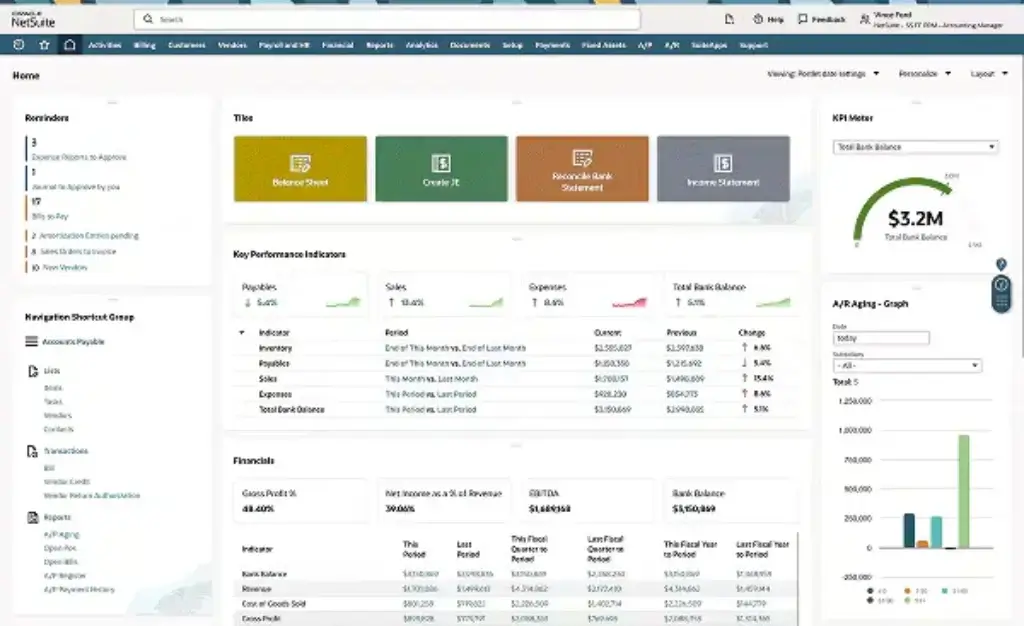
NetSuite gives you one integrated system for finance, operations, customers, inventory, projects, and reporting. Instead of using separate tools for accounting, CRM, ecommerce, inventory, and analytics, you can run these processes from a shared database.
This is one of NetSuite’s biggest advantages. When implemented properly, your finance team does not need to wait for exports from other departments to understand revenue, inventory, orders, expenses, or cash flow.
Financial Management
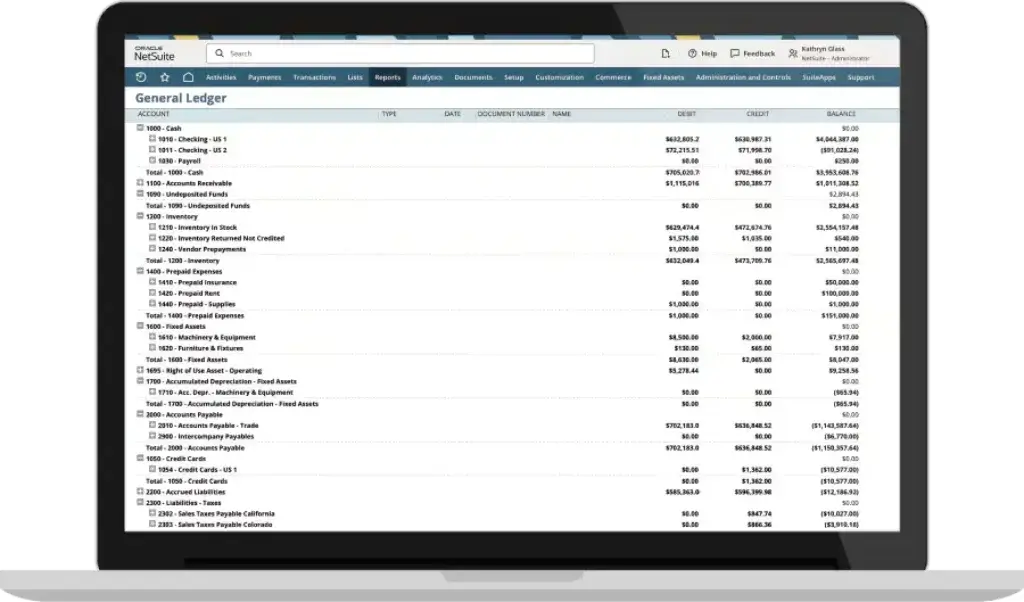
NetSuite’s financial management module covers the core accounting functions you would expect from an enterprise-grade system, including general ledger, accounts payable, accounts receivable, tax management, cash management, fixed assets, and financial close.
Where it becomes more powerful is in the way it connects accounting activity to operational data. You can connect customer orders, purchase orders, inventory movement, billing schedules, and revenue rules to the same financial system.
Revenue Recognition
Revenue recognition is one of NetSuite’s most important features for SaaS, subscription, professional services, and project-based companies.
Instead of manually tracking revenue schedules in spreadsheets, you can automate revenue allocation, forecasting, recognition, reclassification, and audit trails. This is especially valuable if your company needs to comply with standards such as ASC 606 or IFRS 15.
Multi-Entity Consolidation
If your business operates multiple subsidiaries, brands, locations, or regions, NetSuite can help consolidate financial data in one system.
This is where many growing companies start to feel the limits of basic accounting tools. Manual consolidation often creates version control issues, currency challenges, reporting delays, and audit risk. NetSuite helps centralize this process with multi-entity, multi-currency, and intercompany support.
Planning and Budgeting
NetSuite Planning and Budgeting helps finance teams build budgets, forecasts, scenarios, and management reports without relying entirely on disconnected spreadsheets.
You can model financial scenarios, compare actuals against budgets, and give department leaders more structured planning workflows. For companies with changing headcount, inventory, or recurring revenue, this can make planning more accurate and less reactive.
Inventory and Order Management
NetSuite is much stronger than standard accounting software for businesses that sell physical products.
It supports inventory tracking, order management, purchasing, demand planning, warehouse workflows, fulfillment, and cost visibility. This makes it a strong fit for ecommerce, wholesale distribution, retail, manufacturing, and product-led companies.
CRM and Customer Management
NetSuite includes CRM capabilities for sales pipeline management, customer records, quotes, renewals, and customer interactions.
It will not always replace a dedicated CRM like Salesforce for every company, but it can reduce data silos by connecting customer activity directly with billing, orders, inventory, and finance.
SuiteAnalytics and Reporting
Reporting is one of NetSuite’s most valuable areas when configured correctly. SuiteAnalytics gives your team real-time dashboards, saved searches, KPIs, financial reports, and operational reports.
For finance leaders, this means you can analyze profitability, cash flow, revenue, expenses, inventory, and performance by entity, department, location, class, customer, or product line.
SuiteCloud Customization
SuiteCloud allows NetSuite to be extended with custom workflows, scripts, integrations, records, and automation.
This flexibility is powerful, but it is also one reason implementation can become complex. If your business has unique approval rules, order flows, revenue rules, or integrations, you may need a NetSuite partner or developer support.
What’s New in NetSuite for 2026?
Recent NetSuite updates finance teams should know
NetSuite continues to evolve beyond traditional ERP functionality. Recent releases have placed stronger emphasis on AI, financial close automation, planning, reconciliation, pricing, cash management, and operational visibility.
For finance teams, this matters because the biggest ERP pain points are rarely simple data entry. They are usually slow close cycles, manual reconciliation, limited forecasting accuracy, inconsistent approvals, and difficulty spotting issues before they affect cash flow.
AI-Powered Financial Close
NetSuite is expanding automation around the close process, helping finance teams monitor close tasks, identify bottlenecks, and reduce repetitive manual work.
This is especially useful for companies where month-end close still depends on email chains, spreadsheets, and manual journal tracking.
Smarter Reconciliation
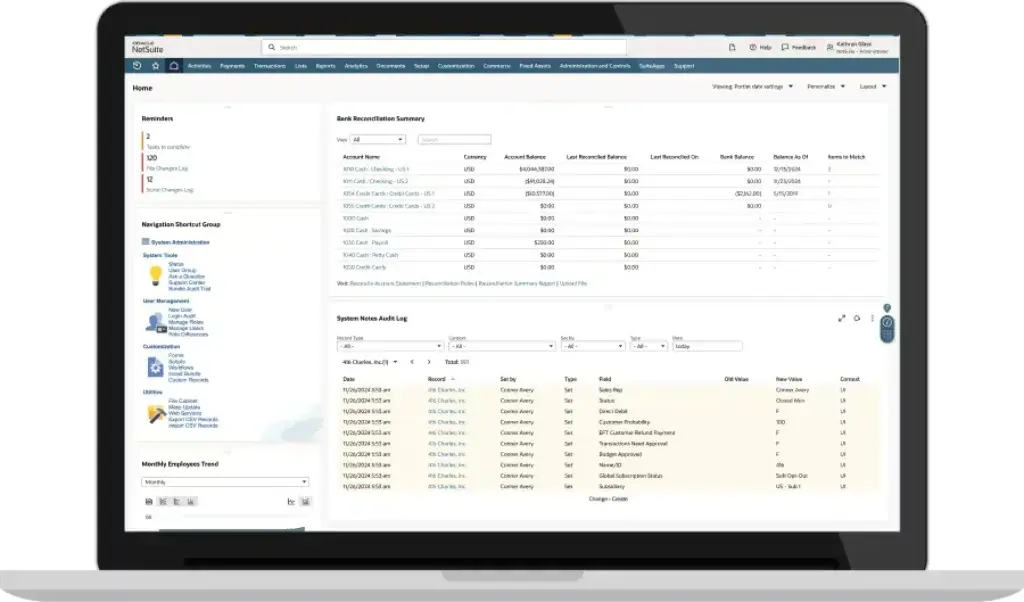
NetSuite’s financial tools are increasingly focused on improving matching, reconciliation, and exception handling.
For accounting teams, the benefit is not only speed. It is also better control. When the system helps identify unmatched transactions or unusual activity, your team can focus more on review and analysis instead of manual checking.
Planning and Forecasting Improvements
Planning and budgeting capabilities continue to become more important as companies look for better forecasting and scenario planning.
If your business has recurring revenue, fluctuating inventory costs, changing headcount, or multiple departments, these planning tools can help you create more reliable forecasts.
Pricing and Margin Controls
NetSuite has also been improving operational capabilities around pricing, inventory, and margin visibility.
This is valuable for product-based companies that need better control over pricing rules, cost changes, stock movement, and profitability by channel or customer segment.
Pros and Cons
A balanced view: what you’ll love and what to consider
NetSuite is powerful, but it is not a lightweight accounting tool. The same depth that makes it valuable for complex businesses can also make it expensive and difficult for smaller teams.
Here is the practical balance you should consider before choosing it.
Positive
✅ Complete ERP platform
✅ Strong multi-entity accounting
✅ Deep reporting tools
✅ Scales with complex operations
Negative
❌ Expensive to implement
❌ Steep learning curve
❌ Not ideal for small teams
❌ Customization may need experts
✅ Pros of NetSuite
- Complete ERP, not only accounting
NetSuite connects accounting, inventory, CRM, procurement, reporting, ecommerce, and operations in one system. - Strong multi-entity accounting
It is built for companies managing subsidiaries, currencies, locations, and consolidated reporting. - Real-time financial visibility
Dashboards and reports help finance teams monitor performance without waiting for spreadsheet exports. - Excellent scalability
NetSuite can support companies as they expand into new markets, products, entities, and business models. - Advanced automation
You can automate approvals, billing, revenue recognition, workflows, reporting, and close-related processes. - Strong inventory and operational depth
It is a better fit than traditional accounting tools for product-based, ecommerce, distribution, and manufacturing businesses.
❌ Cons of NetSuite
- High total cost
Subscription, users, modules, implementation, training, support, and customization can add up quickly. - Complex implementation
Most companies need a structured rollout with a NetSuite partner or experienced internal ERP owner. - Steep learning curve
Users moving from simpler accounting software may need time to understand roles, workflows, searches, dashboards, and records. - Interface can feel dense
NetSuite is highly functional, but it does not always feel as modern or simple as newer SaaS tools. - Customization can require technical help
Advanced workflows, scripts, integrations, and reports may require SuiteScript or partner support. - Overkill for basic accounting
If your needs are simple, you may get better value from QuickBooks, Xero, Zoho Books, or FreshBooks.
Helpful tip: Before buying NetSuite, document your current finance problems clearly. If your issues are mostly basic bookkeeping, choose a simpler tool. If your issues involve consolidation, inventory, controls, reporting, and cross-department visibility, NetSuite becomes much easier to justify.
User Experience
What using NetSuite actually feels like
NetSuite’s user experience depends heavily on how well it is implemented. A clean setup with well-designed roles, dashboards, workflows, and reports can feel organized and efficient. A rushed setup can feel confusing.
This is one of the most important points to understand before choosing NetSuite. The platform is not difficult because it lacks capability. It is difficult because it has a lot of depth.
Interface and Navigation
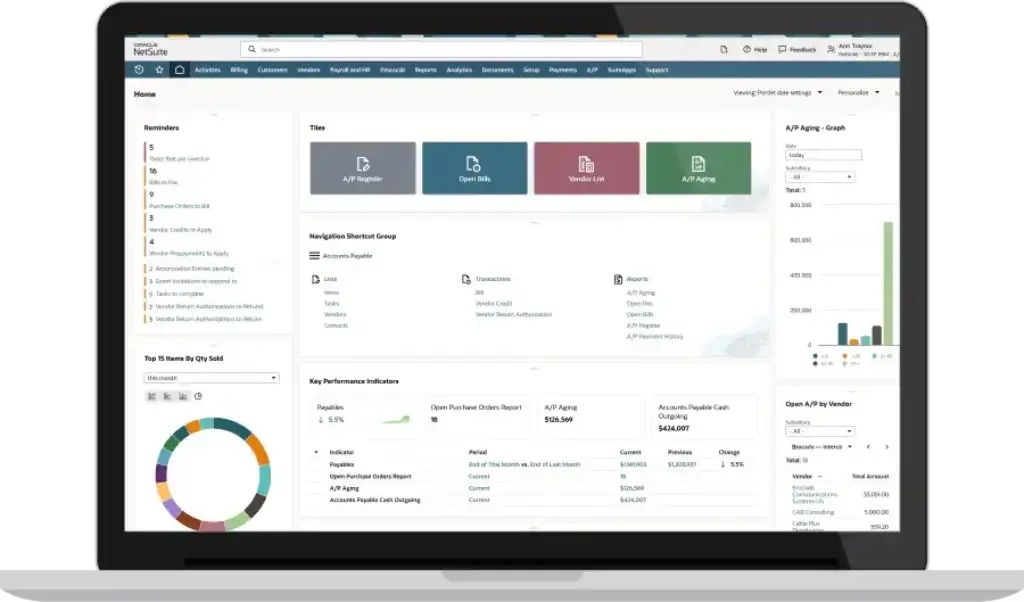
NetSuite uses role-based dashboards, menus, records, lists, reports, and saved searches. A CFO, controller, warehouse manager, sales leader, and customer service user can each see different views based on their role.
That flexibility is valuable, but new users may need training. If your team is used to simple tools like Xero or QuickBooks Online, NetSuite will feel more structured and less instantly intuitive.
Dashboards and Saved Searches
Dashboards are one of NetSuite’s strongest usability features when configured well. You can display KPIs, reminders, tasks, reports, shortcuts, graphs, and saved searches on one screen.
Saved searches are especially powerful. They let you build filtered views of financial and operational data, such as overdue invoices, open purchase orders, revenue exceptions, inventory shortages, or transactions pending approval.
Customization and Workflows
NetSuite can be customized around your approval processes, roles, forms, fields, subsidiaries, and reporting dimensions.
This is a major advantage for companies with complex workflows. However, it can also create long-term maintenance issues if you over-customize too early. In most cases, you should start with essential workflows, then add more customization after your team understands the system.
Mobile Accessibility
NetSuite offers mobile access for iOS and Android. It is useful for approvals, dashboards, time entry, and basic reporting.
However, mobile should be viewed as a companion experience, not a full replacement for desktop use. Most finance, reporting, implementation, and administration work is still better handled from the full web application.
Learning Curve
The biggest usability challenge is not only the interface. It is the shift from simple accounting to ERP discipline.
Your team needs to think more carefully about permissions, workflows, chart of accounts structure, approval paths, reporting dimensions, data quality, and internal controls. That requires training, but it also creates a stronger financial foundation.
Integrations and Ecosystem
Connect NetSuite to your wider business stack
A modern ERP system should not operate in isolation. NetSuite offers a broad integration ecosystem through SuiteCloud, APIs, connectors, and the SuiteApp Marketplace.
This is important because most companies still need to connect ERP data with ecommerce platforms, CRMs, payroll tools, tax engines, payment systems, banks, warehouses, and business intelligence tools.
SuiteCloud Platform
SuiteCloud gives developers and implementation partners tools to extend NetSuite with custom applications, workflows, scripts, and integrations.
This is especially useful if your company has a unique quote-to-cash process, custom fulfillment workflow, complex approval chain, or specialized reporting need.
Common NetSuite Integrations
Popular integrations often include:
- Salesforce for CRM and pipeline data
- Shopify and Magento for ecommerce orders and inventory
- Avalara for sales tax automation
- ADP and Paychex for payroll workflows
- Expensify for expense management
- Banking and payment tools for reconciliation and cash visibility
SuiteApp Marketplace
The SuiteApp Marketplace includes third-party apps and extensions built for NetSuite. These can help with tax compliance, subscription billing, warehouse management, payment automation, procurement, reporting, ecommerce, and industry-specific workflows.
The marketplace is one of NetSuite’s strengths, but you should still evaluate each app carefully. Additional apps can improve your setup, but they also add cost, complexity, and vendor dependency.
Integration Advice
Do not connect everything at once during implementation. Start with the systems that are critical to finance accuracy, such as CRM, ecommerce, payments, tax, payroll, and inventory.
After the core ERP setup is stable, you can expand into more advanced integrations.
Pricing and Plans
How much does NetSuite cost?
NetSuite does not publish simple pricing tiers like most small business accounting platforms. Pricing is quote-based and depends on your users, modules, company size, contract terms, support needs, and implementation scope.
This gives NetSuite flexibility, but it also makes cost planning harder. You should evaluate NetSuite based on total cost of ownership, not just the monthly license fee.
How NetSuite Pricing Works
NetSuite pricing usually includes several cost layers:
- Base platform license for the core NetSuite environment
- User licenses based on the number and type of users
- Optional modules such as advanced financials, inventory, billing, ecommerce, or planning
- Implementation services from Oracle or a certified partner
- Data migration from legacy systems or spreadsheets
- Customizations and integrations for workflows, scripts, and third-party systems
- Training and support for administrators and end users
Most businesses need a discovery process before receiving a custom quote. That process should include a clear review of your entities, users, modules, integrations, and reporting needs.
Estimated NetSuite Pricing Ranges
The following table provides a general market estimate. Your actual quote may vary significantly based on scope, contract terms, implementation complexity, and add-on modules.
| Cost Area | Typical Estimate | What It Means |
| Base Platform | Often estimated from around $999/month | Core NetSuite access before users, modules, and services |
| User Licenses | Often priced per named user | Cost depends on user type and access level |
| Modules | Custom quote | Advanced financials, billing, inventory, ecommerce, planning, and other add-ons |
| Implementation | Often $10,000 to $100,000+ | Depends on entities, integrations, data migration, customization, and training |
| First-Year Cost | Can range from tens of thousands to much higher | Includes software, implementation, setup, and early support |
Implementation and Additional Costs
Implementation is often the biggest cost driver. A simple finance implementation may be manageable, but a multi-entity ERP rollout with inventory, CRM, ecommerce, integrations, and custom workflows can become expensive.
Additional costs to consider include:
- Data cleanup before migration
- Chart of accounts redesign for better reporting
- Third-party integration setup for CRM, ecommerce, tax, or payroll
- Custom reports and dashboards for executives and finance leaders
- Ongoing administrator support after go-live
- User training across finance, operations, sales, and leadership
Is NetSuite Worth the Cost?
NetSuite is worth the cost when the platform replaces operational friction, manual consolidation, disconnected systems, delayed reporting, and financial control issues.
It is harder to justify if your business only needs invoices, expenses, bank reconciliation, and basic reporting.
Best way to decide: calculate the cost of your current process. If your team spends too much time correcting data, reconciling spreadsheets, managing duplicate systems, or producing late reports, NetSuite may deliver a strong return over time.
NetSuite Implementation
What to expect before going live
NetSuite implementation is not just a technical project. It is a business process project.
The quality of your implementation will shape how useful the system becomes. A strong rollout can improve finance visibility and operational control. A weak rollout can create confusion, poor adoption, and expensive rework.
Typical Implementation Timeline
| Implementation Type | Estimated Timeline | Best Fit |
| Basic Finance Setup | 2-4 months | Single-entity company with limited integrations |
| Mid-Market ERP Rollout | 4-8 months | Company using finance, inventory, CRM, and reporting |
| Complex Multi-Entity Rollout | 8-12+ months | Global company with subsidiaries, custom workflows, and multiple integrations |
Common Implementation Challenges
- Poor data quality before migration
- Unclear reporting requirements before setup
- Over-customization too early in the project
- Weak internal ownership from finance or operations
- Underestimated training needs across departments
- Unplanned integration complexity with legacy tools
How to Reduce Implementation Risk
Start with your core finance processes first. Define your chart of accounts, approval workflows, reporting dimensions, roles, entities, and close process before expanding into advanced customization.
You should also appoint an internal NetSuite owner. This person does not need to be a developer, but they should understand finance operations, business processes, and how different teams use system data.
The best implementations are not the most customized. They are the ones that solve the most important operational problems without creating unnecessary complexity.
Alternatives to NetSuite
Compare top competitors
NetSuite is one of the strongest cloud ERP platforms for growing companies, but it is not the only option. The best alternative depends on whether your priority is finance depth, lower cost, Microsoft integration, unlimited users, or simpler accounting.
For a fair comparison, NetSuite should be compared mostly with ERP and mid-market financial systems, not only small business accounting tools.
| Alternative | Best For | Why Choose It Over NetSuite? | Main Limitation |
| Sage Intacct | Finance-led mid-market companies | Strong financial reporting, multi-entity accounting, and accounting automation | Less of a full operational ERP than NetSuite |
| Microsoft Dynamics 365 Business Central | Microsoft-centric companies | Strong fit for teams using Microsoft 365, Teams, Excel, and Power BI | May require partner setup and add-ons for advanced needs |
| Acumatica | Growing mid-sized companies | Unlimited-user pricing model can be attractive for broader team access | Smaller ecosystem than NetSuite |
| QuickBooks Enterprise | SMBs not ready for full ERP | More affordable and familiar for companies with simpler operations | Less scalable for multi-entity and advanced ERP workflows |
| Odoo | Budget-conscious companies wanting modular ERP | Flexible, modular, and often more affordable | May require configuration and partner support |
| SAP Business One | Product-centric SMBs and manufacturers | Strong ERP option for inventory, operations, and manufacturing needs | Can feel less modern depending on deployment and setup |
NetSuite vs. Sage Intacct
Sage Intacct is one of NetSuite’s strongest finance-focused alternatives. It is especially attractive for companies that care more about accounting depth, multi-entity financials, dashboards, and reporting than broad ERP operations.
Choose Sage Intacct if:
- You want a finance-first platform
- You need strong reporting and consolidations
- Your operations can remain in other best-of-breed tools
Choose NetSuite if:
- You need accounting, inventory, CRM, ecommerce, and operations in one ERP
- You want one database across finance and operations
- Your business model requires deeper inventory or order management
NetSuite vs. Microsoft Dynamics 365 Business Central
Microsoft Dynamics 365 Business Central is a strong NetSuite alternative for companies already invested in the Microsoft ecosystem.
Choose Business Central if:
- Your team relies heavily on Microsoft 365, Excel, Teams, and Power BI
- You want an ERP that fits naturally into your Microsoft stack
- You need solid finance and operations without NetSuite’s pricing structure
Choose NetSuite if:
- You want a cloud-native ERP with a broad suite of integrated business modules
- You need strong multi-subsidiary and global business management
- You prefer NetSuite’s SuiteCloud and SuiteApp ecosystem
NetSuite vs. Acumatica
Acumatica is often considered by companies that want ERP depth but do not like per-user pricing models. Its unlimited-user approach can be appealing for companies that want more employees, partners, or stakeholders inside the system.
Choose Acumatica if:
- You want broad user access without paying per user
- You operate in distribution, construction, manufacturing, or services
- You want a flexible ERP with strong customization options
Choose NetSuite if:
- You want a more established global ERP ecosystem
- You need mature SuiteApps and a larger partner network
- You need strong support for global subsidiaries and reporting
NetSuite vs. QuickBooks Enterprise
QuickBooks Enterprise is not as powerful as NetSuite, but it can be a practical stepping stone for companies that need more than QuickBooks Online but are not ready for a full ERP rollout.
Choose QuickBooks Enterprise if:
- You want a familiar accounting system
- You need better inventory and reporting than QuickBooks Online
- You are not ready for ERP-level implementation costs
Choose NetSuite if:
- You need real-time multi-entity consolidation
- You are replacing several disconnected systems
- You need ERP-level workflows, approvals, and operational visibility
👉🏼 Read the full QuickBooks review
NetSuite vs. Zoho Books
Zoho Books is much simpler and more affordable than NetSuite. It is a strong option for small businesses that need invoicing, bank feeds, expenses, tax support, and basic financial reporting.
Choose Zoho Books if:
- You need affordable accounting software
- You want fast setup and a simple interface
- You already use other Zoho apps
Choose NetSuite if:
- You need ERP-level accounting and operations
- You have multiple entities, currencies, or departments
- You need advanced workflows, controls, and financial reporting
👉🏼 Read the full Zoho Books review
NetSuite vs. FreshBooks
FreshBooks is built for freelancers, agencies, consultants, and service businesses that need simple invoicing, expense tracking, time tracking, and client billing.
Choose FreshBooks if:
- You bill clients by project or hour
- You want a clean and simple interface
- You do not need ERP functionality
Choose NetSuite if:
- You manage inventory, subsidiaries, or complex reporting
- You need revenue recognition and advanced controls
- You want one system for finance and operations
👉🏼 Read the full FreshBooks review
NetSuite vs QuickBooks
When should you upgrade from QuickBooks to NetSuite?
Many companies evaluate NetSuite when QuickBooks starts to feel stretched.
This does not mean QuickBooks is bad. QuickBooks is excellent for many small and medium-sized businesses. The issue is that it was not built to operate like a full ERP system across multiple entities, departments, inventory workflows, and global reporting needs.
Signs You May Be Ready for NetSuite
- You manage multiple entities or subsidiaries
- You rely on spreadsheets for consolidation
- Your month-end close takes too long
- You need advanced revenue recognition
- You have complex inventory or order workflows
- You need better audit trails and approval controls
- You want one system for finance, inventory, CRM, and operations
When QuickBooks Is Still Enough
QuickBooks is still a better fit if your business has straightforward accounting needs, limited entities, simple reporting, and a smaller finance team.
Moving to NetSuite too early can create unnecessary cost and complexity. The right time to upgrade is when your current system creates operational bottlenecks that slow decision-making or increase financial risk.
NetSuite Use Cases by Industry
How different companies use NetSuite
NetSuite is used across many industries, but its value is strongest when financial management is deeply connected to operations.
NetSuite for SaaS Companies
SaaS companies often use NetSuite for subscription billing, revenue recognition, renewals, deferred revenue, multi-entity accounting, and investor reporting.
It is especially useful when your finance team needs to manage recurring revenue, contract changes, usage-based billing, and ASC 606 compliance.
NetSuite for Ecommerce
Ecommerce businesses can use NetSuite to connect orders, inventory, fulfillment, payments, returns, and accounting.
This is helpful if you sell across multiple channels and need clearer visibility into inventory, margin, and cash flow.
NetSuite for Wholesale Distribution
Wholesale distributors often need strong purchasing, inventory control, warehouse visibility, order management, and demand planning.
NetSuite can help reduce manual work between sales orders, purchase orders, fulfillment, and accounting.
NetSuite for Manufacturing
Manufacturing companies may use NetSuite for bills of materials, procurement, inventory, production planning, costing, and financial reporting.
It can be useful when you need a stronger connection between operational activity and financial performance.
NetSuite for Professional Services
Professional services companies can use NetSuite for project accounting, billing, resource planning, revenue recognition, time tracking, and profitability reporting.
This is especially helpful if you need to understand project margin, utilization, revenue timing, and delivery costs.
Security and Compliance
Your financial data deserves enterprise-grade protection
Security is one of the main reasons companies move from basic accounting tools to a more controlled ERP platform.
NetSuite includes enterprise-grade security controls such as role-based access, two-factor authentication, audit trails, encryption, and data center protections. These controls are especially important for companies managing sensitive financial data, customer data, payments, regulated workflows, or public-company readiness.
Data Security Features
- Role-based access controls: Limit access by job function, department, subsidiary, or permission level
- Two-factor authentication: Add another layer of protection to user logins
- Audit trails: Track changes and transaction activity for review and accountability
- Encryption: Protect sensitive data in transit and at rest
- Data center controls: Support uptime, disaster recovery, and physical security
Compliance and Audit Support
NetSuite can support stronger compliance workflows through permissions, approvals, audit logs, transaction history, and reporting controls.
It is important to be precise here. NetSuite can help support compliance programs, but using NetSuite does not automatically make your business compliant with every regulation.
Your compliance posture still depends on how you configure roles, workflows, data retention, integrations, approvals, and internal policies.
Best Fit for Regulated and Audit-Ready Companies
NetSuite is especially relevant for companies preparing for audits, fundraising, acquisitions, IPO readiness, SOX controls, or stricter reporting requirements.
If your finance team needs more control over who can approve, edit, view, post, or report on transactions, NetSuite offers a stronger foundation than lightweight accounting tools.
Conclusion
Is NetSuite worth it in 2026?
⭐ Overall Rating: 8.4/10
NetSuite is one of the strongest cloud ERP platforms for growing companies that need more than standard accounting software.
It is a strong fit if your business is dealing with multi-entity accounting, complex reporting, advanced revenue recognition, inventory management, order workflows, global operations, or disconnected systems.
It is not the right choice if you only need simple bookkeeping, fast setup, and a low monthly subscription.
Choose NetSuite if:
- You need ERP-grade accounting and financial controls
- You operate across entities, regions, currencies, or departments
- You want one system for finance and operations
- You need deeper reporting, automation, and audit trails
- You are ready to invest in implementation and training
Consider alternatives if:
- You are a freelancer, solopreneur, or very small business
- You only need invoicing, expenses, and basic reports
- You want transparent low-cost pricing
- You do not have the resources for ERP implementation
- Your current processes are simple and working well
Final recommendation: NetSuite is best for companies whose accounting needs have become operationally complex. If your finance team is spending too much time fixing data, managing spreadsheets, consolidating entities, or chasing reports from different systems, NetSuite can be worth the investment.
If you are still in the early stages of growth, start with a simpler accounting tool and move to NetSuite when your complexity justifies the cost.
Have more questions?
Frequently Asked Questions
What is NetSuite used for?
NetSuite is used to manage accounting, ERP, inventory, order management, CRM, ecommerce, reporting, procurement, and financial operations in one cloud-based platform. It is mainly used by growing businesses that need more than basic bookkeeping.
Is NetSuite accounting software or ERP software?
NetSuite is ERP software with strong accounting and financial management capabilities. It includes general ledger, accounts payable, accounts receivable, revenue recognition, consolidation, reporting, inventory, CRM, and operational workflows.
How much does NetSuite cost?
NetSuite pricing is quote-based and depends on users, modules, implementation scope, support needs, and contract terms. Many market estimates reference a base platform cost from around $999 per month before users, modules, and implementation services.
Why is NetSuite so expensive?
NetSuite is expensive because it is a full ERP platform, not a simple accounting app. Costs usually include licensing, user seats, modules, implementation, data migration, integrations, training, customization, and ongoing support.
Is NetSuite good for small businesses?
NetSuite can work for smaller businesses with complex operations, but it is usually better for mid-sized and scaling companies. Most small businesses with simple accounting needs will find tools like QuickBooks, Xero, Zoho Books, or FreshBooks easier and more affordable.
How long does NetSuite implementation take?
NetSuite implementation can take a few months for simpler finance setups and 8-12 months or more for complex multi-entity, multi-country, or heavily customized ERP rollouts. The timeline depends on data migration, modules, integrations, workflows, and training needs.
Is NetSuite better than QuickBooks?
NetSuite is better than QuickBooks for companies that need ERP functionality, multi-entity consolidation, advanced reporting, inventory workflows, revenue recognition, and stronger controls. QuickBooks is better for smaller businesses that need affordable and familiar accounting software.
What are the main disadvantages of NetSuite?
The main disadvantages of NetSuite are high total cost, complex implementation, a steep learning curve, dense navigation, and the need for expert support when building advanced workflows, integrations, reports, or customizations.
What are the best NetSuite alternatives?
The best NetSuite alternatives include Sage Intacct for finance-led companies, Microsoft Dynamics 365 Business Central for Microsoft users, Acumatica for flexible ERP with broader user access, QuickBooks Enterprise for growing SMBs, and Odoo for modular ERP at a lower cost.
Is NetSuite secure?
NetSuite includes enterprise-grade security features such as role-based access, two-factor authentication, audit trails, encryption, and data center controls. Compliance also depends on how your business configures permissions, workflows, integrations, data retention, and internal policies.

- 1Who Is NetSuite Best For?
- 2NetSuite Features and ERP Modules
- 3What’s New in NetSuite for [year]?
- 4Pros and Cons
- 5User Experience
- 6Integrations and Ecosystem
- 7Pricing and Plans
- 8NetSuite Implementation
- 9Alternatives to NetSuite
- 10NetSuite vs QuickBooks
- 11NetSuite Use Cases by Industry
- 12Security and Compliance
- 13Conclusion
- 14Have more questions?







