
Introduction
Podcasting has evolved into a competitive medium where creators need reliable tools to stand out. Podbean positions itself as an all‑in‑one ecosystem for hosting, distributing, and monetizing audio and video content. From unlimited storage on paid plans to AI‑powered editing and multiple revenue streams, it promises a streamlined workflow whether you’re a hobbyist or a business. In this comprehensive Podbean review, you’ll discover what makes the platform unique and where it falls short so that you can decide if it’s the right home for your show.
Key Takeaways
- Unified platform: Host, publish, distribute, promote, and monetize from one dashboard, eliminating the need for multiple tools.
- AI assistance: Podbean AI offers noise reduction, volume leveling, filler‑word removal, automated transcripts, and AI‑generated titles, show notes, and chapter markers.
- Monetization options: Ads Marketplace, dynamic ad insertion (PodAds), premium paid content, Apple Podcast subscriptions, and live gifts give you several ways to earn.
- Private & business podcasts: Enterprise‑level security, SSO, and private feeds make it suitable for internal communications or training podcasts.
- Mobile workflow: Record, edit, live stream, and publish directly from the Podbean mobile app, making it ideal for creators on the go.
- Room for improvement: Basic website templates, limited free plan, and simple analytics may leave advanced creators wanting more.
What Is Podbean?
Podbean launched in 2006 as a “blog‑like” platform and has grown into a full podcasting ecosystem. Over 2026 it has served millions of episodes and built a community of more than 600,000 shows. Its goal is to make podcasting accessible by providing every essential tool under one roof.
All‑in‑One Podcast Ecosystem
When you sign up for Podbean, you aren’t just getting file storage. You get unlimited audio and video hosting on paid plans, one‑click distribution to major directories, a built‑in website, monetization tools, analytics, and a mobile recording studio. For businesses, Podbean offers private podcast feeds with enterprise‑level security so you can share training or internal communications with a select group.
How Podbean Works
- Create or import a show: Start from scratch by choosing your podcast name, description, and cover art, or import an existing RSS feed.
- Upload or record: Upload pre‑recorded audio/video files or use the Podbean mobile app to record on the go.
- Publish & distribute: Schedule episodes, then publish to Apple Podcasts, Spotify, Amazon Music, and dozens of other directories automatically.
- Promote & monetize: Share episodes on social media, integrate with email tools like Mailchimp, and enable ads or subscriptions to start earning.
- Analyze & grow: Use Podbean’s IAB‑certified statistics to track downloads, listeners’ locations, retention rates, and top episodes so you can refine your content strategy.
Podcast Key Features
Podbean Podcast Creation and Hosting Features
Podcast Hosting & Publishing
Podbean’s core offering is reliable hosting for audio and video. All paid plans include unlimited storage and unmetered bandwidth, so you never worry about file size or listener spikes. Your RSS feed is automatically generated and compliant with all major platforms. Publishing is simple: upload your file, fill in title and description, schedule it, and you’re done. You can organize episodes into seasons and even run multiple shows from one account on higher‑tier plans.
Benefits
- Unlimited storage on paid plans ensures you won’t hit data caps.
- Global CDN delivery means your episodes stream smoothly worldwide.
- Automatic backups and HTTPS security protect your content and listeners.
Distribution & Discovery
Podbean handles distribution for you. Once your show is set up, every new episode is pushed to Apple Podcasts, Spotify, Amazon Music, iHeartRadio, TuneIn, Podbean’s own app, and more. You only need to connect each directory once; the platform keeps everything in sync.
Promotion Tools
- Social media auto‑share: Automatically post new episodes to Facebook, LinkedIn, YouTube, Tumblr, and WordPress. For YouTube, Podbean can generate a video version of your audio and upload it to your channel.
- Embeddable players: Customizable audio and video players in different sizes allow you to embed episodes on your website or blog.
- Email integration: Connect your Mailchimp account to collect subscribers and notify them when new episodes are available.
- Podbean app community: With millions of downloads, the Podbean app helps listeners discover new shows and lets creators respond to comments and engage directly with fans.
Recording & Editing Tools
Unlike some hosts that only handle storage, Podbean lets you record and edit your show within its ecosystem.
- Mobile recording: Use the Podbean Studio app (iOS and Android) to record from anywhere. You can invite up to seven co‑hosts or guests, making it useful for interviews or panel discussions.
- Editing features: Trim sections, cut or merge clips, and add built‑in music or sound effects. While it lacks advanced multitrack editing, it’s sufficient for straightforward episodes or quick publishing.
- Live streaming: Broadcast live audio shows, take listener calls, and interact with comments in real time. You can choose public or invitation‑only streams and even sell tickets or accept virtual gifts during the event.
Private & Enterprise Podcasting
Podbean isn’t just for public podcasts. The Business and Network plans allow you to create private shows for internal communications, training, or paid membership communities. Features include:
- Single sign‑on (SSO) and SOC2‑level security for enterprise environments.
- Unlimited team roles and administrator controls to manage multiple users.
- Private RSS feeds that restrict access to authorized listeners only.
- Network analytics that aggregate data across multiple shows.
Enterprises such as corporations, universities, and nonprofit organizations use Podbean’s private podcasting to deliver internal updates, training sessions, and event recordings securely.

Post Production Features
Growth, Monetization, and Expansion Features
Podbean AI for Post‑Production
Podbean AI aims to simplify post‑production by handling repetitive tasks. When activated, it processes your uploaded file and generates:
- Noise reduction: Removes background noise for a cleaner sound.
- Intelligent leveler: Balances volume between speakers, music, and narration.
- Filler‑word trimming: Cuts out “uh,” “um,” and long silences to create smoother dialogue.
- Filtering & AutoEQ: De‑esses sibilance and applies equalization to enhance clarity.
- Automated titles and show notes: Generates engaging titles and summaries to help with SEO and listener attraction.
- AI‑enhanced transcripts: Produces accurate transcripts that boost accessibility and SEO value.
- Precisely crafted chapter markers: Adds chapters to improve navigation and listener engagement.
These AI features save time, especially for solo creators or small teams, though advanced producers might still pair Podbean with more robust editors.
Monetization Options
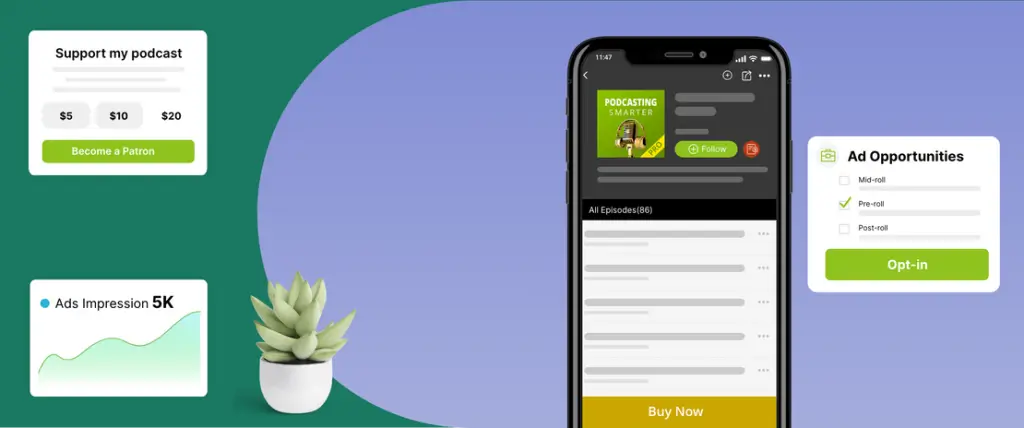
Monetizing a podcast often requires juggling different services. Podbean brings several revenue tools into one dashboard:
- Ads Marketplace: List your show in Podbean’s marketplace to be matched with advertisers. Once approved, you can insert host‑read spots directly into your episodes. This marketplace is ideal for smaller shows that want ad revenue without cold-pitching sponsors.
- PodAds (Dynamic Ad Insertion): Manage ad campaigns with targeted insertion. You can specify pre‑roll, mid‑roll, or post‑roll slots and swap ads across multiple episodes without re‑editing your files. PodAds also provides basic analytics on impressions and earnings.
- Premium & Patron Programs: Charge listeners for exclusive content on a per‑episode or subscription basis. Set your price (minimum $0.50 per episode) and decide what bonuses or behind‑the‑scenes materials you’ll offer to paying fans. The Patron program allows your supporters to pledge recurring amounts in exchange for tiered rewards, similar to Patreon but integrated within Podbean.
- Apple Podcasts Subscriptions: Enable subscription tiers directly within Apple Podcasts via Podbean’s integration. This is helpful if most of your audience listens on Apple devices and you want to offer ad‑free episodes or bonus content.
- Live gifting & fan club: During live streams, listeners can purchase virtual gifts. You keep the majority of the revenue after platform fees, and you can create fan club memberships for recurring income.
These diverse monetization options mean you can build multiple income streams – ads, premium content, subscriptions, and live events – all without leaving the platform.
Analytics & Insights
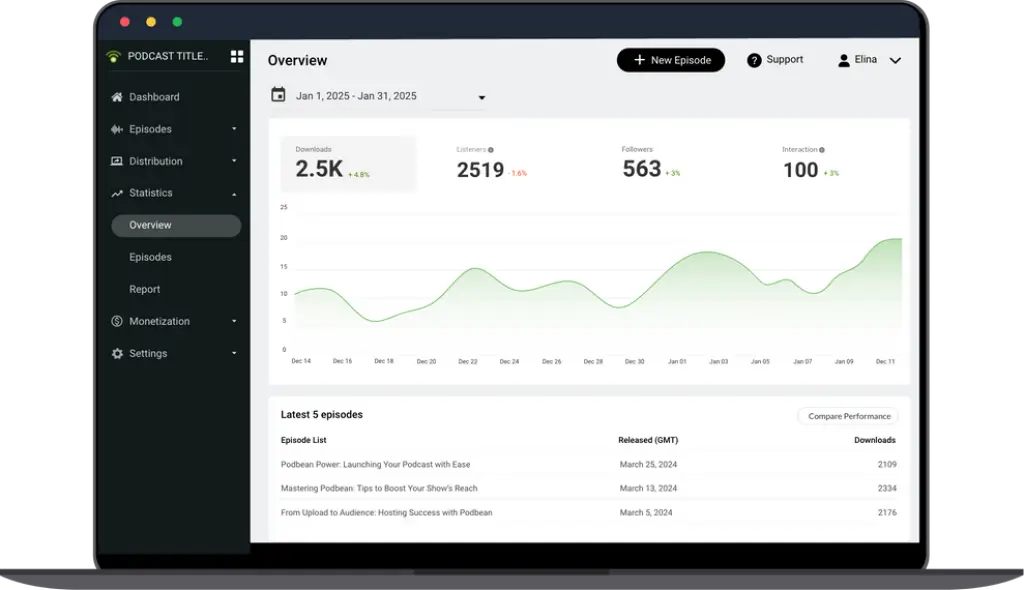
Podbean provides IAB‑certified analytics that track downloads, listens, and audience demographics. Key metrics include:
- Downloads & trends: See total downloads per episode and detect spikes or declines over time.
- Geo & sources: Find out where listeners are located and which apps or devices they use to tune in.
- Most active time: Identify when your audience is most engaged so you can release episodes at optimal times.
- User retention: Measure how many listeners complete each episode and where drop‑offs occur.
- Episode comparison: Compare the performance of recent episodes against your historical average.
While Podbean’s analytics provide enough data to inform basic strategy, advanced marketers may need external tools for granular listener‑level insights or marketing attribution.
Marketing & Promotion Tools
Podbean offers built‑in marketing features to extend your reach:
- Dedicated podcast website: Every account includes a hosted website with podcast‑focused templates. You can customize colors, logos, and layouts and attach your own domain. The sites are mobile responsive and SEO‑optimized, though customization is somewhat basic compared to full website builders.
- SEO essentials: Edit titles, descriptions, and metadata for each episode. You can also add meta tags using simple plugins to improve search visibility.
- Social video clips: Podbean generates audiograms (short video clips with audio and waveforms) to share on social platforms. Note that more advanced audiogram tools are still outside Podbean.
- Email capture: Collect email addresses from your site and send notifications to subscribers when new episodes drop.
Repurposing: Blog‑to‑Podcast & Video‑to‑Podcast
If you already produce written or video content, Podbean helps you repurpose it without starting from scratch:
- Blog‑to‑Podcast: Convert written articles into audio using text‑to‑speech. This is a quick way to create consistent episodes for informational blogs or newsletters, though it still sounds like an AI voice. For more personality, consider recording the narration yourself.
- Video‑to‑Podcast: Pull audio from a YouTube playlist or RSS video feed and automatically create podcast episodes. It’s useful for course creators or webinars who want to reach audio‑only audiences.
These repurposing tools save time and expand your content’s reach across different mediums.
Integrations & Extra Features
Podbean integrates with a range of tools and platforms:
- Social platforms: Facebook, Twitter/X, LinkedIn, Tumblr, and YouTube for auto‑sharing episodes.
- Website platforms: WordPress, Wix, Squarespace, and Tumblr via embeddable players and RSS feeds.
- Email marketing: Mailchimp integration for collecting emails and sending episode notifications.
- Smart speakers: Amazon Alexa skill so listeners can play your show via voice commands.
- Plugins & developer tools: Podbean Marketplace offers plugins such as Stripe payment gateways, Patreon integration, and player customization. There’s also an API for custom workflows.
Pricing and Plans
How much does PodBean cost?
PodBean’s pricing is competitive, especially for long‑term creators. The plans below reflect annual billing rates:
| Plan | Price (Yearly) | Key Features |
| Basic | Free | 5 hours storage, 100 GB bandwidth, basic stats, podcast site, no monetization |
| Unlimited Audio | $9/mo | Unlimited storage, unmetered bandwidth, custom site, multiple podcasts, ads marketplace, premium sales |
| Unlimited Plus | $29/mo | All Unlimited Audio features + video hosting, Patron program access, deeper customization |
| Network | $79/mo | Multiple shows, network analytics, branded network site, up to 50 team members |
| Business | $99/mo | All Unlimited Plus features + private podcasts, SSO, SOC2 security, unlimited team roles, live chat support |
Hidden Fees & Considerations
- Ad fees: Podbean keeps 5 % of your Patron program earnings and takes a $1 CPM fee for ad campaigns.
- AI feature cost: Automated transcripts and AI editing may cost extra, depending on usage; check the Podbean AI pricing page for the latest rates.
- Virtual gifts revenue split: Live gifting revenue is subject to Podbean’s cut, which can vary.
Pros and Cons
Advantages and Limitations
Positive
✅ Affordable unlimited hosting
✅ Mobile first
✅ Multiple monetization paths
✅ User‑friendly interface
Negative
❌ Limited free plan
❌ Basic website templates
❌ Simple analytics
❌ No multitrack editing
✅Pros
- Affordable unlimited hosting: Paid plans provide unlimited storage and bandwidth at competitive prices.
- Mobile first: Record, edit, and publish from the app, great for on‑the‑go creators.
- Multiple monetization paths: Ads marketplace, dynamic ads, premium content, Apple subscriptions, live gifts, and fan club memberships.
- User‑friendly interface: Simple dashboard with minimal learning curve; easy migration from other hosts.
- Customizable embeddable players: Place audio/video players on any website and choose colors, sizes, and settings.
- Reliable analytics: IAB‑certified stats inspire confidence for advertisers and sponsors.
- Automatic backups: Episodes are stored securely with redundant servers.
- Team collaboration: Higher‑tier plans allow multiple admins and contributors.
❌Cons
- Limited free plan: The Basic plan’s 5‑hour storage cap means you’ll need to upgrade quickly.
- Basic website templates: Customization is minimal compared with full site builders; layouts may feel dated.
- Simple analytics: Lacks deep listener‑level insights, marketing attribution, and advanced SEO tools.
- No multitrack editing: Recording tools are convenient but not sufficient for professional production; you’ll need external software for complex edits.
- Video hosting caps: Upload limits on video hosting can be restrictive for long shows.
- Learning curve for dynamic ads: Setting up PodAds campaigns requires some familiarity with ad placement and targeting.
Best Use Cases
Who Should Use Podbean
Beginner Podcasters Launching Their First Show
Podbean is a strong starting point if you want to launch without technical friction. The setup process is guided, hosting is included, and distribution to major podcast platforms is handled for you.
You do not need prior experience with RSS feeds, encoding, or publishing workflows. Everything is centralized in one dashboard, which lowers the barrier to entry.
Mobile-First Creators and Solo Podcasters 📱
If you record or publish on the go, Podbean’s mobile app is one of its biggest advantages. You can record, edit, publish, and even livestream directly from your phone.
This makes Podbean ideal for solo creators who value speed and flexibility over advanced production workflows.
Podcasters Focused on Monetization from Day One
Podbean stands out for creators who want built-in monetization without relying on third-party tools.
You can experiment with ads, premium episodes, subscriptions, and live gifting as your audience grows, all from the same platform.
Businesses and Teams Running Private Podcasts
Podbean’s higher-tier plans support private podcasting, team roles, and secure access, making it suitable for internal communications, training, or customer education.
This is especially relevant for companies that want controlled distribution without using public podcast directories.
Content Creators Repurposing Blogs or Videos
If you already publish written or video content, Podbean’s repurposing tools help you extend that content into podcast form with minimal effort.
This is a good fit for educators, marketers, and thought leaders who want a broader reach without doubling their workload.
Set Up and Best Practices
Best Practices for Using PodBean
Creating Your Podcast and Initial Setup
Start by creating your podcast profile, uploading artwork, and filling in show details such as description, category, and language.
Take time to write a clear, keyword-aware description, as this impacts discoverability across podcast platforms.
Best practice: Use consistent branding across artwork, titles, and episode descriptions to build recognition.
Uploading Episodes and Optimizing Metadata
When uploading episodes, Podbean lets you add titles, descriptions, tags, and episode artwork.
This metadata directly affects how your podcast appears in directories and search results.
Best practice:
- Use descriptive episode titles instead of episode numbers alone
- Write show notes that summarize value, not just timestamps
Distributing Your Podcast to Major Platforms
Podbean simplifies distribution by generating an RSS feed and connecting it to platforms like Apple Podcasts and Spotify.
Once connected, new episodes are pushed automatically.
Best practice: Double-check your show information before submitting to directories, as some details are harder to change later.
Using Podbean AI to Improve Efficiency 💡
Podbean’s AI tools can clean up audio, remove filler words, and generate transcripts, show notes, and chapters.
These features are especially useful if you want to reduce post-production time.
Best practice: Use AI as a baseline, then manually review outputs to maintain tone and accuracy.
Monetization Setup and Early Revenue Strategies
You can enable monetization features gradually, starting with listener support or ads once eligible.
Podbean allows you to test different revenue models without migrating platforms.
Best practice: Introduce monetization after establishing consistency, not on episode one.
Tracking Performance and Iterating Content
Podbean’s analytics help you monitor downloads, episode trends, and listener locations.
Use this data to refine content length, publishing frequency, and topics.
Best practice: Focus on trends over time, not single-episode performance spikes.
Common Mistakes to Avoid
Avoid uploading inconsistent audio quality, skipping episode descriptions, or relying solely on AI-generated content.
These shortcuts can limit long-term growth and listener trust.
Competitors
Alternatives to PodBean
Podbean is an all-in-one podcast hosting and monetization platform, but it is not always the best fit for every workflow. Some creators prioritize studio-grade recording, advanced AI editing, or remote interviews over built-in monetization and hosting.
Below is a focused comparison with three of the most searched Podbean alternatives: Riverside, Descript, and Podcastle.
Podbean vs Riverside vs Descript vs Podcastle – Feature Comparison
| Feature Area | Podbean | Riverside | Descript | Podcastle |
| Primary Use Case | Podcast hosting, distribution, monetization | Remote recording and interviews | AI-powered editing and content creation | AI podcast creation and enhancement |
| Audio & Video Hosting | Yes – audio and video podcast hosting | No – recording only | No – editing only | Limited – not a full host |
| Remote Recording | Basic mobile recording | Studio-quality local recording | Yes, with limitations | Yes |
| AI Editing Tools | Basic cleanup, transcripts, show notes | Minimal AI editing | Advanced text-based editing | Strong AI audio enhancement |
| Podcast Monetization | Ads, subscriptions, premium content, live gifts | No built-in monetization | No built-in monetization | No built-in monetization |
| Live Streaming | Yes – live audio with listener interaction | No | No | No |
| Best For | Creators wanting an all-in-one platform | Interview-driven podcasts | Editing-heavy workflows | AI-first solo creators |
Podbean vs Riverside – Hosting vs Recording Focus
Riverside is built specifically for high-quality remote recording, making it ideal for interview-based podcasts and video shows. It records locally on each participant’s device, which results in superior audio and video quality.
Podbean, by contrast, focuses on what happens after recording. It handles hosting, distribution, monetization, and audience engagement.
Choose Podbean if: you want publishing, monetization, and distribution in one place.
Choose Riverside if: studio-grade remote recording is your top priority.
Podbean vs Descript – All-in-One vs Editing Power
Descript is an editing-first platform that lets you edit audio and video like a text document. It excels at content repurposing, narration fixes, and collaborative editing.
Podbean’s AI tools are designed for speed and efficiency, not deep creative editing.
Choose Podbean if: you want to host, publish, and monetize without extra tools.
Choose Descript if: editing and content transformation drive your workflow.
Podbean vs Podcastle – Monetization vs AI Creation
Podcastle is an AI-driven platform aimed at simplifying podcast creation through voice enhancement and AI narration. It is strong for solo creators experimenting with AI-generated audio.
Podbean goes further by offering real monetization, distribution, and audience tools, which Podcastle lacks.
Choose Podbean if: you want to grow and monetize a real audience.
Choose Podcastle if: AI-assisted creation is your main goal.
When Podbean Is the Better Choice Overall
Podbean is the stronger option if you want:
- Hosting, publishing, and monetization in one platform
- Built-in podcast ads and subscriptions
- Live audio streaming and fan engagement
- Mobile-first recording and publishing
Many professional creators actually combine tools, using Riverside or Descript for production and Podbean for hosting and monetization. That hybrid workflow often delivers the best long-term results.
Conclusion
Final thoughts
Podbean has matured into a comprehensive podcasting platform that bundles hosting, distribution, marketing, and monetization into one convenient package. Its unlimited storage on paid plans, reliable CDN, and ease of use make it a solid choice for beginners and growing creators. The addition of Podbean AI and repurposing tools shows the company’s commitment to innovation, helping podcasters save time and reach wider audiences. While the free plan is limited and some features like dynamic ad insertion and website customization still need improvement, the overall value is hard to ignore, particularly if you want to manage everything from one dashboard.
Have more questions
Frequently Asked Questions
Is Podbean free?
Podbean offers a Basic plan that is free and includes 5 hours of storage, 100 GB of monthly bandwidth, a simple podcast website, and basic statistics. However, it lacks monetization tools and has limited storage, so most creators upgrade to a paid plan to access unlimited hosting and revenue features.
How does Podbean help me make money?
Podbean includes several monetization options: Ads Marketplace to connect with sponsors, PodAds for dynamic ad insertion, premium paid episodes, Apple Podcast subscriptions integration, and live streaming gifts or fan club memberships. You can combine these methods to build multiple revenue streams.
Does Podbean support video podcasts?
Yes. The Unlimited Plus, Network, and Business plans let you host video episodes with generous upload limits (20–40 GB per month). You get a video-enabled RSS feed so your show can appear in podcast apps that support video.
Can I record my podcast using Podbean?
You can record directly through the Podbean Studio mobile app. It lets you capture audio, invite up to seven co-hosts or guests, add music or effects, and edit basic clips. For advanced multitrack editing, you’ll need an external editor.
What analytics does Podbean provide?
Podbean’s analytics dashboard shows downloads, geographic distribution, listening platforms, and retention trends. You can compare episode performance and identify when your audience is most active. Higher-tier plans add network analytics for multiple shows.
How does Podbean handle private podcasts?
On the Business plan, Podbean lets you create private feeds secured with SSO and SOC2-level security. You can restrict access to specific email addresses, assign team roles, and share internal training or corporate updates without exposing them to the public.
Does Podbean integrate with other tools?
Yes. Podbean integrates with Mailchimp for email capture, social media platforms for auto-sharing, WordPress and other website builders through embeddable players, and Amazon Alexa for voice playback. Its plugin marketplace offers additional functionality like payment gateways and player customization.
What are Podbean’s AI features?
Podbean AI offers noise reduction, volume leveling, filler-word removal, equalization, automated transcripts, AI-generated titles and show notes, and precise chapter markers. These tools streamline post-production and improve accessibility.
Are there any hidden costs with Podbean?
While base plans are straightforward, Podbean takes a 5 % cut of earnings from the Patron program and charges a $1 CPM fee for ads managed through PodAds. AI features like transcripts may incur additional per-minute costs. Always check the latest pricing before committing.
How does Podbean compare to other hosting platforms?
Podbean stands out with its unlimited hosting, integrated monetization options, video support, and AI tools. Buzzsprout offers a more polished interface and audio optimization but lacks video and private podcasting. Castos is ideal for WordPress users but doesn’t provide advertising or AI features. Spreaker excels at programmatic ads and radio-style broadcasting but doesn’t have video hosting or integrated mobile editing.
Your choice depends on whether you prioritize all-in-one convenience, advanced production tools, or specific monetization models.