Introduction
The explosion of audio and video content has created an equally large need for tools that simplify production without sacrificing quality. Editing traditionally involved scrubbing through waveforms, juggling multiple apps, and spending hours on tasks like transcription, cleanup, and formatting. Descript promises to change that. Marketed as an all‑in‑one editing suite that feels as approachable as a word processor, it combines local recording, transcription, text‑based editing, AI voice technology, and collaborative tools in a single package. In this Descript review, you’ll learn what makes the software different, who it’s best suited for, where it excels, and what limitations you should be aware of before adopting it as part of your workflow. Whether you produce podcasts, training videos, marketing content, or educational materials, the platform’s blend of AI and human‑centred design may help you work smarter.
What Is Descript?
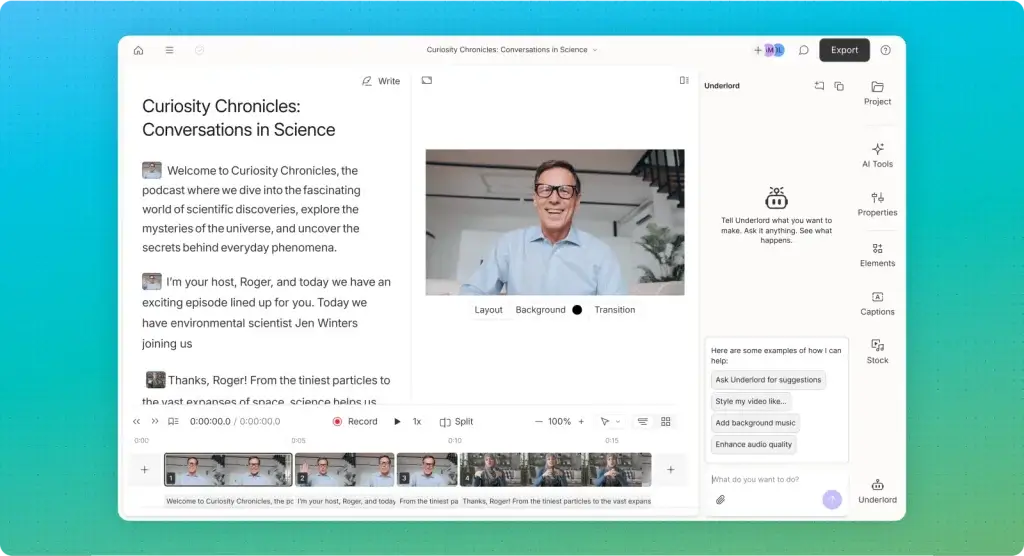
Descript is a cloud‑based audio and video editing platform that replaces complex timelines with a simple document‑style interface. Instead of dragging clips on a timeline, you edit your content by editing the automatically generated transcript. Delete a sentence from the text and the corresponding audio and video vanish; re‑order paragraphs and the media follow suit. The software is available via a desktop application (macOS and Windows) with optional web access for reviewing projects.
Beyond its signature text‑based editing, Descript offers a suite of AI features: automatic transcription in more than 25 languages, studio‑quality audio enhancement, voice cloning (called Overdub), generative show notes and social clips, automatic removal of filler words, and an AI co‑editor known as Underlord that can handle mundane editing tasks or even generate complete videos from prompts. Recently, Descript added Rooms for local, multi‑track remote recordings, Brand Studio for corporate branding, and enterprise‑grade security features that meet SOC 2 Type II, GDPR, and CCPA standards.
Podcasting Features
Key Features for Recording and Production
Descript began as a podcast editing tool, and its current suite of features makes it one of the most complete platforms for audio storytelling. The sections below outline the key podcasting capabilities you should know about.
Recording & Rooms
High‑quality recording is the foundation of every great podcast. Descript’s Rooms allow you to capture local audio and 4K video for each participant, even if your guests connect from different locations. The software records each track directly to each person’s machine, eliminating the choppiness and noise often caused by unstable internet connections. Producers can monitor sessions off‑screen, and as soon as you stop recording, the files begin uploading and transcribing, so you can start editing immediately. This built‑in remote studio removes the need for separate recording solutions like Riverside or SquadCast.
Transcription & Text‑Based Editing
As soon as you upload or record a file, Descript automatically generates a transcript with roughly 95 % accuracy. The software supports over 25 languages and identifies multiple speakers. Once transcribed, your audio or video becomes as editable as a text document. You can:
- Delete sentences, paragraphs, or words to remove them from the final project.
- Rearrange sections by cutting and pasting text; the underlying media moves accordingly.
- Search for words or phrases and perform bulk edits (for instance, replacing a mispronounced name throughout the recording).
- Correct transcription errors directly in the text to improve the accuracy of captions.
This approach eliminates the need to scrub through waveforms and makes editing feel familiar, especially if you’re comfortable with word processors. It also simplifies collaboration because anyone can jump in and make changes without understanding traditional editing software.
Studio Sound & Audio Enhancement
Background noise, echo, and inconsistent microphone quality can ruin an otherwise engaging conversation. Studio Sound applies machine learning to isolate voices and remove unwanted noise, effectively simulating a professional recording booth. You can enable it with a single toggle; the effect is particularly dramatic when guests call from noisy environments. For minor fixes, the Edit for Clarity tool balances volume levels, removes cross‑talk, and smooths abrupt transitions. When you mispronounce a word or need to correct a fact, the Regenerate tool uses your voice model (see Overdub below) to replace the offending phrase without re‑recording the entire segment.
AI‑Generated Show Notes, Chapters and Translations
Preparing a finished podcast involves more than editing audio. Descript’s AI assistant can generate show notes, titles, and YouTube descriptions based on your transcript. It also creates chapter markers with timestamps, making your episodes easier to navigate. If you want to reach non‑English audiences, the translation feature converts your content into more than 20 languages while preserving names and industry terms. These tools reduce the time spent on marketing and localisation tasks so you can focus on storytelling.
Publishing and Distribution Tools
Once your episode is ready, Descript lets you publish directly to hosting services like Buzzsprout, Captivate, Podbean, and Transistor. You can also export video podcasts straight to YouTube in up to 4K resolution. The platform automatically generates audiograms, short audio clips with animated waveforms and captions, for promotion on social media. For teams, branded share pages allow you to send preview links to clients or collaborators with your logo and colour scheme.
Filler Word & Retake Removal
Filler words (“um”, “uh”, “you know”) and repeated takes can make a podcast sound amateurish. Descript recognises common fillers and marks them in the transcript. You can remove all filler words across your project with one click or review them individually to avoid deleting meaningful pauses. The Remove Retakes feature identifies multiple attempts at the same line (often during scripted reads) and lets you keep only the best take. Together, these tools help you polish your audio quickly.

Editing and Recording
Descript Video Editing & Screen Recording
Although Descript’s roots lie in audio, its video capabilities have expanded dramatically. If you produce content for YouTube, social media or internal training, you’ll appreciate these features.
Text‑Based Video Editing & Timeline Controls
Descript applies the same transcript‑editing paradigm to video. After the automatic transcription, you can delete or reorder sections of the transcript to cut or move video clips. For more precise edits, the timeline view offers frame‑accurate controls, keyframing, and the ability to adjust timing without leaving the transcript. Time mapping allows you to speed up or slow down segments, ideal for emphasising demonstrations or condensing unimportant moments. Colour correction, cropping, rotation, and other basic adjustments are included, so you can deliver a polished video without exporting to a separate editor.
Screen Recorder & Multicam
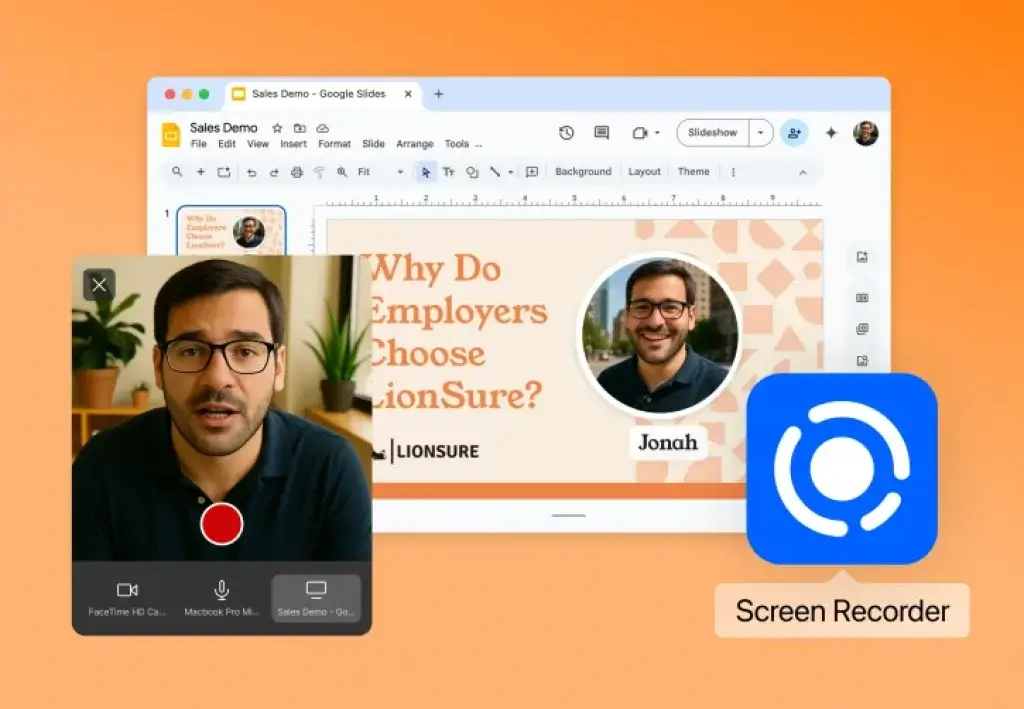
The Screen Recorder captures your entire desktop, a specific application window, or a custom region. Each recording is automatically transcribed and inserted into your project. You can also enable the webcam overlay to create picture‑in‑picture tutorials or explainer videos. For more complex productions, Descript’s Automatic Multicam detects multiple camera feeds and switches between them based on who is speaking, saving you hours of manual editing. All recordings remain in sync with the transcript and can be edited just like any other media.
Overdub & AI Voice Cloning
Overdub is Descript’s voice cloning feature. By reading a short script into the software, you train a personalised voice model that can regenerate your speech. When you need to fix a misspoken word, insert a new sentence, or add narration, you simply type the desired text, and Overdub synthesises your voice to match the tone and pacing of the surrounding audio. The technology also offers stock voices in multiple languages, allowing you to create multilingual versions or add character voices to your projects. Voice cloning is opt‑in and requires your explicit consent.
Templates, Stock Footage & Social Clips
Creating eye‑catching videos is faster when you don’t start from scratch. Descript includes a library of templates tailored for different use cases: Instagram Reels, YouTube Shorts, audiograms, product demos, webinars, and more. These templates define video layouts, typography, and animations that you can customise to fit your brand. The built‑in stock library provides royalty‑free footage, images, and music tracks you can drag into your timeline. Once your long‑form video is ready, the Clip Finder tool analyses it and recommends segments that are likely to perform well on social platforms. With a click, you generate shareable clips complete with captions and aspect ratio adjustments.
AI Video Maker & Avatars
One of Descript’s newest capabilities is the AI Video Maker. You can paste a script or type a prompt (e.g., “overview of workplace safety”), choose a voice (yours or a stock voice) and select B‑roll preferences. The AI then generates a full video with voiceover, matching stock footage or AI‑generated visuals and on‑brand design elements. You can edit the resulting project just like any other composition.
For situations where you’d rather not appear on camera, AI avatars step in. You can select a pre‑built avatar from Descript’s gallery or create a customised avatar by uploading a portrait or describing it with a text prompt. Each avatar can read scripts using your cloned voice or a stock voice. Avatars are limited to segments of around 12 minutes, and any edits require re‑rendering, so careful planning is recommended. Nevertheless, the feature opens up new possibilities for faceless videos, training modules, and multilingual presentations.
AI Features & Underlord AI Editor
Descript’s artificial intelligence does more than transcribe and clean audio, it assists with content creation and editing. The Underlord AI assistant is at the centre of these capabilities.
Underlord AI Co‑Editor & Natural‑Language Commands
Underlord is your AI co‑editor, designed to handle time‑consuming editing tasks. Instead of hunting through menus, you can give Underlord plain‑language instructions, such as “remove all filler words,” “make this clip two minutes long,” “add zooms to hide jump cuts,” or “generate a 30‑second highlight reel for LinkedIn.” Underlord reads your script, watches your video, and uses its understanding of Descript’s toolset to carry out your request. It also suggests improvements, like adding B‑roll to maintain viewer engagement or inserting chapter markers for longer videos, and accepts feedback so you can refine the output. Because Underlord integrates fully with Descript, it knows how to use every feature without leaving the platform.
AI Avatars & Voice Cloning Capabilities
As mentioned earlier, Overdub and the AI avatar system allow you to clone voices and create digital presenters. Underlord can combine these technologies to write scripts, select appropriate voices, and pair them with avatars. For example, you could ask Underlord to “create an explainer video about our new app using a cheerful female voice” and receive a fully voiced, branded video. The voice cloning system supports multiple languages and tonal variations, enabling you to produce content for different regions or audiences without hiring voice actors. Just remember that creating voice models requires explicit consent from the speaker, and changes after rendering consume additional avatar credits.
Brand Studio & Customisation Tools
Consistency is crucial for businesses that create lots of videos. Descript’s Brand Studio centralises your organisation’s colours, fonts, logos, and layouts. Once you set up your brand kit, any team member can apply approved styles to their videos with a single click. Admin‑level permissions let you lock specific colours or fonts, ensuring that off‑brand options disappear from pickers. You can build a shared glossary of industry terms and proper names so that transcripts and translations respect your brand vocabulary. A Do Not Translate list prevents your company name or product names from being mistranslated when generating multilingual versions. Brand Studio is available on Business and Enterprise plans and includes branded share pages for client reviews.
Pros and Cons
Advantages and Limitations
Positive
✅ Intuitive, transcript‑based editing
✅ Comprehensive feature set
✅ Time‑saving AI tools
✅ Affordable entry point
Negative
❌ Performance on large projects
❌ Learning curve for advanced features
❌ Limited pro‑level editing
❌ No full mobile editor
No tool is perfect. Understanding Descript’s strengths and weaknesses will help you decide whether it’s the right fit for your workflow.
✅ Pros
- Intuitive, transcript‑based editing: Editing by editing text dramatically reduces the learning curve, especially for podcasters and script‑driven video creators.
- Comprehensive feature set: Descript combines recording, editing, AI audio cleanup, voice cloning, video generation and collaboration in one application. You no longer need to juggle separate tools for transcription, editing, captioning, and publishing.
- Time‑saving AI tools: Features like filler word removal, Studio Sound, show note generation, and Underlord’s natural‑language commands automate tedious tasks, freeing you to focus on creative decisions.
- Affordable entry point: The Free and Creator plans offer considerable value compared to hiring professional editors or purchasing separate transcription services.
- Robust collaboration: Real‑time editing, commenting, share links, and version history streamline teamwork and client approvals.
- Multi‑language support: Transcription, translation, and AI voices in more than 25 languages help you reach global audiences without specialised software.
- Security and privacy: SOC 2 compliance, encryption and opt‑in AI features build trust, making Descript suitable for businesses that handle sensitive information.
❌ Cons
- Performance on large projects: Users report occasional lag when working with long recordings or multiple tracks. Older computers may struggle with Descript’s processing requirements, leading to delays during editing or export.
- Learning curve for advanced features: While basic editing is simple, mastering Underlord commands, Brand Studio and AI avatars requires time and experimentation. Some users may feel overwhelmed by the breadth of tools available.
- Limited pro‑level editing: Descript lacks advanced features like keyframing for complex animations, detailed colour grading, motion graphics and extensive effect libraries found in professional editors like Final Cut Pro or DaVinci Resolve. Serious filmmakers may need to finish their projects in another application.
- No full mobile editor: Although you can view and comment on projects from a web browser, there is no dedicated mobile app for recording or editing on the go. Tablet users, in particular, might miss a native solution.
- AI imperfections: Automatic transcription is highly accurate but still makes mistakes with unusual names or heavy accents. Studio Sound can sometimes produce artefacts, and AI avatars may look uncanny if your prompts aren’t specific. Overdub works best for minor fixes; generating entire scripts can sound unnatural.
- Costs can add up: While entry plans are affordable, advanced features like AI avatars, long projects or additional transcription hours require credits or higher‑tier subscriptions. Teams may need to budget for per‑user pricing at the Business level.
Pricing and Plans
How much does Descript cost?
Descript offers several plans to suit different user profiles. Pricing varies slightly depending on promotions and annual billing options, but the general tiers look like this:
| Feature Type | Free Plan | Creator Plan | Pro/Business Plan |
| Monthly price (approx.) | $0 | $15–24/mo | $30–50+/mo per user |
| Transcription hours | 1 hour/month | 10–30 hours/month | 40+ hours/month (plus top‑ups) |
| Video export resolution | 720p (with watermark) | 4K | 4K |
| Filler word removal | Basic (um, uh) | Standard | Expanded list |
| Overdub vocabulary | 1,000 words | 1,000 words | Unlimited |
| Studio Sound & AI tools | Limited minutes | 60 min files | Unlimited |
| Stock library access | Limited search results | Moderate search results | Unlimited results |
| Cloud storage | 5 GB | 100 GB | 1 TB or more |
| Brand Studio & Enterprise features | Not available | Not available | Included in Business/Enterprise |
If you’re just getting started, the Free plan gives you a taste of text‑based editing and Overdub, but the 1‑hour transcription limit and watermark on 720p exports make it impractical for regular production. The Creator tier (sometimes marketed as Hobbyist or Plus) is ideal for part‑time creators: you gain 10–30 transcription hours, 4K exports, access to more AI features, and additional stock media. For teams or high‑volume creators, the Pro or Business plans offer 40+ hours of transcription, unlimited Overdub vocabulary, Brand Studio access, translation into 30+ languages and priority support. Enterprise plans add custom pricing, higher security guarantees, and dedicated account management.
Best Use Cases
Who Should Use Descript
Descript is designed for creators and teams who work primarily with spoken content and want to reduce editing time without sacrificing quality. If your workflow revolves around audio, dialogue, or educational video, Descript fits naturally.
Podcasters and Podcast Networks 🎙️
Descript is one of the strongest podcast editing tools available when clarity, speed, and scalability matter.
You benefit most if you:
- Edit interviews, conversations, or solo shows
- Publish weekly or high-volume episodes
- Repurpose podcast content into clips, transcripts, or show notes
Key value for podcasters:
- Edit audio by editing text instead of waveforms
- Remove filler words and awkward pauses in one action
- Enhance sound quality using Studio Sound without advanced audio knowledge
- Generate transcripts and captions automatically
- Publish directly to major podcast hosting platforms
This makes Descript especially effective for multi-episode workflows and teams managing multiple shows.
Video Creators Focused on Talking-Head Content
If your videos rely on narration, screen recordings, or interviews rather than complex visual effects, Descript is a strong fit.
Common use cases include:
- YouTube explainers and tutorials
- Educational and training videos
- Webinar recordings and replays
- Thought leadership and commentary videos
Why Descript works well here:
- Edit video by editing the transcript
- Automatically center the active speaker
- Fix eye contact and clean up jump cuts
- Create short clips for social platforms quickly
Descript is not built for cinematic editing, but it excels at clear, polished, dialogue-driven video.
Marketing and Content Teams
Descript is particularly effective for marketing teams producing repeatable, on-brand video and audio content.
You will benefit if you:
- Produce product demos or feature walkthroughs
- Create internal training or onboarding content
- Repurpose long-form content into short clips
- Collaborate across teams or stakeholders
Team-focused advantages:
- Real-time collaboration similar to Google Docs
- Commenting and approval without requiring extra licenses
- Brand Studio for consistent fonts, layouts, and terminology
- AI-generated show notes, descriptions, and summaries
This makes Descript well-suited for B2B SaaS marketing, sales enablement, and customer education.
Educators, Coaches, and Course Creators
Descript is a strong option if your content prioritizes clarity, accessibility, and speed.
Ideal scenarios include:
- Online courses and lesson recordings
- Coaching sessions and workshops
- Internal company training libraries
What stands out:
- Automatic captions for accessibility
- Multilingual transcription and translation
- Easy updates without re-recording entire lessons
- Clean exports for LMS platforms
For educators, Descript removes technical friction and keeps focus on teaching.
Who Descript Is Less Suitable For
Descript may not be the best fit if you:
- Need advanced cinematic video effects
- Rely heavily on timeline-based color grading or motion graphics
- Work primarily with non-verbal visual content
In those cases, traditional video editors may be more appropriate.
Set Up and Best Practices
Best Practices for Using Descript
Getting started with Descript is straightforward, but applying best practices early can significantly improve output quality and efficiency.
Getting Started – Initial Setup
Your setup process typically follows these steps:
- Create an account and choose a plan
- Install the desktop app for full feature access
- Set your default language and transcription preferences
- Upload existing audio or video, or start a new recording
For podcasting and video creation, starting with the desktop app provides better performance and access to advanced features.
Optimize Audio Quality from the Start 🔊
Descript can dramatically improve audio, but good input still matters.
Best practices:
- Record in a quiet environment when possible
- Use a dedicated microphone instead of a laptop mic
- Apply Studio Sound after transcription, not before
- Review AI cleanup results manually for natural pacing
This ensures Studio Sound enhances clarity without over-processing voices.
Edit with the Transcript First
One of Descript’s biggest advantages is text-based editing.
Recommended workflow:
- Read through the transcript before touching visuals
- Remove filler words and retakes early
- Adjust pacing by tightening word gaps
- Fix transcription errors before exporting
This approach is significantly faster than timeline-based editing and reduces mistakes later.
Use AI Features Intentionally
Descript’s AI tools are powerful, but they work best with direction.
Effective ways to use AI:
- Generate show notes and summaries after final edits
- Use clip detection to find highlights, not final cuts
- Apply voice regeneration sparingly for corrections
- Review AI-generated content before publishing
Think of AI as an assistant, not a replacement for editorial judgment.
Maintain Brand Consistency with Brand Studio
If you work in a team or publish regularly, Brand Studio is essential.
Best practices include:
- Create a shared glossary for brand terms
- Lock fonts and layouts to prevent inconsistencies
- Set “do not translate” terms for names and products
- Use branded share pages for client reviews
This reduces revision cycles and keeps content aligned.
Collaboration and Review Workflow
To streamline approvals:
- Share projects with comment-only access
- Use @mentions for specific feedback
- Track changes using version history
- Avoid exporting drafts too early
This keeps all feedback centralized and prevents version confusion.
Export and Distribution Tips
Before exporting:
- Double-check captions and formatting
- Choose the correct resolution for your platform
- Export audio and video separately when needed
- Use direct publishing integrations when available
This ensures your final output is optimized for each channel.
Final Tip – Build Repeatable Templates 💡
For long-term efficiency:
- Create reusable project templates
- Save preferred layouts and styles
- Standardize intro and outro sections
- Document your internal workflow
This turns Descript into a scalable production system rather than a one-off editing tool.
Competitors
Alternatives to Descript
While Descript is a powerful all-in-one editor, it is not always the best fit for every workflow. Depending on whether you prioritize remote recording quality, live streaming, podcast hosting, or timeline-based editing, one of the alternatives below may suit you better.
Riverside
Riverside focuses on high-quality remote recording, making it a strong alternative if capture quality matters more than deep post-production editing.
Best for:
- Remote interviews with guests
- Video podcasts and webinars
- Creators who want local audio and video tracks
Key differences vs Descript:
- Riverside excels at recording, Descript excels at editing
- Local track recording reduces internet-related quality loss
- Editing tools are improving but still less flexible than Descript
Riverside works best when paired with another editor, while Descript aims to replace multiple tools.
StreamYard
StreamYard is designed for live streaming, not post-production editing. It is a strong alternative if your content strategy revolves around real-time broadcasting.
Best for:
- Live podcasts and panels
- YouTube, LinkedIn, and Facebook Live
- Simple layouts with minimal setup
Key differences vs Descript:
- StreamYard does not offer text-based editing
- No advanced AI cleanup or transcription workflows
- Much easier for live content, less capable for polished edits
StreamYard is a broadcasting tool first, while Descript is a production platform.
Podbean
Podbean is primarily a podcast hosting and monetization platform, with light editing features included.
Best for:
- Hosting and distributing podcasts
- Monetization and listener analytics
- Beginners who want a simple setup
Key differences vs Descript:
- Podbean focuses on distribution, not editing
- Editing tools are basic compared to Descript
- No advanced AI video or voice tools
Podbean complements Descript well, but does not replace it for production.
Descript vs Top Alternatives – Feature Comparison
| Feature Type | Descript | Riverside | StreamYard | Podbean |
| Primary Focus | AI editing & transcription | Remote recording | Live streaming | Podcast hosting |
| Text-Based Editing | Yes | Limited | No | No |
| Local Track Recording | No | Yes | No | No |
| AI Audio Cleanup | Studio Sound | Basic enhancements | None | Basic tools |
| Video Editing Tools | Advanced (dialogue-focused) | Basic | Very limited | Minimal |
| Live Streaming | No | No | Yes | No |
| Podcast Hosting | No | No | No | Yes |
| Best For | Editing & repurposing | Remote interviews | Live broadcasts | Distribution & monetization |
How to Choose the Right Alternative
You should choose:
- Descript if editing speed, AI tools, and repurposing matter most
- Riverside if recording quality with remote guests is your top priority
- StreamYard if live streaming is your core format
- Podbean if hosting and monetization come first
In many workflows, Descript works best alongside one of these tools rather than being replaced entirely.
Conclusion
Final thoughts
⭐ Overall Rating: 9.3/10
Descript represents a paradigm shift in audio and video editing. Turning your recordings into editable text makes the process accessible to anyone comfortable writing a document. Pair that with AI tools like Studio Sound, Overdub, automatic show notes, translation, and the Underlord co‑editor, and you have a platform that can dramatically reduce production time. Its built‑in recording, collaboration, and publishing features further consolidate your workflow.
That said, Descript isn’t a one‑size‑fits‑all solution. Performance can lag on older machines, and filmmakers requiring advanced colour grading or effects will still need dedicated software. The learning curve for some features may frustrate newcomers, and mobile‑only creators must look elsewhere. Yet for podcasters, educators, marketers, and teams who prioritise efficiency and collaboration, Descript offers a compelling blend of usability and power. Try the Free or Creator plan to see whether the platform’s AI‑driven approach fits your creative process.
Have more questions
Frequently Asked Questions
What is Descript, and how does it work?
Descript is an AI-powered audio and video editing platform. It automatically transcribes your recordings and lets you edit the content by editing the text. Delete or rearrange words in the transcript and the corresponding media updates instantly. Additional tools handle recording, screen capture, audio cleanup, voice cloning, and more.
Is Descript good for podcast editing?
Yes. You can record interviews locally through Rooms, transcribe them within minutes, remove filler words with one click, polish the sound using Studio Sound, generate show notes, and publish directly to hosting platforms. The transcript-based interface makes editing conversations faster than scrubbing through waveforms.
How accurate is Descript’s transcription?
Descript’s automatic transcription is roughly 95 % accurate and supports more than 25 languages. It identifies speakers and can be improved by correcting errors in the text. For mission-critical projects, you should review and fix names or jargon manually.
Can you use Descript for free?
Descript’s Free plan allows 1 hour of transcription per month, limited Overdub vocabulary, and 720p exports with a watermark. It’s ideal for trying out the workflow. Regular creators will likely need the Creator or Pro plan for more transcription hours, higher-quality exports, and additional AI features.
Does Descript support multiple languages?
Yes. Transcription, translation, and text-to-speech features cover more than 25 languages. You can generate subtitles, voiceovers, and even translate your entire project into another language. Brand Studio also provides tools to keep brand names consistent across translations.
What is Descript Underlord, and how can it help me?
Underlord is Descript’s AI co-editor. You can give it plain-language instructions such as “find the best clips for social media,” “remove all ums”, or “generate a 30-second highlight reel.” It executes those tasks using Descript’s tools and offers suggestions to improve your content. Underlord also writes scripts, generates titles, and helps design layouts.
Can I create AI avatars in Descript?
Yes. Descript’s AI avatar system lets you choose from a gallery of stock avatars or create custom ones from a photo or text description. Pair them with your voice clone or a stock voice to generate faceless videos. Avatars are limited to segments of about 12 minutes, and each render uses credits from your plan.
Is Descript suitable for professional video editors?
Descript is excellent for quickly assembling podcasts, tutorials, and social videos, but it lacks advanced pro-level features like detailed colour grading, complex effects, and motion graphics. Many professionals use Descript for rough cuts and then export to tools like Final Cut Pro or DaVinci Resolve for finishing touches.
Does Descript have a mobile app?
As of 2026, Descript does not offer a full mobile editor. You can access projects through a web browser to review and comment, but recording and editing functions are limited to the desktop application. Mobile support is a common request among users, so this may change in the future.
How secure is my data in Descript?
Descript employs industry-standard security measures. The platform is SOC 2 Type II compliant and conforms to GDPR and CCPA regulations. Your data is encrypted at rest and in transit, AI features are opt-in, and the company has a dedicated Data Protection Officer. Descript only uses your project data to provide its services and does not sell or market it.