

Introduction
When you start a podcast, you quickly discover how much work goes into recording high‑quality audio and video. Between coordinating guests, ensuring clean sound, editing episodes, and distributing them across platforms, the process can be daunting. You may have tried different tools only to find yourself juggling multiple apps and still dealing with technical issues.
Zencastr promises to simplify this workflow by bringing studio‑quality recording, AI‑powered editing, hosting, and monetization under one roof. Launched in 2014 by Josh Nielsen and Adrian Lopez, the platform began as a browser‑based audio recording tool and has grown into a comprehensive suite designed for podcasters, interviewers, and video creators. In this Zencastr review, you’ll discover how its features work, where it shines, and where it falls short so you can decide whether it fits your needs.
What Makes Zencastr Unique?
Zencastr differentiates itself through an all‑in‑one approach. Instead of stitching together separate services for recording, editing, hosting, and monetization, Zencastr offers a seamless workflow that starts with your recording session and ends with your podcast published and promoted. This review covers those capabilities in depth while highlighting extra tools like AI clipping, dynamic content insertion, and an embeddable player that other reviews often overlook.
Key Features of Zencastr
Core Recording & Production Features
Zencastr is more than a remote recording tool. It combines high‑quality audio and video capture with AI‑powered editing, unlimited hosting, analytics, and monetization. Below you’ll find detailed sections covering each major feature set and how they contribute to a smoother podcasting experience.
Remote Recording and Multi‑Track Audio
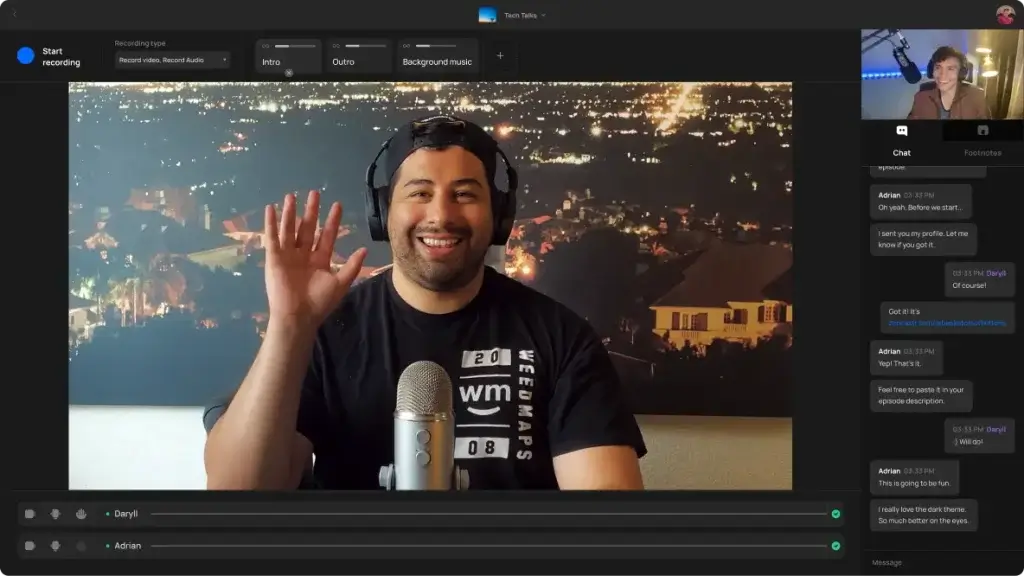
Remote interviews are the lifeblood of many podcasts, and Zencastr excels at making them painless. With a simple invite link, guests join from their browser, no downloads or accounts needed. Each participant’s audio and video are recorded locally at 48 kHz WAV for audio and up to 4 K resolution for video, then uploaded separately to the cloud. This ensures crystal‑clear sound even when internet connections fluctuate because the recording happens on the user’s device rather than over the network. Multi‑track recording also allows you to edit individual speakers with precision.
From your perspective as the host, the setup is quick. You can see real‑time waveforms and monitor levels to catch issues early, and Zencastr automatically backs up files to the cloud. Separate tracks mean you can remove background noise or adjust volume on one speaker without affecting the others. If you rely on a team, Zencastr’s mobile app lets co‑hosts and producers monitor sessions and record with the same quality from iOS devices.
4 K Video Recording and Mobile Access
Many podcasts now include video for YouTube and social media. Zencastr offers 4 K video recording for both desktop and mobile sessions. Guests connect via browser or the iOS app and can switch between cameras, share screens or toggle virtual backgrounds.
Having both audio and video tracks captured locally allows you to produce a polished video podcast without losing sync. The video files integrate seamlessly into the editing workflow, and Zencastr’s hosting supports video RSS feeds so your show appears on Apple Podcasts and other video‑friendly platforms. If your audience enjoys watching conversations as well as listening, 4 K video gives you a competitive edge.
AI‑Powered Editing
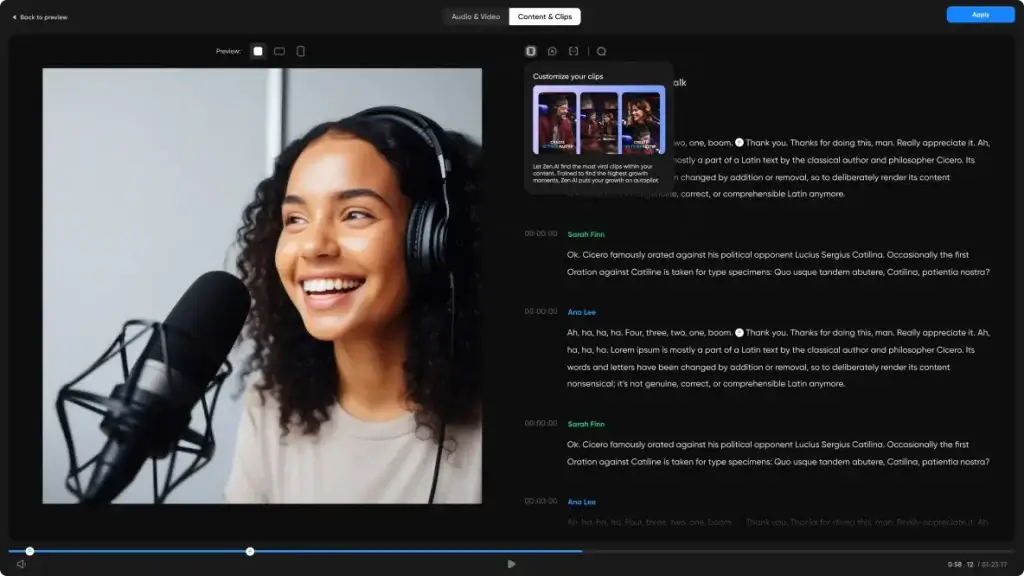
Editing is often where podcasters spend the most time. Zencastr introduces ZenAI, an AI‑powered editor that behaves like a text document. The platform transcribes your recordings and lets you edit audio by editing text. You can highlight filler words like “uh” and “um” or repeated phrases and remove them with one click. ZenAI will delete the corresponding audio segments and automatically cross‑fade the surrounding parts for a natural sound.
Noise reduction, automatic leveling, and equalization are also built in. These processes run in the background while you edit, saving you from manually applying plugins. For quick improvements, you can choose an AI preset to balance voices and reduce room echo. Text‑based editing doesn’t replace a professional DAW for advanced mixing, but it helps you clean up episodes quickly and publish faster.
Mobile Recording & Call Recording
While many podcasters record from a desktop, sometimes an interview happens on the go. The Zencastr mobile app (currently for iOS) allows you to record audio and video directly from your phone. Mobile call recording is particularly useful for capturing phone interviews with guests who can’t join via browser. The app maintains the same multi‑track, locally recorded quality as the desktop version.
Transcriptions & Accessibility
Accessibility is not just a best practice; it opens your content to wider audiences. Zencastr provides automated transcriptions with up to 99 % accuracy. You can download transcripts in various formats, embed them on your website, or use them to create show notes and SEO‑friendly blog posts. Transcripts also feed into the AI editing system, allowing you to search for keywords and navigate to specific moments quickly.
Additional Tools
Post-Production, Distribution & Growth Tools
AI Clipping & Social Media Promotion
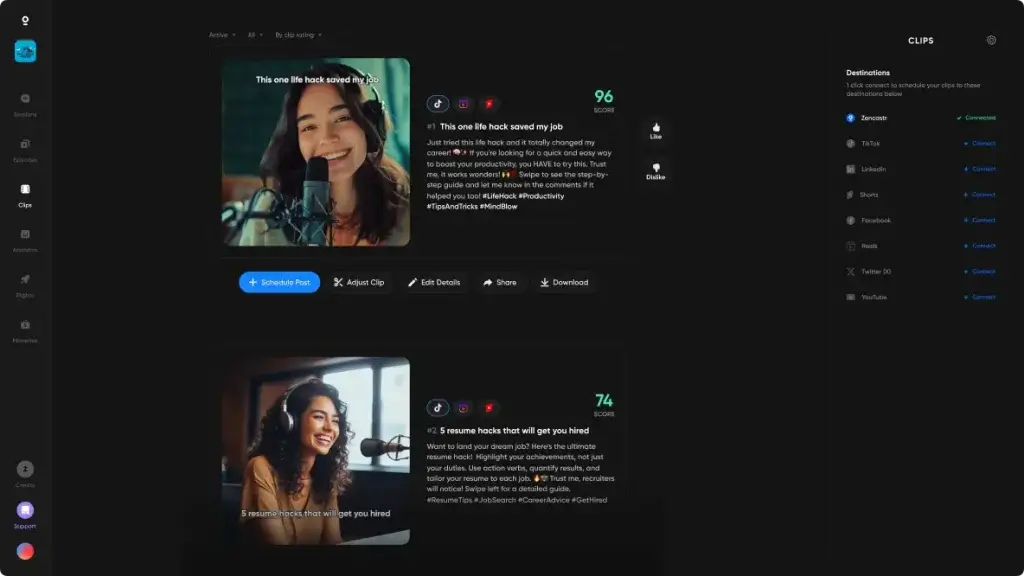
Building an audience requires more than publishing full episodes. Zencastr’s AI clipping tool analyzes your recording to identify engaging moments and automatically generates short video clips. You can publish these clips to platforms like Instagram Reels, YouTube Shorts, TikTok, LinkedIn, and Facebook. Scheduling tools allow you to set release times in advance so your feeds stay active even when you’re away from the computer.
This feature helps you repurpose content and reach new listeners without investing extra hours in video editing. You can tweak the start and end points of each clip, add captions or branding, and export them in the appropriate aspect ratio for each platform.
Hosting, Distribution & Analytics
Once your episode is edited, you can host it directly on Zencastr. Unlimited storage means there are no caps on uploads or downloads, and you can host both audio and video files. Zencastr distributes your podcast to all major apps, including Spotify, Apple Podcasts, Google Podcasts, YouTube, and Amazon Music. For video podcasts, the platform generates a video RSS feed so your 4 K files reach compatible players.
Analytics are available in your dashboard. You’ll see listener numbers, downloads over time, location breakdowns, and engagement metrics. These insights help you gauge which episodes resonate with your audience so you can refine your content strategy. If you embed the Zencastr player on your website, the analytics dashboard also tracks interactions there.
Monetization & Dynamic Ad Insertion
Turning a podcast into a revenue stream is easier when monetization tools are built into your workflow. Zencastr offers two primary options:
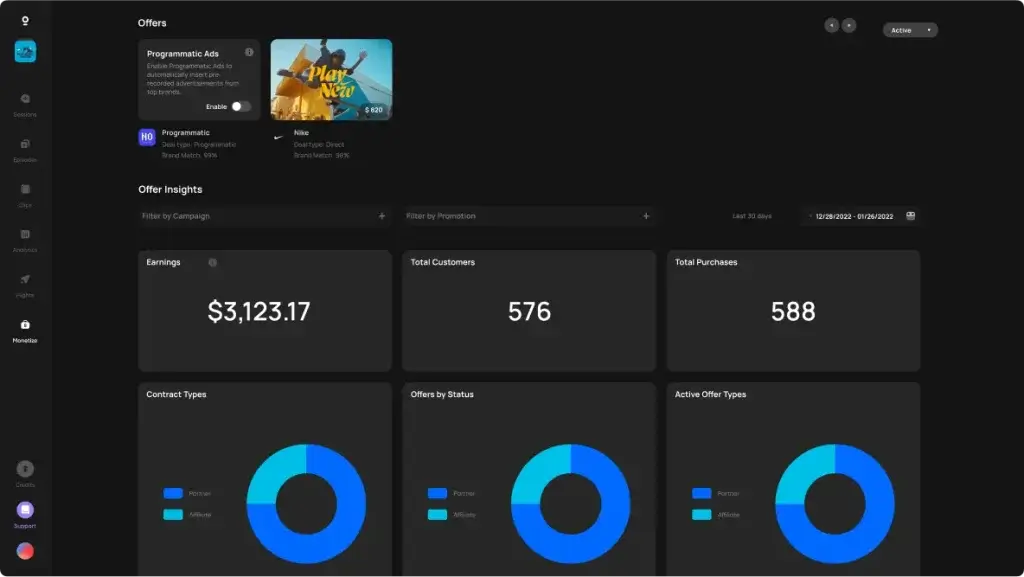
- Dynamic ad insertion: You can insert ads at designated markers without re‑exporting episodes. Zencastr supports programmatic ads and direct sponsorship. Dynamic insertion allows you to target different regions or remove ads for premium subscribers.
- Marketplace and programmatic ads: If you don’t have sponsorship deals, Zencastr’s marketplace connects you with advertisers. The platform matches your show with campaigns based on your category and audience size. Ads are inserted automatically into eligible episodes.
The monetization dashboard shows earnings, fill rates, and CPM rates so you understand how well ads perform. You retain control over which advertisers can appear on your show, and you can choose to opt out or decline campaigns that don’t fit your brand.
Team Collaboration & Cloud Storage
Podcasting often involves a team, co‑hosts, editors, social media managers, and producers. Zencastr supports multiple roles and allows you to grant different permissions to team members. Everyone can access the same project, leave comments, and download files without juggling external storage services. Cloud storage keeps raw and edited files safe and accessible from anywhere, and you can share download links with clients or guests.
Team members also benefit from real‑time transcription notes and editing comments. When you highlight a section of the transcript, the time‑stamped note appears for others to review. This collaborative editing can significantly shorten the production cycle.
Embeddable Player and Dynamic Content Insertion
If you have your own website, Zencastr’s embeddable player lets visitors stream episodes directly without leaving your page. You can customize its colors to match your branding and insert call‑to‑action buttons. The player supports chapter markers and transcripts, giving listeners an interactive experience.
Dynamic content insertion goes beyond ads. You can insert promotional segments, cross‑promotions, or seasonal messages after publishing. Updating your content without re‑uploading the entire file saves time and keeps your library evergreen. If you need to comply with regulations or remove outdated information, dynamic insertion simplifies the process.
Video RSS & ZenCloud
Zencastr’s video RSS ensures your video podcast appears on supported platforms. The feed includes metadata like episode titles, descriptions, and thumbnails. With the growing popularity of video podcasts, this feature expands your reach beyond audio‑only listeners.
ZenCloud is Zencastr’s storage and CDN infrastructure. It ensures that your files download quickly for listeners around the world. Hosting your episodes on ZenCloud also reduces the risk of losing files due to hardware failure or accidental deletion.
Integrations and API
Zencastr integrates with tools you likely already use. You can export files directly to Google Drive or Dropbox, publish videos to YouTube, or schedule posts via integrated social media platforms. The API allows developers to build custom workflows, connect to CRM systems or create unique listener experiences. This flexibility helps businesses integrate Zencastr into existing marketing stacks.
Pros and Cons
Advantages and Limitations
Positive
✅ High‑quality recordings
✅ No downloads for guests
✅ AI‑powered editing
✅ All‑in‑one workflow
Negative
❌ Learning curve
❌ Pricing escalates
❌ Limited offline recording
❌ Customer support feedback
Every platform has strengths and weaknesses. Understanding them helps you decide if Zencastr aligns with your priorities. Here’s a balanced look at what users appreciate and what could be improved.
✅Pros
- High‑quality recordings: 48 kHz WAV audio and 4 K video capture ensure professional‑level files without the need for specialized hardware.
- No downloads for guests: Participants join via a browser link, reducing technical barriers and making scheduling easier.
- AI‑powered editing: Text‑based editing, automatic filler word removal, and noise reduction speed up post‑production.
- All‑in‑one workflow: Recording, editing, hosting, and monetization live in one dashboard, minimizing tool juggling.
- Unlimited hosting: Even lower‑tier plans allow unlimited audio and video uploads, which is rare in podcast hosting.
- Transcriptions included: Automated transcripts support accessibility, searchability, and content repurposing.
- Team collaboration: Role‑based permissions, shared projects, and comment threads streamline teamwork.
❌Cons
- Learning curve: Advanced features like dynamic ad insertion and AI clipping require time to master.
- Pricing escalates: While the free plan is generous, higher tiers may feel expensive for hobbyists or small creators.
- Limited offline recording: Unlike some competitors, Zencastr relies on a stable internet connection during recording and does not offer an offline mode for field recording.
- Customer support feedback: Some users have reported slower response times or difficulty resolving technical issues.
- Audio deletion policy: On lower tiers, recordings may be deleted after a set period (usually 30 days) if not backed up, so you need to manage file storage carefully.
Pricing and Plans
How much does Zencastr cost?
Zencastr offers several pricing tiers so you can choose features that match your budget and production needs. Prices below reflect the latest data available as of 2026. Always check the official site for current promotions and currency adjustments.
Plan Monthly Price Key Inclusions Free $0 2 collaborators, unlimited audio & video recording (up to 4 K), separate tracks, basic editing Standard $20 Unlimited collaborators, AI editing with 3 hours of transcription, basic analytics, hosting Grow $30 Everything in Standard plus 10 hours of transcription, AI clipping, advanced analytics, monetization tools Scale $50 30 hours of transcription, priority support, enhanced monetization and dynamic ad insertion Business $100 Custom transcription limits, dedicated account management, API access, enterprise features
Most users start with the free plan to test the platform. Upgrading unlocks more transcription hours, advanced analytics, and monetization features. Consider your expected episode length, team size, and monetization goals when choosing a plan. For long‑form shows with frequent releases, the higher tiers provide better value because additional transcription hours and higher ad fill rates can offset the subscription cost.
Best Use Cases
Who Should Use Zencastr
Podcasters & Interviewers
If you record remote interviews regularly or host multi‑person shows, Zencastr’s local recording and multi‑track capabilities offer a clear advantage. You can invite guests with a simple link, capture isolated audio and video for each participant, and minimize the need for retakes due to connection issues. Its AI editing tools help you publish episodes quickly, which is critical if you maintain a consistent schedule.
Video Creators & YouTubers
Video creators who want to release both audio and video versions of their content benefit from Zencastr’s 4 K recording and video RSS feeds. You can seamlessly publish to Apple Podcasts, YouTube, and Spotify while clipping highlights for social media. This unified pipeline saves you from exporting files between multiple platforms.
Marketing Teams & Businesses
Brands using podcasts as part of their content strategy appreciate Zencastr’s team collaboration and dynamic content insertion. Marketing teams can swap promotional messages, run region‑specific ads, and track analytics. Integration with Google Drive, Dropbox, and social platforms simplifies repurposing content across marketing channels.
Educational Institutions & Coaches
Instructors and coaches who conduct virtual interviews or panel discussions can use Zencastr for high‑quality recordings and transcripts. Transcriptions make it easy to repurpose content into course materials, blog posts or accessibility resources. If you teach in multiple languages, Zencastr’s multi‑language support helps deliver inclusive content.
Best Practices
Tips for Maximizing Value
Using Zencastr effectively goes beyond hitting record. Here are some practical tips to get the most out of the platform:
- Optimize Your Recording Environment: Even with local recording, microphone quality matters. Use a decent mic and quiet space to reduce post‑production work.
- Plan Chapter Markers: During recording, note time stamps for important sections. Chapter markers in the transcript help you and your team navigate the episode and improve listener engagement when published.
- Leverage AI Clipping: After editing, generate clips and schedule them across social media. Consistent micro‑content increases discoverability and grows your audience.
- Monitor Analytics Regularly: Review listener data to see which topics resonate. Use these insights to refine future episodes and advertising strategy.
- Backup Your Files: Even though Zencastr hosts your content, maintain backups in Google Drive or Dropbox, especially if you’re on a lower tier with time‑limited storage.
- Experiment with Monetization: Start with small ad placements or sponsorships and track performance. Adjust your placement strategy and ad length based on audience feedback.
Competitors
Alternatives to Zencastr
While Zencastr is a strong all-in-one platform for remote podcast recording, editing, and hosting, it is not always the best fit for every creator. Depending on your workflow, you may prioritize higher video quality, deeper live streaming features, simpler editing, or a more affordable entry point.
Below, you will find the most relevant Zencastr alternatives, broken down by use case and compared side by side to help you choose the right platform faster.
Top Alternatives to Zencastr Explained
Riverside
Riverside is often the top alternative for creators who focus on video podcasts and interviews. It records audio and video locally on each participant’s device, then uploads the files in full resolution, ensuring consistent quality even with unstable internet connections.
Riverside is especially strong for YouTube-first podcasts and content repurposing workflows.
Podcastle
Podcastle appeals to solo creators and small teams looking for AI-powered editing and voice tools. It combines recording, transcription, and AI voice features in a simplified interface that reduces post-production effort.
This option works well if you want fast turnaround times without advanced production complexity.
StreamYard
StreamYard is best known for live streaming rather than pure podcast recording. It is ideal if your workflow involves broadcasting live episodes to multiple platforms before repurposing them into podcast content.
Its ease of use makes it popular with marketers and creators running live shows.
Descript
Descript takes a different approach by focusing on text-based editing. You edit audio and video by editing the transcript, which significantly speeds up post-production for teams working with frequent episodes.
It is best suited for editing rather than raw remote recording.
SquadCast
SquadCast emphasizes reliability and audio fidelity for interview-based podcasts. It integrates tightly with Descript, making it a solid option if you value stability and clean audio over built-in hosting or monetization tools.
Zencastr vs Top Alternatives – Feature Comparison
| Feature Type | Zencastr | Riverside | Podcastle | StreamYard | Descript |
| Local Recording | Yes (audio & video) | Yes (audio & video) | Audio-focused | No | Limited |
| Video Resolution | Up to 4K | Up to 4K | HD | HD | HD |
| AI Editing Tools | Built-in ZenAI | Basic | Advanced AI voices | None | Advanced text-based |
| Hosting & Distribution | Included | Limited | Included | Not included | Not included |
| Live Streaming | No | No | No | Yes | No |
| Best For | All-in-one podcasting | Video podcasts | Solo creators | Live shows | Fast editing |
Conclusion
Final thoughts
⭐ Overall Rating: 8.7/10
Zencastr has evolved from a simple remote recording tool into a robust platform that covers recording, editing, hosting, and monetization. Its strengths lie in high‑quality multi‑track audio and 4 K video, AI‑powered editing, unlimited hosting, and dynamic ad insertion. For podcasters who value an integrated workflow and want to spend less time juggling tools, Zencastr offers convenience and efficiency.
However, it’s not without drawbacks. The learning curve for advanced features, higher pricing tiers, and reliance on internet connectivity may deter hobbyists or those seeking offline flexibility. Customer support experiences vary, so investigating user reviews and taking advantage of the free trial is wise.
If you’re building a professional show, managing a brand podcast or exploring video podcasting, Zencastr deserves serious consideration. Its AI tools can accelerate production, while its hosting and monetization capabilities help you grow and sustain your podcast. By understanding its features and limitations, you can decide whether Zencastr is the right partner for your podcasting journey.
Have more questions
Frequently Asked Questions
Is Zencastr free to use?
Yes. Zencastr offers a free plan with unlimited audio and video recording, separate tracks, and basic editing. However, advanced features like additional transcription hours, AI clipping, and monetization tools require a paid subscription.
How does Zencastr’s local recording work?
During a session, each participant’s audio and video are recorded locally on their device at high resolution. Zencastr then uploads these files to the cloud once the session ends. This approach ensures excellent quality even with unstable internet connections.
Can I record video with Zencastr?
Yes. Zencastr supports up to 4 K video recording on desktop and mobile. You can create video podcasts, capture screen shares and export files for YouTube or video RSS feeds.
Does Zencastr provide built-in hosting?
Zencastr includes unlimited audio and video hosting for all plans. You can distribute your show to Spotify, Apple Podcasts, YouTube and other platforms directly from your dashboard.
What is ZenAI and how does it help with editing?
ZenAI is Zencastr’s AI-powered editor. It transcribes your recordings and lets you edit audio by editing the text. You can remove filler words, adjust pacing and apply noise reduction automatically, saving time compared with manual editing.
How do I monetize my podcast with Zencastr?
You can monetize through programmatic ads, direct sponsorships and dynamic ad insertion. Zencastr matches your show with advertisers or lets you insert your own ads. Earnings data appears in your monetization dashboard.
Can multiple team members work on the same project?
Yes. Zencastr supports role-based permissions and collaborative editing. Team members can access recordings, leave comments and edit transcripts simultaneously.
Does Zencastr have a mobile app?
Zencastr offers an iOS app that supports remote recording and monitoring. You can host sessions, record separate tracks and invite guests from your phone. An Android version has been announced, so check the official site for release updates.
Are there limitations on recording duration?
No. Zencastr does not impose time limits on recordings. You can host long-form interviews or multi-hour discussions without interruption. Only your storage plan and bandwidth may affect uploading times.
How secure is my data on Zencastr?
Zencastr uses encrypted connections and cloud storage to protect your recordings. Access controls and team permissions help you manage who can view or download files. Remember to back up important content if you use a plan with limited retention periods.





