
Introduction
Managing agreements manually still slows down too many teams. Contracts get stuck in email threads, approvals require constant follow-up, and signed documents often end up scattered across inboxes, folders, and disconnected systems. SignNow is designed to solve that problem with a document workflow platform focused on sending, signing, tracking, and automating agreements at scale.
What makes SignNow especially appealing is that it goes beyond simple eSignatures. In addition to letting you sign your own documents or request signatures from others, it supports reusable templates, role-based routing, team collaboration, integrations, payment collection, and API-based embedding. That makes it relevant not only for occasional signature requests, but also for recurring workflows in sales, HR, operations, legal, healthcare, and finance.
In this review, you will get a full picture of SignNow’s core features, user experience, advantages and disadvantages, pricing approach, and best use cases. You will also see how it compares with leading alternatives and whether it is the right fit for your organization.
Software Specification
SignNow’s Core Features
Electronic signatures and document sending
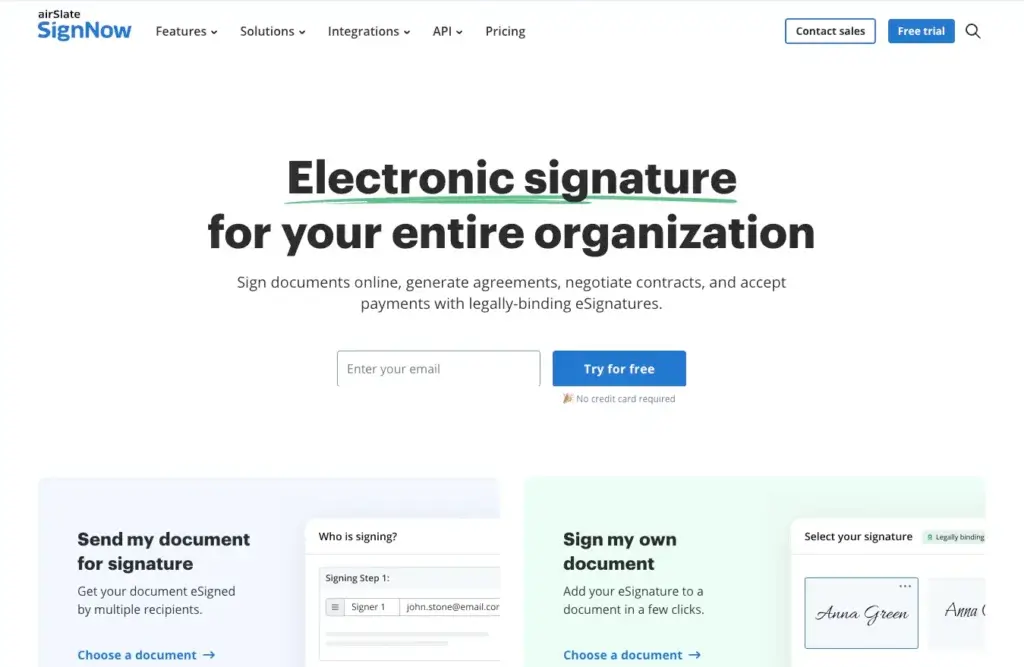
At its core, SignNow lets you upload PDFs or other business documents, add fillable fields, place signature and date blocks, and send the file for signing in just a few clicks. The experience is built for speed, which matters when teams need to move contracts, onboarding packets, approvals, or internal forms without delay. You can also sign your own documents directly, making it useful for both outbound workflows and quick one-off needs.
Reusable templates and fillable fields
One of SignNow’s strongest features is its template system. Instead of rebuilding the same agreement every time, you can turn commonly used files into reusable templates and add customizable fillable fields for names, dates, initials, checkboxes, dropdowns, and more. This saves time, reduces preparation errors, and helps teams standardize document workflows across departments.
Role-based routing and advanced forms
SignNow supports multi-step signing processes through role-based routing. You can define the order in which recipients receive and complete a document, which is especially useful for approvals, procurement, HR onboarding, and contract execution. For more structured workflows, advanced forms let you build multi-role templates where each signer only sees the fields relevant to their role. This is a meaningful advantage for businesses that need more control than a simple “send for signature” flow.
Invite links and faster recipient access
Not every workflow begins with a known recipient list. SignNow allows you to share documents via an invite link, so multiple recipients can access and sign a document without manually entering every email address in advance. This works well for waivers, applications, registration forms, or any process where ease of access matters as much as document completion.
Payments inside the signing workflow
Another notable capability is payment collection inside documents. SignNow allows you to insert payment fields so signers can pay while completing and signing a file. This can be useful for service agreements, deposits, order forms, invoices, and similar workflows where the goal is not only to get the document signed, but also to complete the transaction in one flow.
Integrations and API access
SignNow fits more naturally into business operations when connected to the tools teams already use. The platform supports integrations with a range of business systems and also provides API access for companies that want to embed eSignature workflows into websites, internal tools, CRMs, or customer-facing apps. That makes it a practical option for organizations that want eSignatures to become part of a larger automated process rather than a standalone step.
Team collaboration and admin controls
For growing companies, SignNow includes team functionality that makes it easier to collaborate on shared templates and documents. Depending on the plan, organizations can manage one team, multiple teams, or broader organization-level controls. This matters for businesses that want to standardize document processes while still controlling who can access templates, send files, and manage subscriptions.
Security, audit trails, and compliance support
Document security is a major part of the product’s appeal. SignNow includes detailed audit trails, document history, signer authentication options, and encryption for data in transit and at rest. It also highlights compliance support for standards and regulations such as ESIGN, UETA, GDPR, HIPAA, 21 CFR Part 11, CCPA, and SOC 2 Type II related controls. For many businesses, this is what moves SignNow from a convenience tool into a platform suitable for formal business workflows.
Pros and Cons
Advantages and Disadvantages
Positive
✅ Easy to deploy
✅ Unlimited users on paid plans
✅ Strong template and routing tools
✅ Built-in payment collection
✅ Solid compliance and audit features
Negative
❌ Pricing is less transparent than fixed-seat tools
❌ Interface is functional more than modern
❌ Advanced admin structure can take time to learn
Pros
✅ Easy to deploy
SignNow is designed for quick adoption. You can upload a document, place fields, and send it for signature within minutes, which makes it attractive for SMBs and lean teams that do not want a heavy implementation process. The learning curve for basic sending and signing is relatively low, even for users who are new to eSignature tools.
✅ Unlimited users on paid plans
One of SignNow’s most important differentiators is that paid plans support unlimited users, while billing is centered around usage rather than seat expansion. This is especially appealing for growing companies that want to roll out eSignatures across more teams without dealing with escalating per-user pricing.
✅ Strong template and routing tools
Reusable templates, role-based signing order, and advanced forms make SignNow much more than a simple digital signature tool. It works well for businesses with repeatable document processes, such as offer letters, sales agreements, intake forms, approvals, and service contracts.
✅ Built-in payment collection
The ability to collect payment during the signing flow is a useful edge for businesses that want to reduce friction between agreement and transaction. Instead of getting a document signed and then chasing payment separately, both actions can happen within the same workflow.
✅ Solid compliance and audit features
Detailed audit trails, signer authentication options, encryption, and support for major compliance frameworks make SignNow a credible option for organizations that need stronger governance. This is especially relevant in industries where proof of signing, change history, and data handling standards matter.
Cons
❌ Pricing is less transparent than fixed-seat tools
Although SignNow emphasizes transparent, usage-based pricing, it is not always as simple to estimate total cost as with flat per-user subscriptions. Businesses that send highly variable document volumes may need to pay closer attention to invite usage and plan structure before committing.
❌ Interface is functional more than modern
The platform is efficient, but it does not always feel as polished or visually refined as some newer SaaS tools. Users looking for a particularly sleek, design-forward interface may find the experience more practical than delightful.
❌ Advanced admin structure can take time to learn
Basic document sending is straightforward, but once you start working with subscription membership, team membership, admin roles, multi-team structures, and advanced routing, the setup can become more complex. Larger organizations may need some internal process planning before rolling it out broadly.
User Experience
Practical and Workflow-Focused Interface
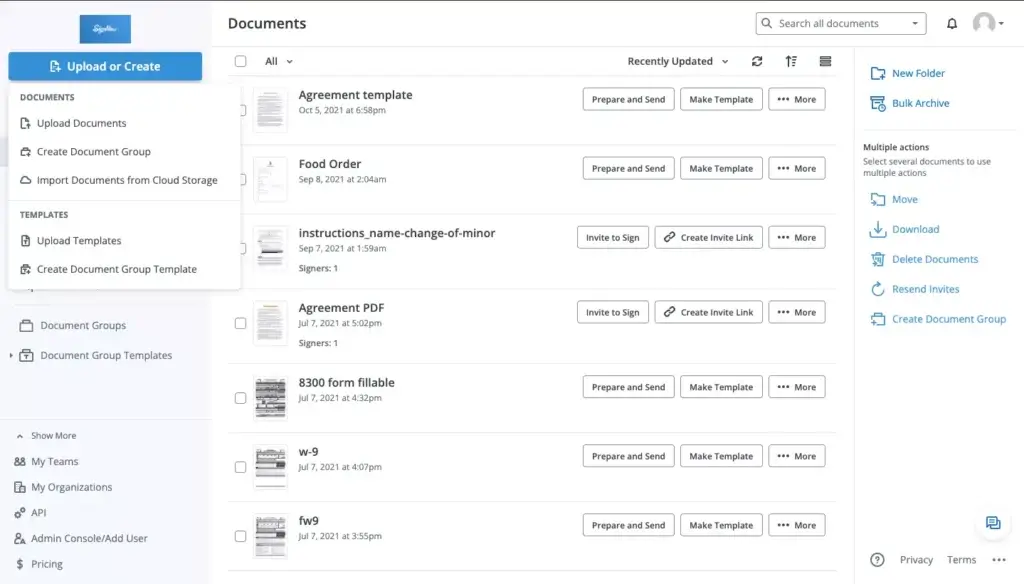
SignNow’s interface is built around getting documents signed with as little friction as possible. Instead of trying to become an all-in-one document suite, it keeps the user experience centered on a few high-value actions: upload a file, add fields, assign recipients, define the signing order, send the document, and track completion.
That makes the product feel practical from the start. Most users can understand the basics quickly, especially if their main goal is to send contracts, forms, or approvals without adding unnecessary operational overhead.
Fast document preparation
The document editor is built for speed. You can drag and drop fields, assign them to recipients, add signature and date fields, and convert a frequently used document into a reusable template. This reduces repetitive work and makes the platform especially efficient for teams that send the same types of documents repeatedly.
Clear progress tracking
Once documents are sent, tracking is straightforward. You can see whether a recipient has viewed, completed, or ignored a document, and you can review its history when needed. That visibility is important for sales, HR, and operations teams that otherwise waste time manually following up on document status.
More capable than it first appears
At first glance, SignNow seems simple. But once you go deeper, there is more complexity beneath the surface, including authentication options, advanced forms, team structures, integrations, admin roles, and payment-enabled workflows. This is good for scalability, although it does mean the platform becomes less “plug and play” as your use cases become more sophisticated.
Good fit for mobile and distributed work
Because document workflows often happen outside the office, SignNow’s accessibility across web and mobile environments is valuable. It supports teams that need to send, sign, and review documents on the go, whether that means field teams, managers working remotely, or clients signing from a phone.
Best Use Cases
Who Should Use SignNow
SignNow is not only for companies that need a signature on a PDF. It is most valuable for teams that want to systemize document workflows and reduce manual work across departments.
Sales teams and account managers
Sales teams can use SignNow to send contracts, proposals, order forms, renewals, and approval documents faster. Reusable templates, status tracking, and the option to collect payment within the signing process make it particularly useful for shortening the path from agreement to revenue.
HR and people operations
HR teams often manage repeatable documents such as offer letters, policy acknowledgements, onboarding packets, and employee forms. SignNow’s templates and role-based workflows help make those processes more consistent while reducing the administrative burden on internal teams.
Operations and finance teams
Internal approvals, procurement paperwork, vendor agreements, and finance documents often require multiple signers and audit visibility. SignNow’s signing order controls, document history, and authentication options make it a practical choice for departments that need both speed and accountability.
Healthcare and regulated industries
Organizations operating in regulated environments may appreciate SignNow’s emphasis on compliance support, security settings, and audit trails. While every implementation still needs legal and internal review, the platform is better positioned than lightweight signature tools for use cases where controls and traceability are essential.
Growing SMBs and multi-team organizations
Because SignNow allows unlimited users on paid plans, it can be especially attractive for growing businesses that want multiple departments to use eSignatures without taking on large seat-based software costs. That pricing model can become a significant advantage when adoption spreads beyond one team.
Compare with Others
Alternatives to SignNow
If you are comparing eSignature tools, SignNow generally stands out for cost efficiency, workflow flexibility, and scalability for growing teams. The table below compares it with three popular alternatives.
| Feature Type | SignNow | DocuSign | Dropbox Sign | Adobe Acrobat Sign |
| Core Strength | Affordable business eSignature workflows with templates, routing, and usage-based pricing | Enterprise maturity and broad market adoption | Simple eSignature experience for smaller teams | Strong fit for Adobe-centric document environments |
| Pricing Model | Usage-based with unlimited users on paid plans | Often seat-based and volume-dependent | Typically user-based tiers | Often user-based with enterprise packaging |
| Workflow Features | Templates, signing order, advanced forms, payments, audit trail | Strong workflow automation and enterprise controls | Good basics, lighter advanced workflow depth | Strong document controls, especially in Adobe ecosystems |
| Integrations / API | Business integrations plus API access | Extensive ecosystem and API tools | Integrations available, lighter enterprise depth | Strong integrations across Adobe and enterprise stacks |
| Best Fit | SMBs and growing organizations wanting scalable eSignature adoption | Larger enterprises with complex governance needs | Small teams prioritizing simplicity | Organizations already standardized on Adobe tools |
When to choose another tool
DocuSign – Choose DocuSign if your organization needs the broadest enterprise ecosystem, very mature enterprise controls, or has already standardized on it internally. It is often the safer choice for very large organizations, although it can become more expensive as usage and user count grow.
Dropbox Sign – Choose Dropbox Sign if your needs are relatively simple and you want a lightweight signing experience without much workflow complexity. It can be easier for smaller teams, but it is not always as capable for structured multi-step business processes.
Adobe Acrobat Sign – Choose Adobe Acrobat Sign if your business already lives in Adobe’s document environment and you want deeper alignment with Acrobat and PDF-heavy workflows. It is a strong option for document-centric enterprises, though not always the most cost-efficient for broad rollout.
Pricing & Plans
Plans Built for Scaling Document Workflows
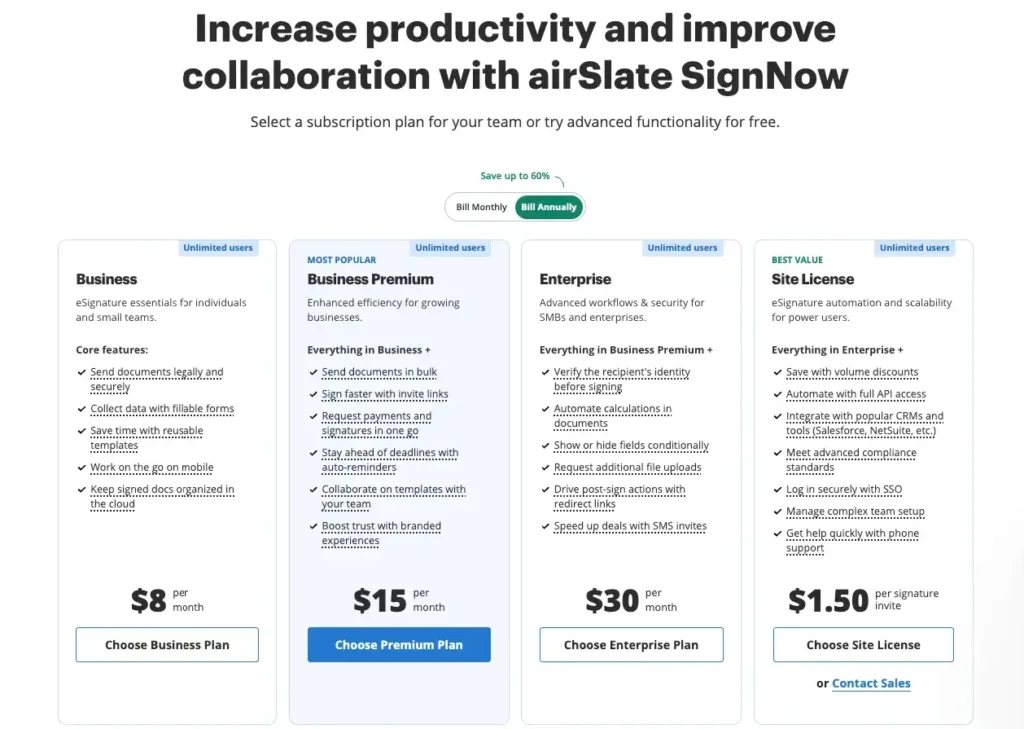
SignNow’s pricing structure is different from many eSignature competitors because it emphasizes usage-based billing rather than charging strictly by seat. The big headline is that paid plans include unlimited users, while pricing scales according to the number of signature invites you send. For teams that want to expand adoption across departments, this can be a significant cost advantage.
Business
The Business plan is aimed at smaller teams that need core eSignature functionality, a manageable team structure, and efficient document sending without enterprise complexity. It is a practical starting point for SMBs that want templates, signing workflows, and admin visibility.
Business Premium
Business Premium is better suited to organizations that need broader collaboration and more than one team. This tier makes more sense when eSignature usage is spreading across departments and you want more flexibility in how users collaborate on templates and documents.
Enterprise
Enterprise is the plan to consider when centralized administration, organization-wide controls, and more advanced governance matter. Larger businesses that need stronger admin oversight, structured team permissions, and broader rollout support will usually find this tier more appropriate.
Site License
For high-volume organizations, SignNow also positions a Site License model based on usage. This is designed for businesses that need flexible scaling, unlimited users, and potentially API-heavy or company-wide eSignature deployment without being constrained by traditional seat pricing.
| Plan | Best For | Main Focus |
| Business | Small teams and SMBs | Core eSignature workflows, templates, and basic team setup |
| Business Premium | Growing businesses | Multiple teams, broader collaboration, more scalable administration |
| Enterprise | Larger organizations | Advanced controls, organization-wide governance, stronger admin oversight |
| Site License | High-volume and large-scale deployments | Usage-based scaling, unlimited users, broader rollout flexibility |
Because SignNow’s structure is usage-based, it is worth checking the latest official pricing before publishing exact numbers. The positioning is attractive for businesses that want predictable rollout across many users, but invite volume still matters when evaluating total cost.
How to Use SignNow
A Step-by-Step Guide
Even if you are new to eSignature tools, SignNow is relatively easy to start using. A typical workflow looks like this:
Upload your document
- Start from the dashboard: Log in and choose whether you want to sign your own document or send one out for signature.
- Add your file: Upload a contract, form, agreement, offer letter, invoice, or other business document.
- Prepare the layout: Place signature blocks, initials, dates, text fields, checkboxes, dropdowns, and any other form fields your workflow requires.
Assign recipients and roles
Once the document is ready, assign recipients and map fields to the right signer. If multiple people are involved, define the order in which the document should move. For recurring workflows, convert the document into a template so you do not have to rebuild it again later.
Send for signature or share via link
You can send the document directly to named recipients or distribute it through an invite link, depending on your use case. This flexibility is especially useful for applications, waivers, intake forms, and customer-facing workflows where recipient access needs to be fast and simple.
Track progress and follow up
After sending, monitor whether the document has been viewed, signed, or completed. This helps eliminate manual chasing and gives your team a much clearer view of where agreements are getting stuck.
Collect payments if needed
If your workflow includes a financial step, add a payment field so the signer can pay while completing the document. This can streamline order forms, deposits, and service agreements by reducing the gap between signature and revenue collection.
Store, reuse, and automate
Once a process works well, save it as a template, share it with your team, or connect SignNow to other systems through integrations or API workflows. That is where the platform starts to create real operational leverage over time.
Conclusion
Final Thoughts
SignNow is a strong option for businesses that want more than just a way to place a digital signature on a PDF. Its real value comes from combining core eSignature functionality with reusable templates, role-based routing, integrations, payment collection, audit trails, and scalable team access. That makes it especially compelling for organizations that handle repeatable document processes and want to reduce manual administrative work.
The platform’s biggest competitive advantage is its approach to scale. Unlimited users on paid plans can make SignNow especially attractive for growing companies that want to expand adoption across sales, HR, operations, and finance without taking on steep seat-based costs. That pricing philosophy gives it a strong position against more expensive or more rigid alternatives.
SignNow will not be the perfect fit for every buyer. Some enterprises may still prefer the deepest ecosystem and governance layers offered by more established enterprise vendors, while some very small teams may want a simpler lightweight tool. But for many SMBs and mid-market businesses, SignNow offers one of the better balances of affordability, workflow capability, and business readiness in the eSignature market.
Have more questions?
Frequently Asked Questions
1. What is SignNow used for?
SignNow is used to send, sign, and manage business documents digitally. It helps teams handle contracts, forms, approvals, onboarding documents, and other agreement workflows without relying on paper, printing, or manual follow-up.
2. Is SignNow only for signatures?
No. In addition to eSignatures, it supports reusable templates, fillable fields, signing order, audit trails, team collaboration, integrations, API workflows, and payment collection inside documents.
3. Does SignNow offer unlimited users?
Paid plans are positioned around unlimited users, which is one of the product’s key differentiators. Instead of scaling primarily through seat count, the platform emphasizes usage-based pricing tied to signature invites.
4. Can SignNow handle multi-step approvals?
Yes. The platform supports role-based routing and advanced forms, which makes it suitable for workflows where documents need to move through multiple recipients in a specific order.
5. Can I collect payment with a signed document?
Yes. The platform includes payment fields that allow signers to complete a payment while finishing the signing process. This can help reduce friction in customer-facing agreements and order forms.
6. Does SignNow integrate with other software?
Yes. It offers integrations with business platforms and also provides API access for companies that want to embed eSignature workflows into internal systems, customer portals, websites, or custom applications.
7. Is SignNow secure enough for business use?
It includes encryption, authentication options, detailed audit trails, and compliance-oriented capabilities that make it suitable for formal business workflows. Many organizations choose it specifically because it offers stronger governance than basic consumer signature tools.
8. Does SignNow keep an audit trail?
Yes. Signed documents include document history and audit information that can show who interacted with a file, when actions occurred, and other relevant activity details. That visibility is important for compliance, dispute resolution, and internal review.
9. Who is SignNow best for?
It is especially well suited to SMBs, mid-market companies, and growing teams that want scalable eSignature workflows without heavy per-seat costs. It is also a good fit for departments with repeatable document processes, such as sales, HR, finance, and operations.
10. How does SignNow compare with DocuSign?
It is often viewed as the more cost-conscious choice, especially for organizations that want unlimited users and flexible workflow features without the expense that can come with larger enterprise-focused platforms. The better option depends on whether your priority is affordability and rollout scale or the broadest enterprise ecosystem.