Introduction
Choosing an HR platform is no longer just about keeping employee records in one place. It affects how fast you can onboard new hires, how accurately you can run payroll, how securely you can control app and device access, and how easily your business can scale across teams and countries. In this Rippling review, you will get a practical look at what Rippling does well, where it stands out, where it may feel too complex, and which kinds of companies will get the most value from it.
Rippling is not a traditional HRIS, and that is exactly why it has become one of the most talked-about workforce platforms in 2026. Instead of stopping at HR, Rippling connects employee data to payroll, benefits, identity, app provisioning, device management, spend controls, and global workforce operations. That broader scope makes it one of the strongest choices for businesses that want one operational system instead of a patchwork of disconnected tools.
What Is Rippling?
Rippling is a workforce management platform that combines HR, payroll, IT, and finance-related operations on one unified system. You can use it to manage employee data, onboarding, benefits, payroll, time tracking, app access, devices, compliance workflows, and global hiring from a single source of truth.
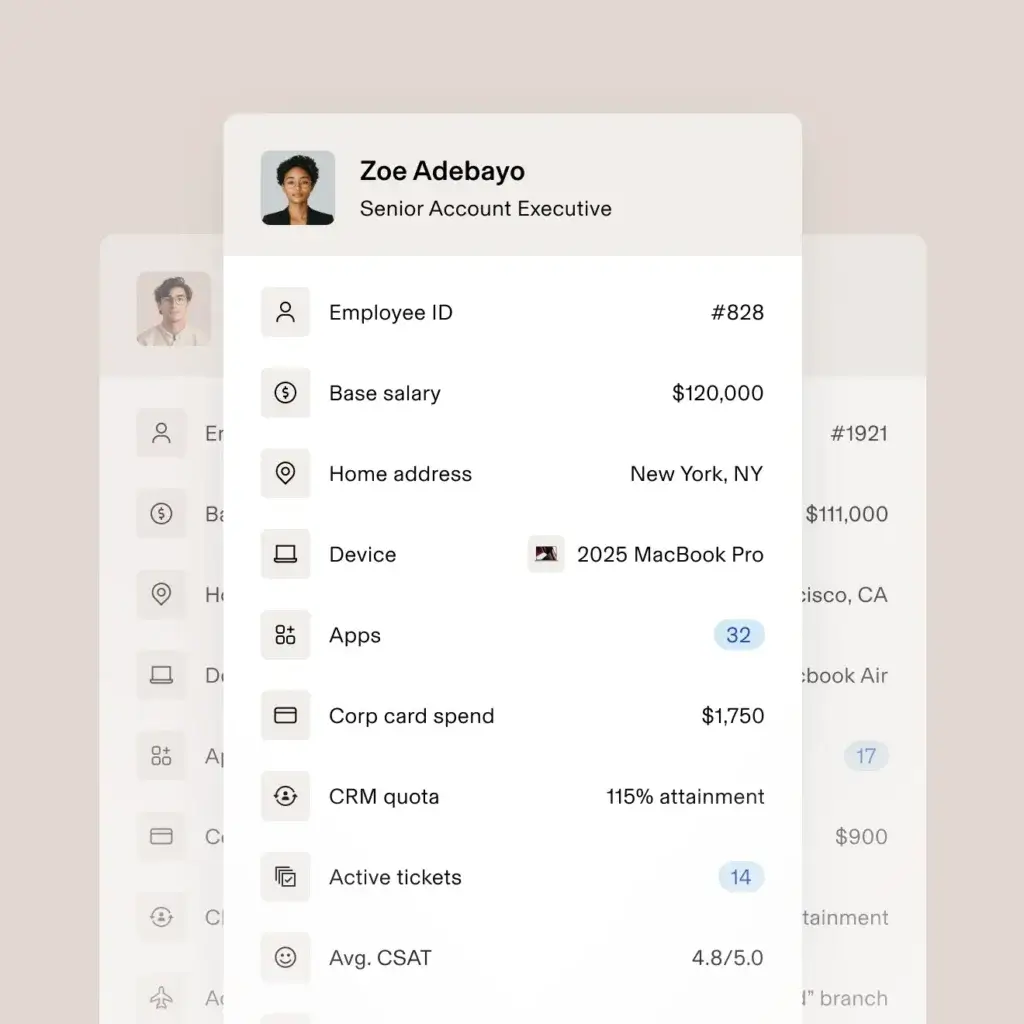
Its biggest strength is not just feature breadth. It is the fact that the platform links employee data across multiple business systems. When a person joins, changes roles, or leaves, that change can automatically affect payroll, benefits, permissions, devices, and workflows. That is a very different model from most HR software, and it is the main reason Rippling stands out.
Background and Positioning
Rippling positions itself as a unified platform for running HR, IT, and finance operations together. Its current product ecosystem covers HCM, payroll, benefits, recruiting, performance management, learning, surveys, scheduling, time and attendance, headcount planning, identity and access management, device management, and global workforce tools. That positioning makes Rippling much broader than a classic HR platform and more operationally ambitious than many HRIS competitors.
Target Users and Use Cases
Rippling is especially relevant for several buyer types:
- Small and mid-sized businesses scaling quickly – You get strong automation without jumping straight into enterprise HCM complexity.
- Companies that want HR and IT in one system – Rippling is one of the few platforms that handles both seriously.
- Distributed and global teams – Global payroll, EOR, contractor management, and international HR workflows are meaningful strengths.
- Operations-heavy businesses – If onboarding, offboarding, compliance, access, and approvals involve many moving parts, Rippling fits well.
- Teams replacing multiple disconnected tools – Rippling makes the most sense when you want consolidation, not just HR software.
That said, Rippling is not always the best fit if you want the simplest possible HR system, highly transparent public pricing, or a lightweight platform for very small teams with basic needs. It is strongest when you want automation, breadth, and operational control.

Core Features of Rippling
How Does Rippling Work?
Rippling stands out because it does more than centralize people’s data. It connects employee information across HR, payroll, benefits, identity, app access, devices, and global workforce workflows. That means the platform is not just a system of record. It is a system for running operations.
Core HR and Employee Data Management
Rippling includes a strong HRIS foundation for employee records, documents, org structures, policies, approvals, and reporting. Employees can self-serve many routine tasks, which helps reduce the constant back-and-forth with HR. This is important because even though Rippling is broader than many HR tools, it still needs to perform well at the core HR layer, and generally it does.
Onboarding and Offboarding Workflows
Onboarding is one of Rippling’s biggest strengths. Because the platform connects HR data to payroll, benefits, app access, and device workflows, you can automate much more than a standard welcome checklist. New hires can be enrolled into payroll, assigned apps, provisioned to the right groups, issued devices, and given policy tasks from one workflow. The same applies in reverse during offboarding, which is where Rippling often saves teams serious time and reduces security risk.
Payroll and Benefits Administration
Rippling’s payroll product is tightly connected to HR data, which is one of its clearest advantages. New hires, salary changes, benefit deductions, time data, and status updates can flow directly into payroll instead of relying on manual sync work. Benefits administration is also closely tied into the system, which helps reduce duplicate entry and makes employee changes easier to manage from one place.
Time Tracking, Attendance, and Scheduling
Rippling has grown beyond classic HRIS functions and now includes time and attendance as well as employee scheduling. That makes it more relevant for hourly and operational teams, not just salaried office environments. If you need one platform that handles time tracking, payroll, HR, and workforce planning together, Rippling is a much stronger option than HR tools that stop at leave requests and employee records.
IT, Identity, and Device Management
This is the feature area that most clearly separates Rippling from BambooHR, HiBob, and many other HR tools. Rippling can provision and deprovision app access based on employee attributes, enforce MFA policies, manage SSO, control permissions, retrieve devices from departing employees, and support secure device warehousing. For companies that care about operational security, that combination is a major competitive advantage.
Performance, Recruiting, and Workforce Planning
Rippling now covers more of the talent lifecycle than many buyers may expect. It offers recruiting, performance management, learning, surveys, and headcount planning alongside core HR and payroll. This matters because it lets you keep more employee lifecycle data inside one system instead of stitching together multiple point solutions. The result is stronger continuity from hiring to compensation to performance and planning.
Reporting, Automation, and AI
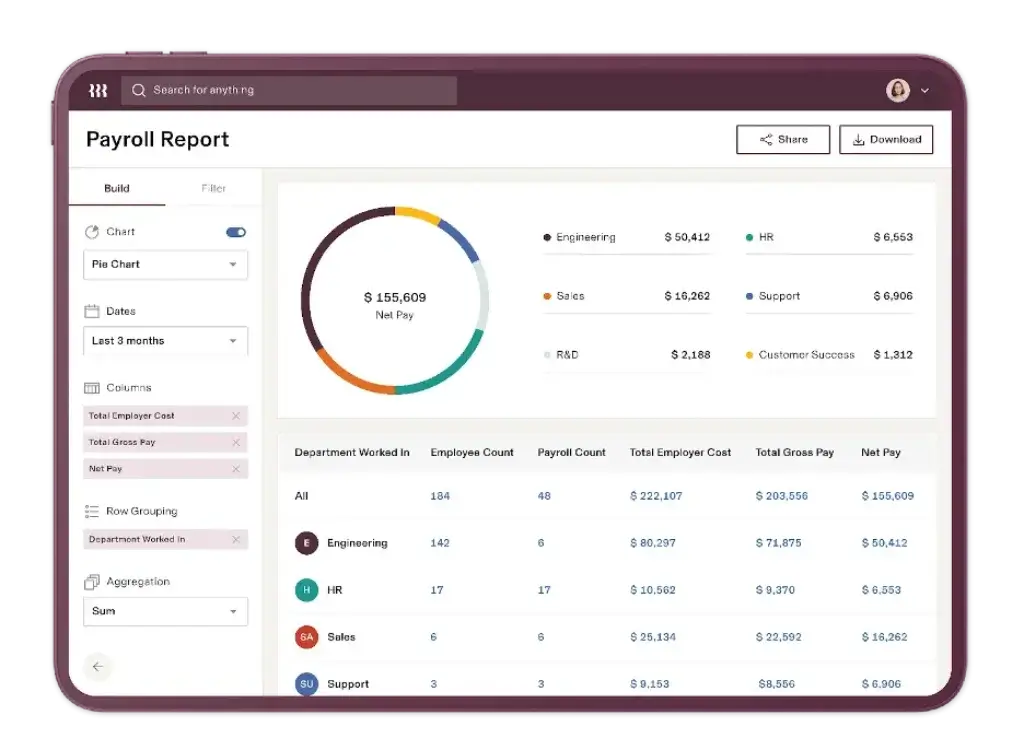
Rippling’s automation engine is one of its biggest practical benefits. The platform is built around workflows, permissions, and data triggers that let teams automate repetitive operational work. Rippling is also leaning more heavily into AI across areas like payroll, time and attendance, recruiting, and broader workflow support, which reinforces its position as an operations platform rather than just a database.
Business Operations Features
Rippling Payroll, IT, and Global Workforce Management
One of the most important things to understand about Rippling is that it is broader than a normal HR platform. If your team only wants Core HR, Rippling may already be more than enough. But if you want payroll, global hiring, contractor payments, identity controls, and devices connected to the employee lifecycle, this is where Rippling becomes especially compelling.
US Payroll and Global Payroll
Rippling’s payroll story is much stronger than many HRIS competitors because payroll is treated as a native operational layer, not just an add-on afterthought. The platform emphasizes automated payroll flows tied directly to HR data and also supports global payroll for teams operating internationally. That makes Rippling especially attractive for growing businesses that do not want payroll disconnected from everything else.
Global HR, EOR, and Contractor Management
Rippling also supports global HR, employer of record services, and contractor management. This means you can hire globally without an entity in some cases, manage international employees and contractors, and keep those records in the same ecosystem as domestic workers. For companies expanding internationally, this gives Rippling a stronger global operations story than many SMB-focused HR tools.
Identity and Access Management
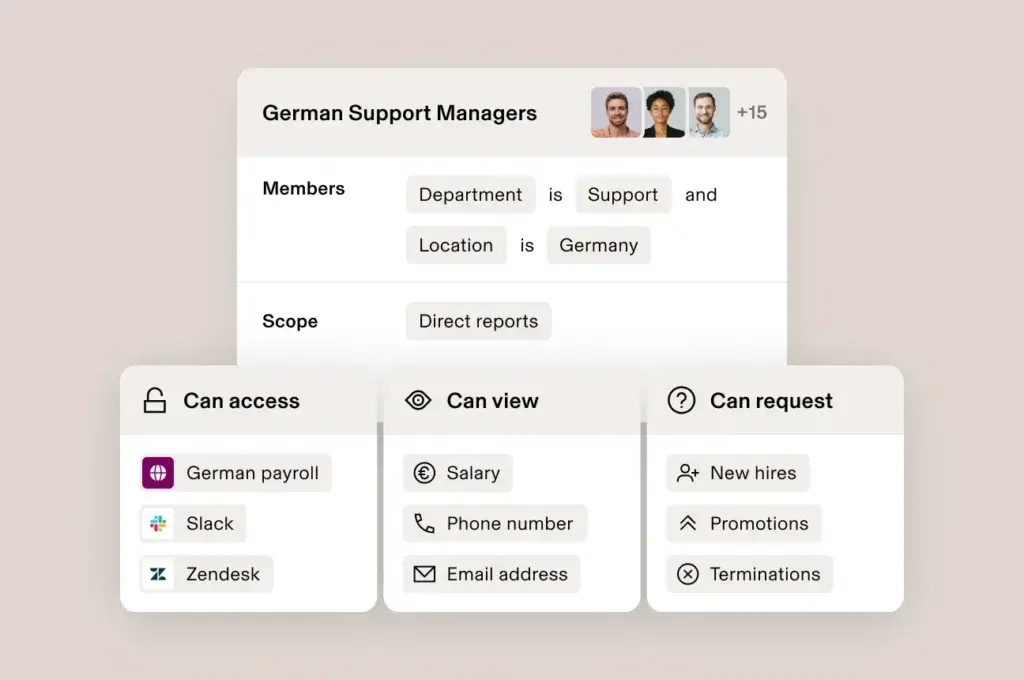
Rippling’s identity and access functionality is one of the most valuable reasons to choose it. You can automatically assign or remove app access based on attributes like department, role, or location, and permissions can update automatically when employees move or leave. This is not a small extra feature. It materially reduces security gaps and manual IT work.
Device Management
Rippling’s device management capabilities add another layer of operational control. Businesses can manage devices across operating systems, keep better visibility into inventory, retrieve devices from offboarded employees, and even use secure device warehousing in multiple countries. If you issue laptops and need tighter operational control, this matters a lot.
Custom Workflows and Extensibility
Rippling is not just feature-rich. It is designed to be configurable. With workflows, custom apps, and broader platform automation, you can shape the system around your own processes rather than forcing everything into a rigid HR template. That flexibility is a strength, though it also contributes to the learning curve.
Pros and Cons
Benefits and Limitations of Using Rippling
Positive
✅ Unified operations model
✅ Excellent automation potential
✅ Serious IT functionality
✅ Broad global workforce and payroll capabilities
Negative
❌ No public pricing
❌ Can feel complex for smaller teams
❌ Broad functionality creates a steeper learning curve
❌ Support feedback is not perfect
Strengths & Benefits
Rippling gets a lot right if your company wants more than a standard HR system.
- Unified operations model – HR, payroll, benefits, apps, and devices can all react to the same employee data.
- Excellent automation potential – Rippling is especially strong when repetitive tasks need to run across departments.
- Serious IT functionality – Identity, access, provisioning, and device controls are real differentiators.
- Broad global workforce and payroll capabilities – Global payroll, EOR, and contractor support expand Rippling beyond domestic HR needs.
Limitations & Drawbacks
Rippling is impressive, but it is not the most lightweight option on the market.
- No public pricing – You need to go through sales for a tailored quote.
- Can feel complex for smaller teams – Very small businesses may find simpler HR tools easier to manage.
- Broad functionality creates a steeper learning curve – Users often praise the interface but still mention that the full platform takes time to master.
- Support feedback is not perfect – Reviews are strong overall, but some users mention slower responses or implementation friction in more complex scenarios.
Operational Fit
Rippling User Experience, Support, and Security
Software fit is not just about feature lists. It also depends on how easy the platform is to adopt, how much operational discipline it requires, and whether your company can trust it with payroll, employee data, devices, and access control.
Ease of Use
Rippling is generally well-liked for usability. Public review summaries repeatedly describe it as user-friendly, intuitive, and effective at centralizing workflows. That said, broad functionality naturally creates more moving parts than a basic HRIS, so ease of use should be understood in context. The interface is modern, but the platform still rewards thoughtful setup.
Implementation Experience
Rippling implementation can be very smooth when your needs are clear, but it can become more involved as you add payroll, global workflows, app provisioning, device policies, and custom automations. In other words, the same flexibility that makes Rippling powerful also means rollout quality matters. Companies that treat implementation as an operations project usually get the most value.
Customer Support
Customer sentiment is positive overall, but support is not a flawless category. Many users describe strong outcomes and good usability, while some reviews note that support responsiveness or setup help can be inconsistent in more complicated environments. I would not call support a deal-breaker, but I also would not assume Rippling’s breadth eliminates the need for internal ownership during rollout.
Security and Compliance
Security is one of Rippling’s stronger trust signals. Its Trust Center highlights certifications and audit coverage including ISO 27001, ISO 27018, ISO 42001, SOC 1, and SOC 2. That matters because Rippling sits at the center of highly sensitive workflows involving payroll, employee data, app access, and devices. When a vendor is that deeply embedded in operations, trust and control matter even more than usual.
Permission Controls and Governance
Rippling also benefits from strong permission and identity controls. The platform lets you assign access dynamically, automate deprovisioning, and manage policies around authentication and app permissions. This is a real strength for businesses that want tighter least-privilege access and more disciplined offboarding.
Pricing
Rippling Pricing & Plans
Rippling pricing is one of the least transparent parts of the buying process. The company does not publish standard public plans with clear monthly rates. Instead, it directs buyers to request a custom quote based on the services they want.
How Rippling Pricing Works
The current pricing flow is quote-based. That usually means your total cost depends on company size, selected modules, payroll needs, global requirements, implementation scope, and how broadly you want to use the platform across HR, IT, and finance operations.
What Affects Total Cost
Your price can vary significantly depending on whether you only need HRIS and payroll or whether you also want benefits, time and attendance, scheduling, recruiting, performance, global payroll, EOR, identity management, device management, and advanced workflows. This is one of the clearest reasons why Rippling pricing can be harder to benchmark than simpler HR software.
What to Ask Before You Buy
If you are evaluating Rippling, ask about implementation fees, minimum commitments, module packaging, global service pricing, device and IT add-ons, payroll support by country, and how costs change as your headcount grows. Those details matter because Rippling is a platform purchase, not just a basic HR subscription.
Pricing Table
The table below gives a practical view of how Rippling’s pricing approach works today.
| Feature Type | Rippling | What it means for buyers |
| Pricing model | Custom pricing | You need to speak with sales for a tailored quote |
| Base structure | Modular platform | Total cost depends heavily on which products you add |
| Core focus | HR, payroll, IT, and global workforce operations | Better for consolidation than for one narrow use case |
| Global options | Global payroll, EOR, and contractor management | Useful for international growth, but pricing needs close review |
| Best for | Scaling businesses with operational complexity | More value when you will use multiple modules together |
For many buyers, the real question is not whether Rippling is cheap. It usually is not positioned as the simplest budget choice. The better question is whether consolidating multiple systems into Rippling will save enough time, reduce enough risk, and create enough operational leverage to justify the investment. In many scaling businesses, the answer is yes.
Use Cases
Who Should Use Rippling?
Rippling is not for every business, but it fits several types of buyers especially well.
Companies That Want HR and IT Together
If your employee lifecycle has major IT implications, Rippling is one of the best tools in the market. The ability to connect HR events with app access, permissions, devices, and workflows is a real operational advantage.
Fast-Growing SMBs and Mid-Market Teams
If you are outgrowing entry-level HR software and need deeper automation, better payroll connectivity, and more operational control, Rippling is a strong fit. This is arguably where the platform makes the most sense.
Global and Distributed Workforces
Rippling is also appealing for companies hiring internationally or managing contractors and employees across regions. Global HR, payroll, and EOR support make it much more relevant to international businesses than many domestic HR tools.
When Rippling Might Not Be Right
Rippling may not be the best fit if you want a very simple HR platform with minimal setup, if you need fully transparent pricing before engaging sales, or if your team only needs a narrow HR use case and nothing related to IT or global operations. In those cases, simpler tools may feel more natural.
User Feedback
Rippling Customer Reviews
Rippling reviews are very strong overall. Public snapshots currently show 4.8 out of 5 from 14,503 reviews on G2 and 4.9 out of 5 from 4,484 reviews on Capterra. That kind of review volume matters because it gives the platform far more credibility than software with only a limited review footprint.
What Users Like Most
The most common positives in public reviews include Rippling’s intuitive interface, centralized experience, broad automation, smooth HR and payroll workflows, and the convenience of managing multiple operational functions in one place. Users also regularly praise onboarding and the time savings that come from reducing manual admin work.
Common Complaints
The most common drawbacks are also fairly consistent. Some users say the platform can feel complex to configure at first, especially when more advanced modules are involved. Others mention that support response times can be better, and some reviewers say the mobile experience is not as strong as the desktop experience. Pricing opacity is also a recurring concern for buyers comparing alternatives.
My Take on the Review Pattern
The review pattern suggests that Rippling’s main trade-off is not poor quality. It is that broad capability creates broader expectations. If you buy Rippling as a full operations platform and invest in setup, it can be extremely powerful. If you buy it expecting a simple HR app with no learning curve, it can feel like more system than you actually need.
Competitors
Competitor Alternatives to Rippling
Rippling is most often compared with BambooHR, HiBob, and Workday. The right alternative depends on whether you care most about simplicity, employee experience, enterprise HCM depth, or operational control across HR and IT.
| Feature Type | Rippling | BambooHR | HiBob | Workday |
| Core angle | Unified HR, payroll, IT, and global ops platform | Simpler HR software for SMBs | Modern HR platform for scaling teams | Enterprise HCM suite |
| Best for | Companies wanting consolidation and automation | Smaller teams with straightforward HR needs | Mid-market companies focused on people operations | Large enterprises with complex HCM requirements |
| User experience | Modern, broad, and operationally powerful | Clean and approachable | Modern and employee-friendly | Powerful but more complex |
| Payroll approach | Strong native payroll plus global options | More limited and add-on dependent | Native plus integration-led depending on region | Deep enterprise payroll and workforce capabilities |
| IT and access controls | Major differentiator with IAM and device management | Very limited | Not a core strength | Not its main differentiator for SMB buyers |
| Overall angle | Best for operational unification | Best for simple HR administration | Best for modern HR experience | Best for large enterprise depth |
Compared with BambooHR, Rippling is usually the stronger choice when you want deeper automation, payroll, and IT control, but BambooHR is often easier for simpler HR use cases. Compared with HiBob, Rippling is more operational and systems-oriented, while HiBob tends to feel more HR- and employee-experience-centric. Compared with Workday, Rippling is usually more approachable for small and mid-market buyers, while Workday remains the heavier enterprise option for very large organizations.
If I had to summarize it simply, Rippling is one of the best choices for companies that want to run the employee lifecycle as one connected operational system instead of a group of separate HR and IT tools.
Best Practices
Getting Started with Rippling
To get the most out of Rippling, you should make a few smart decisions early.
Define Your Operational Scope First
Rippling can cover HR, payroll, IT, and global workforce workflows, but that does not mean you should roll out everything at once. Start by deciding whether your core priority is HRIS, payroll, benefits, app access, devices, or global hiring.
Map Employee Lifecycle Automations Carefully
Rippling is most valuable when you use it to automate events like hiring, role changes, promotions, and terminations. Build these flows carefully from the beginning, because they can touch payroll, permissions, compliance, and hardware.
Clarify Ownership Across HR and IT
One of Rippling’s strengths is that it spans functions. One of the risks is that no one takes clear ownership. Make sure HR, IT, finance, and operations agree on who manages permissions, workflows, approvals, policies, and change control.
Audit Your Module Needs
Rippling’s modular structure is powerful, but it can also expand quickly. Be disciplined about which modules you actually need now versus later. That will help keep implementation focused and budgeting more predictable.
Plan for Scale, Not Just Current Headcount
Rippling makes the most sense when you are building for a more complex future. If your company expects more hiring, more geographies, more compliance needs, and more operational handoffs, Rippling becomes much easier to justify.
Conclusion
Final Thoughts
⭐ Overall Rating: 8.9/10
Rippling remains one of the most compelling workforce platforms because it solves a bigger problem than most HR tools. It is not only about managing employee data. It is about turning employee data into operational action across payroll, benefits, app access, devices, and global workforce workflows.
Its biggest strengths are automation, breadth, payroll connectivity, global capabilities, and especially the link between HR and IT. Its biggest drawbacks are pricing opacity, growing complexity as you add modules, and the reality that the platform may feel heavier than necessary for teams with very simple HR needs.
Overall, Rippling is a strong recommendation for businesses that want one platform to run the employee lifecycle with more control and less manual work. If your organization values consolidation, automation, and operational discipline, Rippling is one of the best options to consider in 2026.
Have more questions?
Frequently Asked Questions
What is Rippling best used for?
Rippling is best used for managing HR, payroll, benefits, onboarding, app access, devices, and global workforce operations from one connected platform.
Is Rippling an HRIS or an IT platform?
It is both. Rippling started gaining attention as an HR platform, but one of its biggest strengths is that it also handles IT functions like identity, app provisioning, and device management.
Does Rippling include payroll?
Yes. Payroll is one of Rippling’s core strengths, and it is tightly connected to employee, benefits, and time data.
Does Rippling support global teams?
Yes. Rippling offers global HR, global payroll, contractor management, and employer of record services for international workforce operations.
How much does Rippling cost?
Rippling uses custom pricing. The company does not publish standard public plans, so you need to request a quote.
Is Rippling easy to use?
Generally, yes. Users often praise the interface and centralized experience, though the platform can still take time to learn because it covers so many functions.
Is Rippling good for small businesses?
It can be, especially for growing small businesses that want automation and consolidation. But very small teams with basic HR needs may prefer a simpler tool.
What makes Rippling different from competitors?
The biggest difference is that Rippling connects HR data to payroll, benefits, app access, identity, and device management in one platform.
What are the main Rippling alternatives?
The main alternatives often include BambooHR, HiBob, and Workday, depending on whether you prioritize simplicity, employee experience, or enterprise-scale depth.
Is Rippling worth it overall?
Yes, for the right buyer. If your company values automation, operational control, and replacing multiple tools with one system, Rippling is one of the strongest platforms in its category.