

Introduction
Choosing the best social media management tools is no longer just about scheduling posts in advance. You need a platform that helps you plan campaigns, collaborate with teammates, respond to comments, measure performance, and keep your workflow organized across multiple channels.
That is why the market has become more specialized. Some tools are built for agencies that need approvals and client reporting. Others focus on analytics, while some are better for lean teams that want affordable publishing with AI support.
In this guide, you will compare seven strong options: Hootsuite, SocialBee, Iconosquare, Vista Social, Pallyy, Sendible, and SocialRails. Each tool serves a slightly different type of user, so the best choice depends on your budget, team size, reporting needs, and how much you value automation.
How to Evaluate Social Media Management Tools
Before you choose a platform, it helps to look beyond the homepage claims. The right tool should fit the way your team actually works, not just look good in a demo.
Publishing and scheduling
A strong social media management platform should let you plan, draft, schedule, and publish content across the networks that matter most to your business. Some tools go further with bulk scheduling, evergreen queues, best-time recommendations, and cross-posting features.
Collaboration and approvals
If more than one person touches your content, collaboration features matter. Look for approval workflows, draft privacy, internal comments, role-based access, and shared calendars. These features become essential when you work with clients, multiple brands, or distributed marketing teams.
Analytics and reporting
Scheduling is only half the job. You also need to know what is working. The best platforms help you track engagement, follower growth, post performance, campaign outcomes, and sometimes competitor benchmarks. Reporting quality often separates basic tools from premium ones.
Inbox and engagement
Not every social media tool handles engagement equally well. Some focus mostly on publishing, while others include a unified inbox for comments, direct messages, reviews, and mentions. If community management is a priority, this area deserves extra attention.
Pricing and scalability
Pricing structures vary more than many buyers expect. Some tools charge by user, some by social profile, and some combine both. You should also check whether advanced analytics, white label reports, or approval workflows require higher-tier plans.
Best Social Media Management Tools
The platforms below stand out for different reasons. Rather than forcing a one-size-fits-all ranking, this comparison focuses on where each tool performs best and where it falls short.
Hootsuite


Features & Benefits
Hootsuite remains one of the most complete social media management platforms on the market. It combines publishing, AI-assisted caption creation, best-time-to-post recommendations, inbox management, competitor benchmarking, and brand monitoring in one environment.
What makes Hootsuite especially appealing for larger teams is how broad the platform feels. You can manage multiple social accounts, centralize incoming messages, assign conversations to teammates, and build more advanced analytics workflows as your needs grow. Its integration ecosystem is also a major advantage for businesses that already rely on outside tools for creative production or operations.
This is not the cheapest option, but it is one of the most mature if your workflow goes far beyond basic scheduling.
Pricing & Plans
Hootsuite currently offers Standard, Advanced, and Enterprise plans, with a free 30-day trial available on its main pricing pages. Standard includes up to 10 social accounts, unlimited scheduling, AI assistance, inbox features, and basic listening tools. Advanced adds unlimited social accounts, report exports, bulk scheduling, saved replies, and deeper competitor benchmarking. Enterprise is custom priced for organizations that need SSO, more users, and access to advanced modules.
Pros & Cons
Pros
- Strong all-in-one platform for publishing, engagement, and listening
- Advanced collaboration and team routing features
- Useful AI writing and publishing optimization tools
- Large integration ecosystem for broader marketing workflows
Cons
- Higher cost than most SMB-focused tools
- Can feel heavy if you only need scheduling
- Best reporting features are tied to higher tiers
SocialBee

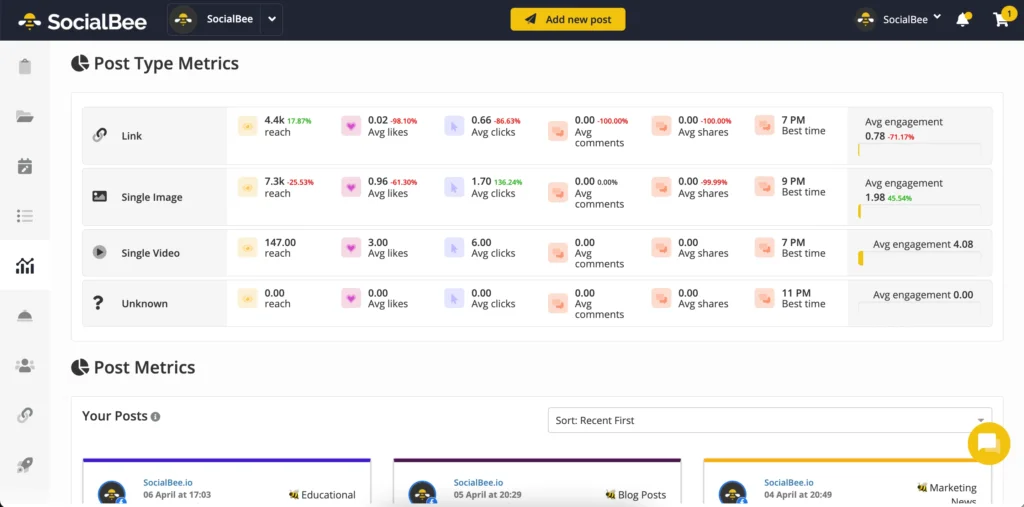
Features & Benefits
SocialBee is one of the easiest platforms to recommend to smaller teams that care about consistency. Its core strength is category-based scheduling. Instead of loading your calendar one post at a time, you can organize content by theme, queue it by category, and keep your posting mix balanced over time.
The platform also supports evergreen recycling, which is especially useful if you regularly repurpose educational posts, blog updates, or recurring promotional content. SocialBee includes AI content support and integrates with tools like Canva, which keeps the workflow efficient for lean marketing teams.
It does not go as deep into listening and enterprise reporting as Hootsuite or Vista Social, but for straightforward day-to-day publishing, it offers strong value.
Pricing & Plans
SocialBee currently lists three main plans. Bootstrap starts at $29 per month and supports up to 5 social profiles. Accelerate is the mid-tier plan for growing businesses, while Pro starts at $82.50 per month and adds more profiles, workspaces, advanced analytics, exported reports, and approvals. A 14-day free trial is available.
Pros & Cons
Pros
- Excellent category-based scheduling system
- Evergreen recycling is genuinely useful
- Affordable entry pricing for small teams
- Easy to learn compared with enterprise-heavy tools
Cons
- Less advanced social listening
- Reporting is not as deep as analytics-first platforms
- Best for SMBs, not complex enterprise structures
Iconosquare


Features & Benefits
Iconosquare has evolved from an Instagram analytics specialist into a broader social media management platform, but analytics still define its identity. If your team makes decisions based on reporting, dashboards, best-time recommendations, and campaign performance tracking, Iconosquare deserves serious attention.
The platform supports publishing across major social networks and includes collaboration features such as approvals, private drafts, shared dashboards, and role controls. It also offers a social inbox and AI caption assistance, which makes it more rounded than many people expect.
Its biggest strength is the way it translates performance data into practical decisions. For brands focused on proving ROI and improving content strategy, that matters more than flashy extras.
Pricing & Plans
Iconosquare currently offers Launch, Scale, Excel, and Custom plans. Official materials describe Launch as the entry plan for beginners, Scale as the option for growing brands, and Excel as the enterprise-ready tier with unlimited posts, more users, white-label reporting, onboarding, and priority support. Recent official Iconosquare materials also reference pricing that starts around $33 per month for Launch, $69 for Scale, and $116 for Excel, with a 14-day free trial and a limited free version after trial expiration.
Pros & Cons
Pros
- Excellent analytics and reporting depth
- Useful best-time and performance optimization features
- Good fit for data-driven teams and agencies
- More capable publishing tool than its reputation suggests
Cons
- Not the cheapest option if you only need scheduling
- Analytics-first positioning may be overkill for simpler teams
- Some buyers still expect stronger listening breadth
Vista Social


Features & Benefits
Vista Social is one of the strongest modern alternatives for teams that want more than a basic scheduler. It combines publishing, engagement, analytics, review management, DM automations, employee advocacy options, and listening add-ons in one system.
What stands out here is breadth without feeling old-fashioned. Vista Social supports a wide range of networks, includes AI-powered workflows, and is clearly designed for teams that manage multiple brands or need scalable engagement processes. It is especially attractive for agencies that want a platform with stronger client-facing utility than many lightweight tools can offer.
Compared with Hootsuite, Vista Social often feels more flexible and cost-conscious for growing teams, though Hootsuite still has stronger enterprise recognition.
Pricing & Plans
Vista Social pricing starts at $39 per month. Official pricing materials also highlight an Advanced plan for teams and agencies with 30 social profiles and 6 users, plus a Scale plan with 70 profiles and 10 users. Optional add-ons include listening, which starts at $75 per month for web and news monitoring, and employee advocacy, which starts at $199 per month for 25 employees.
Pros & Cons
Pros
- Very strong feature depth for agencies and multi-brand teams
- Includes publishing, engagement, review management, and AI tools
- Broad channel support and scalable plan structure
- Good balance of modern UX and advanced workflows
Cons
- Add-ons can increase total cost
- May be more platform than solo users need
- Not as simple as stripped-down schedulers
Pallyy

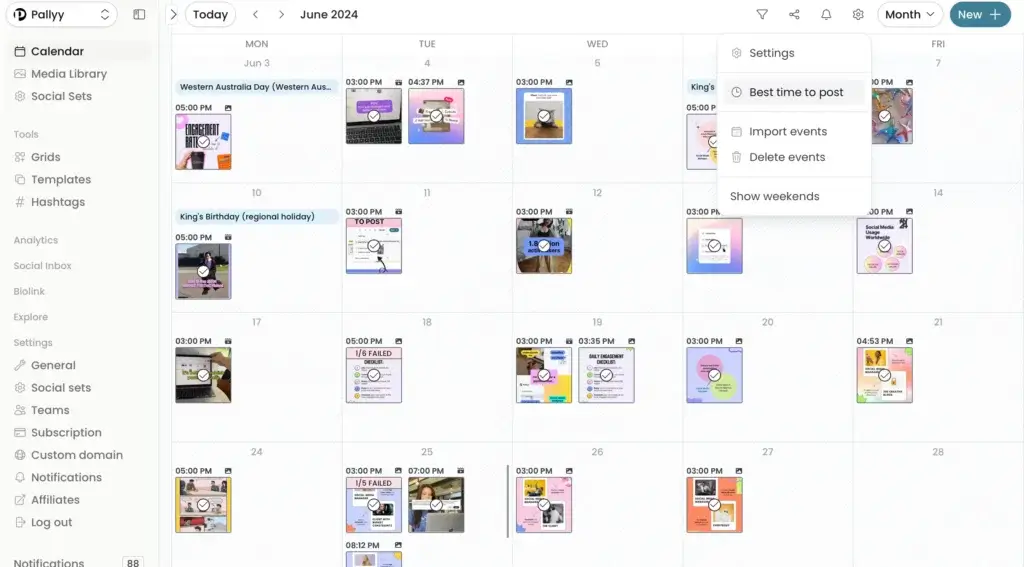
Features & Benefits
Pallyy is one of the most appealing tools if you value simplicity. It is designed for solo creators and small teams that want an easy way to plan, schedule, and manage content without fighting through a bloated interface.
Its official positioning focuses on social media scheduling for solo creators and teams, but it also includes a social inbox for comments, direct messages, mentions, reviews, labels, automations, and team assignments. That combination makes Pallyy more capable than many low-cost schedulers.
If your priority is ease of use and affordability, Pallyy is easy to like. If you need advanced enterprise reporting, it is less compelling.
Pricing & Plans
Pallyy currently lists a Starter plan at $15 per month for up to 2 social accounts, with 20 posts per month, 1 user, basic analytics, and media storage. Its help center also lists a Pay As You Go plan at $25 per month with unlimited scheduled posts, advanced analytics, social inbox, team collaboration, and approval workflows, plus extra social sets and extra users as add-ons.
Pros & Cons
Pros
- Very approachable interface
- Affordable pricing for creators and small teams
- Inbox features add real value at lower price points
- Good option if you want simplicity without losing core features
Cons
- Less suited to complex agency or enterprise environments
- Reporting is lighter than analytics-first tools
- Scales less elegantly for large teams
PostEverywhere


Features & Benefits
PostEverywhere is an AI-powered social media management platform built around a simple promise: create content once, then publish it across multiple social platforms from one place. The platform includes a visual content calendar, drag-and-drop scheduling, bulk scheduling via CSV, cross-platform publishing, analytics, and multi-account management.
Where it stands out is AI-assisted content production. PostEverywhere promotes AI caption generation, AI image generation, and AI video creation for short-form content, which makes it especially attractive for creators, founders, small businesses, and agencies that want to move faster without stitching together several different tools. It also says it automatically optimizes content formatting across supported networks, which is useful if you publish the same campaign in multiple versions.
PostEverywhere is more focused on speed, AI content support, and cross-platform publishing than on deep enterprise reporting or mature agency workflow features. That makes it a good fit for teams that care more about output efficiency than complex governance.
Pricing & Plans
PostEverywhere’s pricing is clear and competitive. It offers three plans, all with unlimited scheduled posts, AI content tools, API access, and a 7-day free trial. The Starter plan costs $19 per month and includes 10 social accounts, 1 user, 1 workspace, bulk scheduling, a content calendar, and 50 AI credits per month. Growth costs $39 per month and increases those limits to 25 social accounts, 3 team members, 5 workspaces, and 500 AI credits per month. Pro costs $79 per month and is built for larger teams, with 40 social accounts, 10 team members, 20 workspaces, priority support, and 2,000 AI credits per month. PostEverywhere also offers 20% off with annual billing, which makes the platform even more attractive for creators, agencies, and growing social teams.
Pros & Cons
Pros
- Strong AI content creation for captions, images, and video
- Cross-platform publishing across major social networks
- Visual calendar and bulk scheduling support
- Good fit for creators, SMBs, and lean agencies
Cons
- Less established than legacy social media suites
- Not the strongest fit for brands that need white-label or enterprise-heavy controls
- Not positioned as a deep enterprise analytics platform
Sendible

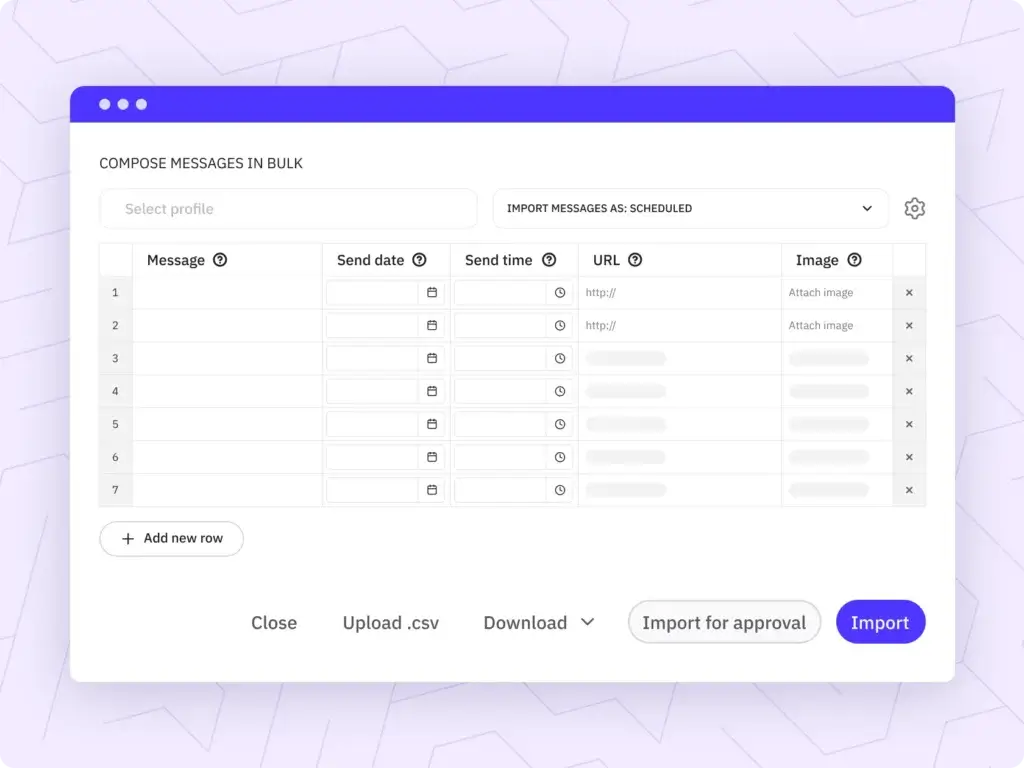
Features & Benefits
Sendible has long been a practical choice for agencies, and its positioning still makes sense. The platform focuses on social media scheduling, content management, analytics, reporting, team collaboration, and white label capabilities. That mix is especially useful when you manage client accounts and need a platform that supports both internal operations and external presentation.
White label features are a real differentiator here. Many tools say they support agencies, but Sendible goes further with branding and client-oriented workflows. It is not the most modern-looking platform in the category, but it remains very functional for service businesses.
If your business model depends on managing multiple client accounts at scale, Sendible is still one of the safer choices in this category.
Pricing & Plans
Sendible currently lists Creator at $29 per month, Traction at $89 per month, Scale at $199 per month, and Advanced at $299 per month, with Enterprise available via custom pricing. Official pages highlight advanced reports, team collaboration, and white label options as you move up the tiers. Sendible also offers a separate white label solution starting at $268 per month.
Pros & Cons
Pros
- Strong agency orientation
- White label options are valuable for client work
- Good collaboration and reporting structure
- Scales well for service-based teams
Cons
- Less appealing for solo users
- Interface feels more utilitarian than newer competitors
- Higher tiers climb quickly in price
SocialRails
Features & Benefits
SocialRails is a newer entrant, but it stands out by blending social scheduling with built-in content creation tools. According to its official positioning, the platform supports scheduling to 9 platforms, switching between up to 25 workspaces, and generating short-form content with 350+ customizable video templates.
That makes it particularly relevant if you do not want to rely on separate tools for AI captions, basic creative workflows, and multi-platform scheduling. It is a practical option for small businesses, creators, and lean agencies that care about output speed and affordability more than enterprise reporting depth.
Compared with more established platforms, SocialRails is lighter on brand authority, but its feature mix is compelling for budget-conscious teams.
Pricing & Plans
SocialRails promotes paid plans starting at $29 per month, with Creator, Business, and Agency tiers referenced across its official materials. Its affiliate and comparison pages repeatedly reference Creator at $29, Business at $49, and Agency at $99, with API access included on paid plans.
Pros & Cons
Pros
- Affordable starting price
- AI content and video creation support built in
- Useful for creators, SMBs, and lean agencies
- Multi-workspace structure adds flexibility
Cons
- Newer brand with a smaller installed base
- Less proven than long-established competitors
- Reporting and listening are not its main strengths
Features & Benefits
Breeze is HubSpot’s AI system, built across the wider customer platform rather than as a standalone social media scheduler. For social media teams, the most relevant pieces are Breeze Assistant, Content Remix, and the Breeze social media agent. Together, these tools help you generate social posts, repurpose existing assets into campaign content, and create post suggestions based on your company details, audience, and past performance.
That positioning makes Breeze especially useful if your team already works inside HubSpot for marketing, CRM, email, landing pages, and campaign management. Instead of using a separate AI tool for ideation and another platform for execution, you can keep more of your content workflow inside one system. Breeze can also suggest posting times and build multi-channel content ideas around your existing marketing assets.
The main limitation is that Breeze is strongest inside the HubSpot ecosystem. If you want a dedicated social media management platform with deep inbox management, listening, and channel-specific publishing controls, tools like Hootsuite or Vista Social will usually be a better fit.
Pricing & Plans
Breeze is part of HubSpot’s broader platform rather than a separate standalone social tool. HubSpot’s official materials position Breeze across its AI-enabled products, while features like Content Remix are tied to specific HubSpot tiers such as Content Hub Professional. HubSpot also offers broader marketing software plans and free entry points, but access to advanced AI and social-related capabilities depends on the HubSpot products and subscription level you use.
Pros & Cons
Pros
- Strong fit for teams already using HubSpot
- Helpful AI support for social post creation and repurposing
- Can turn existing assets into multi-channel campaign content
- Connects social workflows with CRM and broader marketing data
Cons
- Not a standalone social media management platform
- Best value depends on already being in the HubSpot ecosystem
- Less suitable if you mainly want a dedicated scheduler or social inbox
Breeze is a smart addition to this list if you want to show readers an AI-first option. It is most relevant for businesses that already use HubSpot and want social content generation, campaign support, and AI assistance without adding another major tool to their stack.
Comparing the Best Social Media Management Tools
When you compare these tools side by side, a few patterns become clear. Hootsuite and Vista Social are stronger all-in-one choices for teams that need publishing, engagement, and broader workflow depth. Iconosquare is the best fit for analytics-heavy teams. SocialBee is one of the easiest wins for small businesses that want reliable publishing without a steep learning curve.
Pallyy is particularly attractive for creators and lean teams that care about ease of use and reasonable pricing. Sendible remains one of the better agency-first options thanks to white label capabilities and client workflows. SocialRails is promising if you want low-cost scheduling plus AI content and short-form video support.
| Feature Type | Hootsuite | SocialBee | Iconosquare | Vista Social | Pallyy |
| Best for | Large teams and enterprises | Small businesses and solopreneurs | Analytics-driven brands | Agencies and multi-brand teams | Creators and lean teams |
| Starting price | Custom by region and plan | $29/month | Starts around $33/month | $39/month | $15/month |
| Scheduling strength | Advanced | Very strong | Strong | Very strong | Strong |
| Analytics depth | High | Moderate | Very high | High | Moderate |
| Inbox and engagement | Strong | Basic | Good | Very strong | Good |
| Approvals and collaboration | Strong | Good | Good | Strong | Good |
| White label support | Limited focus | No | Limited | Available in agency use cases | No |
| Standout edge | Complete enterprise toolkit | Evergreen category scheduling | Analytics-first workflow | Broad modern feature set | Simple and affordable UX |
How to Choose the Right Social Media Management Tool
If you are choosing for a solo business or small team, start by deciding whether you care more about simplicity or reporting depth. SocialBee and Pallyy are often the best places to begin because they reduce friction and keep costs under control.
If analytics drive your strategy, Iconosquare is the smarter fit. If you run an agency or manage many brands, Vista Social and Sendible deserve priority consideration. If your team needs broader enterprise workflows, Hootsuite remains one of the safest choices.
SocialRails is worth considering when affordability and built-in AI content support matter more than legacy brand recognition. It is not as proven as Hootsuite or Sendible, but the value proposition is strong for smaller teams.
Conclusion
The best social media management tools do not all solve the same problem. Hootsuite is the strongest option for larger organizations that want a mature, full-stack platform. SocialBee is one of the best choices for small businesses that need dependable scheduling and evergreen content management. Iconosquare is the best fit for teams that want deeper analytics and smarter reporting.
Vista Social is a standout option for agencies and growing teams that want broad functionality without jumping immediately to enterprise pricing. Pallyy is ideal when you want a simpler, more affordable tool that still covers the essentials. Sendible remains highly relevant for agency workflows, especially where white-label reporting matters. SocialRails is a good budget-conscious option for creators and small teams that want AI and content production support built in. Breeze stands apart from the rest because it is not a traditional standalone social media management tool. Instead, it brings AI-powered social content generation, post suggestions, and campaign support into the broader HubSpot ecosystem. That makes it especially attractive for teams already using HubSpot for CRM, content, email, and marketing automation.
For most buyers, the right move is to shortlist two or three tools based on your workflow, then test the free trials. A polished feature list is helpful, but a real fit only becomes obvious once you build your calendar, invite teammates, and see how the tool feels in daily use.
Frequently Asked Questions
What is the best social media management tool overall?
There is no single best tool for every team. Hootsuite is one of the strongest all-around options for large organizations, while SocialBee, Vista Social, and Iconosquare are often better fits for more specific needs.
Which tool is best for small businesses?
SocialBee and Pallyy are especially strong for small businesses because they balance affordability, usability, and core scheduling features well.
Which platform has the best analytics?
Iconosquare is one of the best choices if analytics and reporting are your top priorities. It is particularly strong for brands that want performance insights tied closely to content decisions.
Which social media management tool is best for agencies?
Vista Social and Sendible are both strong agency options. Sendible is especially relevant if white label workflows matter, while Vista Social is attractive for broader engagement and modern feature depth.
Is Hootsuite still worth it?
Yes, especially if your team needs publishing, inbox management, listening, team routing, and enterprise-ready workflows in one platform. It is less attractive if you only need low-cost scheduling.
What makes SocialBee different?
SocialBee stands out for category-based scheduling and evergreen content recycling. Those features make it particularly useful for businesses that want to keep posting consistently without rebuilding the calendar from scratch each week.
Is Pallyy good for creators?
Yes. Pallyy is a strong fit for creators because it keeps the interface simple, offers affordable plans, and adds inbox features that are useful without being overwhelming.
Does Sendible still make sense for agencies in 2026?
Yes. Sendible remains relevant because it is built around agency workflows, collaboration, analytics, and white label presentation.
Which tool is best if I want AI features?
Hootsuite, SocialBee, Vista Social, Iconosquare, and SocialRails all promote AI-related features. SocialRails is one of the more budget-friendly options if built-in AI support is a key priority.
Should I choose based on price alone?
No. Price matters, but workflow fit matters more. A cheaper tool that slows approvals, weakens reporting, or creates publishing friction often costs more in lost efficiency over time.




