
Introduction
Choosing the right applicant tracking system can have a direct impact on how quickly you find candidates, how consistently your team evaluates applicants, and how much administrative work hiring creates for your business. In this JazzHR review, you will get a practical look at what JazzHR offers, where it performs well, where it has limitations, and which types of hiring teams are most likely to benefit from it in 2026.
JazzHR is built for small and growing businesses that need a more organized way to recruit without adding a large talent acquisition team. It is not trying to be a full HR suite or an enterprise HCM platform. Instead, it focuses on the core recruiting workflow: posting jobs, collecting applicants, managing candidates, collaborating with hiring teams, automating communication, scheduling interviews, and sending offers.
That positioning makes JazzHR especially relevant if your company is moving away from spreadsheets, email threads, and manual job board posting. It gives you enough structure to manage hiring professionally, while still staying more accessible than larger recruiting platforms designed for complex enterprise teams.
What Is JazzHR?
JazzHR is an applicant tracking and recruiting software platform designed to help businesses manage hiring from job post to offer. You can use it to create jobs, distribute openings, organize applicants, customize hiring workflows, collaborate with managers, automate candidate communication, track recruiting performance, and manage offers with eSignatures.
The platform is now part of Employ, the same broader recruiting technology company behind other talent acquisition products. That gives JazzHR a clear place in the market: it is the small-business and growing-team ATS option within a broader recruiting software ecosystem.
Background and Positioning
JazzHR positions itself as recruiting software for teams that need hiring to feel manageable, even without a dedicated recruiting department. The product is strongest when your business needs a practical ATS with transparent pricing, unlimited users, job posting tools, candidate tracking, and workflow automation.
Unlike enterprise-focused systems such as Greenhouse, Workday Recruiting, or iCIMS, JazzHR is less about complex global hiring governance and more about helping smaller teams build a repeatable hiring process quickly. That makes it a more natural fit for SMBs, franchises, multi-location businesses, nonprofits, agencies, and teams that hire regularly but do not need enterprise-level complexity.
Target Users and Use Cases
JazzHR is especially relevant for several buyer types:
- Small businesses – You get a structured ATS without enterprise-level complexity.
- Growing teams – JazzHR helps standardize hiring as applicant volume increases.
- Lean HR teams – Automation reduces repetitive candidate communication and task management.
- Multi-location employers – Custom workflows and job-based teams help organize decentralized hiring.
- Cost-conscious buyers – Published pricing makes budgeting easier than quote-only ATS tools.
JazzHR is not the best fit if you need deep recruitment CRM, advanced workforce planning, native payroll, or highly sophisticated enterprise reporting. It is strongest when you want a practical recruiting system that is easy to launch, easy to understand, and broad enough to cover the core ATS workflow.
Core Features of the Platform
How Does JazzHR Work?
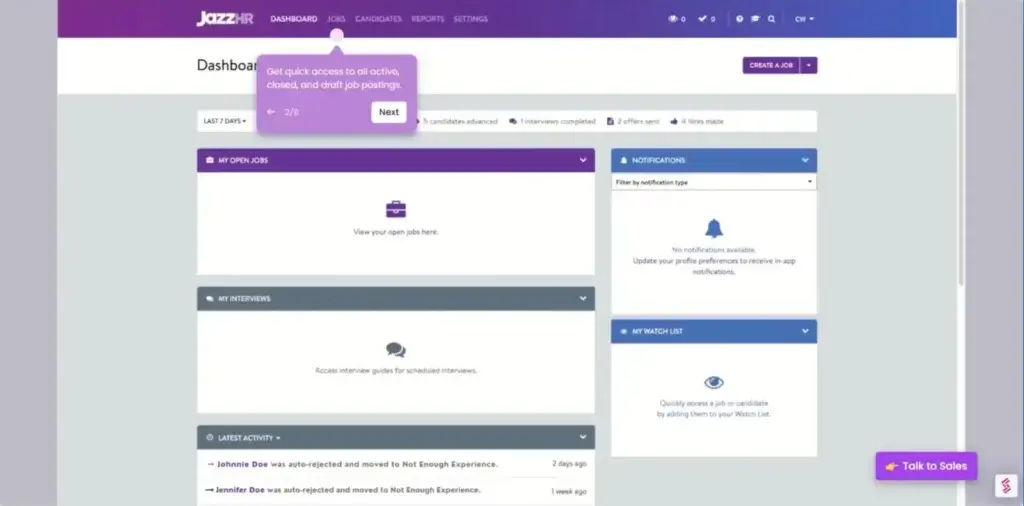
JazzHR works by centralizing the main parts of recruiting inside one applicant tracking system. Instead of managing job ads, resumes, candidate notes, interview feedback, hiring tasks, and offer letters in separate tools, you can run the process through JazzHR’s hiring pipeline.
The product is designed to simplify recruiting operations for lean teams. That means the platform puts a lot of emphasis on job posting, workflow customization, candidate communication, team collaboration, and automation.
Applicant Tracking and Pipeline Management
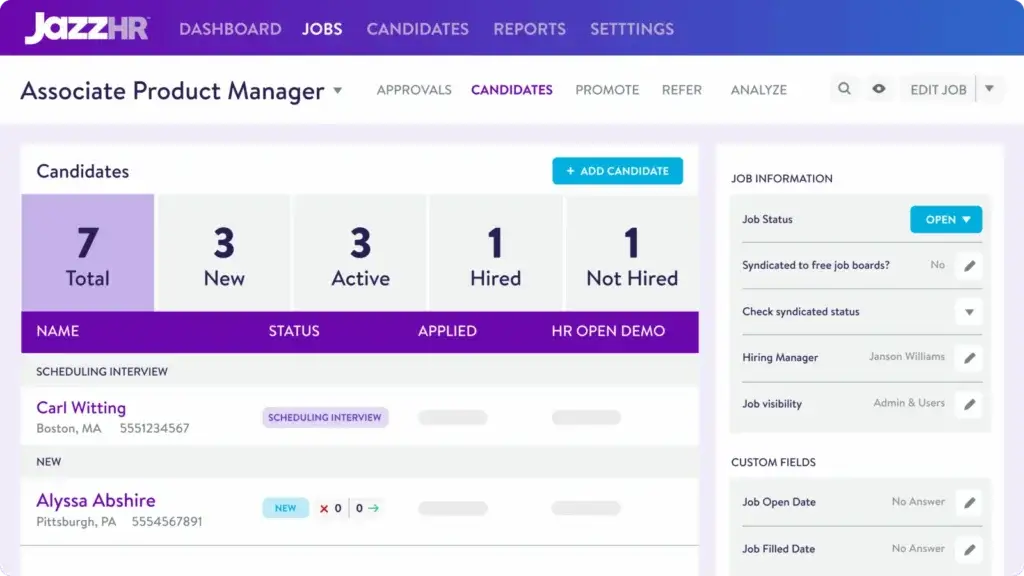
Applicant tracking is the core of JazzHR. You can create job openings, collect applicants, move candidates through hiring stages, add notes, review resumes, and track where each person stands in the process.
The pipeline view helps replace scattered spreadsheets and inbox-based recruiting. For smaller businesses, that is often the first major improvement. You get one shared place where hiring managers and HR can understand the status of each role without asking for constant updates.
Job Posting and Candidate Sourcing
JazzHR helps you post openings and distribute jobs to relevant job boards. This is useful when you need to increase applicant reach without manually recreating the same posting across multiple channels.
The platform is especially practical for teams that hire across several roles or locations. You can create structured job posts, publish opportunities, and track applicants as they enter your pipeline.
Custom Hiring Workflows
One of JazzHR’s most useful strengths is workflow customization. You can build hiring stages that match how your company evaluates candidates, rather than forcing every job into the same generic process.
This matters because a sales role, operations role, and technical role may not require the same steps. JazzHR gives you enough flexibility to define stages, assign tasks, and create a repeatable hiring process for each opening.
Candidate Communication and Email Automation
JazzHR helps you reduce repetitive communication by using email templates, automated messages, and candidate updates. That can save a significant amount of time when applicant volume increases.
For example, you can use templates for application confirmations, interview invitations, rejections, follow-ups, and next-step messages. This gives candidates a more consistent experience while reducing manual work for your team.
Collaborative Hiring
JazzHR supports collaborative hiring by allowing recruiters, HR managers, executives, and hiring managers to participate in the hiring process. Team members can leave notes, review candidates, provide feedback, and stay informed about candidate activity.
This is valuable for small businesses because hiring often involves people outside HR. JazzHR gives those stakeholders a clearer way to participate without losing context in email threads.
Interviews and Assessments
JazzHR includes tools that help coordinate interviews and structure candidate evaluation. You can manage interview stages, collect feedback, and keep evaluation details attached to each candidate profile.
The platform is not as deep as advanced structured interviewing systems, but it gives smaller teams enough control to avoid completely informal hiring decisions. That alone can improve consistency across managers.
Offers and eSignatures
JazzHR includes offer management and eSignature capabilities on higher plans or through relevant plan options. This helps you move from candidate selection to accepted offer without relying on manual document handling.
You can create offer templates, populate offer details, send documents, and collect signatures digitally. For teams that still manage offers through PDFs and email attachments, this is a meaningful workflow upgrade.
Reporting and Compliance
JazzHR includes reporting features that help you track recruiting activity, hiring progress, and process performance. You can use reports to better understand where candidates come from, how roles are progressing, and where bottlenecks may appear.
For compliance, JazzHR supports hiring documentation and reporting needs that matter for growing companies. It is not the most advanced analytics platform in the ATS category, but it provides enough visibility for many SMB recruiting teams.
AI Candidate Matching
JazzHR has added AI-powered candidate matching through its Talent Fit capability. The purpose is to help teams surface stronger candidate matches based on the job requirements, so recruiters and hiring managers can prioritize review more efficiently.
This is best viewed as a screening support feature, not a replacement for human evaluation. It can help reduce resume review time, but hiring teams should still review context, qualifications, and role fit carefully.
Integrations and API Access
JazzHR connects with a marketplace of HR, payroll, background check, sourcing, scheduling, and productivity tools. It also provides API and platform documentation for teams that need custom integrations.
This matters because recruiting rarely happens in isolation. A candidate may start in a sourcing tool, move through JazzHR, complete a background check, and then need to be added to an HRIS or payroll system. Integrations make that handoff easier.
Business Operations Features
JazzHR Recruiting, Automation, and Team Collaboration
JazzHR is most useful when you look at it as a recruiting operations tool. It does not only store applicants. It helps small teams create a more repeatable hiring process without needing a large recruiting department.
Recruiting Software for Lean Teams
The strongest use case for JazzHR is lean hiring. If one HR manager, office manager, founder, or department leader is responsible for recruiting, the platform can make the process much easier to manage.
You can centralize job postings, candidate activity, notes, emails, feedback, and offer steps. That reduces the risk of losing candidates because someone forgot to follow up or missed an application in an inbox.
Automation for Repetitive Hiring Tasks
JazzHR includes automation features that help move candidates through the process and reduce manual task management. You can automate certain emails, trigger tasks, and keep hiring steps moving with less administrative effort.
This is one of the main reasons JazzHR is appealing for SMBs. You do not need a highly complex automation builder to see value. Even basic email and task automation can save hours across multiple roles.
Employer Branding and Candidate Experience
JazzHR supports employer branding through branded job pages, candidate communication, and white-label options. This helps small businesses present a more professional hiring experience.
Candidate experience matters because many applicants judge your company by how clearly and quickly you communicate. JazzHR can help you create a more polished process, especially if your current process depends on manual emails and inconsistent follow-up.
Hiring Team Visibility
JazzHR makes it easier for managers to see where hiring stands. Instead of asking HR for a status update, stakeholders can review candidate progress, notes, and hiring activity in the platform.
This is useful for accountability. When hiring managers need to leave feedback or complete a task, JazzHR can help keep the process visible and structured.
Scalability for Growing Hiring Needs
JazzHR works best for companies that hire often enough to need structure, but not so heavily that they require an enterprise recruiting suite. It can scale from a small number of openings to more active hiring, depending on the selected plan.
The plan structure also gives you room to grow. You can start with a more basic package and move into more advanced features when you need stronger automation, reporting, offers, eSignatures, or higher hiring volume.
Pros and Cons
Benefits and Limitations of Using JazzHR
Positive
✅ Easy to use
✅ Transparent pricing
✅ Unlimited users
✅ Strong SMB fit
Negative
❌ Limited enterprise depth
❌ Add-ons may increase cost
❌ Reporting is not advanced
❌ Not a full HR suite
Strengths & Benefits
JazzHR gets a lot right for small businesses and lean HR teams that need a straightforward recruiting platform.
- Easy to use – JazzHR is approachable for non-technical hiring teams.
- Transparent pricing – Published plans make budgeting easier than quote-only ATS tools.
- Unlimited users – You can involve hiring managers without per-seat cost pressure.
- Workflow automation – Templates and task triggers reduce repetitive recruiting work.
- Strong SMB fit – The platform is practical for small and growing businesses.
Limitations & Drawbacks
JazzHR is useful, but it is not the right ATS for every hiring environment.
- Limited enterprise depth – Larger companies may need stronger governance and analytics.
- Add-ons may increase cost – Some capabilities can depend on plan level or paid options.
- Reporting is not advanced – Analytics are useful, but not best-in-class for complex teams.
- Not a full HR suite – Payroll, benefits, and broader HR operations require other systems.
- Less CRM depth – It is stronger as an ATS than a sophisticated talent CRM.
Operational Fit
JazzHR User Experience, Support, and Security
When evaluating JazzHR, the main question is not whether it has every advanced recruiting feature. The better question is whether it gives your team the right level of structure without adding unnecessary complexity.
Ease of Use
Ease of use is one of JazzHR’s strongest selling points. The interface is designed for teams that may not have a dedicated recruiter or ATS administrator.
This is important because many smaller companies struggle with adoption when recruiting software feels too complicated. JazzHR’s simpler structure makes it easier for hiring managers to participate and for HR to keep the process moving.
Implementation Experience
JazzHR is generally easier to implement than enterprise recruiting platforms. However, setup still matters. You should define your hiring stages, email templates, job approval process, and team responsibilities before rolling it out across the business.
The platform is most valuable when it reflects your actual hiring process. If you simply copy generic stages without thinking through your workflow, you may miss much of the value.
Customer Support
JazzHR provides support resources, training materials, and help documentation. The level of support available may depend on your plan and whether you purchase additional support options.
For smaller companies, the most important support consideration is onboarding. Make sure you understand what setup guidance is included, what support channels are available, and whether faster support requires an add-on.
Security and Compliance
JazzHR is part of Employ, and Employ publishes security and compliance information for vendor review. Available security materials include SOC 2, ISO 27001, penetration testing information, security policies, and architecture documentation through support or sales.
For most SMB recruiting use cases, that is a meaningful trust signal. However, companies with strict enterprise procurement, regulated hiring environments, or global data residency requirements should still complete their own vendor security review.
AI Governance Considerations
JazzHR’s Talent Fit AI capability can help prioritize candidates, but hiring teams should use it responsibly. AI matching should support screening, not replace human judgment.
If your company uses AI-assisted screening, document how it is used, review the criteria behind candidate evaluation, and ensure hiring decisions remain fair, transparent, and compliant with applicable employment laws.
Pricing
JazzHR Pricing & Plans
JazzHR pricing is more transparent than many ATS platforms. Instead of forcing every buyer into a custom quote process, JazzHR publishes annual pricing for its main plans.
As of the latest pricing information available, JazzHR offers three main plans: Hero, Plus, and Pro. The right plan depends on your hiring volume, required automation, reporting needs, and whether you need offer management or more advanced functionality.
Hero Plan
Hero is the entry-level JazzHR plan. It is designed for smaller teams that need to start organizing recruiting, posting jobs, and tracking applicants in a central system.
This plan is best for businesses with lighter hiring needs. If you only need basic applicant tracking and a more professional process than spreadsheets, Hero may be enough.
Plus Plan
Plus is positioned for growing teams. It adds more functionality for companies that hire more frequently and need stronger collaboration, automation, and workflow capabilities.
For many small businesses, Plus is likely the most practical plan. It gives you more room to manage active hiring without immediately moving into the highest tier.
Pro Plan
Pro is built for more serious hiring operations. It is the strongest option if you need more advanced features, stronger offer workflows, eSignatures, reporting capabilities, or a more complete recruiting setup.
This plan is best for companies where recruiting has become a regular operational function rather than an occasional task.
Pricing Table
The table below summarizes JazzHR’s public plan structure.
| Feature Type | Hero | Plus | Pro |
| Best for | Getting started with hiring | Growing recruiting teams | More serious hiring operations |
| Annual price | $1,000/year | $3,480/year | $5,508/year |
| Primary use case | Basic ATS organization | More active hiring workflows | Advanced recruiting process needs |
| Hiring volume fit | Light hiring | Regular hiring | High or structured hiring |
| Key value | Affordable ATS foundation | Better automation and collaboration | More complete recruiting functionality |
| Buyer caution | May be limited as you grow | Check needed add-ons | Confirm full feature access |
JazzHR’s pricing is attractive compared with many enterprise ATS tools, especially because the platform supports unlimited users. That matters if you want several hiring managers to participate without increasing cost every time you add a user.
However, you should review plan limits, add-ons, support options, and feature access before buying. The advertised annual plan cost may not represent your full cost if you need texting, advanced reporting, additional integrations, or support upgrades.
Use Cases
Who Should Use JazzHR?
JazzHR is not a universal recruiting platform, but it is a strong choice for a specific type of buyer: small and growing teams that want recruiting structure without enterprise complexity.
Small Businesses Moving Beyond Spreadsheets
If you currently manage applicants through spreadsheets, email folders, and shared notes, JazzHR is a clear upgrade. It gives you a centralized hiring workflow that is easier to track and easier to share with your team.
This is one of JazzHR’s strongest use cases. You do not need a complex ATS to see major value when your current process is manual.
Growing Companies That Hire Regularly
JazzHR also fits companies that hire throughout the year. If you are regularly opening new roles, coordinating managers, and managing candidate communication, a structured ATS becomes much more important.
In this scenario, JazzHR can help reduce dropped follow-ups, inconsistent interview stages, and unclear hiring ownership.
Lean HR Teams Without Dedicated Recruiters
JazzHR is useful when hiring is owned by a small HR team, office manager, operations leader, or founder. The platform gives those users a practical recruiting system without requiring deep ATS administration expertise.
That is a real advantage for SMBs. Many tools are too light to support process improvement, while others are too complex for lean teams. JazzHR sits in a practical middle ground.
When JazzHR Might Not Be Right
JazzHR may not be the best choice if you need enterprise analytics, advanced recruitment marketing, deep CRM nurturing, global compliance workflows, or a full HRIS with payroll and benefits.
It may also feel limiting for high-volume staffing agencies or companies with complex multi-country hiring operations. In those cases, platforms like Greenhouse, Lever, Ashby, SmartRecruiters, iCIMS, or Workday Recruiting may be more suitable.
User Feedback
JazzHR Customer Reviews
JazzHR reviews are generally positive, especially around ease of use, applicant tracking, job posting, and candidate management. Users often appreciate that it helps small teams create a more organized recruiting process without a steep learning curve.
What Users Like Most
The most common positive themes include simple navigation, centralized candidate tracking, useful job posting tools, team collaboration, and time savings from templates and automation.
For many users, JazzHR’s biggest benefit is not one advanced feature. It is the operational improvement that comes from moving hiring into one system.
Common Complaints
Common complaints tend to focus on limitations around reporting flexibility, occasional workflow constraints, add-on costs, and the need to move to higher plans for more complete functionality.
Some teams may also want more modern CRM-style engagement, deeper analytics, or more sophisticated automation. These are fair concerns, especially if your recruiting operation is more mature.
My Take on the Review Pattern
The review pattern suggests that JazzHR succeeds when buyers understand what it is designed to be. It is a practical ATS for small and growing businesses, not a full enterprise talent acquisition suite.
If you evaluate JazzHR against enterprise recruiting platforms, it will look less advanced. If you evaluate it against spreadsheets, inbox-based hiring, or very basic applicant trackers, its value becomes much clearer.
Competitors
Competitor Alternatives to JazzHR
JazzHR competes with tools like Breezy HR, Workable, Greenhouse, Lever, and other recruiting software platforms. The right alternative depends on your hiring volume, budget, workflow complexity, and whether you need a simple ATS or a more advanced hiring platform.
| Feature Type | JazzHR | Breezy HR | Workable | Greenhouse |
| Core angle | SMB applicant tracking | Visual hiring pipeline | Recruiting suite for growing teams | Structured hiring platform |
| Best for | Small businesses needing simple ATS structure | Teams wanting visual and user-friendly hiring | Companies needing sourcing plus ATS depth | Scaling companies needing process rigor |
| Pricing style | Published annual plans | Published plans | Published and custom options | Custom pricing |
| Ease of use | Strong | Strong | Strong but broader | Strong but more process-heavy |
| Reporting depth | Moderate | Moderate | Stronger | Stronger |
| Overall fit | Best for lean SMB hiring | Best for visual hiring workflows | Best for active recruiting teams | Best for structured hiring at scale |
Compared with Breezy HR, JazzHR feels more like a practical ATS for businesses that want a straightforward hiring system and published pricing. Breezy may appeal more if you prefer a highly visual pipeline experience.
Compared with Workable, JazzHR is usually simpler and more cost-conscious. Workable may be stronger if sourcing, candidate database tools, and broader recruiting features are a priority.
Compared with Greenhouse, JazzHR is easier to justify for small businesses, while Greenhouse is stronger for structured hiring, complex recruiting operations, and companies that need more advanced process control.
Overall, JazzHR is one of the better ATS options for small businesses that want a real recruiting system without overbuying.
Best Practices
Getting Started with JazzHR
To get the most out of JazzHR, you should treat implementation as a process design project, not just a software setup task.
Define Your Hiring Stages First
Before adding jobs, define the stages your candidates should move through. A simple structure might include applied, screening, interview, final interview, offer, hired, and rejected.
You can customize this by role, but start with a consistent foundation. This makes reporting cleaner and helps hiring managers understand the process.
Create Email Templates
Email templates are one of the easiest ways to save time in JazzHR. Build templates for application confirmations, interview scheduling, rejection messages, and offer follow-ups.
This improves candidate communication and reduces repetitive writing for HR.
Train Hiring Managers
JazzHR adoption depends on manager participation. Show hiring managers how to review candidates, leave notes, submit feedback, and complete assigned tasks.
The easier you make their role, the more likely they are to use the platform consistently.
Use Automations Carefully
Automation is useful, but it should not make your hiring process feel robotic. Use it for repetitive actions, but keep personalized communication where it matters most.
This is especially important for later-stage candidates who expect thoughtful updates and clear communication.
Review Reports Regularly
Use JazzHR reporting to review hiring bottlenecks, candidate sources, and role progress. Even simple reporting can help you identify where your process slows down.
For example, you may discover that candidates are waiting too long between screening and interview, or that certain job boards produce more relevant applicants than others.
Conclusion
Final Thoughts
JazzHR is a strong applicant tracking system for small businesses and growing teams that want to make hiring more organized without investing in a large enterprise recruiting platform. Its biggest strengths are ease of use, transparent pricing, unlimited users, workflow customization, candidate communication, job posting, and practical automation.
It is not the deepest recruiting platform on the market. Reporting can feel limited for advanced teams, some features depend on plan level or add-ons, and it does not replace a full HRIS. However, those limitations are easier to accept when you evaluate JazzHR for the right use case.
Overall, JazzHR is easy to recommend for businesses that need to replace manual hiring workflows with a real ATS. If your team wants an affordable, structured, and user-friendly recruiting platform for SMB hiring, JazzHR deserves a serious look in 2026.
Frequently Asked Questions
Have more questions?
What is JazzHR?
JazzHR is an applicant tracking and recruiting software platform for small and growing businesses. It helps teams post jobs, manage applicants, collaborate on hiring, automate communication, and send offers from one system.
Who is JazzHR best for?
JazzHR is best for small businesses, growing companies, lean HR teams, franchises, and organizations that need a structured ATS without enterprise-level complexity.
How much does JazzHR cost?
JazzHR publishes annual pricing for three main plans: Hero at $1,000 per year, Plus at $3,480 per year, and Pro at $5,508 per year. Final cost can vary if you need add-ons or upgraded support.
Does JazzHR offer a free trial?
JazzHR has promoted a free trial option on its product pages. You should confirm current trial availability on the JazzHR website before signing up, as offers can change.
Is JazzHR easy to use?
Yes. JazzHR is generally considered easy to use, especially for small businesses and hiring managers who need a straightforward way to manage applicants, feedback, and hiring stages.
Does JazzHR include job posting tools?
Yes. JazzHR supports job posting and job distribution features that help employers publish openings and collect applicants inside the applicant tracking system.
Does JazzHR support offers and eSignatures?
Yes. JazzHR supports offer management and eSignature capabilities, allowing teams to digitize offer letters and reduce manual document handling during the final hiring stage.
Does JazzHR have AI features?
Yes. JazzHR includes Talent Fit, an AI-powered candidate matching capability designed to help hiring teams identify stronger candidate matches based on job requirements.
What are the best JazzHR alternatives?
Common JazzHR alternatives include Breezy HR, Workable, Greenhouse, Lever, Ashby, SmartRecruiters, and iCIMS. The best option depends on your hiring volume, budget, workflow needs, and reporting requirements.
Is JazzHR worth it?
JazzHR is worth considering if your business needs an affordable, structured ATS for small-business hiring. It is strongest for teams replacing spreadsheets and manual recruiting workflows, but less ideal for complex enterprise recruiting operations.