
Introduction
Managing customer relationships should make your business easier to run, not harder. That is the core idea behind Less Annoying CRM, a simple CRM built for small businesses that want better organization without unnecessary complexity.
Unlike large CRM platforms that often require long setup, training, and ongoing admin work, Less Annoying CRM focuses on the essentials: contacts, leads, tasks, calendars, pipelines, and follow-ups. It is designed for teams that need a reliable system, not a complicated software project.
In this Less Annoying CRM review, we’ll look at its features, pricing, pros and cons, user experience, integrations, security, and best-fit use cases. By the end, you’ll have a clear idea of whether this CRM is the right fit for your business.
Quick Summary
Less Annoying CRM is best for small businesses, freelancers, consultants, and lean sales teams that need a simple CRM to manage relationships without heavy automation or complex reporting.
It is not the most advanced CRM on the market, and that is the point. If you want something your team can adopt quickly, use daily, and understand without formal training, Less Annoying CRM makes a strong case.
| Category | Less Annoying CRM Details |
| Best For | Solo users, freelancers, consultants, startups, and small sales teams |
| Starting Price | $15/user/month |
| Free Trial | 30 days, no credit card required |
| Main Strength | Simple contact, task, lead, and pipeline management |
| Main Limitation | Limited advanced automation, analytics, and enterprise controls |
| Mobile Access | Available through mobile web access |
| Best Alternative For Scaling | HubSpot, Zoho CRM, Pipedrive, or monday CRM |
Key Features
Less Annoying CRM Features
When it comes to CRM software, more features do not always mean better results. Less Annoying CRM proves that simplicity can be a competitive advantage, especially when your sales process is straightforward and your team does not want to fight the software every day.
Here are the main features you should know before choosing it.
Simple Contact and Company Management
At its core, Less Annoying CRM gives you a clean place to manage contacts, companies, communication history, notes, tasks, and relationship details.
You can store the information that matters most to your business, then use custom fields, groups, and filters to keep records organized. This is especially helpful if you are moving from spreadsheets and need a more structured system without adding complexity.
- Store contacts, companies, notes, and background details
- Use custom fields to capture business-specific information
- Group and filter contacts for cleaner follow-up workflows
Lead and Pipeline Tracking
Less Annoying CRM includes simple pipeline management for tracking leads, opportunities, and sales stages. You can customize your pipeline to match how you actually sell, whether your process has three stages or ten.
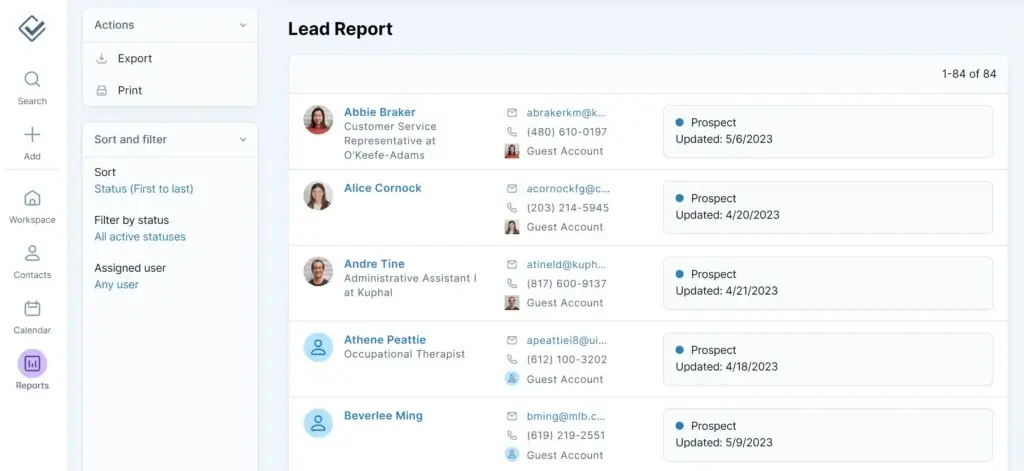
The lead reports are easy to read, which makes them useful for small teams that want visibility without complex forecasting dashboards. You can quickly see where each deal stands, who owns it, and what needs to happen next.
- Create custom pipelines for different sales workflows
- Track deal status, lead value, and next steps
- Use lead reports to avoid missed opportunities
Task Management and Follow-Up Reminders
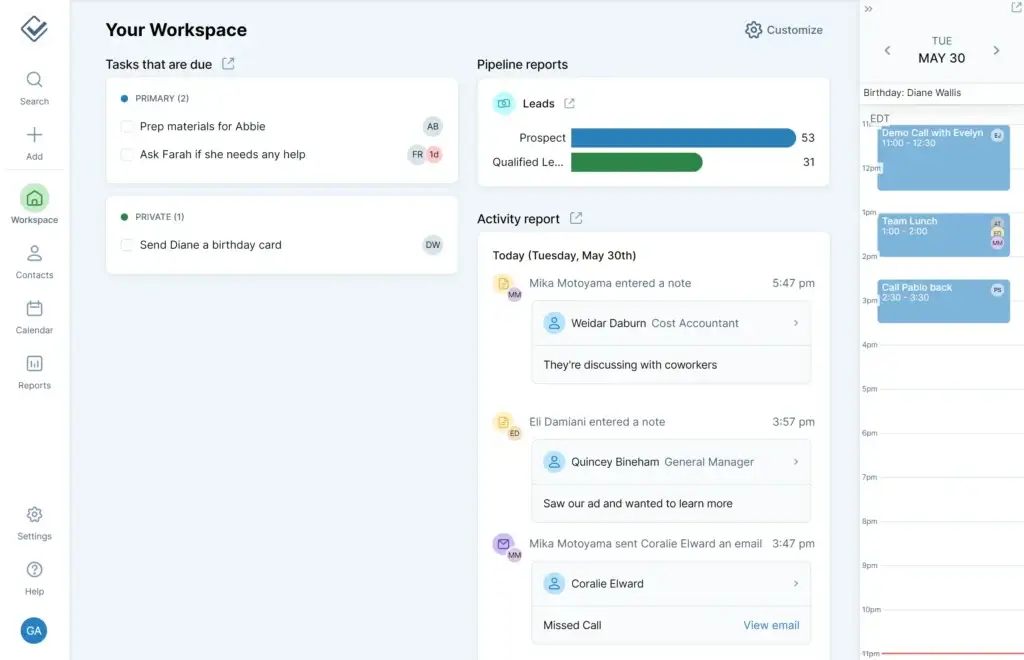
A CRM only works if it helps you remember what to do next. Less Annoying CRM does this well with task tracking, reminders, and daily agenda visibility.
You can link tasks to specific contacts or companies, set due dates, and make sure every follow-up has an owner. For small teams, this is often more valuable than advanced automation because it creates accountability without adding friction.
- Create tasks linked to contacts and companies
- Set reminders for calls, emails, and follow-ups
- View upcoming work in a simple task dashboard
Email Logging
Email logging is an important feature because it helps you keep a communication history inside the CRM. Instead of searching through your inbox for context, you can keep relevant messages tied to the right contact record.
This is not the same as built-in email marketing automation. It is better understood as a practical communication-tracking feature for small teams that want cleaner records.
Custom Fields, Groups, and Pipelines
Less Annoying CRM gives you enough customization to make the system feel relevant to your business, without turning setup into a technical project.
You can create custom fields for contacts, companies, and leads. You can also build pipelines that reflect your process, then use groups and filters to segment your database.
- Add unlimited custom fields
- Create pipelines that match your sales cycle
- Organize contacts with groups, filters, and tags
Calendar and Scheduling
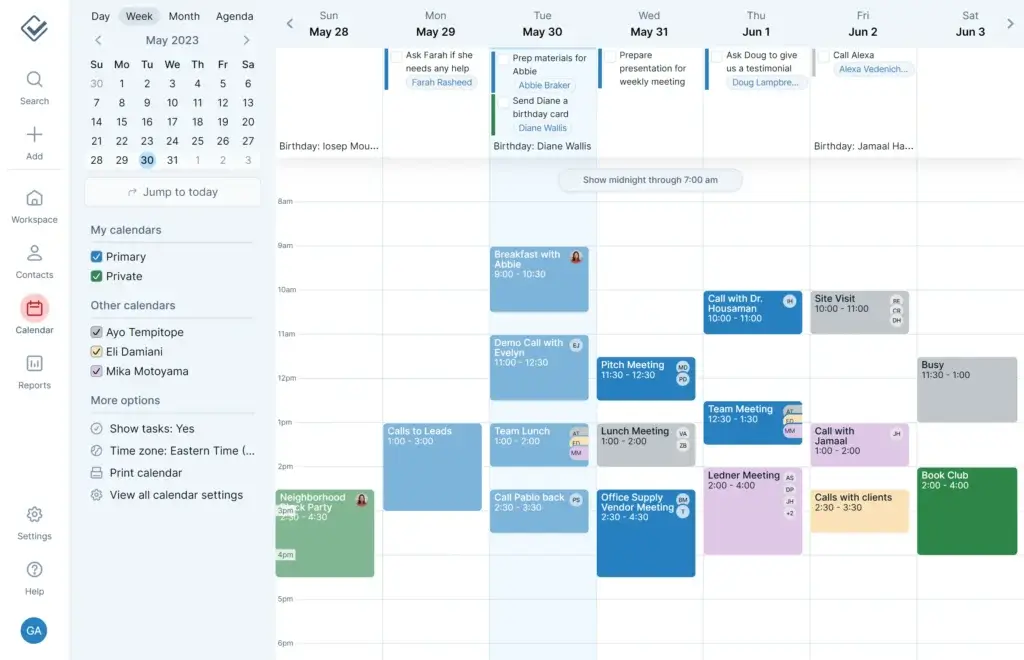
The built-in calendar helps you connect meetings, calls, events, and follow-ups to your CRM activity. This gives you a clearer view of your day and helps you manage customer interactions from one place.
It is not meant to replace a dedicated scheduling platform, but it works well for CRM-related calendar management. For small businesses, that is usually enough.
- Manage meetings, calls, and follow-up events
- Connect calendar activity to contacts and leads
- Use daily and weekly views to stay organized
Integrations with Essential Tools
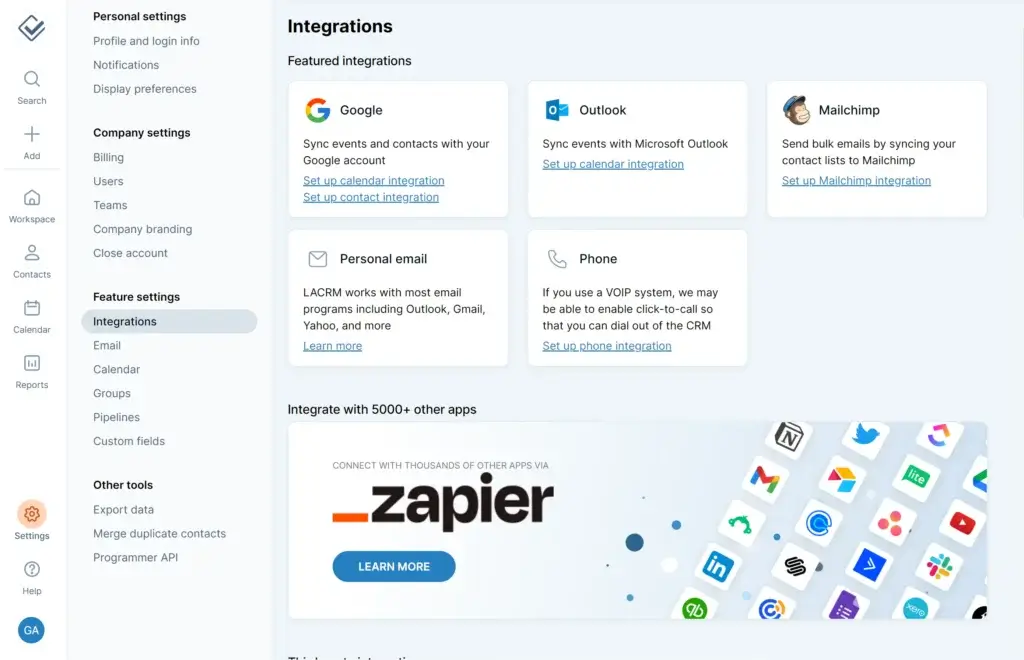
Less Annoying CRM does not try to offer hundreds of native integrations inside the platform. Instead, it focuses on essential connections and uses tools like Zapier to extend functionality.
This works well if you use common tools such as Google Workspace, Outlook, Mailchimp, forms, or invoicing software. If you need deep native integrations across a large tech stack, you may prefer a more advanced CRM.
| Integration Type | Examples | Best Use Case |
| Email and Calendar | Google, Outlook | Sync communication and calendar activity |
| Email Marketing | Mailchimp | Connect CRM contacts with email campaigns |
| Automation Connector | Zapier | Connect with thousands of third-party tools |
| Forms and Lead Capture | Web forms and third-party form tools | Capture new leads and reduce manual entry |
Mobile Access Without a Native App
Less Annoying CRM does not rely on a traditional native mobile app. Instead, you access it through a mobile-friendly web experience.
That may sound like a drawback, but for many small teams, it works well. You can open your CRM from a phone or tablet, check contacts, update tasks, view your calendar, and manage leads while away from your desk.
Product Tour, Help Center, and Human Support
The platform offers a full Less Annoying CRM product tour, help resources, and support designed for non-technical users.
This matters because small businesses rarely have time for complicated onboarding. The easier it is to get help, the more likely your team is to keep using the CRM consistently.
Key Benefits
Benefits of Using Less Annoying CRM
1. It Reduces CRM Overwhelm
Many CRM tools become difficult because they try to solve every possible sales, marketing, service, and operations problem. Less Annoying CRM keeps the experience focused.
You get the core tools most small businesses need: contacts, companies, notes, tasks, pipelines, calendars, and reports. This makes it easier for your team to use the CRM daily instead of avoiding it.
2. It Fits Simple Sales Processes
If your sales process depends on timely follow-ups and organized records, Less Annoying CRM is a strong match. You can track where each lead stands, what was last discussed, and what needs to happen next.
This is especially useful for consultants, agencies, service providers, real estate professionals, nonprofits, and small B2B teams.
3. It Keeps CRM Costs Predictable
CRM pricing can become frustrating when basic features are locked behind higher tiers. Less Annoying CRM avoids this by offering one plan with the core product included.
For small businesses, this is a major advantage. You can budget clearly, onboard users without complicated plan decisions, and avoid paying for advanced features you do not need.
4. It Offers Support That Feels Personal
Support is one of the strongest reasons to consider Less Annoying CRM. The company has built its reputation around being helpful, approachable, and easy to contact.
That matters because small businesses often need practical guidance, not generic help articles. If your team is new to CRM software, good support can make the difference between adoption and abandonment.
Strengths and Limitations
Less Annoying CRM Pros and Cons
Pros
✅ Extremely easy to learn and use
✅ Transparent $15/user/month pricing
✅ All core features included in one plan
✅ Strong customer support for small teams
Cons
❌ Limited advanced automation
❌ Basic reporting compared to larger CRMs
❌ Not ideal for complex enterprise workflows
❌ Fewer native integrations than major CRM suites
Less Annoying CRM has a clear personality. It is not built to impress enterprise buyers with endless modules, AI forecasting, or complex automation. It is built to help small businesses organize contacts, track leads, manage follow-ups, and stay consistent without needing a CRM administrator.
That focus is both its biggest advantage and its biggest limitation. If your team wants a simple CRM that can be understood quickly, Less Annoying CRM is one of the easiest platforms to recommend. If you need advanced sales operations, deep analytics, or multi-department workflows, you will probably need a more robust CRM.
✅ Pros of Less Annoying CRM
1. Extremely Easy to Learn and Use
The strongest reason to choose Less Annoying CRM is its simplicity. You do not need long onboarding sessions, technical setup, or a dedicated CRM manager to understand how the system works.
The interface is clean and practical. Contacts, companies, tasks, calendar items, and leads are easy to find, which makes daily adoption much easier for small teams.
2. Transparent $15/User/Month Pricing
Less Annoying CRM uses one of the clearest pricing models in the CRM market: $15 per user per month. There are no pricing tiers, hidden fees, long-term contracts, or essential features locked behind higher plans.
This is a major advantage for small businesses that need predictable software costs. You can add users without worrying that your team will suddenly need to upgrade just to access basic CRM functionality.
3. All Core Features Included in One Plan
Many CRM tools split key features across multiple pricing plans. Less Annoying CRM keeps things simple by including its main features in one plan.
You get contact management, unlimited pipelines, task management, email logging, mobile access, user permissions, customer support, and 25GB file storage per user. For a small business, that is a strong feature set for the price.
4. Strong Customer Support for Small Teams
Customer support is one of the areas where Less Annoying CRM stands out. The platform is designed for small businesses, so the support experience feels approachable rather than overly technical.
This matters if you are setting up a CRM for the first time. Good support helps you migrate from spreadsheets, structure your pipeline, clean up your contact records, and build better follow-up habits from the start.
❌ Cons of Less Annoying CRM
1. Limited Advanced Automation
Less Annoying CRM is not the best option if you want advanced workflow automation. You can manage tasks, leads, reminders, and pipelines, but you will not get the same automation depth you would find in platforms like HubSpot, Zoho CRM, or Salesforce.
If your sales process requires automated lead scoring, multi-step sequences, complex routing, or conditional workflows, this CRM may feel too lightweight.
2. Basic Reporting Compared to Larger CRMs
The reporting tools are useful for simple visibility, but they are not built for advanced revenue analytics. You can track lead activity and pipeline information, but you should not expect enterprise-level dashboards or detailed forecasting.
This is fine for small teams that mainly need to know what deals are open and what follow-ups are due. It becomes more limiting when you need deeper performance tracking across reps, regions, campaigns, or customer segments.
3. Not Ideal for Complex Enterprise Workflows
Less Annoying CRM works best when your sales and customer management process is simple. It is not designed for large organizations with multiple departments, strict approval flows, advanced permission structures, or complex CRM governance needs.
Growing teams can still use it successfully, but once your CRM becomes central to sales operations, marketing automation, customer success, reporting, and management forecasting, you may eventually outgrow it.
4. Fewer Native Integrations Than Major CRM Suites
Less Annoying CRM supports useful integrations, and Zapier can extend its connectivity. Still, it does not offer the same deep native integration ecosystem you get from larger CRM platforms.
If your business depends on many tightly connected tools, such as billing, marketing automation, support desk software, proposal tools, and business intelligence platforms, you should review the integration options carefully before committing.
User Experience
User Interface and Experience
When you choose a CRM, features matter. But adoption matters more. If your team finds the system confusing, they will avoid it, and your CRM data will quickly become incomplete.
This is where Less Annoying CRM performs well. The experience is clean, fast, and intentionally simple.
Navigation That Makes Sense
The interface is built around the sections small teams use most: contacts, calendar, reports, tasks, and settings.
You do not need to click through layers of menus to find basic information. The layout feels closer to a well-organized workspace than a complex enterprise system.
Performance Across Devices
Less Annoying CRM is cloud-based and works from a browser. While there is no traditional native app experience, the mobile-friendly interface lets you access customer records, tasks, and calendar items from your phone or tablet.
For most small teams, this is enough. If your sales team lives inside mobile apps and needs offline mobile functionality, you may want to compare it with CRMs built more heavily around mobile-first sales work.
Customer Support That Does Not Make You Wait
Support is one of the strongest parts of the Less Annoying CRM experience. You get access to real human help, which is especially useful if you are setting up your first CRM.
- Free support during the trial
- Helpful phone and email assistance
- Guidance for setup, migration, and daily use
Customer Reviews and Reputation
Less Annoying CRM tends to receive strong feedback from small business users because it does what they expect it to do: keep contacts, tasks, leads, and follow-ups organized.
Most positive reviews focus on ease of use, customer support, and value for money. Most limitations mentioned by users relate to advanced reporting, automation, and scaling needs.
Where Users May Feel Limited
The main limitation is not quality. It is depth. Less Annoying CRM is intentionally lightweight, so it will not satisfy every CRM use case.
- No advanced sales automation builder
- No AI-powered forecasting or predictive scoring
- Limited reporting compared to enterprise CRMs
- No deep multi-department workflow management
Best Practices for Getting the Most Out of It
To get the most value from Less Annoying CRM, keep your setup simple at the beginning. Start with clean contacts, a basic pipeline, and clear follow-up rules.
- Customize your pipeline around your actual sales process
- Use custom fields carefully so records stay clean
- Create follow-up habits around tasks and reminders
- Connect key tools early if you rely on email marketing or forms
Business Size Fit
Who Is Less Annoying CRM Best For?
Less Annoying CRM is best for businesses that value ease of use over advanced features. It works especially well when your sales cycle is simple, your team is small, and your main goal is to stop losing track of contacts and follow-ups.
Here is a quick breakdown by business size.
| Business Type | Fit | Why |
| Solo Professionals | ✅ Excellent | Simple setup, low cost, and no steep learning curve. |
| Small Teams | ✅ Strong Fit | Good for shared contacts, tasks, calendars, and basic pipeline tracking. |
| Growing Businesses | ⚠️ Moderate Fit | Useful during early growth, but may feel limited as automation and reporting needs increase. |
| Mid-Sized and Large Companies | ❌ Limited Fit | Not designed for complex workflows, enterprise governance, or advanced analytics. |
Pricing and Plans
Less Annoying CRM Pricing
Less Annoying CRM keeps pricing simple: $15 per user per month. There are no confusing tiers, no annual contract requirement, and no essential features locked behind higher plans.
This pricing model is one of its biggest advantages. Small businesses can budget clearly and avoid the common CRM problem of starting on a cheap plan, then upgrading just to unlock basic functionality.
Less Annoying CRM Pricing Overview
| Pricing Detail | What You Get |
| Monthly Cost | $15/user/month |
| Free Trial | 30 days, no credit card required |
| Contacts and Companies | Unlimited contacts and companies |
| File Storage | 25GB file storage per user |
| Pipelines | Unlimited pipelines |
| Included Features | Task management, email logging, mobile access, user permissions, and support |
| Contracts | No long-term contract required |
Is Less Annoying CRM Worth the Price?
For small teams, yes. At $15/user/month, the value is strong because you are paying for a CRM your team is likely to use consistently.
However, if you need advanced analytics, marketing automation, AI features, or complex workflow design, you may get better long-term value from a more powerful CRM, even if the starting cost is higher.
Security and Data Protection
Less Annoying CRM Security and Compliance
When you store customer data in a CRM, security matters. Less Annoying CRM follows practical security standards that are well-suited for small business use.
It is not positioned as an enterprise compliance platform for highly regulated industries, but it does provide the core protections most small teams should expect from a cloud CRM.
How Less Annoying CRM Protects Your Data
- 256-bit encryption: Data is encrypted in transit, at rest, and in backups.
- AWS hosting: The platform is hosted on Amazon Web Services infrastructure.
- Encrypted backups: Backups are encrypted and stored to help reduce data-loss risk.
- User permissions: Teams can manage access to CRM data by user.
- GDPR support: The company provides GDPR-related documentation and a data processing structure.
- No data selling: Customer data is not used as an advertising product.
Bottom line: Less Annoying CRM gives small businesses solid security basics without making data protection feel complicated. If you operate in a heavily regulated industry, review its documentation carefully before committing.
Comparison Context
Less Annoying CRM Alternatives
Less Annoying CRM is excellent for simplicity, but it is not the right choice for every business. If you need more automation, reporting, integrations, or marketing tools, it is worth comparing it with other CRM platforms.
| CRM Alternative | Better For | Why You Might Choose It Instead |
| HubSpot CRM | Marketing and sales alignment | Stronger automation, marketing tools, and reporting options. |
| Zoho CRM | Customizable small to mid-sized teams | Broader feature set and deeper customization. |
| Pipedrive | Sales pipeline management | More visual deal tracking and stronger sales-focused workflows. |
| monday CRM | Flexible work and sales management | Better if you want CRM plus project-style workflow visibility. |
If you are still comparing options, our guide to the best CRM software can help you evaluate tools by features, pricing, business size, and use case.
Conclusion
Final Thoughts
⭐ Overall Rating: 7.7/10
If you’ve made it this far, you’re clearly serious about choosing the right CRM for your business, and that is a smart move.
Picking a CRM is not just about managing contacts. It is about building a system your team will actually use, trust, and maintain over time. That is where Less Annoying CRM earns its place.
🔍 What You’re Really Getting
Here’s a quick recap of what Less Annoying CRM offers:
- A clean, no-clutter interface designed for small businesses
- Simple contact, company, task, and lead management
- Custom fields and pipelines without technical complexity
- Email logging, calendar visibility, and mobile web access
- Flat pricing at $15/user/month with a 30-day free trial
- Helpful human support that small teams can rely on
If your team is moving from spreadsheets or struggling with a bloated CRM, Less Annoying CRM can feel like a major upgrade without creating a new operational burden.
👥 Is It the Right Fit?
If you are a freelancer, consultant, startup founder, agency owner, nonprofit leader, or small sales team, Less Annoying CRM is one of the easiest CRM tools to recommend.
It gives you enough structure to manage relationships professionally, while avoiding the complexity that makes many small teams abandon CRM software altogether.
But if your business needs advanced automation, AI forecasting, complex permission structures, or deep analytics, you may eventually outgrow it. In that case, compare it with other tools in our Top CRM Software guide.
🧠 Final Word from a CRM Expert
After reviewing many CRM platforms, my opinion is simple: Less Annoying CRM is not the most powerful CRM, but it may be one of the most usable CRMs for small businesses.
That matters more than many buyers realize. A CRM with advanced features is worthless if your team does not use it consistently.
If you want a reliable, affordable, and low-friction CRM that helps you stay organized without slowing you down, Less Annoying CRM is a smart choice. If you want enterprise-grade depth, look elsewhere.
Frequently Asked Questions
Have more questions?
What makes Less Annoying CRM different from other CRMs?
Less Annoying CRM is different because it focuses on simplicity, transparent pricing, and small business usability. It avoids the complexity of larger CRM systems and gives you the core tools needed to manage contacts, tasks, leads, and follow-ups.
Is Less Annoying CRM good for small businesses?
Yes. Less Annoying CRM is best for small businesses, freelancers, consultants, startups, and lean sales teams that need an easy CRM without heavy setup or advanced technical requirements.
How much does Less Annoying CRM cost?
Less Annoying CRM costs $15 per user per month. It offers one plan, a 30-day free trial, no credit card requirement for the trial, and no locked feature tiers.
Does Less Annoying CRM have a free plan?
No. Less Annoying CRM does not offer a permanent free plan. It offers a 30-day free trial, then the paid plan costs $15 per user per month.
Does Less Annoying CRM have a mobile app?
Less Annoying CRM does not depend on a traditional native mobile app. Instead, it offers mobile access through a browser-friendly interface that works on phones and tablets.
What integrations does Less Annoying CRM support?
Less Annoying CRM supports essential integrations such as Google, Outlook, Mailchimp, and Zapier. Zapier can be used to connect the CRM with many additional business apps.
Can I customize Less Annoying CRM?
Yes. You can customize fields, pipelines, groups, and filters. This makes it flexible enough for many small business workflows without requiring technical setup.
Is Less Annoying CRM secure?
Less Annoying CRM uses encryption, secure cloud hosting, encrypted backups, and user permissions. It also provides GDPR-related documentation and privacy practices for customers that need compliance support.
Is Less Annoying CRM better than HubSpot?
Less Annoying CRM is better if you want simplicity, fast setup, and predictable pricing. HubSpot is better if you need built-in marketing automation, advanced reporting, and a broader sales and marketing platform.
Who should not use Less Annoying CRM?
Less Annoying CRM is not ideal for large companies, enterprise sales teams, or businesses that need advanced workflow automation, AI scoring, complex permissions, or deep analytics.