
Introduction
Choosing the best automation workflow tools can completely change how your team handles repetitive work, app connections, approvals, data movement, customer operations, and AI-assisted processes.
The challenge is that “automation workflow software” now covers several different types of platforms. Some tools are built for simple no-code workflows. Others are designed for technical teams, enterprise integration, robotic process automation, or AI-native task execution.
That is why the right choice depends less on the longest feature list and more on the type of workflows you actually need to automate.
In this guide, you’ll compare the best automation workflow tools for 2026, including Zapier, Make, n8n, Workato, Microsoft Power Automate, Tray.ai, Activepieces, Relay.app, Pipedream, and Gumloop.
You’ll see where each tool fits, what it does best, where it may feel limited, and how to choose the right platform for your business.
What to Look for in Automation Workflow Software
Before comparing the tools, it helps to define what a strong automation platform should offer.
A good automation workflow tool should help you connect apps, move data accurately, reduce manual work, and give your team enough control to manage exceptions without constantly rebuilding workflows.
- Ease of use: Can non-technical users build and maintain workflows?
- Integration depth: Does it connect with the apps your team already uses?
- Workflow logic: Does it support conditions, branches, filters, loops, and approvals?
- AI capabilities: Can it summarize, classify, generate, enrich, or trigger actions with AI?
- Governance: Can admins control access, usage, logs, and permissions?
- Pricing model: Is pricing based on tasks, operations, executions, flows, seats, or credits?
- Scalability: Can it support mission-critical workflows as volume grows?
If your team only needs simple app-to-app automations, a no-code platform may be enough. If you need enterprise governance, complex data orchestration, or self-hosting, you’ll need a more advanced platform.
Quick Comparison
Best Automation Workflow Tools
| Tool | Best For | Main Strength | Pricing Style |
| Zapier | General no-code automation | Largest app ecosystem and fast setup | Task-based |
| Make | Visual workflow automation | Flexible scenario builder with branching logic | Credit-based |
| n8n | Technical teams and self-hosting | Advanced workflows with open-source flexibility | Execution-based or self-hosted |
| Workato | Enterprise iPaaS and governed automation | Enterprise orchestration and governance | Custom pricing |
| Tray.ai | Enterprise AI and data orchestration | AI-ready workflows, MCP governance, and integrations | Custom pricing |
| Microsoft Power Automate | Microsoft 365 and RPA users | Cloud flows, desktop flows, and Microsoft ecosystem fit | User and bot-based |
| Activepieces | Open-source automation | Unlimited runs and AI agents | Flow-based |
| Relay.app | Human-in-the-loop AI workflows | Simple AI automation with approvals and team control | Step and AI credit-based |
| Pipedream | Developer-first API automation | Code-friendly workflows and API connections | Credit-based |
| Gumloop | AI-native workflow automation | Agentic workflows with unlimited flows | Credit-based |
Zapier

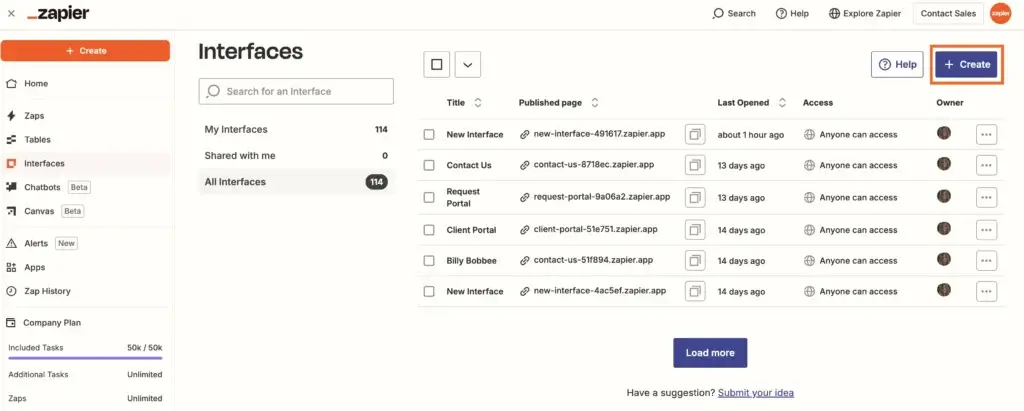
Zapier is one of the most accessible automation workflow tools for teams that want to connect apps without writing code.
Its biggest advantage is reach. Zapier connects with thousands of apps, which makes it a strong fit for marketing teams, sales teams, customer support teams, operations teams, and small businesses that use many SaaS tools.
Zapier is especially useful when you want to automate common actions, such as sending form submissions to a CRM, creating support tickets from emails, sending Slack alerts, updating spreadsheets, enriching leads, or routing tasks between tools.
Key Features
- Zaps: Build automated workflows using triggers and actions.
- Multi-step workflows: Add filters, paths, delays, formatting, and conditional logic.
- AI workflows: Use AI steps, Copilot, chatbots, agents, and AI-powered workflow creation.
- Tables and forms: Store workflow data and capture inputs without extra tools.
- Enterprise controls: Add admin permissions, governance, security, and shared workspaces.
Best Use Cases
Zapier is best when you need fast no-code automation across many apps.
It is a strong choice for lead routing, CRM updates, email notifications, content operations, customer support handoffs, marketing reporting, and lightweight AI workflows.
Strengths
- One of the largest integration ecosystems in workflow automation.
- Very easy for non-technical users to start building workflows.
- Strong template library for common business automations.
- Useful AI features for building, extending, and managing automations.
Limitations
- Task-based pricing can become expensive as workflow volume grows.
- Advanced workflows may become harder to manage at scale.
- Technical teams may find it less flexible than n8n or Pipedream.
Pricing Overview
Zapier offers a free plan with 100 tasks per month. Paid plans scale based on task usage and advanced platform needs.
For small teams, Zapier is one of the easiest ways to start. For high-volume operations, you should estimate monthly task usage before committing.
Make

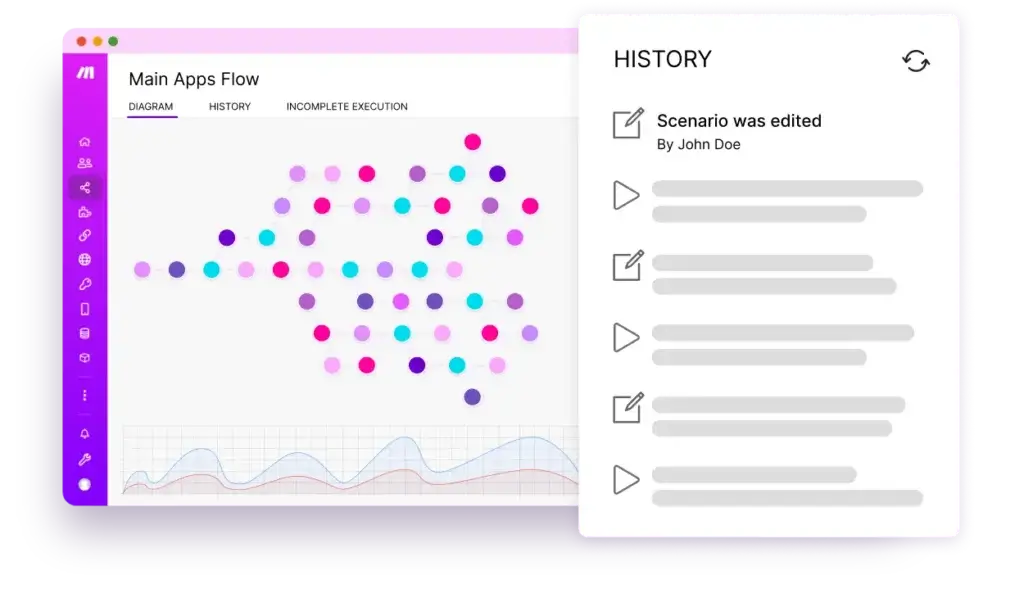
Make is one of the best automation workflow tools for users who want more visual control than Zapier provides.
Instead of building workflows in a linear step-by-step format, you design “scenarios” on a visual canvas. This makes it easier to understand how data moves between apps, where conditions split, and how each workflow branch behaves.
Make is a strong option for teams that need more logic, more branching, and better visibility into workflow structure without moving into fully technical automation.
Key Features
- Visual scenario builder: Build workflows using a drag-and-drop canvas.
- Routers and filters: Split workflows into multiple paths based on conditions.
- AI automation: Build AI agents and agentic workflows across connected apps.
- Execution logs: Review workflow runs and troubleshoot failed steps.
- Make API: Connect automation workflows with custom systems.
Best Use Cases
Make works well for marketing operations, sales operations, finance workflows, HR automations, customer onboarding, reporting workflows, and internal operations that require multiple steps.
It is also useful when you need to see the entire workflow visually before deploying it.
Strengths
- Excellent visual workflow builder for complex processes.
- Strong value for teams running multi-step automations.
- Good balance between no-code usability and advanced logic.
- Supports routers, filters, scheduled workflows, and API access.
Limitations
- Credit-based pricing requires planning if workflows run frequently.
- Scenario building may feel more technical than Zapier at first.
- Very complex scenarios can still require automation expertise.
Pricing Overview
Make offers a free plan with up to 1,000 credits per month. Paid plans start with Core, followed by Pro, Teams, and Enterprise options.
The Core plan is often the best entry point for serious users because it adds unlimited active scenarios and more scheduling control.
n8n

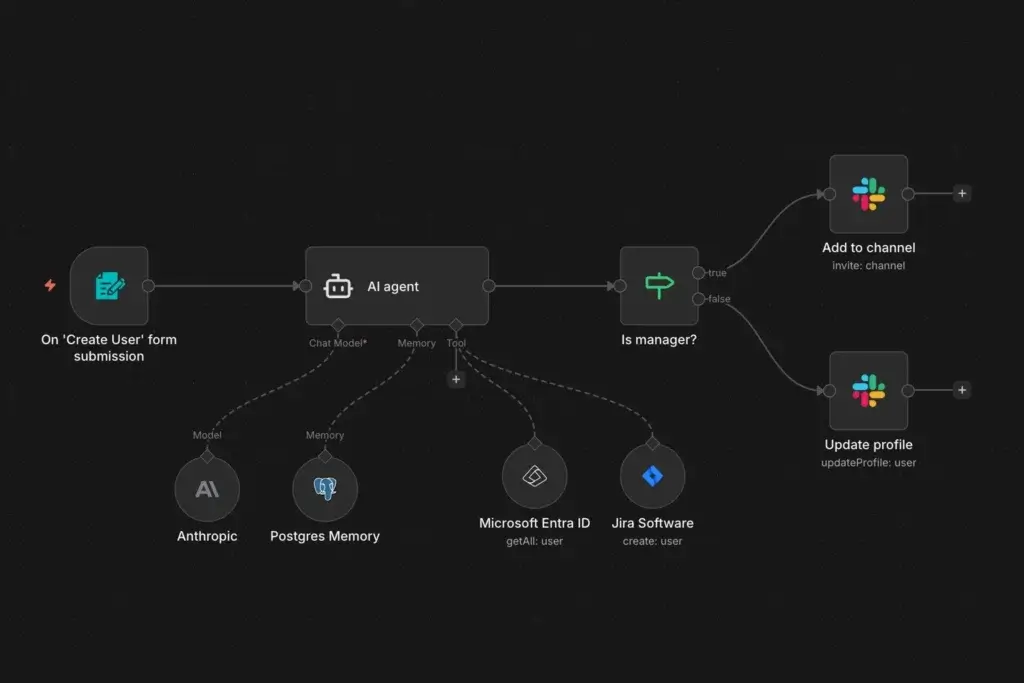
n8n is a powerful automation workflow platform for technical teams, developers, agencies, and companies that want more control over workflow logic and infrastructure.
Unlike many no-code automation tools, n8n offers both cloud hosting and self-hosting. This makes it attractive for teams that care about data control, customization, and cost predictability.
n8n is also strong for AI workflows because it gives builders flexibility to connect language models, databases, APIs, internal tools, and business systems in one workflow.
Key Features
- Visual workflow builder: Build workflows with nodes and custom logic.
- Self-hosting option: Host automation infrastructure on your own environment.
- Unlimited users and workflows: Cloud plans focus on workflow executions.
- AI workflow builder: Use AI credits and AI nodes for intelligent workflows.
- Developer flexibility: Add custom code, APIs, webhooks, and advanced transformations.
Best Use Cases
n8n is best for technical operations, SaaS teams, internal tools, AI workflow automation, data syncs, API workflows, and companies that want more control than a fully managed no-code platform provides.
It is also a strong option when you want to avoid per-seat pricing for large teams.
Strengths
- Excellent flexibility for technical and semi-technical teams.
- Self-hosting gives more control over data and infrastructure.
- Cloud pricing is based on workflow executions, not individual steps.
- Strong option for AI, API, and internal automation workflows.
Limitations
- Less beginner-friendly than Zapier or Relay.app.
- Self-hosting requires maintenance and technical ownership.
- Business users may need support from technical builders.
Pricing Overview
n8n Cloud pricing is based on monthly workflow executions. Plans include unlimited users, unlimited workflows, and every integration.
The Starter plan is positioned for teams getting started, while higher tiers add more executions, more concurrency, and stronger business controls.
Workato

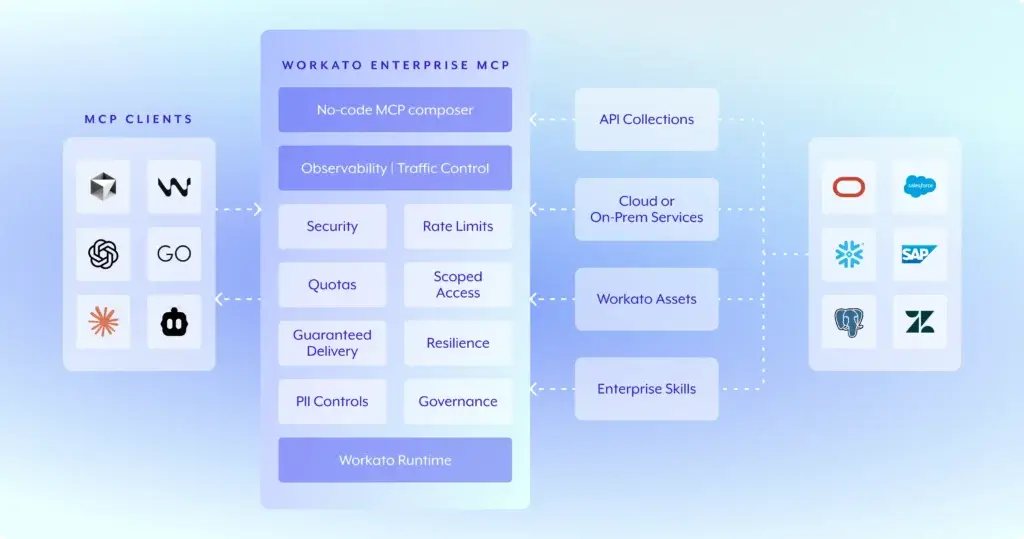
Workato is built for enterprise automation, integration, data orchestration, and governed workflows across departments.
While tools like Zapier and Make are often adopted by individual teams, Workato is usually evaluated by IT, operations, security, finance, and enterprise architecture teams.
Its value is strongest when workflows affect multiple systems, sensitive data, compliance requirements, and mission-critical processes.
Key Features
- Enterprise iPaaS: Connect business apps, databases, APIs, and internal systems.
- Recipes: Build automated workflows with triggers, actions, logic, and transformations.
- Governance controls: Manage permissions, security, monitoring, and compliance needs.
- AI and MCP capabilities: Connect AI agents to governed enterprise workflows.
- Business and IT collaboration: Support both technical and operational builders.
Best Use Cases
Workato is best for enterprises that need scalable integration and automation across systems like Salesforce, NetSuite, Workday, ServiceNow, Snowflake, Slack, and internal applications.
It fits revenue operations, employee lifecycle automation, finance operations, IT service workflows, compliance workflows, and enterprise data orchestration.
Strengths
- Strong governance for enterprise automation programs.
- Suitable for high-value, cross-functional workflows.
- Supports collaboration between business teams and IT teams.
- Better fit for enterprise architecture than lightweight no-code tools.
Limitations
- Pricing is usually custom and less transparent than SMB automation tools.
- Implementation may require planning, onboarding, and governance design.
- Less practical for solo users or small teams with simple workflows.
Pricing Overview
Workato uses a custom pricing model. You should expect pricing to depend on workflow volume, platform requirements, connectors, governance needs, and enterprise support.
For larger organizations, Workato can be the better long-term option when automation is part of a broader digital operations strategy.
Tray.ai

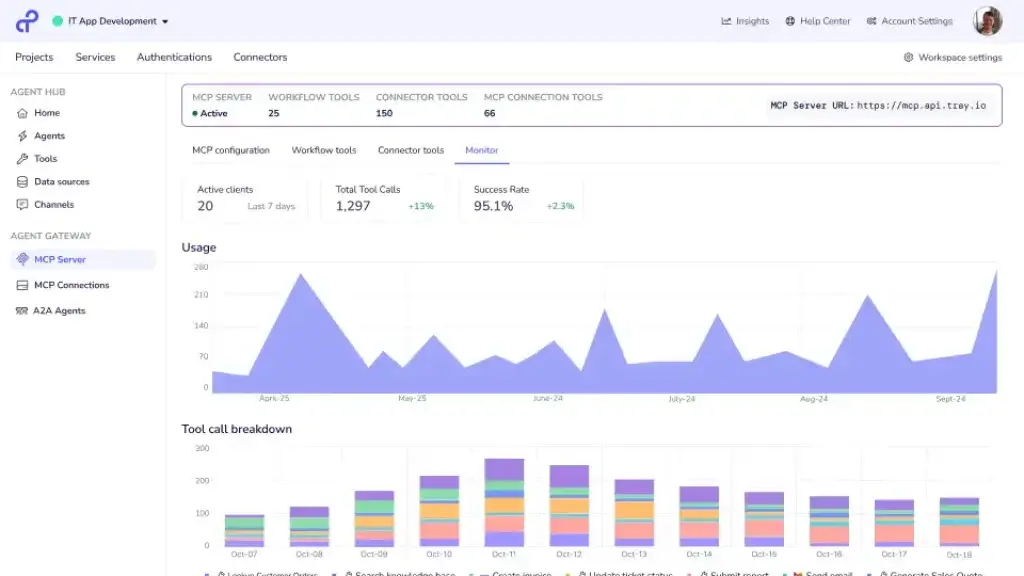
Tray.ai is an enterprise automation and integration platform built for teams that need to orchestrate data, apps, APIs, and AI workflows.
It is not the simplest option for basic automations. Instead, Tray.ai is better suited to organizations that want governed automation infrastructure across complex systems.
Its current positioning is especially relevant for teams building AI agents, managing MCP governance, and connecting enterprise data sources into automated workflows.
Key Features
- Enterprise orchestration: Connect apps, data, APIs, and business processes.
- AI agents: Build conversational or autonomous agents with governed access.
- MCP governance: Control how AI connects to tools and enterprise systems.
- Workflow canvas: Build workflows visually with logic and data transformations.
- Enterprise security: Support governance, access control, and operational oversight.
Best Use Cases
Tray.ai is best for larger teams that need integration automation across customer data, revenue operations, SaaS systems, support platforms, data warehouses, and AI-enabled workflows.
It is especially relevant when automation needs to be governed centrally rather than built in isolated team silos.
Strengths
- Strong fit for enterprise data and AI orchestration.
- Useful for teams building governed AI workflows.
- More scalable than simple no-code workflow tools.
- Supports complex integration and automation architecture.
Limitations
- Custom pricing means less transparency for small teams.
- More enterprise-oriented than beginner-friendly automation tools.
- May require technical or operations expertise to implement well.
Pricing Overview
Tray.ai uses custom pricing based on usage, features, and enterprise requirements.
If you are comparing it with Workato, evaluate governance, data transformation, AI agent controls, connector needs, and implementation support.
Microsoft Power Automate

Microsoft Power Automate is one of the best automation workflow tools for organizations already using Microsoft 365, Teams, SharePoint, Excel, Dynamics 365, Power BI, and Azure.
It combines cloud-based automation, desktop automation, process mining, approvals, connectors, and AI-assisted workflow creation.
Its biggest advantage is ecosystem fit. If your company already works inside Microsoft, Power Automate can automate processes without forcing teams into a separate standalone platform.
Key Features
- Cloud flows: Automate workflows across cloud apps and services.
- Desktop flows: Use robotic process automation for desktop apps and legacy systems.
- Approvals: Build approval processes across Teams, email, and Microsoft apps.
- Process mining: Discover and analyze workflow improvement opportunities.
- Copilot support: Create and edit automations using natural language assistance.
Best Use Cases
Power Automate is a strong fit for approval workflows, document processing, Excel and SharePoint automations, employee requests, finance processes, IT operations, and legacy desktop automation.
It is also useful for enterprise teams that want automation, analytics, apps, and agents within the Microsoft Power Platform.
Strengths
- Excellent fit for Microsoft-heavy organizations.
- Combines cloud automation and robotic process automation.
- Strong governance and enterprise administration options.
- Useful for automating legacy systems through desktop flows.
Limitations
- Licensing can be difficult to understand at scale.
- Best value appears when your team already uses Microsoft tools.
- Non-Microsoft app automation may feel less intuitive than Zapier or Make.
Pricing Overview
Power Automate Premium is priced per user, while Process and Hosted Process plans are priced per bot for unattended automation and hosted RPA use cases.
For teams already using Microsoft 365, it is worth checking what automation capabilities are included before buying additional licenses.
Activepieces

Activepieces is a strong option if you want an open-source automation workflow tool with AI agents, unlimited runs, tables, MCP servers, and a more predictable pricing structure.
It appeals to users who like the idea of Zapier-style automation but want more control, self-hosting potential, and less concern about paying for every task.
For startups, technical operators, agencies, and automation builders, Activepieces can be a practical middle ground between no-code automation and developer-led workflow infrastructure.
Key Features
- Open-source foundation: Build and customize automation workflows with more control.
- Unlimited runs: Avoid paying per task execution in the same way as many competitors.
- AI agents: Build AI-powered automations and multi-agent workflows.
- Tables: Store structured workflow data inside the platform.
- MCP support: Connect AI agents to tools and workflows through MCP servers.
Best Use Cases
Activepieces is best for teams that want open-source automation, AI workflows, cost predictability, and flexibility.
It is useful for internal operations, marketing automation, data routing, AI task execution, support workflows, and lightweight internal tools.
Strengths
- Open-source approach gives teams more control.
- Unlimited runs make pricing easier to understand.
- Strong AI automation direction with agents and MCP support.
- Good alternative for teams comparing Zapier, Make, and n8n.
Limitations
- Smaller ecosystem than Zapier.
- May require more technical confidence for advanced workflows.
- Enterprise governance features are usually part of higher plans.
Pricing Overview
Activepieces offers a Standard plan with free active flows, then usage based on active flows. Its Ultimate plan is custom and adds more governance and security controls.
This pricing can be attractive if your team runs many workflow executions but a manageable number of active flows.
Relay.app

Relay.app is a workflow automation platform focused on approachable AI workflows, team collaboration, approvals, and controlled automation.
It is not trying to be the largest integration platform. Instead, Relay.app is designed to make automation feel safe, understandable, and manageable for business teams.
This makes it useful when you want AI assistance but still need humans to review, approve, or guide important workflow steps.
Key Features
- Multi-step workflows: Build automations across popular business apps.
- AI model access: Use GPT, Claude, and Gemini in workflows.
- Human approvals: Add human review steps before sensitive actions happen.
- Shared workflows: Collaborate with team members on automation processes.
- Simple interface: Build workflows without heavy technical setup.
Best Use Cases
Relay.app fits teams that want automation for sales, recruiting, marketing, client onboarding, customer communication, internal operations, and approval-based workflows.
It is especially useful when AI should support decisions but not fully replace human judgment.
Strengths
- Very approachable for business users.
- Good fit for AI workflows that require review or approval.
- Simple pricing structure compared with many automation tools.
- Useful for teams that want controlled automation rather than black-box AI.
Limitations
- Smaller integration ecosystem than Zapier or Make.
- Not as developer-focused as n8n or Pipedream.
- May not fit heavy enterprise integration projects.
Pricing Overview
Relay.app offers a free plan, a Professional plan, a Team plan, and custom Enterprise pricing.
Pricing scales based on users, workflow steps, AI credits, and collaboration needs.
Pipedream

Pipedream is a workflow automation platform for developers and technical teams that want to connect APIs, apps, databases, and AI services quickly.
It is less focused on non-technical drag-and-drop automation and more focused on giving builders a fast way to automate processes that involve APIs and custom logic.
If your workflows require code, webhooks, API calls, serverless execution, or internal systems, Pipedream can be more flexible than traditional no-code tools.
Key Features
- API automation: Connect APIs, apps, databases, and services.
- Workflow builder: Build workflows with triggers, steps, and custom logic.
- Code support: Add custom JavaScript, Python, or API calls where needed.
- Event-driven automation: Trigger workflows from webhooks and app events.
- Developer tooling: Work faster with technical workflow infrastructure.
Best Use Cases
Pipedream is best for technical teams building API integrations, internal automations, data pipelines, developer operations, alerts, AI workflows, and custom backend workflows.
It is especially useful when no-code automation becomes too restrictive.
Strengths
- Excellent for API-heavy workflow automation.
- More flexible than beginner no-code tools.
- Useful for developers who want speed without building everything from scratch.
- Good fit for custom workflows and internal systems.
Limitations
- Not the easiest choice for non-technical business users.
- Requires more technical understanding than Zapier or Relay.app.
- Credit-based pricing should be reviewed for compute-heavy workflows.
Pricing Overview
Pipedream Workflows uses a credit-based pricing model where you pay for compute time used during workflow execution.
This can be efficient for technical teams, but you should estimate usage carefully if workflows involve long-running processes or heavy compute.
Gumloop
Gumloop is an AI-native automation platform built for teams that want to create agents, flows, research automations, analysis workflows, and business processes without heavy coding.
Unlike traditional automation tools that add AI as one step inside a workflow, Gumloop is designed around AI-driven execution from the beginning.
This makes it a strong fit for workflows that require classification, research, content generation, data extraction, lead enrichment, document analysis, or decision support.
Key Features
- Unlimited flows: Build many workflows without restricting the number of flows.
- Unlimited agents: Create AI agents for different tasks and processes.
- Triggers: Run workflows based on events and connected systems.
- Concurrent runs: Scale execution with paid plans.
- Enterprise controls: Add RBAC, SAML, audit logs, analytics, and VPC on Enterprise.
Best Use Cases
Gumloop is best for marketing automation, sales research, SEO workflows, competitive analysis, lead qualification, CRM automation, support analysis, and data-heavy AI workflows.
It is especially useful when the workflow needs AI reasoning, not just basic app-to-app data transfer.
Strengths
- Strong AI-native workflow design.
- Useful for research, analysis, enrichment, and agentic automation.
- Free plan includes credits, agents, and flows.
- Enterprise plan adds strong governance and security controls.
Limitations
- Credit usage can vary depending on workflow complexity.
- Less suited for basic two-app automations than Zapier or Make.
- AI-heavy workflows need careful testing before production use.
Pricing Overview
Gumloop offers a free plan with monthly credits, a Pro plan starting at $37 per month, and custom Enterprise pricing.
For teams building AI-heavy workflows, the key is to test credit consumption before scaling workflows across departments.
How to Choose the Best Automation Workflow Tool
The best automation workflow software depends on your team’s technical level, workflow complexity, app stack, security requirements, and budget model.
For most teams, the right decision starts with one question: are you automating simple repetitive tasks, complex business processes, technical API workflows, or AI-powered work?
Choose Zapier If You Want the Easiest Starting Point
Zapier is the best place to start if your team wants simple no-code automation across many apps.
It is especially strong for marketing, sales, customer support, operations, and small business workflows.
Choose Make If You Need Visual Control
Make is better when you need branching workflows, routers, filters, scheduled scenarios, and visual workflow logic.
It is a strong choice for teams that have outgrown basic Zaps but still want a no-code or low-code experience.
Choose n8n If You Want Flexibility and Self-Hosting
n8n is the better option if your team has technical builders and wants control over hosting, workflow logic, custom code, and AI workflows.
It is also attractive if you want unlimited users and workflows on cloud plans.
Choose Workato or Tray.ai for Enterprise Orchestration
Workato and Tray.ai are better suited to enterprise teams that need governance, security, data orchestration, and cross-system automation.
They are not the first tools I would recommend for a solo creator or small team, but they can be much stronger for enterprise automation programs.
Choose Power Automate If You Already Use Microsoft
Power Automate is the natural choice for Microsoft-heavy teams.
If your workflows live in Teams, SharePoint, Outlook, Excel, Power BI, Dynamics 365, and Azure, it can deliver strong value without adding another separate ecosystem.
Choose Gumloop or Relay.app for AI-First Workflows
Gumloop is stronger when you want AI-native workflow execution, research, enrichment, and agentic automation.
Relay.app is stronger when you want AI workflows with human review, approvals, and business-friendly control.
Pricing Comparison
What to Watch Before You Buy
Automation pricing can be confusing because every platform uses a different billing model.
Some tools charge by task. Some charge by credit. Some charge by workflow execution. Some charge by user, bot, active flow, or custom enterprise agreement.
| Pricing Model | Common In | What It Means | Risk to Watch |
| Task-based | Zapier | You pay based on successful automated actions | Costs rise as workflows run more often |
| Credit-based | Make, Gumloop, Pipedream | You consume credits when workflows perform actions or compute work | Complex workflows may use more credits than expected |
| Execution-based | n8n | You pay based on workflow executions, not every step | High-frequency workflows still need planning |
| Flow-based | Activepieces | You pay based on active flows rather than task volume | Many active workflows can increase cost |
| User and bot-based | Power Automate | You pay per user or bot depending on automation type | Licensing can become complex |
| Custom enterprise | Workato, Tray.ai | Pricing depends on requirements and usage | Requires negotiation and clear scope |
My recommendation is to map your first 5 to 10 workflows before choosing a tool.
Estimate how often each workflow runs, how many steps it includes, how many people need access, and whether the workflow is business-critical. That exercise will reveal which pricing model is actually best for you.
Final Thoughts
The best automation workflow tools are not interchangeable. Each platform has a different philosophy, pricing model, and ideal user.
Zapier is the safest overall choice for no-code automation because it is easy to use and connects with a very wide app ecosystem. Make is the better option if you want visual workflows with more branching logic and stronger control. n8n is the better choice for technical teams that want flexibility, self-hosting, and advanced workflow design.
For enterprise teams, Workato and Tray.ai are stronger options when governance, orchestration, and system-wide automation matter more than beginner simplicity. Microsoft Power Automate is the most logical choice for organizations already standardized on Microsoft 365 and Power Platform.
Activepieces is worth considering if you want an open-source approach with unlimited runs. Relay.app is a strong fit for AI workflows that still need human review. Pipedream is excellent for developer-first API automation, while Gumloop stands out for AI-native workflows that require research, reasoning, and agentic execution.
If I had to recommend a starting point for most business teams, I would shortlist Zapier, Make, and n8n first. Then I would add Workato, Power Automate, or Tray.ai if the organization has enterprise-level governance, compliance, or integration requirements.
The right tool should reduce operational friction, not create another system your team struggles to maintain. Start with your real workflows, test the top two or three platforms, and choose the one your team can confidently manage over time.
FAQs
What are automation workflow tools?
Automation workflow tools are software platforms that connect apps, trigger actions, move data, route approvals, and automate repetitive business processes. They help teams reduce manual work across sales, marketing, operations, finance, HR, support, and IT workflows.
What is the best automation workflow tool overall?
Zapier is the best overall automation workflow tool for most teams because it is easy to use, supports a very large app ecosystem, and works well for no-code business automation. Make and n8n are stronger options if you need more visual control or technical flexibility.
Which automation workflow tool is best for small businesses?
Zapier, Make, Relay.app, and Activepieces are strong choices for small businesses. Zapier is best for quick setup, Make is better for visual multi-step workflows, Relay.app is useful for AI workflows with approvals, and Activepieces is attractive if you want unlimited runs.
Which workflow automation tool is best for technical teams?
n8n and Pipedream are the strongest options for technical teams. n8n offers self-hosting, advanced workflow logic, and AI workflow flexibility, while Pipedream is ideal for developer-first API automation and custom code workflows.
Which automation tool is best for enterprise companies?
Workato, Tray.ai, and Microsoft Power Automate are strong enterprise automation tools. Workato is best for enterprise iPaaS and governed automation, Tray.ai is strong for AI and data orchestration, and Power Automate is best for Microsoft-heavy organizations.
Is Make better than Zapier?
Make can be better than Zapier when you need visual workflow mapping, branching logic, routers, filters, and more control over complex scenarios. Zapier is usually better if you want the easiest setup and the broadest app ecosystem.
Is n8n better than Zapier?
n8n can be better than Zapier for technical teams that want self-hosting, custom code, advanced workflow logic, and more control over infrastructure. Zapier is better for non-technical teams that want fast no-code automations across many apps.
What is the difference between workflow automation and RPA?
Workflow automation usually connects apps and automates digital processes through triggers, actions, APIs, and business rules. RPA automates tasks in desktop applications or legacy systems by mimicking human actions, which is useful when APIs are unavailable.
Can AI workflow automation replace manual work?
AI workflow automation can replace many repetitive tasks, such as summarizing data, classifying requests, drafting responses, enriching leads, and routing work. However, sensitive decisions should still include human review, especially in finance, legal, HR, compliance, and customer-facing workflows.
How do I choose the right automation workflow software?
Start by listing the workflows you want to automate, the apps involved, expected monthly volume, required approvals, security needs, and technical skill level. Then compare tools based on workflow complexity, integration coverage, governance, AI features, and pricing model.