
Introduction
If you want more control over workflow automation than traditional no-code tools provide, n8n is one of the strongest platforms to consider. It lets you connect apps, APIs, databases, AI models, and internal systems through visual workflows that can also include custom code when needed.
This n8n review for 2026 will help you decide whether it is the right automation platform for your business. You will learn how n8n works, what makes it different from Zapier and Make, how pricing works, what its AI features can do, and where alternatives like Zapier, Make, Microsoft Power Automate, Workato, and Activepieces may be better options.
n8n is especially interesting because it sits between no-code automation and developer-led integration work. You can build visually, but you are not limited to basic triggers and actions. You can use JavaScript, Python, HTTP requests, custom API calls, self-hosting, AI agents, human approval steps, and advanced workflow logic.
| Category | n8n Review Summary |
| Best For | Technical teams, automation builders, AI workflow teams, developers, operations teams, IT teams, and businesses that want deployment control |
| Main Strength | Flexible workflow automation with code, self-hosting, API control, and strong AI workflow capabilities |
| Main Weakness | Higher learning curve than beginner-friendly automation tools like Zapier |
| Best Alternative | Zapier for ease of use, Make for visual no-code automation, Power Automate for Microsoft users, Workato for enterprise iPaaS |
| Overall Recommendation | Best for teams that want technical control, AI automation, self-hosting options, and predictable execution-based pricing |
What Is n8n?
n8n is a workflow automation platform that helps you connect software tools and automate business processes. It uses a visual workflow builder where each step is represented as a node. These nodes can trigger workflows, retrieve data, transform information, call APIs, run logic, send messages, update records, or connect to AI models.
Unlike many automation tools built mainly for non-technical users, n8n is designed for teams that want flexibility. You can start with visual automation, then go deeper with code, HTTP requests, custom integrations, webhooks, self-hosting, and advanced error handling.
This makes n8n a strong option for companies that have outgrown simple app-to-app automation but do not want to build every integration from scratch.
How n8n Works
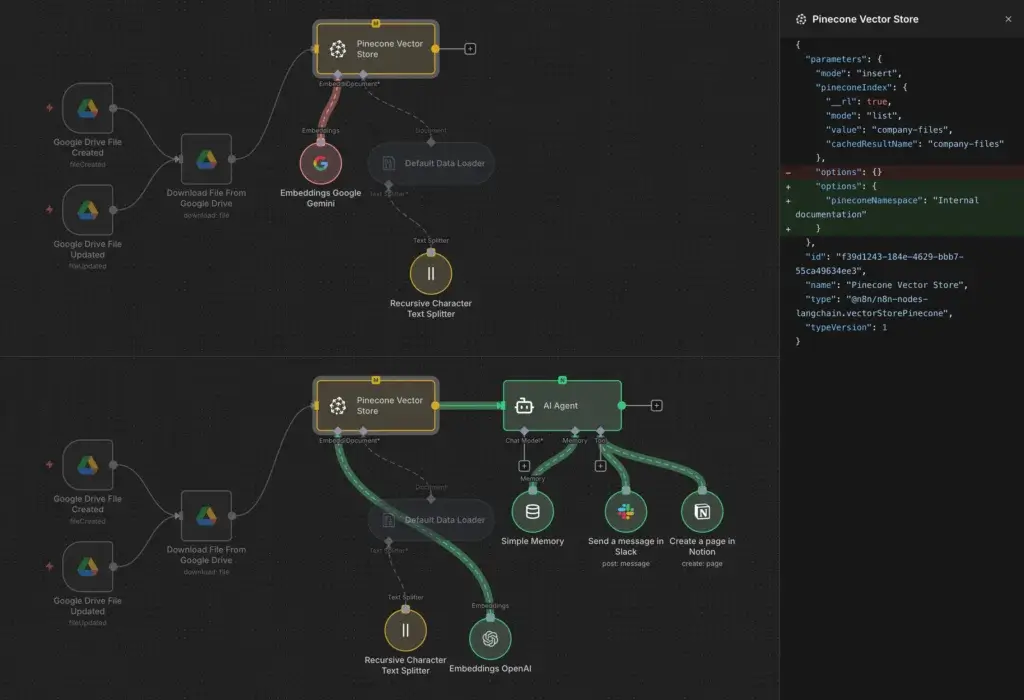
n8n workflows are built from nodes. A node can trigger a workflow, perform an action, transform data, call an API, run code, or connect an AI model to a business system.
- Trigger: The event that starts a workflow, such as a webhook, schedule, form submission, CRM update, or app event.
- Node: A workflow step that retrieves, processes, transforms, or sends data.
- Workflow: The full automation that connects triggers, actions, logic, and data movement.
- Execution: A completed workflow run, which is central to n8n Cloud pricing.
The execution-based pricing model is important. Instead of charging for every individual step in a workflow, n8n Cloud pricing is based mainly on workflow executions. That can make n8n more attractive for multi-step automations where a single workflow includes many actions.
Software Specification
n8n’s Core Features
n8n is not only an app connector. It is a flexible automation environment for teams that want to build workflows with logic, data transformation, API control, and AI orchestration.
Visual Workflow Builder
n8n’s visual builder lets you design workflows as connected steps. You can see how data moves through the process, inspect each node, test workflow paths, and debug issues more clearly than you can with many linear automation builders.
This is valuable when workflows become more complex. For example, you may want to collect a lead, enrich the company, classify the request with AI, route it to the right CRM pipeline, notify Slack, create a follow-up task, and log the result in a database.
In a simpler tool, that type of workflow can become difficult to understand. In n8n, the canvas makes the process easier to inspect and improve.
Nodes, Triggers, Actions, and Logic
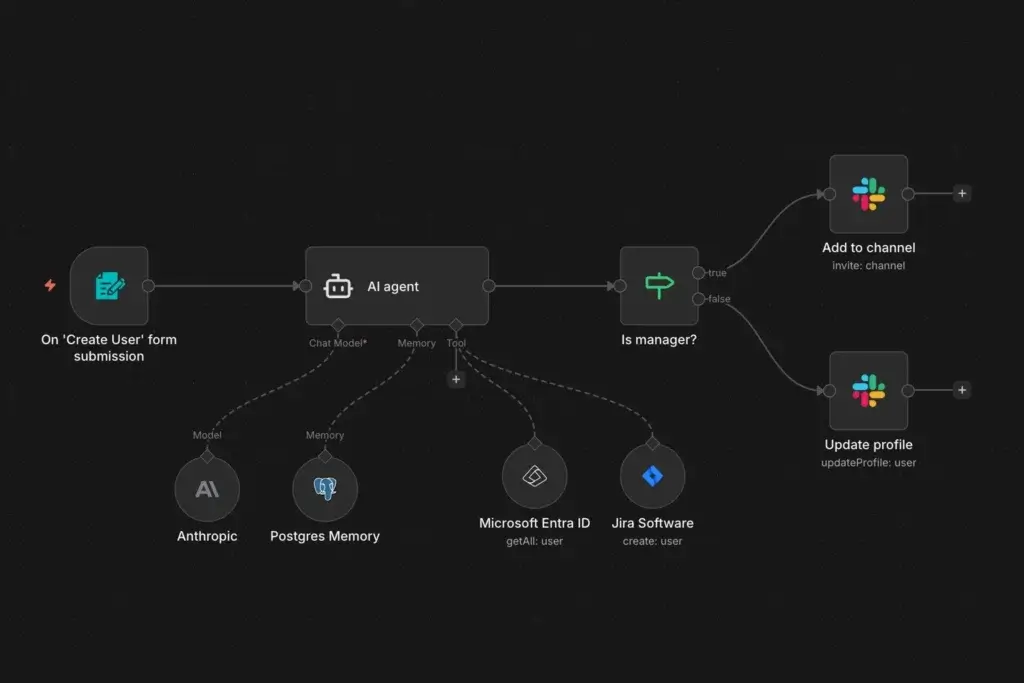
n8n uses nodes as the building blocks of automation. These nodes can connect to apps, trigger workflows, process data, apply conditions, transform information, run API calls, or interact with AI models.
You can use logic nodes to branch workflows based on conditions. For example, enterprise leads can go to a sales manager, smaller leads can enter a nurture sequence, and support requests can route to different channels based on urgency.
This makes n8n useful for structured business processes where you need more than a simple “when this happens, do that” automation.
Code Steps, HTTP Requests, and API Flexibility
One of n8n’s biggest advantages is that it does not trap you inside prebuilt integrations. You can use the Code node to add JavaScript or Python, and you can use HTTP Request nodes to connect to APIs even when there is no dedicated integration.
This matters for technical teams because many real workflows involve edge cases. You may need to clean data, normalize fields, call an internal API, parse complex JSON, authenticate with a niche tool, or combine several services in a way that standard connectors do not support.
For developers and technical operators, this is where n8n becomes much more powerful than basic no-code automation tools.
Self-Hosting and Deployment Control
n8n offers both n8n Cloud and self-hosted deployment. n8n Cloud is the easier option because n8n manages the infrastructure, hosting, updates, and availability. Self-hosting is better when you want more control over infrastructure, data location, customization, and internal security rules.
You can self-host n8n using options such as npm, Docker, Docker Compose, AWS, Azure, Google Cloud, DigitalOcean, Hetzner, Heroku, and OpenShift. This flexibility makes n8n attractive for technical teams that want automation close to their own systems.
The tradeoff is operational responsibility. Self-hosting can reduce platform costs, but your team must manage updates, backups, security hardening, monitoring, scalability, and uptime.
AI Agents and Advanced AI Workflows
n8n has become highly relevant for AI workflow automation. You can build AI agents, connect AI models to business systems, add memory, call tools, use external data, create RAG workflows, and combine deterministic automation with AI decision-making.
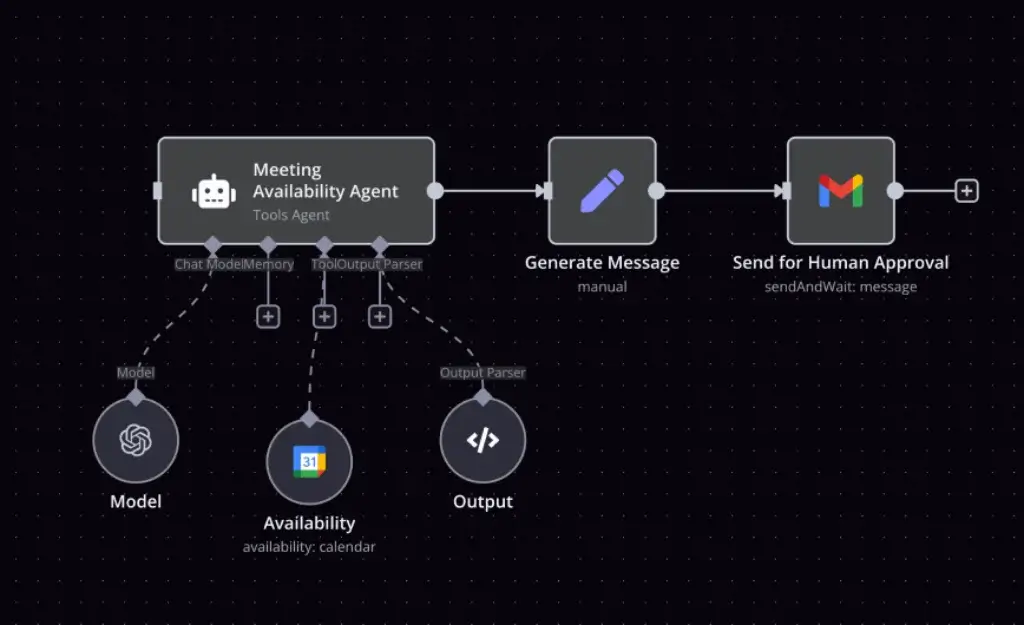
This is one of n8n’s strongest differentiators. Many AI tools can generate text, but n8n helps you connect AI outputs to real operational actions. For example, an AI workflow can summarize a customer message, classify intent, check CRM records, create a support ticket, and ask a human to approve the response before anything is sent.
For business use, that combination of AI and controlled workflow logic is more useful than a standalone chatbot.
Workflow Templates, Credentials, and Community Nodes
n8n provides workflow templates that help you start faster. These templates can support CRM automation, lead routing, IT operations, reporting, AI workflows, support workflows, marketing operations, and data movement.
The platform also includes credential management for connected services. This is important because workflows often need secure access to CRMs, databases, cloud tools, communication apps, APIs, and AI providers.
Beyond built-in nodes, n8n supports community nodes. These can extend the platform, but you should review community-built components carefully before using them in sensitive or production workflows.
Collaboration, Debugging, and Governance
n8n includes features for teams that need to manage automation beyond one person’s personal workflow. Depending on the plan, you can use shared projects, admin roles, workflow history, execution search, environments, Git-based version control, SSO, audit logging, log streaming, and external secret store integration.
These features become more important as automation becomes business-critical. A workflow that updates CRM records, handles security alerts, or triggers billing actions should not live inside an unmanaged personal setup.
For teams serious about automation governance, n8n is stronger than many lightweight no-code tools.
Pros and Cons
Advantages and Disadvantages
Positive
✅ Strong technical flexibility
✅ Self-hosting option
✅ Powerful AI workflow tools
✅ Execution-based pricing
Negative
❌ Higher learning curve
❌ Self-hosting needs maintenance
❌ Fewer native apps than Zapier
❌ Governance needed at scale
n8n is one of the best automation tools for teams that value control, extensibility, and AI workflow design. However, it is not the easiest platform for complete beginners, and self-hosting should not be treated as a “set and forget” option.
✅ Pros
- Strong technical flexibility: n8n supports visual automation, custom code, HTTP requests, webhooks, API calls, and advanced workflow logic.
- Self-hosting option: You can run n8n on your own infrastructure when you need more control over deployment, data, and configuration.
- Powerful AI workflow tools: n8n supports AI agents, AI workflows, RAG use cases, memory, tools, and human-in-the-loop controls.
- Execution-based pricing: n8n Cloud pricing can be more predictable for multi-step workflows because pricing is based on workflow executions rather than every action step.
- Developer-friendly automation: Code steps, custom nodes, CLI access, Git version control, and API flexibility make n8n useful for technical teams.
- Good governance potential: Higher plans include features such as SSO, environments, workflow history, audit logging, and external secret store integration.
❌ Cons
- Higher learning curve: n8n is more flexible than beginner tools, but it takes more time to learn, especially for non-technical users.
- Self-hosting needs maintenance: Running n8n yourself means managing infrastructure, updates, backups, security, and uptime.
- Fewer native apps than Zapier: n8n has strong integration flexibility, but Zapier still has a larger native app ecosystem.
- Governance needed at scale: As workflows grow, teams need ownership rules, naming standards, access controls, and regular audits.
- Advanced features may require paid plans: Enterprise features such as SSO, environments, external secrets, and deeper governance are not part of the basic community setup.
- AI workflows need careful oversight: AI agents and tool-calling workflows should include approval steps, permissions, and monitoring to prevent unwanted actions.
Common Use Cases
What Is n8n Good For?
n8n is best for workflows where flexibility matters. It works especially well when your team needs to combine app integrations, APIs, logic, data transformation, AI models, and custom code in one automation system.
AI Workflow Automation
n8n is a strong choice for AI workflows because it helps you connect AI models to real business systems. You can build agents that read data, classify information, summarize content, call tools, search knowledge sources, and trigger approved actions.
For example, you can build an AI workflow that reviews inbound support emails, summarizes the issue, checks customer history, assigns a priority score, creates a support ticket, and sends the draft response to a human for approval.
This makes n8n useful for teams that want AI automation with structure, not just open-ended chatbot responses.
Sales and CRM Automation
Sales teams can use n8n to automate lead capture, enrichment, routing, CRM updates, follow-up tasks, and sales notifications. It is especially useful when your sales stack includes tools that do not integrate cleanly with each other.
For example, n8n can receive a form submission, enrich the company domain, check if the contact exists in your CRM, assign the lead based on territory, notify the sales team, and create a task for follow-up.
You can also connect n8n workflows to your broader CRM software stack or internal sales operations workflows.
IT Operations and DevOps Automation
IT and DevOps teams can use n8n to automate internal requests, incident routing, deployment notifications, access workflows, infrastructure alerts, and API-based operational tasks.
This is where n8n’s technical flexibility becomes useful. You can call internal APIs, trigger workflows from webhooks, run code, branch logic based on alert severity, and route issues to the right system.
For teams that need more control than a simple ticketing automation, n8n is a practical middle ground between no-code tools and custom scripts.
Security Operations
Security teams can use n8n to enrich alerts, check IP addresses, query threat intelligence sources, create tickets, notify Slack or Teams channels, and log investigation steps.
For example, when a security alert is triggered, n8n can call enrichment APIs, check internal records, classify severity, open a case, and escalate high-risk incidents to the right responder.
Because security workflows often touch sensitive systems, you should use strict credentials, limited permissions, audit logs, and human approval for high-impact actions.
Marketing and Lead Automation
Marketing teams can use n8n to automate lead flows, campaign reporting, content workflows, webinar follow-up, form processing, and list management.
n8n is especially useful when marketing operations teams need more logic than standard form-to-CRM automation. You can segment leads, enrich data, normalize fields, add campaign attribution, and route contacts based on company size, geography, or interest.
For more strategic content planning, you can also connect n8n to AI agents, spreadsheets, SEO tools, and internal approval processes.
Data Syncing and Backend Prototyping
n8n can help teams sync data between CRMs, databases, spreadsheets, internal tools, and third-party apps. It can also support backend prototyping when you need to validate an integration quickly before investing in custom development.
This does not mean n8n should replace a full data warehouse, ETL platform, or production backend for every use case. However, it is very useful for operational data movement, workflow orchestration, and internal automation prototypes.
For many teams, n8n becomes the place where business systems finally talk to each other.
UX and Support
Ease of Use and Support Options
n8n is easier than building integrations from scratch, but it is not as beginner-friendly as Zapier. The platform is best described as low-code rather than pure no-code.
Business users can build useful workflows in n8n, especially with templates and the visual builder. However, the platform becomes much more powerful when you understand APIs, JSON, data structures, authentication, expressions, error handling, and basic scripting.
This is not a weakness for the right user. It is actually one of the reasons technical teams like n8n. The platform gives you room to grow instead of forcing you into a simplified automation model.
Support by Plan
- Community Edition: Best for users comfortable with documentation, forums, and self-managed troubleshooting.
- Starter Cloud: Includes forum support and a managed cloud environment.
- Pro Cloud: Adds more production-friendly features and better workflow management tools.
- Business and Enterprise: Better for teams needing governance, support, SSO, environments, and scale.
Tips for Getting More Value from n8n
- Start with one workflow: Automate one painful process before building a large automation system.
- Map your data first: Understand fields, formats, and source systems before building the workflow.
- Use naming standards: Clear workflow and node names make automation easier to maintain.
- Test with real records: Workflow logic often breaks when test data is too clean.
- Add error handling: Production workflows need fallback paths, alerts, and retry logic.
- Control AI actions: Use human review before AI-generated decisions update important systems.
AI
Latest AI Innovations
n8n’s most important recent direction is AI workflow automation. The platform is no longer only about moving data between apps. It is increasingly used to connect AI models, business systems, APIs, memory, tools, and human review steps into production workflows.
This is valuable because most companies do not need AI that only generates answers. They need AI that can work inside controlled business processes.
AI Workflow Builder
n8n’s AI Workflow Builder helps you create, refine, and debug workflows using natural language. You describe the workflow you want, and the builder can help generate the workflow structure, select nodes, place them, and configure parts of the process.
This lowers the barrier to workflow creation, but it should not replace testing. You should still review credentials, field mapping, logic paths, API responses, and error handling before deploying any workflow to production.
AI Agents
n8n lets you build AI agents that combine model reasoning with tools, memory, business data, and workflow logic. For example, an AI agent can research a lead, summarize context, check a CRM, draft an email, and ask for approval before the email is sent.
The important advantage is control. You can combine AI flexibility with predefined rules, conditions, fallback steps, and approval gates.
This makes n8n a strong option for companies that want AI agents but do not want uncontrolled autonomous workflows.
MCP and Human-in-the-Loop Controls
n8n also supports modern AI workflow patterns such as MCP-related workflows, tool calling, and human-in-the-loop review. These capabilities matter because AI agents become more useful when they can interact with real systems, but they also become riskier.
A good n8n AI workflow should not give an agent unlimited freedom. It should define what the agent can access, what it can update, when it needs approval, what happens when it fails, and how each execution is logged.
That balance between automation and control is one of n8n’s biggest strengths.
Security and Compliance
What About Security?
n8n can be a secure automation platform, but your security outcome depends heavily on how you deploy it, who can edit workflows, which credentials are connected, and how carefully you manage permissions.
n8n publishes security and compliance information, including SOC 2 availability for enterprise customers and SOC 3 reporting. Higher plans also include security-oriented features such as SSO, SAML, LDAP, encrypted secrets, external secret store integration, log streaming, audit logging, and extended data retention.
For business users, the biggest risk is usually not the workflow builder itself. The bigger risk is giving workflows too much access. Automation tools can move data, update records, call APIs, and trigger actions across many systems. That means credentials and permissions must be managed carefully.
If you self-host n8n, you should also maintain a regular update process. Self-hosting gives you control, but it also makes your team responsible for patching, hardening, backups, monitoring, and access management.
AI workflows need even more oversight. If you let an AI agent call tools, update systems, or send messages, you should use human-in-the-loop approval, clear permissions, rate limits, logs, and fallback paths.
Pricing
How Much Does n8n Cost?
n8n pricing depends on whether you use n8n Cloud, self-hosted Community Edition, Business self-hosted, or Enterprise. The most important pricing difference is that n8n Cloud is based on workflow executions, not the number of individual workflow steps.
This can be a major advantage if your workflows are complex. A multi-step workflow with many nodes can still count as one execution when it runs from start to finish, depending on your plan and configuration.
| Plan | Starting Price | Best For | Key Features |
| Community Edition | Free, self-hosted | Technical users who can manage their own infrastructure | Self-hosted core product with strong automation capabilities, but without many enterprise features |
| Starter Cloud | From €20/month, billed annually | Individuals and small teams starting with managed n8n | 2.5K workflow executions, unlimited users, unlimited workflows, every integration, 1 shared project, and forum support |
| Pro Cloud | From €50/month, billed annually | Solo builders and small teams running production workflows | 10K workflow executions, 3 shared projects, 20 concurrent executions, workflow history, execution search, admin roles, and global variables |
| Business Self-Hosted | From €667/month, billed annually | Companies needing collaboration, scale, and governance on their own infrastructure | 40K workflow executions, SSO, SAML, LDAP, environments, scaling options, Git version control, and 30 days of insights |
| Enterprise | Custom pricing | Larger organizations with strict security, governance, and scale requirements | Cloud or self-hosted deployment, custom executions, unlimited shared projects, 200+ concurrent executions, external secrets, log streaming, extended retention, and dedicated support |
How n8n Workflow Executions Work
In n8n Cloud, a workflow execution is generally a run of the workflow. This is different from task-based pricing models where each successful action may count separately.
For example, a workflow that receives a form submission, enriches a lead, updates a CRM, sends a Slack message, creates a task, and logs the activity may still be more cost-efficient in n8n than in a tool that charges for every action step.
| Example Workflow | Runs Per Month | Workflow Complexity | Why n8n Can Be Attractive |
| New lead to enrichment, CRM, Slack, and task | 500 | Multi-step workflow | Execution-based pricing may be easier to forecast than per-action pricing |
| AI ticket summary and routing workflow | 1,000 | AI and conditional logic | You can combine AI, routing, and human review in one workflow |
| Security alert enrichment workflow | 2,000 | API-heavy workflow | HTTP requests and code steps can reduce dependency on native connectors |
| Internal data sync across systems | 3,000 | Data transformation workflow | Code, expressions, and branching improve control over data handling |
The practical takeaway is clear: n8n can be very cost-effective for complex workflows, but you should still estimate execution volume, hosting costs, support needs, AI API costs, and maintenance effort before choosing a plan.
Who Should Use Each n8n Plan?
The Community Edition is best for technical users who want a free self-hosted automation platform and are comfortable managing servers, updates, security, and backups.
The Starter Cloud plan is best when you want to test n8n without infrastructure work. It gives you a managed environment, unlimited users, unlimited workflows, and enough execution volume for early workflows.
The Pro Cloud plan is the better fit for small teams that are running real production automations and need better workflow history, more concurrent executions, admin roles, and execution search.
The Business self-hosted plan is best for companies that want n8n on their own infrastructure but still need collaboration, SSO, environments, Git version control, and stronger operational controls.
The Enterprise plan is for larger organizations that need custom execution volume, external secret stores, log streaming, audit logging, dedicated support, extended retention, and deeper governance.
Compare with Others
Alternatives to n8n
n8n is one of the best workflow automation platforms for technical flexibility, but it is not the best fit for every team. The right alternative depends on ease of use, budget, technical skill, app ecosystem, AI requirements, and governance needs.
| Tool | Best For | Main Advantage Over n8n | Main Limitation |
| Zapier | Beginners and non-technical business teams | Easier setup and a larger native app ecosystem | Task-based pricing can become expensive for multi-step workflows |
| Make | Visual no-code workflow builders | Strong visual canvas and easier no-code experience for operations teams | Less flexible than n8n for self-hosting and code-heavy workflows |
| Microsoft Power Automate | Microsoft 365 and enterprise Microsoft environments | Deep Microsoft ecosystem integration and RPA options | Less appealing for teams outside the Microsoft stack |
| Workato | Large enterprise automation and iPaaS programs | Enterprise-grade governance, integrations, and scale | Usually too expensive and complex for smaller teams |
| Activepieces | Open-source automation users | Simple open-source automation experience | Less mature and less powerful for advanced technical workflows |
n8n vs Zapier
Zapier is easier for beginners and has a much larger native app marketplace. If your team wants the fastest path to simple automations, Zapier is usually the easier choice.
n8n is better when you need more control. It is stronger for self-hosting, code steps, HTTP requests, AI workflow orchestration, custom logic, and complex multi-step workflows.
Choose Zapier if ease of use matters most. Choose n8n if flexibility, control, and technical depth matter more.
n8n vs Make
Make is a strong alternative if you want a visual automation builder that is still easier for non-developers. It is especially good for operations teams that like building workflows on a visual canvas.
n8n is better for technical teams that want self-hosting, code extensibility, API flexibility, and deeper control over how workflows run.
Choose Make for visual no-code automation. Choose n8n for low-code automation with stronger technical freedom.
n8n vs Microsoft Power Automate
Microsoft Power Automate is a strong choice for companies already built around Microsoft 365, Teams, SharePoint, Dynamics, Azure, and desktop automation.
n8n is usually more attractive for teams using a broader mix of SaaS tools, APIs, databases, and self-hosted infrastructure. It also feels more flexible for developers and technical operators who want to build outside a Microsoft-first environment.
Choose Power Automate for Microsoft-heavy environments. Choose n8n for broader workflow control across different systems.
n8n vs Workato
Workato is built for enterprise integration and automation at scale. It is stronger for large companies that need deep governance, enterprise iPaaS capabilities, procurement support, and mature cross-department automation programs.
n8n is more flexible and accessible for technical teams, startups, mid-sized companies, and builders that want strong automation without a heavy enterprise platform.
Choose Workato for enterprise iPaaS. Choose n8n for technical workflow automation with more deployment flexibility.
n8n vs Activepieces
Activepieces is an open-source automation platform that may appeal to users who want a simpler self-hosted automation experience. It can be a good fit for smaller workflows and teams that want an open-source-oriented Zapier alternative.
n8n is more mature for advanced workflows, AI agents, API-heavy automations, and technical operations. It has a stronger ecosystem, deeper workflow flexibility, and more production-oriented capabilities.
Choose Activepieces for simpler open-source automation. Choose n8n when workflow complexity and technical depth are more important.
Conclusion
Final Thoughts
n8n is one of the strongest workflow automation platforms in 2026 for teams that want more flexibility than basic no-code automation tools can provide. It is especially valuable for technical teams, AI automation builders, developers, IT operations teams, security teams, and businesses that want control over deployment and workflow logic.
The platform’s biggest strength is its balance between visual workflow building and technical depth. You can build automations on a canvas, but you can also add code, call APIs, self-host, connect AI models, create agents, use approval steps, and manage workflows with more structure.
n8n is not the best choice for every user. If you want the simplest possible automation platform, Zapier will usually feel easier. If you want a visual no-code tool with less technical complexity, Make may be more comfortable. If you are fully committed to Microsoft, Power Automate may fit better. If you need large enterprise iPaaS governance, Workato may be stronger.
However, if your priority is control, AI workflow automation, self-hosting flexibility, and the ability to build beyond standard app connectors, n8n is an excellent choice. My recommendation is to choose n8n when your workflows are important enough to need technical ownership, but not so custom that every integration should be built from scratch.
Frequently Asked Questions
Have more questions?
What is n8n?
n8n is a workflow automation platform that helps teams connect apps, APIs, databases, AI models, and internal systems. It uses a visual workflow builder with nodes, triggers, actions, logic, code steps, and integrations to automate business processes.
Is n8n free?
Yes. n8n offers a free self-hosted Community Edition. You can also use paid n8n Cloud plans if you want a managed environment without handling infrastructure, hosting, updates, and maintenance yourself.
How much does n8n cost?
n8n Cloud plans start at €20 per month when billed annually for the Starter plan and €50 per month when billed annually for the Pro plan. Business self-hosted pricing starts at €667 per month when billed annually, while Enterprise pricing is custom.
How does n8n pricing work?
n8n Cloud pricing is mainly based on workflow executions rather than individual workflow steps. This can make n8n attractive for complex multi-step workflows because a full workflow run can be easier to forecast than per-action task pricing.
Is n8n better than Zapier?
n8n is better than Zapier for technical teams that need self-hosting, code steps, API flexibility, AI workflow control, and complex automation logic. Zapier is better for beginners who want the easiest setup and the largest native app ecosystem.
Can n8n build AI agents?
Yes. n8n can be used to build AI agents and AI workflows that connect models, tools, business apps, memory, APIs, and human approval steps. This makes it useful for controlled AI automation, not just simple chatbot interactions.
Can you self-host n8n?
Yes. n8n can be self-hosted using options such as Docker, Docker Compose, npm, AWS, Azure, Google Cloud, DigitalOcean, Hetzner, Heroku, and OpenShift. Self-hosting gives you more control but requires infrastructure, updates, backups, and security maintenance.
Is n8n open source?
n8n is source-available under its Sustainable Use License, but it does not describe itself as OSI-approved open source because the license includes usage limitations. It still gives many users open-source-like benefits, especially for internal self-hosted automation.
Is n8n secure?
n8n provides security and compliance information, including SOC 2 availability for enterprise customers and SOC 3 reporting. Security also depends on your setup, permissions, credentials, hosting, update process, and workflow governance.
Who should use n8n?
n8n is best for technical teams, developers, IT teams, AI automation builders, operations teams, and businesses that need flexible workflows, API control, self-hosting options, and more customization than basic no-code automation platforms provide.