Introduction
Cold email becomes difficult to manage once your team moves beyond one mailbox and a few hundred prospects. You need sending accounts, domain authentication, inbox warm-up, campaign rotation, reply management, deliverability testing, and accurate reporting to work together.
Smartlead is designed to bring those operational layers into one outbound platform. It started as a cold email automation tool, but its current product direction is much broader. The platform now combines email sequencing, automated warm-up, mailbox infrastructure, prospect data, a unified reply inbox, AI-powered automation, calling, CRM features, and agency workspaces.
That makes Smartlead particularly relevant when you need to scale outbound without paying for every mailbox or user. Rather than positioning itself as a traditional sales engagement platform, Smartlead focuses heavily on the infrastructure behind cold outreach.
In this Smartlead review 2026, you will learn:
- How Smartlead manages cold email campaigns at scale
- Which deliverability and mailbox tools are included
- Where its prospecting, CRM, and AI features add value
- What current pricing and add-ons may cost
- Which Smartlead alternatives deserve consideration
Smartlead is not the simplest cold email tool available. However, it is one of the more capable options when deliverability, mailbox scale, automation, and agency operations matter more than having a minimal interface.
What Is Smartlead?
Smartlead is an outbound sales platform built for creating, sending, monitoring, and scaling cold email campaigns across multiple mailboxes. You can connect email accounts, rotate sending activity, build multi-step sequences, warm up inboxes, categorize replies, and manage prospect conversations from a centralized workspace.
The platform is primarily used by lead generation agencies, outbound sales teams, growth operators, and founders. It is particularly well suited to businesses that send from several domains or manage outreach for multiple clients.
More Than an Email Sequencer
Smartlead’s core product is still cold email automation, but the surrounding platform has expanded considerably.
Its wider product ecosystem now includes:
- SmartDelivery for inbox placement and deliverability testing
- SmartSenders for purchasing domains and sending mailboxes
- SmartProspect for finding and verifying B2B contacts
- Master Inbox for managing replies across accounts
- SmartFunnel for lightweight deal and pipeline tracking
- SmartAgents for no-code sales workflow automation
- SmartDialer for adding calling to outbound sequences
- White-label workspaces for client-facing agencies
This broader direction makes Smartlead closer to an outbound operating system than a basic sequence builder. You can still connect it to a full CRM, but more of the prospecting and campaign workflow can now happen inside Smartlead itself.
Who Should Use Smartlead?
Smartlead is most relevant for:
- Cold email agencies managing several client campaigns
- Outbound teams operating many domains and mailboxes
- Founders building a repeatable B2B prospecting process
- Growth teams that need API-driven campaign automation
- Companies concerned about inbox placement and sender health
If you only send occasional campaigns from one mailbox, Smartlead may provide more infrastructure than you need. Its value becomes clearer as your sending operation grows.
Key Features
Smartlead Software Specification
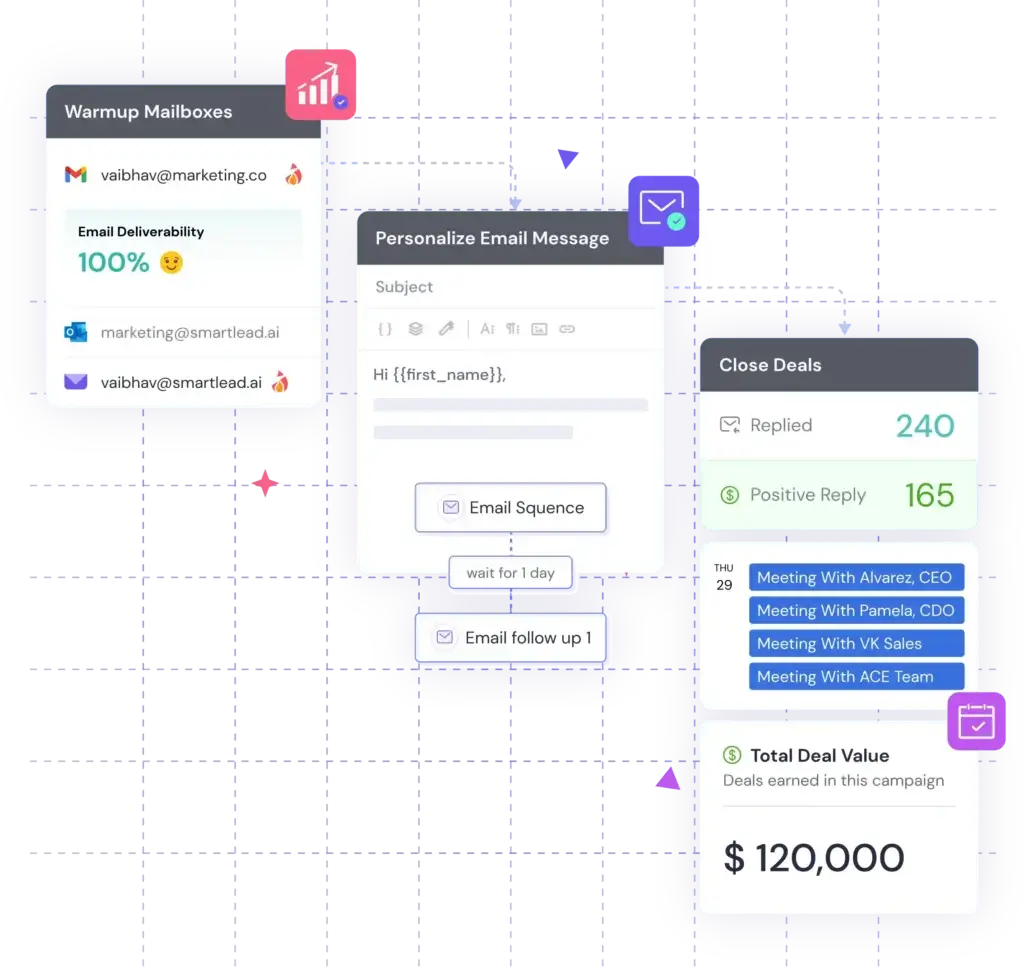
Smartlead’s strongest capabilities are built around running outbound across many sending accounts without losing control of deliverability, replies, or campaign activity.
1. Multi-Mailbox Cold Email Campaigns
Smartlead lets you connect and rotate multiple email accounts within the same campaign. Instead of sending every message from one mailbox, activity can be distributed across several accounts to maintain safer per-mailbox volumes.
You can build multi-step email sequences, configure delays, choose campaign schedules, set time zones, and personalize messages with variables. Spintax helps vary portions of the copy, while mailbox rotation distributes sending across the selected accounts.
This setup is particularly useful when you manage several domains. It gives you one operational view while preventing your entire campaign from depending on a single sender.
2. Automated Email Warm-Up
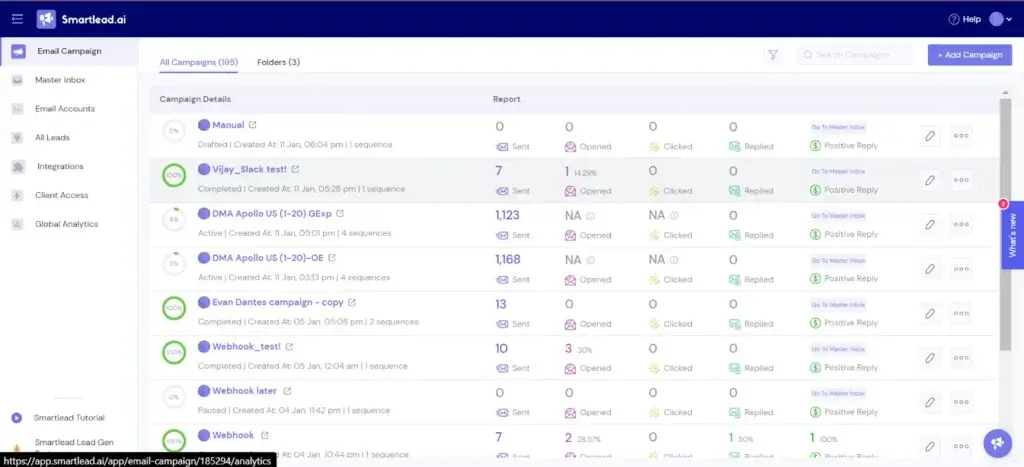
Warm-up is central to Smartlead’s deliverability proposition. The system gradually generates sending activity and engagement patterns to help connected mailboxes establish or maintain sender reputation.
Smartlead now separates its warm-up infrastructure into Foundation, Growth, Premium, and eligibility-based Ultra Premium pools. The available pool depends on your subscription level.
Warm-up does not guarantee inbox placement. Your domain configuration, list quality, message content, complaints, and sending behavior still influence results. However, having warm-up built into the same platform simplifies monitoring and reduces the need for a separate tool.
3. SmartDelivery Inbox Placement Testing
SmartDelivery helps you test where a message is likely to land before sending it to real prospects. Tests can show whether an email reaches the primary inbox, a secondary category, spam, or fails to appear.
You can run manual tests when reviewing a new campaign or schedule automated tests to monitor deliverability over time. This is valuable because campaign-level statistics do not always reveal whether a mailbox or message has developed an inbox placement problem.
SmartDelivery is one of the more practical differences between Smartlead and basic cold email platforms. It gives you a pre-send diagnostic layer rather than forcing you to identify deliverability problems after campaign performance declines.
4. Master Inbox for Reply Management
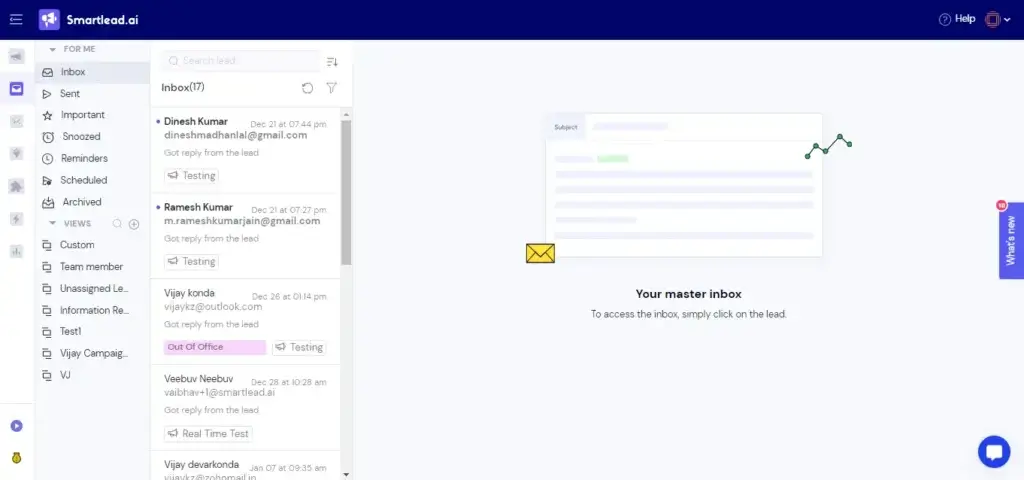
The Master Inbox consolidates responses from connected sending accounts. You can read and answer replies without signing into each mailbox individually.
Replies can be filtered by sender, campaign, client, category, or lead status. Team members can assign conversations, add notes, and organize follow-up ownership. Smartlead can also classify replies by intent, helping you separate interested prospects, objections, referrals, out-of-office responses, and unsubscribe requests.
This centralized workflow becomes increasingly important as mailbox volume grows. Sending from 30 accounts may be manageable, but monitoring 30 separate inboxes is not.
5. SmartProspect B2B Lead Finder
SmartProspect adds a prospecting layer to the platform. It provides access to a large database of business profiles and lets you filter contacts by criteria such as role, seniority, industry, geography, company size, and keywords.
Verified prospects can be moved directly into Smartlead campaigns. This removes the CSV export and import step that normally sits between a data provider and a sending platform.
The main advantage is workflow simplicity. However, teams with complex data enrichment requirements may still prefer a specialist provider such as Apollo, Clay, or another multi-source data platform.
6. SmartSenders Email Infrastructure
SmartSenders lets you purchase domains and mailboxes through providers available inside Smartlead. Depending on the selected provider, the service can handle domain purchasing, mailbox creation, and DNS records such as SPF, DKIM, and DMARC.
This is useful if setting up dozens of sending accounts has become a bottleneck. SmartSenders reduces manual provisioning and gives you several mailbox infrastructure options, including standard and pre-warmed accounts.
Mailbox and domain costs are separate from the main Smartlead subscription. You should include those infrastructure expenses when calculating the true cost of your outbound program.
7. SmartAgents and Reply Automation
SmartAgents is Smartlead’s no-code automation layer. You can describe a workflow in plain language and create an agent that reacts to events, updates lead information, routes activity, sends notifications, or synchronizes data with other systems.
AI-assisted reply categorization can identify the intent behind incoming messages. Depending on your setup, Smartlead can trigger follow-up actions, update your CRM, notify a representative, or move the lead into another sequence.
This is most useful when your team already receives enough replies that manual sorting creates delays. High-intent responses can be prioritized while administrative replies are handled automatically.
8. SmartFunnel CRM and Deal Tracking
Smartlead includes lightweight CRM functionality through SmartFunnel and its deal management tools. You can create pipeline stages, assign leads, track opportunities, and move conversations from the first positive reply toward a closed deal.
This may be sufficient for an agency, founder, or small outbound team that only needs a basic sales pipeline. It is less suitable as a replacement for a full CRM when you require forecasting, territory management, account hierarchies, customer service history, or detailed revenue reporting.
9. Agency Workspaces and White Labeling
Smartlead has a strong agency-oriented setup. Separate client workspaces can isolate campaign information, leads, reports, and replies. White labeling lets you apply your own branding and provide access through a custom domain.
Clients can view campaign performance without seeing other accounts or the agency’s backend operation. You can also package the platform as part of a managed outreach service.
Client workspaces are available from the Pro plan as paid add-ons, while the Unlimited Prime plan includes three workspaces.
Key Benefits
Why Teams Choose Smartlead
Build a More Scalable Sending Operation
Smartlead removes artificial limits on the number of mailboxes you can connect. Your actual sending capacity is controlled by the monthly email allowance and the safe limits you establish for each account.
This pricing model is attractive for teams that would otherwise pay a separate fee for every sender or sales representative.
Bring Deliverability Into the Campaign Workflow
Warm-up, inbox placement testing, mailbox rotation, sender activity, and bounce monitoring are available within the same ecosystem. You can evaluate campaign performance alongside the health of the infrastructure delivering the messages.
Reduce Manual Reply and Data Management
The Master Inbox, AI categorization, webhooks, CRM integrations, and SmartAgents help your team react faster when a prospect replies. Instead of manually copying activity between systems, you can create workflows that update the relevant record automatically.
Support Client-Based Agency Operations
Separate workspaces, white labeling, client reporting, and centralized mailbox management make Smartlead especially suitable for lead generation agencies. These features are more difficult to reproduce with a basic cold email tool.
Pros and Cons
Advantages and Limitations of Smartlead
Smartlead provides substantial value when outbound is a core business function. Its strengths are concentrated around scale and deliverability, while its drawbacks are most visible in usability, reporting, pricing complexity, and the operational knowledge required to use it well.
Positive
✅ Strong multi-mailbox campaign infrastructure
✅ Deliverability tools built into the platform
✅ Practical Master Inbox for managing replies
✅ Strong agency and white-label capabilities
✅ Flexible APIs, webhooks, and integrations
Negative
❌ Interface can feel busy as features expand
❌ Total cost increases with infrastructure add-ons
❌ Reporting may not satisfy advanced RevOps teams
❌ Some users report bugs or inconsistent support
❌ Requires deliverability knowledge to use safely
✅ Pros
1. Strong multi-mailbox campaign infrastructure
Smartlead is built for teams that manage many sending accounts. Mailbox rotation, campaign scheduling, warm-up, and centralized administration make it easier to scale without creating a fragmented operation.
2. Deliverability tools built into the platform
SmartDelivery and the tiered warm-up pools give you more visibility into inbox placement and sender health than a basic email sequencer.
3. Practical Master Inbox for managing replies
Consolidated replies, intent categorization, assignments, notes, filters, and CRM synchronization reduce the risk of losing valuable responses across multiple inboxes.
4. Strong agency and white-label capabilities
Client workspaces, custom branding, separate reporting, and isolated data make Smartlead one of the stronger options for outreach agencies.
5. Flexible APIs, webhooks, and integrations
You can connect Smartlead with CRMs, data tools, automation platforms, Slack, spreadsheets, and internal systems. This makes it suitable for more advanced outbound workflows.
❌ Cons
1. Interface can feel busy as features expand
Smartlead now includes prospecting, deliverability, CRM, AI, calling, infrastructure, and agency tools. That breadth adds value, but it can also make navigation less intuitive for new users.
2. Total cost increases with infrastructure add-ons
The subscription is only one part of your potential cost. Prospect data, client workspaces, private infrastructure, deliverability testing, domains, and mailboxes may be billed separately.
3. Reporting may not satisfy advanced RevOps teams
The included analytics are useful for monitoring sends, replies, campaign performance, and lead status. Teams requiring highly customized attribution, forecasting, or cross-channel reporting may need an external CRM or BI tool.
4. Some users report bugs or inconsistent support
Public feedback is mostly positive, but not uniform. Some reviewers mention delayed support responses, campaign inconsistencies, integration problems, or reliability issues.
5. Requires deliverability knowledge to use safely
Unlimited mailboxes do not make unlimited sending safe. You still need properly configured domains, verified data, conservative volume limits, relevant messaging, and a clear compliance process.
User Experience
Smartlead Interface and Campaign Workflow
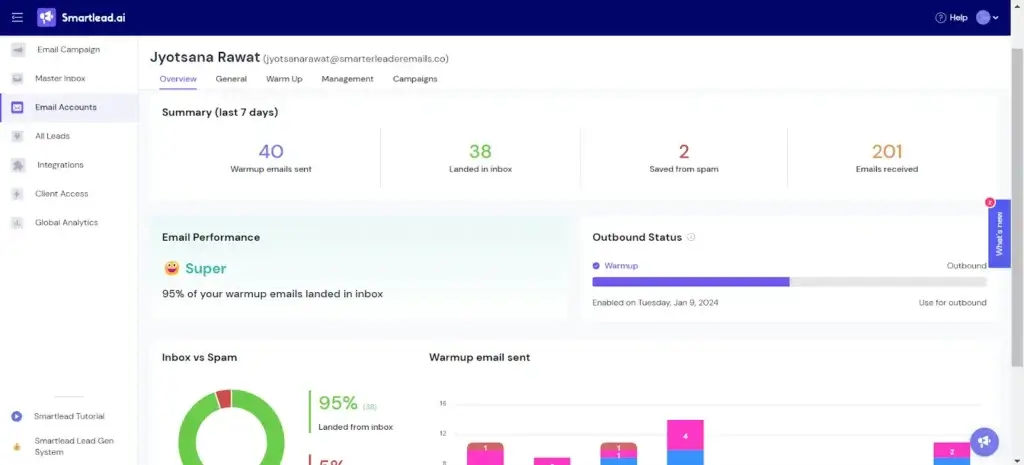
Smartlead is relatively approachable at the campaign level. The basic workflow of connecting accounts, importing prospects, writing a sequence, setting a schedule, and launching a campaign is easy to understand.
The learning curve increases when you start configuring warm-up pools, SmartDelivery, infrastructure, subsequences, APIs, client workspaces, and automated reply handling. Smartlead is easier to adopt when one person owns deliverability and campaign operations.
What Users Commonly Like
Campaign and mailbox management
Users frequently value the ability to control multiple campaigns and sending accounts without paying per mailbox.
Accessible core workflow
The main sequence builder and campaign dashboard are generally considered straightforward once the sending infrastructure is configured.
Customer assistance and learning resources
Many reviewers praise Smartlead’s support and educational content, although experiences are not consistent across every review.
Common User Concerns
Interface density
The platform can feel cluttered as more products and settings are added.
Technical troubleshooting
Authentication errors, mailbox provider restrictions, integration issues, and deliverability problems may require more technical knowledge than a beginner expects.
Reporting depth
Campaign reporting is adequate for most outbound teams, but more advanced organizations may want deeper attribution and customizable analytics.
Overall user experience:
Smartlead is easier to understand as an outbound infrastructure platform than as a simple email application. It rewards teams that invest in setup and process ownership, but it may feel unnecessarily complex for occasional outreach.
Business Size Fit
Smartlead for Different Business Sizes
| Business Type | Fit | Why | Main Consideration |
| Solo founder | Good | Affordable entry plan and scalable campaign tools | May require separate lead data or the SmartProspect add-on |
| Small sales team | Very good | Multi-mailbox campaigns, CRM access, and centralized replies | Needs a clear owner for deliverability |
| Outbound agency | Excellent | Client workspaces, white labeling, and scalable infrastructure | Client and mailbox add-ons affect margins |
| Mid-sized company | Very good | Integrations, APIs, automation, and high sending capacity | External CRM may still be required |
| Large enterprise | Moderate to good | Private infrastructure and advanced automation options | Security, governance, and support terms require evaluation |
Solo Founders and Consultants
The Base plan can help you validate an ideal customer profile and message without purchasing a large sales engagement platform. However, Smartlead becomes less economical if you add prospect data, mailboxes, domains, and deliverability products before proving the campaign.
Small and Mid-Sized Sales Teams
The Pro and Unlimited Smart plans provide a strong balance of sending capacity, CRM access, reply management, and automation. These teams are likely to gain the most value when cold email is already a consistent pipeline channel.
Lead Generation Agencies
Agencies are Smartlead’s clearest target market. White labeling, separate client workspaces, high mailbox volume, infrastructure options, and centralized replies directly address common agency requirements.
Enterprise Teams
Larger organizations can use Smartlead as a specialized outbound execution layer. However, security review, access controls, data residency, service commitments, CRM governance, and audit requirements should be assessed before deployment.
Integrations and Automation
Connecting Smartlead to Your Sales Stack
Smartlead can connect with CRMs, data providers, communication tools, and automation platforms. Native and documented connections include platforms such as HubSpot, Salesforce, Pipedrive, Zoho CRM, Clay, Slack, and Google Sheets.
Zapier, Make, and n8n can extend the platform to thousands of additional applications. Smartlead also provides REST APIs and real-time webhooks for more customized implementations.
What You Can Automate
- Add verified prospects to the appropriate campaign
- Create or update contact records in your CRM
- Notify a representative when an interested lead replies
- Pause outreach after a reply, bounce, or unsubscribe
- Route leads into different sequences based on intent
- Export campaign events to reporting systems
Smartlead supports multiple named API keys, which can help you separate internal workflows, third-party integrations, and client-specific automations. You can reset or revoke one key without disrupting every connected system.
Where Integrations Matter Most
Smartlead is strongest as the sending and reply-management layer of your stack. Your CRM should remain the primary source of truth when you need account management, forecasting, lifecycle reporting, or coordination between sales and customer success.
Pricing and Plans
How Much Does Smartlead Cost?
Smartlead currently offers four primary subscription levels. Monthly prices start at $39, while annual billing reduces the equivalent monthly price by approximately 17%.
A 14-day free trial is available without requiring a credit card. The trial is useful for testing the interface and campaign workflow, but SmartSenders mailbox purchases require a paid subscription.
| Plan | Monthly Price | Contact Storage | Monthly Email Sends | Best For |
| Base | $39/month | 2,000 contacts | 6,000 emails | Testing small outbound campaigns |
| Pro | $94/month | 30,000 contacts | 90,000 emails | Growing teams with active campaigns |
| Unlimited Smart | $174/month | Unlimited | 150,000 emails | Consistent high-volume outbound |
| Unlimited Prime | $379/month | Unlimited | 500,000 emails | Agencies and advanced outbound operations |
Important Pricing Details
The Base plan includes the Foundation warm-up tier but does not include CRM access or client workspaces. The Pro plan adds CRM access and uses the Growth warm-up tier.
Unlimited Smart includes unlimited contact storage, 50,000 verified prospect emails per month, Premium warm-up, CRM access, and customer success calls.
Unlimited Prime raises the sending allowance, includes 170,000 verified prospect emails, private infrastructure, a dedicated account manager, a private Slack channel, and three client workspaces.
Potential Additional Costs
- SmartProspect or verified prospect add-ons on lower plans
- Client workspaces and white labeling
- Domains and mailboxes purchased through SmartSenders
- Pre-warmed mailbox infrastructure
- Private sending infrastructure
- Deliverability testing and other optional products
Pricing assessment: Smartlead offers strong value when you need many mailboxes, team members, or client campaigns. It is less compelling when you only need one sender and a basic follow-up sequence.
Smartlead Alternatives
How Does Smartlead Compare With Other Tools?
The strongest Smartlead alternative depends on whether you prioritize sending infrastructure, lead data, personalization, ease of use, or broader sales engagement.
| Tool | Best For | Main Strength | Main Limitation |
| Smartlead | Infrastructure-led cold outreach | Mailbox scale, deliverability, agencies, APIs | More complex setup and add-on costs |
| Instantly.ai | Accessible all-in-one outbound | Usability, lead database, deliverability ecosystem | Costs expand across separate modules |
| Apollo.io | Database-led sales prospecting | B2B data, enrichment, sequences, sales workflow | Less specialized in mailbox infrastructure |
| lemlist | Personalized multichannel outreach | Campaign personalization and visual content | Less attractive for infrastructure-heavy scale |
| Reply.io | Structured sales engagement | Multichannel sequences and AI SDR workflow | Can feel heavier for email-only campaigns |
Smartlead vs Instantly.ai
Instantly.ai is a close Smartlead competitor. Both platforms support multiple email accounts, warm-up, centralized replies, lead data, and deliverability workflows.
Instantly is generally easier to approach if you want prospecting, sending, and lightweight CRM features in one polished ecosystem. Smartlead is more compelling when agency workspaces, white labeling, APIs, infrastructure control, and advanced outbound operations are priorities.
Best choice: Choose Smartlead for infrastructure-heavy outbound and agency operations. Choose Instantly for a more accessible all-in-one workflow.
Read the full Instantly.ai review.
Smartlead vs Apollo.io
Apollo.io starts with B2B data. It combines a large contact database, enrichment, account search, intent signals, sequences, calling, and sales workflow features.
Smartlead starts with sending infrastructure. It is better suited to teams that already have a data source and need greater control over mailboxes, warm-up, deliverability, and client campaigns.
Best choice: Choose Apollo when prospect data and sales intelligence drive the buying decision. Choose Smartlead when scalable cold email execution is the priority.
Read the full Apollo.io review.
Smartlead vs lemlist
lemlist is known for personalized outreach. Its campaign tools support tailored images, landing pages, text variables, email sequences, LinkedIn steps, and calling workflows.
Smartlead is usually better for high mailbox volume, agency operations, inbox placement testing, and infrastructure management. Lemlist is more attractive when creative personalization and rep-led multichannel engagement are central to the strategy.
Best choice: Choose lemlist for personalization-driven campaigns. Choose Smartlead for deliverability-focused sending operations.
Read the full lemlist review.
Smartlead vs Reply.io
Reply.io is a broader sales engagement platform with multichannel sequences, calling, LinkedIn steps, prospect data, meeting booking, and AI SDR capabilities.
Reply.io is a stronger fit when sales representatives work through structured tasks across several channels. Smartlead is a stronger fit when cold email infrastructure and mailbox scale remain the center of the workflow.
Best choice: Choose Reply.io for multichannel sales engagement. Choose Smartlead for agency-friendly, infrastructure-led cold outreach.
Read the full Reply.io review.
Security and Compliance
How Smartlead Handles Business Data
Smartlead publishes a privacy policy and Data Processing Addendum covering its role as a data processor, applicable data protection obligations, subprocessors, security incidents, and Standard Contractual Clauses for certain international transfers.
The company states that it applies appropriate technical and organizational measures to protect personal data. Its privacy policy identifies Amazon Web Services in Sydney, Australia as its hosted service provider and notes that technical support may involve staff in India.
Security and Privacy Considerations
- A Data Processing Addendum is available for eligible customers
- Standard Contractual Clauses address certain international transfers
- SmartSenders providers may include MFA and configured DNS authentication
- API keys can be created, reset, and revoked independently
- Users remain responsible for lawful data sourcing and outreach practices
Public materials reviewed for this article did not prominently confirm a current Smartlead SOC 2 or ISO 27001 certification. Enterprise buyers should request the latest security documentation, audit reports, subprocessors, retention policies, access-control details, and incident response commitments directly from Smartlead.
Using Smartlead does not automatically make a cold email campaign compliant. You remain responsible for lawful targeting, a valid processing basis where required, accurate sender identification, opt-out handling, suppression lists, and the regulations that apply to each recipient.
Is Smartlead Right for You?
Who Gets the Most Value From Smartlead?
Choose Smartlead If:
- You manage many mailboxes or outbound domains
- Cold email is a consistent pipeline channel
- You run campaigns for several clients
- You need deliverability testing and warm-up controls
- You want API-driven outbound automation
- You prefer flat platform pricing over per-mailbox fees
Consider Another Platform If:
- You only send occasional campaigns from one mailbox
- You want the simplest possible interface
- You need enterprise CRM forecasting and account management
- Your priority is creative email personalization
- You need a mature B2B database more than sending infrastructure
- You do not have anyone responsible for deliverability
Smartlead should be evaluated as part of your full outbound cost. Include prospect data, domains, mailboxes, verification, CRM, automation, and staff time rather than comparing subscription prices alone.
Conclusion
Final Thoughts on Smartlead
Smartlead is one of the stronger cold email platforms for teams that have moved beyond basic sequencing. Its multi-mailbox architecture, warm-up system, SmartDelivery tests, Master Inbox, APIs, client workspaces, and infrastructure marketplace address the operational problems that appear when outbound begins to scale.
The platform is particularly well matched to agencies. White labeling, isolated client workspaces, centralized reporting, and flexible mailbox management give service providers a practical way to operate several campaigns from one system.
Its broader product direction also deserves attention. SmartProspect, SmartAgents, SmartDialer, SmartFunnel, and SmartSenders are turning Smartlead into a more complete outbound platform rather than a single-purpose cold email application.
The tradeoff is complexity. You may need several add-ons, and successful implementation still requires careful domain setup, verified data, responsible sending limits, and ongoing deliverability management.
What Stands Out Most
- Excellent fit for multi-mailbox outbound operations
- Strong deliverability and inbox placement focus
- Agency-friendly workspaces and white labeling
- Flexible automation through APIs and webhooks
- Expanding prospecting, CRM, AI, and calling capabilities
Editor’s recommendation: Smartlead is highly recommended for outbound agencies and B2B teams that treat cold email as a serious acquisition channel. Smaller teams should begin with the trial and validate the full cost of data, domains, mailboxes, and add-ons before committing to a larger plan.
Have More Questions
Frequently Asked Questions
What is Smartlead used for?
Smartlead is used to create and scale cold email campaigns across multiple mailboxes. It also provides email warm-up, deliverability testing, prospect data, reply management, automation, CRM tools, and agency workspaces.
How much does Smartlead cost?
Smartlead plans currently start at $39 per month for Base. Pro costs $94 per month, Unlimited Smart costs $174 per month, and Unlimited Prime costs $379 per month. Add-ons and mailbox infrastructure may cost extra.
Does Smartlead offer a free trial?
Yes. Smartlead offers a 14-day free trial, and a credit card is not required to begin. Some services, including mailbox purchases through SmartSenders, require a paid subscription.
Does Smartlead provide unlimited email accounts?
Smartlead allows you to connect unlimited mailboxes. However, your monthly subscription still includes an email sending allowance, and each mailbox should follow conservative daily sending limits.
Is Smartlead good for agencies?
Yes. Smartlead is particularly well suited to outbound and lead generation agencies. It supports client workspaces, white labeling, custom domains, centralized reporting, mailbox management, and separate client data.
What is the Smartlead Master Inbox?
The Master Inbox consolidates replies from connected sending accounts. You can filter conversations, categorize replies, assign owners, add notes, respond to prospects, and synchronize activity with other systems.
Does Smartlead include lead data?
Yes. SmartProspect provides access to verified B2B profiles and lets you move selected contacts into campaigns. Verified prospect allowances or add-ons vary according to the Smartlead plan.
Does Smartlead replace a CRM?
Smartlead includes lightweight CRM and pipeline tools through SmartFunnel. It may be sufficient for simple outbound deal tracking, but most growing companies will still need a full CRM for forecasting, account management, and revenue reporting.
What are the best Smartlead alternatives?
Leading Smartlead alternatives include Instantly.ai, Apollo.io, lemlist, and Reply.io. Instantly is strong for accessible all-in-one outbound, Apollo for B2B data, lemlist for personalization, and Reply.io for multichannel sales engagement.
Is Smartlead safe for cold email outreach?
Smartlead provides warm-up, inbox placement testing, authentication support, suppression handling, and data protection documentation. You are still responsible for lawful targeting, list quality, sending limits, opt-outs, and compliance with applicable regulations.