Introduction
Finding the right prospects is only one part of outbound sales. The harder part is reaching them with the right message, at the right time, across the right channel.
That is where Reply.io can be useful. Reply.io, often called Reply, is an AI-powered sales engagement platform built for cold outreach, multichannel sequencing, lead generation, deliverability management, and meeting booking.
In this Reply.io review, you’ll learn what the platform does well, where it may fall short, how its AI SDR works, what to know about pricing, and whether it is the right sales engagement software for your team in 2026.
Workflow
How Reply.io Works
Reply.io is best for B2B sales teams, SDR teams, founders, agencies, and revenue teams that want to manage outbound prospecting from one platform.
Its main strengths are multichannel sequences, AI personalization, built-in B2B data, deliverability tools, and Jason AI, Reply’s AI SDR. If your team wants a tool that can support email, LinkedIn, calls, SMS, WhatsApp, data enrichment, and automated follow-ups, Reply.io is a strong option.
However, it may not be the best fit if you only need a basic cold email sender or if your team is very price-sensitive. Costs can increase once you add AI SDR, data credits, LinkedIn actions, email validation, or agency features.
What Is Reply.io?
Reply.io is a sales engagement and cold outreach platform designed to help you find prospects, create personalized campaigns, automate follow-ups, and book more meetings.
The platform combines several outbound sales tools into one system:
- Cold email automation
- LinkedIn outreach workflows
- Calls, SMS, and WhatsApp steps
- AI-generated personalization
- B2B contact data and enrichment
- Email deliverability tools
- CRM integrations and reporting
Instead of switching between separate tools for prospecting, email sending, follow-ups, meeting scheduling, and performance tracking, Reply.io gives you a central workspace for managing outbound campaigns.
Who Is Reply.io Best For?
Reply.io is most valuable when your team already has a clear outbound strategy and needs software to execute it at scale.
You will get the most value from Reply if you need to send personalized sales outreach across several channels, manage multiple mailboxes, improve deliverability, and track campaign performance in one place.
It is especially relevant for SaaS companies, lead generation agencies, B2B service providers, consultants, recruiters, and sales teams that rely on outbound pipeline generation.
Software Specification
Reply.io Key Features
Reply.io is not just a cold email tool. It is closer to a full sales engagement platform with prospecting, AI personalization, outreach automation, deliverability, and reporting in one interface.
Below are the most important Reply.io features to review before choosing it for your outbound sales workflow.
Multichannel Outreach Sequences
Reply.io lets you build multichannel sales sequences that combine emails, LinkedIn touches, calls, SMS, WhatsApp messages, and manual tasks.
This matters because buyers rarely respond to one isolated email. A stronger outbound motion usually combines several light, relevant touchpoints across different channels.
You can create a sequence from scratch, use templates, or generate one with AI. Once the sequence is live, Reply can automatically move prospects through follow-up steps based on timing, engagement, and behavior.
For example, you can create a workflow where a prospect receives a first email, then a LinkedIn profile view, then a follow-up email, then a call task if there is no reply. This helps your team stay consistent without manually tracking every touchpoint.
AI Variables and Personalization Tools
Personalization is one of the main reasons teams consider Reply.io. The platform supports variables that let you tailor messages based on fields like name, company, title, industry, location, persona, and other contextual data.
Reply’s AI variables go further by helping you create more specific personalization at scale. Instead of relying only on basic merge tags, you can use AI to create more relevant opening lines, contextual notes, and tailored messaging.
This is useful when you want your outreach to feel more relevant without spending 10 minutes researching every prospect manually. Still, AI personalization should be reviewed before sending, especially for high-value accounts.
Jason AI and AI SDR Capabilities
Jason AI is Reply.io’s AI SDR, designed to help with prospecting, sequence creation, personalization, response handling, and meeting booking.
The value of Jason AI is that it can take parts of the SDR workflow and automate them. It can help define your ideal customer profile, find relevant contacts, generate personalized outreach, and support follow-up handling.
For teams with limited SDR capacity, this can be a major advantage. Instead of hiring additional reps immediately, you can use Reply’s AI SDR to support prospecting and outreach while your sales team focuses on qualified conversations.
That said, AI SDR workflows still need human oversight. You should review targeting, copy, data quality, and reply handling before allowing automation to run at scale.
B2B Contact Data and Lead Enrichment
Reply.io includes built-in B2B data features that help you find contacts, enrich profiles, and build outbound lists without relying entirely on separate data tools.
You can search for prospects, filter by relevant attributes, and use the Chrome extension to capture lead information while browsing LinkedIn or company websites.
This is helpful if your team wants one platform for list building and outreach. However, if your outbound strategy depends heavily on advanced data enrichment, intent data, or highly specific niche targeting, you may still want to compare Reply with tools like Apollo, Clay, Prospeo, or dedicated sales intelligence platforms.
Email Deliverability and Warm-Up Tools
Deliverability is a major factor in cold email success. Reply.io includes tools that help you protect sender reputation and improve inbox placement.
The platform supports email warm-up, email validation, custom tracking domains, and technical checks such as SPF, DKIM, and DMARC. These tools help reduce the risk of your emails landing in spam.
Still, no deliverability tool can fix poor outreach practices. Your results will also depend on list quality, domain age, send volume, personalization, bounce rate, unsubscribe rate, and how relevant your messages are to recipients.
Reporting and Sales Analytics
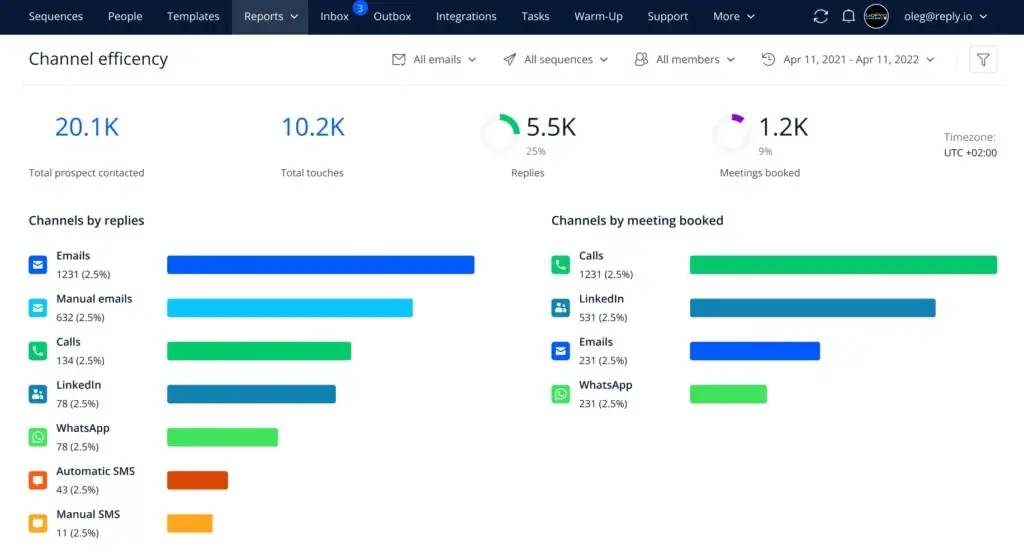
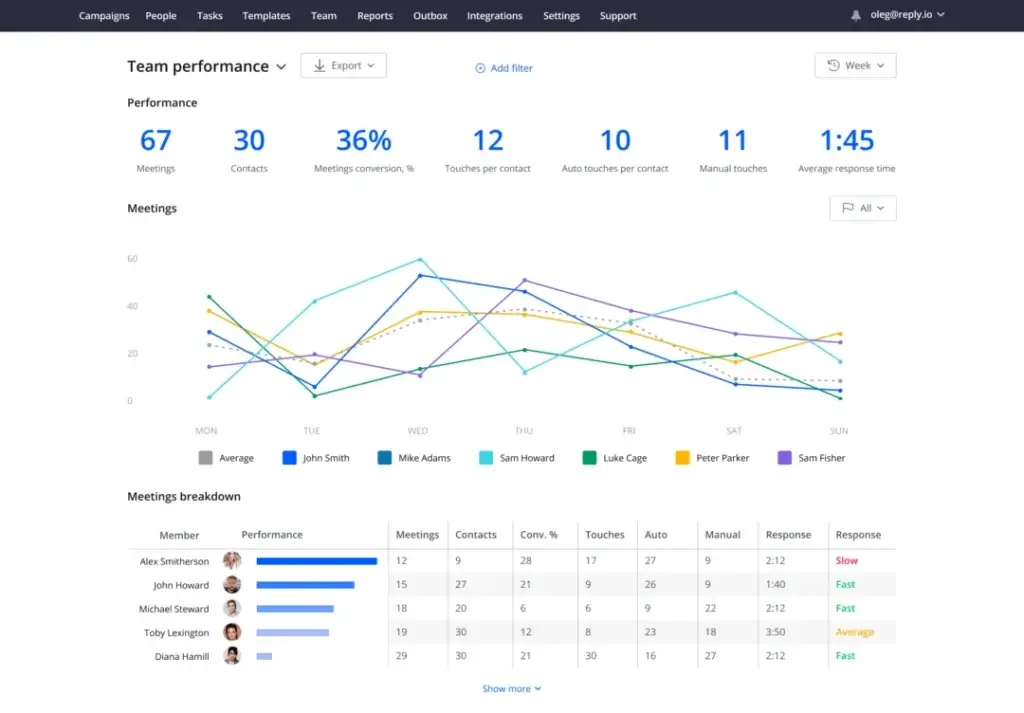
Reply.io includes reporting dashboards that show how your outreach performs across channels. You can track contacted prospects, total touches, replies, meetings booked, response time, and team performance.
This makes it easier to understand which channels are driving replies and where your outbound process needs improvement.
For example, if LinkedIn touchpoints generate more meetings than email, you can adjust your sequence strategy. If one rep has a better response rate, you can review their messaging and turn it into a team template.
CRM Integrations and API
Reply.io integrates with popular CRMs and sales tools, including Salesforce, HubSpot, Pipedrive, Zoho CRM, and other platforms. It also supports workflow automation through tools like Zapier, Make, and API connections.
This helps you connect outbound activity with your broader sales process. For example, you can sync leads into your CRM, update statuses, trigger sequences, or log outreach activity.
Before committing, check whether your specific CRM workflow is supported natively or whether you will need a Zapier setup, API configuration, or custom field mapping.
Pros and Cons
Advantages and Limitations of Using Reply.io
Positive
✅ Strong multichannel sequences
✅ AI SDR and personalization tools
✅ Built-in data and enrichment
✅ Useful deliverability features
Negative
❌ Pricing can become complex
❌ Advanced setup takes time
❌ Some features depend on add-ons
❌ Not ideal for basic email-only outreach
Reply.io offers a broad feature set, but the real question is whether those features match your sales motion. Here is a practical look at the main advantages and limitations.
✅ Pros
- Strong multichannel outreach: Reply supports email, LinkedIn, calls, SMS, WhatsApp, and manual tasks.
- AI SDR functionality: Jason AI can help with prospecting, personalization, follow-ups, and meeting booking.
- Useful personalization tools: AI variables help you make cold outreach more relevant at scale.
- Built-in prospecting data: Reply can reduce the need for a separate contact database.
- Deliverability support: Warm-up, validation, and domain checks help improve sender reputation.
- Good reporting dashboards: You can monitor replies, meetings, channel performance, and team activity.
❌ Cons
- Pricing can be hard to compare: Plans, add-ons, active contacts, data credits, and AI SDR costs need review.
- Advanced workflows take setup: AI SDR, multichannel logic, and CRM syncing may require onboarding time.
- Not always the cheapest option: Email-only teams may find better value with simpler cold email platforms.
- Data quality still needs review: Built-in data is helpful, but you should still validate important prospect lists.
- Some integrations may need configuration: Complex CRM workflows can require custom field mapping or automation tools.
How Reply.io Works
The Mechanism Behind Reply.io
Reply.io works by connecting your prospect data, outreach channels, campaign sequences, and performance reporting into one workflow.
The typical process starts with finding or importing leads, creating a sequence, personalizing the message, launching outreach, and monitoring results.
Onboarding and Setup
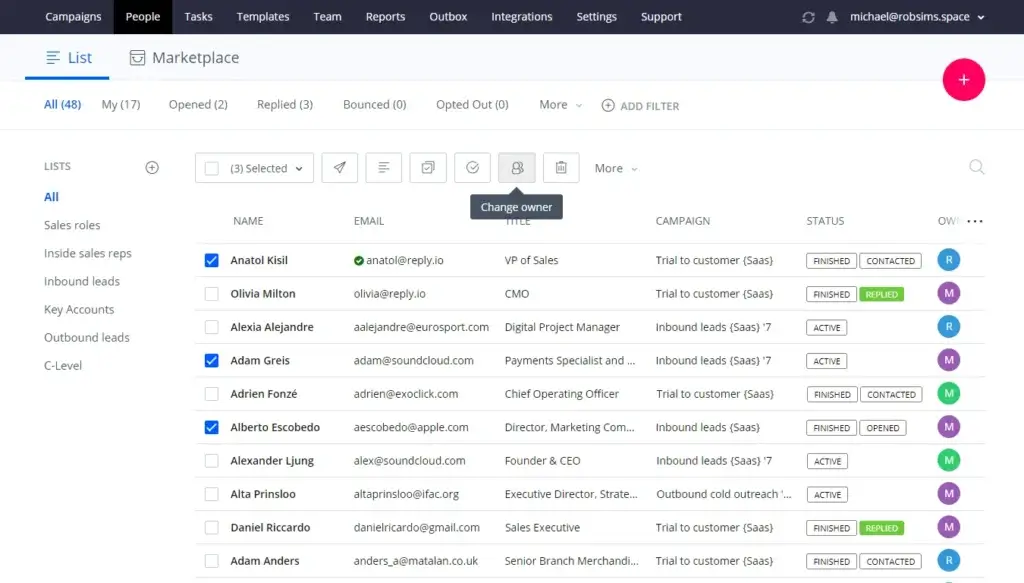
To start using Reply.io, you connect your email account, configure sender settings, check domain health, and import or search for prospects.
The setup process is straightforward if you already understand cold outreach basics. However, teams new to outbound sales should spend time configuring sending limits, warm-up, domain authentication, and unsubscribe settings before launching campaigns.
This is important because Reply can automate your outreach, but it should not be used to scale poorly targeted campaigns. You need clean data, clear ICP criteria, and responsible sending practices.
Building Your Ideal Customer Profile
Your ideal customer profile is the foundation of every Reply.io campaign.
You can segment prospects by role, industry, location, company size, seniority, and other fields. You can also build different lists for different buyer personas, such as sales leaders, founders, marketing executives, or RevOps managers.
This segmentation helps you create more relevant messaging. A campaign aimed at sales leaders should not use the same pain points as a campaign aimed at recruiters or agency owners.
Creating and Launching Sequences
After you define your audience, you can create an outreach sequence. Reply gives you the option to use templates, write your own copy, or generate messaging with AI.
A strong Reply sequence usually includes a mix of automated emails, manual review points, LinkedIn actions, and call tasks. This gives your team consistency without removing human judgment entirely.
For best results, avoid over-automating every step. Use automation for structure, but keep important messages personal, especially when targeting senior decision makers or enterprise accounts.
Monitoring and Improving Campaigns
Once your campaign is live, Reply’s reports help you understand what is working.
You can review performance by channel, sequence, mailbox, team member, reply type, and meeting outcome. This helps you find weak points in your outreach process.
If reply rates are low, your issue may be targeting, offer clarity, subject lines, or the first sentence. If deliverability metrics are weak, you may need better validation, lower sending volume, or stronger domain setup.
AI Sales Automation
Reply.io AI SDR Review: Jason AI Explained
Jason AI is one of the most important parts of Reply.io’s current positioning. It is designed to act like an AI SDR that can support prospecting, personalization, outreach, reply handling, and meeting booking.
This makes Reply.io more than a sequencing tool. It becomes a platform that can help automate parts of the sales development process.
What Jason AI Can Do
Jason AI can help you define your ICP, identify prospects, create personalized sequences, generate messages, and support follow-up workflows.
Depending on your setup, it can also help manage replies and schedule meetings. This can be useful when you want to test outbound campaigns without immediately expanding your SDR team.
Autopilot vs Human Review
AI SDR tools are most effective when you use them with clear controls. Reply.io can help automate the workflow, but you should decide where human approval is required.
For low-risk campaigns, automation may be enough. For high-value accounts, enterprise prospects, or sensitive industries, you should review targeting, personalization, and replies before sending.
When Jason AI Is Worth It
Jason AI is worth considering if your team has a clear offer, strong ICP, and enough outbound volume to justify automation.
It can be especially useful for founders, lean sales teams, and agencies that need to launch campaigns faster. It is less useful if you are still unsure who you sell to, what pain points matter, or which industries respond best.
Where Jason AI Still Needs Human Oversight
AI can create outreach copy quickly, but it does not replace strategy. You still need to define positioning, check the data, review personalization quality, and measure campaign outcomes.
The best approach is to treat Jason AI as a productivity layer, not as a complete replacement for sales judgment.
Business size fit
Who Should Use Reply.io?
Reply.io can support several types of users, but it is strongest when outbound sales is a meaningful part of your growth strategy.
Best-Fit Teams and Use Cases
| Use Case | Why Reply.io Fits | Potential Limitation |
| B2B sales teams | Automates multichannel follow-ups and helps book more meetings | Requires proper setup and messaging strategy |
| Founders and solo sellers | Helps scale outreach without hiring a full SDR team | AI SDR and add-ons may increase cost |
| Lead generation agencies | Supports campaign management, client workspaces, and reporting | High-volume email agencies may prefer inbox-scaling tools |
| Recruiters | Useful for reaching candidates through email, LinkedIn, and SMS | Messaging must remain personal and compliant |
| RevOps teams | Integrates with CRMs and supports outbound process visibility | Complex workflows may need API or automation setup |
| SaaS sales teams | Useful for outbound prospecting, demos, and pipeline generation | Data quality and segmentation still need review |
Who Reply.io May Not Be Right For
Reply.io may be more than you need if you only want a simple cold email sender. It may also feel expensive if your team does not plan to use multichannel sequences, AI SDR, reporting, and deliverability tools.
You may want to consider alternatives if your main priority is very high-volume email sending, low-cost inbox rotation, deep CRM-native sales engagement, or advanced data orchestration through tools like Clay.
Pricing and Plans
How Much Does Reply.io Cost?
Reply.io pricing can be difficult to evaluate because the platform offers several product paths, including email volume, multichannel outreach, AI SDR, and agency plans.
Pricing may also vary based on billing cycle, users, active contacts, mailboxes, data credits, AI usage, and add-ons. Before buying, review the live pricing page and confirm which features are included in your selected plan.
Reply.io Pricing Explained
Reply’s pricing model is not only about users. You should also understand active contacts, data credits, mailboxes, and add-ons.
Active contacts typically refer to the unique contacts you can send the first step of a campaign to during a billing period. Follow-ups may be treated differently depending on plan details.
Data credits are used for finding or enriching contacts. If your team relies heavily on Reply’s database, these credits can affect your monthly cost.
Email Volume Plan
The Email Volume plan is designed for teams that mainly need cold email outreach, unlimited mailboxes, warm-up, and active contact capacity.
This plan can be a good fit if email is your primary channel and you do not need full multichannel automation across LinkedIn, calls, SMS, and WhatsApp.
Multichannel Plan
The Multichannel plan is better for teams that want email plus additional outreach channels. This is the plan to review if your sales process includes LinkedIn touches, calls, SMS, WhatsApp, and team collaboration.
For most outbound sales teams, this is likely the more practical Reply.io plan because it aligns with how modern SDR teams actually prospect.
AI SDR Plans
Reply.io’s AI SDR plans are built for teams that want Jason AI to support more of the outreach workflow. This can include prospecting, personalization, response handling, and meeting booking.
These plans can make sense if you want to scale outbound capacity without immediately hiring more SDRs. However, they require clear campaign goals and ongoing quality control.
Agency Plans
Agency plans are designed for companies managing outbound campaigns for multiple clients. They may include client workspaces, reporting, white-label options, and agency-focused workflows.
If you run a lead generation agency, this structure can be useful because it lets you separate client campaigns while centralizing reporting and operations.
Reply.io Pricing Table
| Plan Type | Best For | Key Notes |
| Email Volume | Email-focused outbound teams | Designed for cold email sending, warm-up, and mailbox scaling |
| Multichannel | SDR teams using email, LinkedIn, calls, SMS, and WhatsApp | Better fit for broader sales engagement workflows |
| AI SDR | Teams that want Jason AI to support outbound execution | Useful for AI-assisted prospecting, replies, and meeting booking |
| Agency Core | Agencies managing campaigns for clients | Supports client workflows and centralized campaign management |
| Agency AI SDR | Agencies offering AI-powered outbound services | Combines client campaign management with AI SDR functionality |
| Add-ons | Teams needing more data, channels, or validation | Can include LinkedIn, calls, SMS, AI credits, live data, and validation |
Value for Money
Reply.io can provide strong value when your team uses several parts of the platform together. For example, if you use its data, AI personalization, email warm-up, multichannel sequences, CRM sync, and reporting, it can replace several separate tools.
If you only use it for basic email automation, the value may be harder to justify. In that case, a simpler tool may offer a better price-to-feature ratio.
How Does Reply.io Compare To Other Tools?
Reply.io competes with several outbound sales and sales engagement platforms. The right alternative depends on whether you care most about data, email volume, LinkedIn automation, CRM workflow, or enterprise sales execution.
| Tool | Best For | How It Compares to Reply.io |
| Reply.io | AI-assisted multichannel outreach | Strong for teams that want sales engagement, data, AI SDR, and deliverability in one platform |
| Apollo.io | Sales intelligence plus outreach | Often stronger for database-led prospecting and all-in-one sales intelligence workflows |
| Lemlist | Creative cold email personalization | Often easier for teams focused on personalized email campaigns and visual outreach |
| Instantly | High-volume cold email | Better fit for teams that prioritize inbox scaling and email sending volume |
| Smartlead | Agencies and inbox-heavy outbound | Strong for managing many mailboxes and high-volume sending operations |
| Salesloft | Enterprise sales engagement | Better suited for mature revenue teams needing deeper enterprise workflows |
| Outreach | Enterprise revenue execution | Stronger for large sales organizations with complex sales processes |
Where Reply.io Stands Out
Reply.io stands out because it combines sales engagement, AI SDR, contact data, personalization, and deliverability in one platform.
This makes it especially useful for teams that want a practical outbound system without stitching together many separate tools.
When to Consider Alternatives
Consider Apollo.io if data coverage and sales intelligence are your top priorities. Consider Instantly or Smartlead if your main goal is high-volume email sending across many inboxes.
For larger revenue teams that need advanced governance, forecasting, and enterprise workflows, Salesloft or Outreach may be better fits.
Integration & Compatibility
Reply.io Integrations and CRM Compatibility
Reply.io’s integrations help connect outbound campaigns with your broader sales stack. This is important because outreach data should not live in isolation.
CRM Integrations
Reply.io integrates with popular CRM platforms, including Salesforce, HubSpot, Pipedrive, Zoho CRM, and others.
These integrations can help you sync contacts, update lead statuses, log activity, and trigger workflows. This is useful for sales teams that want Reply to support their CRM process rather than replace it.
Email and Communication Tools
Reply supports major email providers and lets you connect multiple mailboxes. It also supports calls, SMS, WhatsApp, and LinkedIn touchpoints depending on your plan and setup.
This gives your team a more complete outreach workflow compared with tools focused only on cold email.
API, Zapier, Make, and Workflow Automation
For more advanced workflows, Reply.io supports API access and automation through tools like Zapier, Make, and n8n.
This is helpful if your team wants to connect Reply with spreadsheets, CRMs, Slack notifications, enrichment tools, or custom internal systems.
However, advanced workflows may require technical setup. If clean CRM sync is critical, test the integration before rolling it out across your sales team.
Email Performance
Reply.io Deliverability and Email Warm-Up
Email deliverability should be one of your biggest considerations when evaluating Reply.io. Strong automation is only useful if your emails actually reach the inbox.
Reply includes several deliverability tools designed to help you prepare and monitor your sending infrastructure.
What Reply.io Includes for Deliverability
- Email warm-up support
- SPF, DKIM, and DMARC checks
- Custom tracking domains
- Email validation options
- Mailbox and sender health monitoring
- Sending controls and campaign performance reports
These features can help reduce bounce rates, protect your domain reputation, and improve inbox placement.
What Still Depends on Your Team
Reply.io can help with deliverability, but it cannot guarantee inbox placement by itself.
You still need to use verified data, avoid aggressive sending volume, write relevant messages, include clear opt-out options, and monitor negative engagement signals.
If your emails are generic, misleading, or sent to poor-quality lists, deliverability will suffer no matter which tool you use.
Trust and Safety
Compliance and Responsible Outreach
Cold outreach tools should be used carefully. Reply.io can support responsible outreach workflows, but it does not make your campaigns automatically compliant.
Your team is still responsible for following applicable email, privacy, and data protection rules in the markets where you operate.
Responsible Outreach Best Practices
- Use accurate and relevant prospect data
- Include clear opt-out options
- Avoid misleading subject lines
- Respect regional privacy and email laws
- Monitor bounce rates and complaints
- Keep outreach relevant to the recipient’s role
If you sell into regulated regions or industries, review your outreach process with a legal or compliance professional before scaling campaigns.
Conclusion
Is Reply.io Worth It?
⭐ Overall Rating: 8.4/10
Reply.io is one of the stronger options if you want AI-assisted outbound sales engagement in one platform.
It is especially useful if your team needs multichannel sequences, AI personalization, email deliverability tools, built-in prospecting data, and CRM integrations. Jason AI also makes Reply.io more compelling for teams that want to test AI SDR workflows without building everything manually.
The main concern is cost. Reply.io can become expensive if you need multiple channels, AI SDR, data credits, add-ons, and agency features. For teams that only need basic cold email sending, simpler tools may offer better value.
My opinion: Reply.io is best for serious outbound teams that want to improve productivity and scale personalized outreach. It is not the cheapest tool, but it can be worth it if you use the full platform rather than only a small part of it.
If your team wants a broader view of similar platforms, you can also compare Reply.io with the tools listed in our Best Lead Generation Tools guide.
FAQ
Frequently Asked Questions
What is Reply.io used for?
Reply.io is used for outbound sales engagement, cold email automation, multichannel prospecting, AI personalization, lead generation, email warm-up, and meeting booking. It helps sales teams manage outreach across email, LinkedIn, calls, SMS, WhatsApp, and other sales channels.
Is Reply.io good for cold email?
Yes. Reply.io is a strong cold email platform if you need automation, personalization, deliverability tools, mailbox warm-up, email validation, and reporting. It is best for teams that want structured outbound campaigns rather than simple one-off email sending.
Does Reply.io have an AI SDR?
Yes. Reply.io offers Jason AI, an AI SDR designed to support prospecting, personalization, outreach, reply handling, and meeting booking. It can help sales teams automate parts of the SDR workflow while still allowing human review and control.
How much does Reply.io cost?
Reply.io pricing depends on the plan, users, active contacts, mailboxes, data credits, AI usage, and add-ons. The platform offers email volume, multichannel, AI SDR, and agency plans. Always check the current pricing page before purchasing because packages may change.
What are active contacts in Reply.io?
Active contacts generally refer to the unique contacts you can send the first step of a campaign to during a billing period. Follow-ups may be handled differently depending on the plan. This is important when estimating monthly outreach volume and cost.
Does Reply.io include email warm-up?
Reply.io includes email warm-up and deliverability tools in relevant plans. These features help improve sender reputation, but deliverability also depends on list quality, sending volume, domain setup, bounce rates, and message relevance.
Does Reply.io integrate with Salesforce and HubSpot?
Yes. Reply.io integrates with major CRM platforms, including Salesforce, HubSpot, Pipedrive, Zoho CRM, and others. It also supports workflow automation through tools like Zapier, Make, n8n, and API connections.
Is Reply.io better than Apollo.io?
Reply.io is often better for AI-assisted multichannel outreach and sales engagement workflows. Apollo.io is often stronger for sales intelligence and database-led prospecting. The better choice depends on whether your priority is outbound execution, data coverage, or both.
What are the best Reply.io alternatives?
The best Reply.io alternatives include Apollo.io, Lemlist, Instantly, Smartlead, Salesloft, and Outreach. Apollo is strong for data, Lemlist for personalization, Instantly and Smartlead for high-volume email, and Salesloft or Outreach for enterprise sales teams.
Is Reply.io worth it for small sales teams?
Reply.io can be worth it for small sales teams if outbound sales is a major growth channel and the team will use automation, AI personalization, deliverability, and multichannel workflows. If you only need basic email sending, a simpler tool may be more cost-effective.