
Introduction
If your outbound process depends on more than sending a few automated emails, lemlist is one of the more complete sales engagement platforms to consider. It combines lead discovery, contact enrichment, personalized outreach, email deliverability, LinkedIn automation, calling, SMS, WhatsApp, and reply management within one connected workspace.
Its main strength is not simply automation. lemlist is designed to help you automate outreach without making every message look mass-produced. Dynamic variables, AI-assisted research, personalized images, multichannel sequences, and engagement-based conditions give you more control over how each prospect experiences a campaign.
That makes lemlist particularly relevant when your sales strategy depends on thoughtful outbound rather than maximum email volume alone. It can support founders, SDR teams, growth agencies, and mid-market sales organizations that want to combine prospecting and campaign execution without assembling a complicated stack of separate tools.
In this lemlist review 2026, you will see:
- How lemlist manages multichannel sales outreach
- Which personalization and AI features provide real value
- How its lead database and enrichment system work
- Where its pricing becomes expensive
- How lemlist compares with leading alternatives
lemlist is not automatically the best cold email platform for every use case. However, it is one of the stronger options when relevance, personalization, and coordinated multichannel outreach matter more than sending the largest possible volume.
What Is lemlist?
lemlist is an AI-powered sales engagement platform for finding B2B prospects, enriching contact information, building personalized campaigns, automating outreach, and managing replies.
The platform originally became known for cold email personalization. It has since expanded into a much broader outbound sales system that covers most of the workflow between identifying a potential buyer and starting a qualified sales conversation.
A Brief Overview
lemlist lets you search for prospects, reveal verified contact data, add leads to campaigns, and engage them through email, LinkedIn, phone, SMS, and WhatsApp. You can build linear sequences or create conditional workflows that change according to a lead’s profile or previous engagement.
The platform also includes lemlist AI, lemAgent, agentic enrichment, intent signals, website visitor identification, lemwarm, inbox rotation, deliverability diagnostics, and a unified inbox.
This broad feature set places lemlist between a specialist cold email tool and a larger sales engagement platform. It offers more prospecting and data functionality than a basic sequencer, but it does not attempt to replace a complete CRM for forecasting, account management, renewals, and post-sale operations.
Who Should Use lemlist?
lemlist is particularly suitable for:
- SDR teams running personalized outbound campaigns
- Founders building an early B2B sales pipeline
- Growth teams combining email and LinkedIn outreach
- Lead generation agencies prioritizing campaign quality
- RevOps teams connecting enrichment, outreach, and CRM data
- Mid-market sales teams needing multichannel automation
The platform is less compelling when your only goal is sending very high volumes of cold email through dozens or hundreds of mailboxes. Tools built specifically for mailbox infrastructure and agency-scale sending may provide a simpler and more economical setup for that use case.
What Makes lemlist Different?
lemlist’s differentiator is the connection between data, personalization, and multichannel execution.
Many outreach tools let you insert a first name and company name into an email. lemlist goes further by helping you research prospects, clean lead data, generate contextual variables, personalize images and messages, and change the sequence according to the prospect’s actions.
Its workflow is therefore built around a more useful question: how can you automate outreach while still making each interaction feel relevant?
Key Features
lemlist Software Specification
lemlist covers a large portion of the outbound workflow. The most valuable features are those that reduce the distance between identifying a suitable account and starting a relevant conversation with the right person.
1. B2B Lead Database and Prospecting
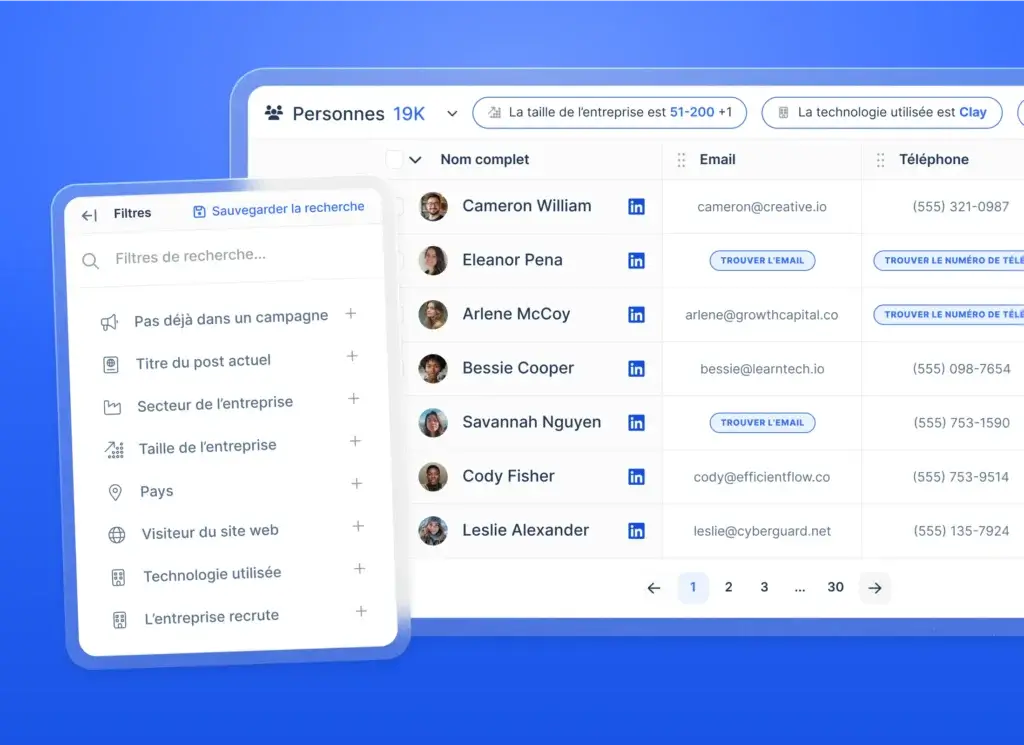
lemlist includes access to a large B2B lead database containing hundreds of millions of professional profiles. You can search for prospects using criteria such as job title, seniority, location, company size, industry, technology usage, funding, and hiring activity.
This gives you a way to build targeted lists without beginning every campaign in LinkedIn Sales Navigator or purchasing data from a separate sales intelligence provider.
The database is useful, but it should not be confused with unlimited verified contact data. Finding or revealing specific email addresses and phone numbers uses lemlist credits. Your real data cost will therefore depend on how many contacts you enrich.
2. Waterfall Email and Phone Enrichment
Instead of relying on one contact database, lemlist’s waterfall enrichment searches across multiple data providers. If the first provider does not return a valid result, the system continues through additional sources.
This method can improve coverage and reduce the need to subscribe to several enrichment products. lemlist also applies verification to found email addresses and charges for successful results rather than every attempted search.
Waterfall enrichment is especially useful when you:
- Prospect across several regions or industries
- Need better coverage than a single data vendor provides
- Want to enrich LinkedIn lists before launching outreach
- Need contact data directly inside your campaign workflow
The limitation is predictability. A credit-based model requires you to estimate data usage separately from software subscription costs.
3. Multichannel Outreach Sequences
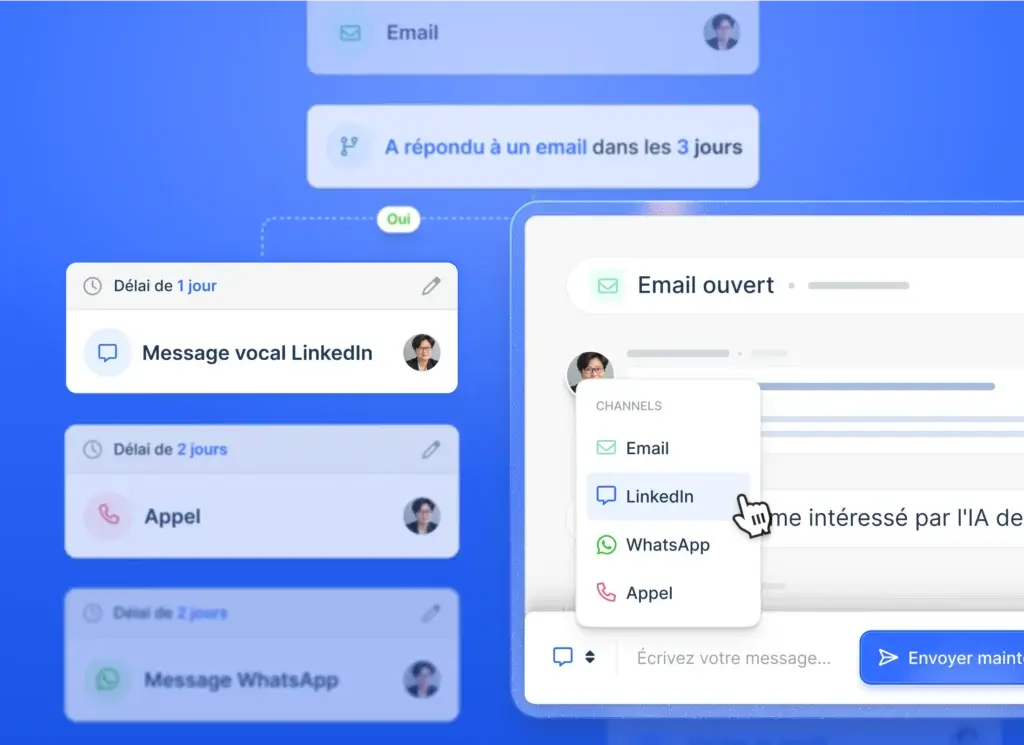
Multichannel sequencing is one of lemlist’s most important advantages. You can combine email, LinkedIn, calls, SMS, WhatsApp, and manual tasks in the same campaign.
A typical workflow might begin with an email, wait for engagement, visit the prospect’s LinkedIn profile, send a connection request, create a call task, and then follow up through another channel.
This approach reduces your dependence on one inbox. It also lets you adapt outreach to the channels your prospects are more likely to use.
lemlist supports both automated and manual steps. That balance is valuable because not every sales interaction should be fully automated. A manual reminder to comment on a relevant LinkedIn post may create more value than another generic automated message.
4. Advanced Conditions and Engagement-Based Branching
Basic outreach tools move every lead through the same sequence. lemlist can use conditions to change what happens next.
For example, you can create a call task when a lead opens an email, pause until a LinkedIn invitation is accepted, or send a different follow-up when a contact does not have a verified email address.
These conditions help you build a more responsive buyer journey. They also make campaign setup more demanding. Your team must understand the logic behind each branch and test workflows carefully before adding large lead lists.
5. AI Personalization and Agentic Enrichment
lemlist’s AI functionality extends beyond writing email drafts. It can help clean lead data, segment contacts, research companies, create variables, build sequences, and generate contextual personalization.
Agentic enrichment can analyze company websites, LinkedIn profiles, CRM data, and previous call information. The resulting insights can be stored as structured fields and inserted into campaign messages.
This is a practical use of AI because it addresses one of the most expensive parts of outbound sales: researching every account well enough to write something relevant.
However, AI-generated personalization still requires quality control. A message can be technically personalized while remaining strategically weak. Your value proposition, segmentation, offer, and timing remain more important than the number of variables in the email.
6. lemAgent and AI Campaign Creation
lemAgent provides a conversational way to build campaigns. You can describe your audience and campaign objective, then use the agent to find prospects, enrich contact information, create messaging, and prepare a sequence.
This lowers the setup barrier for less technical users. It can also shorten the time between identifying an audience and launching a campaign.
The feature is most valuable as a starting point. Experienced teams should still review targeting rules, sequence timing, personalization fields, and sending limits before publishing a campaign.
7. Personalized Images, Messages, and LinkedIn Voice Notes
Personalization has always been central to lemlist. In addition to text variables, you can create visual assets and messages that use prospect-specific information.
The platform can also generate personalized LinkedIn voice notes from a reusable script. This gives sales representatives another way to stand out in crowded LinkedIn inboxes without manually recording every message.
These features work best when personalization supports a strong reason for contacting the prospect. Adding someone’s name to an image will not rescue a weak offer, but relevant personalization can make a credible message easier to notice.
8. Email Deliverability and lemwarm
lemlist includes deliverability tools intended to help you configure domains, warm mailboxes, monitor sending health, and protect sender reputation.
lemwarm gradually exchanges emails with other inboxes to create sending history and engagement signals. The wider Deliverability Hub also supports domain checks, sending limit management, custom tracking domains, inbox rotation, alerts, and diagnostics.
This integrated approach is convenient because you do not need a separate warm-up subscription. Still, warm-up does not guarantee inbox placement. List quality, complaint rates, authentication, sending consistency, message relevance, and domain history all affect deliverability.
9. Unified Inbox
The Unified Inbox centralizes replies from different sending accounts and supported channels. Your team can review conversation history, filter messages, respond from the correct account, and manage follow-up without switching between multiple inboxes.
This becomes particularly helpful when one prospect has received messages from more than one channel. A consolidated conversation view reduces the chance of duplicated replies or disconnected follow-ups.
10. Intent Signals and Website Visitors
lemlist can use signals such as website activity, hiring changes, fundraising events, technology usage, and LinkedIn engagement to help you identify accounts that may be more receptive to outreach.
Website visitor functionality can identify visiting companies, find relevant decision-makers, enrich their contact details, and add them to sequences.
These tools shift outbound from static list building toward event-driven prospecting. Instead of contacting every suitable company at the same time, you can prioritize accounts showing a more immediate reason to engage.
Pros and Cons
Benefits and Limitations of lemlist
lemlist provides a strong combination of personalization, prospecting, and multichannel automation. Its limitations become more noticeable when you scale user seats, consume large quantities of enrichment credits, or need high-volume cold email infrastructure.
Positive
✅ Strong multichannel campaign builder
✅ Advanced personalization options
✅ Integrated prospecting and enrichment
✅ Useful deliverability toolkit
✅ Good CRM connectivity
Negative
❌ Multichannel pricing can become expensive
❌ Enrichment credits increase total cost
❌ Advanced workflows require onboarding
❌ Not ideal for maximum-volume cold email
✅ Pros
1. Strong multichannel campaign builder
You can coordinate email, LinkedIn, phone, SMS, WhatsApp, and manual actions within the same sequence. Conditions make it possible to adapt the next step according to lead data or engagement.
2. Advanced personalization options
lemlist supports contextual variables, AI research, personalized images, custom LinkedIn messages, and voice notes. These tools make it easier to create outreach that feels more considered than a basic mail merge.
3. Integrated prospecting and enrichment
The combination of a lead database, LinkedIn workflows, waterfall enrichment, email verification, and campaign creation reduces the need to move lists between several disconnected platforms.
4. Useful deliverability toolkit
lemwarm, domain setup checks, inbox rotation, sending limits, tracking domains, and monitoring tools help you build a healthier sending foundation.
5. Good CRM connectivity
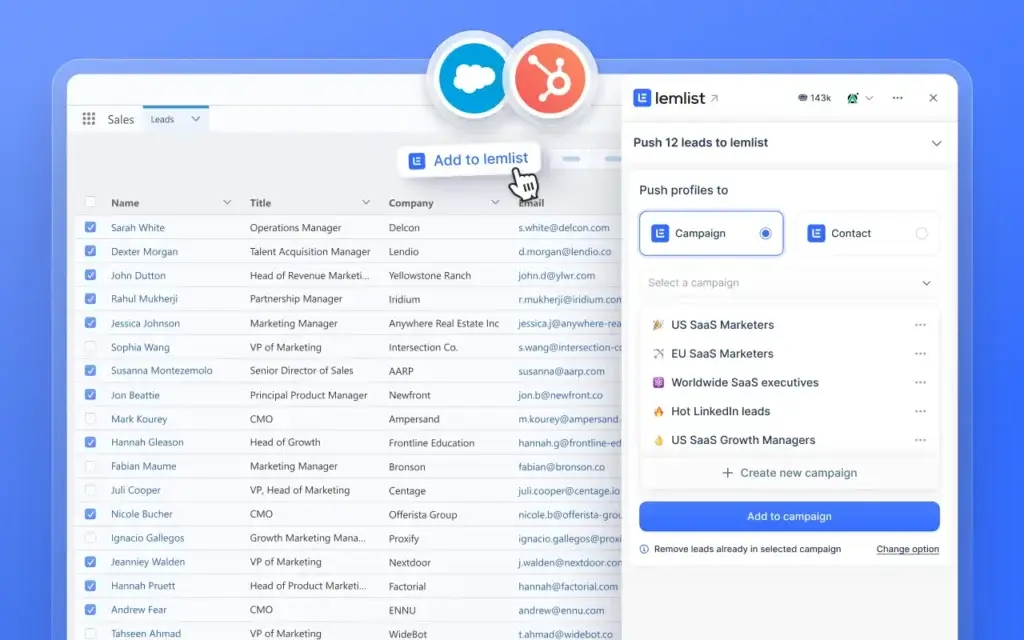
Native integrations with platforms such as HubSpot, Salesforce, and Pipedrive make lemlist easier to use as an outbound execution layer while keeping your CRM as the primary system of record.
❌ Cons
1. Multichannel pricing can become expensive
The Multichannel plan is priced per user. A team requiring several seats can therefore pay considerably more than it would for a cold email platform with workspace-level or unlimited-user pricing.
2. Enrichment credits increase total cost
Email addresses, phone numbers, and intent signals use credits. The published subscription price may not represent your complete monthly expense if your team performs substantial prospecting and enrichment.
3. Advanced workflows require onboarding
Simple campaigns are relatively approachable, but conditional sequences, data enrichment, multichannel timing, CRM syncing, and deliverability configuration introduce a learning curve.
4. Not ideal for maximum-volume cold email
lemlist can support inbox rotation and multiple senders, but platforms designed specifically for large-scale mailbox operations may be more efficient for agencies managing extensive sending infrastructure.
User Experience
Using lemlist Day to Day
lemlist’s interface is designed around the main stages of outbound sales: finding leads, organizing contacts, creating campaigns, managing conversations, and reviewing performance.
Public user feedback commonly praises its ease of use, personalization, automation, and ability to coordinate multiple channels. Criticism tends to focus on pricing, the learning curve associated with advanced configurations, and the need for deeper reporting or CRM-style visibility.
Campaign Setup and Sequence Building
The visual campaign builder makes sequence logic relatively easy to understand. Each step clearly shows the channel, timing, and action. You can preview messages, insert variables, test content, and review leads before activating the campaign.
A basic email campaign can be created quickly. A sophisticated multichannel campaign takes more planning because you need to consider LinkedIn limits, call tasks, conditional branches, enrichment status, and sender availability.
Lead Management Workflow
leads can be imported from CSV files, captured through the Chrome extension, pulled from the native database, enriched inside the platform, or synced from a CRM.
This creates a smoother workflow than repeatedly exporting and uploading lists. Your team can move from research to enrichment and outreach without losing the fields used for segmentation and personalization.
Reporting and Campaign Analytics
lemlist tracks metrics such as sent emails, opens, clicks, replies, bounces, and interested responses. These metrics are helpful for comparing campaign steps and identifying weak messages.
However, advanced revenue attribution and pipeline reporting still belong in your CRM or business intelligence system. Outreach engagement does not automatically show whether a campaign generated qualified opportunities, influenced revenue, or attracted the right customer profile.
What New Users Should Expect
The interface itself is approachable, but successful implementation requires more than learning where buttons are located.
Your team should establish:
- A clear ideal customer profile and exclusion criteria
- Rules for verifying and reviewing contact data
- Safe sending limits for every connected mailbox
- Standards for AI-generated personalization
- Ownership rules for replies and CRM updates
Without these processes, even a well-designed outreach platform can produce inconsistent data, duplicated activity, and poor-quality campaigns.
Business Size Fit
Who Gets the Most Value From lemlist?
lemlist can support companies of different sizes, but the value changes according to team structure, channel mix, sending volume, and existing sales technology.
| Business Type | Fit | Why | Main Concern |
| Solo founders | Good | Combines prospecting, enrichment, outreach, and warm-up | May be expensive for light usage |
| Small B2B teams | Strong | Supports repeatable email and LinkedIn campaigns | Credits require cost monitoring |
| Lead generation agencies | Moderate to strong | Useful personalization and client campaign workflows | Per-user multichannel pricing may limit margins |
| Mid-market sales teams | Excellent | Strong balance of automation, CRM sync, and personalization | Requires process governance |
| Enterprise teams | Good | Enterprise roles, SSO, onboarding, and account support | May need deeper analytics and approval controls |
Solo Founders
lemlist can help a founder manage prospecting and outbound without immediately hiring a large sales team. AI-assisted research and campaign creation are useful when time is limited.
However, a solo user should compare the subscription and credit costs with simpler email-first alternatives. The platform offers more value when several channels and enrichment workflows are actively used.
Small and Mid-Sized Sales Teams
This is lemlist’s strongest segment. You get enough automation to build a repeatable process without the administrative weight of an enterprise sales engagement platform.
Shared campaigns, CRM sync, multichannel steps, unified conversations, and centralized data can improve consistency across SDRs and account executives.
Lead Generation Agencies
Agencies that sell personalized outbound services can get strong value from lemlist. Its visual personalization and multichannel options make it easier to differentiate campaigns from basic high-volume cold email.
Agencies focused mainly on managing large numbers of client mailboxes should compare lemlist with infrastructure-oriented tools. Per-user pricing and sender limits may become less attractive as client volume increases.
Enterprise Sales Organizations
Enterprise plans add custom roles, permissions, SSO or SAML, onboarding, priority support, and dedicated account management.
lemlist can function as an outbound execution layer for enterprise teams, especially when connected to Salesforce or HubSpot. Larger organizations should still evaluate reporting depth, approval processes, data governance, and regional compliance requirements before deployment.
Integrations
Connecting lemlist to Your Sales Stack
lemlist offers native integrations, browser workflows, API access, and automation connections. The most important integrations are those that keep prospecting and outreach activity synchronized with your CRM.
HubSpot Integration
lemlist supports two-way workflows with HubSpot. Leads and outbound activity can move between the platforms, helping your team use lemlist for campaign execution while HubSpot remains the customer and pipeline system of record.
Salesforce Integration
Salesforce users can transfer leads and outbound activity between both systems. This is useful for larger sales teams that need lemlist’s outreach features without separating campaign data from account and opportunity records.
Pipedrive and Other CRM Connections
lemlist can forward leads, opens, replies, and other activities to Pipedrive. Additional CRM connections include platforms such as Close, Zoho CRM, Attio, and Breakcold.
Review the direction and depth of every sync before implementation. Not every integration supports identical two-way behavior, custom objects, field mapping, or historical activity.
Chrome Extension, API, and Automation
The Chrome extension helps you collect prospects from LinkedIn and add them to lemlist workflows. API access and integrations with automation tools allow RevOps teams to connect lead sources, enrichment processes, CRM updates, and campaign actions.
lemlist also offers an MCP connection for compatible AI agents. This can allow an agent to search leads, enrich records, create campaigns, and review performance through natural-language instructions.
Pricing and Plans
How Much Does lemlist Cost?
lemlist’s pricing requires careful reading because software access, multichannel seats, data enrichment, intent signals, SMS, and other usage-based services can affect the final cost.
The official pricing page currently presents monthly, quarterly, and annual billing options. Annual billing is advertised with a 20% discount.
lemlist Subscription Plans
| Plan | Monthly Billing | Annual Billing | Main Highlights |
| $69/month | $55/month | 50,000 emails monthly, unlimited users and email senders, lead database, enrichment, unified inbox, warm-up, CRM integrations, and API | |
| Multichannel | $109/user/month | $87/user/month | Five senders per user, LinkedIn automation, SMS, calling, task management, and unlimited emails and messages |
| Enterprise | Custom | Custom annual contract | At least five users, advanced permissions, SSO/SAML, onboarding, dedicated account manager, and priority support |
The Email plan is unusual because the main pricing card advertises unlimited users and email senders within a 50,000-email monthly allowance. The Multichannel plan changes to per-user pricing and includes five senders for each user.
Before purchasing, confirm the exact packaging presented in your account or proposal. Software companies can update limits, bundles, and promotional pricing without changing every supporting page at the same time.
Enrichment Credits
| Credit Usage | Published Cost | Equivalent Result |
| Credit purchase | $10 per 1,000 credits | Credits can be recharged as needed |
| Verified email | 5 credits | Approximately 200 verified emails per 1,000 credits |
| Phone number | 20 credits | Approximately 50 phone numbers per 1,000 credits |
| Website visit signal | 20 credits | Charged per successful signal |
| Other intent signals | From 100 credits | Cost varies by signal type |
Is lemlist Good Value?
lemlist offers good value when you actively use several parts of the platform. Replacing separate subscriptions for warm-up, enrichment, LinkedIn automation, email sequencing, calling, and reply management can justify the cost.
The value is weaker when your requirements are narrow. You may find a cheaper alternative if you only need one of the following:
- Basic cold email sequences
- High-volume mailbox rotation
- A large B2B contact database
- Simple LinkedIn automation
- Email verification without outreach
The best way to evaluate pricing is to estimate your complete workflow. Include seats, sending accounts, verified emails, phone numbers, signals, SMS usage, and any required integrations or add-ons.
lemlist Alternatives
How Does lemlist Compare With Other Tools?
lemlist competes with cold email platforms, B2B databases, LinkedIn automation products, and full sales engagement systems. The strongest alternative depends on the part of your outbound workflow you consider most important.
| Tool | Best For | Main Strength | Main Trade-Off |
| lemlist | Personalized multichannel outbound | Combines data, AI personalization, email, LinkedIn, calls, and deliverability | Per-user multichannel pricing and credit costs |
| Instantly.ai | Cold email scale | Multi-inbox operations, deliverability, and high-volume outreach | Less emphasis on advanced multichannel personalization |
| Apollo.io | Database-led prospecting | Large sales database with engagement and enrichment tools | Can feel heavier and less specialized for campaign personalization |
| Smartlead | Agency email infrastructure | Mailbox management and scalable cold email sending | Less complete as a prospecting and multichannel workspace |
| Reply.io | Structured sales engagement | AI-assisted sequences and broad engagement workflows | May be more complex than necessary for smaller teams |
lemlist vs Instantly.ai
Instantly.ai is a strong alternative for teams focused on cold email infrastructure, multiple sending accounts, deliverability, and high-volume campaign operations.
lemlist is generally the stronger choice when email is only one part of your outreach strategy. Its LinkedIn actions, calls, conditional sequences, personalization, and integrated enrichment give you more control over the complete prospect journey.
Choose Instantly.ai for operational email scale. Choose lemlist for more personalized and coordinated multichannel outreach.
Read the full Instantly.ai review for a closer examination of its deliverability, lead database, and outreach plans.
lemlist vs Apollo.io
Apollo.io is one of the strongest choices when prospecting data is the starting point of your buying decision. It combines a large B2B database with contact enrichment, sequences, calling, workflows, and opportunity tracking.
lemlist has the advantage when your campaigns require richer personalization and more flexible multichannel sequencing. Apollo may provide stronger value for teams that need broad sales intelligence and outbound tools in one system.
Choose Apollo.io for database-led prospecting. Choose lemlist when campaign relevance, LinkedIn workflows, and personalization are the higher priorities.
See the complete Apollo.io review for its pricing, credit model, CRM features, and limitations.
lemlist vs Smartlead
Smartlead is designed primarily around scalable cold email operations. It is often attractive to agencies and teams that manage many mailboxes, client campaigns, and sender identities.
lemlist provides a broader sales experience. It combines lead sourcing, waterfall enrichment, LinkedIn, calls, AI personalization, intent data, and reply management in a more representative-friendly interface.
Choose Smartlead for email infrastructure and agency-scale sending. Choose lemlist for a more complete multichannel prospecting workflow.
Read the full Smartlead review for a closer look at its mailbox infrastructure, deliverability tools, agency features, pricing, and limitations.
lemlist vs Reply.io
Reply.io offers a broad sales engagement platform with multichannel sequences, AI-supported prospecting, deliverability features, calling, and sales automation.
Reply.io may suit teams that want more structured engagement operations and AI SDR capabilities. lemlist stands out for personalization, visual campaign creation, LinkedIn workflows, and the close connection between enrichment and messaging.
Choose Reply.io for a broader structured sales engagement environment. Choose lemlist for flexible, personalization-led outbound.
Read the full Reply.io review to compare its workflow, pricing, AI features, and business fit.
Security and Compliance
How lemlist Protects Business Data
Security is particularly important for an outbound sales platform because it can connect to business inboxes, CRM records, prospect data, LinkedIn workflows, and internal sales activity.
SOC 2 Type II
lemlist’s Trust Center lists a SOC 2 Type II report. This indicates that its security controls have been assessed over a defined period rather than reviewed only at a single point in time.
GDPR and Privacy Documentation
lemlist publishes a privacy policy and data processing documentation addressing GDPR requirements. Companies operating in Europe should still examine how prospect data is sourced, processed, stored, exported, and used in their specific outreach workflows.
Enterprise Access Controls
The Enterprise plan includes custom user roles, permissions, and advanced login security through SSO or SAML. These controls are valuable for larger teams that need centralized access management and clearer separation between administrators and campaign users.
Your Compliance Responsibilities
Using a compliant software provider does not automatically make every campaign compliant. Your organization remains responsible for lawful data usage, appropriate targeting, opt-out handling, regional communication rules, suppression lists, and internal retention policies.
Before scaling outreach, involve the appropriate legal, security, or privacy stakeholders and document how prospect information moves through lemlist and your connected systems.
Conclusion
Final Thoughts on lemlist
lemlist is one of the more capable platforms for teams that want to combine prospecting, enrichment, personalized messaging, deliverability, and multichannel campaign automation.
Its greatest strength is the way these capabilities work together. A lead can move from the database into enrichment, receive AI-generated research fields, enter a conditional email and LinkedIn sequence, and have every reply managed from a centralized inbox.
That connected workflow can save substantial time and reduce the need for separate prospecting, warm-up, personalization, and automation products.
The main trade-off is cost. Multichannel access is priced per user, while enrichment and signals create additional usage-based expenses. Teams focused primarily on high-volume cold email may receive better value from a more specialized platform.
What Stands Out Most
- Excellent combination of email and LinkedIn outreach
- Strong personalization and AI research capabilities
- Useful waterfall enrichment and lead database
- Integrated warm-up and deliverability tools
- Flexible CRM and API connectivity
Final recommendation: lemlist is a strong choice for B2B teams that want outreach to feel researched, coordinated, and relevant across several channels. It is less suitable when the main requirement is simply operating the largest possible cold email infrastructure at the lowest cost.
Have More Questions?
Frequently Asked Questions
What is lemlist used for?
lemlist is used to find B2B prospects, enrich contact information, create personalized outreach, automate email and LinkedIn sequences, manage calls and messages, improve deliverability, and centralize replies.
Is lemlist a CRM?
No. lemlist includes lead records, campaign activity, task management, and reply tracking, but it is primarily a sales engagement platform. Most teams connect it to a dedicated CRM such as HubSpot, Salesforce, or Pipedrive.
How much does lemlist cost?
The Email plan is listed at $69 per month or $55 per month with annual billing. The Multichannel plan is $109 per user per month or $87 per user with annual billing. Enterprise pricing is customized.
Does lemlist offer a free trial?
Yes. lemlist offers a 14-day free trial of its Multichannel plan without requiring a credit card. After the trial, you can retain account access, but you cannot send new campaigns without a paid subscription.
Does lemlist include email warm-up?
Yes. lemlist includes lemwarm and additional deliverability tools for mailbox warm-up, domain setup, inbox rotation, sending limits, monitoring, and diagnostics.
Can lemlist automate LinkedIn outreach?
Yes. The Multichannel plan supports LinkedIn profile visits, connection requests, text messages, voice notes, and engagement-based conditions as part of a broader outreach sequence.
Does lemlist have a lead database?
Yes. lemlist includes a large B2B database that can be filtered by contact and company criteria. Verified emails, phone numbers, and some intent signals use rechargeable credits.
Is lemlist good for lead generation agencies?
lemlist is a good option for agencies offering personalized email and multichannel campaigns. Agencies managing very large numbers of mailboxes should also compare infrastructure-focused platforms because per-user pricing can increase costs.
Is lemlist better than Instantly.ai?
lemlist is generally better for personalized multichannel campaigns involving email, LinkedIn, calls, and conditional workflows. Instantly.ai is often better for high-volume cold email operations and managing many sending accounts.
What are the best lemlist alternatives?
Leading lemlist alternatives include Instantly.ai for cold email scale, Apollo.io for database-led prospecting, Smartlead for agency email infrastructure, and Reply.io for structured sales engagement workflows.