Introduction
Pictory is built around a practical promise: you should be able to turn an idea, script, article, presentation, recording, or document into a publishable video without learning a traditional editing timeline. That promise is largely accurate, especially when your goal is to create educational, marketing, social, or internal videos at a consistent pace.
The platform is strongest with structured source material. Give it a blog post, script, webinar, podcast, or PowerPoint, and it can divide the content into scenes, suggest media, add captions, generate narration, and apply branding. You still need to review visual relevance, pronunciation, pacing, and scene changes.
The main tradeoff is creative depth. Pictory provides a storyboard-style editor rather than the detailed timeline, motion controls, audio mixing, and layered effects available in professional video software. Its new generative images, video clips, and avatars also use AI credits, which means the subscription price is only one part of the cost for high-volume generative workflows.
This Pictory review examines the current creation tools, editing experience, pricing, AI-credit system, strengths, limitations, ideal use cases, and best alternatives in 2026.
What Is Pictory?
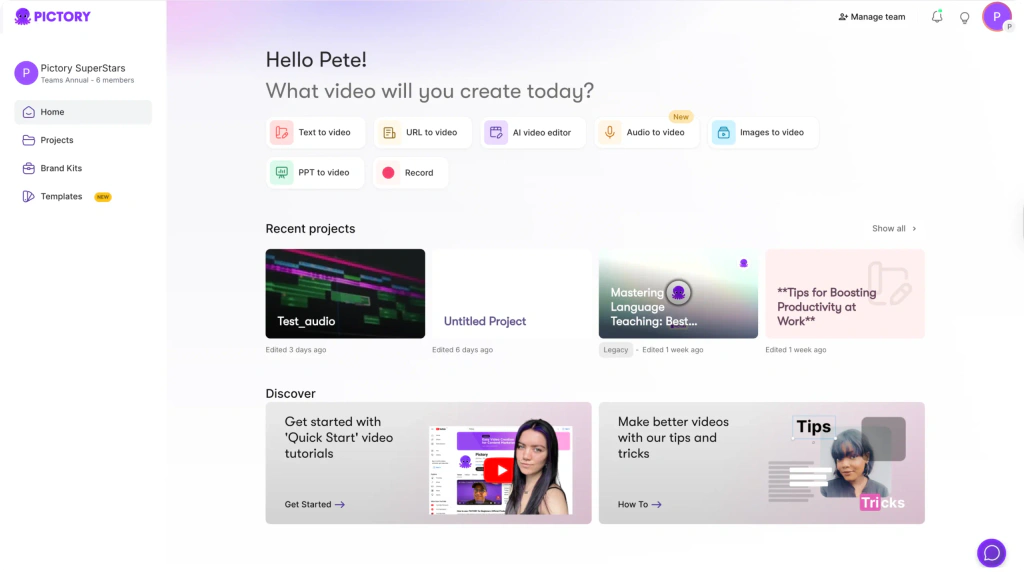
Pictory is a cloud-based AI video creation and editing platform. It can generate videos from prompts, scripts, URLs, PDFs, documents, PowerPoint presentations, images, audio, screen recordings, and existing video files.
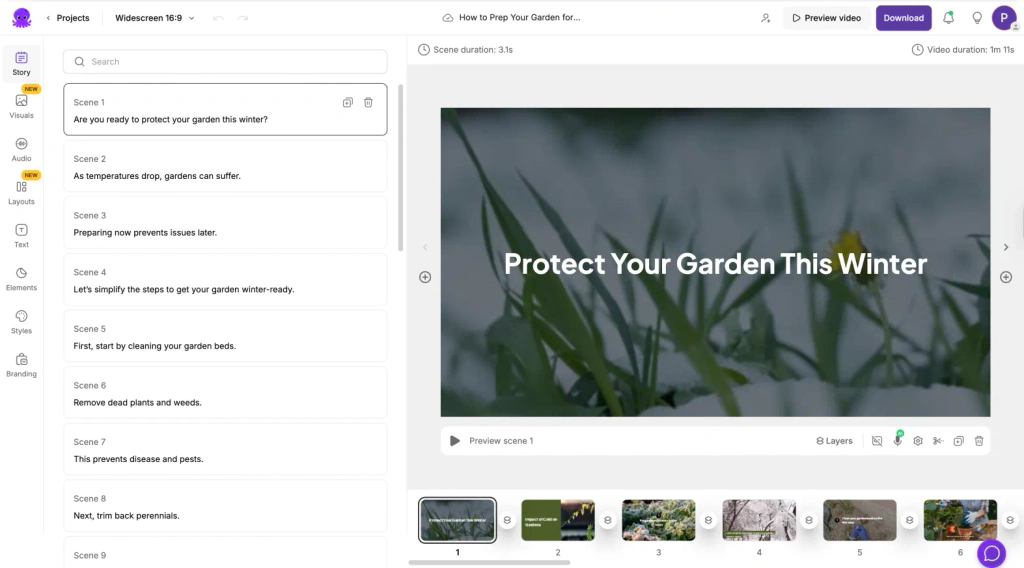
Instead of starting with an empty editing timeline, you begin with source content. Pictory analyzes that material, creates a script or scene structure, recommends visuals, adds captions, and can generate an AI voiceover. You then refine the draft scene by scene before exporting it as a landscape, portrait, or square video.
How Pictory Has Evolved
Pictory originally became known for script-to-video, article conversion, text-based editing, captions, and highlights. Pictory 2.0 adds generative visuals, avatars, voice cloning, document conversion, and interactive hosting while keeping content repurposing at its core.
Who Pictory Is Designed For
- Content marketers – Turn articles, reports, campaign ideas, and product messaging into branded videos.
- YouTube creators – Build narrated faceless videos, summaries, explainers, and supporting visual content.
- Course creators and educators – Convert scripts, documents, presentations, and lessons into instructional video.
- Agencies – Produce repeatable client videos without assigning every project to a specialist editor.
- Podcast and webinar teams – Create captions, summaries, highlights, and short clips from long recordings.
- Learning and development teams – Build branded training videos and, with Enterprise, add interactive chapters, quizzes, and SCORM delivery.
Pictory is less suitable for filmmakers, advanced motion designers, or editors who need frame-level control across many video and audio layers.
Key Features
AI Creation, Editing, and Repurposing
Pictory combines several content-to-video workflows in one interface. The most useful feature is not one-click generation by itself. It is the ability to start from material you already own, create a workable first draft, and then refine each scene without rebuilding the project manually.
Idea, Script, and Text to Video
You can enter a topic, prompt, outline, or finished script. Pictory can help generate or improve the script, divide it into scenes, choose stock visuals, add text overlays, create captions, and apply a voice. You can control whether scenes break at sentences or line breaks, adjust text length, and replace any visual that does not match the message.
This workflow is effective for explainers, list videos, thought-leadership summaries, product education, social content, and faceless YouTube production. It is less reliable when the subject depends on highly specific footage, technical demonstrations, emotional storytelling, or a consistent fictional character.
URL, Blog, PDF, and Document to Video
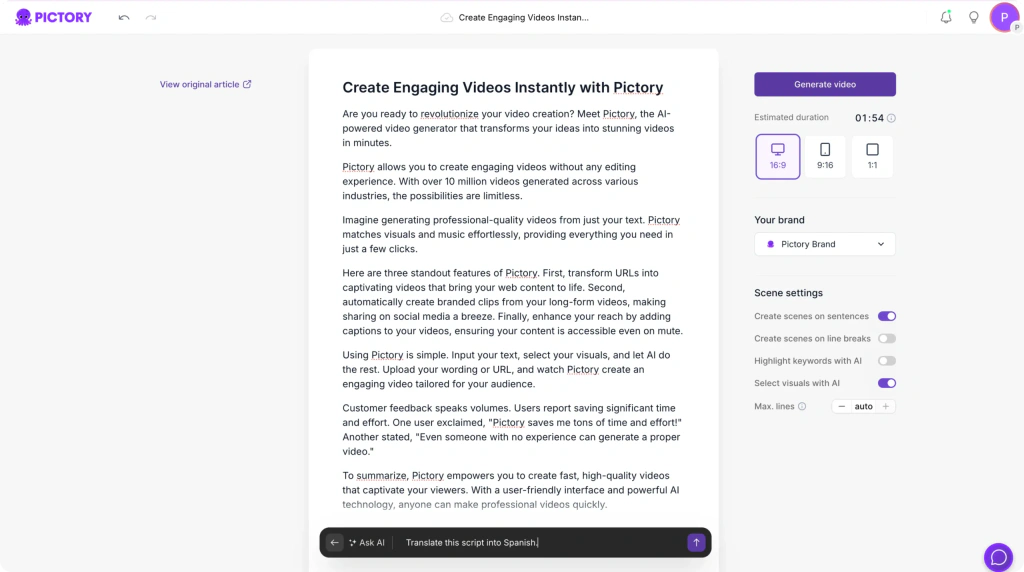
Pictory can import a webpage or blog URL, identify the main content, summarize it, and create a video draft. Doc to Video extends the same idea to PDFs and other supported documents. This gives content teams a fast way to repurpose articles, guides, reports, white papers, and internal knowledge.
Review the selected text before generating scenes. Long articles often contain background and caveats that do not belong in a short video, and written copy usually needs rewriting for spoken delivery.
PowerPoint, Images, Audio, and Recordings
Pictory supports PowerPoint-to-video, image-to-video, audio-to-video, and browser-based recording. A presentation can become a narrated training or sales video, while an audio file or podcast can be paired with captions and supporting visuals.
Uploaded voiceovers can be synchronized with scenes, while scene-by-scene recording makes corrections easier than rerecording the full video.
AI Video Editor and Transcript-Based Editing
For existing recordings, Pictory transcribes the speech and lets you edit through text. Removing a sentence from the transcript can remove the corresponding section of video, while automated tools can help identify filler words and silent gaps. You can add captions, B-roll, music, branding, and highlights without navigating a dense professional timeline.
This is a practical workflow for webinars, interviews, talking-head videos, product demonstrations, Zoom recordings, and podcasts. It is faster for content cleanup than a traditional editor, but you have less control over detailed cuts, layered audio, keyframes, masking, color correction, and complex motion graphics.
Automatic Highlights and Short Clips
Pictory can analyze long-form video and create shorter summaries or social clips. This is one of its strongest return-on-content features because one webinar or podcast can become several captioned assets for LinkedIn, YouTube Shorts, Instagram Reels, TikTok, or internal communication.
The generated selections should be treated as candidates, not final clips. A useful highlight still needs a clear opening, enough context, a complete idea, and an ending that does not feel abruptly cut. Check captions, crop position, and on-screen text on an actual phone before publishing.
AI Studio, Generative Visuals, and Avatars
AI Studio generates images and video clips from prompts inside the editor. It helps when the stock library does not contain a suitable visual, particularly for abstract ideas, niche industries, conceptual scenes, or branded illustration styles.
Higher plans add stock and custom avatars plus voice cloning. These tools support presenter-led training, announcements, and product education without repeated filming, but they consume AI credits and require quality review.
Stock Media, AI Voices, Captions, and Music
Starter includes access to a smaller stock library, while Professional and Team expand access across Storyblocks and Getty Images. Pictory automatically searches for media based on scene text, and you can search manually, upload your own assets, or replace footage scene by scene.
Standard AI voices cover several languages, and higher tiers include an allowance for more realistic ElevenLabs voices in additional languages. Captions are generated automatically and can be styled or exported in common subtitle formats.
Stock matching still needs correction. Generic business scenes and literal interpretations can make a video feel automated, while original product footage, screenshots, and diagrams improve credibility.
Brand Kits, Layouts, and Export Formats
Brand Kits store logos, colors, and fonts so recurring videos look consistent. Pictory can also create a Brand Kit from a website URL, reducing initial setup. Professional supports more kits than Starter, while Team is better suited to agencies or departments managing several brands.
Paid plans export up to 1080p in landscape, portrait, and square formats. This covers most marketing, social, training, and YouTube workflows. It does not replace a professional finishing tool when you need 4K delivery, detailed color work, complex sound design, or precise motion.
Team Collaboration, API, and Pictory Central
The Team plan adds a shared workspace for assets and projects, plus onboarding and training. Pictory also offers a separate video API for businesses that want to automate creation through systems such as Zapier, Make, or n8n.
Enterprise includes Pictory Central for interactive hosting, AI-generated chapters, quizzes, calls to action, tracking, and SCORM export. These capabilities are not part of the standard self-serve workflow.
Performance and User Experience
Video Quality, Workflow, and Ease of Use
How Good Are Pictory’s AI-Generated Drafts?
Pictory is usually good at creating structure. It can turn a clean script into logical scenes, apply captions, choose a voice, and produce a usable first version quickly. The quality of the final video depends more heavily on the source script and your review process than on the initial generation.
Visual matching is less consistent. Common topics often receive relevant footage, while niche or metaphorical ideas can produce generic suggestions. User feedback similarly praises speed and ease while criticizing visual selection, transitions, and voice flexibility.
Editing Experience for Beginners
The storyboard layout is approachable because each scene has visible text, timing, media, and audio choices. You do not need to understand tracks, keyframes, codecs, or professional editing terminology to create a useful result.
The simplicity also creates limits. Reordering scenes, revisiting generation choices, and refining transitions can feel restrictive compared with a timeline editor.
Browser, Device, and Project Limits
Pictory is web-based and currently recommends Google Chrome. It does not provide a full mobile editing app, so you need a desktop or laptop for serious creation. Text, URL, image, and PowerPoint generation is capped at 30 minutes per video on paid plans, while AI editing supports recordings up to one hour on Starter and three hours on Professional and Team.
Long documentaries, full courses, or extended podcasts may need to be split into smaller projects.
Security and Business Readiness
Pictory presents the platform as SOC 2 and GDPR compliant and displays ISO 27001 security credentials. Enterprise adds controls such as single sign-on, dedicated success support, and custom implementation services.
Review the current Pictory security and trust information, privacy terms, and retention requirements before uploading confidential or regulated material.
Pros and Cons
Benefits and Limitations of Pictory
Positive
✅ Excellent content repurposing
✅ Beginner-friendly storyboard
✅ Strong stock media access
✅ Fast captions and voiceovers
✅ Useful brand automation
Negative
❌ Stock choices need review
❌ Limited advanced editing
❌ Generative tools use credits
❌ No full mobile editor
❌ Chrome-focused experience
Strengths and Benefits
- Excellent content repurposing – Pictory converts scripts, URLs, documents, presentations, audio, and long recordings into reusable video formats.
- Beginner-friendly storyboard – Non-editors can change scenes, text, media, narration, captions, and branding without learning a professional timeline.
- Strong stock media access – Higher plans include large Storyblocks and Getty libraries, reducing the need to source every visual separately.
- Fast captions and voiceovers – Automatic transcription, subtitle styling, AI narration, and voice synchronization remove repetitive production work.
- Useful brand automation – Brand Kits, templates, multiple aspect ratios, and website-based brand extraction improve consistency across recurring content.
Limitations and Drawbacks
- Stock choices need review – Automatically selected media may be generic, repetitive, overly literal, or inaccurate for specialized topics.
- Limited advanced editing – The storyboard is not designed for deep timeline control, complex animation, professional audio mixing, or cinematic finishing.
- Generative tools use credits – AI images, video clips, and avatars consume a separate credit pool that can increase real production costs.
- No full mobile editor – Pictory creation and editing require a desktop workflow, which is less flexible for mobile-first creators.
- Chrome-focused experience – Other browsers may work inconsistently, and some users report occasional interface or export friction.
Pricing
Pictory Pricing and Plans
Pictory offers a 14-day free trial, Starter, Professional, Team, Enterprise, and a separate API plan. Annual billing currently provides meaningful discounts, including promotional pricing that may change. The figures below were checked in July 2026.
| Plan | Monthly Price | Annual Equivalent | Video Allowance | Storage | Best For |
| Free Trial | $0 for 14 days | Not applicable | 15 video minutes | Trial limits | Testing the workflow |
| Starter | $29/month | $25/month | 200 minutes/month or 2,400/year | 5 GB | New solo creators |
| Professional | $59/month | $35/month promotional rate | 600 minutes/month or 7,200/year | 20 GB | Regular content production |
| Team | $199/month | $119/month | 1,800 minutes/month or 21,600/year | 100 GB | Agencies and collaborative teams |
| Enterprise | Custom | Custom contract | Custom | Custom | Governance, interactivity, and scale |
Free Trial and Starter
The free trial gives you 14 days, a small video allowance, limited premium voice usage, and lower export limits. Downloads are restricted after the trial until you subscribe.
Starter includes one user, 200 monthly video minutes, 5 GB of storage, one Brand Kit, 60 minutes of ElevenLabs voices, basic AI tools, 100 monthly AI credits, and 1080p export.
Starter is appropriate for occasional social videos and early experimentation. Its main constraints are limited storage, one brand, lower stock access, and a relatively small AI-credit allowance.
Professional
Professional is the best-value plan for most serious solo creators and marketers. It increases the allowance to 600 video minutes per month, 20 GB of storage, five Brand Kits, broader Getty and Storyblocks access, and 120 minutes of premium AI voices.
It also adds advanced AI tools, long-video summarization, custom avatars, and voice cloning. Annual promotions may provide a larger AI-credit allowance than monthly billing, so verify the checkout details.
Team and Enterprise
Team starts with three or more users and provides 1,800 video minutes per month, 100 GB of storage, ten Brand Kits, larger voice and AI-credit allowances, shared assets, project collaboration, onboarding, and team training.
Enterprise is designed for larger deployments. It can include custom minutes and storage, unlimited Brand Kits, single sign-on, a dedicated success manager, custom templates, consulting, API access, and Pictory Central for interactive hosting, chapters, quizzes, calls to action, and SCORM export.
AI Credits and Potential Extra Costs
Video minutes and AI credits measure different things. Standard scene assembly, stock-based production, captions, and ordinary editing use your video allowance. Generative images, generative video, and avatars use AI credits.
Credit use varies by model. Generated video is charged per second, avatars by duration, and recurring top-up packs currently start at $25 for 500 credits. Test one representative project and track minutes, voice usage, storage, and credits before buying annually.
Best Use Cases
Who Should Use Pictory?
Best for Blog and Content Repurposing
Pictory is particularly strong when a blog post, report, newsletter, guide, or script already provides the structure for a narrated video.
Best for Faceless Educational and YouTube Videos
Creators can combine scripts, stock footage, captions, music, and AI voices without appearing on camera. Topic-specific media and a clear point of view improve the result.
Best for Webinar, Podcast, and Training Repurposing
Transcript editing, captions, summaries, and highlights help turn one recording into several assets. Professional and Team provide longer editing limits.
Best for Lean Marketing Teams and Agencies
Writers and marketers can produce useful video without a specialist editor. Agencies can apply separate Brand Kits, while Team adds stronger collaboration.
Not Ideal for Advanced Editors or Cinematic Production
Choose another tool for multi-camera timelines, keyframe animation, color grading, motion tracking, advanced compositing, or detailed audio. Pictory is a production accelerator, not a full professional editor.
Competitors
Best Pictory Alternatives
InVideo AI – Best for Prompt-to-Video Generation
InVideo AI is the closest alternative when you want to describe a video in a prompt and receive a more complete generated draft with script, scenes, voice, and media. Read the complete InVideo AI review for its current features, pricing, and limits.
Pictory is more naturally aligned with structured repurposing and scene-by-scene editing. InVideo AI is better when a prompt should drive more of the creative direction.
When Pictory Is Better
Choose Pictory for article-to-video, document conversion, PowerPoint workflows, long-video summaries, transcript editing, automatic highlights, and repeatable brand-led production. Its storyboard makes it easier to see and replace the visual attached to each sentence or scene.
When InVideo AI Is Better
Choose InVideo AI when you want a more conversational prompt workflow, broader generative drafting, and faster creation from a high-level brief. It is often a better starting point for marketing concepts where you do not already have a finished script or article.
| Feature | Pictory | InVideo AI |
| Primary strength | Repurposing structured content | Generating videos from prompts |
| Article and URL workflow | Strong and central | Available, less central |
| Transcript-based editing | Strong for long recordings | More generation-focused |
| Scene-level control | Clear storyboard workflow | Conversational and generative workflow |
| Automatic highlights | Strong use case | Not the main focus |
| Best for | Marketers, educators, and repurposing teams | Prompt-led marketing and social creation |
Synthesia – Best for Presenter-Led Training
Synthesia is a stronger specialist choice for polished AI presenter videos, multilingual training, corporate templates, and enterprise localization. Pictory provides broader article, stock-video, and repurposing workflows. Read the full Synthesia review to compare its avatars, languages, collaboration, and enterprise controls.
Kapwing – Best for Collaborative Browser Editing
Kapwing offers a more flexible browser-based editing canvas for social media teams that need layers, resizing, subtitles, templates, comments, and shared workspaces. Pictory is faster for automated content-to-video drafts. The complete Kapwing review explains its collaborative editing workflow.
OpusClip – Best for Automatic Short-Form Clipping
OpusClip is more specialized for finding short social clips inside long videos, reframing speakers, adding captions, and scoring potential highlights. Pictory is broader because it also creates videos from text, documents, and presentations. Read the full OpusClip review for a closer look at its clipping workflow.
Canva – Best for All-Around Visual Content
Canva is better when video is only one part of a larger marketing system that includes social graphics, presentations, documents, ads, thumbnails, websites, and print assets. Pictory is more focused on automated video creation and repurposing. Read the complete Canva review to compare its broader creative suite.
Best Practices
Getting the Most Out of Pictory
Write for Voice Before Generating Scenes
Shorten long sentences, remove unnecessary clauses, and use natural spoken language. A script that reads well on a page may sound dense when narrated. Clear sentences also improve scene segmentation and caption readability.
Replace the Most Important Visuals First
Prioritize the opening, core claim, product demonstration, proof point, and call to action before polishing supporting scenes.
Use Your Own Assets to Avoid a Generic Look
Upload product footage, screenshots, charts, diagrams, and branded illustrations. Original assets make the video more specific than stock-only output.
Approve the Script Before Generating Premium Voice
Finalize wording and pronunciation before applying a premium voice or cloned voice. Script changes can require affected audio to be generated again and may consume additional voice allowance.
Track Four Types of Usage
Monitor video minutes, storage, premium voice minutes, and AI credits separately. A project can stay within its video allowance while exceeding generative or voice limits. A simple usage sheet helps you choose the right plan and avoid unnecessary top-ups.
Create a Quality-Control Checklist
Before export, review pronunciation, captions, names, visual relevance, audio levels, timing, branding, aspect ratio, and the final call to action.
Conclusion
Final Thoughts
Pictory is one of the most practical AI video tools for turning existing content into new formats. Its strongest workflows are script-to-video, article and document conversion, transcript-based editing, automatic captions, long-video summaries, and short-form repurposing.
The platform is easy to learn because it replaces a complex timeline with a scene-based storyboard. That makes it accessible to marketers, educators, agencies, course creators, and business teams that need more video without increasing production headcount.
You should not expect the first generated draft to be publication-ready. Stock footage can be generic or contextually wrong, AI voices may need pronunciation adjustments, and advanced editors will notice the limits around transitions, audio, motion, and layered control. Generative visuals and avatars also introduce a second usage economy through AI credits.
Overall, Pictory is recommended when speed, repurposing, captions, and repeatable production matter more than cinematic control. Professional offers the best balance for active solo creators, while Team is more suitable for shared workspaces and multiple brands.
Frequently Asked Questions
Have more questions?
What is Pictory mainly used for?
Pictory is mainly used to turn scripts, prompts, articles, URLs, documents, presentations, audio, and long videos into narrated, captioned, branded videos and short social clips.
Is Pictory free?
Pictory offers a 14-day free trial with limited video minutes and export capabilities. Continued downloading and full paid-plan allowances require a subscription.
How much does Pictory cost?
Pictory currently starts at $29 per month for Starter, or $25 per month with annual billing. Professional starts at $59 monthly, with a lower promotional annual rate, while Team and Enterprise cost more.
Can Pictory turn a blog post into a video?
Yes. You can paste a public article URL or provide text directly. Pictory extracts or summarizes the content, divides it into scenes, suggests visuals, and adds captions and narration.
Does Pictory create YouTube videos?
Yes. Pictory can create faceless explainers, list videos, educational videos, summaries, Shorts, and supporting visual content. You should still review visual relevance, pacing, captions, and pronunciation before publishing.
Can Pictory edit existing videos?
Yes. Pictory transcribes uploaded recordings and lets you edit through text, remove sections, add captions and B-roll, generate highlights, and apply branding without using a traditional timeline.
Does Pictory support AI avatars and voice cloning?
Yes. Higher plans support custom avatars and voice cloning, while AI-credit allowances cover generated images, video clips, and avatar video. Availability and usage limits vary by plan.
What are Pictory AI credits?
AI credits are a separate allowance used for generative images, generated video clips, and AI avatars. They are different from ordinary video minutes and can be expanded through paid credit packs.
Is Pictory better than InVideo AI?
Pictory is better for structured repurposing from articles, documents, scripts, and long recordings. InVideo AI is generally better when you want a prompt-led system to generate more of the video concept and draft.
Which Pictory plan offers the best value?
Professional offers the best balance for most active solo creators because it expands video minutes, storage, stock media, Brand Kits, premium voices, advanced AI tools, long-video summaries, avatars, and voice cloning.