Introduction
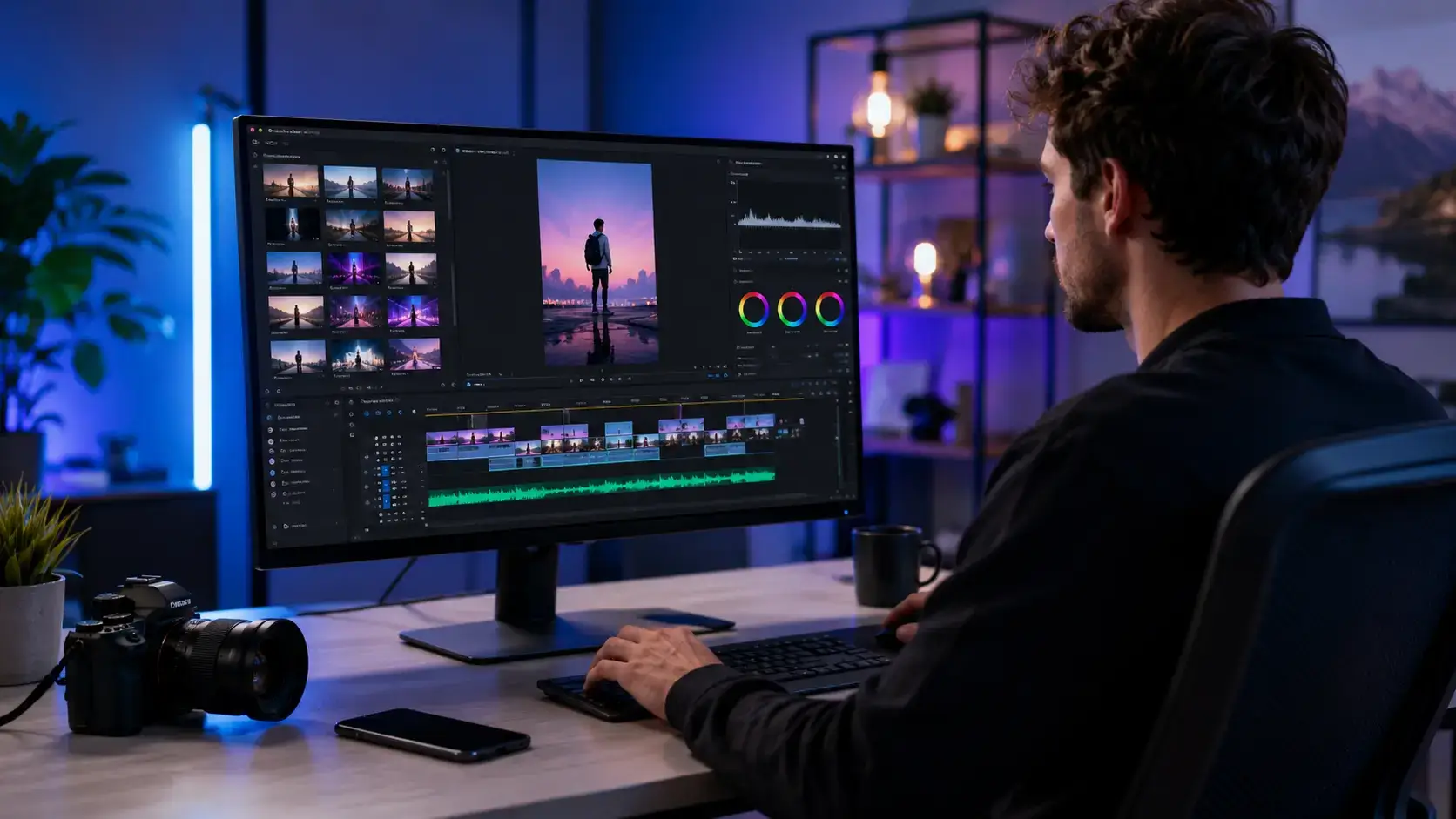
The best video creators are no longer simple editing apps. Modern platforms can generate a first draft from a prompt, record your screen or camera, remove filler words, add captions, translate speech, create short clips, apply brand assets, and prepare different versions for social media. The challenge is not finding a tool with AI. It is finding one that fits the way you actually produce video.
A social media manager needs fast resizing, templates, captions, and trend-friendly effects. A B2B marketing team may care more about brand governance, approvals, product demos, and localization. A podcaster needs reliable recording and text-based editing, while a learning team may prefer AI presenters that remove the need for repeated filming.
Video is already a standard business format. According to Wyzowl’s Video Marketing Statistics 2026, 91% of businesses use video as a marketing tool, while 93% of video marketers consider it an important part of their strategy. The research was based on 266 marketers and consumers surveyed in late 2025.
This guide ranks the 10 best video creator software tools for 2026 based on editing speed, output quality, AI usefulness, brand controls, collaboration, repurposing, pricing, and workflow fit. Rather than rewarding the platform with the longest feature list, each product is judged on how effectively it helps its intended user move from idea to publishable video. When live broadcasting is the main requirement, compare the options in our best streaming software guide.
How the best video creators were evaluated
- Creation workflow – How quickly you can move from script, prompt, recording, article, or raw footage to a usable first draft.
- Editing control – The balance between automation and the ability to refine timing, layouts, captions, audio, and visual assets.
- AI value – Whether AI removes real production work instead of adding novelty features or unpredictable credit costs.
- Brand consistency – Brand kits, templates, shared assets, fonts, colors, and controls that help teams publish consistently.
- Collaboration – Comments, shared workspaces, approvals, roles, and handoffs between creators, marketers, and stakeholders.
- Distribution readiness – Aspect ratios, subtitles, translations, exports, social formats, and repurposing capabilities.
- Pricing value – Free-plan usefulness, paid-plan limits, AI credits, storage, seats, export quality, and watermark policies.
Quick ranking of the best video creator software
| Rank | Video Creator | Best For | Pricing Model |
| 1 | Canva | Overall marketing and social video creation | Free and subscription |
| 2 | VEED | Browser-based AI video production | Free and subscription |
| 3 | Descript | Text-based editing and spoken content | Free and subscription |
| 4 | Adobe Express | Brand-safe social content | Free and subscription |
| 5 | CapCut | Short-form and trend-driven video | Free and subscription |
| 6 | InVideo AI | Prompt-to-video marketing drafts | Credit-based subscription |
| 7 | Synthesia | AI presenter, training, and localization | Free and subscription |
| 8 | Kapwing | Collaborative social video editing | Free and subscription |
| 9 | Riverside | Recording, editing, and repurposing | Free and subscription |
| 10 | Pictory | Turning text and long content into video | Subscription and trial |
Canva

Canva ranks first because it solves more of the everyday content workflow than most dedicated video editors. You can combine templates, stock media, uploaded footage, animations, music, captions, transitions, brand assets, and collaborative feedback inside the same environment used for presentations, social graphics, documents, and campaign materials.
The video editor is approachable enough for occasional users, but its wider design system is the real advantage. A marketing team can create a campaign video, thumbnail, social cutdown, ad variation, and supporting graphics without rebuilding the visual identity in separate tools.
Key strengths and limitations
- Strongest features – Drag-and-drop editing, templates, stock assets, brand kits, resizing, mobile access, and team collaboration.
- Best for – Social media teams, small businesses, educators, creators, and marketers producing mixed visual content.
- Watch for – Timeline control, audio mixing, and advanced color work remain lighter than specialist editing software.
- Pricing – A capable free plan is available, while Pro and business plans add premium assets, more AI usage, and stronger brand controls. Pricing varies by market.
VEED
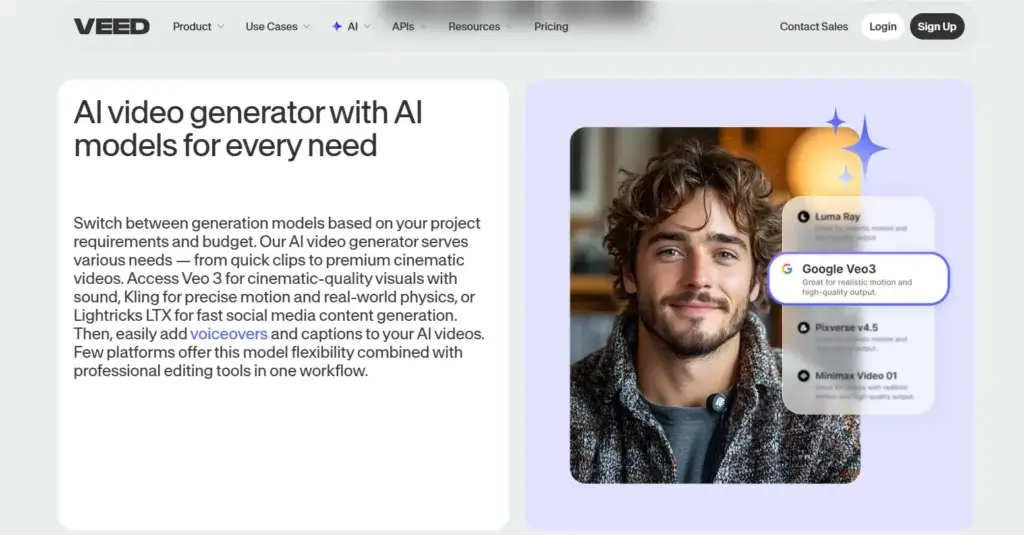
VEED is the strongest all-around browser video platform in this ranking. It combines recording, timeline editing, subtitles, dubbing, translation, AI avatars, text-to-video tools, voice features, templates, brand kits, and review workflows. That breadth makes it particularly valuable for marketers who want a video-focused workspace without adopting professional desktop software.
Its strongest advantage is the balance between automation and manual control. You can generate a draft, then refine the scenes, captions, timing, B-roll, audio, and layout rather than accepting a locked AI output.
Key strengths and limitations
- Strongest features – Automatic captions, AI editing, dubbing, translation, screen recording, brand tools, and browser collaboration.
- Best for – Marketing teams, agencies, educators, and creators publishing frequent social, product, or training videos.
- Watch for – Heavy projects can be less responsive than desktop workflows, and the free plan includes meaningful limits.
- Pricing – A free plan is available. Paid plans remove watermarks, raise export quality, and expand AI, translation, storage, and collaboration allowances.
VEED is the best choice when video is the center of your workflow and you need more depth than a general design platform. Read the full VEED review for a closer look at its AI and localization tools.
Descript

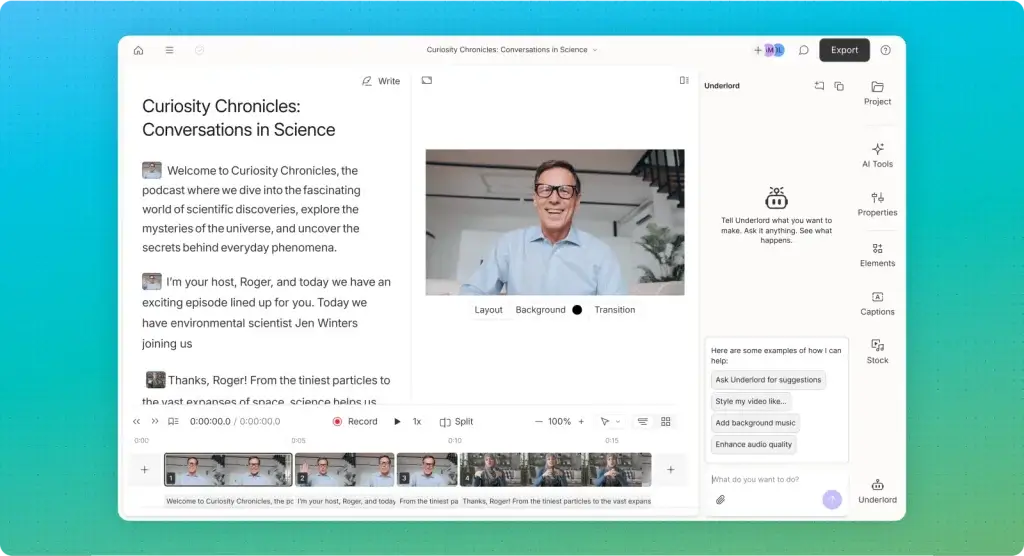
Descript changes the editing process by turning recorded speech into an editable transcript. Delete a sentence from the text and the corresponding video disappears. This makes it unusually efficient for interviews, video podcasts, tutorials, webinars, thought-leadership clips, and screen-recorded content where the spoken narrative drives the edit.
The platform also includes remote recording, screen capture, captions, audio enhancement, filler-word removal, eye contact correction, clip creation, generated media, and an AI co-editor. It is less natural for music videos or visual montages, but highly effective when your raw material is conversation.
Key strengths and limitations
- Strongest features – Transcript editing, multitrack recording, audio cleanup, screen capture, captions, and AI-assisted repurposing.
- Best for – Podcasters, YouTube educators, B2B creators, interview shows, and teams editing a high volume of spoken content.
- Watch for – Traditional timeline editors provide more precise control over complex visual sequences and motion graphics.
- Pricing – The free plan includes limited media time and AI credits. Paid plans currently start from $16 per person per month with annual billing.
Descript is a strong operational choice because non-editors can make meaningful changes without learning a conventional editing interface.
Adobe Express
Adobe Express is a practical video creator for teams that want fast social content with access to Adobe’s design ecosystem. Its editor supports trimming, splitting, transitions, animations, captions, resizing, templates, music, Adobe Stock assets, and brand kits without requiring the learning curve of Premiere Pro.
The platform is especially useful when designers already work with Adobe assets but marketers need a simpler environment for day-to-day publishing. Shared libraries and brand controls make it easier to protect visual consistency while still allowing non-designers to create.
Key strengths and limitations
- Strongest features – High-quality templates, Adobe Stock integration, quick actions, brand libraries, clip creation, and Firefly-powered tools.
- Best for – Brand teams, social marketers, small businesses, and organizations already using Adobe products.
- Watch for – It is optimized for quick branded content, not advanced multi-track editing or detailed audio production.
- Pricing – A useful free plan is available. Premium adds more templates, assets, fonts, storage, brand tools, and generative AI access.
CapCut

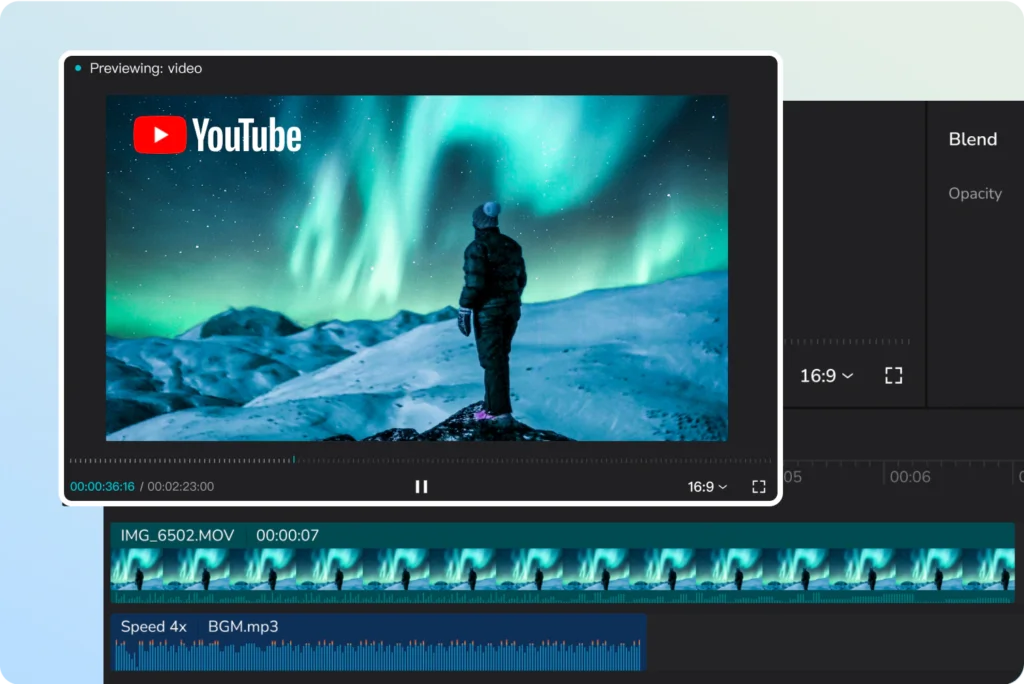
CapCut is one of the most capable choices for short-form video because its editing model is closely aligned with the pace, formats, captions, templates, effects, and visual language of social platforms. It is available across browser, desktop, and mobile workflows, which makes it easy to capture on a phone and finish on a larger screen.
Features such as automatic captions, background removal, voice tools, long-video-to-shorts conversion, effects, keyframes, speed controls, and AI generation help creators move quickly without losing access to a traditional timeline.
Key strengths and limitations
- Strongest features – Social templates, automatic captions, vertical editing, effects, mobile workflow, AI tools, and long-form repurposing.
- Best for – TikTok, Reels, Shorts, creator channels, ecommerce clips, and teams that need rapid social experimentation.
- Watch for – Premium assets, AI credits, and plan structures can change, while governance may be a concern for some organizations.
- Pricing – CapCut offers free access plus Standard and Pro subscriptions. Official pricing varies by region, platform, and promotion.
InVideo AI
InVideo AI is designed for users who want to describe a video and receive a structured draft with a script, scenes, narration, visuals, music, and subtitles. You can then revise the result with text commands, which reduces the amount of manual assembly required for list videos, explainers, ads, product content, and faceless channels.
The platform now brings multiple image, video, audio, and voice models into one environment. This gives creators more creative range, but it also makes credit economics an important part of the buying decision.
Key strengths and limitations
- Strongest features – Prompt-to-video workflow, script generation, stock integration, AI voiceovers, model choice, and command-based revisions.
- Best for – Faceless channels, marketing explainers, product videos, list content, and creators who need fast first drafts.
- Watch for – AI drafts still require fact-checking, visual review, pacing changes, and brand refinement before publishing.
- Pricing – Paid plans are credit-based and currently start from about $17 per month with annual billing. Higher-volume generation can become expensive.
InVideo AI is best treated as a production accelerator, not an automatic publishing system. The value comes from shortening the first-draft stage while preserving a human review process.
Synthesia
Synthesia is the strongest specialist option for presenter-led business video without repeated filming. You select an AI avatar, add a script, choose a language and voice, then build scenes using templates, screen recordings, media, text, and brand elements. The format is particularly effective for training, onboarding, internal communications, product education, and localized explainers.
Its advantage is repeatability. When a policy, feature, or script changes, you can update the content without bringing the presenter, camera, studio, and production team back together.
Key strengths and limitations
- Strongest features – AI avatars, multilingual voices, translation, templates, screen recording, collaboration, and enterprise governance.
- Best for – Learning teams, HR, customer education, software training, internal communication, and global organizations.
- Watch for – Avatar-led videos can feel repetitive, and emotional or highly creative storytelling still benefits from human production.
- Pricing – A free plan includes limited monthly video generation. Paid plans expand minutes, avatars, collaboration, branding, and enterprise controls.
Synthesia is not the best general editor, but it is the most operationally useful choice when consistent presenter video must be produced across many topics or languages.
Kapwing
Kapwing is a flexible browser editor built around the practical needs of social teams. It combines a drag-and-drop timeline with subtitles, resizing, B-roll generation, audio cleanup, transcript editing, clip creation, translation, shared workspaces, comments, brand kits, and AI generation.
It is especially useful when several people need to review or edit content without exchanging large project files. The interface remains approachable, but there is enough depth for multi-layer social videos, explainers, memes, ads, and YouTube cutdowns.
Key strengths and limitations
- Strongest features – Browser collaboration, subtitles, resizing, AI B-roll, transcript tools, shared assets, and 4K export on Pro.
- Best for – Social agencies, distributed marketing teams, YouTube creators, educators, and collaborative content operations.
- Watch for – The free plan restricts export length and quality, while AI features consume credits.
- Pricing – The free plan supports short watermarked exports. Pro currently starts at $16 per member per month with annual billing, or $24 monthly.
Riverside


Riverside is the best option when your video starts with a real conversation, interview, webinar, podcast, or presentation. It records participants locally in separate high-quality tracks, then moves the content into a text-based editor with captions, audio enhancement, silence and filler-word removal, layouts, AI B-roll, eye contact correction, and automatic clips.
This end-to-end flow reduces the handoff between recording and post-production. It is especially useful for teams that want one long recording to become a full episode, several short clips, transcripts, and supporting content.
Key strengths and limitations
- Strongest features – Local multitrack recording, up to 4K capture, transcript editing, AI enhancement, Magic Clips, and publishing tools.
- Best for – Video podcasts, remote interviews, webinars, thought leadership, customer stories, and expert-led content.
- Watch for – It is less suitable for template-led videos created entirely from stock media or prompts.
- Pricing – A free plan is available. Pro currently starts at $24 per month with annual billing and includes advanced recording and editing capabilities.
Read the full Riverside review for a deeper comparison of recording quality, editing, and plan limits.
Pictory
Pictory is built for content repurposing. You can start with a script, article, URL, presentation, image, or existing recording, then let the platform identify scenes, suggest visuals, add narration, generate captions, and assemble a first draft. This makes it useful for blog-to-video workflows, educational explainers, faceless content, and turning long recordings into shorter assets.
The platform includes stock libraries, brand kits, AI voices, avatars, generative visuals, collaborative editing, and an API for automated production. Its main value is volume and consistency rather than detailed cinematic editing.
Key strengths and limitations
- Strongest features – Script-to-video, URL-to-video, scene detection, stock media, captions, voices, brand kits, and content summarization.
- Best for – Bloggers, course creators, content marketers, agencies, and teams repurposing written or long-form material.
- Watch for – Automatically selected visuals can feel generic and should be reviewed for context, accuracy, and brand fit.
- Pricing – Starter currently begins at $25 per month with annual billing. Higher plans expand video minutes, AI credits, storage, voices, and brand kits.
Pictory is a valuable production layer when your organization already has a strong library of articles, webinars, and scripts that should be converted into more accessible video formats.
How to choose the right video creator software
The best platform is determined by your source material and publishing workflow, not by the number of AI tools on the pricing page. Start by identifying what enters the system and what must come out.
Start with your primary source material
Choose Canva, Adobe Express, VEED, or Kapwing when you usually begin with brand assets, templates, product images, stock footage, and short clips. Choose Descript or Riverside when you start with recorded speech. Choose InVideo AI or Pictory when the starting point is a prompt, script, article, or URL. Choose Synthesia when the script needs a consistent on-screen presenter without filming.
Decide how much editing control you need
AI-first tools produce drafts quickly, but speed can become a limitation when every scene needs correction. Look for a platform that lets you replace visuals, rewrite narration, adjust pacing, restyle captions, change aspect ratios, and refine the timeline without regenerating the entire project.
Calculate the real cost of AI usage
Do not compare subscriptions by headline price alone. Check video minutes, generation credits, stock allowances, dubbing limits, transcription hours, storage, seats, export resolution, watermark removal, and the cost of top-ups. A cheaper plan can become expensive when your team produces content at scale.
Prioritize brand and approval controls for team use
Solo creators can work effectively with presets and manual review. Teams need shared templates, locked brand elements, reusable caption styles, comments, version history, roles, and organized asset libraries. Canva, Adobe Express, VEED, and Kapwing are particularly strong when several stakeholders contribute to the same content pipeline.

Test one complete production cycle
Create a real video during the trial. Import your actual assets, generate captions, make a vertical version, collect feedback, export the final file, and measure the time required. A tool that produces an impressive demo but creates friction during approvals or revisions will not improve your publishing cadence. For teams that also need secure hosting and branded embeds, the Vimeo review covers a different part of the video workflow.
Best video creators by workflow
| Workflow | Recommended Tool | Why It Fits |
| Mixed marketing content | Canva | Combines video, design, templates, and brand assets |
| Browser-based business video | VEED | Strong editing, subtitles, localization, and AI tools |
| Podcast and interview editing | Descript | Transcript-first editing makes spoken content faster |
| Brand-controlled social campaigns | Adobe Express | Connects quick creation with Adobe assets and libraries |
| Short-form social experimentation | CapCut | Fast vertical editing, effects, captions, and trends |
| Prompt-to-video production | InVideo AI | Builds complete first drafts from instructions |
| Training and localization | Synthesia | Repeatable avatar-led videos in many languages |
| Collaborative social editing | Kapwing | Shared browser workspace with strong repurposing tools |
| Remote recording and clips | Riverside | High-quality capture followed by AI editing |
| Article-to-video repurposing | Pictory | Turns scripts, URLs, and long content into drafts |
Conclusion
Canva is the best overall video creator for 2026 because it gives marketing teams an accessible video editor inside a much broader visual content system. It is the strongest choice when speed, templates, collaboration, and brand consistency matter more than advanced post-production.
VEED is the better video-first platform for browser-based editing, captions, localization, and AI production. Descript is the strongest option for spoken content, while Adobe Express fits teams already working in the Adobe ecosystem. CapCut remains the leading choice for fast, trend-aware short-form content.
For more specialized workflows, InVideo AI creates prompt-based drafts, Synthesia scales presenter-led training, Kapwing supports collaborative social production, Riverside connects high-quality recording with repurposing, and Pictory converts existing written and long-form content into video.
The safest decision is to test one real project from brief to publication. Measure production time, correction time, stakeholder feedback, export quality, and total usage cost. The best video creator is the one that improves your repeatable workflow, not the one that produces the most impressive one-click demo.
FAQs
What is the best video creator software in 2026?
Canva is the best overall video creator for most marketing teams because it combines accessible editing, templates, stock assets, brand kits, collaboration, and supporting design tools. VEED is better when you need a more video-focused browser workflow.
What is the best free video creator?
Canva, Adobe Express, CapCut, Descript, VEED, Kapwing, Riverside, and Synthesia offer free access. Canva is the strongest general free option, while the best choice depends on watermark, export, AI credit, and project-length requirements.
Which video creator is easiest for beginners?
Canva and Adobe Express are the easiest for template-led social videos. Descript is especially easy for spoken content because you can edit the transcript instead of learning a traditional timeline.
Which video creator is best for social media?
CapCut is the best choice for fast, trend-driven short-form video. Canva is better when you need consistent branding across video, graphics, presentations, and other campaign assets.
What is the best AI video creator from text?
InVideo AI is the strongest option for generating a complete marketing video draft from a prompt. Pictory is better for turning articles, scripts, and URLs into structured videos, while Synthesia is best for AI presenter videos.
Which video creator is best for YouTube?
Descript is excellent for interviews, tutorials, and talking-head YouTube videos. CapCut works well for fast creator editing, while VEED and Kapwing provide stronger browser-based collaboration and repurposing.
Which video creator is best for business training?
Synthesia is the best specialist platform for training videos because it combines AI presenters, templates, translation, multilingual voices, collaboration, and enterprise controls without requiring repeated filming.
Can video creator software automatically add captions?
Yes. Most leading video creators can generate captions automatically. You should still review names, technical terms, punctuation, and timing before publishing, especially for customer-facing or regulated content.
What should I check before paying for an AI video tool?
Check generation credits, video minutes, export resolution, watermarks, storage, stock rights, transcription, dubbing, brand kits, seats, top-up costs, and whether the generated output remains fully editable.
Do AI video creators replace professional editors?
AI video creators reduce repetitive work and speed up first drafts, captions, cleanup, localization, and repurposing. Professional editors remain valuable for complex storytelling, advanced motion design, detailed color work, and high-stakes brand content.