
Introduction
Synthesia is a leading AI avatar video generator, but its value extends beyond turning text into a talking presenter. It is built for repeatable training, onboarding, internal communication, product education, software tutorials, and multilingual business video.
Its strongest advantage is repeatability. You can create a presenter-led video without cameras or repeated recording sessions, then revise the script, presenter, screen recording, or language when information changes. This makes long-term maintenance more important than first-draft speed.
The main limitation is usage economics. Basic, Starter, and Creator plans share credits across video generation, AI assets, and dubbing. Self-serve plans also include only one editor, while live collaboration, Brand Kits, SCORM export, SSO, and broader governance are concentrated in Enterprise.
This Synthesia review examines its avatars, editor, localization tools, pricing, credit system, security, strengths, limitations, and best alternatives in 2026.
What Is Synthesia?
Synthesia is a browser-based AI video platform that creates presenter-led videos from scripts. You select a stock or personal avatar, choose a voice and language, organize the content into scenes, add text and media, then generate a finished video without filming a human presenter for every version.
The platform combines AI avatars, text-to-speech, script assistance, templates, screen recording, translation, dubbing, media generation, sharing, analytics, commenting, API access, and enterprise administration. Synthesia currently promotes more than 240 avatars and voiceovers in more than 160 languages, although plan-level avatar access and localization features vary.
How Synthesia Differs From a General AI Video Generator
General AI video generators often prioritize a visually varied first draft. Synthesia is more structured, using scenes, presenters, templates, translations, brand controls, and updateable publishing for content that must remain consistent over time. It is therefore stronger for repeatable information delivery than for cinematic storytelling or trend-driven social content.
Who Synthesia Is Designed For
- Learning and development teams – Produce onboarding, compliance, process, and skills training without repeated filming.
- HR and internal communications teams – Create policy updates, employee announcements, and workplace guidance in consistent formats.
- Customer education teams – Build product walkthroughs, help-center videos, feature explainers, and implementation content.
- Sales enablement teams – Standardize product training, objection handling, competitive updates, and partner education.
- Global organizations – Translate and dub the same core content across languages while preserving visual consistency.
- Agencies and consultants – Deliver repeatable presenter videos for clients without coordinating a new shoot for every revision.
Synthesia is less compelling for creators who need organic discovery, advanced timeline editing, documentary-style authenticity, or visually unpredictable generative video.
Key Features
Avatars, Creation, and Localization
Synthesia covers the most important stages of repeatable business video creation. You can turn source material into a script, place an avatar into a designed scene, add supporting visuals, translate the project, collect feedback, and distribute the result through a downloadable file, shared page, embed, LMS, or API workflow.
Stock Avatars and Personal Avatars
The stock avatar library is the platform’s defining feature. Depending on your plan, you can select presenters with different appearances, clothing, framing, and delivery styles. Newer avatar models add more expressive gestures and movement.
Paid plans support Personal Avatars created from approved source material after a live consent step. They are useful when you want a recognizable trainer, expert, or executive in future videos without repeated filming. Short sentences, natural punctuation, and spoken language produce more credible results than dense corporate copy.
AI Video Assistant and Document-to-Video Creation
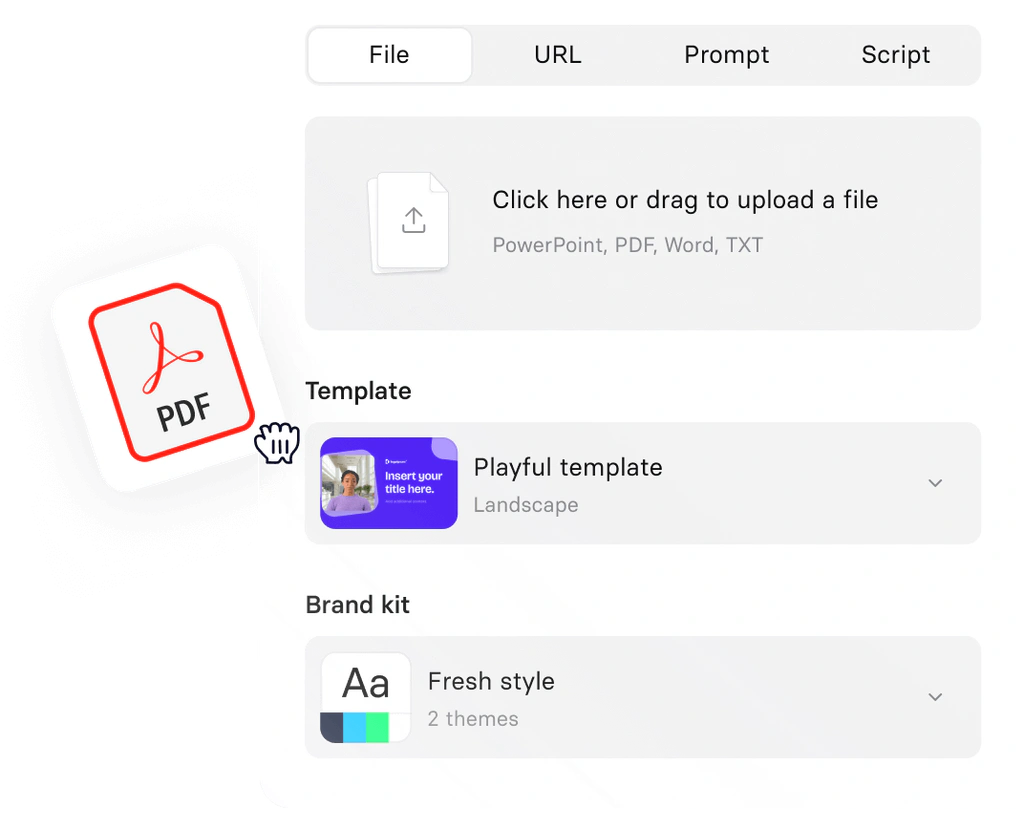
The AI Video Assistant can turn a prompt, document, presentation, web page, or outline into a structured draft with a script and scenes. It speeds up initial assembly, but a subject-matter expert should still verify accuracy, remove generic language, and decide what belongs in narration versus on screen.
Scene-Based Video Editor and Templates
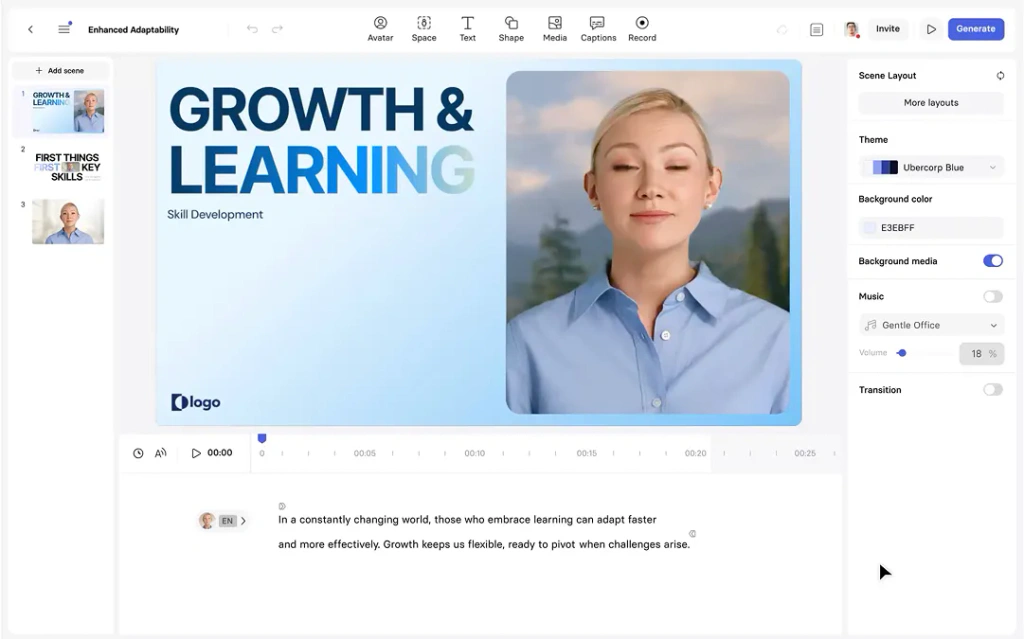
Synthesia’s editor resembles a presentation builder more than a professional nonlinear editor. Scenes can contain an avatar, text, shapes, images, recordings, music, and generated assets. Templates, duplicated layouts, and scene-level editing reduce the learning curve, although you receive less timeline, audio, color, and motion control than a dedicated editor provides.
AI Screen Recorder and PowerPoint Import
The screen recorder suits software training and product education. You can capture a workflow, edit the recording through its transcript, remove pauses, and place it beside an avatar. PowerPoint import also reuses existing material, but text-heavy slides should be simplified into shorter scenes designed specifically for video.
AI Voices, Languages, Translation, and Dubbing
Synthesia offers voiceovers in more than 160 languages and supports translated versions and AI Dubbing. Enterprise includes one-click translation into more than 80 languages and a multilingual player, while dubbing availability and usage depend on the plan.
Lip-synced dubbing consumes more credits than dubbing without lip sync. Approve the master script, timing, and visuals before localization so changes do not create unnecessary regeneration and review work.
AI Playground and Generated Visual Assets
The AI Playground can generate images, short clips, and motion assets that reduce visual repetition. These assets share the self-serve credit balance, so use them when they clarify a concept rather than as decoration that makes project costs harder to predict.
Interactive Video, Calls to Action, and Branching
Creator and Enterprise include clickable calls to action and branching paths. Interactive behavior depends on Synthesia’s hosted player and is not retained in a standard MP4 download. SCORM export and more formal learning delivery require Enterprise, so training teams should test the complete LMS workflow before buying.
Collaboration, API Access, and Bulk Production
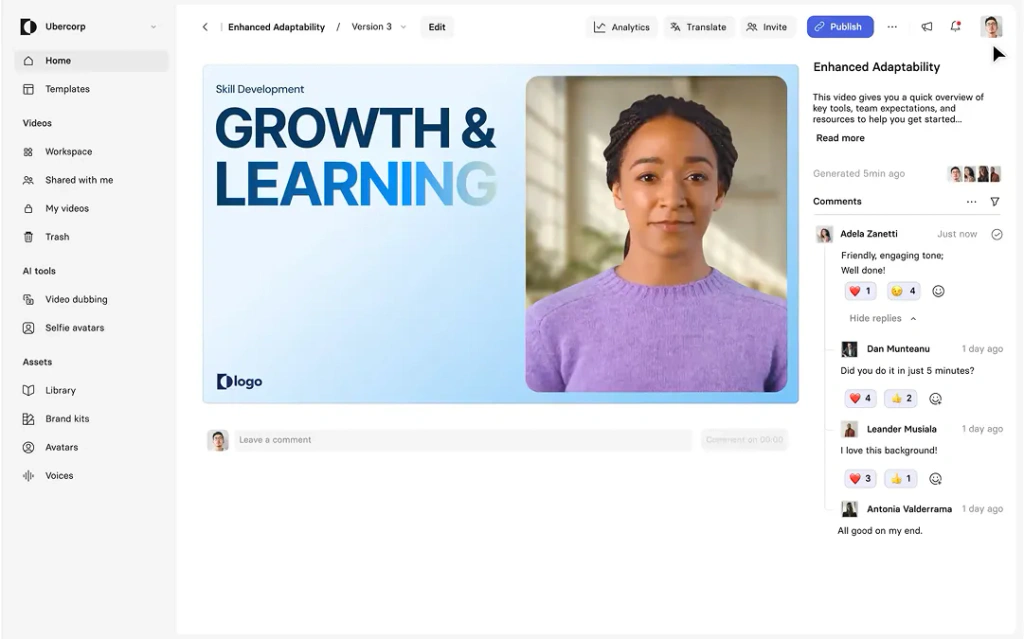
Starter and Creator include guests for feedback, but every self-serve workspace has one editor. Creator adds API access, branded pages, multiple avatars per scene, and priority support. Enterprise unlocks custom editor counts, live collaboration, Brand Kits, SSO, onboarding, and stronger administration for large-scale production.
Publishing, Embeds, and Smart Updates
Paid users can download Full HD MP4 files, use hosted pages, or embed videos in websites, knowledge bases, and learning platforms. Smart Updates automatically reflect later edits in shared or embedded versions, which lowers the maintenance cost of frequently changing policies, tutorials, and compliance content.
Performance and User Experience
Video Quality, Workflow, and Security
Avatar Realism and Presentation Quality
Synthesia’s avatars are convincing enough for clear corporate and educational delivery, especially when combined with screen recordings, diagrams, and examples. Longer full-screen presenter scenes can expose repeated gestures or restrained emotion. Real footage remains safer for testimonials, emotional leadership communication, and high-profile brand storytelling.
Ease of Use and Editing Workflow
The presentation-style editor is approachable for non-editors, and current user feedback commonly praises ease of use and production speed. Rendering, moderation, dubbing, and complex assets can still add delays, so complete the script and visual review before generating the final version.
Maintaining Video Over Time
Maintenance is a major advantage. You can revise one scene, replace an outdated screen recording, update terminology, and refresh embedded versions without reproducing the entire video. The relevant buying question is therefore how efficiently you can keep a growing library accurate, not only how quickly you can create the first video.
Security, Privacy, and Enterprise Governance
Synthesia’s Trust Center reports SOC 2 Type II and ISO/IEC 27001, 27701, and 42001 certifications. Enterprise adds SAML SSO and administrative controls. Organizations should still verify retention, subprocessors, data location, access, and contractual requirements for their specific use case.
Consent, Moderation, and Responsible AI
Personal Avatars require consent, and Synthesia moderates generated videos. This reduces impersonation risks, but flagged scripts may require manual review. Teams producing sensitive or regulated content should test representative material before a deadline.
Desktop and Mobile Experience
The complete creation environment is designed for desktop. Mobile users can watch content and access selected tools, but they cannot replace the full editing workflow. This matters mainly for field teams and social creators who expect phone-first production.
Pros and Cons
Benefits and Limitations of Synthesia
Positive
✅ Scalable presenter-led video
✅ Strong localization workflow
✅ Easy content maintenance
✅ Business-focused governance
✅ Fast template-based creation
Negative
❌ Restrictive credit allowances
❌ One editor on self-serve plans
❌ Avatars can feel artificial
❌ Key team features are Enterprise-only
❌ Full editor is desktop-only
Strengths and Benefits
- Scalable presenter-led video – You can produce consistent explainers without coordinating presenters, cameras, studios, and repeated shoots.
- Strong localization workflow – Multilingual voices, translation, dubbing, and a multilingual player support global content operations.
- Easy content maintenance – Scene-level edits and Smart Updates reduce the effort required to keep published videos accurate.
- Business-focused governance – Enterprise security, SSO, Brand Kits, collaboration, SCORM, and implementation support suit structured deployments.
- Fast template-based creation – Non-editors can build professional training and communication videos through familiar presentation-style tools.
Limitations and Drawbacks
- Restrictive credit allowances – The free and Starter plans both support roughly ten minutes of standard video per month, and other AI actions share the same pool.
- One editor on self-serve plans – Guests can help with feedback, but true multi-editor production generally pushes a team toward Enterprise.
- Avatars can feel artificial – Presenter-led output works for information delivery, but it can lack the emotional range and authenticity of real footage.
- Key team features are Enterprise-only – Live collaboration, SCORM export, SSO, Brand Kits, broader translation, and governance require custom pricing.
- Full editor is desktop-only – Mobile access does not replace the complete desktop creation workflow.
Plans and Usage Economics
Synthesia Pricing and Credits
Synthesia offers Basic, Starter, Creator, and Enterprise plans. Paid self-serve tiers can be purchased monthly or annually. Annual billing reduces the effective monthly price and provides a yearly credit balance, which is more flexible for uneven production schedules.
The pricing below was checked in July 2026. Promotional offers, taxes, Enterprise quotes, and plan allowances can change, so verify the current Synthesia pricing page before purchasing.
| Plan | Monthly Price | Annual Equivalent | Credits or Video Allowance | Editors and Guests | Best For |
| Basic | $0 | Not available annually | 1,200 credits/month, up to 10 standard video minutes | 1 editor | Testing the workflow |
| Starter | $29/month | $18/month billed yearly | 1,200/month or 14,500/year, up to 10 monthly or 120 annual minutes | 1 editor and 3 guests | Solo business users |
| Creator | $89/month | $64/month billed yearly | 3,600/month or 44,000/year, up to 30 monthly or 360 annual minutes | 1 editor and 5 guests | Regular production and API use |
| Enterprise | Custom | Custom contract | Unlimited standard video minutes plus custom credits | Custom editors and guests | Large teams, governance, and localization |
Basic Plan
Basic is a product test rather than a full business plan. It includes one editor, 1,200 monthly credits, limited avatars, and up to ten minutes of standard generated video. Use it to evaluate scripts, scenes, avatar quality, and templates with a representative project before paying.
Starter Plan
Starter costs $29 monthly or $18 per month with annual billing. It adds downloads, logo removal, the AI Video Assistant, dubbing, more than 125 avatars, Personal Avatars, three guests, and support. Monthly Starter still has 1,200 credits, while annual billing provides 14,500 credits in one yearly balance.
Creator Plan
Creator costs $89 monthly or $64 per month annually. It provides 3,600 monthly credits or 44,000 annual credits, plus more avatars, five Personal Avatars, branded pages, multiple avatars per scene, interactive video, API access, five guests, and priority support. The single-editor limit remains.
Enterprise Plan
Enterprise uses custom pricing and adds unlimited standard video minutes, more than 240 avatars, custom editor counts, live collaboration, broader Personal Avatar access, one-click translation, Brand Kits, SCORM export, SSO, onboarding, and a customer success manager. Request written allowances for dubbing, AI assets, API usage, and other credit-based features.
How Synthesia Credits Work
Standard video uses two credits per second, or 120 per minute. Dubbing without lip sync uses 120 credits per minute, while lip-synced dubbing uses 240. Generated assets have separate rates. Unused credits reset, and additional generated duration from revisions can consume more credits.
The Real Cost of a Synthesia Project
Estimate runtime, revisions, generated assets, languages, personalized versions, editor seats, and update frequency. A ten-minute master localized into several languages can consume far more than ten minutes of allowance. The useful metric is cost per approved and maintained version, not cost per generated minute.
Best Use Cases
Who Should Use Synthesia?
Best for Employee Training and Onboarding
Synthesia is particularly strong for repeatable training where accuracy and consistency matter more than cinematic personality. HR and learning teams can standardize introductions, process walkthroughs, compliance explanations, and role-specific modules, then update individual scenes as policies change.
Best for Product Education and Software Tutorials
Screen recording, avatars, annotations, templates, and Smart Updates fit software education well. You can place a presenter beside the interface, explain each task, and replace outdated recordings without rebuilding the entire project.
Best for Global Internal Communication
Organizations with distributed teams can reuse one approved project across languages. This improves visual consistency and reduces the coordination required to record separate presenters, although every translated version should still receive linguistic and cultural review.
Best for Compliance and Frequently Updated Content
Compliance content becomes expensive when every rule change requires a new shoot. Synthesia’s scene-level editing and updateable embeds make it well suited to procedures, safety instructions, policy explanations, and operational knowledge that changes regularly.
Useful for Sales Enablement and Customer Success
Sales and customer teams can produce product updates, partner training, implementation guidance, and account-specific explainers. API and bulk workflows extend this further, but personalization should serve a clear business purpose rather than create large volumes of low-value video.
Not Ideal for Emotional Storytelling or Advanced Editing
Synthesia is not the strongest choice for customer documentaries, cinematic ads, creator-led entertainment, or videos where subtle human emotion is central to trust. It also cannot replace a full editor when you need detailed sound design, color grading, compositing, or complex motion graphics.
Competitors
Best Synthesia Alternatives
HeyGen – Best for Creative Avatars and Marketing Video
HeyGen is the closest broad alternative for lifelike avatars, creative customization, translation, personalized outreach, and marketing production. Synthesia is more structured around training, governance, and maintainable business content, while HeyGen places greater emphasis on expressive avatars and campaigns.
When Synthesia Is Better
Choose Synthesia for structured learning, internal communication, updateable embeds, SCORM delivery, and organization-wide governance.
When HeyGen Is Better
Choose HeyGen when avatar realism, creative flexibility, social formats, and personalized marketing matter more than an enterprise training system.
| Feature | Synthesia | HeyGen |
| Primary focus | Training and business knowledge | Creative avatar marketing |
| Workflow | Structured scenes and governance | Flexible campaign creation |
| Enterprise learning | Strong, with SCORM on Enterprise | Less central |
| Avatar approach | Professional and standardized | Expressive and creative |
| Best for | Onboarding, education, and internal video | Marketing, outreach, and social video |
Colossyan – Best for Interactive Learning
Colossyan is a compelling alternative for teams that want AI avatar video to behave more like a course-authoring environment. Its focus includes branching scenarios, in-video quizzes, knowledge checks, conversational learning, translation, and SCORM delivery.
Synthesia has the broader corporate video presence and mature business workflow. Colossyan is more specialized when learner decisions, scored assessments, and scenario-based training are central to the project.
VEED – Best for Browser-Based Editing
VEED is better when you want avatars to be one option inside a broader browser editing workflow. It combines recording, timeline editing, subtitles, dubbing, translation, templates, brand tools, and AI generation with more manual control over finished marketing content.
Synthesia is stronger for standardized presenter-led training. VEED is the more flexible choice for social videos, campaigns, recorded footage, subtitles, and collaborative post-production. Read the complete VEED review for a detailed comparison of its editor and AI features.
Canva – Best for Design-Led Content Teams
Canva is the better alternative when video is part of a wider content operation that includes presentations, social graphics, documents, ads, brand templates, and campaign assets.
Synthesia offers a more specialized avatar and localization workflow. Canva provides broader visual design, faster mixed-format production, and easier reuse of assets across channels. The complete Canva review explains where its AI and video tools fit.
InVideo AI – Best for Prompt-to-Video Drafts
InVideo AI is better for generating a complete marketing or faceless video draft from a prompt, including script, narration, scenes, stock footage, music, and subtitles. It is oriented toward fast first drafts and visually varied content rather than standardized avatar training.
Synthesia is more suitable when a presenter, repeatable template, localization, and long-term maintenance matter. Read the InVideo AI review, or compare both categories in the best video creators guide.
Best Practices
Getting the Most Out of Synthesia
Design the Workflow Before Choosing a Plan
Map the number of editors, guests, videos, revisions, languages, interactive modules, API generations, and required security controls. A plan that looks sufficient from runtime alone may fail because you need multiple editors, SCORM, live collaboration, or SSO.
Write for Speech, Not for a Document
Use short sentences, active language, natural pauses, and one idea at a time. Read the script aloud before generation. If it sounds formal or overloaded when spoken by a person, it will sound even more artificial through an avatar.
Use the Avatar as a Guide
Alternate presenter shots with screen recordings, diagrams, examples, text highlights, and generated visual assets. Keeping the avatar full-screen for several minutes increases repetition and makes limitations in gesture and emotion more noticeable.
Approve the Master Before Localization
Finalize the source script, terminology, timing, and visuals before creating translated or dubbed versions. This reduces duplicated credit use and prevents language teams from reviewing content that will later change.
Create a Maintenance Standard
Add an owner, review date, source document, and update trigger to every important video. Measure outcomes such as completion, support reduction, onboarding speed, product adoption, or content update time instead of counting generated videos alone.
Test Sensitive Content Early
Generate a small representative section before a deadline when the subject could trigger moderation. This gives you time to adjust phrasing, provide context, or contact support without delaying the complete project.
Conclusion
Final Thoughts
Synthesia is one of the strongest AI video platforms for repeatable business communication in 2026. Its combination of avatars, voices, templates, screen recording, translation, dubbing, interactive elements, publishing, and enterprise governance can replace a significant amount of routine filming and editing.
The best reason to choose Synthesia is not that it can generate a talking presenter from text. It is that the same approved content can be revised, localized, reused, and kept current without rebuilding the entire production process. That advantage becomes more valuable as your video library grows.
The main concerns are credits and collaboration. Basic and Starter allow only about ten minutes of standard monthly generation, AI assets and dubbing draw from the same pool, unused credits do not roll over, and every self-serve plan includes only one editor. Many of the features that turn Synthesia into a scalable team system sit behind Enterprise pricing.
Overall, Synthesia is recommended for learning, HR, customer education, product, enablement, and internal communication teams that produce clear informational video at scale. HeyGen is better for creative avatar marketing, Colossyan is stronger for interactive training, VEED offers broader browser editing, Canva supports design-led campaigns, and InVideo AI is better for prompt-generated visual drafts.
Have more questions?
Frequently Asked Questions
What is Synthesia used for?
Synthesia is used to create AI avatar videos for training, onboarding, internal communication, product education, software tutorials, compliance, sales enablement, and multilingual business content.
Is Synthesia free?
Yes. The Basic plan is free and includes 1,200 credits per month, equivalent to up to ten minutes of standard generated video, but downloads and broader business features require a paid plan.
How much does Synthesia cost?
Starter costs $29 monthly or $18 per month with annual billing. Creator costs $89 monthly or $64 per month annually. Enterprise uses custom pricing.
How do Synthesia credits work?
Self-serve plans use credits across video generation and other AI features. Standard video uses 120 credits per minute, and unused credits reset rather than rolling into the next billing period.
Can Synthesia create a personal avatar?
Yes. Paid plans support Personal Avatars created from approved source material after a consent process. Allowances vary by plan, while Enterprise includes broader avatar capacity subject to reasonable use.
Does Synthesia support multiple languages?
Yes. Synthesia offers voiceovers in more than 160 languages and supports translation and AI dubbing. Exact translation, dubbing, and multilingual player capabilities depend on the plan.
Can Synthesia export SCORM files?
Yes, but SCORM export is an Enterprise feature. It lets learning teams package Synthesia content for compatible learning management systems, including translated versions.
Is Synthesia safe for business use?
Synthesia reports SOC 2 Type II and several ISO certifications, applies content moderation, and offers Enterprise controls such as SAML SSO. Organizations should still complete their own security and privacy review.
What is the biggest limitation of Synthesia?
The biggest limitations are restricted self-serve credits, one editor per self-serve workspace, Enterprise-only team features, and avatar output that may feel less authentic than real human footage.
What is the best Synthesia alternative?
HeyGen is a strong alternative for creative avatar marketing, Colossyan for interactive learning, VEED for browser editing, Canva for design-led content, and InVideo AI for prompt-to-video drafts.