

Introduction
Why Choosing the Right Accounting Software Matters
If you run a small business, freelance practice, or service-based agency, accounting software is not just where you “store the numbers.” It directly affects how quickly you get paid, how clearly you understand cash flow, and how much time you lose to admin work.
You do not need a finance system that feels like enterprise software if your daily work is sending invoices, tracking expenses, logging billable hours, and preparing clean records for your accountant.
That is where FreshBooks becomes interesting. It is built around practical financial workflows for small businesses, especially service providers that care about speed, simplicity, and client billing.
Where FreshBooks Stands in 2026
FreshBooks started as an invoicing tool, but it has grown into a broader cloud accounting platform. You can now use it for invoicing, expenses, payments, time tracking, estimates, proposals, reporting, bank reconciliation, and accountant collaboration.
Its strongest advantage is not deep enterprise accounting. Its real strength is making everyday accounting feel approachable for people who are not accountants.
That makes it different from tools like QuickBooks Online, Xero, and Zoho Books. Those platforms can be more powerful for inventory, advanced reporting, and accounting complexity, but FreshBooks is often faster to learn and easier to use.
Quick FreshBooks Review Summary
| Category | FreshBooks Review Summary |
| Best For | Freelancers, consultants, agencies, and service-based small businesses |
| Not Best For | Inventory-heavy, enterprise, or multi-entity businesses |
| Best Feature | Invoicing, time tracking, and client billing workflows |
| Main Limitation | Client limits, add-on costs, and less advanced reporting |
| Free Trial | 30-day free trial is commonly available |
| Best Alternative | QuickBooks for deeper accounting, Xero for automation, Zoho Books for value |
Our take: FreshBooks is one of the easiest accounting tools for freelancers and service businesses. It is a strong choice if you want to get paid faster and spend less time managing financial admin. But if you need advanced inventory, detailed financial controls, or deep custom reporting, you may outgrow it.
Who Is FreshBooks Best For?
Find out if FreshBooks fits your business needs
FreshBooks is not built for every type of business, and that is part of its appeal. It works best when your revenue depends on client work, services, projects, retainers, or billable hours.
Ideal Business Sizes and Types
FreshBooks is best suited for people and teams that want simple financial management without the learning curve of heavier accounting systems.
| User Type | Fit | Why It Works |
| Freelancers | Excellent | Fast invoices, time tracking, online payments, and receipt capture |
| Consultants | Excellent | Project billing, retainers, proposals, and professional client communication |
| Small Agencies | Strong | Team time tracking, estimates, expense rebilling, and project profitability in higher plans |
| Remote Teams | Strong | Cloud access, mobile apps, and accountant collaboration |
| Ecommerce Businesses | Limited | Better for service billing than inventory-heavy operations |
| Larger Companies | Limited | Reporting, permissions, and scalability may feel too basic |
When FreshBooks Might Not Be the Right Choice
You may want to consider another platform if your business depends on inventory, complex financial reporting, multi-entity accounting, or advanced budgeting.
FreshBooks can handle basic accounting needs well, but it is not the strongest fit for product-based companies that need stock tracking, purchase orders, complex cost of goods sold, or advanced workflow automation.
Real Scenarios Where FreshBooks Shines
- A freelance designer who wants to send invoices and track billable hours quickly
- A marketing agency that bills clients by project, retainer, or hourly work
- An IT consultant who needs estimates, expenses, mileage, and online payments
- A coach or advisor who wants recurring invoices and payment reminders
- A small remote team that needs simple collaboration with an accountant
If your accounting pain is mainly about getting paid, tracking work, and keeping clean records, FreshBooks is likely to feel natural.
FreshBooks Features
Core Features That Matter in 2026
FreshBooks focuses on the accounting workflows that matter most to small service businesses. Instead of overwhelming you with enterprise-level features, it gives you tools for invoicing, expenses, payments, time tracking, proposals, projects, and basic reports.
Invoicing and Online Payments
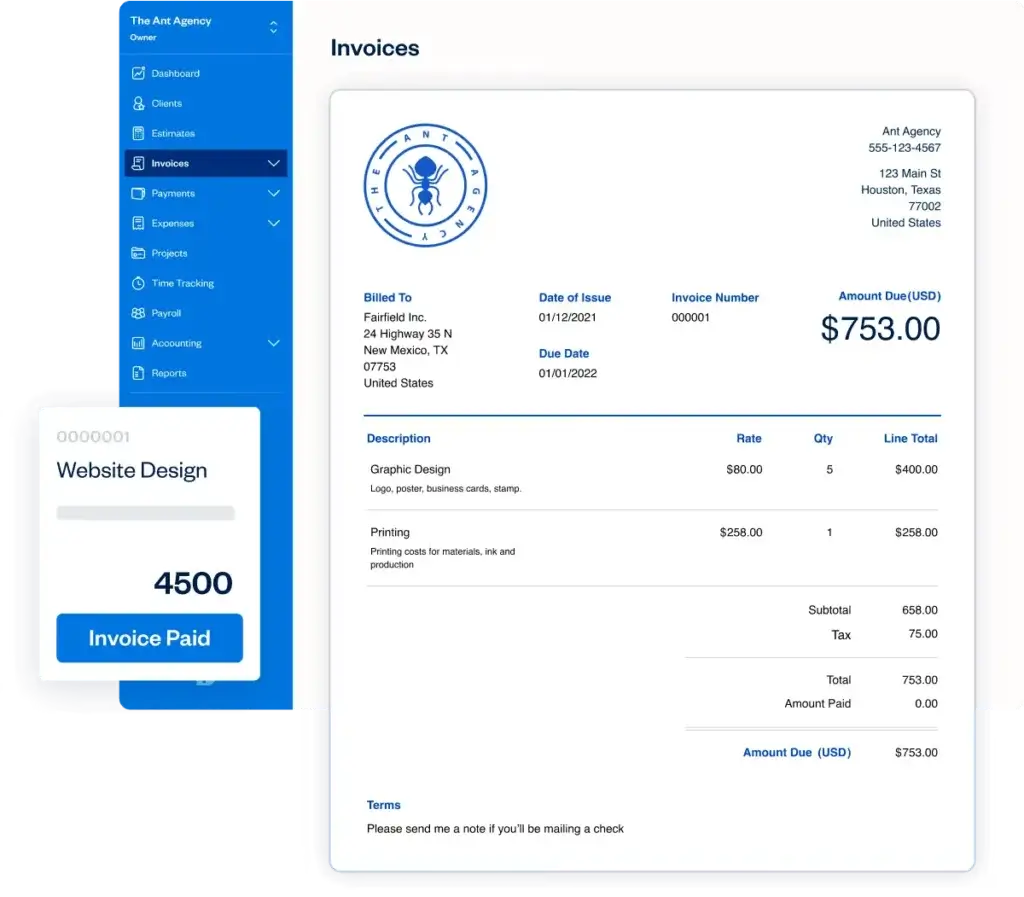
Invoicing is the strongest part of FreshBooks. You can create polished invoices, add your branding, customize line items, include taxes, and send invoices directly to clients.
The workflow is simple enough for beginners but useful enough for professional service businesses.
- Send customized invoices with your logo and payment terms
- Create recurring invoices for retainers and subscriptions
- Set automatic late payment reminders and scheduled late fees
- Accept online payments through card, ACH, and supported wallets
- See when clients have viewed invoices
This is where FreshBooks feels more refined than many general accounting tools. It is built for the moment when you finish work and need to turn that work into revenue.
Expense Tracking and Receipt Capture
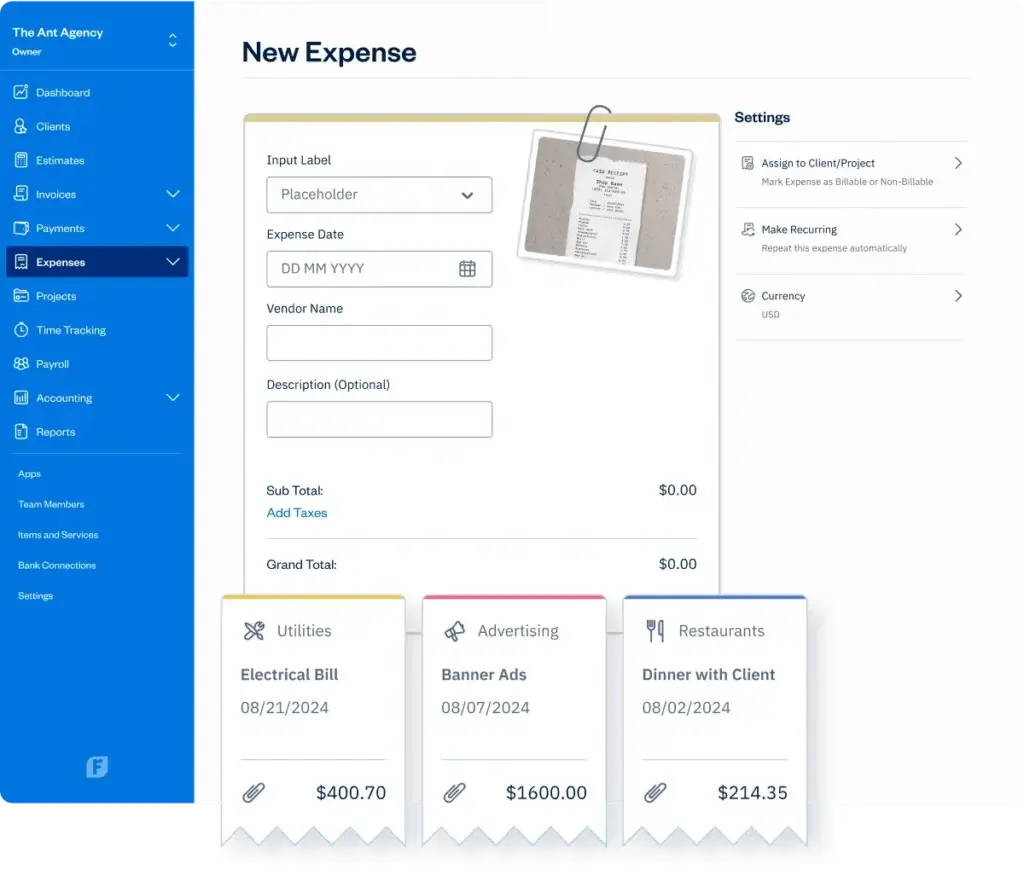
FreshBooks helps you capture expenses from your bank feed, credit card, and mobile receipts. You can categorize costs, attach receipts, and mark expenses as billable when they need to be passed on to a client.
For freelancers and agencies, this is important. Missed expenses reduce profitability, and poorly tracked billable costs create awkward client conversations later.
- Import transactions from connected bank accounts
- Capture receipts through the mobile app
- Assign expenses to clients or projects
- Track recurring expenses
- Prepare cleaner records for tax time
Time Tracking and Project Billing
If you bill by the hour, FreshBooks can reduce the need for a separate time tracking tool. You can track time by client, project, or task, then convert billable time into an invoice.
This is especially useful for consultants, developers, designers, legal professionals, marketers, and other service providers who need accurate billing records.
Estimates, Proposals, and Retainers
FreshBooks supports the full client billing journey, not only the invoice. You can create estimates and proposals, send them for approval, and convert approved work into invoices.
This keeps the sales-to-billing workflow clean. It also helps you look more professional when quoting project work.
Accounting Reports and Business Health
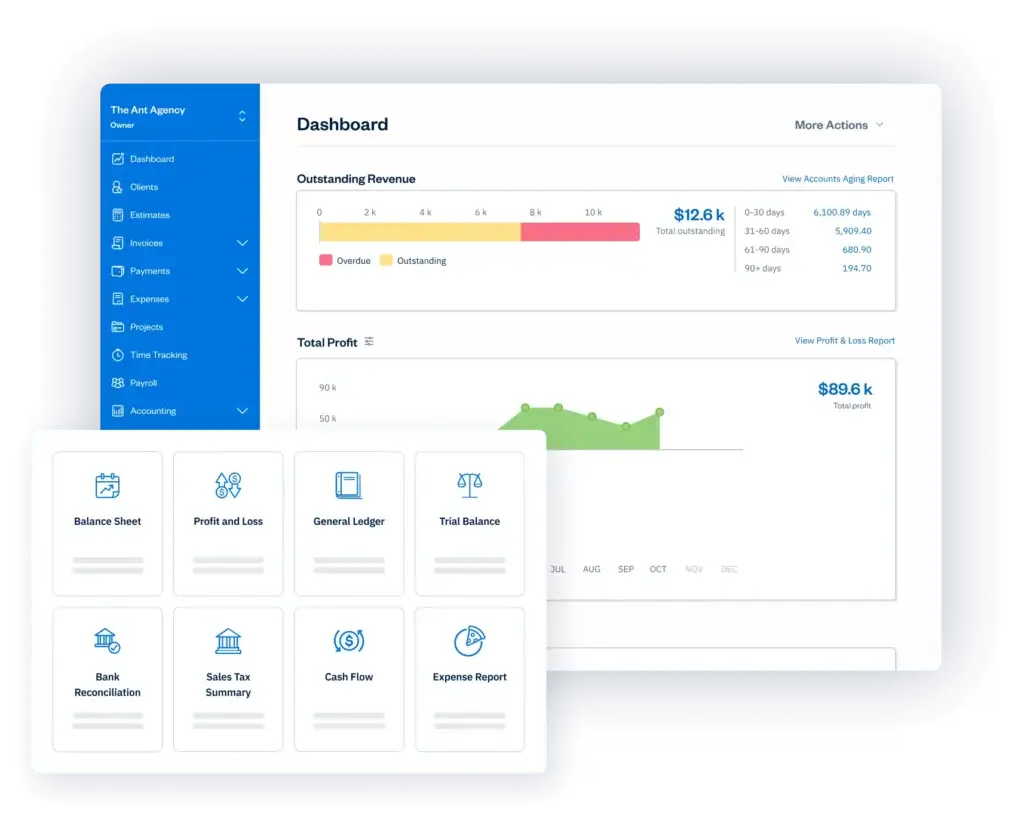
FreshBooks includes useful reports such as profit and loss, tax summaries, invoice details, accounts aging, expenses, payments collected, and business health views.
In higher plans, you also get more accounting-focused capabilities like double-entry accounting reports, bank reconciliation, accountant access, accounts payable, and project profitability.
This is enough for many small service businesses. However, it is still not as deep as QuickBooks or Xero when you need highly customizable reporting, complex chart of accounts management, or advanced inventory-related accounting.
Mobile App and Cloud Access
FreshBooks is strong on mobile. You can send invoices, track time, capture receipts, view client details, and manage expenses from your phone.
For freelancers and service providers who work from client sites, coworking spaces, or home offices, this is a major advantage. You do not need to wait until you are back at your desk to handle basic financial tasks.
What’s New in FreshBooks for 2026
FreshBooks continues to release product updates that improve accounting workflows, reporting, bank connections, dashboard insights, and data exports.
Recent updates include improvements such as dashboard revenue-by-client insights, CSV import for manual bank accounts, updated trial balance reporting, bank connection widgets, and export options for charts of accounts, expenses, invoices, items, and services.
These updates matter because FreshBooks is no longer only an invoice generator. It is gradually becoming a more capable accounting environment for small businesses that still want a simple user experience.
Pros and Cons
A balanced view: what you’ll love and what to consider
Positive
✅ Very easy to use
✅ Excellent invoicing workflow
✅ Built-in time tracking
✅ Strong mobile experience
✅ Good for service businesses
Negative
❌ Client limits on lower plans
❌ Add-ons raise the cost
❌ Limited inventory features
❌ Reporting can feel basic
❌ Less scalable for complex businesses
What You’ll Like Most
- Simple interface: You can start using it without accounting training.
- Fast invoicing: It is one of the smoothest invoicing tools for service businesses.
- Time tracking: Built-in timers help you bill accurately without another app.
- Client communication: Estimates, proposals, portals, and reminders improve the client experience.
- Mobile usability: The mobile app is practical for invoicing, receipts, and expenses.
What Could Be Better
- Client limits: Lite and Plus can feel restrictive as your client base grows.
- Team costs: Extra team members can increase the total monthly price.
- Inventory: It is not built for product-heavy businesses.
- Reporting: Reports are useful, but less customizable than QuickBooks or Zoho Books.
- Advanced accounting: Larger businesses may need deeper controls and workflows.
Bottom line: FreshBooks is excellent if your business is service-first. It is less ideal if your business needs advanced accounting controls, inventory, or enterprise-level reporting.
FreshBooks Ease of Use
User Interface and Operational Simplicity
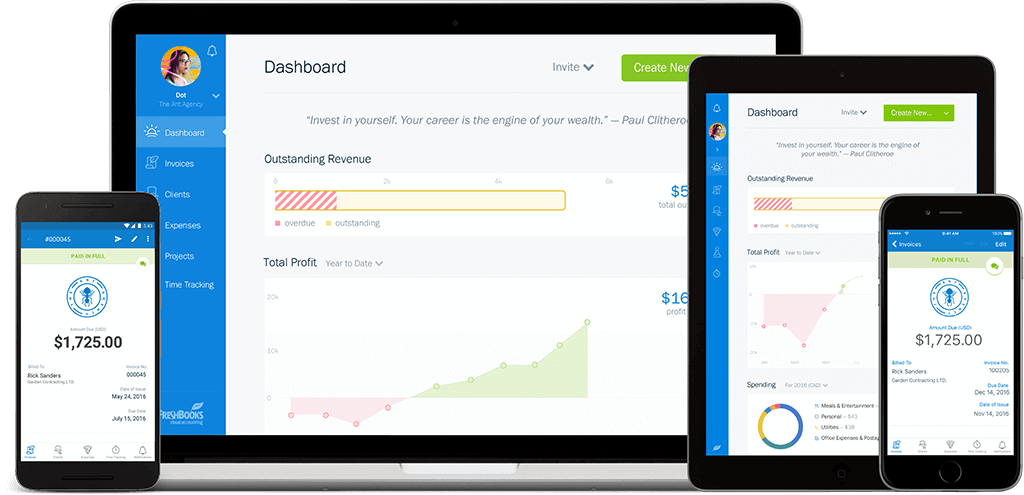
FreshBooks is designed for business owners who want accounting software to feel less intimidating. The interface is clean, visual, and focused on common actions like creating invoices, adding expenses, checking reports, and managing clients.
First-Time Setup
The setup process is easy to follow. You can add your company details, upload your logo, connect a payment method, and create your first invoice without spending hours in settings.
This is important for freelancers and small business owners who need software they can adopt quickly. You do not need a finance team to get value from it.
Dashboard and Navigation
The dashboard gives you quick visibility into revenue, outstanding invoices, expenses, and recent activity. Navigation is straightforward, with clear sections for invoices, clients, expenses, projects, time tracking, and reports.
The experience feels more like a modern business app than a traditional accounting system. That is one of the reasons FreshBooks is easier for non-accountants to use.
Mobile Experience
The mobile app is one of FreshBooks’ strongest usability advantages. You can create invoices, capture receipts, track time, view client records, and check basic financial activity while you are away from your desk.
For mobile-first freelancers, consultants, and field-service professionals, this can make a real difference in daily work.
Collaboration with Accountants and Teams
FreshBooks lets you invite accountants and team members with controlled access. This helps you collaborate without giving everyone full visibility into sensitive financial settings.
For small agencies, this is useful because team members can track time and submit expenses while the business owner or accountant handles reporting and financial review.
Integrations and Ecosystem
Connect FreshBooks to your favorite apps
FreshBooks connects with many tools used by small businesses, including payment processors, payroll platforms, CRM systems, ecommerce tools, and productivity apps.
Popular FreshBooks Integrations
- Stripe and PayPal: Accept online payments from clients
- Gusto: Add payroll and employee management workflows
- Shopify and WooCommerce: Connect ecommerce activity where supported
- HubSpot: Sync client and CRM workflows
- Trello and Asana: Support project and task workflows
- Zapier: Build automations across thousands of apps
Automation with Zapier and API Options
If a native integration is not available, Zapier can help you connect FreshBooks with tools like Slack, Google Sheets, ClickUp, monday.com, or email marketing platforms.
For more advanced needs, FreshBooks also offers API options. This is useful if your team wants to connect internal systems or build custom workflows around invoices, clients, or payments.
Where the Ecosystem Falls Short
The integration library is useful, but it is not as deep as QuickBooks or Xero. If your business relies heavily on niche industry apps, you should check the integration marketplace before choosing a plan.
For most freelancers and small service businesses, the available integrations cover the essentials. For more complex operations, the app ecosystem may feel limited.
Pricing and Plans
How much does FreshBooks cost?
FreshBooks uses a tiered pricing model with plans for freelancers, growing service businesses, established teams, and larger custom accounts. Prices can change based on region, promotions, and annual billing, so you should always confirm the latest rate on the official pricing page before subscribing.
Plan Overview: Lite, Plus, Premium, and Select
| Plan | Best For | Main Limit | Typical Starting Price |
| Lite | Freelancers with a small client base | Up to 5 billable clients | From around $19/month before discounts |
| Plus | Growing solo businesses and consultants | Up to 50 billable clients | From around $33/month before discounts |
| Premium | Established service businesses | Unlimited billable clients | From around $60/month before discounts |
| Select | Larger or custom accounts | Custom setup and support | Custom pricing |
What’s Included in Each Plan?
All plans typically include core tools such as invoicing, estimates, expense tracking, time tracking, payment acceptance, mileage tracking, tax-time reports, and mobile access.
The key differences appear as you move into higher tiers. Plus adds important accounting and client management features, while Premium is better for businesses with more clients and more mature accounting needs.
| Feature | Lite | Plus | Premium | Select |
| Billable Clients | 5 | 50 | Unlimited | Custom |
| Unlimited Invoices | Yes | Yes | Yes | Yes |
| Time Tracking | Yes | Yes | Yes | Yes |
| Bank Reconciliation | No | Yes | Yes | Yes |
| Double-Entry Reports | No | Yes | Yes | Yes |
| Accountant Access | No | Yes | Yes | Yes |
| Project Profitability | No | No | Yes | Yes |
| Accounts Payable | No | No | Yes | Yes |
| Advanced Support | No | No | No | Yes |
Add-On Costs to Consider
The listed plan price does not always represent your final monthly cost. If you need payroll, extra team members, or advanced payment options, your total spend can increase.
- Team members: Usually priced per additional team member
- Advanced payments: May be an add-on in lower plans
- Payroll: Available as an add-on in supported regions
- Payment processing: Transaction fees may apply when clients pay online
Is FreshBooks Worth the Price?
FreshBooks is worth it if invoicing, time tracking, payment collection, and client billing are central to your business. The platform can save time and reduce admin work, especially if you currently use spreadsheets or disconnected tools.
However, the best value is often the Plus plan rather than Lite. Lite is useful for very small client lists, but many businesses will need Plus for accountant access, bank reconciliation, recurring billing, and double-entry reports.
Accounting Depth
How strong is FreshBooks as accounting software?
FreshBooks is often described as simple accounting software, but it is important to understand what that means. It is more capable than a basic invoice tool, but less advanced than a full accounting suite built for complex businesses.
What FreshBooks Handles Well
- Creating invoices, estimates, and proposals
- Tracking income and expenses
- Managing billable time and client projects
- Accepting online payments
- Running tax-time and business health reports
- Working with an accountant in supported plans
- Reconciling bank transactions in higher plans
Where It Is Less Advanced
FreshBooks is not the strongest option if you need advanced inventory, multi-entity consolidation, highly customized reports, complex approval workflows, or detailed budget controls.
For those needs, QuickBooks Online, Xero, Zoho Books, Sage Intacct, NetSuite, or another more advanced accounting platform may be better, depending on company size.
In simple terms, FreshBooks is excellent for service-based accounting workflows, but it is not designed to be the financial backbone of a complex enterprise.
FreshBooks User Reviews
What customers say after using it
User feedback is generally consistent. People like FreshBooks because it is easy to use, fast for invoicing, and friendly for non-accountants. Many users also praise the mobile app and customer support.
Most Praised Features
- Simple invoice creation
- Professional client-facing documents
- Easy expense tracking
- Helpful time tracking
- Good mobile experience
- Responsive support
Common Complaints
- Lower plans limit billable clients
- Some features require higher plans
- Reporting is not as flexible as competitors
- Extra team members increase cost
- Not ideal for inventory-heavy businesses
The pattern is clear. FreshBooks is loved by the users it is built for, especially freelancers and service businesses. It gets more criticism when users expect it to behave like a deeper accounting platform for complex operations.
FreshBooks Alternatives
Compare top competitors
FreshBooks is not the only strong accounting tool in the market. The right choice depends on how you bill clients, how complex your accounting is, and whether you need inventory, payroll, automation, or advanced reporting.
FreshBooks vs QuickBooks, Xero, Zoho Books, and Wave
| Software | Best For | Where It Beats FreshBooks | Where FreshBooks Wins |
| QuickBooks Online | Small businesses needing deeper accounting | Reporting, inventory, accountant adoption | Simpler invoicing and easier UX |
| Xero | Growing businesses and accountant-led workflows | Bank reconciliation, app marketplace, multi-currency | Better for freelancers and client billing |
| Zoho Books | Budget-conscious SMBs using Zoho tools | Automation, inventory, Zoho ecosystem | Cleaner setup and friendlier experience |
| Wave | Very small businesses wanting free accounting | Free core accounting tools | Better time tracking, proposals, and support |
FreshBooks vs QuickBooks Online
QuickBooks Online is better if you need more advanced accounting, stronger reporting, inventory, and wider accountant familiarity. It is a better long-term fit for businesses that expect accounting complexity to grow.
FreshBooks is better if ease of use, client billing, and invoicing speed matter more than accounting depth.
FreshBooks vs Xero
Xero is strong for bank reconciliation, automation, multi-currency needs, and collaboration with accountants. It also has a broader app ecosystem.
FreshBooks is easier for many freelancers and small service providers because it focuses more directly on invoicing, time tracking, and client workflows.
FreshBooks vs Zoho Books
Zoho Books offers excellent value and stronger automation, especially if you already use Zoho CRM, Zoho Inventory, or other Zoho tools.
FreshBooks is more approachable and usually easier to learn. It is a better fit when you want simplicity over customization.
FreshBooks vs Wave
Wave is attractive because its core accounting tools are free. It is a good starting point for very small businesses with simple needs.
FreshBooks offers a more polished service-business workflow with better time tracking, proposals, payment reminders, and client billing features.
Security and Compliance
Your financial data deserves serious protection
Security matters when software stores client records, invoices, payment data, bank activity, and accounting reports. FreshBooks provides modern security and compliance measures designed for small business financial data.
Data Security and Reliability
FreshBooks uses industry-standard encryption practices to transmit sensitive information. Its infrastructure includes vulnerability scanning, secure development practices, redundant servers, datacenter protections, and regular backups.
FreshBooks also uses Google Cloud Platform for hosting, which supports security, reliability, and availability.
PCI Compliance
FreshBooks handles cardholder data in line with PCI Data Security Standard requirements. For card storage and recurring payment use cases, it uses PCI DSS Level 1 compliant practices and audits.
This matters if you accept online payments or store client card details for recurring billing.
GDPR Support
FreshBooks has processes in place for GDPR requirements. Eligible users can request account data export or personal information anonymization.
If your business works with clients in the EU, this is a valuable trust and compliance signal.
SOC 2 Type 1
FreshBooks completed SOC 2 Type 1 certification, which helps validate that its controls and processes have been formally reviewed.
For small businesses, this adds reassurance. Still, you should also follow your own best practices, including strong passwords, multi-factor authentication, and careful user access management.
Conclusion
Is FreshBooks the right accounting tool for you?
⭐ Overall Rating: 9.6/10
FreshBooks is one of the best accounting software options for freelancers, consultants, and service-based small businesses that want a simpler way to manage invoices, expenses, payments, and billable time.
Its biggest strength is usability. It helps you create professional invoices quickly, track project time, capture expenses, and get paid without turning accounting into a complicated process.
However, FreshBooks is not the best fit for every business. If you need advanced inventory, deep custom reporting, multi-entity accounting, or complex financial workflows, you should compare it carefully with QuickBooks Online, Xero, and Zoho Books.
Our Recommendation by Business Type
- Freelancers: Excellent fit
- Consultants: Excellent fit
- Small agencies: Strong fit, especially on Plus or Premium
- Product-based businesses: Limited fit
- Growing companies with complex accounting: Consider QuickBooks, Xero, or Zoho Books
- Enterprise teams: Look at more scalable financial platforms
If your main goal is to save time, look professional, and get paid faster, FreshBooks is a strong choice. If your business is becoming more complex, use it as part of a broader comparison before committing.
Want to compare it with other tools before making a decision? Read our full guide to the best accounting software.
FreshBooks FAQs
Frequently Asked Questions
Is FreshBooks good for small businesses?
Yes. It is a strong fit for small service-based businesses that need easy invoicing, expense tracking, time tracking, online payments, and simple financial reports without a steep learning curve.
Is FreshBooks better than QuickBooks?
It depends on your needs. It is usually easier for freelancers and service businesses, while QuickBooks is stronger for advanced accounting, inventory, reporting, and accountant-led workflows.
Does FreshBooks have a free plan?
No. The platform does not usually offer a permanent free plan, but a 30-day free trial is commonly available so you can test the software before paying.
How much does FreshBooks cost?
Pricing depends on the plan, billing cycle, region, and promotions. Plans typically start with Lite for a small number of billable clients, then move to Plus, Premium, and Select for larger needs.
What is the main limitation of FreshBooks?
The main limitation is scalability for complex accounting. Lower plans have billable client limits, and the platform is not ideal for advanced inventory, deep custom reporting, or multi-entity accounting.
Is FreshBooks good for freelancers?
Yes. It is one of the better options for freelancers because it combines invoices, estimates, time tracking, expense capture, online payments, and client communication in one simple platform.
Can FreshBooks track inventory?
It is not a strong inventory management platform. Product-based businesses that need stock tracking, purchase orders, and detailed product costing should usually consider QuickBooks, Xero, or Zoho Books.
Does FreshBooks support double-entry accounting?
Yes, but availability depends on the plan. Double-entry accounting reports, bank reconciliation, and accountant access are generally available from higher tiers rather than the entry-level plan.
Does FreshBooks integrate with payroll?
Yes. Payroll is available through supported payroll options and add-ons in eligible regions. Always check the latest plan details because payroll availability and pricing can vary.
Is FreshBooks secure?
Yes. The platform uses modern security practices such as encryption, PCI compliance controls, backups, vulnerability scanning, and GDPR-related processes for data export and anonymization requests.








