
Introduction
Why Choosing the Right Accounting Software Really Matters
Running a small business means managing invoices, expenses, taxes, cash flow, and client payments, often without a full finance team behind you.
That is why the accounting software you choose matters. The right tool helps you stay organized, send professional invoices, understand your numbers, and avoid the spreadsheet mess that usually appears around tax time.
That is where Wave comes in.
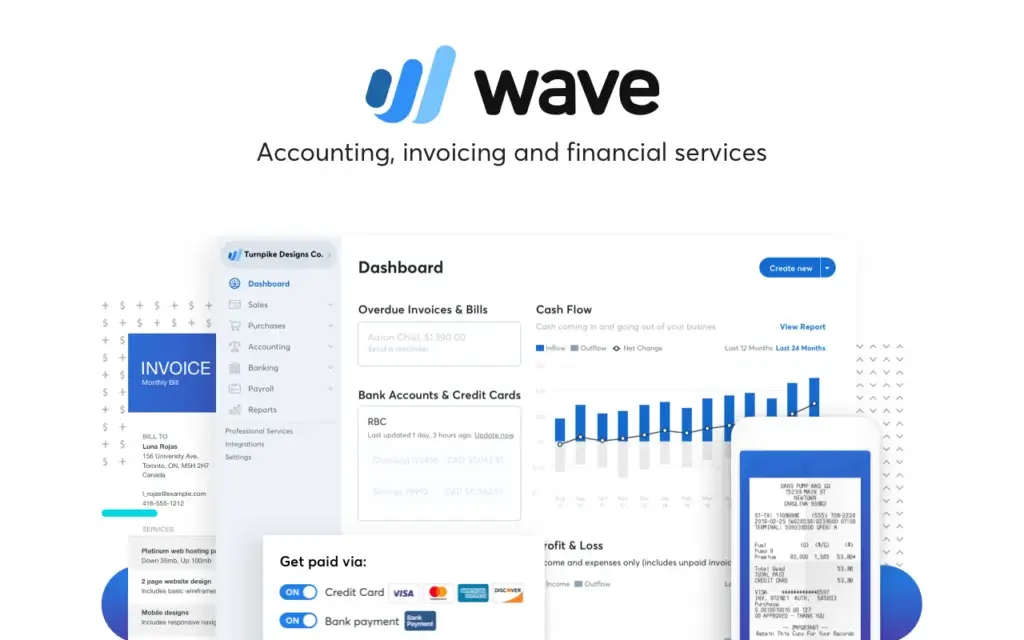
Wave is a cloud-based accounting and invoicing platform built mainly for freelancers, solopreneurs, consultants, and very small businesses. It focuses on the financial tasks most small business owners need every week, including invoicing, income tracking, expense management, receipt capture, basic reports, and online payments.
In this Wave review for 2026, we will look at what the software does well, where it falls short, how much it costs, and whether it still deserves its reputation as one of the best free accounting software options for small businesses.
Quick Take: Is Wave Worth It?
Wave is worth considering if you run a freelance, consulting, or service-based business and need simple accounting without a heavy monthly software bill.
It gives you a strong starting point for invoicing, bookkeeping, and basic financial reporting. However, it is not designed for companies that need advanced inventory, project profitability, budgeting, custom reporting, or complex user permissions.
| Category | Wave Review Summary |
| Best For | Freelancers, solopreneurs, consultants, and micro-businesses |
| Not Best For | Inventory-heavy businesses, larger teams, and advanced accounting workflows |
| Starting Price | $0 Starter plan |
| Paid Plan | Pro plan from $19/month or $190/year |
| Main Strength | Free core accounting and invoicing tools |
| Main Weakness | Limited scalability compared with QuickBooks, Xero, and Zoho Books |
Who Is Wave Best For?
Find out if Wave fits your business needs
Ideal Users: Freelancers, Solopreneurs, and Service Businesses
Wave is best for you if your accounting needs are simple, predictable, and mostly service-based.
You are likely a good fit if you:
- Send invoices to clients regularly
- Track business expenses without a full-time bookkeeper
- Want free accounting software with optional paid upgrades
- Need basic reports like profit and loss, balance sheet, and cash flow
- Run a business in the U.S. or Canada, where more features are available
Common examples include:
- Freelance writers, designers, developers, and marketers
- Consultants, coaches, and small agencies
- Photographers, trainers, and local service providers
- Side-hustle owners who need clean records before tax season
✅ If you mainly need invoicing, simple bookkeeping, and clear visibility into income and expenses, Wave is one of the strongest free options available.
When Wave Might Not Be the Right Fit
Wave is not built for every small business. If your operations are getting more complex, you may outgrow it quickly.
You may want to consider an alternative if you need:
- Advanced inventory management
- Project profitability or job costing
- Time tracking and billable hours
- Advanced budgeting or forecasting
- Deep custom reports
- Multi-currency accounting
- Granular user roles and audit trails
- A large app marketplace with native integrations
For those needs, tools like QuickBooks Online, Xero, or Zoho Books may be better long-term choices.
Real-Life Scenarios Where Wave Works Best
Wave works best when your business model is easy to understand financially.
For example, it can be a great fit for:
- A freelance designer who sends monthly invoices and tracks design software expenses
- A consultant who needs clean income records and simple client billing
- A photographer who wants to upload receipts and track travel costs
- A small agency owner who needs invoicing and reports but not complex finance operations
In these scenarios, Wave helps you stay organized without forcing you into a complicated accounting system.
Core Features
A practical look at the tools that matter most
Wave keeps the feature set focused. It does not try to match every advanced function found in enterprise accounting platforms, but it covers the core needs of many small business owners very well.
Here are the features that matter most in 2026.
🧾 Invoicing and Online Payments
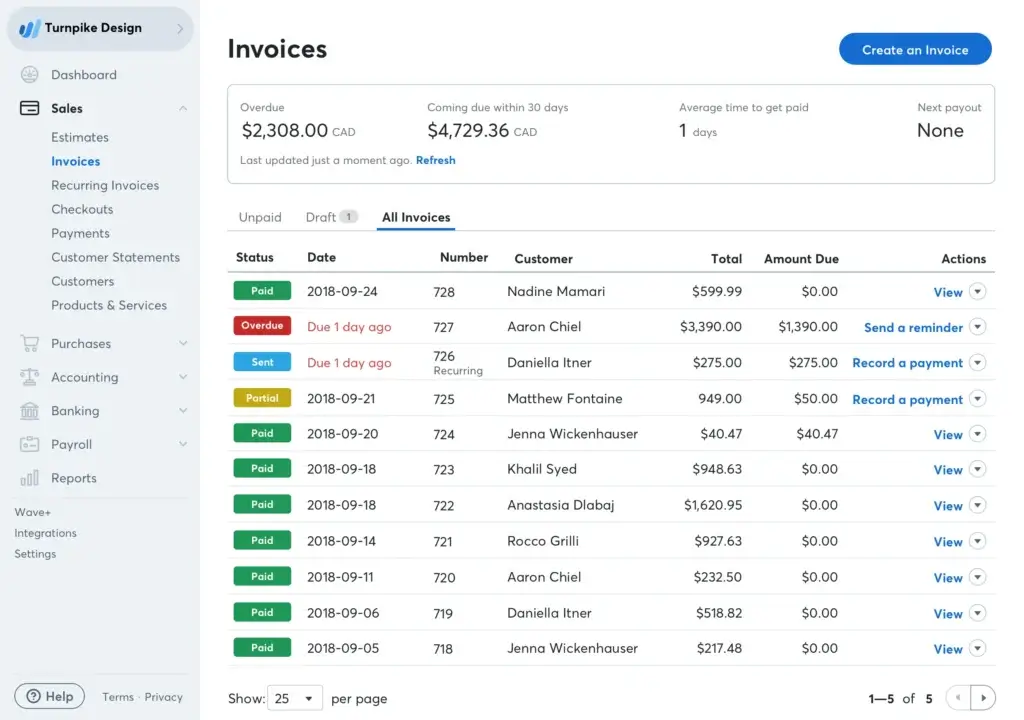
Invoicing is one of Wave’s strongest areas. You can create professional invoices, customize them with your logo and brand colors, send them to clients, and track whether they are viewed, overdue, or paid.
Key invoicing features include:
- Unlimited invoices and estimates
- Custom invoice templates
- Recurring invoices for repeat clients
- Automatic reminders for overdue invoices
- Online payment options for credit cards and bank payments
This is especially useful if your business depends on client billing. Instead of building invoices manually in Word or spreadsheets, you can keep your sales activity and accounting records connected.
Online payments are available as an add-on. Payment processing fees apply, but they can help you get paid faster and reduce manual follow-up.
💼 Expense Tracking and Receipt Capture
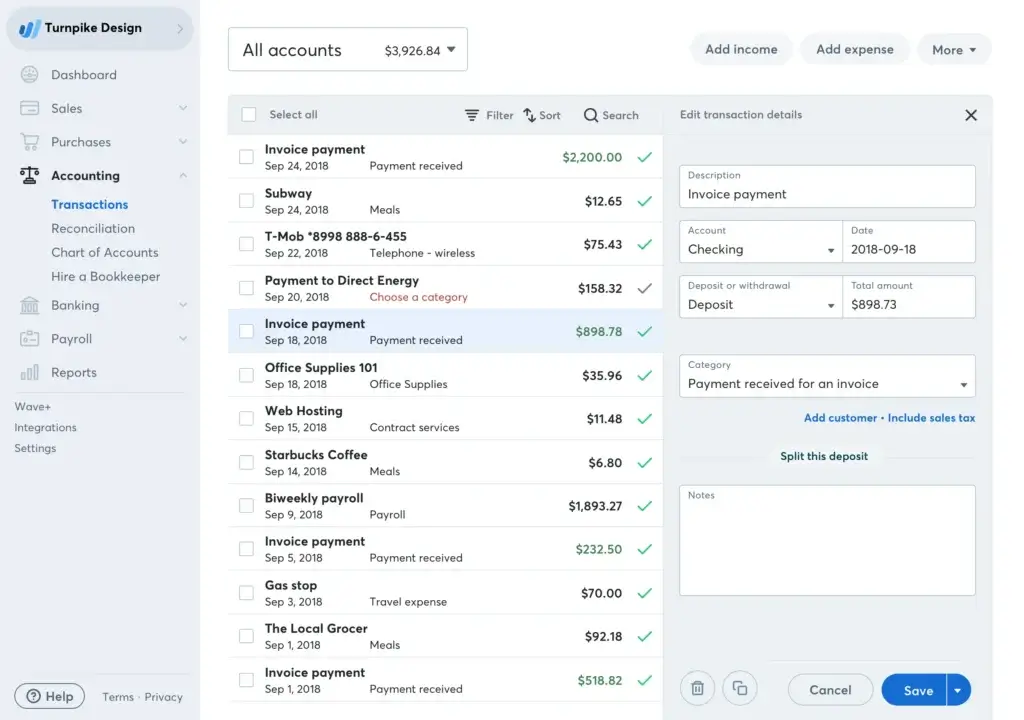
Wave helps you track income and expenses in one place, which is essential for clean bookkeeping.
You can categorize transactions, upload receipts, and prepare your records for tax time. Receipt capture uses OCR technology to extract information from receipts and turn them into bookkeeping records.
Important pricing note: Receipt capture is not simply free for every user in every setup. It is available as an add-on for Starter users and included with the Pro plan. Always check current pricing by region before relying on it as a free feature.
🏦 Bank Connections and Reconciliation
Bank reconciliation is one of the biggest time-savers in accounting software.
With Wave Pro, you can automatically import, merge, and categorize bank transactions. This helps reduce manual entry and makes it easier to compare your bank activity with your accounting records.
On the free Starter plan, you can still create bookkeeping records, but you may need to upload statements manually or enter transactions yourself.
⚠️ This is one of the biggest differences between Starter and Pro. If you want hands-off bank syncing, Pro is the more practical option.
📊 Reports and Financial Dashboards
Wave includes essential reports that help you understand your business performance without needing an advanced finance background.
You can access reports such as:
- Profit and loss statement
- Balance sheet
- Cash flow reports
- Sales tax reports
- Aged receivables
- Customer statements
The reporting is clear and useful for basic financial management. However, it is not as flexible as what you get from QuickBooks Online, Xero, Zoho Books, or Sage accounting tools.
📱 Mobile App and Cloud Access
Wave is cloud-based, so you can access your data from your browser. It also offers a mobile app for iOS and Android.
From the app, you can create invoices, check payments, receive notifications, and manage basic work on the go. This is useful if you work from client sites, travel often, or run your business outside a traditional office.
📦 Inventory and Project Tracking Limitations
Wave does not offer native inventory management, project accounting, job costing, or time tracking.
That matters if you sell physical products, manage project margins, bill by the hour, or need profitability reporting by client, job, or department.
For those workflows, FreshBooks may be better for client service billing, Xero may be better for multi-currency and inventory needs, and QuickBooks Online may be better for broader accounting depth.
Key Feature Highlights
| Feature | Starter Plan | Pro Plan |
| Unlimited Invoices and Estimates | ✅ Included | ✅ Included |
| Online Payments | ➕ Optional add-on | ➕ Optional add-on with discounted rates |
| Receipt Capture | ➕ Add-on | ✅ Included |
| Automatic Bank Imports | ❌ Not included | ✅ Included |
| Auto-Merge and Categorization | ❌ Not included | ✅ Included |
| Basic Financial Reports | ✅ Included | ✅ Included |
| Live Chat and Email Support | Limited or tied to paid add-ons | ✅ Included |
| Payroll | ➕ Paid add-on | ➕ Paid add-on |
Pros and Cons
Advantages and disadvantages
Positive
✅ Free Starter plan
✅ Easy to use
✅ Strong invoicing tools
✅ Good for freelancers
✅ Simple reporting
Negative
❌ Limited scalability
❌ No inventory tools
❌ No project tracking
❌ Limited integrations
❌ Support depends on plan
✅ What You’ll Like About Wave
1. The free plan is genuinely useful
You can start with invoicing, estimates, bills, bookkeeping records, dashboards, and basic reports without paying a monthly subscription.
2. The interface is beginner-friendly
The platform is clean and simple enough for non-accountants. You can send invoices, track payments, and review reports without getting lost in complex menus.
3. Invoicing is strong for small businesses
Professional invoices, recurring billing, reminders, and online payment options make it easier to manage client billing.
4. It works well for service-based businesses
If you sell services rather than products, Wave gives you most of what you need without overcomplicating your workflow.
5. The Pro plan adds practical automation
Automatic bank imports, receipt capture, and transaction categorization help you save time as your bookkeeping workload grows.
❌ What Could Be Better
1. It is not ideal for growing product-based businesses
There is no native inventory management, purchase order workflow, or item-level stock control.
2. Reporting is basic
The included reports are useful, but you do not get deep custom reporting, forecasting, or advanced analytics.
3. Integrations are limited
Wave does not have a large app marketplace like Xero or QuickBooks. If your business runs on many connected apps, this may become frustrating.
4. Support is not equal across plans
Free users rely more heavily on self-service resources. Live-person support is more accessible with Pro or paid add-ons.
5. It may be harder to scale long-term
As your accounting needs become more complex, you may eventually need to move to QuickBooks, Xero, Zoho Books, or another more advanced system.
User Interface and Experience
Everyday usability for small business owners
Wave’s user experience is one of its strongest advantages. It is not overloaded with accounting terminology, and most day-to-day actions are easy to find.
This matters because many small business owners do not want to become accounting experts. They want a tool that helps them send invoices, track cash flow, and stay organized.
Setup and Onboarding
Getting started is straightforward. You create an account, enter your business details, choose your currency, and begin setting up invoices, customers, and bookkeeping records.
If you use the Pro plan, you can connect bank accounts for automatic imports. If you stay on Starter, you can still use the software, but more work may be manual.
Dashboard and Navigation
The dashboard gives you a simple view of your business finances. You can monitor invoice activity, customers, cash flow, payments, and reports without switching between too many screens.
The main navigation is clear, with sections for sales, purchases, accounting, banking, and reports. This makes Wave easier to learn than more advanced platforms.
Mobile Experience
The mobile app is helpful for business owners who work outside the office. You can create invoices, track payments, receive notifications, and manage key tasks from your phone.
It is not a full replacement for detailed bookkeeping work on desktop, but it is more than enough for quick invoicing, receipt capture, and payment tracking.
Collaboration With Accountants
You can invite accountants, bookkeepers, partners, or payroll managers to your account. This is useful when you want help without sharing your personal login.
However, permissions are not as advanced as what you get from more robust accounting systems. If you need detailed approval workflows or strong audit controls, Wave may feel limited.
Integrations and Compatibility
Connect Wave to your workflow
Wave keeps integrations simple. This is good if you want fewer moving parts, but it can be limiting if your business depends on a connected tech stack.
Built-In Add-Ons
Wave’s strongest ecosystem features are its native add-ons.
- Wave Payments – Accept online payments from invoices
- Wave Payroll – Run payroll in supported regions
- Wave Advisors – Get bookkeeping support from finance professionals
- Receipt Capture – Digitally capture receipts and create bookkeeping records
These add-ons help keep small business finance workflows in one place.
Third-Party Integrations
Wave does not have the same integration depth as QuickBooks Online, Xero, or Zoho Books.
You can still connect workflows through tools like Zapier, export reports to spreadsheets, and use payment-related connections. But if your goal is a fully integrated accounting system connected to CRM, inventory, e-commerce, payroll, and project management tools, Wave may feel restrictive.
No Large App Marketplace
This is one of Wave’s biggest long-term limitations.
QuickBooks and Xero both offer broad app ecosystems. Zoho Books connects naturally with the Zoho suite. Wave is more self-contained, which keeps it simple but reduces flexibility.
That is not a problem for many freelancers. But for businesses with multiple systems, it can become a reason to switch later.
Pricing and Plans
Current pricing and plan differences
Wave’s pricing is one of the main reasons small businesses consider it. The Starter plan is free, while the Pro plan adds automation, better support access, receipt capture, and more polished workflows.
Pricing can vary by country and promotion, so always check the official pricing page before subscribing.
Wave Starter Plan
The Starter plan costs $0 and is best for very small businesses that want basic bookkeeping and invoicing without monthly software costs.
Best for: freelancers, side hustlers, new businesses, and simple service-based businesses.
Starter includes:
- Unlimited estimates, invoices, bills, and bookkeeping records
- Invoice creation from the mobile app
- Cash flow and customer dashboard
- Option to accept online payments
- Manual bookkeeping workflows
Wave Pro Plan
The Pro plan starts at $19/month or $190/year in the U.S. It is best for users who want to reduce manual bookkeeping work.
Best for: active freelancers, consultants, and small businesses that use Wave regularly and want more automation.
Pro includes:
- Automatic bank transaction imports
- Auto-merge and categorization
- Unlimited receipt capture
- Automated late payment reminders
- Users and collaboration features
- Live-person chat and email support
- Discounted online payment processing rates
Optional Add-Ons
Wave also offers paid add-ons, so you can expand functionality without moving to a more expensive platform.
| Plan or Add-On | Current Pricing | Best For |
| Starter | $0 | New businesses and freelancers needing basic accounting |
| Pro | $19/month or $190/year | Users who want automation, receipts, and support |
| Online Payments | Starts at 2.9% + $0.60 on Starter | Businesses that want clients to pay invoices online |
| Payroll | Paid add-on, pricing varies by location and service type | Small businesses paying employees or contractors |
| Wave Advisors | From $199/month | Owners who want bookkeeping support |
| Receipt Capture | Add-on for Starter, included in Pro | Users who manage many receipts and expenses |
Is Wave Worth the Price?
For freelancers and small service-based businesses, the free Starter plan can be a strong value. You get enough accounting functionality to move away from spreadsheets and manage your finances more professionally.
The Pro plan is worth considering if you want to save time. Automatic bank imports, transaction categorization, receipt capture, and support can easily justify the monthly cost if you use the software every week.
However, if you need inventory, project accounting, advanced reporting, or many integrations, paying for Wave Pro may not solve the deeper limitation. In that case, a more scalable accounting platform may be the better investment.
Alternatives to Wave
Compare top competitors
Wave is excellent for simple accounting, but it is not the right tool for every business. The best alternative depends on what you are missing.
If you want stronger reporting, choose QuickBooks. If you want a more global cloud accounting platform, consider Xero. If you want automation at a low cost, Zoho Books is worth exploring. If you bill clients by time or project, FreshBooks may be a better fit.
| Alternative | Choose It Instead of Wave If… | Main Trade-Off |
| QuickBooks Online | You need stronger reporting, inventory, payroll, accountant support, and scalability | Higher cost and steeper learning curve |
| Xero | You need multi-currency, stronger integrations, and better scaling | Starter plan can feel limited |
| FreshBooks | You bill clients by time, manage projects, or need stronger client workflows | Less accounting depth than QuickBooks or Xero |
| Zoho Books | You use Zoho CRM, Zoho Inventory, or want more automation at a low cost | Best value comes inside the Zoho ecosystem |
| Sage 50 | You want traditional accounting depth, job costing, and stronger audit structure | Less beginner-friendly and more traditional |
Wave vs QuickBooks Online
QuickBooks Online is stronger for growing businesses. It offers deeper reporting, inventory features, payroll options, accountant familiarity, and a larger app ecosystem.
Wave is better if you want a lower-cost starting point and your accounting needs are simple.
Wave vs Xero
Xero is better for businesses that need stronger automation, multi-currency support, app integrations, and collaboration with accountants.
Wave is better for freelancers and small teams that want free accounting basics without committing to a paid platform.
Wave vs FreshBooks
FreshBooks is stronger for service professionals who bill by time, send proposals, manage client projects, or need a polished client-facing billing experience.
Wave is better if you mainly need free accounting and invoicing without project management features.
When You Should Stick With Wave
- You run a freelance, service-based, or solo business
- You want basic accounting and invoicing without monthly fees
- You do not need inventory, project tracking, or advanced user roles
- You prefer a simple accounting system over a large app ecosystem
When to Consider an Alternative
- You need project tracking, budgeting, or custom workflows
- You sell physical products and need inventory management
- You want deep integration with CRM, e-commerce, or POS tools
- You need multi-currency accounting or advanced financial reporting
Pro Tip: If you are still unsure which platform fits best, compare more options in our full Top Accounting Software Comparison.
User Reviews and Common Complaints
Real feedback from small business users
User feedback around Wave is usually very clear: people love it when they need simple accounting at low cost, but they become frustrated when they expect advanced accounting software.
What Users Like Most
- The free plan is useful for real business tasks
- The interface is easy for non-accountants
- Invoices look professional and are simple to send
- Basic reports are enough for many freelancers
- It helps small businesses stop relying on spreadsheets
Common Complaints
- Support can feel limited for free users
- Payment or payroll issues can be stressful when they happen
- Reporting is too basic for growing businesses
- There is no inventory, project tracking, or time billing
- Native integrations are limited compared with competitors
Our Analysis
The pattern is simple. Wave works best when you treat it as a lightweight accounting platform for very small businesses. It works less well when you expect it to behave like a full finance operations system.
If you only need invoicing, expense tracking, receipt organization, and basic reports, it can be an excellent fit. If you need stronger controls, workflows, integrations, or scalability, you will likely outgrow it.
Security and Compliance
Your financial data deserves reliable protection
Security matters when your accounting software stores invoices, customers, payments, receipts, and financial records.
Wave uses several important protections for small business financial data.
Data Encryption and Storage
Wave uses up to 256-bit TLS encryption to protect data while it moves between your browser and the platform. It also stores accounting data on secure servers with controlled access and monitoring.
Payment Security
Wave is a PCI Level 1 Service Provider for payment processing. Credit card numbers are not stored directly in the software. Instead, payment data is handled through secure tokenization and payment processing workflows.
Bank Connection Security
Bank connections are read-only. This means the software can import transaction data, but it cannot move money from your bank account.
User Access
You can invite users such as accountants, bookkeepers, partners, and payroll managers. This helps you collaborate without sharing your personal login.
However, permissions are still simpler than those in more advanced accounting platforms. Larger teams may need deeper controls and audit trails.
Compliance Notes
Wave is not HIPAA compliant, so it is not a good fit for healthcare businesses that need to manage protected health information inside their accounting workflows.
Businesses with strict regulatory or regional data requirements should review Wave’s current privacy, security, and legal policies before adopting it.
Bottom line: Wave offers solid security for freelancers and small businesses, but it is not built for highly regulated or complex enterprise environments.
Final Recommendation
Is Wave the right accounting tool for you?
⭐ Overall Rating: 8.7/10
Wave is one of the best accounting tools for very small businesses that want to start with free invoicing and bookkeeping.
It is simple, practical, and approachable. You do not need advanced accounting knowledge to send invoices, track payments, organize expenses, and review basic financial reports.
That said, it is not the best choice for every business.
💡 Recap of Strengths and Weaknesses
What stands out:
- Free Starter plan with useful core features
- Clean and beginner-friendly interface
- Strong invoicing for freelancers and service providers
- Pro plan adds valuable automation
- Good fit for simple bookkeeping and tax preparation
What is missing:
- No inventory management
- No project accounting or job costing
- No time tracking
- Limited custom reporting
- Limited third-party integrations
- Basic permissions compared with larger platforms
🎯 Our Recommendation Based on Business Type
| Business Type | Is Wave a Good Fit? |
| Freelancers and Solopreneurs | ✅ Yes – one of the best fits |
| Small Service-Based Businesses | ✅ Yes – especially for invoicing and expenses |
| Side Hustles | ✅ Yes – strong free starting point |
| Growing Teams | ⚠️ Maybe – depends on complexity |
| Inventory-Based Businesses | ❌ No – lacks inventory tools |
| International Businesses | ❌ Usually not – better with Xero or Zoho Books |
| Mid-Sized Companies | ❌ No – choose a more scalable platform |
Next Steps
If you run a freelance, consulting, or very small service-based business, start with the free Starter plan and see whether it covers your workflow.
If you need automation, receipt capture, bank imports, and better support, the Pro plan is the more complete option.
If you need inventory, advanced reporting, project tracking, or a larger integration ecosystem, compare Wave with other options in our Top Accounting Software Guide.
Have more questions?
Frequently Asked Questions
Is Wave still free?
Yes. The Starter plan is free and includes core tools for estimates, invoices, bills, bookkeeping records, dashboards, and basic reports. However, some convenience features, such as automated bank imports, receipt capture, and live-person support, are tied to Pro or paid add-ons.
What is included in Wave Starter?
The Starter plan includes unlimited estimates, invoices, bills, and bookkeeping records. It also gives you access to basic dashboards, customer management, mobile invoicing, and optional online payments. It is best for freelancers and very small businesses with simple accounting needs.
What is included in Wave Pro?
The Pro plan adds automatic bank transaction imports, auto-merge and categorization, receipt capture, live chat and email support, user access, and more polished invoicing features. It is best for users who want to save time and reduce manual bookkeeping work.
Is Wave good for freelancers?
Yes. It is especially useful for freelancers who need to send invoices, track payments, organize expenses, and prepare basic financial reports without paying for complex accounting software.
Does Wave support inventory management?
No. It does not include native inventory management. If your business sells physical products, tracks stock levels, or needs purchase order workflows, platforms like QuickBooks Online, Xero, Zoho Books, or Sage may be better options.
Can I use Wave for payroll?
Payroll is available as a paid add-on in supported regions. It can help with employee and contractor payments, direct deposit, and tax-related payroll tasks, depending on location and service availability.
Is Wave better than QuickBooks?
It depends on your business size and needs. It is better if you want free, simple accounting for a very small business. QuickBooks is better if you need inventory, advanced reporting, payroll depth, accountant support, and stronger scalability.
Is Wave secure for small business accounting?
Yes, it uses encryption, secure data storage, read-only bank connections, and PCI Level 1 payment practices. However, businesses with strict compliance needs should review the latest security and privacy policies before choosing any accounting platform.
Does Wave work outside the U.S. and Canada?
Some core features may be available outside the U.S. and Canada, but availability can vary by region. Payments, payroll, and certain add-ons may be limited, so international businesses should confirm feature availability before committing.
Can I migrate from Wave to another accounting platform later?
Yes. You can export data such as reports and records, but migration may still require manual cleanup. If you expect rapid growth, it is worth considering whether a more scalable accounting platform would save work later.