
Introduction
Choosing accounting software is not only about comparing features. It is about choosing a system that fits the way you invoice customers, pay employees, manage tax, track inventory, and review your numbers.
MYOB, short for Mind Your Own Business, is one of the most established accounting software brands in Australia and New Zealand. It is especially relevant if your business needs local payroll, GST/BAS support, inventory management, and accounting workflows built around AU/NZ compliance.
MYOB is not the most modern accounting platform in every area. Xero feels cleaner, QuickBooks has a broader global ecosystem, and Zoho Books may offer stronger value for software-driven teams. But if you operate in Australia or New Zealand, MYOB remains a serious accounting platform because it combines bookkeeping, invoicing, payroll, reporting, inventory, and tax compliance in one system.
In this MYOB review, you will see who it is best for, where it falls short, how much it costs, which plan makes sense for your business, and how it compares with alternatives like Xero, QuickBooks, Zoho Books, and Reckon.
At a glance
If you want the quick answer, MYOB is best for Australian and New Zealand businesses that need accounting software with strong local payroll, BAS, GST, and inventory tools. It is less ideal if you want the cleanest interface, the largest app marketplace, or accounting software for markets outside AU/NZ.
| Category | MYOB Review Summary |
| Best For | Australian and New Zealand businesses needing payroll, GST/BAS, invoicing, and inventory |
| Best Plan for Sole Traders | Solo by MYOB or MYOB Business Lite |
| Best Plan for Growing Teams | MYOB Business Pro or AccountRight Plus |
| Strongest Feature | Local compliance, payroll, and business accounting depth |
| Main Weakness | Interface and integrations are less polished than Xero or QuickBooks |
Who Is MYOB Best For?
Find Out If MYOB Fits Your Business Needs
MYOB is not a universal accounting tool. Its biggest strength is that it is deeply focused on Australian and New Zealand businesses.
If that is your market, MYOB can save time across tax, payroll, invoicing, and inventory. If you are outside that region, you may find better value in Xero, QuickBooks Online, Zoho Books, or FreshBooks.
✅ MYOB is a great fit if you:
Operate in Australia or New Zealand
It is built around local business requirements, including GST, BAS, STP, payroll, superannuation, and ATO-related workflows.
Need accounting, payroll, and inventory in one platform
If you do not want to connect separate tools for bookkeeping, payroll, inventory, and reporting, MYOB gives you a more complete system.
Run a small or mid-sized business with employees
It is especially useful when your business has payroll obligations, employee records, timesheets, and compliance requirements.
Track inventory, orders, or client jobs
MYOB is a strong fit for retailers, wholesalers, tradies, hospitality businesses, and professional service firms that need job tracking or stock visibility.
Want desktop plus cloud flexibility
AccountRight plans are useful if you like the depth of desktop accounting software but still want browser access and online collaboration.
🚫 MYOB might not be the best fit if you:
Need accounting software for the US, UK, or EU
It is highly localized for Australia and New Zealand. Businesses in other regions should usually consider tools with stronger local tax support.
Want the cleanest cloud-first experience
MYOB is practical and capable, but Xero and FreshBooks generally feel more modern for new users.
Need a large integration ecosystem
It connects with useful apps, but Xero and QuickBooks offer broader third-party ecosystems for global SaaS, e-commerce, and CRM workflows.
Only need simple invoicing
If you are a solo service provider with very basic needs, a simpler tool may feel easier unless Solo by MYOB covers your workflow well.
🎯 Real scenarios where MYOB shines
Tradie business with employees
You can quote clients, send invoices, track expenses, pay employees, manage superannuation, and prepare tax reports from one system.
Retail or inventory-based business
It helps you manage inventory, sales orders, purchase orders, costs, and reporting without relying on spreadsheets.
Professional services firm
You can track billable time, manage jobs, invoice clients, and review profitability by project or customer.
Growing AU/NZ business
When your business grows beyond simple bookkeeping, MYOB gives you room to add payroll, inventory, reports, approvals, and accountant collaboration.
Software specification
Core Features That Matter in 2026
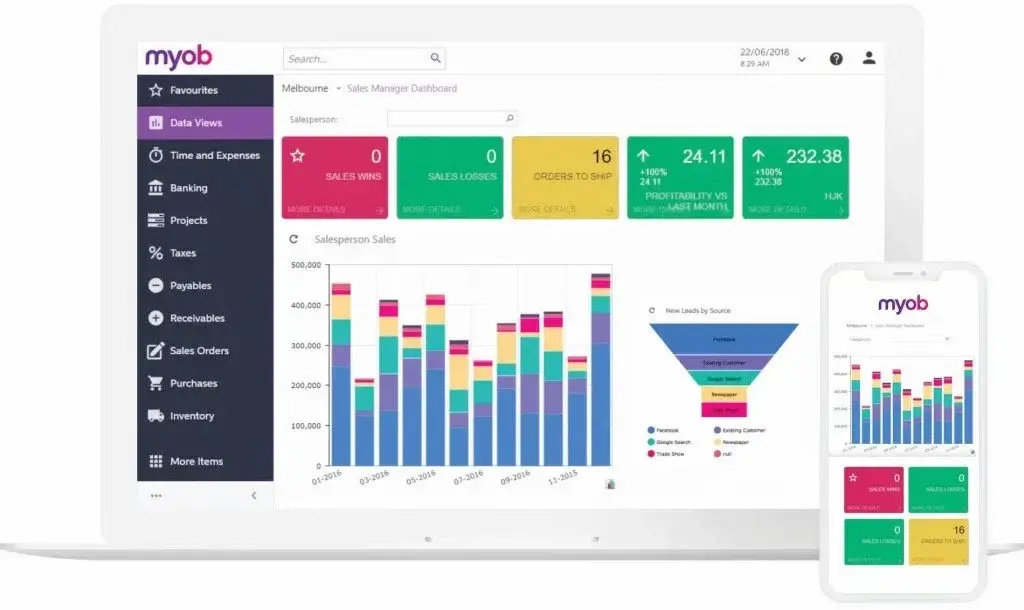
MYOB offers a wide range of accounting, payroll, tax, and business management features. Its value is not in having one standout feature. Its value is in bringing the financial workflow together.
That makes it especially useful for businesses that want to reduce manual admin and keep their accounting data connected to invoices, payroll, expenses, inventory, and reports.
Invoicing and Quotes
MYOB lets you create and send professional invoices and quotes, track payment status, and accept payments online. This is useful when cash flow depends on getting invoices out quickly and following up without manual reminders.
- Unlimited invoices and quotes on key plans
- Custom invoice branding for a professional client experience
- Online payment options to help customers pay faster
- Invoice tracking so you can see what is paid, overdue, or outstanding
Best for service businesses, trades, consultants, and local businesses that need fast billing.
Expense and Bill Tracking
Expense tracking is one of the areas where accounting software can save serious admin time. MYOB helps you capture receipts, categorize expenses, and connect bank transactions to your records.
- Receipt capture for faster record keeping
- Bank feeds to reduce manual transaction entry
- Bill tracking to monitor supplier payments
- Expense categorization for cleaner reports and tax preparation
This is especially useful if you manage multiple suppliers, subcontractors, or employee reimbursements.
Payroll, STP, and Superannuation
Payroll is one of MYOB’s strongest areas for Australian businesses. Depending on your plan, you can process pay runs, manage employee details, report through Single Touch Payroll, and handle superannuation obligations.
- STP support for Australian payroll reporting
- Employee pay runs with tax and super calculations
- Payslips and leave tracking for employee management
- Payroll options across Pro, Payroll Only, AccountRight Plus, and Premier
If your business has employees, payroll support is one of the main reasons to consider MYOB over simpler invoicing tools.
GST, BAS, and Tax Reporting
MYOB is built with local compliance in mind. You can track GST, prepare BAS-related information, and keep cleaner accounting records for your accountant or bookkeeper.
- GST tracking for Australian businesses
- BAS preparation support for tax workflows
- ATO-related payroll reporting for eligible plans
- Tax-ready reports to reduce year-end stress
This is where MYOB has a real advantage over global-first accounting tools that are not as focused on AU/NZ compliance.
Inventory, Orders, and Time Billing
MYOB is more than bookkeeping software. Higher plans support inventory, sales orders, purchase orders, job tracking, time billing, and multi-location stock needs.
- Inventory tracking for stock visibility
- Sales and purchase orders for buying and selling workflows
- Time billing for service businesses and client work
- Job tracking to understand project or customer profitability
This makes MYOB a better fit for product-based businesses than tools built mainly around invoicing.
Reports and Business Insights
MYOB includes financial reporting tools that help you understand performance, cash flow, profitability, income, expenses, and tax position.
For business owners, the benefit is simple: you can make decisions from your actual numbers instead of waiting for your accountant to prepare everything manually.
- Profit and loss reports for business performance
- Balance sheet reports for financial position
- Cash flow visibility to plan ahead
- Budgeting and job reports on higher plans
AI BAS and AI Business Insights
MYOB is now adding AI-powered features that make the platform more relevant in 2026. AI BAS is designed to help with BAS preparation by importing transactions, checking GST rules, flagging missing receipts, surfacing anomalies, and preparing BAS-ready outputs for review.
AI Business Insights is available in beta for MYOB Business Pro and AccountRight browser users. It highlights trends across income, expenses, cash management, and profit, helping you understand what is happening without running several reports manually.
Important: AI features can help reduce admin, but they should not replace professional tax advice. You are still responsible for reviewing the results and making sure your BAS and reports are accurate before submission.

Pros and Cons
A Balanced View: What You’ll Love and What to Consider
Positive
✅ Excellent AU/NZ payroll support
✅ Strong GST and BAS workflows
✅ Inventory and job tracking options
✅ Cloud plus desktop flexibility
✅ Useful AI features in beta
Negative
❌ Less useful outside AU/NZ
❌ Interface can feel dated
❌ Pricing can become complex
❌ Smaller app ecosystem than Xero
❌ Learning curve for new users
No accounting software is perfect. MYOB offers real depth, especially for Australian and New Zealand businesses, but it also has limitations you should understand before choosing a plan.
✅ What You’ll Love About MYOB
Strong local compliance
It is built for AU/NZ requirements, including payroll, GST, BAS, and ATO-related workflows.
Payroll and accounting in one place
You can manage invoices, expenses, pay runs, employee records, and reports without relying on multiple disconnected tools.
Good fit for inventory-based businesses
With AccountRight plans, MYOB becomes especially useful for retailers, wholesalers, and businesses managing stock.
Desktop and cloud options
It gives you more flexibility than purely cloud-first tools if you prefer desktop depth with online access.
New AI capabilities
AI BAS and AI Business Insights show that MYOB is actively modernizing, particularly around compliance and reporting admin.
❌ What Could Be Better
Limited relevance outside Australia and New Zealand
If you operate in another region, MYOB’s strongest features will not carry the same value.
Interface is functional but not the cleanest
It gets the job done, but Xero, FreshBooks, and QuickBooks Online often feel more polished for new users.
Pricing needs careful review
Plans, offers, payroll add-ons, and AccountRight tiers can be confusing if you do not compare them side by side.
Smaller integration marketplace
MYOB integrates with useful apps, but Xero and QuickBooks still lead in third-party ecosystem depth.
Setup may take time
If you are migrating from spreadsheets or another system, expect a learning curve, especially around payroll, inventory, and reporting setup.
User Experience
User Interface and Operational Simplicity
MYOB is built more for function than style. The interface is practical, familiar, and workflow-driven, but it does not feel as lightweight as newer cloud-native tools.
That is not always a bad thing. If your priority is payroll, compliance, invoicing, and reporting depth, MYOB gives you the tools you need. But if you want the simplest possible accounting experience, it may take some time to feel comfortable.
Getting Started: Setup and Onboarding
When you start with MYOB, you will need to set up business details, bank feeds, invoice settings, tax settings, payroll details, and user permissions. This setup is important because the quality of your accounting reports depends on clean configuration.
- Set up business and tax details
- Connect bank feeds
- Import customers, suppliers, and inventory
- Configure payroll if you have employees
- Invite your accountant or bookkeeper
You do not need to be an accountant, but you should give the setup process enough attention.
Navigation and Dashboard Design
MYOB organizes most workflows around common accounting actions, such as sales, purchases, payroll, banking, reports, inventory, and contacts.
The dashboard is useful once you understand where everything is, but it is not as instantly intuitive as Xero for first-time users.
- Clear workflow-based navigation
- Useful cash flow and invoice visibility
- Reports accessible from the main menu
- More depth than many simple bookkeeping tools
Mobile Experience
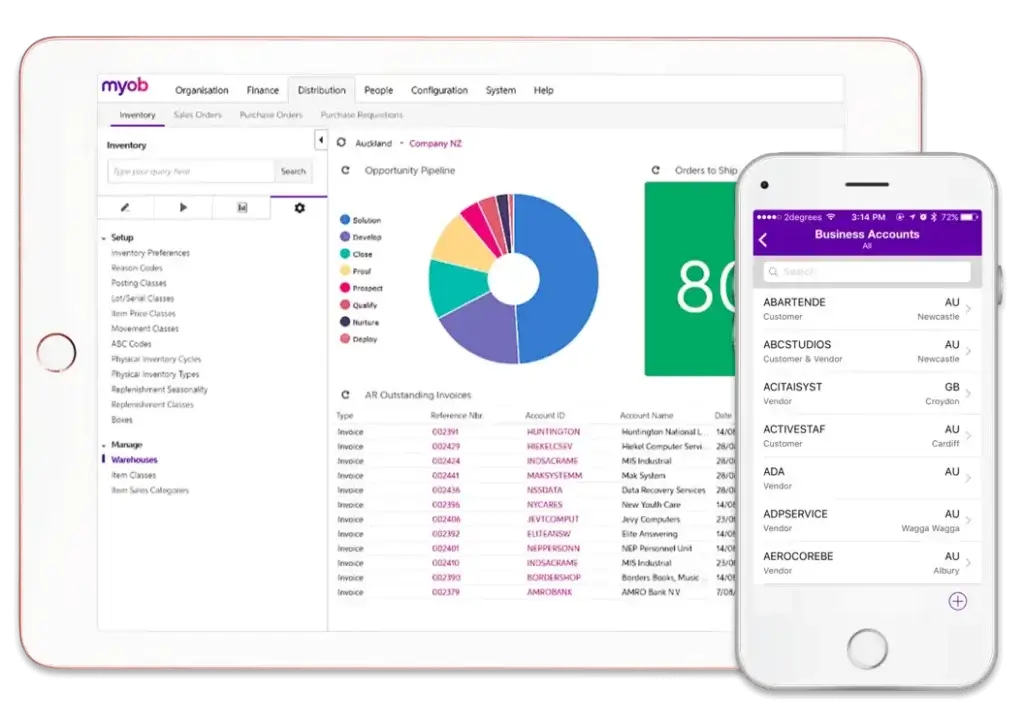
MYOB’s mobile experience is useful for business owners who work away from a desk. You can send invoices, capture receipts, monitor payments, and keep basic admin moving while you are on the go.
Solo by MYOB is particularly mobile-focused, making it a strong option for sole traders who want invoicing, payments, expense capture, and cash flow visibility from a phone.
Collaboration With Accountants and Team Members
MYOB allows accountant collaboration and multi-user workflows, depending on your plan. This matters if your accountant needs access to reports, tax data, payroll records, or BAS-related information.
For growing businesses, role-based access is important because not every employee should have the same level of visibility into financial data.
Final Thoughts on Ease of Use
MYOB is not the easiest accounting software on the market, but it is reliable once configured. It is best for users who want accounting depth and compliance support more than a minimalist interface.
If ease of use is your top priority, compare it with Xero and FreshBooks. If local payroll and tax compliance matter more, MYOB becomes more attractive.
Integrations and Ecosystem
Connect MYOB to Your Business Workflow
MYOB works best when it becomes part of your broader business workflow. You can connect it with payment tools, e-commerce platforms, CRM systems, POS tools, inventory apps, and industry-specific software.
The integration ecosystem is not as large as Xero’s or QuickBooks Online’s, but it is strong enough for many Australian and New Zealand businesses.
Popular Integrations
Stripe and online payments
Accepting payments from invoices can help improve cash flow and reduce payment delays.
Shopify and e-commerce tools
Online sellers can connect sales and accounting workflows to reduce duplicate data entry.
POS systems
Retail and hospitality businesses can connect sales data to accounting and inventory workflows.
Inventory and warehouse tools
Businesses with complex stock needs can extend MYOB with dedicated inventory software.
CRM and job management tools
Sales and service teams can connect customer and job data to financial records.
Workflow Automation and API Access
MYOB supports automation through recurring transactions, bank feeds, invoice workflows, and third-party connections. Businesses with more advanced needs can use MYOB’s API or work with certified partners to create custom workflows.
This is useful if you want to reduce manual entry between sales, payments, payroll, inventory, and accounting data.
Where MYOB Falls Behind
MYOB’s ecosystem is useful, but not as broad as Xero or QuickBooks. If your business relies heavily on SaaS integrations, advanced CRM automation, or a global tech stack, you should compare the app marketplaces carefully before committing.
For local accounting, payroll, and compliance workflows, MYOB’s ecosystem is usually enough. For global automation-heavy businesses, Xero or QuickBooks may be a better fit.
Pricing and Plans
How Much Does MYOB Cost?
MYOB pricing depends on the product line, plan, billing cycle, current promotion, and whether you need payroll, inventory, or advanced AccountRight features.
The table below reflects the current public pricing structure available at the time of writing. Always check MYOB’s official pricing page before buying because promotions and plan terms can change.
| Plan | Best For | Key Features | Current Starting Price |
| Solo by MYOB | Sole operators who work from mobile | Invoicing, payments, expense capture, GST tracking, Tap to Pay, AI features | $24/year for first 12 months, then $99/year |
| MYOB Business Lite | Sole traders and small businesses with up to 2 employees | GST/BAS, inventory and orders, invoices, AI features, optional payroll | $94.50/year for first year, then $315/year |
| MYOB Business Pro | Small to medium businesses with multiple employees | Unlimited bank accounts, sales orders, AI features, optional unlimited payroll | $126/year for first year, then $630/year |
| MYOB Business Payroll Only | Businesses needing standalone payroll | Pay runs, ATO reporting, tax compliance, superannuation contributions | $2/month for first 3 months, then $15/month |
| AccountRight Plus | Established businesses needing payroll and inventory | Unlimited payroll, unlimited inventory, priority support, AI features | $82.50/month for first 3 months, then $165/month |
| AccountRight Premier | Complex businesses with jobs, currencies, or warehouses | Multi-currency, multiple warehouse locations, time, budgets, jobs, inventory | $105/month for first 3 months, then $210/month |
Which Plan Is Right for You?
Choose Solo if:
You are a sole trader who mainly wants mobile invoicing, payments, expense capture, and basic tax tracking without a full accounting setup.
Choose Business Lite if:
You are a sole trader or small business that needs GST/BAS support, inventory and orders, invoicing, and optional payroll for up to 2 employees.
Choose Business Pro if:
You have a growing business with more bank accounts, sales orders, and payroll needs. This plan is the better option if you have multiple employees.
Choose Payroll Only if:
You already manage bookkeeping elsewhere and only need a standalone payroll system for up to 4 employees.
Choose AccountRight Plus if:
You need unlimited payroll, unlimited inventory, and stronger desktop-plus-cloud accounting depth.
Choose AccountRight Premier if:
You manage multiple currencies, multiple warehouse locations, jobs, budgets, and more complex accounting workflows.
Is MYOB Worth the Price?
MYOB is worth the price if you use its compliance, payroll, and inventory depth. If you only need basic invoicing, it may feel expensive compared with simpler tools.
The value becomes clearer when MYOB replaces several disconnected workflows: invoicing, payroll, expense tracking, bank reconciliation, BAS preparation, inventory, and reporting.
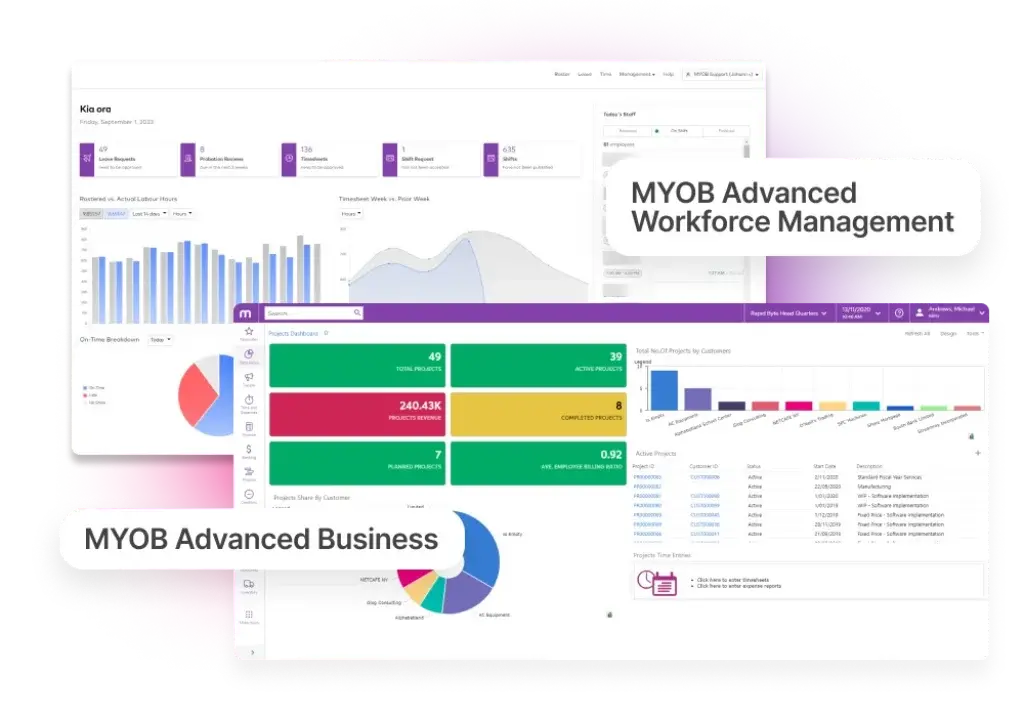
MYOB Business vs MYOB Advanced: What’s the Difference?
This image is better for explaining that MYOB is not only small business accounting software. MYOB Advanced Workforce Management connects onboarding, timesheets, and rostering in an all-in-one cloud platform.
Alternatives to MYOB
Compare Top Competitors
MYOB should not be reviewed in isolation. The right choice depends on your region, payroll needs, inventory complexity, integration stack, and how much accounting experience you have.
| Software | Best For | Where It Beats MYOB | Where MYOB Wins |
| MYOB | AU/NZ businesses needing payroll, BAS, GST, and inventory | Not applicable | Local compliance, payroll, AccountRight depth |
| Xero | Cloud-first businesses and accountants | Cleaner UX, stronger app marketplace, better automation feel | MYOB is stronger for AccountRight users and some payroll/inventory workflows |
| QuickBooks Online | Global SMBs and integration-heavy teams | Broad app ecosystem, strong reporting, large accountant network | MYOB is better localized for Australian compliance workflows |
| Zoho Books | Cost-conscious businesses using Zoho apps | Lower cost, CRM ecosystem, workflow automation | MYOB is stronger for AU/NZ payroll and BAS needs |
| Reckon | Australian businesses wanting local bookkeeping | Can be simpler for basic accounting needs | MYOB offers broader business management and inventory options |
MYOB vs Xero
Xero is probably MYOB’s biggest competitor in Australia and New Zealand. It has a cleaner interface, a large app marketplace, and excellent accountant collaboration.
MYOB is stronger if you want local payroll, inventory, and AccountRight-style depth. Xero is stronger if you want a modern cloud-first experience and broader integrations.
Choose Xero if automation, design, and app ecosystem matter most. Choose MYOB if payroll, BAS, inventory, and local compliance are the priority.
MYOB vs QuickBooks Online
QuickBooks Online is a strong global accounting platform, especially for US-based businesses and companies that rely on a wide range of integrations.
For Australian and New Zealand businesses, MYOB has a stronger local fit because its payroll and compliance workflows are built around the region.
Choose QuickBooks if you need global flexibility and deep integrations. Choose MYOB if your accounting and payroll requirements are mainly AU/NZ-based.
MYOB vs Zoho Books
Zoho Books is strong if you already use Zoho CRM, Zoho Inventory, or other Zoho apps. It is also attractive for cost-conscious businesses that want automation and customization.
MYOB is stronger for Australian and New Zealand payroll, BAS workflows, and local compliance. Zoho Books is stronger for businesses that want a broader modular software suite at a lower cost.
MYOB vs FreshBooks
FreshBooks is easier for freelancers, consultants, and service businesses that mainly need invoicing, time tracking, and simple expense management.
MYOB is more powerful for payroll, tax, inventory, and accounting depth. FreshBooks is easier, but MYOB is more complete for businesses with employees and compliance needs.
Security and Compliance
Your Financial Data Deserves Strong Protection
Accounting software holds sensitive information, including business bank data, payroll records, customer details, tax reports, and supplier information. Security is not optional.
MYOB uses several layers of protection, including two-factor authentication, secure encrypted channels, independent security reviews, and compliance processes for privacy and payment-related standards.
Two-Factor Authentication
MYOB uses two-factor authentication to help protect accounts from unauthorized access. This means a password alone is not enough to access the account.
For businesses with payroll, accounting, and tax data, this extra login step is important. It reduces the risk of account compromise if a password is exposed.
Security Reviews and Compliance
MYOB states that it is subject to regular independent security reviews, including ISO 27001 and PCI DSS-related reviews. It also performs technical security testing in line with its information security policies.
This matters because accounting software must protect both financial data and personal information. Independent reviews help support trust, especially for businesses handling payroll and customer payment information.
Privacy and Data Handling
It complies with Australian and New Zealand privacy laws. This is important for businesses that store customer details, employee data, supplier records, and transaction history in the platform.
Privacy compliance does not remove your own responsibility as a business owner. You still need to manage user access, use strong passwords, and review who can see payroll and financial information.
Role-Based Access
MYOB supports user access controls, which helps you decide who can view, edit, or manage different parts of the system.
- Give your accountant access without sharing your password
- Limit payroll access to authorized users
- Control who can view financial reports
- Reduce internal risk as your team grows
Compliance Strength for AU/NZ Businesses
MYOB’s strongest compliance value is local. It helps with Australian and New Zealand accounting workflows, including GST, BAS, payroll, STP, superannuation, and tax-ready reporting.
That is one of the main reasons MYOB remains relevant even when newer tools may feel easier to use.
Customer feedback
What Real Users Say About MYOB
User feedback around MYOB is mixed, which is common for accounting software with a long history and a broad product range.
Many users like MYOB because it centralizes accounting, payroll, invoicing, and reporting. They also value the local compliance support, especially when payroll and BAS obligations become too complex for spreadsheets.
The main complaints usually focus on support wait times, the learning curve, price changes, and parts of the interface feeling older than newer cloud accounting tools.
What Users Tend to Like
- Strong accounting and payroll features
- Good fit for Australian businesses
- Useful reports and tax workflows
- Inventory and AccountRight depth
- Cloud access for accountant collaboration
Common Complaints
- Interface can feel less modern
- Support quality can vary
- Pricing can be confusing
- Migration may take time
- Some users prefer Xero’s simplicity
The most balanced way to think about MYOB is this: it is not the simplest accounting software, but it can be very effective when your business needs local compliance, payroll, and financial control in one system.
Final Recommendation
Is MYOB the Right Accounting Tool for You?
⭐ Overall Rating: 8.5/10
MYOB is a strong accounting platform for Australian and New Zealand businesses that need more than basic invoicing. Its best use cases are payroll, GST/BAS support, inventory, job tracking, and compliance-heavy accounting workflows.
It is not the best fit for every business. If you want the most modern interface, Xero may be more comfortable. If you want a global app ecosystem, QuickBooks Online may be stronger. If you already use Zoho apps, Zoho Books can offer better value.
But if you are an AU/NZ business that wants accounting, payroll, compliance, inventory, and reporting in one place, MYOB is still a smart option in 2026.
Choose MYOB if:
- You operate in Australia or New Zealand
- You need payroll, STP, GST, or BAS support
- You manage inventory, jobs, orders, or billable time
- You want accounting software that can grow beyond simple bookkeeping
- You prefer a tool with strong local market experience
Consider an alternative if:
- You operate outside Australia or New Zealand
- You want the cleanest cloud-first interface
- You need a very large app marketplace
- You only need simple invoicing and expenses
- You prefer lower-cost accounting software
Want to explore more options before deciding? Compare MYOB with other leading platforms in our full guide to the best accounting software.
Frequently Asked Questions
Have more questions?
What is MYOB used for?
It is used for accounting, invoicing, expense tracking, payroll, GST/BAS reporting, inventory management, and business financial reporting. It is especially popular with Australian and New Zealand businesses that need local compliance support.
Is MYOB good for small businesses?
Yes. It is a strong option for small businesses in Australia and New Zealand, especially if you need payroll, GST/BAS support, invoicing, inventory, or accountant collaboration. Very small businesses may prefer Solo by MYOB or MYOB Business Lite.
Is MYOB cloud-based?
Yes. It offers cloud-based products such as Solo, Business Lite, and Business Pro. AccountRight plans combine desktop accounting depth with browser access and online collaboration.
What is Solo by MYOB?
Solo is a mobile-first app for sole traders. It supports invoicing, payments, expense capture, GST tracking, cash flow graphs, Tap to Pay, and in-built AI features. It is best for solo operators who want to manage admin from a phone.
Does MYOB include payroll?
It includes payroll options across several plans. Business Lite can add payroll for up to 2 employees, Business Pro can add payroll for unlimited employees, Payroll Only supports standalone payroll, and AccountRight Plus includes unlimited payroll at no extra cost based on current plan details.
Can MYOB help with BAS?
Yes. It supports GST and BAS workflows for Australian businesses. MYOB is also rolling out AI BAS in beta, which helps prepare BAS by categorizing transactions, checking GST rules, flagging missing receipts, and preparing BAS-ready outputs for review.
Is MYOB better than Xero?
MYOB is better if you prioritize AU/NZ payroll, BAS workflows, AccountRight depth, and inventory. Xero is better if you want a cleaner cloud-first interface, broader integrations, and strong automation for everyday bookkeeping.
Does MYOB support inventory management?
Yes. It supports inventory and order management in selected plans. AccountRight Plus and Premier are stronger options for businesses that need unlimited inventory, multiple warehouse locations, jobs, budgets, or more advanced stock workflows.
Is MYOB suitable outside Australia and New Zealand?
Usually, no. It is strongest for Australian and New Zealand businesses. If your business operates mainly in the US, UK, EU, or another region, software like QuickBooks, Xero, Zoho Books, or FreshBooks may be a better local fit.
Does MYOB offer a free trial?
It offers free trials or introductory promotional pricing on selected plans, depending on the product and current offer. Check MYOB’s official pricing page before subscribing because prices, discounts, and trial terms can change.








