Introduction
TickTick is one of the most complete to-do list apps you can choose if you want more than a basic checklist. It combines task management, calendar planning, habit tracking, focus tools, and lightweight collaboration in one polished platform. That makes it especially appealing if you want a productivity app that can support both personal planning and work tasks without forcing you into a heavy project management system.
Why Read This Review?
This TickTick review takes a closer look at what the app does well, where it still falls short, and who will get the most value from it. We also compare its strengths against the broader market of leading task management tools, including the options featured in our best to-do list apps guide. If you are trying to decide whether TickTick is worth using for work, study, or everyday productivity, this review will help you make a smarter decision.
Our take is that TickTick stands out because it blends flexibility with depth. You can use it as a simple daily planner, but you can also build a more advanced workflow with smart lists, multiple calendar views, recurring tasks, focus sessions, and progress tracking. That balance is what makes it one of the strongest all-around choices in the category.
Software specification
Core Features of TickTick
TickTick is much more than a basic list app. Its feature set now covers task capture, planning, prioritization, time management, and light project coordination. That broad functionality is one of the main reasons it continues to appeal to students, solo professionals, and users who want a flexible productivity system without moving to a heavier platform.
Smart Task Capture and Natural Language Input
One of TickTick’s strongest features is how quickly it lets you capture tasks. You can add items manually, use voice input, create tasks from widgets, and rely on natural language processing to turn phrases like “submit report Friday at 3 PM” into scheduled tasks automatically.
- Great for fast idea capture before tasks slip through the cracks.
- Reduces friction compared with tools that require more manual setup.
Calendar Planning with Multiple Views
TickTick’s calendar is one of its best differentiators. Instead of offering just a simple date picker, it gives you several planning views that help you see your workload from different angles.
- Includes monthly, weekly, agenda, multi-day, and multi-week calendar views.
- Lets you drag and drop tasks, set start and end dates, and plan more visually.
Multiple Work Views, Including Kanban and Timeline
TickTick now supports more than one way to manage work. If you prefer a classic list, you can keep things simple. If you want more structure, Kanban helps you organize tasks by status or custom grouping. Timeline adds a lighter project-planning layer for users who want something more visual than a list but less complex than a full Gantt chart.
- List view works well for daily execution and fast task edits.
- Kanban and Timeline make it easier to manage ongoing projects and workflows.
Reminders and Recurring Task Controls
TickTick is especially strong when it comes to reminders. You can set multiple alert times, flexible recurring rules, daily review reminders, and even constant reminders for tasks that should keep notifying you until they are completed.
- Supports recurring rules for weekly, monthly, yearly, and custom schedules.
- Offers location-based reminders on supported platforms, which is useful for errands and context-specific tasks.
Focus Tools, Pomodoro, and Habit Tracking
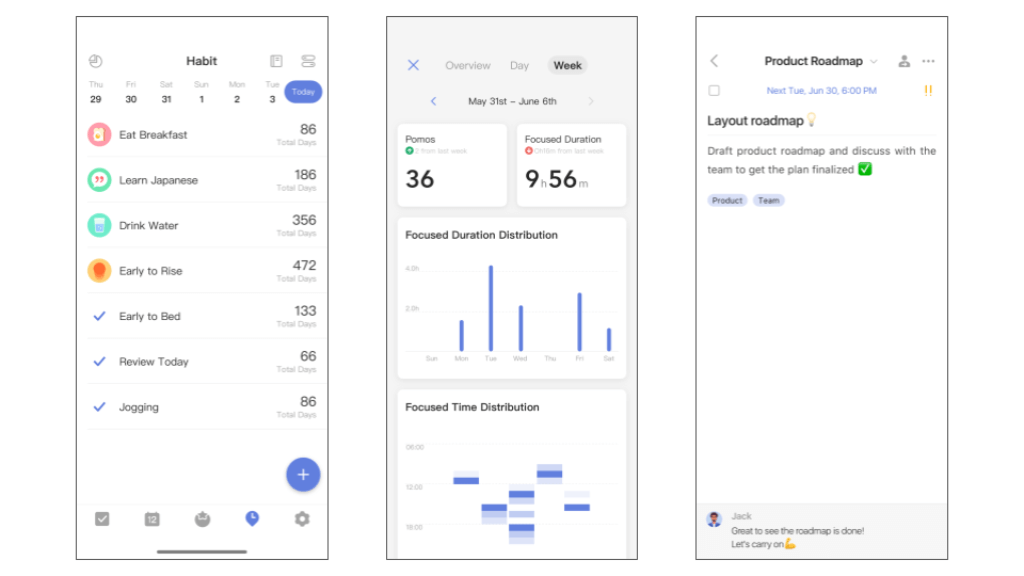
Unlike many to-do apps, TickTick includes built-in tools for improving focus and consistency. The Pomodoro timer helps you work in timed sessions, while the Habit Tracker gives you another layer for building routines and monitoring consistency over time.
- Useful if you want one app for tasks, focus sessions, and routine building.
- Statistics and history features make progress easier to review.
Eisenhower Matrix, Countdown, Notes, and Progress Tracking
TickTick has grown beyond standard task management by adding features that help with prioritization and planning. The Eisenhower Matrix is helpful for sorting tasks by urgency and importance, Countdown helps track important dates, and Notes gives you a simple place to store supporting details alongside your tasks.
- These features make the app feel more complete than many direct competitors.
- They are especially useful if you like combining planning and execution in one workspace.
Why TickTick Works for You
TickTick works best when you want flexibility. It can behave like a straightforward to-do app, but it can also become a more advanced personal productivity hub. That range is what makes it such a strong fit for users who outgrow basic task apps but do not want the complexity of a full work management platform.
Pros and Cons
Advantages and Disadvantages
Positive
✅ Excellent balance of depth and ease of use
✅ Strong calendar, reminders, and recurring task tools
✅ Built-in Pomodoro, habits, and prioritization features
✅ Broad platform support with flexible views
Negatives
❌ Premium is needed for the full experience
❌ Collaboration is lighter than in team-first platforms
❌ Some advanced reminders and features vary by platform
❌ Can feel feature-heavy if you only want a very simple list app
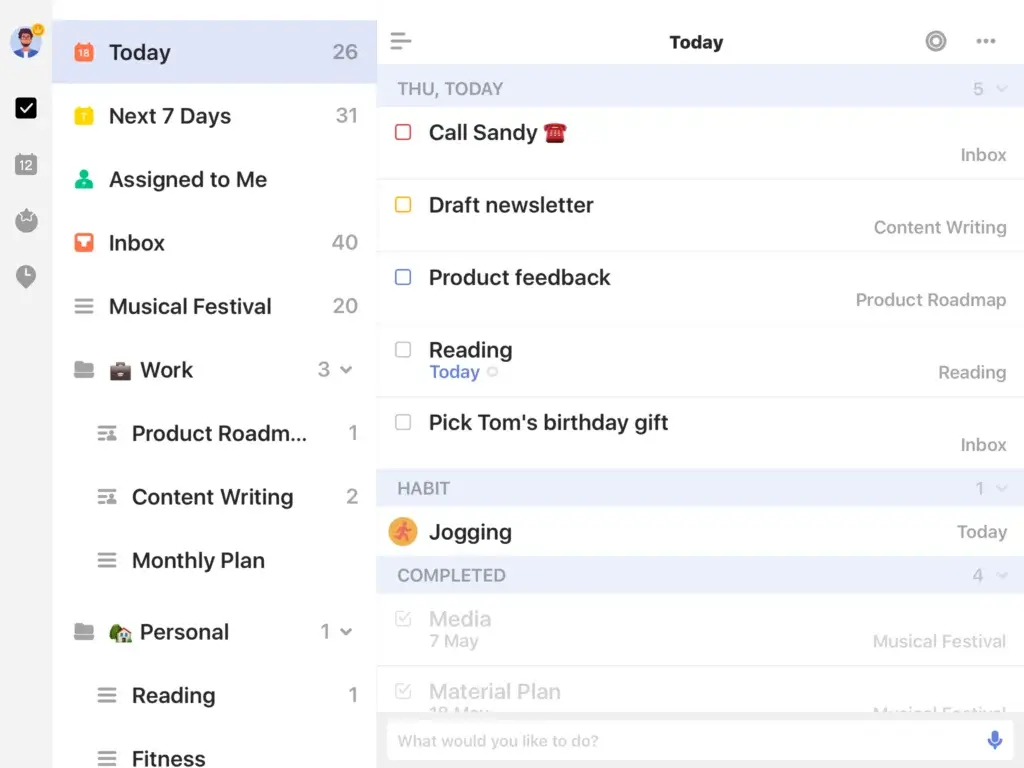
TickTick gets many things right, but its strengths are not the same for every type of user. It is particularly good for individuals who want one tool for planning, reminders, focus, and habits. For teams that need more advanced workflow management, it may still feel limited compared with broader work management platforms.
✅ Pros
- Excellent balance of simplicity and depth: You can start with basic lists and reminders, then gradually use features like smart filters, Kanban, Timeline, and statistics as your workflow becomes more advanced.
- Strong calendar and planning experience: Multiple calendar views and flexible scheduling make it one of the better choices for users who think visually about time.
- More than just a task manager: Pomodoro, habits, Eisenhower Matrix, Countdown, and Notes add real value and reduce the need for extra apps.
- Reliable cross-platform support: It works across mobile, desktop, and web, making it easy to stay consistent wherever you work.
❌ Cons
- The free plan is good, but the best features sit behind Premium: Advanced calendar functionality, filters, more capacity, historical statistics, and several power-user tools are part of the paid tier.
- Collaboration is useful, but not deeply advanced: Shared lists and assigned tasks help for small teams or household planning, but this is still not a full replacement for stronger team execution software.
- Some features depend on platform support: Certain reminder types and mobile functions are not equally available everywhere, which matters if you expect identical functionality on every device.
- It may be more than some users need: If you want the simplest possible checklist app, the broader feature set can feel unnecessary.
User Experience
User Interface and Operational Simplicity
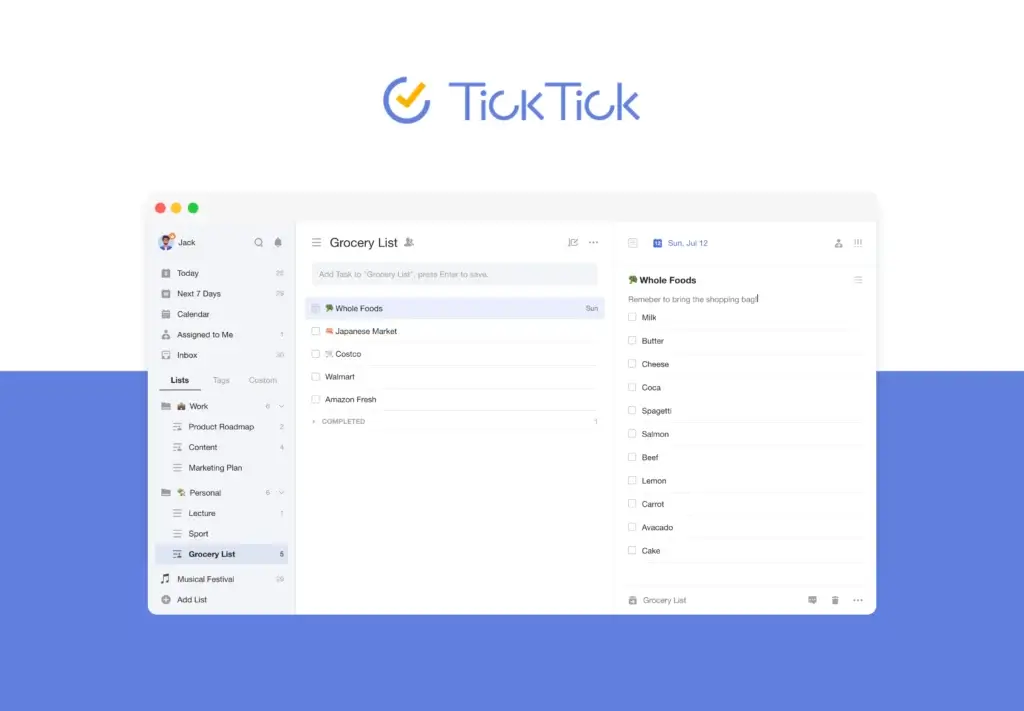
TickTick’s interface is one of the reasons it performs so well as an all-around to-do app. It offers enough structure for serious planning, but it usually stays approachable even when you activate more advanced features. That makes it easier to grow into the app instead of feeling overwhelmed from the start.
Clean, Organized, and Easy to Learn
The design is modern and practical. Lists, tasks, details, tags, and priorities are easy to find, and the app does a good job of keeping more advanced options available without making the main workspace feel crowded.
- Good fit for users who want to move quickly without a steep learning curve.
- The layout supports both quick edits and more detailed task planning.
Strong Calendar and Planning Experience
If calendar-based planning matters to you, TickTick is one of the better apps in this category. The drag-and-drop experience makes rescheduling simple, and switching between views helps you move from detailed planning to big-picture scheduling without friction.
- Helpful for users who want to see tasks and time in one place.
- Supports a more visual planning style than many basic to-do apps.
Flexible Views for Different Work Styles
One of TickTick’s biggest UX strengths is that it does not force one workflow. Some people want a traditional list. Others think in boards or timelines. By offering multiple views, the app adapts better to different planning habits and project types.
- List view is best for daily execution.
- Kanban and Timeline help when work becomes more process-oriented.
Fast Capture on Mobile and Desktop
Quick capture is smooth across devices. Voice input, widgets, keyboard shortcuts, and fast task creation reduce the amount of effort it takes to record ideas or commitments when they appear.
- Especially useful for busy users who need low-friction capture.
- Makes the app feel responsive in real daily use, not just in demos.
Customization Helps the App Feel Personal
TickTick also offers themes and list background customization, which sounds minor at first but can improve comfort for people who spend a lot of time inside their task manager. This helps the interface feel less generic and more adaptable to your style.
- A nice benefit for long-term users.
- Contributes to an interface that feels polished rather than purely functional.
Why the Experience Stands Out
What makes TickTick’s user experience work is not just that it looks good. It is that the app stays fast, flexible, and understandable while offering more depth than many competitors. That balance is hard to get right, and TickTick handles it better than most apps in the same tier.
Pricing and Plans
How much does TickTick cost?
TickTick keeps pricing simple. There is a free plan for everyday task management and one Premium plan that unlocks the more advanced features. This is a smart model because it gives casual users a no-cost entry point while keeping the upgrade path easy to understand.
Free Plan
The free version is good enough to test the app seriously and even use it long term if your needs are relatively straightforward. You still get task lists, reminders, recurring tasks, and cross-platform sync, which makes it more useful than many free tools in the category.
- Best for personal task management, students, and light everyday planning.
- A solid option if you do not need advanced calendar views, deep filters, or higher limits.
Premium Plan ($35.99/year)
Premium is where TickTick becomes much more compelling for serious users. It unlocks full calendar functionality, customizable filters, more project capacity, task and list activity history, historical statistics, reminders for check items, calendar widgets, estimated Pomodoro tracking, premium themes, more white noise options, and Quick Ball on Android.
- Best for power users, productivity enthusiasts, freelancers, and professionals who plan heavily around time.
- Also a better fit if you use the app across several workflows and want the most flexibility.
Which Plan is Right for You?
- Choose the Free Plan if you want a capable to-do list app with reminders and cross-platform sync but do not need the full planning stack.
- Choose Premium if calendar planning, advanced filtering, statistics, and extra control are central to how you work.
| Plan | Cost | Key Features | Best For |
| Free Plan | $0 | Task lists, reminders, recurring tasks, cross-platform sync, core productivity tools | Personal planning and lighter everyday use |
| Premium Plan | $35.99/year | Full calendar functionality, filters, more capacity, activity history, historical statistics, widgets, estimated Pomo, premium themes | Power users, professionals, and users who plan around time |
Integrations and Compatibility
< class="mt0 mb10 font200" style="color:#111;"> How TickTick Integrates with Other SoftwareTickTick works well as a connected productivity tool, especially if your workflow revolves around calendars, quick task capture, and device flexibility. It is not the deepest integration ecosystem in the market, but it covers the essentials that matter most to everyday users.
Calendar and Planning Integrations
Calendar integration is one of the strongest reasons to consider TickTick. It supports Google Calendar integration and also lets Premium users subscribe to third-party calendars, which makes it easier to keep tasks and events aligned.
- A smart fit for users who want one view of commitments and to-dos.
- Useful if your planning system depends on both deadlines and time blocking.
Quick Capture and Everyday Workflow Compatibility
TickTick supports several capture methods that improve workflow speed, including widgets, desktop shortcuts, browser text actions, voice input, and email-related task capture options. These are practical integrations because they reduce the effort of getting tasks into your system.
- Helps you capture work from multiple contexts.
- Makes the app feel more connected to your day-to-day digital habits.
Cross-Platform Support
TickTick is available on iOS, Android, Windows, macOS, web, and other supported environments, which gives it strong compatibility for users who work across devices. That matters more than many people realize because task management breaks down quickly when sync and access are inconsistent.
- Real-time availability improves reliability and reduces friction.
- A good fit for people who switch between desktop planning and mobile capture.
Other Connected Tools
TickTick also points to integration with apps like Notion and broader calendar subscriptions, which helps extend the platform beyond a standalone to-do list. While it is not trying to be an all-in-one enterprise operating system, it covers enough ground for most personal and professional productivity use cases.
- Best suited to users who want practical integrations rather than a huge app marketplace.
- Strong enough for most individual and light team workflows.
Why Compatibility Matters Here
Compatibility is one of TickTick’s quieter strengths. The app does not just exist on multiple platforms. It also maintains a consistent experience across them, which is exactly what many task management users need most.
Security and Compliance
Enhanced Security Features in TickTick
TickTick presents a solid security foundation for everyday users, but this section is best understood with realistic expectations. It is not positioned like an enterprise security platform, yet it does clearly explain several important protections around hosting, encryption at rest, backups, privacy, and breach notification.
Hosting and Data Protection
According to TickTick’s security page, its databases and servers are hosted on Amazon Web Services in the United States. The company says it uses AWS firewalls for protection and that user data is stored and encrypted at rest.
- This provides a stronger baseline than vague security language with no specifics.
- It is enough for most personal productivity and many professional use cases.
Backups and Reliability
TickTick states that user data is automatically backed up on AWS servers with point-in-time recovery capability. It also says users can manually create a backup on the web, which is a useful extra layer for anyone who relies heavily on the platform.
- Helpful for users who want reassurance that data loss risk is reduced.
- Adds confidence for long-term planning and archive-heavy workflows.
Privacy and Data Use
The privacy policy explains that TickTick collects account, device, and usage-related information needed to provide the service, and it also outlines how location access is used for location reminders and how AI interactions are handled when AI features are used. The company says AI feature data is processed on its cloud infrastructure and is not shared with third-party AI providers or used to train its models.
- This is an important point for privacy-conscious users evaluating newer AI-related functionality.
- The policy is more informative than the current review previously suggested.
Breach Notification and User Control
TickTick says it would notify users within 72 hours after becoming aware of a qualifying breach that is likely to create a risk to user rights. It also states that users retain rights to their data and can manage account information through settings.
- This is a meaningful trust signal, even if the platform is not marketed as enterprise-grade governance software.
- It is enough to make the security section feel credible without overstating compliance claims.
How TickTick’s Security Measures Up
Overall, TickTick’s security posture looks appropriate for a modern productivity app. The important thing is to describe it accurately: AWS hosting, encrypted data at rest, automatic backups, a stated breach-notification process, and a privacy policy that explains how core data and AI interactions are handled. That is a more trustworthy framing than making unsupported claims about features the company does not clearly document.
Conclusion
Final thoughts
TickTick remains one of the strongest to-do list apps for users who want more than a simple checklist but less complexity than a full work management suite. Its combination of reminders, calendar planning, focus tools, habits, and flexible views makes it more capable than many apps in the same category.
What makes it especially appealing is range. You can use it for everyday personal planning, recurring routines, lightweight project coordination, or a more structured productivity system built around time and priorities. That versatility is why it still deserves consideration alongside the tools featured in our top to-do list apps guide.
Is TickTick Worth It?
Yes, for many users it is. If you care about calendar-based planning, powerful reminders, recurring task control, and built-in focus features, TickTick offers excellent value. The free plan is useful, but the Premium plan is where the app feels fully unlocked.
Who Should Choose TickTick?
- Individuals who want a flexible but polished productivity system.
- Professionals who plan heavily around calendar visibility and reminders.
- Users who want habits, Pomodoro, and task management in one app.
- People who need strong cross-platform access without moving to a more complex platform.
Who Should Consider Alternatives?
- Teams that need deeper collaboration, reporting, or workflow automation.
- Users who want the absolute simplest to-do app with very few advanced features.
- Organizations that require more formal enterprise governance and admin controls.
Overall, TickTick is one of the better all-around choices in the market. It is not perfect, but it succeeds where many task apps struggle: it gives you room to grow without making daily planning harder than it needs to be. If you want to explore the product further, you can visit TickTick’s official site or compare it with other leading tools on Work Management.
Have more questions?
Frequently Asked Questions
Is TickTick good for work as well as personal tasks?
Yes. It works especially well for people who want one place for personal tasks, work to-dos, routines, and reminders. It is less suitable for teams that need advanced project management or deeper workflow automation.
Can TickTick replace a calendar app?
For many users, it can replace part of a calendar workflow because it offers multiple calendar views, task scheduling, and calendar subscriptions. It works best if your planning revolves around tasks and deadlines rather than only meetings.
Is TickTick better than Todoist?
That depends on your workflow. It is often the better fit if you want built-in calendar planning, Pomodoro, habits, and more planning depth in one app. Todoist may feel better if you prefer a cleaner, more minimal task management experience.
Does TickTick work well for students?
Yes. It is a strong option for students because it combines deadlines, recurring reminders, calendar planning, and focus tools in one place. The habit tracker and Pomodoro timer are especially useful for study routines.
Does TickTick support recurring tasks?
Yes. You can create recurring tasks with flexible schedules, including weekly, monthly, yearly, and custom recurrence rules. This makes it useful for routines, bill reminders, and repeating work responsibilities.
Can TickTick be used for lightweight team collaboration?
Yes. Shared lists, task assignments, and comments make it useful for small teams, family planning, or simple shared workflows. For larger teams, a dedicated project management platform will usually offer more control.
Does TickTick have a habit tracker?
Yes. The app includes a built-in habit tracker that helps you monitor consistency and review progress over time, which is one of its biggest advantages over simpler to-do list apps.
Is TickTick Premium worth it?
For many users, yes. Premium becomes worth it if you rely on advanced calendar views, filters, more project capacity, progress tracking, and a more complete planning experience. If your needs are basic, the free plan may be enough.
Does TickTick work offline?
Yes. You can continue working on tasks without a connection, and changes will sync when you are back online. That makes it practical for users who move between devices and locations during the day.
Who should avoid TickTick?
Users who need advanced enterprise controls, deep reporting, or full-scale team project management may be better served by broader work management platforms. It may also be more feature-rich than necessary for people who want only a minimal checklist app.