
Introduction
Akiflow is not a standard to-do list app. In 2026, it is better described as a time-blocking planner that brings your tasks, meetings, calendar, and daily planning routine into one focused workspace.
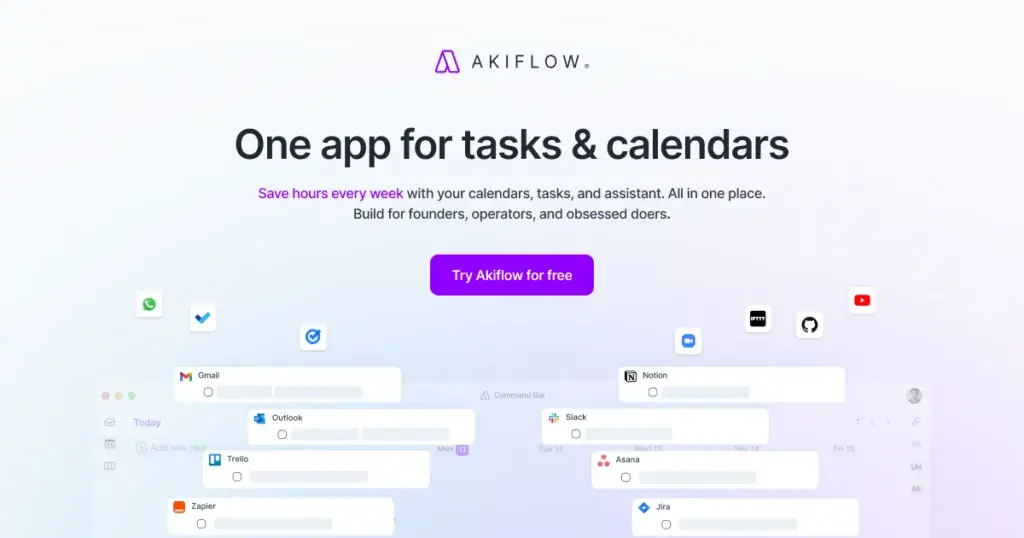
If you already use several tools for work, such as Gmail, Slack, Notion, Asana, Jira, GitHub, Todoist, or ClickUp, Akiflow’s main value is consolidation. Instead of checking every app separately, you can pull tasks into one universal inbox, plan them on your calendar, and protect time for focused work.
That makes this Akiflow review especially relevant if your biggest productivity problem is not task creation, but task execution. Many tools help you collect work. Akiflow is designed to help you decide when that work will actually happen.
What is Akiflow?
Akiflow is a productivity and time-blocking app that combines task management, calendar planning, meeting organization, integrations, and AI-assisted scheduling in one workspace.
The platform is built around a simple idea: your tasks should not live separately from your calendar. You can capture tasks from different sources, organize them in Akiflow, and then drag them into time blocks so your day becomes realistic instead of overloaded.
This makes Akiflow different from traditional task management software. It is less about managing team projects from start to finish and more about helping busy professionals, founders, managers, developers, marketers, and operators plan their own workday with clarity.
If you want a broader comparison of task-focused tools, you can also read our guide to the best task management software.
Software specification
Core Features of Akiflow
Akiflow’s strongest feature is not one single tool. It is the way it connects task capture, calendar planning, time blocking, and daily review into a single routine.
That is important because productivity systems often fail when they create more places to check. Akiflow tries to reduce that friction by becoming the planning layer above your existing tools.
1. Universal inbox for tasks from multiple tools
The universal inbox is one of Akiflow’s most important features. You can bring work from several connected apps into one central place instead of jumping between your email, project management tool, chat app, and calendar.
This is especially useful if your work arrives from many sources. For example, a developer may get tasks from GitHub, Linear, Jira, and Slack. A marketer may get tasks from Gmail, Notion, Asana, and ClickUp. Akiflow gives you a cleaner way to process that incoming work.
The benefit is not only convenience. It also helps you avoid hidden commitments. When tasks stay scattered across apps, it is easy to overestimate how much capacity you really have.
2. Calendar-first time blocking
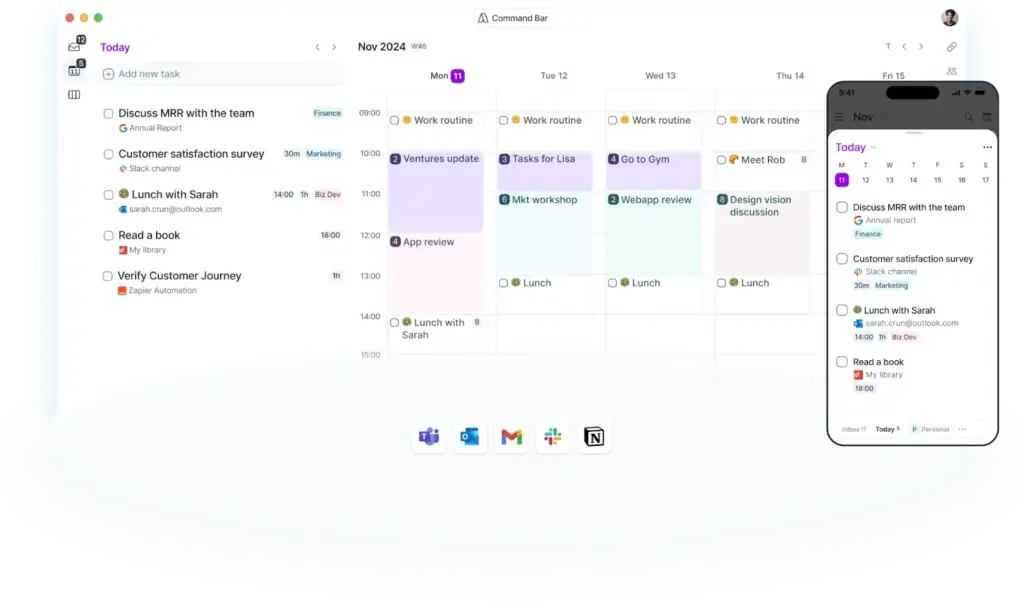
Akiflow is built around time blocking. You can take tasks from your inbox and schedule them directly on your calendar, which turns a loose task list into a realistic daily plan.
This is where Akiflow feels more practical than a basic to-do list. A task list tells you what needs to happen. A time-blocked calendar forces you to decide when it will happen.
For busy professionals, this can be the difference between feeling productive and actually protecting time for deep work.
3. Time slots for structured planning
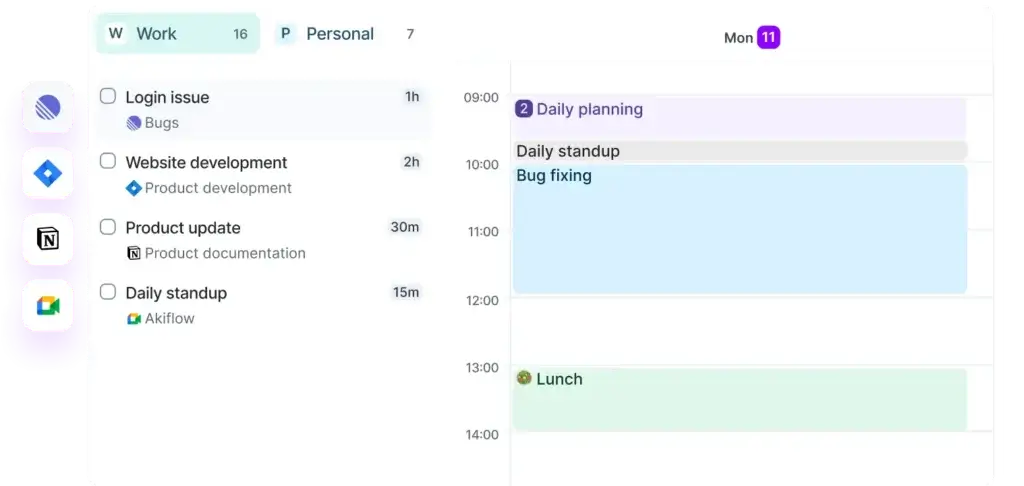
Time slots help you group tasks into planned blocks of work. Instead of scheduling every small task separately, you can create a block for admin, content work, sales follow-up, product planning, or personal routines.
This is useful when your schedule changes frequently. You can move a time slot without losing the tasks inside it, which makes Akiflow more flexible than a rigid calendar.
For users who already believe in time blocking, time slots are one of the platform’s most valuable productivity features.
4. Command bar and quick capture
Akiflow’s command bar is designed for speed. You can create tasks and events, add dates, set durations, assign priorities, add tags, choose calendars, and add descriptions with keyboard-first input.
This matters because task capture needs to be frictionless. If adding a task takes too many clicks, people either delay it or forget it. Akiflow’s command bar makes capture feel closer to writing a quick note than filling out a project form.
The command bar is also helpful for turning copied web content into tasks. If you find an article, request, or idea you want to process later, you can capture it into Akiflow and return to the source when needed.
5. Aki AI assistant
Aki is Akiflow’s AI assistant. It is designed to help with planning, prioritization, task organization, voice commands, daily briefings, and reminders.
The value of Aki depends on how you work. If you want full AI automation that rebuilds your calendar automatically, other tools may feel more aggressive. If you prefer manual control with AI support, Akiflow’s approach is more balanced.
That balance is one of the reasons Akiflow works well for power users. It can assist your planning without taking the entire planning process away from you.
6. Meeting Assistant
Akiflow also includes a Meeting Assistant designed to turn meetings into action. It can help with notes, transcripts, highlights, action items, and follow-up emails.
This feature fits naturally into Akiflow’s broader workflow. Meetings often create tasks, but those tasks are easy to lose. Akiflow’s approach is to move the next steps from the meeting into your inbox so you can plan them properly.
For managers, consultants, sales professionals, and founders, this can be a meaningful addition because meetings are often the biggest source of unplanned work.
7. Calendar and email integrations
Akiflow connects with Google Calendar and Outlook Calendar, and it supports multi-calendar visibility. You can view events from multiple calendars in one place and create or update events from Akiflow.
Email integrations are also important. Gmail and Outlook Email support make it easier to turn emails into tasks instead of letting important follow-ups sit inside your inbox.
This is one of Akiflow’s biggest practical advantages. It helps you treat email as an input source, not as your main task manager.
8. Project and task app integrations
Akiflow integrates with many work tools, including Notion, Microsoft To Do, Asana, Linear, Jira, GitHub, Trello, Todoist, and ClickUp. It also supports Zapier and IFTTT, which expands the number of possible workflows.
This makes Akiflow especially useful if you already have a task system but still struggle to plan your workday. You do not necessarily need to replace every tool. You can use Akiflow as the daily planning hub above them.
That said, this also means Akiflow is most valuable when you actually use the integrations. If all your tasks already live in one simple app, you may not benefit from the full product.
9. Focus mode and daily routines
Akiflow includes features such as focus time, focus mode, goals, daily rituals, and productivity analytics. These features support the daily planning habit behind the software.
The platform is not only trying to store your tasks. It is trying to improve your work rhythm. That is why Akiflow often feels closer to a personal productivity operating system than a simple checklist.
10. Cross-platform access
Akiflow is available across desktop, web, iOS, and Android. This matters because planning tools need to be accessible when work arrives, not only when you are sitting at your desk.
The desktop app is particularly important for power users because the global command bar and quick capture experience are strongest there.
Pros and Cons
Advantages and Disadvantages
Positive
✅ Excellent for time blocking and daily planning
✅ Strong universal inbox and integrations
✅ Fast command bar and keyboard-first workflow
✅ Good fit for busy professionals and founders
Negatives
❌ No permanent free plan
❌ More expensive than basic to-do list apps
❌ Not a full project management platform
❌ Best value depends on using integrations daily
Akiflow’s pros and cons are closely tied to its positioning. It is excellent if you need a serious daily planning system, but it may be more than you need if you only want a simple checklist.
Pros:
- Excellent for time blocking: Akiflow makes it easy to turn tasks into scheduled calendar blocks, which helps you build a more realistic plan for your day.
- Strong universal inbox: You can bring tasks from several tools into one place, which reduces context switching and helps you see your real workload.
- Fast capture workflow: The command bar, natural language input, shortcuts, and quick capture options make task creation feel fast and practical.
- Useful integrations: Akiflow connects with calendars, email, task tools, project tools, communication tools, and automation platforms.
- Designed for serious personal productivity: Features such as time slots, daily planning, focus mode, goals, and routines support better execution habits.
Cons:
- No permanent free plan: Akiflow offers a free trial, but it is not the best choice if you want a free task management app for long-term use.
- Higher price than simple to-do list tools: Compared with apps like Todoist or TickTick, Akiflow is clearly positioned as a premium productivity tool.
- Not built for full project management: It is not a replacement for platforms like Asana, ClickUp, monday.com, or Jira when you need team workflows, reporting, dependencies, or portfolio management.
- Requires a planning habit: Akiflow works best when you actively plan your day. If you do not want to time block, much of the platform’s value is reduced.
- May feel too structured for casual users: If you only need a place to store errands and reminders, Akiflow can feel heavier than necessary.
Overall, Akiflow is strongest for people who already care about intentional planning. It will not magically solve poor prioritization, but it gives you a strong system for turning priorities into scheduled work.
User Experience
User Interface and Daily Planning Experience
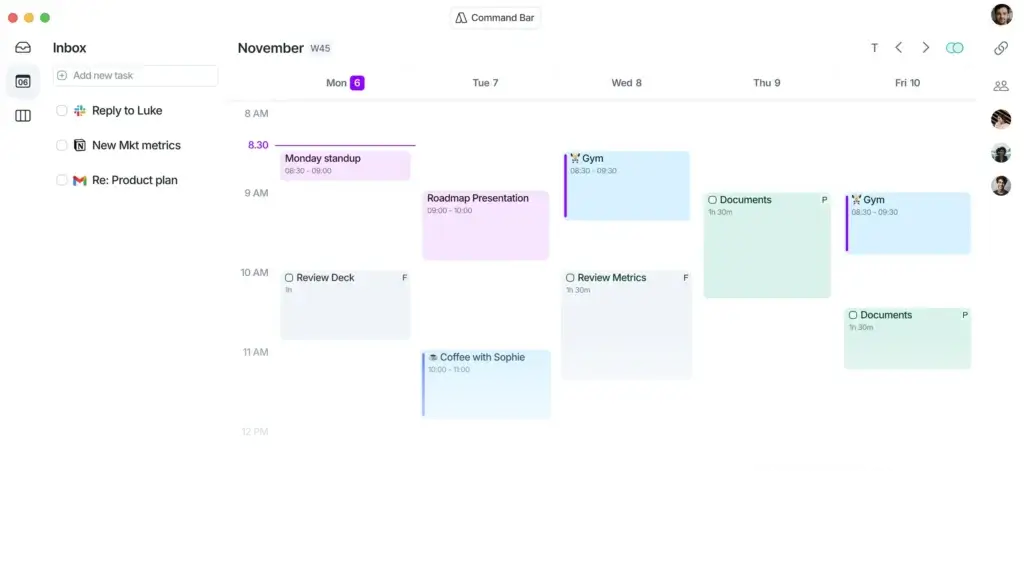
Akiflow’s user experience is built around speed, focus, and calendar visibility. It does not try to look like a traditional project management dashboard. Instead, it feels like a productivity cockpit for planning your day.
Clean calendar-first layout
The calendar is central to the Akiflow experience. Tasks, events, time slots, and meetings all connect to the same planning view, which helps you understand your capacity before committing to more work.
This is one of Akiflow’s main usability strengths. Instead of showing you a long list of tasks without context, it encourages you to schedule work into available time.
Fast keyboard-first workflow
The command bar is one of the best parts of the interface. You can create tasks quickly, set scheduling details, add tags, add priorities, and move around the app with shortcuts.
For power users, this makes Akiflow feel efficient. You do not need to leave the keyboard every time you want to capture or adjust work.
Daily planning feels intentional
Akiflow encourages you to review your tasks, choose what matters, and plan your day. This is important because many productivity apps become storage systems for unfinished tasks.
Akiflow is more opinionated. It pushes you to translate task lists into a plan, which is exactly what many busy professionals need.
Best for focused individual execution
Akiflow can be useful for teams, but its strongest experience is still individual execution. It helps you organize your own commitments across many systems.
If you are a manager, founder, consultant, or specialist who receives work from many channels, this is a major advantage. If you are looking for a collaborative project hub for your whole team, it may not be enough on its own.
Learning curve is moderate
Akiflow is not difficult to understand, but it does require a mindset shift. You need to think in terms of calendar capacity, not just task lists.
For users who are new to time blocking, the first week may feel different. Once the routine becomes familiar, the system becomes much more valuable.
Mobile experience supports capture and review
Akiflow’s mobile apps are useful for checking your plan, capturing tasks, and reviewing your day on the go. The desktop app remains the stronger environment for power planning, especially because of the global command bar.
That is not unusual for productivity software. The key point is that Akiflow gives you enough mobile access to keep your system current when you are away from your computer.
Pricing and Plans
How much does Akiflow cost?
Akiflow is a premium productivity tool, and its pricing reflects that. It is not competing with free checklist apps. It is competing with serious planning tools for professionals who want to save time, reduce context switching, and create a better daily execution system.
Akiflow offers a 7-day free trial. After that, the main pricing options are Pro Monthly and Pro Yearly.
- Pro Monthly: $34 per month, billed monthly.
- Pro Yearly: $19 per month, billed yearly.
- Student or researcher discounts: Akiflow says eligible users can get in touch for exclusive discounts.
- Team use: Akiflow invites teams to contact the company for team-related needs.
Both Pro options include unlimited integrations, unlimited tasks, unlimited meetings, all power features, Aki the AI Executive Assistant, a free 1:1 onboarding call, and the 7-day free trial.
The annual plan is clearly the better value if you know Akiflow fits your workflow. However, the monthly plan is safer if you are still deciding whether time blocking is something you will use consistently.
Comparison Table: Akiflow Pricing Plans
| Plan | Price | Billing | Best For | Main Highlights |
| Free Trial | Free for 7 days | Trial period | Testing Akiflow before paying | Access to Akiflow before choosing a paid plan |
| Pro Monthly | $34/month | Billed monthly | Users who want flexibility | Unlimited integrations, tasks, meetings, Aki, power features, onboarding call |
| Pro Yearly | $19/month | Billed yearly | Committed users who want better value | All Pro Monthly features with lower effective monthly pricing |
| Student or Researcher Discount | Contact Akiflow | Custom | Eligible students and researchers | Potential exclusive discount based on eligibility |
| Team Use | Contact Akiflow | Custom | Teams that want to use Akiflow together | Team-related setup and commercial discussion |
Is Akiflow expensive?
Akiflow is expensive if you compare it only to basic to-do list apps. Todoist, TickTick, Microsoft To Do, and Google Tasks are much cheaper or free for many users.
However, that is not the fairest comparison. Akiflow is closer to tools like Sunsama, Motion, and Morgen because it focuses on daily planning, calendar-based execution, and time management.
The real question is whether Akiflow helps you protect enough time to justify the price. If it saves you even a few hours per month, the annual plan can be easy to justify for professionals. If you only need reminders and simple lists, it is probably overkill.
Security and Compliance
Security, Privacy, and Data Considerations
Security matters for Akiflow because the platform can connect to sensitive parts of your work stack, including calendars, emails, tasks, meetings, and project tools.
Akiflow provides a public security page, privacy policy, terms of service, and a privacy addendum for AI features. It also provides a vulnerability disclosure policy that invites responsible reporting of security issues.
Data sensitivity is higher than in a basic task app
Akiflow can become a central planning layer across your work. That means it may process information from emails, calendars, meetings, project tools, and communication platforms.
For individual professionals, this is usually acceptable if you are comfortable with Akiflow’s privacy and security terms. For businesses, it should go through the same vendor review process as other productivity tools that connect to Google Workspace, Microsoft 365, Slack, Jira, or GitHub.
AI features deserve extra review
Because Akiflow includes Aki and AI-assisted workflows, you should review the AI privacy addendum before using it with confidential information.
This is not unique to Akiflow. Any AI-enabled productivity tool should be reviewed carefully before connecting it to sensitive client data, legal matters, financial records, HR data, or proprietary strategy documents.
Security review recommendation
For solo professionals and small teams, Akiflow’s public documentation may be enough to make an informed decision. For larger companies or regulated teams, you should request current security documentation directly from Akiflow before deployment.
In practical terms, Akiflow is best treated as a productivity system with meaningful access to your workflow. That does not mean you should avoid it. It means you should review permissions carefully and connect only the tools you actually need.
Akiflow alternatives
What to consider before you choose
Akiflow is strong, but it is not the best choice for every productivity style. The right alternative depends on whether you want simplicity, guided planning, AI scheduling, or team project management.
Akiflow vs Todoist
Todoist is better if you want a clean, affordable, and flexible to-do list app. It is easier to adopt and works well for personal tasks, simple projects, and lightweight team collaboration.
Akiflow is better if you already have tasks across many apps and want to plan them into your calendar. Todoist is about managing tasks. Akiflow is about planning when those tasks will happen.
Akiflow vs TickTick
TickTick is better for users who want tasks, habits, calendar views, reminders, and a Pomodoro-style workflow at a lower price.
Akiflow is stronger for professionals who rely heavily on external work tools and want a more serious time-blocking workflow. TickTick feels broader for personal productivity. Akiflow feels stronger for calendar-driven execution.
Akiflow vs Sunsama
Sunsama is one of Akiflow’s closest alternatives. Both tools focus on daily planning and intentional work. Sunsama feels more guided and mindful, while Akiflow feels faster, more technical, and more keyboard-driven.
Choose Sunsama if you want a calmer planning ritual. Choose Akiflow if you want speed, command bar capture, integrations, and more control over time blocking.
Akiflow vs Motion
Motion is more focused on AI scheduling and automatic calendar planning. It is a better fit if you want the software to dynamically schedule tasks for you.
Akiflow gives you more manual control. It is better if you want AI assistance, but you still want to decide how your calendar is structured.
Akiflow vs Morgen
Morgen is another strong calendar and scheduling tool, especially if you manage multiple calendars and want a clean planning layer. It may appeal to users who want strong calendar management with task support.
Akiflow is more compelling if your workflow depends heavily on importing tasks from many productivity and project tools into one actionable inbox.
Akiflow vs ClickUp
ClickUp is a full work management platform. It is better for teams that need project views, dashboards, automations, docs, goals, reporting, and collaboration in one system.
Akiflow is not trying to replace that kind of platform. It is better as a personal planning layer for your own workload, even if some of that workload originates in ClickUp.
If you are still comparing options, our guide to the best to-do list apps can help you compare simpler alternatives.
Conclusion
Final thoughts
Akiflow is one of the strongest productivity tools for people who want to turn scattered tasks into a realistic daily schedule. It is not just another place to store work. It is a planning system that helps you decide what deserves time on your calendar.
Its main strengths are clear: universal inbox, strong integrations, time blocking, time slots, command bar capture, calendar visibility, Aki AI, and meeting follow-up support.
The biggest limitation is also clear. Akiflow is not cheap, and it is not designed for casual task tracking. You should choose it only if you are serious about planning your day and willing to use time blocking consistently.
Is Akiflow Worth It?
Akiflow is worth it if your productivity problem is scattered work, overloaded calendars, and unclear daily priorities.
It is especially useful if you receive work from multiple tools and need a central system to process, prioritize, and schedule everything. In that situation, Akiflow can create real value because it reduces context switching and helps you protect time for execution.
However, it is not the best value if you only need a basic to-do list. If your workflow is simple, a cheaper tool like Todoist, TickTick, or Microsoft To Do may be enough.
Who Should Choose Akiflow?
- Busy professionals who want to plan tasks directly on their calendar.
- Founders, executives, and managers with meeting-heavy schedules.
- Developers, marketers, and operators who receive work from many tools.
- Users who prefer keyboard shortcuts and fast task capture.
- People who already believe in time blocking and want a dedicated system.
Who Should Consider Alternatives?
- Users who want a free task management app.
- People who only need simple reminders and checklists.
- Teams that need full project management, reporting, and collaboration.
- Users who prefer automatic AI scheduling over manual planning control.
- Organizations with strict compliance needs that require deeper vendor review.
Frequently Asked Questions
Have more questions?
What is Akiflow used for?
Akiflow is used for time blocking, daily planning, task consolidation, calendar management, quick capture, and organizing work from multiple tools into one central planning workspace.
Is Akiflow a to-do list app?
Akiflow includes task management features, but it is better described as a calendar-first planner and time-blocking app. It helps you schedule tasks, not just list them.
Does Akiflow have a free plan?
Akiflow offers a 7-day free trial, but it does not position itself as a permanent free task management app. After the trial, you need a paid plan to continue using it.
How much does Akiflow cost?
Akiflow lists Pro Monthly at $34 per month and Pro Yearly at $19 per month billed yearly. Pricing may change, so you should confirm the latest details on the official pricing page.
What integrations does Akiflow support?
Akiflow supports integrations with tools such as Google Calendar, Outlook Calendar, Gmail, Outlook Email, Slack, Microsoft Teams, Notion, Microsoft To Do, Asana, Linear, Jira, GitHub, Trello, Zoom, Zapier, IFTTT, Todoist, and ClickUp.
Is Akiflow good for time blocking?
Yes. Time blocking is one of Akiflow’s main strengths. You can schedule tasks on your calendar, use time slots, lock focus time, and plan your day around real availability.
Is Akiflow good for teams?
Akiflow can support team use, but its strongest value is individual planning and execution. Teams that need full project management, dashboards, reporting, and collaboration may need a broader work management platform.
What is Aki in Akiflow?
Aki is Akiflow’s AI assistant. It helps with planning, prioritization, recurring tasks, daily briefings, reminders, voice commands, and AI-supported productivity workflows.
What are the main limitations of Akiflow?
Akiflow’s main limitations are its premium pricing, lack of a permanent free plan, moderate learning curve for users new to time blocking, and limited fit as a full project management platform.
What are the best Akiflow alternatives?
The best Akiflow alternatives depend on your workflow. Todoist and TickTick are better for simpler task management, Sunsama is strong for guided daily planning, Motion is better for AI auto-scheduling, and ClickUp is better for full team project management.