Introduction
Evernote is one of the most established note-taking apps in the productivity software market. For years, it has been known as a digital filing cabinet where you can capture notes, web pages, PDFs, images, ideas, meeting notes, and personal knowledge in one searchable workspace.
In 2026, Evernote is more than a traditional notes app. With Evernote v11, the platform now combines note-taking, task management, calendar workflows, AI search, meeting transcription, document capture, and lightweight collaboration.
That makes this Evernote review especially important. The product has improved in several areas, but it has also become more expensive, and the free plan is much more limited than many users remember.
What is Evernote?
Evernote is a note-taking and personal knowledge management app that helps you capture, organize, search, and reuse information across devices. You can create notes, organize them into notebooks and spaces, add tags, save web pages, attach files, scan documents, manage tasks, and connect your calendar.
The platform is especially useful if your work depends on collecting information from many sources. You can use it for research, meeting notes, client records, personal planning, project documentation, writing ideas, saved articles, and digital archiving.
Evernote now sits somewhere between a note-taking app, a productivity workspace, and a lightweight task management tool. It does not replace a full project management platform, but it can support your personal workflow and team knowledge base very well.
If you are comparing Evernote with more task-focused tools, you may also want to read our guide to the best task management software.
Software specification
Core Features of Evernote
Evernote’s biggest strength is still information capture. It gives you a flexible place to save ideas, documents, meeting notes, tasks, online research, and reference material, then retrieve that information later through search, tags, notebooks, and AI-powered discovery.
The platform is not as flexible as Notion for database-style workspaces, and it is not as task-focused as Todoist. However, it remains one of the strongest options if your main need is to collect and find information quickly.
1. Notes, notebooks, spaces, and tags
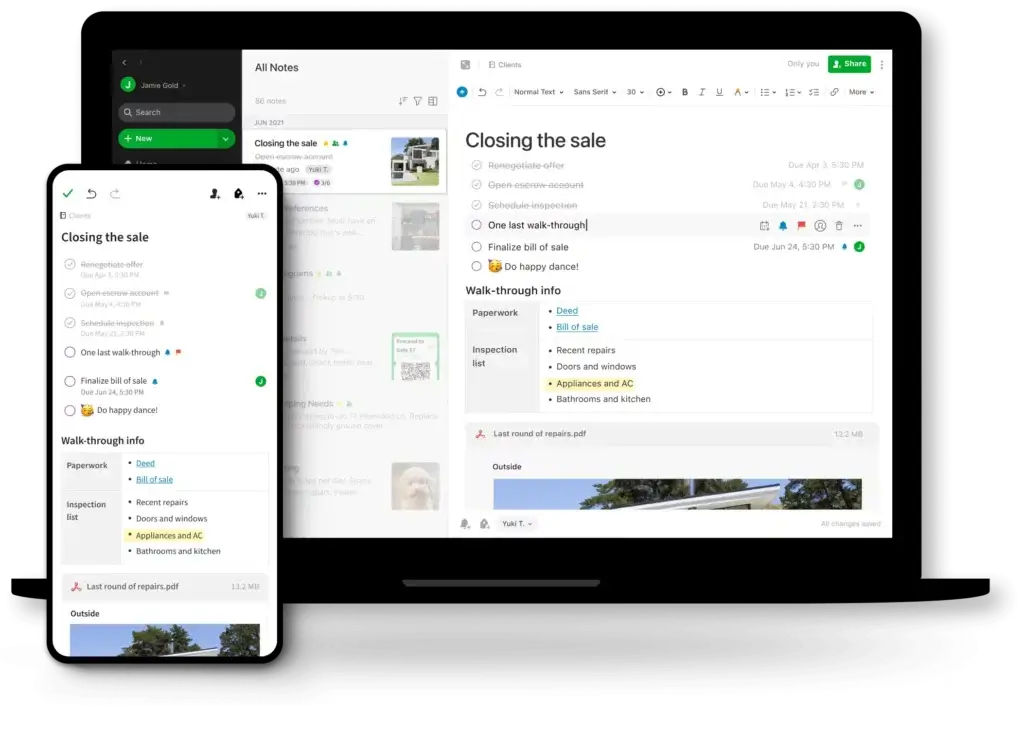
Evernote is built around notes. A note can include text, images, files, checklists, tables, links, audio recordings, scans, and embedded content.
You can organize notes into notebooks, group content into spaces, and use tags for flexible filtering. This structure is especially useful if you want a long-term knowledge base rather than a simple list of daily tasks.
2. Web Clipper for saving online research
Evernote Web Clipper remains one of its strongest features. You can save articles, full pages, simplified article views, screenshots, and selected page content directly into Evernote.
For researchers, marketers, writers, students, and consultants, this is a major advantage. Instead of bookmarking pages that may later disappear or become difficult to organize, you can save useful content directly into your knowledge system.
3. Advanced search and Semantic Search
Search has always been a major part of Evernote’s value. You can search across notes, tags, notebooks, attachments, PDFs, and images depending on your plan and content type.
With Semantic Search, Evernote becomes more useful for users with large note libraries. Instead of needing the exact keyword, you can search by meaning. For example, a search about “client onboarding ideas” may surface related notes even if those exact words are not in the note title.
4. AI Assistant for working with your notes
Evernote’s AI Assistant is one of the most important updates in v11. It lets you interact with your notes through a chat-style interface, ask questions, summarize content, extract action items, and generate new text based on your information.
This is where Evernote becomes more than storage. If you already have years of notes, the AI Assistant can help you turn old information into usable answers, summaries, outlines, and next steps.
5. AI Meeting Notes and transcription
Evernote now supports AI-powered meeting notes. You can record meetings, generate transcripts, create summaries, and capture action items without leaving the platform.
This feature is useful for business users, consultants, students, and managers who attend many meetings. It is not a full replacement for dedicated meeting assistant tools in every scenario, but it works well if you already want your meeting notes stored inside Evernote.
6. Tasks and reminders
Evernote includes task features that let you add due dates, reminders, and task assignments. This helps connect your information with your next actions.
However, Evernote is not a pure task management app. It works best when tasks are attached to notes, projects, meetings, or documents. If you need advanced recurring task workflows, workload management, or team project planning, a dedicated task tool will usually be stronger.
7. Calendar integration
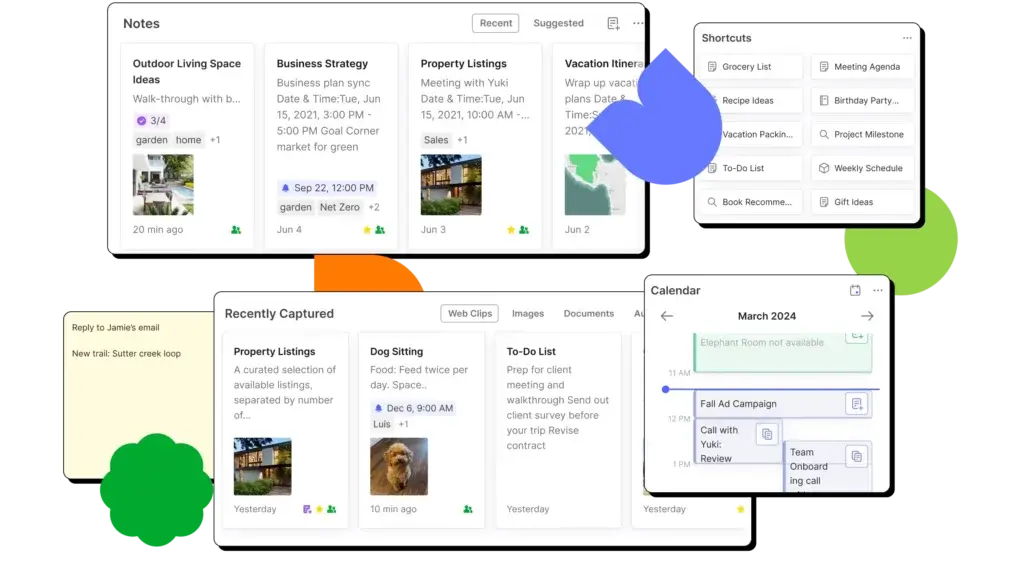
Evernote Calendar lets you connect your Google or Microsoft calendar, create notes around events, and link your schedule with your meeting notes.
This is especially helpful if you use Evernote for meetings. You can prepare notes before a call, attach context to an event, and keep follow-up tasks connected to the original meeting.
8. Document capture and file attachments
Evernote supports uploads for documents, images, and audio recordings. You can use it as a searchable archive for receipts, contracts, PDFs, research documents, screenshots, and scanned papers.
This makes Evernote useful as a personal or business reference system. It is particularly strong for people who want one searchable place for both written notes and saved documents.
9. Cross-platform access
Evernote works across web, desktop, and mobile apps. That matters if you capture ideas on your phone, edit on desktop, and retrieve information from the web app.
Plan limits now matter more than they used to, especially on the Free and Starter plans. Still, the cross-platform experience remains one of Evernote’s core advantages.
Overall, Evernote is strongest when you treat it as a long-term knowledge and capture system. It is less compelling if you only need a free notes app or a simple to-do list.
Pros and Cons
Advantages and Disadvantages
Positive
✅ Excellent for capturing and organizing information
✅ Strong Web Clipper and document storage
✅ Useful AI Assistant and Semantic Search
✅ Good meeting notes and calendar workflow
Negatives
❌ Free plan is very limited
❌ Paid plans are expensive for casual users
❌ Not a full project management platform
❌ Advanced security needs require careful review
Evernote’s strengths are clear, but the product is not the automatic choice it once was. The app is powerful, mature, and much smarter than older versions, but pricing and plan limits make the buying decision more complicated.
Pros:
- Excellent for capturing and organizing information: Evernote is still one of the best tools for storing notes, files, articles, scans, ideas, and reference material in a structured knowledge base.
- Strong Web Clipper and document storage: The Web Clipper, file attachments, document capture, and searchable archive features make Evernote useful for research-heavy workflows.
- Useful AI Assistant and Semantic Search: Evernote’s newer AI features are practical because they work directly with your saved content, not just generic prompts.
- Good meeting notes and calendar workflow: Calendar integration, AI Meeting Notes, transcription, summaries, and tasks help connect meetings with action items.
Cons:
- Free plan is very limited: The Free plan is best for testing Evernote, not for building a serious long-term knowledge system.
- Paid plans are expensive for casual users: Starter and Advanced pricing can feel high if you only want basic notes, especially compared with Microsoft OneNote, Google Keep, Apple Notes, or Joplin.
- Not a full project management platform: Evernote has tasks, reminders, and collaboration, but it does not replace tools like Asana, ClickUp, monday.com, or Todoist for structured task workflows.
- Advanced security needs require careful review: Evernote offers useful protections, but teams with strict compliance, end-to-end encryption, or regulated data needs should evaluate requirements carefully.
In short, Evernote is strongest when you need a searchable knowledge system. It is weaker when you need low-cost note-taking, deep project management, or advanced security controls for highly sensitive information.
User Experience
User Interface and Everyday Workflow
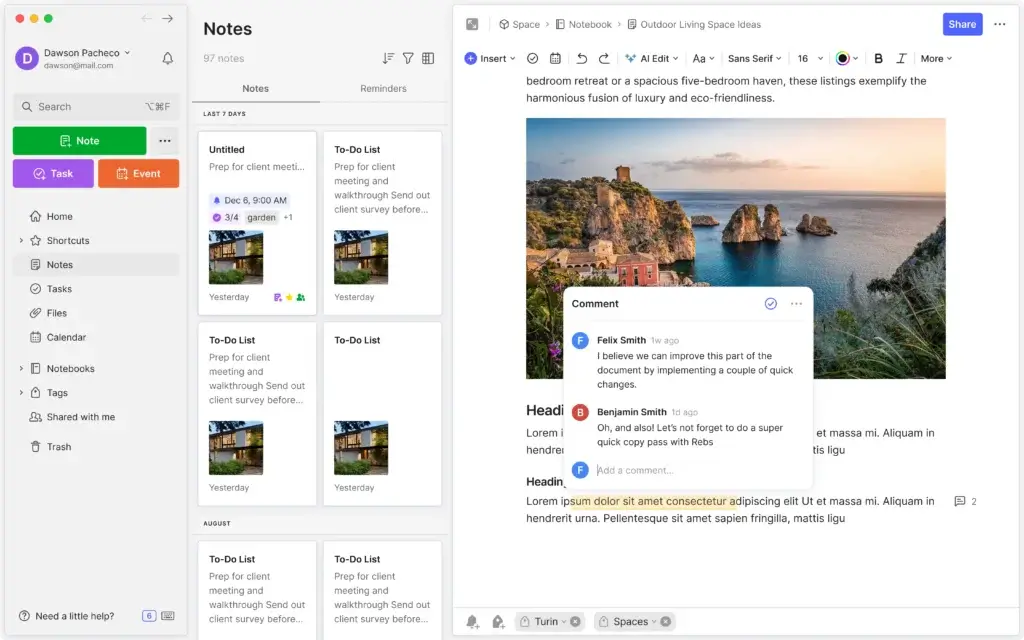
Evernote’s user experience is familiar but more modern than it used to be. The interface is built around a sidebar, notes list, editor, search, notebooks, spaces, and shortcuts.
If you have used Evernote before, the core experience will feel recognizable. If you are new to Evernote, the learning curve is moderate because the platform now includes more than basic notes.
Clean note-taking experience
The editor is simple enough for quick notes, but flexible enough for structured content. You can use headings, lists, checkboxes, tables, attachments, links, images, and audio.
This makes Evernote suitable for both quick capture and more detailed documentation. It feels more focused than Notion, but more powerful than basic notes apps.
Strong capture-first workflow
Evernote works best when you use it as your default capture tool. You can save ideas from your phone, clip pages from your browser, scan documents, forward content, and create meeting notes from your calendar.
This capture-first workflow is what still separates Evernote from many newer productivity tools. It is designed to help you get information into the system quickly.
Search is central to the experience
Evernote is not only about organizing notes manually. It is about finding information when you need it.
That matters if you have hundreds or thousands of notes. Tags and notebooks help, but search is what makes a large Evernote account practical over time.
AI features improve usability for large accounts
Evernote’s AI features are most valuable if you already have a lot of information stored in the app. AI Assistant and Semantic Search can help you retrieve, summarize, and reuse older notes more easily.
For new users with only a few notes, the AI features may feel less essential. For long-time users with a large archive, they can be a meaningful upgrade.
Mobile experience is useful for capture
Evernote’s mobile app is useful for quick capture, scanning, audio notes, and reviewing saved information. This is important because many note-taking workflows start outside the desk environment.
If you often save ideas, receipts, documents, or meeting thoughts on the go, Evernote’s mobile capture experience is one of its stronger practical advantages.
Where the user experience falls short
The main issue is not that Evernote is difficult to use. The issue is that the product now serves multiple purposes at once: notes, tasks, calendar, AI, meetings, files, and collaboration.
That wider scope makes Evernote more powerful, but also more expensive and less simple than minimalist alternatives. If all you want is fast personal notes, the experience may feel heavier than necessary.
Pricing and Plans
How much does Evernote cost?
Evernote’s pricing is one of the most important parts of this review. The product has improved, but the value depends heavily on how much you use it.
The current plan structure includes Free, Starter, Advanced, and Enterprise. Older plans such as Personal and Professional are being replaced by Starter and Advanced.
- Free: Best for trying Evernote with limited notes, notebooks, storage, and device access.
- Starter: Best for casual users who want more room than Free but do not need unlimited content.
- Advanced: Best for power users with large note libraries, many notebooks, unlimited sync needs, and more complex workflows.
- Enterprise: Best for organizations that need admin controls, business ownership, activity history, and SSO.
In USD, Evernote Starter is listed at $14.99 per month or $99 per year. Evernote Advanced is listed at $24.99 per month or $249.99 per year. Pricing may vary by country, app store subscription, taxes, and promotional offers.
For most users, the key decision is simple. If you only need basic note-taking, Evernote may feel expensive. If you rely on it every day as your searchable knowledge base, meeting hub, and document archive, Advanced can be easier to justify.
Comparison Table: Evernote Pricing Plans
| Plan | Best For | Main Limits | Key Features | Pricing |
| Free | Testing Evernote | 50 notes, 1 notebook, 1 device, 1GB storage | Basic notes, limited organization, app access | $0 |
| Starter | Casual and occasional users | 1,000 notes, 20 notebooks, 3 devices, 5GB storage | Tasks, calendars, attachments, AI tools, Web Clipper | $14.99/month or $99/year |
| Advanced | Power users and large note libraries | Unlimited notes, unlimited notebooks, unlimited devices, unlimited storage | Advanced search, AI tools, meeting notes, broader capture and organization | $24.99/month or $249.99/year |
| Enterprise | Businesses and teams | Custom limits | Admin controls, SSO, activity history, business data ownership | Custom pricing |
The Starter plan is the better fit if you use Evernote lightly and your account is within the note, notebook, device, and storage limits.
The Advanced plan is the more realistic option if you already have a large Evernote archive or want to use the platform as your main productivity hub.
Enterprise is more relevant for teams that need control over business data, user management, SSO, and centralized administration.
Security and Compliance
Security and Admin Controls in Evernote
Security is an important consideration because Evernote often stores sensitive work notes, documents, client information, research, and personal records.
Evernote provides several useful security and administration features, but it is important to understand where it fits. It is a cloud productivity app, not a zero-knowledge encrypted notes platform by default.
Core security protections
- Two-factor authentication: Evernote supports 2FA to help protect account access.
- Encryption in transit: Evernote documents SSL protection for communications between client apps and servers.
- In-note encryption: Evernote supports in-note encryption on Mac and Windows for selected text.
Enterprise security and administration
- Business data ownership: Enterprise plans are designed to help organizations maintain ownership and control over business information.
- Centralized administration: Admins can manage users, billing, permissions, and team access from a central console.
- SSO support: Enterprise supports single sign-on through SAML 2.0 and large identity providers.
- User activity history: Admins can review activity history for stronger oversight.
Compliance considerations
Evernote states that it has ISO 27001 certification, which is a positive signal for information security management.
However, Evernote is not the best fit if you need a fully end-to-end encrypted notes platform or if your organization must meet strict regulated requirements such as HIPAA workflows. Teams handling sensitive or regulated data should validate the latest security documentation directly before adopting it.
What this means in practice
For most individuals, creators, students, and general business users, Evernote’s security controls will be sufficient if you also use a strong password and two-factor authentication.
For security-sensitive teams, Evernote should go through a proper vendor review. You should confirm encryption expectations, admin controls, retention policies, AI data settings, and compliance requirements before storing sensitive business data.
Evernote Alternatives
What to consider before you choose
Evernote is still a strong note-taking app, but it is not the best option for everyone. The right alternative depends on whether you care more about free storage, team collaboration, personal productivity, privacy, or flexible workspace building.
Evernote vs Microsoft OneNote
Microsoft OneNote is the better option if you want a free or low-cost note-taking app that works well with Microsoft 365. It is also strong for handwritten notes, classroom-style notebooks, and flexible page layouts.
Evernote is better if you prefer structured capture, Web Clipper workflows, tags, saved documents, and a more focused knowledge archive.
Evernote vs Notion
Notion is better if you want databases, team wikis, project pages, and highly customizable workspaces. It is more flexible for building systems from scratch.
Evernote is better if you want faster capture, simpler note organization, stronger clipping, and less setup work.
Evernote vs Todoist
Todoist is a stronger choice for task management. It handles recurring tasks, priorities, labels, filters, and daily productivity better than Evernote.
Evernote is better if the task is only one part of a broader note, document, meeting, or research workflow.
Evernote vs Obsidian
Obsidian is a better fit for users who want local-first notes, markdown, backlinks, and more control over their files.
Evernote is better for users who want cloud sync, Web Clipper, document capture, AI meeting notes, and a more polished out-of-the-box experience.
Evernote vs Google Keep
Google Keep is better for quick notes, reminders, simple lists, and lightweight personal capture.
Evernote is better for serious knowledge management, longer notes, document storage, advanced search, and long-term organization.
If you want a broader task-focused comparison, our guide to the best task management tools can help you compare Evernote with more execution-oriented platforms.
Conclusion
Final thoughts
Evernote is still one of the most capable note-taking apps available, but it is no longer a simple recommendation for every user. The product has become smarter, more powerful, and more business-ready, especially with AI Assistant, Semantic Search, AI Meeting Notes, Web Clipper, calendar integration, and stronger organization features.
At the same time, Evernote is more expensive than many note-taking alternatives. The Free plan is too limited for serious long-term use, and the Advanced plan will only make sense if you use Evernote often enough to justify the cost.
Is Evernote Worth It?
Evernote is worth it if you want a serious knowledge management system and plan to use it regularly. It is especially strong for users who save research, documents, meeting notes, project information, and personal knowledge in one searchable place.
It is also a stronger product than it was a few years ago. Evernote v11 makes the platform feel more modern, especially for users with large note archives.
However, Evernote is harder to recommend if you only need basic personal notes. In that case, OneNote, Google Keep, Apple Notes, Joplin, or Obsidian may offer better value.
Who Should Choose Evernote?
- Professionals who need a searchable digital filing cabinet.
- Researchers, writers, marketers, and consultants who save web content often.
- Users with large note libraries who can benefit from AI search and summaries.
- Business users who want notes, meetings, calendar context, and tasks together.
Who Should Consider Alternatives?
- Users who want a completely free note-taking app with fewer limits.
- Teams that need full project management, workload planning, or advanced reporting.
- Privacy-focused users who need end-to-end encrypted notes by default.
- People who only need simple reminders, grocery lists, or quick personal notes.
Overall, Evernote remains a strong productivity tool, but its best audience has become clearer. It is best for people who treat notes as a serious work system, not just a place to write quick reminders.
Frequently Asked Questions
Have more questions?
What is Evernote used for?
Evernote is used for note-taking, document storage, web clipping, meeting notes, research organization, task tracking, and personal knowledge management. It is best for users who want one searchable place to save and retrieve information.
Is Evernote still worth using in 2026?
Yes, Evernote is still worth using if you need a serious knowledge management system with strong capture, search, AI features, document storage, and meeting notes. It is less compelling if you only need a basic free notes app.
Does Evernote have a free plan?
Yes. Evernote offers a free plan, but it is limited by notes, notebooks, device access, and storage. It is best for testing the platform rather than building a large long-term note library.
How much does Evernote cost?
Evernote pricing includes a Free plan, Starter, Advanced, and Enterprise. In USD, Starter is listed at $14.99 monthly or $99 yearly, while Advanced is listed at $24.99 monthly or $249.99 yearly. Pricing may vary by country and subscription channel.
What is the difference between Evernote Starter and Advanced?
Starter is designed for casual users with limited notes, notebooks, devices, and storage. Advanced is designed for power users who need unlimited notes, notebooks, devices, storage, and broader workflow capacity.
Does Evernote have AI features?
Yes. Evernote includes AI Assistant, Semantic Search, AI Meeting Notes, AI Transcribe, AI Edit, and AI Cleanup. These features help you search, summarize, organize, transcribe, and improve your notes.
Is Evernote good for task management?
Evernote is useful for simple task management because you can add tasks, due dates, reminders, and assignments. However, it is not as advanced as dedicated task management software like Todoist, Asana, ClickUp, or monday.com.
Is Evernote secure?
Evernote includes security features such as two-factor authentication, encrypted communications, in-note encryption on Mac and Windows, SSO for Enterprise, and admin controls. Teams with strict compliance needs should review Evernote’s latest security documentation before adoption.
What are the best Evernote alternatives?
The best Evernote alternatives depend on your needs. OneNote is strong for free-form notes, Notion is better for customizable workspaces, Todoist is better for task management, Obsidian is better for local-first markdown notes, and Google Keep is better for quick simple notes.
Who should use Evernote?
Evernote is best for professionals, researchers, writers, consultants, students, and business users who need to capture, organize, search, and reuse large amounts of information across notes, files, meetings, and web content.