
Introduction
ProofHub is a project management and team collaboration platform built for teams that want to plan work, assign tasks, manage files, discuss projects, track time, review creative assets, and monitor progress from one central workspace.
Unlike many project management tools that charge per user, ProofHub’s biggest selling point is its flat-rate pricing model. That makes it especially interesting for growing teams, agencies, and businesses that want predictable software costs without paying more every time they invite another team member, freelancer, client, or stakeholder.
In this ProofHub review, you will get a practical look at what the platform offers in 2026, where it performs well, where it feels limited, and whether it is the right choice compared with tools like Asana, monday.com, ClickUp, Basecamp, and Teamwork.
What is ProofHub?
ProofHub is an all-in-one project management software designed to help teams organize projects, collaborate on work, manage tasks, track deadlines, store files, review documents, and communicate in one place.
The platform combines several tools that many teams usually manage separately. You get task lists, Kanban boards, Gantt charts, calendars, discussions, notes, chat, proofing, approvals, time tracking, reports, files, forms, and admin controls inside one workspace.
That makes ProofHub more than a basic task management app. It sits closer to a full project collaboration platform for teams that want structure without the complexity of enterprise project portfolio management software.
If you want to compare it with other tools in this category, you can also read our guide to the best task management software.
Software specification
Core Features of ProofHub
ProofHub’s strength is not that it has one unusually advanced feature. Its value comes from combining project planning, task management, collaboration, proofing, file management, time tracking, and reporting in one straightforward workspace.
That makes it a practical option for teams that want fewer disconnected tools and more predictable project visibility.
1. Task management with lists, boards, and custom workflows
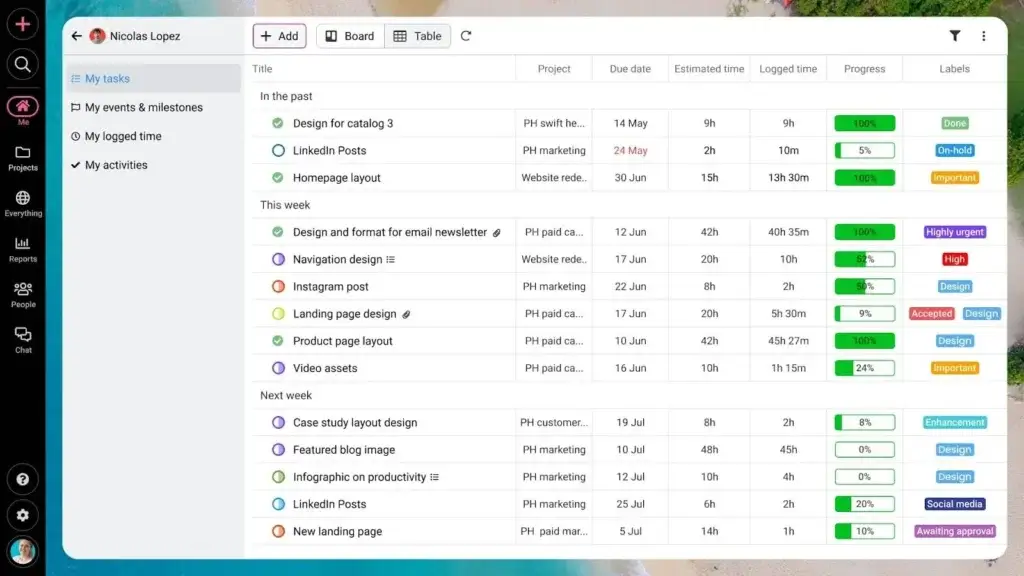
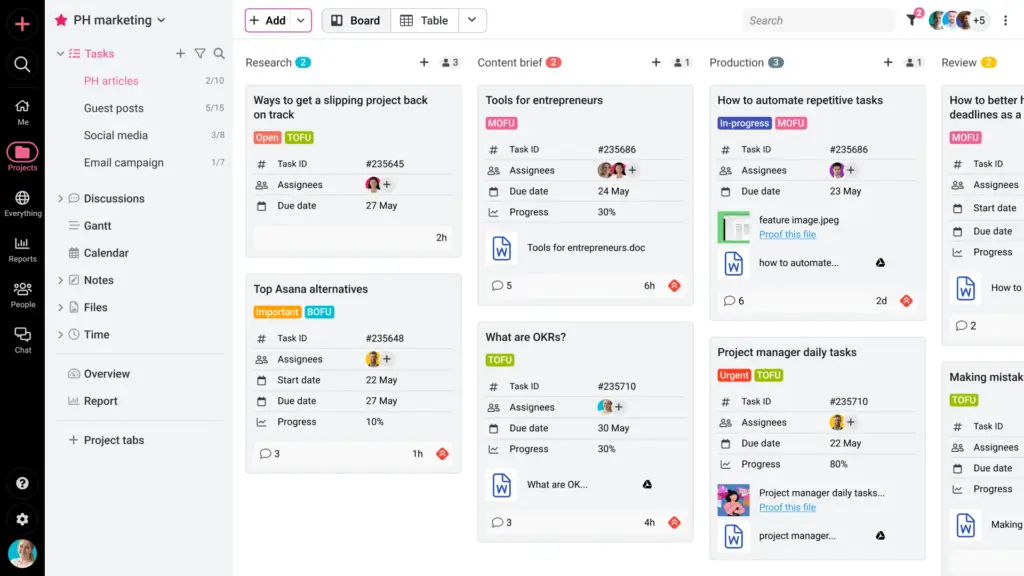
ProofHub gives you several ways to organize tasks. You can create task lists for structured work, use boards for visual task movement, and add labels, start dates, due dates, assignees, estimated time, dependencies, comments, and attachments.
This gives managers enough structure to keep projects organized, while still giving contributors a clear view of what they need to do next.
The board view is especially useful for teams that work with staged workflows, such as content production, design approvals, marketing campaigns, product updates, or client service delivery.
2. Gantt charts for planning timelines and dependencies
ProofHub includes Gantt charts, which help you map project timelines, identify task dependencies, and understand how delays affect delivery dates.
This is important because many lightweight task tools are good at listing work but weaker at showing how work connects over time. ProofHub gives you a more project-oriented view, making it easier to manage campaigns, launches, client projects, and operational plans.
3. Built-in proofing and file approval
ProofHub’s proofing feature is one of its strongest differentiators. You can review, annotate, comment on, and approve files directly inside the platform.
This is particularly valuable for creative teams, marketing departments, agencies, design teams, and content teams. Instead of sending feedback through email threads or scattered chat messages, stakeholders can review assets in context and keep approval history connected to the work.
If your team regularly reviews images, PDFs, campaign materials, designs, documents, or client deliverables, this feature may matter more than another dashboard or automation layer.
4. Discussions, chat, notes, and announcements
ProofHub includes several communication tools. Discussions are useful for project-based conversations, chat supports quick one-on-one and group messages, notes can work as a lightweight knowledge base, and announcements help share broader updates with the team.
This reduces the need to constantly switch between a task manager, Slack, shared documents, and email. It will not fully replace every communication tool for every business, but it does help keep project context closer to the actual work.
5. Time tracking and timesheets
ProofHub includes time tracking on its higher plan. Teams can track time manually or with timers, add time entries to tasks, and use time reports to understand where effort is going.
This is useful for agencies, consultants, service teams, and project-based businesses that need to understand billable hours, workload, and delivery efficiency.
It is not a full invoicing or accounting system, but it can give you a clearer picture of how time is spent across projects.
6. Project reports and workload visibility
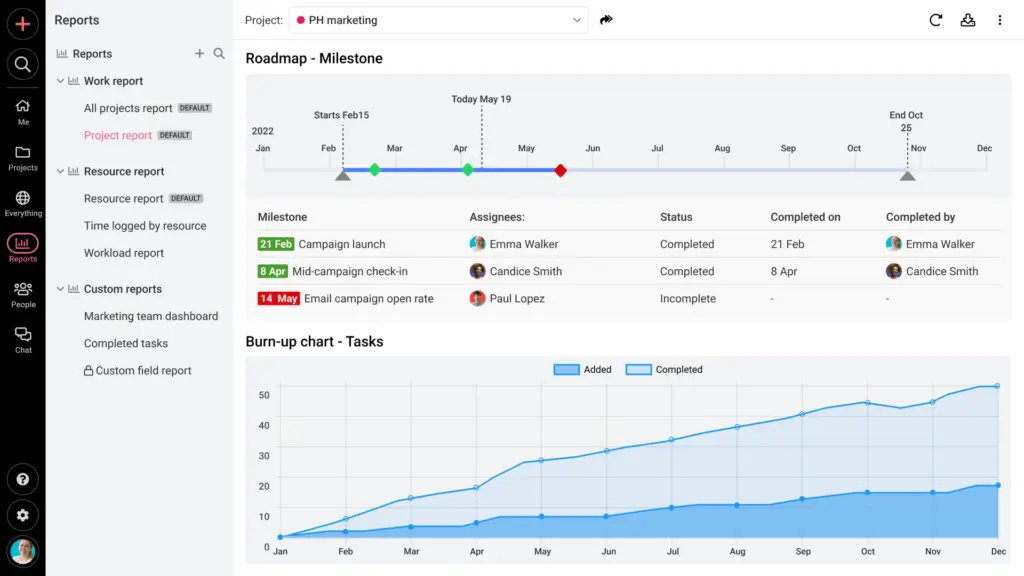
ProofHub provides reports for projects, resources, workload, tasks, milestones, and time. These reports help you understand project status, overdue work, workload distribution, and team activity.
The reporting is practical for small and mid-sized teams. However, it is not as deep as what you may find in enterprise work management platforms or advanced portfolio management systems.
That is an important distinction. ProofHub is good for visibility and operational tracking, but it is not designed to be a heavyweight business intelligence platform.
7. Forms for work requests and intake
Forms help teams collect requests, support tickets, client inputs, or internal work submissions and turn them into organized work inside ProofHub.
This can be especially helpful for marketing teams, operations teams, creative teams, and internal service departments. Instead of receiving requests through email, chat, spreadsheets, and hallway conversations, you can create a more consistent intake process.
8. Admin controls, custom roles, and white labeling
ProofHub’s Ultimate Control plan adds stronger administrative features, including custom roles, IP restrictions, white labeling, advanced activity logs, API access, project manager roles, and more detailed reporting.
These controls are useful if you work with clients, freelancers, external stakeholders, or multiple departments. You can decide who gets access to what and create a more controlled workspace without adding per-user software costs.
9. Integrations with key business tools
ProofHub integrates with tools such as Google Calendar, iCal, Slack, Dropbox, OneDrive, QuickBooks, and FreshBooks. It also supports importing from tools such as Asana and Basecamp.
The integration list is useful, but not as broad as what you get from tools like ClickUp, monday.com, or Asana. If your team depends heavily on many third-party apps, this is one area to review carefully before choosing ProofHub.
10. Flat pricing with unlimited users
ProofHub’s flat pricing is not just a billing detail. It changes the way you can roll out the platform.
With per-user tools, teams often hesitate before inviting clients, contractors, freelancers, or occasional stakeholders because every extra user affects cost. With ProofHub, unlimited users are included, so you can bring more people into the workspace without increasing your subscription every time.
For larger teams or client-facing businesses, this can create real savings over time.
Pros and Cons
Advantages and Disadvantages
Positive
✅ Flat pricing with unlimited users
✅ Strong all-in-one project workspace
✅ Useful proofing and approval tools
✅ Good fit for client-facing teams
Negatives
❌ Fewer integrations than some competitors
❌ Reporting is useful but not enterprise-deep
❌ No permanent free plan
❌ Advanced controls require Ultimate Control
ProofHub’s biggest advantage is its balance between simplicity and completeness. It gives you many of the practical features teams need every day without becoming as complex as enterprise project portfolio software.
Pros:
- Flat pricing with unlimited users: ProofHub is especially attractive for teams that want to add employees, clients, freelancers, or contractors without increasing software costs per seat.
- Strong all-in-one project workspace: Tasks, boards, Gantt charts, discussions, chat, notes, files, proofing, approvals, time tracking, and reports are available in one platform.
- Useful proofing and approval tools: The built-in markup and approval workflow makes ProofHub more valuable for creative, marketing, design, and agency teams.
- Good fit for client-facing teams: Unlimited users, custom roles, private items, white labeling, and project visibility make it useful for teams that collaborate with external stakeholders.
Cons:
- Fewer integrations than some competitors: ProofHub covers important integrations, but it does not offer the same ecosystem depth as monday.com, Asana, or ClickUp.
- Reporting is useful but not enterprise-deep: Reports help with project visibility, time, workload, and progress, but advanced analytics teams may want more customization.
- No permanent free plan: ProofHub offers a free trial, but not a long-term free version, which may matter for solo users or very small teams.
- Advanced controls require Ultimate Control: Features like custom roles, white labeling, IP restrictions, API access, advanced activity logs, and detailed reports are not included in the Essential plan.
Overall, ProofHub is strongest when you want a predictable, centralized, easy-to-adopt project management platform. It is less ideal if your team prioritizes deep automation, huge integration libraries, advanced portfolio analytics, or a generous free plan.
User Experience
User Interface and Daily Usability
ProofHub is designed to feel practical rather than flashy. The interface focuses on projects, tasks, discussions, files, time, and reports, which makes it easier for most teams to understand than highly customizable work operating systems.
That simplicity is one of the reasons ProofHub can work well for mixed teams where not everyone is a technical project manager.
Easy to understand for most teams
ProofHub’s navigation is relatively straightforward. Projects act as the main containers, and each project can include tasks, discussions, files, notes, time, milestones, and reports.
This structure is familiar for teams that already work with projects and deliverables. You do not need to build a complex system before your team can start using it.
Multiple views support different workflows
ProofHub gives you list, board, table, calendar, and Gantt-style views. This matters because teams rarely work in only one format.
A marketing manager may want a campaign calendar. A project manager may prefer Gantt charts. A design team may work best from a board view. A team lead may need a table view for filtering and prioritization.
ProofHub gives each role a practical way to look at the same work.
Good collaboration experience for distributed teams
ProofHub’s collaboration tools are useful because they are connected to the work itself. Discussions, chat, comments, mentions, notes, files, and approvals all reduce the need to search through separate tools for project context.
This is particularly useful for remote teams, hybrid teams, agencies, and organizations that work with external clients.
Proofing improves creative review workflows
For creative and marketing teams, ProofHub’s proofing experience is one of the best parts of the product. You can review files, mark up changes, leave comments, and manage approvals without moving the process into a separate proofing app.
This can reduce feedback confusion, especially when several stakeholders need to approve the same asset.
Where the interface can feel limited
ProofHub is not as flexible as highly customizable platforms like ClickUp or monday.com. If you want complex automations, advanced dashboards, custom app-style workflows, or deep database-style work management, ProofHub may feel more controlled.
That is not always a weakness. For many teams, too much customization creates complexity. But if your organization wants to build highly tailored operational systems, ProofHub may not go far enough.
Pricing and Plans
How much does ProofHub cost?
ProofHub’s pricing is one of its clearest advantages. Instead of charging per user, it offers flat-rate plans with unlimited users.
This makes it easier to predict your monthly cost, especially if your team is growing or if you regularly invite clients, freelancers, contractors, and stakeholders into your workspace.
- Essential: $45 per month billed annually, or $50 per month billed monthly.
- Ultimate Control: $89 per month billed annually during the limited-time offer, with standard pricing listed after the promotional period.
- Free trial: 14 days, with no credit card required.
- Users: Unlimited users are included on both paid plans.
The Essential plan includes core project management and collaboration features, including projects, tasks, boards, Gantt charts, discussions, calendars, file sharing, proofing and approvals, chat, and integrations.
The Ultimate Control plan is better for teams that need more administrative control. It adds features such as unlimited projects, 100GB storage, custom roles, white labeling, workflows, project manager roles, IP restrictions, API access, project and resource reports, advanced activity logs, account transfer tools, and priority support.
Comparison Table: ProofHub Pricing Plans
| Plan | Best For | Users | Storage | Main Highlights |
| Essential | Small teams that need core project management | Unlimited users | 15GB | 40 projects, tasks, boards, Gantt, discussions, calendar, files, proofing, chat, integrations |
| Ultimate Control | Growing teams, agencies, and client-facing businesses | Unlimited users | 100GB | Unlimited projects, custom roles, workflows, white labeling, IP restrictions, reports, API access |
Is ProofHub good value for money?
ProofHub is strongest from a pricing perspective when you have more than a few users. If you only need a tool for one person or a very small team, a free or low-cost per-user tool may be cheaper.
However, once your team grows, ProofHub becomes more attractive. A team of 20, 50, or 100 users can often pay far less with ProofHub than with per-seat tools, especially if you need to involve clients or contractors.
For most businesses, Ultimate Control is the more complete plan. Essential is useful for basic project management, but the higher plan unlocks the features that make ProofHub more serious for team operations.
Security and Privacy
Data Protection and Admin Control
ProofHub provides several practical security and privacy controls, including SSL/TLS encryption for data in transit, encrypted database backups, IP restrictions, custom roles, activity logs, and admin-level visibility.
That makes it suitable for many small and mid-sized businesses, especially those that need controlled access for teams, clients, and external collaborators.
Encryption and infrastructure
ProofHub states that data transmitted between its servers and your browser is encrypted using SSL/TLS. It also states that database backups are encrypted.
The privacy documentation notes that live database data is not encrypted in the same way because it needs to be accessible when users request it, but the company says it uses checks to secure data at rest.
For many standard business use cases, this is acceptable. However, if your company operates in a highly regulated industry, you should ask ProofHub directly for the most current security documentation before procurement.
IP restrictions
IP restriction is available on the Ultimate Control plan. This lets account owners restrict access so users can only access ProofHub from approved IP addresses.
This is useful for organizations that want to limit access to office networks, approved locations, or controlled work environments.
Custom roles and permissions
Custom roles help you define who can see and do what inside ProofHub. This is important if you collaborate with clients, vendors, contractors, or multiple departments.
Instead of giving every user broad access, you can create more tailored permission structures that match your workflow.
Activity logs and administrative visibility
ProofHub’s activity logs help administrators see what users are doing inside the account. Advanced activity logs are part of the Ultimate Control plan.
This can be useful for accountability, auditing, project review, and understanding how work moves through the system.
Data retention and deletion
ProofHub’s privacy policy says account data is stored for the duration of the customer relationship. It also states that once a paid account is closed or a trial ends, account data is deleted within 30 days, while deleted items in trash are purged after 15 days unless manually emptied sooner.
This is useful to know if your organization has data retention requirements or needs a clear offboarding process.
Security limitations to consider
ProofHub provides useful business security controls, but it does not present itself as a highly regulated enterprise security platform in the same way as some larger work management vendors.
If you require advanced compliance documentation, SSO details, data residency commitments, audit certifications, or industry-specific controls, you should confirm those details directly with ProofHub before buying.
Alternatives
ProofHub Competitors
ProofHub is a strong option when you want flat pricing, centralized collaboration, client-friendly project management, and built-in proofing. Still, it is not the best choice for every team.
The right alternative depends on whether you need more automation, a larger integration ecosystem, stronger enterprise reporting, or a simpler communication-focused workspace.
ProofHub vs monday.com
monday.com is more flexible as a work operating system. It is better if you want customizable boards, automations, dashboards, and cross-department workflows.
ProofHub is simpler and more predictable. It is better if you want an all-in-one project management workspace without spending time building a highly customized operating system.
ProofHub vs ClickUp
ClickUp offers more customization, more views, more automations, more templates, and broader product depth. It can be a better fit for teams that want to build detailed workflows across many departments.
ProofHub is easier to understand and may be more manageable for teams that do not want a tool with endless configuration options. It is also attractive for teams that prefer flat pricing over per-seat scaling.
ProofHub vs Basecamp
Basecamp is simpler and more communication-focused. It works well for teams that want a calm, lightweight way to organize projects and conversations.
ProofHub offers more structured project management features, including Gantt charts, proofing, time tracking, reports, dependencies, and more detailed task controls.
ProofHub vs Teamwork
Teamwork is often stronger for client service businesses that need project budgeting, billable time, profitability views, and client work management at a deeper level.
ProofHub is better if you want a simpler all-in-one workspace with flat pricing, built-in proofing, and predictable costs for a larger group of users.
ProofHub vs Asana
Asana is usually the better choice if you want a polished task and project management experience with strong automation, goals, portfolios, and a larger integration ecosystem.
ProofHub is often more attractive if you want flat pricing and unlimited users. It can be especially cost-effective if you need to invite many external collaborators without paying for every seat.
ProofHub comparison table
| Tool | Best For | Main Advantage | Where ProofHub Wins |
| ProofHub | Teams that want flat-rate project management | Unlimited users, proofing, collaboration, simple structure | Predictable cost and client-friendly access |
| monday.com | Custom work operating systems | Flexible boards, dashboards, automations | Simpler setup and flatter pricing |
| ClickUp | Highly customizable work management | Deep features, views, automations, docs | Less overwhelming for many teams |
| Basecamp | Simple project communication | Minimalism and team communication | More structured PM features |
| Teamwork | Client service and agency project delivery | Client work, time, budgets, profitability | Simpler pricing and built-in proofing |
| Asana | Structured task and project management | Automation, portfolios, integrations, polished UX | Lower cost at scale for larger teams |
Who should use it?
Best Use Cases for ProofHub
ProofHub is flexible enough for several types of teams, but it is not equally strong for every use case. It performs best when collaboration, project visibility, approvals, and predictable pricing matter more than deep enterprise customization.
Marketing teams
Marketing teams can use ProofHub to manage campaign calendars, content tasks, design requests, asset reviews, approvals, discussions, and launch timelines.
The proofing feature is particularly useful for reviewing creative assets, social graphics, PDFs, website designs, landing pages, and campaign collateral.
Creative and design teams
Creative teams can use ProofHub to manage briefs, tasks, revisions, approvals, files, and feedback. The platform helps reduce scattered feedback across emails, Slack messages, and document comments.
This makes it easier to keep approval history connected to the actual deliverable.
Agencies and client service teams
Agencies can benefit from ProofHub’s unlimited-user model because client collaboration often becomes expensive on per-seat platforms.
You can invite clients, freelancers, contractors, and internal contributors while keeping the monthly cost predictable.
Operations teams
Operations teams can use ProofHub for recurring workflows, internal requests, task ownership, project tracking, process documentation, and team visibility.
Forms, custom workflows, task lists, reports, and notes can help create a more organized operational workspace.
Remote and hybrid teams
Remote teams need visibility and context. ProofHub supports that with shared projects, discussions, chat, notifications, files, tasks, calendars, and reports.
It is not a full replacement for every collaboration tool, but it can reduce the number of places your team has to check to understand what is happening.
Conclusion
Final Thoughts
ProofHub is a practical project management and team collaboration platform for teams that want structure, visibility, collaboration, and predictable pricing in one place.
Its biggest strength is the combination of flat pricing with unlimited users and a broad set of built-in tools. You get task management, Kanban boards, Gantt charts, calendars, discussions, chat, notes, files, proofing, approvals, time tracking, forms, reports, and admin controls without paying separately for every user.
That makes ProofHub especially appealing for agencies, marketing teams, creative teams, client-facing businesses, and growing companies that want to collaborate with many people without per-seat pricing pressure.
Is ProofHub Worth It?
ProofHub is worth considering if you want an all-in-one project management tool with predictable pricing and unlimited users.
It is particularly strong for teams that care about:
- Flat pricing instead of per-user costs.
- Creative proofing for reviews and approvals.
- Centralized collaboration across tasks, files, discussions, and chat.
- Client-friendly access for agencies and service teams.
However, ProofHub is not the best option if you need a large integration ecosystem, advanced workflow automation, enterprise portfolio analytics, or a permanent free plan.
Who Should Choose ProofHub?
- Agencies that work with clients, freelancers, and contractors.
- Marketing and creative teams that need proofing and approval tools.
- Growing teams that want predictable flat pricing.
- Businesses that want one workspace for tasks, files, discussions, notes, and time tracking.
- Teams that find ClickUp or monday.com too customizable or complex.
Who Should Consider Alternatives?
- Solo users who need a free personal task manager.
- Large enterprises that need advanced portfolio management and governance.
- Teams that rely heavily on many third-party integrations.
- Companies that need deep automation and custom workflow building.
- Organizations with strict compliance requirements that need extensive certification documentation.
Frequently Asked Questions
Have more questions?
What is ProofHub used for?
ProofHub is used for project management, task management, team collaboration, file sharing, proofing, time tracking, discussions, chat, notes, reporting, and client collaboration.
Is ProofHub a project management tool?
Yes. ProofHub is a project management and team collaboration tool that helps teams plan projects, assign tasks, manage deadlines, review files, track time, and monitor progress.
Does ProofHub charge per user?
No. ProofHub uses flat pricing with unlimited users on its paid plans, which means you can add team members, clients, freelancers, and contractors without paying per seat.
Does ProofHub have a free plan?
ProofHub does not offer a permanent free plan. It offers a 14-day free trial with no credit card required, so you can test the platform before choosing a paid plan.
How much does ProofHub cost?
ProofHub has two main paid plans. Essential starts at $45 per month when billed annually, while Ultimate Control starts at $89 per month when billed annually during the current limited-time offer. Pricing can change, so check the official pricing page before subscribing.
What is the difference between ProofHub Essential and Ultimate Control?
Essential includes core project management and collaboration features. Ultimate Control adds unlimited projects, more storage, custom roles, workflows, white labeling, IP restrictions, advanced reports, activity logs, API access, and priority support.
Is ProofHub good for agencies?
Yes. ProofHub is a strong option for agencies because it supports unlimited users, client collaboration, proofing, approvals, files, discussions, task management, and predictable flat pricing.
Does ProofHub include time tracking?
Yes. ProofHub includes time tracking on its higher plan. Teams can track time manually or with timers, manage timesheets, and create time reports for projects and tasks.
Is ProofHub secure?
ProofHub provides SSL/TLS encryption for data in transit, encrypted backups, IP restrictions, custom roles, activity logs, and admin controls. Teams with strict compliance requirements should verify the latest security documentation directly with ProofHub.
What are the best ProofHub alternatives?
The best ProofHub alternatives include Asana, monday.com, ClickUp, Basecamp, and Teamwork. The right choice depends on whether you need more automation, deeper integrations, simpler communication, or stronger client-service features.