
Introduction
OmniFocus is a premium task management app built for people who want more structure, more control, and more depth than a basic to-do list can offer. It is designed primarily for Apple users, and it stands out for its advanced project organization, custom perspectives, review workflows, and powerful planning tools that help you decide what to do now, later, and next.
Why read this review?
If you are considering OmniFocus, you are probably looking for more than a lightweight checklist app. This review looks at what the software does well, where it falls short, how much it costs, and who should actually buy it. If you are still comparing options, you can also browse our guide to the best to-do list apps to see how it stacks up against other leading tools.
My view is simple: OmniFocus is one of the strongest personal productivity systems available for serious Apple users, but it is not the best fit for everyone. If you want flexibility, precision, and long-term planning depth, it is excellent. If you want team collaboration or strong cross-platform support, you will likely be better served elsewhere.
Software specification
Core Features of OmniFocus
What makes OmniFocus different is not just that it can store tasks. Many apps can do that. The real value comes from how it helps you organize work by project, availability, review cycle, and context. If you manage a busy workload and need a system that supports both daily execution and longer-term planning, this app has more depth than most consumer to-do tools.
Projects, folders, and tags
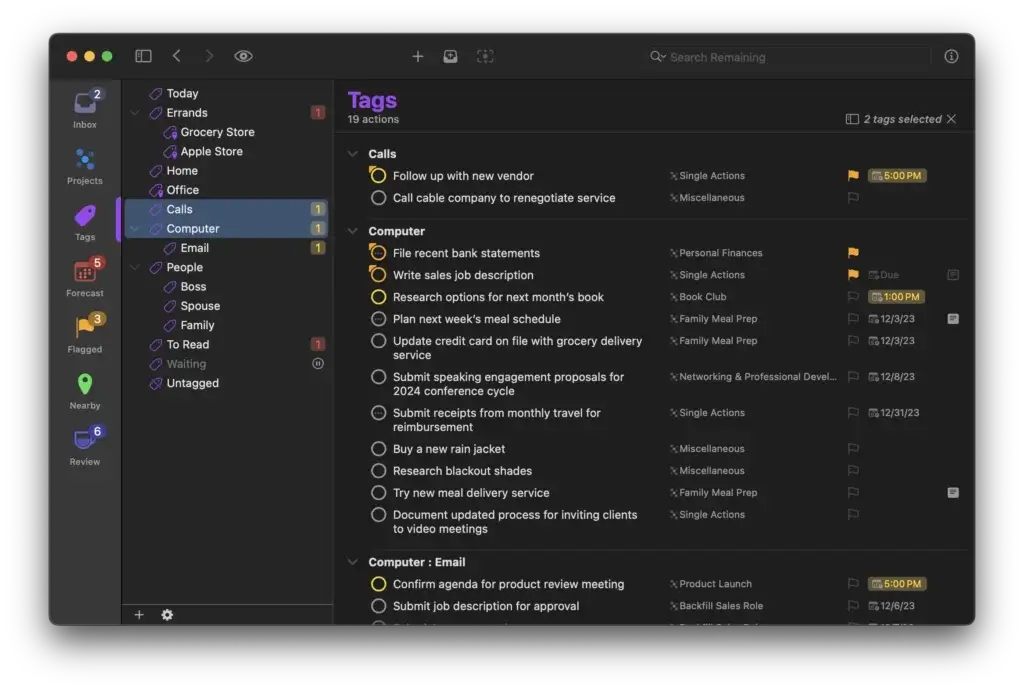
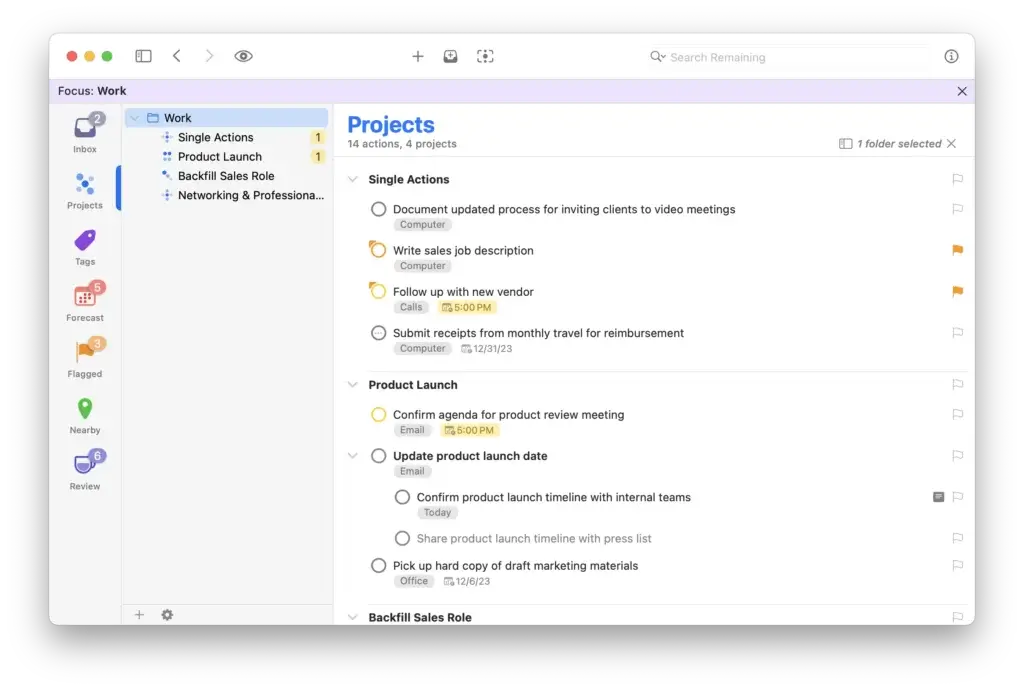
The foundation is strong and flexible. You can capture tasks in an inbox, sort them into projects, group those projects inside folders, and apply multiple tags to reflect context, person, location, priority, or energy level. That makes the software especially useful for users who think in systems rather than simple lists.
- Projects and folders: Build a clear structure for work areas, responsibilities, and long-term plans.
- Tags: Filter tasks by context such as calls, errands, deep work, or waiting for.
Forecast for planning your day
Forecast is one of the most useful features in the entire platform. It pulls together tasks with due dates, planned work, and calendar events so you can see what your day or week actually looks like. Instead of jumping between your to-do list and calendar, you get a more realistic picture of what is possible.
- See time-sensitive work alongside scheduled calendar events.
- Use it to decide what deserves attention now and what can wait.
Review mode for staying on track
Review is another standout feature. It helps you check projects on a recurring schedule so nothing quietly disappears into the background. This is especially valuable if you run many ongoing commitments and need a built-in system for maintenance.
- Assign review intervals to projects based on how often they need attention.
- Use it to catch stalled work, outdated priorities, and forgotten next actions.
Custom perspectives and filtering
OmniFocus is excellent at showing the right slice of work at the right time. Perspectives let you filter your database into focused views, whether that means flagged tasks, work due soon, tasks in a certain area of responsibility, or your own custom workflow views.
- Create tailored views such as “Today,” “Waiting For,” or “Next Actions.”
- Reduce clutter without losing the power of a larger system.
Defer dates, flags, and location-aware actions
This app is built for more thoughtful planning than a standard due-date-only task manager. You can defer work until it becomes actionable, flag important items, and even attach locations to tags for nearby task views and arrival or departure alerts on mobile devices.
- Defer dates: Hide work until it is truly available.
- Location-based task support: Surface relevant actions when you are near a place or leaving it.
Automation for advanced users
For people who like to fine-tune their systems, the Pro tier adds serious flexibility. Custom perspectives, Focus, and Omni Automation plug-ins make it possible to shape the software around your own planning habits. This is one of the reasons experienced users remain loyal to it for years.
- Use automation to speed up repetitive workflows.
- Build a more personalized setup than most to-do apps allow.
Why these features matter
Many task managers are designed for quick adoption. This one is designed for depth. That makes it more demanding at first, but also more capable over time. If your workload is complex and you care about building a reliable personal system, the feature set is genuinely impressive.
Pros and Cons
Advantages and Disadvantages
Positive
✅ Excellent for complex personal planning
✅ Powerful review and forecasting tools
✅ Deep customization for advanced users
✅ Strong Apple ecosystem experience
Negatives
❌ Steeper learning curve than most rivals
❌ Limited team collaboration features
❌ Apple-first platform strategy
❌ Premium pricing for full power
There is a lot to like here, but it is important to be realistic. This is not a universal recommendation for every productivity user. It is a specialized tool, and its strengths are most obvious when you need advanced personal task management rather than lightweight planning or team collaboration.
✅ Pros
- Excellent for complex personal planning: It handles projects, nested structure, defer dates, review cycles, and deep filtering better than most to-do list apps.
- Powerful review and forecasting tools: Forecast and Review are standout features for staying aligned with both deadlines and longer-term responsibilities.
- Deep customization for advanced users: Custom perspectives and automation make it easy to build a system that matches how you think and work.
- Strong Apple ecosystem experience: It feels especially natural for users who rely on Mac, iPhone, iPad, Apple Watch, and Apple Vision Pro.
❌ Cons
- Steeper learning curve: New users may find the structure more demanding than Todoist, TickTick, or Apple Reminders.
- Limited collaboration features: This is mainly a personal productivity tool, not a team-first work management platform.
- Apple-first platform strategy: Web access exists, but the overall experience is still clearly built around Apple devices.
- Premium pricing: It can be worth the cost for the right user, but budget-conscious buyers may hesitate.
User Experience
User Interface and Operational Simplicity
The interface is cleaner and more modern than older versions, but this is still a tool built for depth, not instant simplicity. That is not a flaw, but it does shape the experience. You can get a lot out of it, though you may need a short adjustment period before it feels natural.
Advanced, but more approachable than before
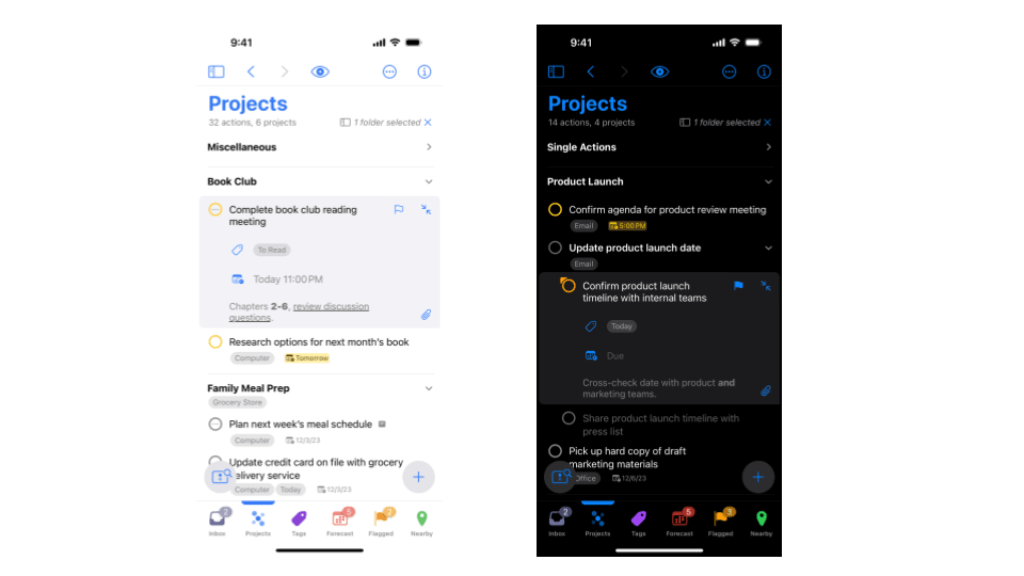
OmniFocus 4 introduced a more unified design across Mac, iPhone, iPad, Apple Watch, and Apple Vision Pro. The experience is more consistent than it used to be, which makes moving between devices easier for people who work across Apple hardware.
- The design feels modern without losing the app’s professional depth.
- The core structure is more consistent across supported devices.
Built for focused users, not casual list makers
The app assumes that you care about planning rigor. Inbox processing, project status, review cycles, defer dates, and custom views are useful, but they also mean the interface contains more concepts than a beginner app. For structured users, that is a strength. For casual users, it can feel like overkill.
- Best suited to people who want a true system, not just reminders.
- Less ideal for someone who wants to start and master the app in ten minutes.
Custom views improve day-to-day usability
Once you set it up properly, the experience becomes much smoother. Perspectives, Forecast, flags, and filtered views reduce visual noise and help you work from a much more relevant list. In practice, this is one of the biggest reasons experienced users stick with it.
- Custom views help reduce overwhelm in large task databases.
- Focused lists make execution easier once the system is configured.
Strong Apple integration
The software feels most natural inside the Apple ecosystem. Siri capture, widgets, calendar visibility in Forecast, and syncing across Apple devices all help make it feel like part of a broader workflow rather than a disconnected app.
- Quick capture is easy when you are already working across Apple devices.
- Forecast becomes more useful when calendar context is included.
My take on the experience
The user experience is strong for the right audience. I would not call it the easiest to-do list app, but I would call it one of the most rewarding for serious users who want structure, planning depth, and a polished Apple-first environment.
Pricing and Plans
How much does OmniFocus cost?
Pricing is one of the most important parts of this review because OmniFocus is not a budget tool. The good news is that the pricing model is clearer than many SaaS competitors. You can either buy a perpetual license for the native Apple apps or subscribe for ongoing access that also includes the web companion.
v4 Standard License – $74.99 one-time purchase
The Standard license is the entry point for users who want the core native app experience without paying for the full Pro toolkit. It is a universal purchase, so it covers Mac, iPhone, iPad, Apple Watch, and Apple Vision Pro for this major version.
- Best for: Individual Apple users who want a serious task manager but do not need advanced customization.
- Main value: A one-time purchase with all 4.x updates included.
v4 Pro License – $149.99 one-time purchase
The Pro version is where the software becomes much more compelling for power users. This tier is the better fit if you want custom perspectives, Focus, and advanced automation capabilities that make the system more tailored and efficient over time.
- Best for: Professionals, GTD users, and productivity enthusiasts who want the full experience.
- Main value: Greater control, deeper customization, and better long-term flexibility.
OmniFocus for the Web – $4.99/month or $49.99/year
The web option is best understood as a companion, not a fully standalone replacement for the native apps. It is useful if you already own the app and want browser access from outside your main Apple workflow. That said, some native features are still stronger, and the web version is positioned as an extension of the main experience.
- Best for: Perpetual license owners who want occasional browser access.
- Main value: Lower ongoing cost if you already own the native apps.
OmniFocus Subscription – $99.99/year
If you want the simplest package, the annual subscription is the most complete option. It includes the latest Pro version across supported Apple devices plus web access, with no separate major-upgrade cost to think about.
- Best for: New users who want Pro features and web access in one package.
- Main value: One plan, full functionality, and no need to think about future upgrade pricing.
Which option is the best value?
If you are confident you will use the app for years and do not care about web access, a perpetual license can make sense. If you want the easiest and most complete setup, the annual subscription is usually the best choice. In my opinion, most serious buyers should compare the Pro license against the annual subscription, because that is where the real value decision sits.
For more detailed information and to make a purchase, users can visit the OmniFocus pricing page here.
| Plan | Cost | Key Features | Best For |
| v4 Standard License | $74.99 one-time | Core native app features across Apple devices, all 4.x updates | Apple users who want a serious task manager without the full Pro toolkit |
| v4 Pro License | $149.99 one-time | Everything in Standard plus advanced customization, Focus, and automation tools | Power users who want the strongest long-term setup |
| Web Subscription | $4.99/month or $49.99/year | Browser access for users who already own the native app | Perpetual license owners who want web access at a lower ongoing cost |
| Annual Subscription | $99.99/year | Latest Pro version on supported Apple devices plus web access | New users who want the simplest all-in-one option |
Alternatives and Comparisons
Best OmniFocus Alternatives
If OmniFocus feels too advanced, too Apple-specific, or simply not aligned with how you work, there are several strong alternatives worth considering. The right choice depends on whether you care most about personal task management, ease of use, cross-platform access, or team collaboration.
My take is straightforward. OmniFocus is still the strongest choice here for structured Apple users who want a serious personal productivity system. But if you want something simpler, more collaborative, or more flexible across devices, Todoist, Any.do, monday.com, or ClickUp may fit better.
OmniFocus vs Todoist
Todoist is the closest alternative if you still want a dedicated task manager, but with a simpler and more accessible experience. It is easier to learn, works across more platforms, and integrates with a wide range of tools. That makes it a better fit for users who want a clean, flexible to-do app without the heavier structure of OmniFocus.
OmniFocus is better if you want deeper planning features like Review, Forecast, defer dates, and custom perspectives. Todoist is better if you value speed, ease of use, and a smoother onboarding experience. For most users, Todoist is the easier recommendation. For power users, OmniFocus offers more depth.
- Choose OmniFocus if: You want advanced personal planning and a GTD-friendly workflow.
- Choose Todoist if: You want a cleaner, faster, and more cross-platform task manager.
OmniFocus vs Any.do
Any.do takes a more consumer-friendly approach. It combines tasks, reminders, calendar, and daily planning in a way that feels approachable and lightweight. If you mainly want to organize everyday responsibilities, recurring reminders, and personal planning, it will feel much easier to start with than OmniFocus.
OmniFocus is clearly more capable for complex workflows, long-term project planning, and advanced task organization. Any.do is better for simplicity, daily planning, and people who want a task app that feels immediate rather than methodical.
- Choose OmniFocus if: You manage many moving parts and want more control over how work is structured.
- Choose Any.do if: You want an easy planner with reminders and calendar support for personal use.
OmniFocus vs monday.com
This comparison is really about personal productivity versus team work management. monday.com is built for collaborative workflows, shared visibility, dashboards, automations, and cross-functional coordination. It is much better suited to teams, departments, and businesses that need to manage work together.
OmniFocus is stronger for individual users who want a deeply structured personal system. monday.com is stronger for companies that need a visual platform for projects, processes, and team accountability. If your work involves multiple stakeholders, status tracking, and reporting, monday.com is the more practical choice.
- Choose OmniFocus if: You need a premium personal productivity app for Apple devices.
- Choose monday.com if: You need collaboration, dashboards, automations, and team-level visibility.
OmniFocus vs ClickUp
ClickUp is the broadest alternative in this group. It goes far beyond task management by combining tasks, docs, goals, chat, dashboards, whiteboards, and automations in one workspace. That makes it far more versatile for teams and more ambitious use cases, but it can also feel heavier and more complex in its own way.
OmniFocus is more focused and refined for individual task management. ClickUp is more expansive and better if you want one system for team execution, documentation, and planning. If you are a solo Apple power user, OmniFocus is often the better fit. If you want an all-in-one work hub, ClickUp is the stronger alternative.
- Choose OmniFocus if: You want a focused personal productivity tool with advanced planning depth.
- Choose ClickUp if: You want an all-in-one workspace for managing team and individual work together.
| Tool | Best For | Main Strength | Main Limitation |
| OmniFocus | Apple power users | Advanced personal task management and planning depth | Limited collaboration and Apple-first approach |
| Todoist | Users who want simplicity and flexibility | Clean experience, strong integrations, cross-platform support | Less depth for advanced planning workflows |
| Any.do | Personal planning and reminders | Easy daily planning, reminders, and calendar use | Less robust for complex project structures |
| monday.com | Teams and business workflows | Collaboration, automations, dashboards, and reporting | Can be more than you need for personal task management |
| ClickUp | Teams wanting an all-in-one platform | Tasks, docs, goals, chat, and broad work management features | Can feel heavier if you only want a focused to-do app |
Which alternative is best?
If you want the closest alternative for personal task management, I would point you first to Todoist. If you want something lighter and more lifestyle-oriented, Any.do is the better fit. If you need serious collaboration, monday.com and ClickUp are both stronger choices than OmniFocus, with monday.com being especially good for structured business workflows and ClickUp being better if you want an all-in-one workspace.
In other words, OmniFocus is still excellent, but it is best when you fully match its ideal user profile. If you do not, one of these alternatives may serve you better.
Integrations and Compatibility
< class="mt0 mb10 font200" style="color:#111;"> How OmniFocus Integrates with Other SoftwareIntegration is one area where you need to set expectations correctly. OmniFocus is deeply connected to the Apple ecosystem, but it is not trying to be a broad, all-in-one collaboration hub. Its compatibility story is strongest when your workflow already lives on Apple devices.
Native Apple ecosystem strengths
This is where the software performs best. It works across Mac, iPhone, iPad, Apple Watch, and Apple Vision Pro, and that consistency matters if you want the same task system available wherever you are.
- Siri support: Capture tasks quickly using voice commands on supported Apple devices.
- Calendar visibility in Forecast: View calendar events alongside scheduled and due tasks for better daily planning.
Web access is useful, but secondary
The web app is helpful when you need access from a browser, but it should be seen as a companion rather than the center of the experience. Some native features remain stronger, and the service is clearly designed to extend the Apple workflow rather than replace it.
- Useful for checking projects and completing actions from a browser.
- Less complete than the full native experience for heavy users.
Automation and advanced workflow support
OmniFocus also appeals to technical and process-oriented users because of its deeper automation options. If your productivity system depends on tailoring the app to your exact workflow, the Pro version gives you more room than many competing to-do list apps.
- Omni Automation: Extend the app with plug-ins and custom workflow tools.
- Custom perspectives: Build filtered views that match your own operating style.
Compatibility takeaway
If you are fully invested in Apple hardware, compatibility is a major strength. If you need a platform-neutral app for mixed-device environments or broader team use, this will feel more limited than tools like Todoist, ClickUp, or Asana.
Security and Compliance
Enhanced Security Features in OmniFocus
Security is one of the more reassuring parts of the product. Omni is clear that synced data is encrypted before it leaves your device and stored encrypted on the server, with encryption and decryption happening locally. That is a stronger and more precise claim than the vague security language many productivity apps use.
End-to-end encryption for synced data
If you use Omni’s sync service or your own supported sync server, your data is protected with end-to-end encryption. The server does not have access to your encryption passphrase, which is an important trust point for privacy-conscious users.
- Your synced database is encrypted before transmission.
- Encryption and decryption happen locally, not on the server.
Extra protection with a distinct encryption passphrase
Advanced users can go a step further by setting a distinct encryption passphrase rather than relying only on the sync password. This adds another layer of protection for people who are especially careful about account access and sensitive information.
- Useful for users who want tighter control over cloud security.
- Helps separate account login credentials from encryption protection.
Biometric access on Apple devices
On supported Apple hardware, Face ID and Touch ID add convenient local protection. That improves both security and usability, especially if you frequently access sensitive planning information on mobile devices.
- Quick and secure access on supported iPhone and iPad devices.
- Helps protect private task databases in everyday use.
Privacy-first positioning
Another positive point is that OmniFocus is not built around advertising or aggressive data monetization. Its overall positioning is much closer to paid software with a privacy-first mindset than to consumer apps that depend on broad data collection.
- Better fit for users who want more control and less noise.
- Strong choice for professionals who keep sensitive plans and notes in their task system.
My take on security
For a productivity app, the security model is strong and thoughtfully communicated. I would not choose it solely because of security, but it is a meaningful advantage if privacy and control matter to you.
Conclusion
Final thoughts
OmniFocus remains one of the most capable personal task management apps you can buy. It is not trying to be the simplest tool on the market, nor is it trying to replace team collaboration platforms. Instead, it focuses on helping serious users manage complex responsibilities with clarity, structure, and control.
That focus is exactly why it still matters. Features like Forecast, Review, defer dates, custom perspectives, and deep Apple integration give it a level of planning sophistication that many to-do apps still do not match. If your goal is to build a durable personal productivity system, it is one of the best options available.
Is OmniFocus worth it?
Yes, for the right type of user. If you are an Apple-based professional, manager, consultant, or productivity enthusiast who wants more than a simple checklist, it can absolutely be worth the price. The software rewards structured thinking and long-term use.
Who should choose OmniFocus?
- Apple users who want a premium personal productivity system.
- People managing complex projects, responsibilities, and recurring review cycles.
- Users who value planning depth, custom views, and advanced control.
Who should consider alternatives?
- Users who need strong Windows or Android support.
- Teams looking for built-in collaboration, shared workspaces, and communication tools.
- Beginners who want a lightweight, immediately intuitive task app.
Have more questions?
Frequently Asked Questions
What is OmniFocus best for?
It is best for structured personal task management, especially if you manage many projects, rely on a GTD-style workflow, and want deeper planning tools than a basic to-do list app provides.
Is OmniFocus only for Apple users?
The core experience is built around Apple devices, including Mac, iPhone, iPad, Apple Watch, and Apple Vision Pro. There is also web access, but the platform is still most compelling for users already invested in Apple hardware.
Does OmniFocus have a free trial?
Yes. The software offers a 14-day fully functional trial, which is enough time to explore both the core workflow and the more advanced features before paying.
What is the difference between OmniFocus Standard and Pro?
Standard gives you the core native app experience, while Pro adds advanced capabilities such as custom perspectives, Focus, and deeper automation tools. Pro is the better fit for power users who want a more customizable system.
Can OmniFocus be used in a web browser?
Yes, but the web version is best viewed as a companion to the native app rather than a full replacement. It is useful for browser access, but the strongest experience still comes from the Apple apps.
Is OmniFocus good for team collaboration?
Not really. It works best as a personal productivity tool. Teams that need shared workspaces, comments, and collaborative project tracking will usually need a different kind of platform.
How secure is OmniFocus?
Synced data is protected with end-to-end encryption, and encryption and decryption happen locally. There are also options for stronger protection, including the use of a distinct encryption passphrase.
Is OmniFocus hard to learn?
It can take longer to learn than simpler to-do apps because it offers more structure and more planning concepts. That said, many users find the extra depth worthwhile once their system is set up.
What makes OmniFocus different from simpler to-do list apps?
Its biggest strengths are Forecast, Review, defer dates, custom perspectives, and the level of control it gives you over how work is organized and surfaced. It is designed for depth rather than minimalism.
Is OmniFocus worth the price?
For serious Apple users who want a long-term personal productivity system, it can be well worth the investment. For lighter needs or mixed-device environments, a simpler and cheaper alternative may be the better choice.