
If you are running a small business and want accounting software that gives you more control over your financial data, AccountEdge Pro is still worth considering.
Unlike cloud-first accounting platforms such as QuickBooks Online, Xero, FreshBooks, or Zoho Books, AccountEdge is built around a desktop-first accounting experience. You install it on your Mac or Windows computer, manage your company file locally, and use optional services such as AccountEdge Hosted or AccountEdge Connect when you need remote access.
That makes AccountEdge different from most modern accounting software.
It is not trying to be the easiest cloud app for freelancers. It is built for businesses that want deeper accounting controls, inventory tracking, payroll support, job costing, time billing, bank reconciliation, and detailed financial reporting in one structured system.
But is AccountEdge Pro still the right choice in 2026?
In this AccountEdge Pro review, we will look at its features, pricing, user experience, payroll tools, hosted access, integrations, pros and cons, and the best alternatives to consider before you choose it.
What Is AccountEdge Pro?
Desktop accounting with deep small business controls
AccountEdge Pro is desktop accounting software for small and midsize businesses that want strong bookkeeping, inventory, payroll, invoicing, and reporting tools without relying completely on a cloud-based accounting platform.
The software runs locally on macOS or Windows. This means your primary company file is stored on your own computer or local network, giving you more direct control over access, backups, and day-to-day performance.
That desktop-first approach is the main reason businesses still look at AccountEdge in 2026. While many competitors have moved almost entirely to browser-based accounting, AccountEdge continues to serve users who prefer traditional accounting workflows, local file control, and advanced desktop functionality.
💡 Key Capabilities
- Double-entry accounting and general ledger
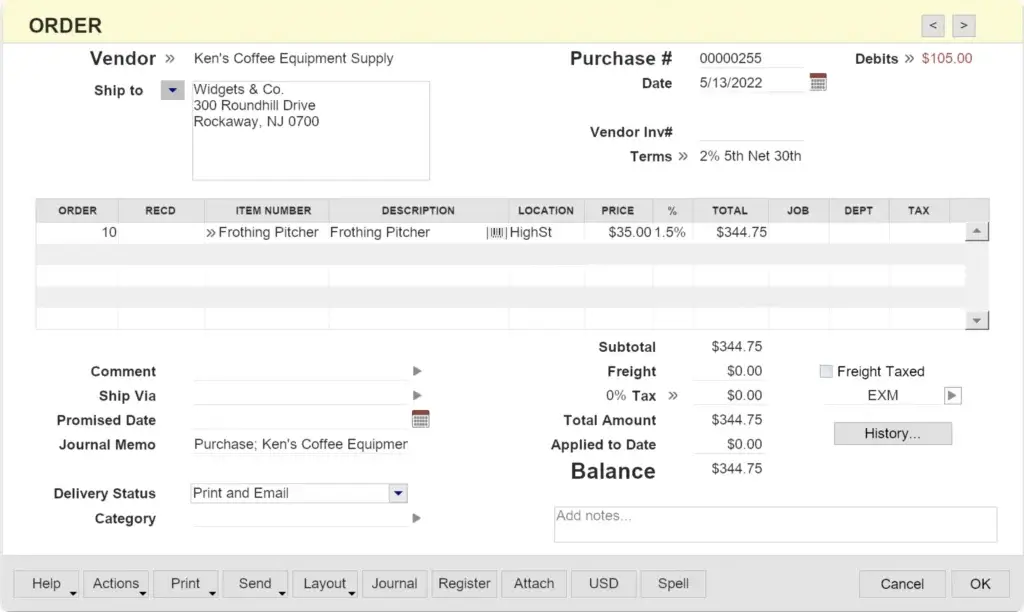
- Sales, invoices, quotes, and purchase orders
- Inventory tracking and item management
- Bank feeds and account reconciliation
- Payroll processing with optional tax table updates
- Time billing, job tracking, and project profitability
- Financial reports, budgets, and audit-friendly records
AccountEdge is especially relevant for product-based businesses, local service companies, and teams that need more accounting depth than basic invoicing software can provide.
It is important to understand one point early: AccountEdge Pro is not a native cloud accounting system. You can add remote access through AccountEdge Hosted or use AccountEdge Connect as a browser-based companion, but the core product remains desktop accounting software.
Who Is AccountEdge Pro Best For?
Find out if it fits your business needs
AccountEdge is best for businesses that want control, accounting depth, and desktop reliability. It is not the best choice for every small business, especially if you want a lightweight cloud app that works instantly from any browser.
You should consider AccountEdge if your business needs more than basic invoicing, but you are not ready for a full ERP system.
✅ AccountEdge is ideal for:
- Product-based businesses that need inventory and item tracking
- Local service companies that use time billing and job tracking
- Small businesses with in-house bookkeeping and structured workflows
- Mac and Windows users who want desktop accounting software
- Companies that prefer local data control over cloud-only access
- Businesses with payroll needs that want an optional in-house payroll add-on
❌ AccountEdge may not be right for:
- Freelancers who only need simple invoices and expense tracking
- Remote-first teams that need real-time browser collaboration
- Automation-heavy companies using multiple SaaS tools
- Businesses that need native mobile accounting apps
- Teams that depend on large app marketplaces and plug-and-play integrations
If you want a modern cloud system with easy remote access, stronger mobile apps, and broader integrations, QuickBooks Online, Xero, or Zoho Books may be easier to manage.
But if your priority is desktop control, accounting detail, and a system that feels closer to traditional bookkeeping software, AccountEdge remains a serious option.
Software Specification
Core Features That Matter in 2026
AccountEdge Pro gives you a broad accounting toolkit. The main benefit is that many core functions live inside one desktop system, so you can manage sales, purchases, inventory, payroll, banking, and reports without depending on multiple cloud apps.
That makes it stronger than simple invoicing tools, but also more complex than beginner-friendly cloud accounting platforms.
General Ledger and Accounting Controls
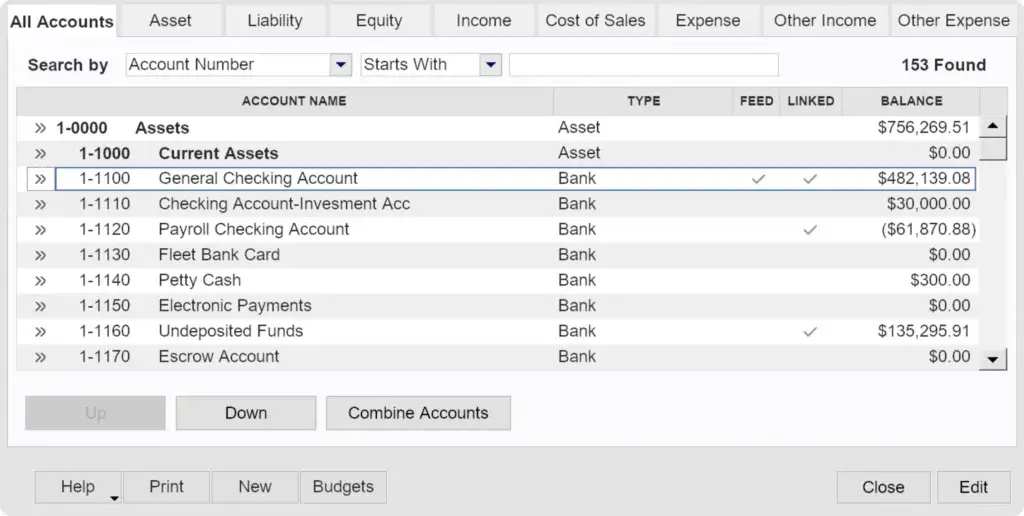
AccountEdge includes a full double-entry accounting system with a general ledger, chart of accounts, journal entries, account reconciliation, and financial statements.
This matters if you want more than a basic income and expense tracker. You can manage detailed accounting records and give your bookkeeper or accountant a structured file to review.
Sales, Invoicing, and Quotes
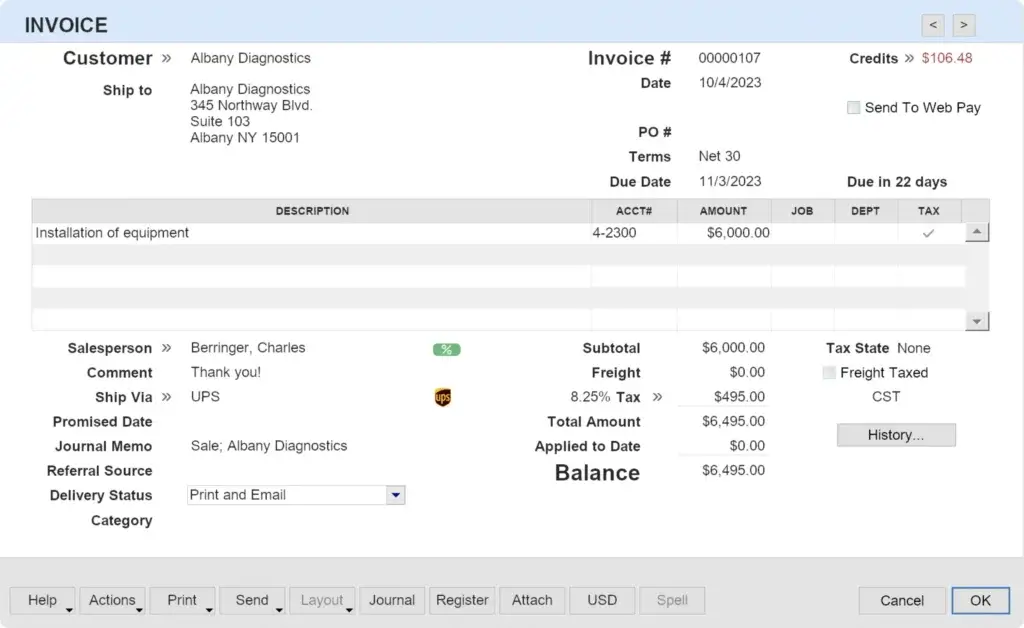
You can create invoices, quotes, orders, receipts, and customer records inside AccountEdge. For businesses that sell products or services, this helps connect sales activity directly to accounting records.
AccountEdge is especially useful when you need invoices tied to items, jobs, time entries, or customer-specific transactions.
Payroll Processing
AccountEdge supports payroll processing through an optional payroll add-on. This allows you to process payroll for unlimited employees, download tax table updates, print checks, manage payroll categories, and use optional electronic payment services.
The important point is that payroll should be treated as an add-on cost, not a free feature included automatically in every plan.
Bank Feeds and Reconciliation
AccountEdge supports bank feeds and reconciliation workflows, helping you bring bank and credit card transactions into the system and match them with your books.
This is useful for reducing manual data entry, although the overall experience still feels more traditional than cloud-native reconciliation tools in platforms like Xero or QuickBooks Online.
Inventory Management
Inventory is one of AccountEdge’s stronger areas. You can track items, stock levels, purchases, sales, and cost of goods sold. This makes it a better fit for product-based businesses than many service-focused accounting tools.
If your business sells physical goods, manages SKUs, or needs more control over item records, AccountEdge can offer more structure than lighter cloud apps.
Time Billing and Job Tracking
AccountEdge includes time billing and job tracking tools, which makes it relevant for consultants, agencies, contractors, and service businesses that bill by time or project.
You can connect activity slips, customer jobs, expenses, and invoices, giving you a clearer view of profitability by job or client.
Reporting and Financial Visibility
AccountEdge includes reports for profit and loss, balance sheets, sales, purchases, inventory, jobs, receivables, payables, and payroll. These reports are useful for businesses that want detailed visibility without moving into a mid-market ERP.
The reports are not as visually modern as cloud dashboards, but they are practical and accounting-focused.
| Feature Type | AccountEdge Pro | Notes |
| Desktop Accounting | Yes | Installed locally on Mac or Windows |
| Native Cloud Accounting | No | Hosted access is available separately |
| Inventory Management | Yes | Good fit for product-based businesses |
| Payroll | Optional add-on | Payroll pricing should be reviewed separately |
| Bank Feeds | Available | May require an add-on subscription |
| Mobile App | No native app | Remote access depends on Hosted or Connect |
| Multi-User Access | Available | Requires Network Edition or Hosted |
Pros and Cons
A balanced view: what you’ll love and what to consider
AccountEdge is strong where many lightweight cloud tools are weak: inventory, local control, accounting depth, and desktop performance.
Its weaknesses are also clear. It is less modern, less mobile, and less connected than many SaaS accounting platforms.
Positive
✅ Strong desktop accounting
✅ Advanced inventory tools
✅ Local data control
✅ Payroll add-on available
Negative
❌ Not cloud-native
❌ No native mobile app
❌ Dated interface
❌ Smaller integration ecosystem
✅ Pros
- Strong desktop performance
Because the software runs locally, AccountEdge can feel fast and stable for users who prefer installed accounting software over browser-based tools. - Detailed inventory management
You can manage items, stock activity, purchase workflows, sales records, and inventory-related reports in one system. - Good fit for traditional bookkeeping
The platform supports structured accounting workflows, including journal entries, reconciliations, account registers, and financial statements. - Payroll support is available
Businesses that want to process payroll in-house can add payroll tools instead of relying only on third-party payroll software. - Works on Mac and Windows
AccountEdge remains one of the more recognizable desktop accounting options for both macOS and Windows users. - Hosted access is available
AccountEdge Hosted gives you browser-based access to the desktop product when your team needs remote availability.
❌ Cons
- Not a native cloud accounting platform
If you want real-time browser collaboration by default, AccountEdge will feel less flexible than QuickBooks Online, Xero, or Zoho Books. - No native mobile accounting app
You do not get the same mobile-first experience that many SaaS accounting tools now provide. - Interface feels traditional
The software is functional, but it does not feel as modern or intuitive as newer cloud accounting platforms. - Add-on costs can increase the total price
Payroll, bank feeds, additional company files, workstation licenses, and hosted access may increase your monthly cost. - Smaller app ecosystem
AccountEdge does not offer the same broad marketplace of integrations you get with cloud leaders like QuickBooks Online or Xero.
User Experience
User Interface and Operational Simplicity
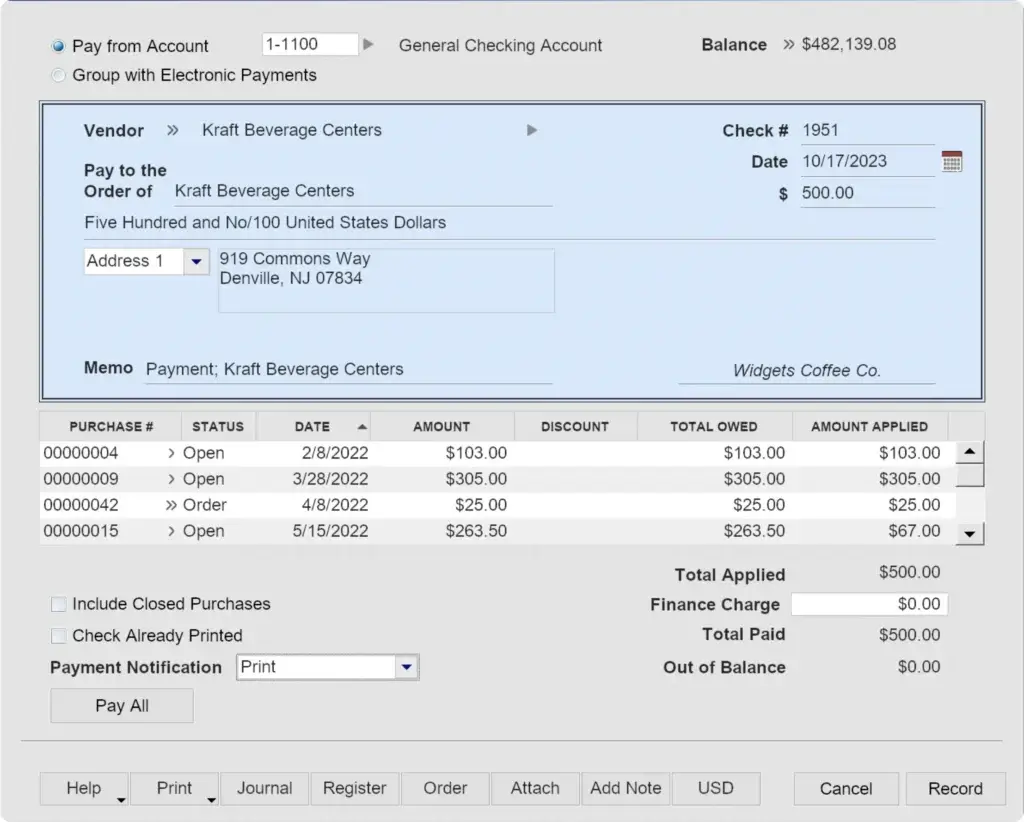
Using AccountEdge Pro feels different from using modern cloud accounting software.
The layout is more traditional. The workflows are more accounting-heavy. The interface is built around menus, command centers, transaction windows, and detailed records rather than simplified dashboards.
For experienced bookkeepers and business owners who understand accounting workflows, this can be a benefit. For beginners, it can create a learning curve.
What You’ll Notice Using AccountEdge
- Desktop-first design
You work from an installed application, not a browser tab. - More structure than lightweight apps
The system encourages proper accounting workflows instead of simplified cash tracking. - Good performance for local users
Local access can feel responsive, especially when working from your main office computer. - Limited flexibility for remote teams
Remote access requires AccountEdge Hosted, AccountEdge Connect, or another remote desktop setup. - Traditional visual experience
The interface works, but it does not look as modern as most cloud-first competitors.
The main question is whether that traditional experience fits your team.
If you want a clean, guided, beginner-friendly app, FreshBooks or Zoho Books may feel easier. If you want desktop accounting with more control and deeper bookkeeping functionality, AccountEdge will make more sense.
Cloud Access Options
AccountEdge Hosted vs AccountEdge Connect
One of the most important things to understand is that AccountEdge has two different remote-access options: AccountEdge Hosted and AccountEdge Connect.
They are not the same thing.
AccountEdge Hosted
AccountEdge Hosted gives you access to the full AccountEdge desktop environment through a web browser or remote desktop-style setup. This is the better option if you want the full software available from outside your office.
Hosted is useful for teams that need remote access, an outside accountant to log in, or a more cloud-like experience without switching to a completely different accounting platform.
AccountEdge Connect
AccountEdge Connect is a browser-based companion that syncs selected activity back to AccountEdge on your desktop. It is designed for functions such as entering sales, purchases, bills, time sheets, activity slips, contacts, and certain remote workflows.
Think of Connect as a satellite for field users, not a replacement for the full desktop product.
| Option | What It Does | Best For | Main Limitation |
| AccountEdge Pro | Desktop accounting software installed locally | Office-based accounting and bookkeeping | Not native cloud software |
| AccountEdge Hosted | Full AccountEdge access through hosted remote access | Remote teams and accountants | Costs more per user |
| AccountEdge Connect | Browser companion that syncs selected data to desktop | Field users, sales entry, time entry, contacts | Not the full accounting system |
Integrations and Ecosystem
Connect AccountEdge to your favourite apps
AccountEdge is not built around a large SaaS app marketplace. Its ecosystem is more focused on internal accounting features, remote access add-ons, payroll services, bank feeds, and selected payment or ecommerce workflows.
This is one of the biggest differences between AccountEdge and cloud accounting systems like QuickBooks Online, Xero, or Zoho Books.
Key Integrations and Add-Ons
- AccountEdge Connect
Gives selected users browser access for sales, purchases, time, contacts, and synced workflows. - AccountEdge Hosted
Lets you access the full AccountEdge environment remotely through hosted access. - Payroll add-on
Adds payroll processing and tax table updates for businesses that process payroll in-house. - Bank feeds
Allows bank and credit card transaction feeds to support reconciliation workflows. - Payment processing
Can support payment collection workflows depending on your setup and region. - Data import and export
CSV and file-based workflows can help with manual data movement when needed.
Where AccountEdge Falls Behind
AccountEdge is not the strongest choice if your workflow depends on modern automation across many apps.
For example, if you want deep native integrations with CRM, ecommerce, project management, HR, expense management, payment platforms, analytics tools, and Zapier-style workflows, you may find AccountEdge more limited.
That does not make it weak accounting software. It simply means it is better suited to businesses that want a self-contained accounting system rather than a highly connected SaaS stack.
Pricing and Plans
How much does AccountEdge Pro cost?
AccountEdge pricing has changed from the older one-time license positioning many users may remember. In 2026, AccountEdge is structured around monthly plans, with different pricing depending on whether you need single-user desktop accounting, multi-user local access, or hosted remote access.
Pricing can also increase if you add payroll, bank feeds, extra company files, workstation licenses, or other services.
AccountEdge Pricing Overview
| Plan | Price | Access Type | Best For |
| AccountEdge Pro | $20/month | Single-user desktop | Small businesses that want local accounting software |
| AccountEdge Network Edition | $30/month | Multi-user desktop, includes 2 users | Office teams needing simultaneous company file access |
| AccountEdge Hosted | $50/user/month | Hosted browser access | Remote teams that need full AccountEdge access |
| Payroll Add-On | $20/month | Optional payroll service | Businesses processing payroll in-house |
| AccountEdge Connect | Starts at $15/month | Browser companion | Field users, time entry, sales, contacts, and synced workflows |
Which Plan Is Right for You?
AccountEdge Pro
AccountEdge Pro is the entry desktop plan. It is best if you are the main accounting user and you want a locally installed accounting system for your business.
Choose this plan if you want accounting depth but do not need simultaneous multi-user access.
AccountEdge Network Edition
Network Edition is better for offices where more than one user needs access to the same company file at the same time.
This is the better choice for small teams that work from the same location and want shared desktop accounting access without moving to hosted software.
AccountEdge Hosted
Hosted is the best option if you want to keep using AccountEdge but need remote access from different locations. It is more expensive, but it solves the biggest limitation of desktop software: access from outside the office.
Choose Hosted if your accountant, bookkeeper, or team members need access without being on the same local machine or network.
Optional Add-On Costs to Watch
Before choosing AccountEdge, review the add-ons carefully. The base monthly price may look low, but your true cost can increase if you need payroll, bank feeds, extra company files, workstation licenses, remote access, or support upgrades.
For many businesses, AccountEdge can still be reasonably priced. But it is no longer accurate to position it mainly as a one-time purchase alternative to subscription software.
User Reviews
What Customers Say About AccountEdge
User reviews generally reflect the same trade-off you see in the product itself: AccountEdge is powerful and reliable for users who want desktop accounting, but it can feel dated or less flexible for teams expecting a modern cloud app.
What Users Tend to Like
- Strong accounting and inventory capabilities
- Local control over company data
- Useful payroll and job tracking workflows
- Good fit for experienced bookkeepers
- Desktop reliability for office-based businesses
Common Complaints
- Interface can feel older than cloud competitors
- Remote access requires extra setup or Hosted
- Mobile access is limited
- Add-on costs can create confusion
- Learning curve is higher for new users
This is why AccountEdge is not a universal recommendation. It is best for businesses that already know they want desktop accounting and are comfortable with a more traditional interface.
Alternatives to AccountEdge Pro
Compare top competitors
AccountEdge has a clear place in the market, but many businesses will be better served by a cloud accounting platform.
If your business prioritizes collaboration, automation, mobile access, and integrations, compare AccountEdge against these alternatives before making a decision.
Quick Comparison Table
| Tool | Best For | Main Advantage Over AccountEdge | Why Choose AccountEdge Instead? |
| QuickBooks Online | Growing small businesses and accountant-led teams | Better cloud access, integrations, and accountant familiarity | Better if you want desktop control and local files |
| Xero | Cloud-first small businesses | Cleaner collaboration, bank feeds, and app marketplace | Better if you prefer installed software and deeper local control |
| Zoho Books | Automation-focused small teams | Workflow automation and Zoho ecosystem integrations | Better if you need desktop-first accounting workflows |
| FreshBooks | Freelancers and service businesses | Easier invoicing, mobile use, and client billing | Better if you need inventory, payroll, and deeper accounting |
| QuickBooks Desktop | Traditional desktop accounting users | Broad accountant familiarity and advanced editions | Better if you want a Mac-friendly desktop alternative |
AccountEdge vs QuickBooks Online
QuickBooks Online is the better choice for most cloud-first businesses. It offers easier collaboration, stronger accountant familiarity, a larger integration ecosystem, mobile apps, and more modern online workflows.
Choose QuickBooks Online if your team works remotely, needs mobile access, or wants to connect accounting with other apps.
Choose AccountEdge if you prefer desktop accounting, local file control, and stronger traditional workflows for inventory, payroll, and bookkeeping.
AccountEdge vs Xero
Xero is a strong alternative for businesses that want clean cloud accounting, real-time collaboration, bank feeds, and a wide app marketplace.
Choose Xero if you want a modern interface and easier access for your accountant or distributed team.
Choose AccountEdge if your business is office-based and you prefer local control over browser-based convenience.
AccountEdge vs Zoho Books
Zoho Books is ideal for small businesses that want automation, client portals, mobile access, and integration with the broader Zoho ecosystem.
Choose Zoho Books if you want cloud-first workflows, recurring automation, approval rules, and a lower-friction user experience.
Choose AccountEdge if you want a more traditional desktop accounting system with stronger local control.
AccountEdge vs FreshBooks
FreshBooks is easier for freelancers, consultants, agencies, and service businesses that mainly need invoicing, payments, expenses, time tracking, and client billing.
Choose FreshBooks if ease of use matters more than accounting depth.
Choose AccountEdge if you need inventory, payroll, job tracking, and deeper accounting controls.
Not Sure Which to Choose?
For a broader view, compare the top options in our full guide: Best Accounting Software Comparison.
Security and Compliance
Your financial data deserves careful protection
Security is one of the main reasons some businesses still prefer AccountEdge over cloud-only accounting tools.
Because the desktop version stores your company file locally, you control where the data lives, who can access it, and how backups are handled. This can be an advantage for businesses that prefer not to keep their accounting database in a cloud app by default.
How AccountEdge Handles Security
- Local company file storage
Your data is stored on your own machine or network unless you choose Hosted. - User permissions
You can restrict access for different team members based on their accounting role. - Hosted access option
AccountEdge Hosted gives remote access through a hosted environment when needed. - Backups require responsibility
Desktop users need to manage their own backup process carefully. - Less reliance on cloud infrastructure
Businesses that prefer local accounting data may see this as a major advantage.
Compliance Considerations
AccountEdge can support payroll and tax table workflows through its optional payroll services, but you should still confirm requirements for your country, state, province, accountant, and industry.
For businesses using Hosted, it is also important to understand how hosted backups, file access, and recovery work. Hosted access can improve flexibility, but it does not remove the need for your own internal backup and data management procedures.
If your business has strict compliance needs, involve your accountant or IT advisor before choosing any accounting system.
Conclusion
Is AccountEdge Pro the Right Accounting Tool for You?
⭐ Overall Rating: 7.8/10
AccountEdge Pro is a strong fit if you want desktop accounting software with serious bookkeeping depth. It gives you local data control, inventory management, payroll support, job tracking, time billing, and detailed reporting in a structured system.
It is not the best choice if you want a modern cloud accounting experience with native mobile apps, real-time browser collaboration, and a large integration marketplace.
You should consider AccountEdge if:
- You prefer desktop accounting over cloud-only software
- Your business needs inventory, payroll, and job tracking
- You want more local control over your company file
- You are comfortable with a traditional accounting interface
- You can manage add-ons, backups, and remote access deliberately
You should consider alternatives if:
- You want simple invoicing and client billing
- Your team works remotely every day
- You need a modern mobile app
- You want a large ecosystem of SaaS integrations
- You prefer automatic cloud updates and browser access by default
For many modern small businesses, QuickBooks Online, Xero, Zoho Books, or FreshBooks will feel easier. But for businesses that value desktop control and deeper traditional accounting workflows, AccountEdge remains a relevant option in 2026.
Final recommendation: choose AccountEdge if you want accounting depth and local control. Choose a cloud accounting platform if collaboration, automation, and mobile access matter more.
Frequently Asked Questions
Have more questions?
What is AccountEdge Pro used for?
AccountEdge Pro is used for desktop accounting, invoicing, inventory management, payroll processing, bank reconciliation, job tracking, time billing, and financial reporting. It is best for small businesses that want more accounting depth than basic invoicing software provides.
Is AccountEdge Pro cloud-based?
No. AccountEdge Pro is primarily desktop accounting software for Mac and Windows. However, AccountEdge Hosted provides remote browser access, and AccountEdge Connect works as a browser-based companion for selected workflows.
How much does AccountEdge Pro cost?
AccountEdge Pro starts at $20 per month. AccountEdge Network Edition starts at $30 per month, and AccountEdge Hosted costs $50 per user per month. Optional add-ons such as payroll, bank feeds, and AccountEdge Connect may increase the total cost.
Does AccountEdge Pro work on Mac?
Yes. AccountEdge Pro supports macOS, making it one of the more recognizable desktop accounting options for Mac users who want local accounting software instead of a fully cloud-based system.
Does AccountEdge Pro work on Windows?
Yes. AccountEdge Pro is available for Windows, and businesses can also use Network Edition or Hosted depending on whether they need multi-user access or remote availability.
Does AccountEdge Pro include payroll?
AccountEdge supports payroll through an optional payroll add-on. The payroll service lets businesses process payroll for unlimited employees, manage payroll categories, and access payroll tax table updates. Electronic payment services may involve additional fees.
What is the difference between AccountEdge Pro and AccountEdge Hosted?
AccountEdge Pro is the desktop version installed locally on your Mac or Windows computer. AccountEdge Hosted gives you remote access to the full AccountEdge environment through a hosted setup, making it better for remote teams or outside accountant access.
What is AccountEdge Connect?
AccountEdge Connect is a browser-based companion that syncs selected data back to AccountEdge on your desktop. It can be used for tasks such as entering sales, purchases, bills, time sheets, activity slips, and contacts, but it is not a full replacement for the desktop software.
Is AccountEdge Pro better than QuickBooks?
AccountEdge Pro may be better if you want desktop accounting, local data control, and detailed inventory or job tracking. QuickBooks Online is usually better if you want cloud access, mobile apps, accountant collaboration, and a larger integration ecosystem.
Who should not use AccountEdge Pro?
AccountEdge Pro is not ideal for freelancers who only need simple invoicing, remote-first teams that need browser collaboration, or businesses that depend heavily on mobile apps and SaaS integrations. These users may be better served by FreshBooks, Zoho Books, Xero, or QuickBooks Online.