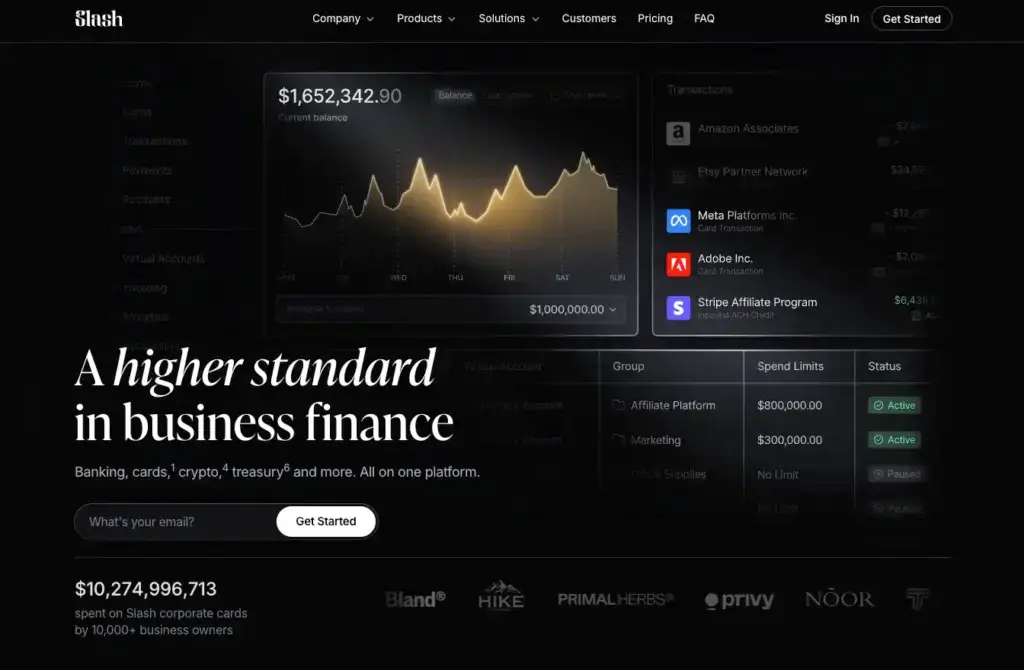
Slash is a modern spend management and business finance platform built for companies that want more control over cards, expenses, payments, and cash movement from one system. It is not traditional accounting software like QuickBooks, Xero, or NetSuite. Instead, Slash sits around your accounting system and helps your team manage company spend before it becomes a reconciliation problem.
The platform combines corporate cards, business banking, expense management, reimbursements, bill pay, accounting automation, spend analytics, treasury, working capital, multi-entity management, and global payment capabilities. That makes it especially relevant for companies that want a practical financial operating layer rather than another narrow expense reporting tool.
Slash is particularly interesting because it focuses heavily on card-heavy businesses, fast-moving operators, agencies, ecommerce companies, affiliate marketers, startups, Web3 companies, wholesalers, travel agencies, and teams that want stronger control over vendor, team, campaign, and department-level spending. If your finance team needs better visibility across cards, payments, accounts, receipts, and accounting sync, Slash deserves serious consideration.
Slash Overview and Where It Fits in Your Finance Stack
What Slash Does for Businesses
Slash is best described as a business finance and spend management platform. It brings together corporate cards, business checking, treasury, bill pay, reimbursements, accounting automation, analytics, multi-entity workflows, and global payments. Instead of treating spend management as only receipt collection and reimbursement approval, Slash connects spend control with the actual movement of money.
That broader positioning matters. Many companies use one tool for corporate cards, another for AP, another for banking, another for reimbursements, and another for analytics. Slash tries to reduce that fragmentation by giving finance teams one dashboard for spending, cards, cash, payments, vendors, and accounting workflows.
Slash vs Traditional Accounting Software
Slash is not a general ledger, bookkeeping platform, or ERP. Your accounting system remains the source of truth for financial statements, tax reporting, revenue recognition, and core accounting records. Slash is better understood as a finance operations layer that feeds cleaner, better-categorized spend data into your accounting system.
For example, Slash can help issue cards, set spend limits, capture receipts, sync transactions, categorize expenses, pay vendors, manage reimbursement workflows, and view spend analytics. But it does not replace the need for accounting software such as QuickBooks, Xero, Sage Intacct, NetSuite, or a similar platform.
That distinction is important for buyers. If your primary need is bookkeeping, Slash is not the full answer. If your primary challenge is controlling business spend, issuing cards, reducing manual expense work, improving cash visibility, and syncing cleaner data into accounting, Slash is much more relevant.
Software specification
Key Features of Slash
Corporate Cards and Spend Controls
Slash’s corporate card functionality is one of the core reasons finance teams should consider it. The platform supports unlimited virtual cards, physical cards, card groups, card issuing controls, merchant limits, and detailed spend insights. This makes it practical for teams that need to separate spend by vendor, campaign, client, department, location, or business entity.
For businesses with high card volume, this structure can be more useful than relying on shared company cards or generic employee cards. You can issue dedicated cards for specific vendors, ad platforms, subscriptions, suppliers, contractors, or teams, then control where and how each card can be used.
Key strengths in this area include:
- Unlimited virtual cards for vendors, teams, campaigns, or departments
- Granular limits by amount, merchant category, or vendor
- Up to 2% cashback positioning on eligible card spend
Expense Management and Receipt Capture
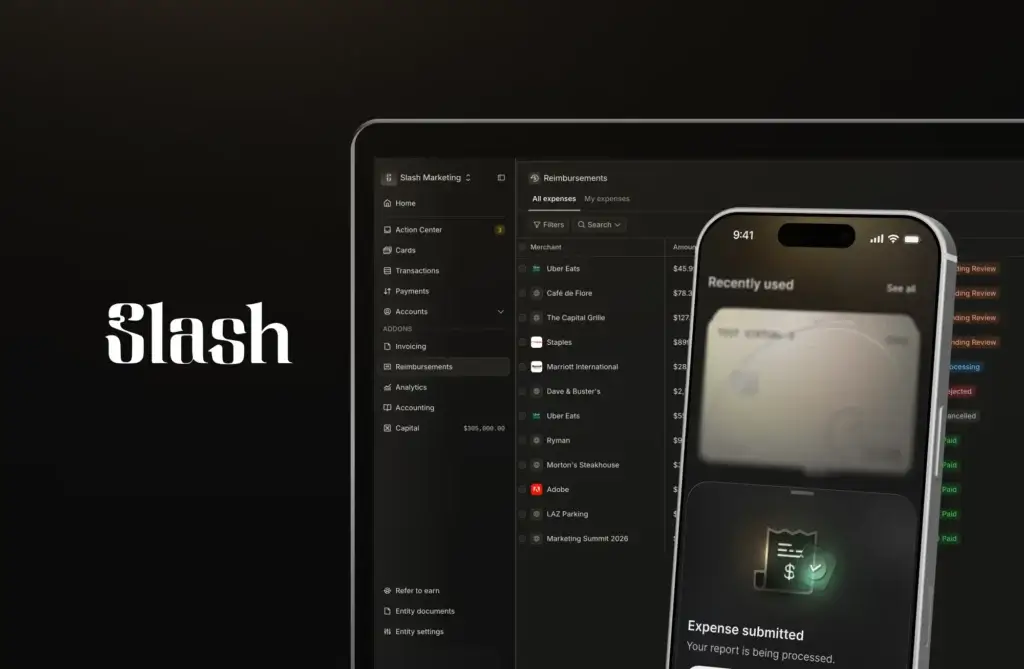
Slash includes expense management workflows for card transactions and reimbursements. Admins can set submission policies by amount, category, or merchant. When employees use a Slash card, they can receive an automated prompt to upload the receipt, then reply with a photo so the receipt is attached to the transaction.
This helps reduce a common finance problem: missing receipts after the transaction already happened. Instead of waiting until month-end to chase employees, Slash pushes documentation closer to the point of spend.
The reimbursement workflow also fits into the broader payment system. Employees submit expenses, managers approve them, and reimbursements flow through the same payment rails. That makes Slash more unified than lightweight expense apps that manage reports but depend on separate payment workflows.
Bill Pay and Accounts Payable Automation
Slash has moved beyond card spend with built-in bill pay. Its AP workflow includes AI-powered bill capture, invoice parsing, configurable multi-step approval workflows, and payments across multiple rails, including ACH, wire, SWIFT, card, crypto, and FedNow.
This is important because many card-led platforms still treat AP as a secondary feature. Slash is more ambitious. You can forward invoices to a dedicated AP inbox, let AI extract invoice details, route bills through approvals, pay vendors, and sync activity back to accounting.
For companies that currently manage vendor bills through email forwarding, spreadsheets, and manual bank payments, Slash can reduce friction across invoice intake, approval, payment, and reconciliation.
Business Banking and Treasury
Slash also includes business banking capabilities, which gives it a different profile from many standalone spend management tools. The platform includes checking, cards, treasury, working capital access, and payment movement from one account experience. This is useful if your company wants spending and cash movement connected rather than separated across multiple systems.
Slash’s business banking page highlights a free plan, up to 3.84% APY on idle cash, free domestic wires for Pro users, and enhanced FDIC coverage through partner bank sweep networks. The platform is not itself a bank, so this structure depends on banking partners, but the user experience is designed to feel like a unified business finance account.
Accounting Automation and Integrations
Slash supports accounting automation through transaction categorization, smart mappings, transaction splitting, and sync with accounting systems. It supports QuickBooks and Xero, and Slash also references NetSuite, Sage Intacct, Sage, FreshBooks, Wave, and Plaid-related bank connections in its broader integrations and pricing pages.
The core value is reducing manual coding. Finance teams can create mapping rules that assign transactions to the right GL codes, vendors, and categories. Slash also supports splitting one transaction into multiple accounting items, which is useful when one purchase needs to be allocated across several departments, clients, campaigns, or accounting categories.
For companies with high transaction volume, the accounting automation layer may be one of Slash’s strongest practical benefits. It is especially valuable when spend data is messy, card use is frequent, and month-end close takes too long because finance has to clean up transactions manually.
Spend Analytics and Budget Visibility
Slash Analytics gives teams a clearer view of spend, income, card groups, merchants, contacts, payment methods, and accounting categories. You can filter spend by card payments, ACH, wire, merchant, contact, or card group, then use that data to understand where money is going.
That matters because spend control is not only about blocking transactions. It is also about seeing patterns early enough to manage budgets, negotiate vendors, detect unusual activity, and understand department-level or campaign-level spending.
For agencies, ecommerce teams, affiliate marketers, and other high-spend operators, card groups can be especially useful. For example, a company could separate ad spend by platform, client, traffic source, or campaign, then use card-level and group-level reporting to understand performance and control budgets.
How Slash Works
Setup and Uses
Setup and Onboarding
Slash positions account opening as fast and relatively simple, with an application process that can take less than 10 minutes for many businesses. Once approved, teams can begin setting up accounts, cards, users, controls, payment workflows, and accounting connections.
Compared with traditional finance systems, the setup is likely to feel lighter. The main implementation work is not a long ERP deployment. It is configuring how your business wants to structure accounts, entities, card groups, approval rules, user permissions, accounting mappings, and payment workflows.
Managing Card Spend Day to Day
Day-to-day card management is one of the strongest Slash use cases. Finance teams can issue virtual cards quickly, assign them to vendors or internal users, create limits, monitor spend, lock cards, and see transaction data in real time.
This is useful for companies that run many recurring subscriptions, marketing campaigns, contractor payments, supplier purchases, or travel-related transactions. Instead of giving employees broad purchasing power, Slash allows more precise spend control by use case.
Managing Vendor Bills and Payments
Slash’s bill pay workflow helps centralize vendor payment operations. A vendor invoice can be forwarded into Slash, parsed by AI, routed through approval steps, paid through the appropriate rail, and reconciled to accounting. This can replace fragmented AP workflows built around inboxes, PDFs, spreadsheets, and manual bank portals.
Slash is especially interesting for businesses that want payments and cards in one system. For example, a vendor could be paid by ACH or wire, while another vendor or software subscription could use a dedicated virtual card. That flexibility gives finance more control over both payment method and payment timing.
Using Slash Across Multiple Entities
Slash includes multi-entity management, allowing businesses to toggle between bank accounts and entities from one dashboard. This is valuable for companies that operate multiple legal entities, client accounts, locations, or business units.
Multi-entity support is not only a convenience feature. It can reduce operational confusion when finance teams need to separate money movement, card spend, permissions, payments, and accounting activity across different parts of the business.
Pros and Cons
A balanced view: what you’ll love and what to consider
Slash is one of the more interesting spend management platforms because it combines cards, banking, bill pay, accounting sync, analytics, treasury, and global payments in one place. That breadth is a major advantage for companies that want fewer finance tools and more real-time control.
Still, Slash is not the right fit for every company. It is stronger for spend-heavy businesses that want card control, cash movement, payments, and accounting automation. It may be less ideal for businesses that need a mature procurement suite, deep travel management, or enterprise AP functionality with highly specialized supplier tax and compliance workflows.
Positive
✅ Broad Finance Platform in One Place
✅ Strong Card Controls and Cashback
✅ Useful Accounting Automation
✅ Flexible Payments and Bill Pay
Negative
❌ Not Full Accounting Software
❌ Procurement Depth Is More Limited
❌ Best Fit Depends on Spend Profile
❌ Banking Partner Structure Requires Review
✅ Benefits of Slash
Broad Finance Platform in One Place
Slash’s biggest advantage is that it combines multiple finance workflows in one system. Cards, business banking, bill pay, reimbursements, accounting sync, treasury, analytics, and payments can all work together. This can reduce tool sprawl and make finance operations easier to manage.
For businesses that currently rely on separate systems for cards, banking, AP, and expense tracking, Slash can create a more unified operating model. That is especially useful when finance needs real-time visibility instead of month-end cleanup.
Strong Card Controls and Cashback
Slash is particularly strong for card-heavy companies. Unlimited virtual cards, card groups, merchant limits, spend controls, and up to 2% cashback positioning make it attractive for teams with frequent vendor, ad platform, subscription, and campaign spend.
This is one of the clearest reasons to consider Slash over more traditional expense management tools. It is not just helping you report spend after it happens. It helps you structure and control spend before and during the purchase.
Useful Accounting Automation
Slash helps finance teams reduce manual accounting work through smart mappings, auto-categorization, transaction splitting, and accounting sync. These features can make a meaningful difference for companies with high card transaction volume or many recurring payments.
The value is strongest when expenses need to be mapped accurately across vendors, GL codes, campaigns, departments, entities, or accounting categories. Slash can help reduce the manual coding that slows down reconciliation and month-end close.
Flexible Payments and Bill Pay
Slash’s bill pay functionality adds important depth. AI invoice parsing, approval workflows, vendor management, partial payments, recurring payments, and support for several payment rails make it more capable than a card-only platform.
This flexibility matters for teams that pay vendors in different ways. Some payments may work best by ACH, others by wire, others by card, and others through international rails. Slash gives finance teams more options inside one system.
❌ Potential Drawbacks and Limitations
Not Full Accounting Software
Slash does not replace accounting software. It can sync data and automate expense categorization, but businesses still need a general ledger or accounting platform for financial statements, compliance reporting, tax preparation, and core accounting records.
This is not necessarily a weakness if Slash is evaluated correctly. It is a spend and finance operations platform, not a bookkeeping suite. The risk is choosing it for the wrong job.
Procurement Depth Is More Limited
Slash includes approvals, spend controls, cards, vendor payments, and bill pay, but it is not a deep procurement platform in the same way as enterprise procure-to-pay tools. Businesses with complex purchase requisitions, sourcing workflows, supplier risk management, contract lifecycle management, or advanced procurement analytics may need a more specialized system.
For many SMBs and scaling companies, Slash may cover enough of the practical spend workflow. For larger procurement-led organizations, it should be compared carefully against procurement-specific platforms.
Best Fit Depends on Spend Profile
Slash is strongest when your company benefits from cards, banking, payments, and spend controls in the same platform. If your company has low card volume, simple expenses, and minimal vendor payment complexity, a lighter expense tool may be enough.
The platform is most compelling for operators with frequent vendor payments, advertising spend, ecommerce activity, multiple accounts, international payment needs, or high-volume card use.
Banking Partner Structure Requires Review
Slash is a financial technology company, not a bank. Banking services and card issuing depend on regulated partner institutions. This is common in fintech, but finance leaders should still review account terms, eligibility, FDIC insurance structure, card repayment terms, treasury disclosures, and geographic limitations before adopting the platform.
This is especially important for companies holding large balances, using treasury products, sending international payments, or relying on crypto and stablecoin-related workflows.
Pricing and Plans
How much does Slash cost?
Slash has a relatively simple public pricing model compared with many spend management platforms. The main plans are Free and Pro. The Free plan starts at $0 per month, while Pro starts at $25 per month. Slash also charges certain transaction fees depending on plan and payment type.
Free Plan
The Free plan starts at $0 per month and is designed for businesses that want full-featured banking essentials without a monthly platform fee. It includes unlimited virtual cards, enhanced FDIC insurance through partner arrangements, and access to core account functionality.
The Free plan still includes some transaction fees. For example, Slash lists same-day ACH transfers at $1, domestic wire transfers at $6, outgoing FedNow/RTP at $5, international wire transfers at $25, and a foreign transaction fee for card activity.
Pro Plan
The Pro plan starts at $25 per month and is designed for businesses that need more advanced operating capabilities. Slash lists same-day ACH, domestic wire, and outgoing FedNow/RTP transfers at $0 on Pro. International wires and card foreign transaction fees still apply.
For teams with regular domestic transfers, frequent wires, higher spend volume, or more serious finance workflows, the Pro plan may be the better value. The decision should be based less on the monthly fee and more on expected payment volume, card usage, support needs, and operational complexity.
Pricing Takeaway
Slash is competitively priced for businesses that want cards, banking, payments, and spend management in one platform. The Free plan lowers the barrier to entry, while the $25 per month Pro plan is simple compared with tools that charge per user or hide key capabilities behind higher software tiers.
However, the real cost depends on transaction behavior. Businesses should evaluate ACH usage, wire volume, international payments, foreign card transactions, treasury needs, and any applicable account or card terms before deciding which plan makes the most sense.
Pricing Comparison Table
| Plan | Monthly Cost | Best For |
| Free | $0/month | Businesses that want banking, unlimited virtual cards, and basic spend controls without a monthly fee |
| Pro | Starts at $25/month | Teams that use frequent payments, domestic wires, same-day ACH, and more advanced financial workflows |
| Transaction fees | Varies by payment type | Companies that need to evaluate ACH, wire, FedNow/RTP, international wire, and foreign card activity |
| Treasury and working capital | Subject to terms and eligibility | Businesses that want yield options or financing access through Slash and its partners |
Business Fit
Who Should Use Slash?
Card-Heavy Businesses
Slash is a strong fit for businesses that use cards heavily. This includes companies with many subscriptions, ad platforms, vendors, contractors, clients, locations, or project-based expenses. The ability to issue unlimited virtual cards and set granular controls gives finance teams a better way to structure spending.
Agencies, Ecommerce Teams, and Affiliate Marketers
Slash is especially relevant for agencies, ecommerce businesses, and affiliate marketers because these businesses often need dedicated cards for ad platforms, traffic sources, stores, suppliers, and client budgets. Card groups and analytics can make this easier to manage than a traditional shared corporate card setup.
Startups and Fast-Growing Operators
Startups and growing companies often need finance controls before they are ready for heavy ERP or procurement software. Slash can help these teams add spend visibility, bill pay, accounting automation, and card controls without creating a complicated finance stack too early.
Multi-Entity Businesses
Businesses with several entities, bank accounts, or operational units may benefit from Slash’s multi-entity dashboard. This is useful when each entity needs separate accounts, cards, payment flows, or accounting structures, while leadership still needs consolidated visibility.
Who Might Need Something Else
Slash may not be the best fit if your main need is full accounting, complex procurement, managed travel, or enterprise-grade global AP. For accounting-first needs, you still need QuickBooks, Xero, NetSuite, Sage Intacct, or another accounting platform. For mature procurement, tools like Coupa may be stronger. For travel-heavy expense programs, Navan or SAP Concur may be more suitable.

Alternatives
Slash Alternatives & Competitors
Slash competes with spend management, corporate card, AP automation, and business banking platforms. The best alternative depends on whether your main priority is cards, expense management, AP, procurement, banking, travel, or enterprise finance controls.
Comparison Table: Slash vs Competitors
| Feature | Slash | BILL Spend & Expense | Ramp | Brex |
| Primary focus | Cards, banking, spend management, bill pay, treasury, and payments | Corporate cards, budgets, and expense management | Spend management, AP, procurement, travel, and finance automation | Corporate cards, banking, expenses, travel, and startup finance workflows |
| Corporate cards | Yes, with unlimited virtual cards and granular controls | Yes, with spend controls and budgets | Yes, with strong policy controls | Yes, with strong startup and global spend features |
| Bill pay / AP | Yes, with AI invoice parsing and multiple payment rails | Best when connected with BILL’s broader AP ecosystem | Strong AP automation and workflow depth | Available, but usually less AP-focused than Ramp or BILL |
| Banking and treasury | Strong focus on banking, treasury, yield, and payments | Less central to Spend & Expense | Available, but finance automation is the main story | Strong business accounts and treasury capabilities |
| Best fit | Spend-heavy operators that want cards, banking, and payments together | SMBs that want card controls tied to BILL workflows | Finance teams that want broad automation and mature AP controls | Startups and global teams that want cards, travel, and spend control |
BILL Spend & Expense: BILL is a strong choice for small and mid-sized businesses that want corporate cards, budgets, expense management, and a connection to the broader BILL ecosystem. Slash is usually more compelling if the business also wants banking, treasury, multi-rail payments, and more flexible card-heavy workflows in one platform.
Ramp: Ramp is one of the strongest overall finance automation platforms. It is particularly strong for AP automation, procurement, travel, expense controls, and accounting workflows. Slash may be the better fit when banking, payments, unlimited virtual cards, treasury, and card-heavy operating needs are more central.
Brex: Brex is a strong alternative for startups, venture-backed companies, and global teams that need corporate cards, spend controls, travel, business accounts, and multi-entity support. Slash may be more attractive to companies that prefer flat cashback, no per-user platform fees, and a simpler banking-plus-cards structure.
Other alternatives worth reviewing include expense management software options such as SAP Concur, Navan, Expensify, Zoho Expense, Spendesk, Paylocity for Finance, and Emburse. The best choice depends on whether the business needs travel, AP, cards, reimbursements, or procurement most.
Integrations and Ecosystem
Connect Slash to your favourite apps
Accounting Integrations
Slash integrates with major accounting tools and bank feed workflows. The most important integrations to evaluate are QuickBooks, Xero, NetSuite, and Sage Intacct, depending on your company size and accounting stack.
The value is not simply data export. Slash is designed to categorize card and bank transactions, create mapping rules, split transactions, and push cleaner data into the ledger. That makes the accounting integration useful for finance teams that want fewer manual journal entries and fewer month-end corrections.
Payment and Banking Ecosystem
Slash’s ecosystem extends beyond accounting. Because the platform includes business banking, cards, bill pay, treasury, stablecoin payments, global USD accounts, and APIs, it can become part of the operational money movement layer for a business.
This is especially useful for companies that need more than employee expense reports. If the business regularly sends wires, pays vendors, manages card spend, receives payouts, or operates across several entities, Slash can bring several finance workflows into one environment.
API and Automation Fit
Slash also highlights API access, which may matter for technical teams, fintech-oriented companies, ecommerce businesses, or operators that want to automate account activity, card management, or financial workflows.
This is not a must-have feature for every small business. However, for companies with internal operations teams or custom finance workflows, API access can make Slash more adaptable than traditional card and expense tools.
Security and Compliance
Security and Compliance in Slash
Security is critical for any platform that handles business banking, payments, cards, accounting connections, employee access, and vendor data. Slash has a strong security story, especially for businesses that want granular financial controls and stronger account protection.
FDIC Coverage and Partner Banking
Slash is a financial technology company, not a bank. Banking services are provided by partner banks, and Slash highlights enhanced FDIC coverage through sweep network arrangements. This can be important for businesses that hold larger balances and want broader deposit protection than a single standard bank account limit.
Buyers should still read the terms carefully. FDIC insurance depends on eligible deposits, partner banks, sweep structures, and account terms. Treasury products are different from bank deposits and may involve investment risk.
User Permissions and Payment Controls
Slash includes granular user controls, user permissions, ACH authorization controls, multi-step payment approvals, and intelligent spend controls. These features are important because spend management is not only about employee convenience. It is also about governance.
Finance teams can use these controls to determine who can view, approve, or execute financial actions. This helps reduce unauthorized spending, payment errors, and internal control gaps.
SOC 2 Type II, PCI, MFA, and Encryption
Slash states that it supports SOC 2 Type II and PCI compliance, multi-factor authentication, and 256-bit encryption for data in transit and at rest. These are important trust signals for a platform that handles payment and card workflows.
For larger businesses, compliance documentation should be reviewed during procurement. Security pages are useful for initial evaluation, but finance and IT teams should also review vendor documentation, terms, data flows, user permissions, and incident response processes before rollout.
Conclusion
Final Thoughts
Slash is a strong spend management platform for companies that want cards, business banking, bill pay, treasury, payments, analytics, and accounting automation in one system. Its biggest advantage is not one isolated feature. It is the way those features work together for businesses that need real-time control over money movement and company spend.
The platform is especially compelling for card-heavy businesses, agencies, ecommerce operators, affiliate marketers, startups, Web3 companies, wholesalers, travel agencies, and multi-entity businesses. Unlimited virtual cards, granular spend controls, card groups, bill pay, accounting mappings, and analytics make Slash practical for companies that need structure around frequent spending.
Slash is not the best choice if your main need is full accounting, heavy procurement, or enterprise travel management. It should work alongside your accounting platform, not replace it. If your company needs deeper procurement, Ramp or Coupa may be stronger. If your company is AP-first, BILL may deserve close comparison. If your company is a venture-backed startup with global card and travel needs, Brex may also be a strong option.
Overall, Slash is one of the more interesting options in the spend management and corporate card category because it combines financial control, banking, cards, and payments in a simple operating model. For businesses that want to reduce finance tool sprawl and manage spend from one connected platform, Slash is a strong option to evaluate in 2026.
Have more questions?
Frequently Asked Questions
What is Slash?
Slash is a business finance and spend management platform that combines corporate cards, business banking, expense management, reimbursements, bill pay, accounting automation, treasury, analytics, and payment workflows.
Is Slash accounting software?
No. It is not a full accounting system or general ledger. It works alongside accounting tools such as QuickBooks, Xero, NetSuite, and Sage Intacct to help automate spend categorization, transaction mapping, and reconciliation workflows.
Who is Slash best for?
Slash is best for card-heavy businesses, agencies, ecommerce companies, affiliate marketers, startups, Web3 companies, wholesalers, travel agencies, and multi-entity operators that need stronger control over cards, payments, cash, and spend visibility.
Does Slash offer corporate cards?
Yes. The platform offers corporate cards with unlimited virtual cards, physical cards, spend controls, merchant limits, card groups, and cashback positioning on eligible card spend.
Does Slash support expense management?
Yes. It supports receipt capture, submission policies, reimbursements, card transaction tracking, approvals, and accounting sync. Employees can upload receipts, while finance teams can manage and categorize expenses from the platform.
Does Slash include bill pay?
Yes. The bill pay product includes AI invoice parsing, email-first bill capture, approval workflows, partial payments, recurring payments, vendor management, and payment rails such as ACH, wire, SWIFT, card, crypto, and FedNow.
How much does Slash cost?
Slash has a Free plan starting at $0 per month and a Pro plan starting at $25 per month. Transaction fees may apply depending on payment type, plan, international usage, and card activity.
What accounting integrations does Slash support?
Slash supports accounting and bank feed workflows for tools such as QuickBooks, Xero, NetSuite, Sage Intacct, Sage, FreshBooks, Wave, and Plaid-related connections, depending on the workflow and plan details.
Is Slash safe to use?
Slash highlights SOC 2 Type II, PCI compliance, multi-factor authentication, user permissions, payment approvals, spend controls, encryption, and enhanced FDIC coverage through partner banking arrangements. Businesses should still review terms and security documentation before rollout.
What are the main Slash alternatives?
The main alternatives include BILL Spend & Expense, Ramp, Brex, SAP Concur, Navan, Spendesk, Expensify, Emburse, and other spend management or corporate card platforms. The best alternative depends on whether your priority is cards, banking, AP, travel, procurement, or accounting automation.