
Ramp has become one of the most important finance platforms for modern businesses, but it is not a traditional accounting system in the way QuickBooks, Xero, or NetSuite are. Instead, Ramp focuses on helping you control and automate company spend across corporate cards, employee expenses, travel, accounts payable, procurement, reimbursements, vendor management, and accounting workflows. If your biggest pain points are scattered spending, slow approvals, missing receipts, manual invoice handling, and time-consuming month-end work, Ramp is built directly around those problems.
What makes Ramp especially compelling is the breadth of its finance automation. Many tools do one part of the job well, such as corporate cards, expense reporting, or AP. Ramp tries to connect those workflows into one system so your finance team can reduce manual work, enforce policy before spend happens, and move faster without giving up visibility or control. In practice, that makes Ramp a very strong option for startups, scaling businesses, and mid-market companies that want a more automated finance stack without jumping straight into a full ERP.
Ramp Overview and Where It Fits in Your Finance Stack
What Ramp Does for Businesses
Ramp is best described as a spend management and finance operations platform. It combines corporate cards, expense management, reimbursements, travel booking and policy enforcement, accounts payable, procurement workflows, vendor management, budgeting, treasury tools, and accounting automation. That combination is important because it means you can manage more of your company’s financial operations from one place instead of stitching together several disconnected products.
For many teams, Ramp becomes the operating layer that sits between employees, vendors, and the accounting system. Your ERP or general ledger still remains the system of record, but Ramp handles much of the day-to-day spend control, approvals, receipt capture, invoice processing, and syncing that would otherwise create a lot of manual finance work.
Ramp vs Traditional Accounting Software
This is one of the most important distinctions to understand before choosing Ramp. Ramp is not a replacement for a general ledger or full accounting platform. It is better viewed as a finance automation and spend control layer that integrates with accounting software. If you need bookkeeping, financial statements, tax accounting, or full ERP functionality, you will still rely on software such as QuickBooks, Xero, Sage Intacct, NetSuite, or a similar platform.
Where Ramp adds value is in reducing the operational burden around company spend. It helps you issue and control cards, automate invoice capture, manage approvals, pay vendors, monitor budgets, collect receipts, and sync transactions into your accounting system faster and with less manual cleanup.
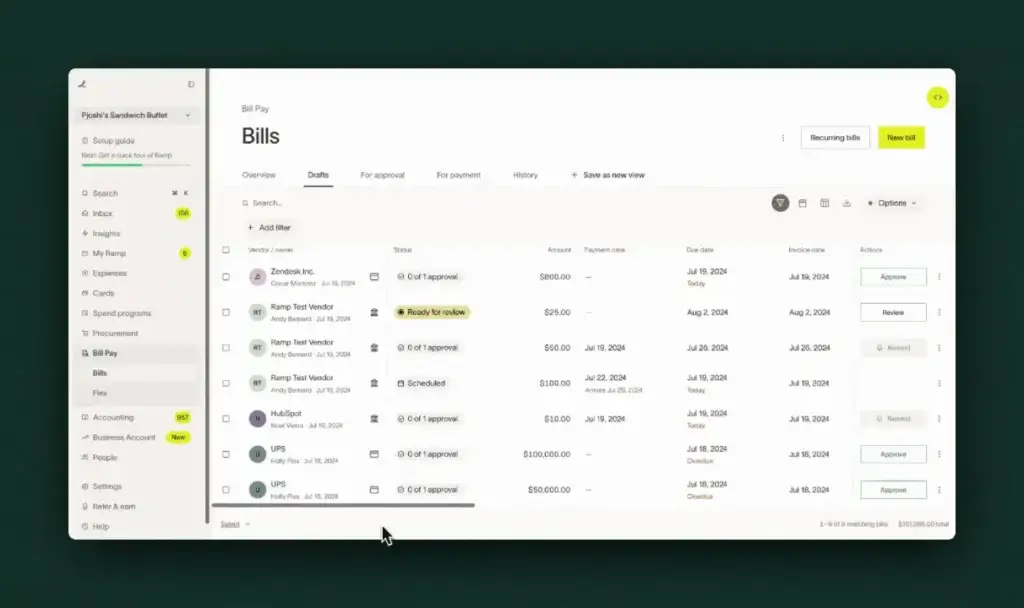
Software specification
Key Features of Ramp
Corporate Cards and Spend Controls
Ramp started as a corporate card and spend management product, and this is still one of its strongest areas. You can issue unlimited virtual and physical cards, set card controls, restrict categories or vendors, define policy rules, and pre-approve spending before money goes out. That makes Ramp particularly useful if you want to prevent policy violations at the point of spend rather than detect them later during reimbursement or reconciliation.
Key strengths in this area include:
- Unlimited physical and virtual cards for teams
- Card controls by vendor, category, and policy rules
- Real-time transaction visibility for finance teams
Expense Management and Reimbursements
Ramp is designed to make expenses easier for both employees and finance teams. Employees can submit receipts through web, mobile, SMS, Slack, and other channels, while Ramp automatically matches receipts to transactions and prompts users to complete missing details. This reduces one of the most frustrating parts of expense management, which is chasing documentation after the purchase has already happened.
For reimbursements, employees can submit out-of-pocket expenses quickly, approvals route automatically, and approved reimbursements can be paid without relying on old-style expense report cycles. That combination helps improve employee compliance while reducing finance admin.
Accounts Payable Automation
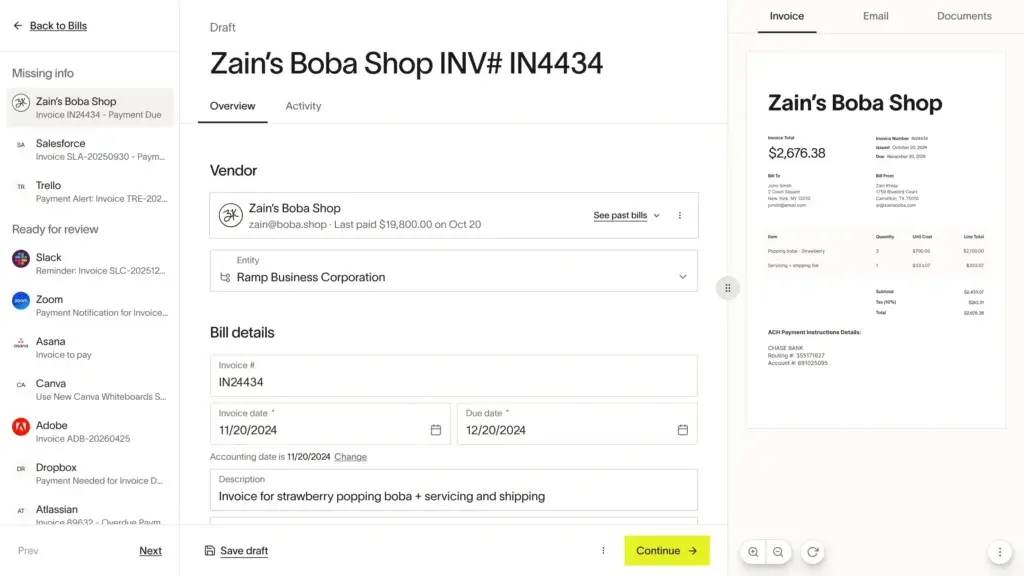
Ramp has expanded well beyond card spend into AP automation. Its bill pay and invoice management capabilities include AI-powered OCR for invoice extraction, approval routing, fraud checks, payment workflows, and syncing into accounting systems. Ramp’s OCR captures invoice details and line items automatically, and the platform supports ACH, card, check, wire, and other payment methods depending on workflow and geography.
This is one of the most important reasons Ramp has moved into more direct competition with AP platforms rather than staying only in the card and expense category. For companies that want to consolidate vendor payments and employee spend into one environment, Ramp has become much more compelling than lighter card-only tools.
Procurement and Purchase Order Workflows
Ramp now includes stronger procurement functionality than many people realize. On Plus and Enterprise, you can add procurement capabilities such as intake and approval workflows, automated purchase order creation and tracking, vendor onboarding workflows, and three-way matching tied to purchase orders. This matters if your team wants more control before a purchase is made rather than only after the bill arrives.
For growing finance teams, this procurement layer is useful because it connects request, approval, spend, payment, and accounting in a more unified flow. It also helps Ramp move closer to finance orchestration rather than simple expense reporting.
Travel, Budgets, and Vendor Management
Ramp’s travel and budgeting tools strengthen its all-in-one appeal. Travel bookings can be tied to policy controls, receipt capture, and expense workflows, which reduces the usual fragmentation between booking and expense systems. Budgeting is also becoming a bigger part of the platform, with real-time budget versus actual visibility across travel and expense, AP, procurement, and purchase orders.
Vendor management is another useful addition. Ramp includes automated vendor tracking, contract extraction, and price intelligence, which gives finance teams more context around recurring spend and vendor relationships. This is a practical advantage if SaaS spend, subscriptions, and vendor renewals are a meaningful part of your finance workload.
Accounting Automation and Integrations
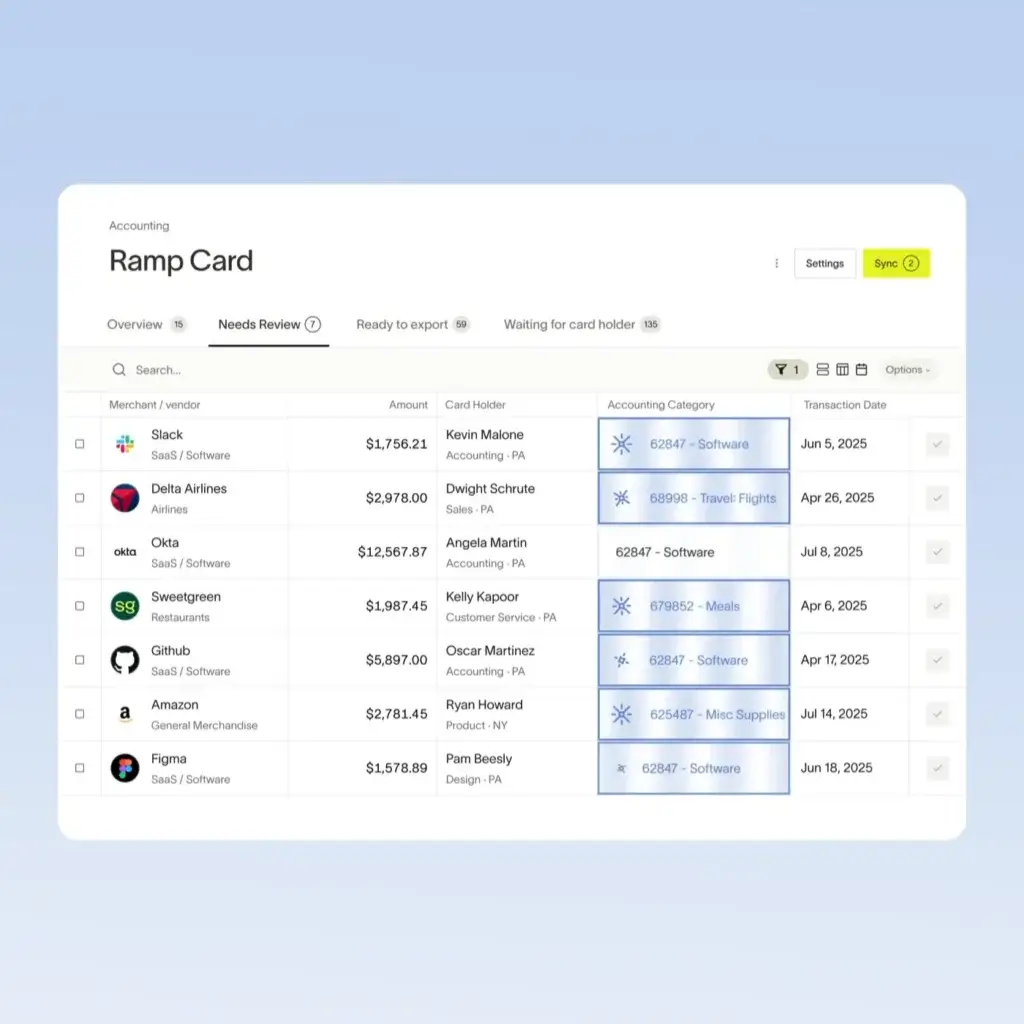
Ramp’s value increases substantially if your finance team cares about close efficiency and reconciliation. The platform integrates with accounting systems such as QuickBooks, Xero, Sage Intacct, NetSuite, and additional ERP environments at higher tiers. It syncs accounting fields, transactions, vendor bills, payments, reimbursements, purchase orders, and related data in real time, which reduces duplicate entry and helps finance teams close the books faster.
This is one of Ramp’s biggest strengths in practice. It is not trying to become your general ledger. It is trying to reduce the manual operational work around everything that feeds the general ledger.
How Ramp Works
Setup and Uses
Setup and Onboarding
Ramp’s onboarding story is one of the reasons the platform gets strong user feedback. Compared with legacy finance tools, it is generally seen as easier to implement and easier for employees to adopt. Ramp positions setup around quick integration, policy configuration, card issuing, and workflow rollout rather than a heavy multi-month software deployment. That is especially attractive for startups and mid-market teams that want finance automation without the implementation burden of a traditional enterprise system.
The free plan lowers adoption friction further because smaller teams can begin without a large software commitment. Ramp also offers a 30-day free trial for Ramp Plus, which is useful if you want to evaluate the more advanced AI and AP automation features before upgrading.
Managing Employee Spend Day to Day
For day-to-day use, Ramp is built to keep spending close to policy instead of fixing problems later. Employees can use a corporate card, submit receipts through channels they already use, and complete transactions quickly without long expense reports. Finance leaders can monitor transactions in real time, see what is missing, and enforce policies automatically through controls and follow-up actions.
That makes Ramp feel less like a back-office recordkeeping tool and more like an active operating system for company spend. If your team is dealing with lots of employee purchases, subscriptions, travel, and card activity, that user experience matters a lot.
Managing Vendor Bills and Approval Workflows
For AP teams, Ramp supports invoice capture, coding, approval routing, batch payments, payment release approvals, and sync to accounting software. Bills can be captured with OCR, processed through configurable approval chains, and paid with multiple payment methods. For more complex finance environments, Plus and Enterprise add stronger automation, multi-entity support, and broader integration options.
If your current AP process relies on inboxes, spreadsheets, PDF forwarding, and manual re-entry into an accounting platform, Ramp can meaningfully reduce friction. It is especially attractive for companies that want AP and employee spend to live in the same ecosystem.
Using Ramp Across Multiple Entities
Ramp is increasingly relevant for businesses with more complexity. The platform supports multi-entity workflows, visibility restrictions, more advanced user roles, and automated intercompany-related syncing for supported ERP integrations. That does not make it a replacement for a true enterprise ERP, but it does make it a more scalable option than many lighter spend tools.
If you are operating several subsidiaries, departments, or legal entities, this is one of the areas you should evaluate carefully in a demo because it can determine whether Ramp is simply a helpful spend tool or a genuine operational layer for your finance organization.
Pros and Cons
A balanced view: what you’ll love and what to consider
Ramp is one of the strongest modern finance platforms in its category, but it is not automatically the right choice for every business. Its biggest appeal comes from usability, automation, and breadth. Its main limitation is that it still depends on your accounting system for true ledger and financial reporting depth, and some advanced workflows are pushed into paid tiers or add-ons.
That makes Ramp excellent for many finance teams, but you should still evaluate it in the context of your ERP, entity complexity, procurement needs, and international requirements.
Positive
✅ Excellent Usability and Faster Adoption
✅ Strong Automation Across Finance Operations
✅ Better Visibility and Spend Control
✅ Broad Product Breadth in One Platform
Negative
❌ It Is Not Full Accounting Software
❌ Advanced Capabilities Move Into Paid Tiers
❌ Procurement and AP Depth May Not Match Specialists
❌ Product Velocity Can Be a Mixed Blessing
✅ Benefits of Ramp
Excellent Usability and Faster Adoption
One of Ramp’s clearest advantages is usability. This is consistent in user feedback and in the product design itself. Employees can submit receipts through channels they already use, finance teams get cleaner data, and the platform generally feels easier to deploy than many older finance systems. That matters because finance software only works well when employees actually comply with it.
Strong Automation Across Finance Operations
Ramp is at its best when you use it to eliminate repetitive finance work. OCR invoice extraction, automated coding, approval routing, policy enforcement, receipt matching, and real-time sync to accounting systems all reduce manual effort. If your current workflows are slow because they depend on chasing people and re-entering data, Ramp can create a meaningful efficiency gain.
Better Visibility and Spend Control
Ramp gives finance leaders much better visibility into where money is going across cards, expenses, travel, vendor bills, and budgets. This is especially valuable for scaling teams that have outgrown informal spend processes. Instead of discovering problems at month-end, you can set controls earlier and monitor spend as it happens.
Broad Product Breadth in One Platform
Many companies would otherwise use separate products for corporate cards, expense management, reimbursements, AP, procurement intake, travel, and spend analytics. Ramp’s breadth is a real differentiator because it can reduce system sprawl. That not only cuts tool count, but it can also improve data consistency and simplify adoption for both employees and finance staff.
❌ Potential Drawbacks and Limitations
It Is Not Full Accounting Software
This is the biggest limitation to keep in mind. Ramp is excellent at spend management and finance operations, but it is not your general ledger, tax engine, or full accounting stack. Businesses that need deep accounting, complex consolidations, or ERP-native financial workflows will still rely on another core platform.
Advanced Capabilities Move Into Paid Tiers
Ramp’s free plan is attractive, but some of the more powerful automation, AI-driven workflow enhancements, multi-entity controls, broader ERP integrations, and procurement capabilities sit in Plus, Enterprise, or add-on packages. That does not make Ramp expensive by default, but it does mean your actual cost depends on how advanced your workflows are.
Procurement and AP Depth May Not Match Specialists
Ramp’s AP and procurement capabilities are much stronger than many people assume, but companies with very mature enterprise procurement requirements may still prefer a more specialized tool. If you have complex sourcing, supplier risk, contract lifecycle, or deeply customized procure-to-pay requirements, you should evaluate Ramp against dedicated procurement software rather than assume it covers every edge case.
Product Velocity Can Be a Mixed Blessing
Ramp releases new capabilities frequently, which is generally a strength. Still, some reviewers note that rapid product changes can occasionally affect familiar workflows. For many teams, this is a minor issue, but highly process-sensitive finance departments may want to pay attention to change management and release communication.
Pricing and Plans
How much does Ramp cost?
Ramp’s pricing is more nuanced than some card-first competitors because it now spans multiple finance workflows and plan tiers. The headline is still attractive because Ramp offers a genuine free plan, but you should look beyond the entry point if you want broader automation, stronger AP workflows, or enterprise-level customization.
Free Plan
Ramp Free starts at $0 per user per month and is aimed at smaller teams that want to simplify finances. It includes core functionality such as corporate cards, card controls, expense submission through SMS or Slack, auto-receipt matching, invoice extraction with OCR, configurable approval workflows, bill payments, basic accounting rules, QuickBooks Online and Xero integrations, custom reporting, and vendor management features like automated vendor tracking and contract extraction.
Plus Plan
Ramp Plus is priced at $15 per user per month, plus a platform fee based on team size, with savings available for annual billing. This is the tier designed for teams that want more AI-driven automation. It adds features such as auto-coded line items, AI-driven approval recommendations, automated batch payments, payment release approvals, broader accounting automation, NetSuite and Sage Intacct integrations, multi-entity support, live reports, budget versus actual tracking, custom user roles, and audit logs.
Enterprise Plan
Ramp Enterprise uses custom pricing and is aimed at companies that need deeper configuration, stronger international support, broader ERP integrations such as Workday and Oracle Fusion Cloud, implementation help, global capabilities, locally funded reimbursements, local currency card issuing in 30+ countries, white-glove support, and more advanced organizational and workflow configuration.
Procurement Add-On
Ramp’s procurement product is sold as an add-on to Plus or Enterprise. It includes more advanced intake and approval workflows, AI-driven vendor compliance reviews, automated PO creation and tracking, three-way match with Ramp purchase orders, vendor onboarding with custom forms, and integration hooks for more complex finance processes.
Pricing Takeaway
Ramp looks inexpensive at the starting level, and for some teams it truly is. But the real value calculation depends on how much of your finance stack you plan to centralize inside the platform. If you just need cards and light expense controls, the free plan is compelling. If you want AP automation, accounting automation, budget controls, multi-entity administration, and procurement support, you should evaluate the paid tiers in detail.
Pricing Comparison Table
| Plan | Monthly Cost | Best For |
| Free | $0/user/month | Small teams that want cards, expenses, AP basics, and accounting sync without upfront software cost |
| Plus | $15/user/month + platform fee | Finance teams that want stronger AI automation, AP controls, reporting, and broader integrations |
| Enterprise | Custom | Organizations needing global support, advanced ERP connections, white-glove service, and deep configuration |
| Procurement Add-On | Custom add-on | Teams that need purchase requests, POs, three-way match, and stronger intake-to-pay workflows |
Business Fit
Who Should Use Ramp?
Startups and SMBs
Ramp is an excellent fit for startups and smaller businesses that want more control over spend without buying a large finance stack. The free plan is appealing, the onboarding is relatively approachable, and the platform helps you put policies and visibility in place earlier than many companies otherwise would.
Scaling Mid-Market Finance Teams
This is probably Ramp’s strongest sweet spot. If your company is growing fast and your finance team is feeling pressure from card sprawl, receipt chasing, AP delays, SaaS overspend, and slow month-end workflows, Ramp can address several of those problems at once. It is especially valuable when you want better automation without fully replatforming your ERP.
Multi-Entity and More Complex Organizations
Ramp is also becoming more relevant for larger and more complex companies, particularly those that want to combine spend controls, AP automation, and accounting automation across multiple entities. Enterprise features such as deeper ERP integrations, local currency support, implementation services, and white-glove support make it more viable in larger environments than many people assume.
Who Might Need Something Else
If your primary need is full accounting rather than spend operations, Ramp should be part of the stack, not the center of it. Likewise, if you require highly specialized global payables or more procurement depth than Ramp currently offers, software like Tipalti or a more procurement-specific platform may deserve closer attention.

Alternatives
Ramp Alternatives & Competitors
Ramp competes across several categories, so the right alternative depends on what problem you are actually trying to solve. Some buyers compare it to spend management tools, others to AP automation software, and others to finance platforms that bundle cards, policy controls, and vendor payments.
Comparison Table: Ramp vs Competitors
| Feature | Ramp | Brex | BILL Spend & Expense | Tipalti |
| Primary focus | Spend management + finance operations | Corporate cards + spend management | Spend management + AP adjacency | AP automation + global payables |
| Corporate cards | Yes | Yes | Yes | No core emphasis |
| AP automation | Yes | More limited depth | More limited depth than AP specialists | Yes, stronger global focus |
| Procurement | Yes, as add-on on higher tiers | More limited | More limited | More payables-oriented than procurement-led |
| Accounting automation | Strong and growing | Good, but less finance-ops breadth | Useful, but narrower than Ramp’s platform scope | Strong for payables workflows |
Brex: One of the most direct comparisons if your focus is cards, employee spend, and startup-friendly finance tools. Ramp generally feels stronger if your priority is finance team control, AP automation, and broader accounting workflow efficiency.
BILL Spend & Expense: This is another logical competitor if you want spend controls tied to a familiar AP ecosystem. Ramp often feels more modern and broader as a unified finance operations layer, while BILL remains an important name for AP-led buying journeys.
Tipalti: The stronger comparison if your company is focused on complex global payables, tax workflows, and supplier payout infrastructure. Ramp is usually more compelling when your goal is a broader spend management platform that includes cards, expenses, AP, travel, and accounting automation in one environment.
Other alternatives worth considering include SAP Concur, Paylocity for Finance, Emburse, and traditional ERP-led approaches where spend management is handled inside or alongside the accounting system.
Integrations and Ecosystem
Connect Ramp to your favourite apps
Accounting Integrations
Ramp’s accounting integration strategy is one of its strongest selling points. It supports popular systems such as QuickBooks, Xero, Sage Intacct, and NetSuite, with more advanced ERP integrations available at higher tiers. The goal is to automate the flow of spend data into the accounting system so finance teams spend less time exporting, cleaning, and reclassifying transactions manually.
Multi-Entity and ERP Workflows
Ramp’s integrations become especially useful in more complex finance environments. For example, its Sage Intacct integration supports multi-entity workflows, real-time sync of transactions and bills, and entity-level or top-level syncing. That makes Ramp more than a simple expense app. It becomes part of the operational finance infrastructure for businesses that want cleaner data movement across entities and systems.
Adoption and Ecosystem Fit
If your business already runs on a modern accounting stack, Ramp fits most naturally as an extension of that system. It is especially appealing if your finance team wants tighter control upstream, before transactions hit the ledger. Instead of replacing your accounting system, it makes the surrounding workflows more automated and easier to govern.
Security and Compliance
Security and Compliance in Ramp
Ramp’s security posture is strong and is clearly positioned as part of its product value. This matters because the platform sits close to sensitive areas such as payments, employee spend, vendor data, receipts, reimbursement details, and accounting integrations.
Encryption and Monitoring
Ramp states that it uses encryption at rest and in motion and supports 24/7 monitoring. For finance teams, that is table-stakes, but it is still worth highlighting because the platform handles financial and employee data across several workflows, not just card transactions.
Compliance Certifications
Ramp’s Trust Center lists SOC 1 Type 2, SOC 2 Type 2, ISO 27001:2022, and PCI DSS documentation. That is a strong set of credentials for a finance platform and should help reassure teams that need independent validation of controls and data protection practices.
Role Controls and Auditability
Role-based permissions, audit logs, and policy-driven approvals are central to Ramp’s operational control model. These features matter not only for security, but also for internal governance. If your business needs cleaner audit trails around spending, bills, approvals, and changes in user access, Ramp offers a better framework than most lightweight expense tools.
Why This Matters in Practice
Security is often treated as a checkbox during software evaluation, but with Ramp it should be considered alongside workflow design. The more parts of finance you run inside the platform, the more important it becomes that permissions, auditability, and system trust are strong. Ramp appears to understand that well and has built a product and trust posture that reflects it.
Conclusion
Final Thoughts
Ramp is one of the strongest finance operations platforms on the market today. It stands out because it brings together corporate cards, expenses, AP, procurement, travel, budgeting, vendor visibility, and accounting automation in a way that feels more unified than many competing tools. That breadth, combined with strong usability, is the main reason it continues to gain attention from both startups and more mature finance teams.
Its biggest strength is not that it replaces accounting software. It is what makes the workflows surrounding accounting far more efficient. If your team is losing time to manual approvals, missing receipts, invoice coding, disconnected spend tools, and messy syncs into the ledger, Ramp can deliver meaningful operational value.
The main caveat is that you still need to evaluate it based on your actual financial complexity. Companies with highly specialized procurement or global payables requirements may still prefer a more purpose-built solution in those areas. Businesses looking for a full accounting platform will also need Ramp alongside, not instead of, their general ledger or ERP.
Overall, Ramp is one of the best options available if you want a modern spend management and finance automation platform that can grow with your business while making finance operations faster, cleaner, and easier to control.
Have more questions?
Frequently Asked Questions
What is Ramp?
Ramp is a spend management and finance operations platform that helps businesses manage corporate cards, employee expenses, reimbursements, accounts payable, procurement, travel, vendor management, and accounting automation from one system.
Is Ramp an accounting software platform?
Not in the traditional sense. Ramp is not a general ledger or full bookkeeping system. It works alongside accounting software such as QuickBooks, Xero, Sage Intacct, and NetSuite to automate the workflows around company spend and financial operations.
What does Ramp do better than many competitors?
Ramp’s biggest strengths are usability, policy-based spend controls, corporate cards, receipt capture, AP automation, and accounting integrations. Its broader product scope also helps reduce the number of separate tools many finance teams need.
Does Ramp support accounts payable automation?
Yes. Ramp includes invoice capture with AI-powered OCR, configurable approval workflows, fraud checks, payment support across multiple methods, automated batch payments, and syncing to accounting systems.
What accounting software does Ramp integrate with?
Ramp integrates with accounting systems such as QuickBooks, Xero, Sage Intacct, and NetSuite, with additional enterprise integrations available at higher tiers.
How much does Ramp cost?
Ramp Free starts at $0 per user per month. Ramp Plus starts at $15 per user per month plus a platform fee based on team size. Ramp Enterprise uses custom pricing, and procurement is available as an add-on for Plus or Enterprise.
Is there a free version of Ramp?
Yes. Ramp offers a free plan for smaller teams, and it also offers a 30-day free trial of Ramp Plus for companies that want to test more advanced functionality.
Is Ramp secure?
Ramp states that it uses encryption at rest and in motion, 24/7 monitoring, and maintains compliance documentation, including SOC 1 Type 2, SOC 2 Type 2, ISO 27001:2022, and PCI DSS.
Who is Ramp best for?
Ramp is best for startups, SMBs, and mid-market companies that want stronger control over spend, faster finance workflows, and better integration between cards, expenses, AP, and accounting systems. It is also becoming increasingly relevant for multi-entity organizations.
What are the main Ramp alternatives?
Common Ramp alternatives include Brex, BILL Spend & Expense, Tipalti, SAP Concur, Emburse, and other spend management or AP-focused platforms. The best alternative depends on whether your priority is cards, AP, procurement, global payables, or full finance workflow automation.