
Introduction
If you’re looking for a sales platform that goes beyond basic contact management, Apollo.io is one of the most compelling tools to consider.
Apollo is not a traditional CRM in the same category as Pipedrive, Zoho CRM, or Salesforce. It is better described as an AI-powered sales platform that combines prospecting data, sales engagement, enrichment, workflow automation, and lightweight deal management.
That distinction matters.
If your team needs a deep CRM for customer success, support operations, or complex post-sale account management, Apollo may not be enough on its own. But if your main goal is to build pipeline, find qualified B2B contacts, automate outreach, and enrich sales data, Apollo can help you move much faster.
In this Apollo.io review, you’ll see where the platform performs best, where it has limitations, how pricing works, and whether it deserves a place in your sales stack.
Apollo.io Review: Quick Summary
Apollo is best for B2B teams that want one place to find prospects, enrich data, launch outbound campaigns, and track early-stage sales activity. It is less ideal if you need a highly customizable CRM for support, renewals, or complex account management.
| Category | Details |
| Best For | B2B outbound sales teams, SDR teams, startups, and revenue teams |
| Not Best For | Customer support, service workflows, and deep CRM customization |
| Main Strength | Combines prospecting data, outreach automation, enrichment, and sales workflows |
| Main Limitation | CRM functionality is lighter than dedicated systems like HubSpot, Salesforce, or Pipedrive |
| Best Use Case | Building outbound pipeline and improving sales productivity |
| Starting Price | Free plan available, paid plans depend on seats, features, and credits |
Key Features
Apollo‘s Software Specification
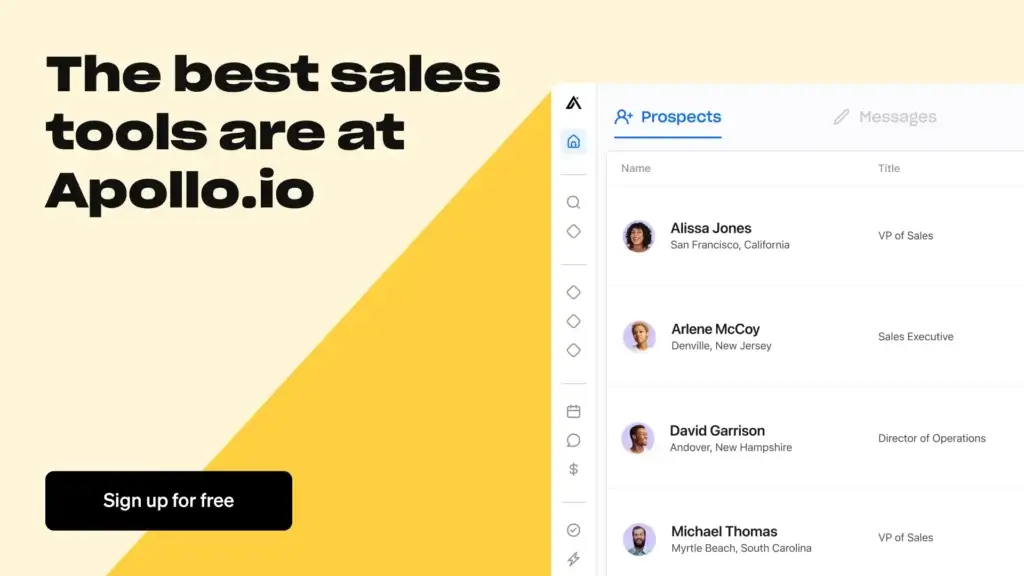
Apollo is built around one core promise: helping revenue teams build pipeline faster. It does this by combining data, engagement, automation, and CRM-style sales tracking inside one workspace.
B2B Contact Database and Prospecting
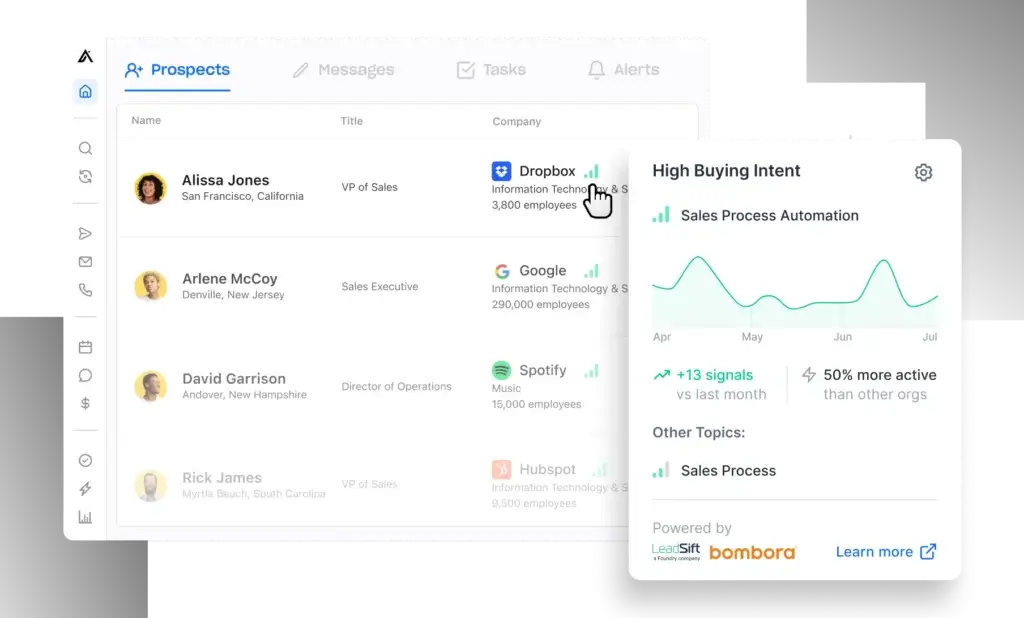
Apollo gives you access to a large B2B database that helps you identify potential buyers by company, role, location, industry, technology usage, and buying signals.
This is where Apollo has a major advantage over traditional CRMs. A standard CRM stores the leads you already have. Apollo helps you find the leads you still need.
- Search contacts by title, department, seniority, location, and company size
- Build prospect lists for cold email, calling, and account-based sales
- Use company data and intent signals to prioritize better-fit accounts
- Save lists and push contacts into sequences or connected CRMs
For sales teams that rely on outbound, this can replace several disconnected tools. Instead of jumping between LinkedIn, spreadsheets, enrichment tools, and your CRM, you can build prospecting workflows from one place.
Sales Engagement and Email Sequences
Apollo’s engagement tools help you turn prospect lists into actual outreach campaigns. You can create multi-step sequences with emails, calls, tasks, LinkedIn steps, and follow-ups.
This is especially useful for SDRs, founders, and growth teams that need to run structured outreach without managing every touch manually.
- Create personalized email sequences with dynamic fields
- Pause sequences when a contact replies or books a meeting
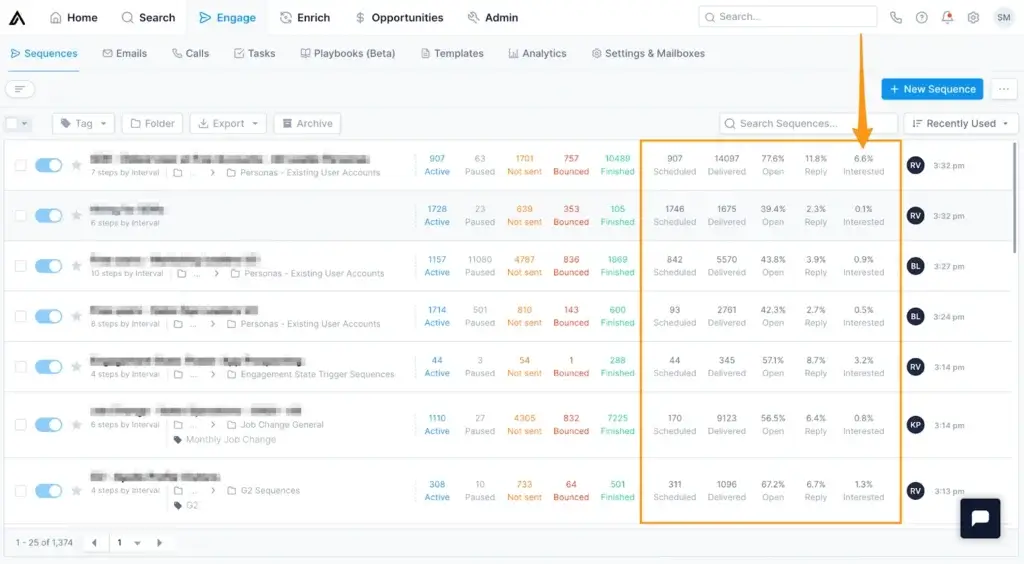
- Track opens, clicks, replies, bounces, and interested leads
- Test messaging and improve campaigns over time
The real value is consistency. Your team can follow up at the right time, reduce forgotten tasks, and keep every touchpoint connected to the prospect record.
Dialer and Call Tracking
Apollo includes calling features that help reps work through prospect lists faster. You can call directly from the platform, log outcomes, and keep call activity connected to the contact timeline.
This is helpful if your sales motion combines email and phone outreach. You get a more complete view of engagement instead of tracking calls in a separate tool.
- Call prospects from Apollo
- Log call activity and outcomes
- Use call data to improve follow-up timing
- Track outreach history across email and phone
Apollo AI Features
Apollo has expanded beyond basic automation into AI-assisted sales execution. Its AI features are designed to help you research accounts, write better outreach, and move faster through repetitive sales tasks.
For teams that send a high volume of emails, this can save hours every week. Still, AI should support your sales strategy, not replace good targeting and strong messaging.
- Use AI-assisted email writing for outreach drafts
- Personalize messaging based on prospect and company context
- Automate repetitive workflow steps
- Improve follow-ups with suggested next actions
The best results usually come when you combine Apollo’s AI with clear buyer personas, clean segments, and a strong value proposition.
Chrome Extension for LinkedIn and Gmail
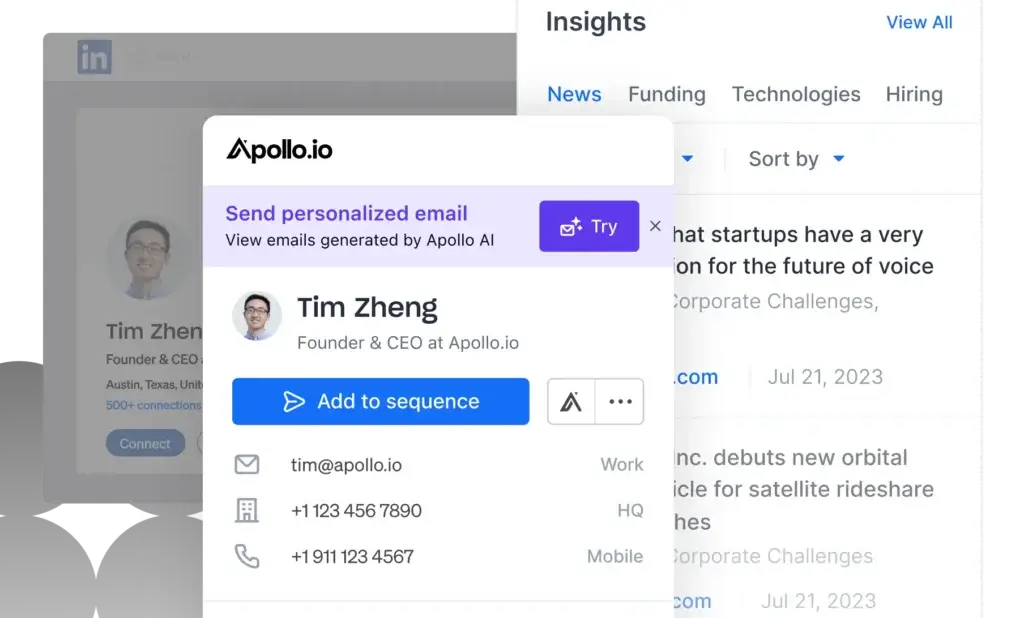
The Apollo Chrome extension is one of the platform’s most practical tools. It helps you find contact data and take action while working inside LinkedIn, Gmail, and other browser-based workflows.
- Find contact details from LinkedIn profiles
- Add prospects to Apollo without switching tabs
- Send contacts into sequences from your browser
- View CRM-style context while researching leads
If your reps spend a lot of time on LinkedIn, the extension can remove a lot of manual copying, searching, and tab switching.
Deal Tracking and Lightweight CRM
Apollo includes pipeline and opportunity management, but it should be viewed as a lightweight CRM rather than a full CRM replacement for every business.
You can manage deals, add notes, assign tasks, and move opportunities through stages. For a sales-first team, that may be enough. For a larger company with complex forecasting, service workflows, and advanced reporting, Apollo may work better alongside a dedicated CRM.
- Track opportunities and deal stages
- Assign tasks and next steps to reps
- Connect activity history to contacts and accounts
- Sync with systems like Salesforce or HubSpot when needed
My recommendation is simple: use Apollo as your sales execution layer. If your CRM needs are basic, it can work on its own. If your sales operations are more mature, connect it to your main CRM.
Data Enrichment
Apollo’s enrichment features help you improve the quality of your CRM and prospecting data. This is important because poor data creates wasted outreach, inaccurate segmentation, and weak reporting.
You can use Apollo to fill missing contact fields, update job changes, enrich company data, and keep records more useful for sales and marketing teams.
- Enrich contacts with emails, phone numbers, titles, and company data
- Improve segmentation for outbound campaigns
- Update records when contacts change roles
- Sync enriched data into connected CRMs
This is one of Apollo’s strongest use cases for revenue operations teams. Even if you do not use Apollo as your primary CRM, it can still help keep your CRM data cleaner.
Key Benefits
Benefits of Using Apollo
Apollo is most valuable when your goal is to create a repeatable outbound sales engine. It helps your team move from “who should we contact?” to “which prospects are engaging?” much faster.
Faster Prospecting
You can build targeted lists using filters such as title, industry, company size, location, and buyer signals. This saves time compared with manual research across LinkedIn, Google, and spreadsheets.
Cleaner Sales Data
With enrichment, you can improve existing contact and account records. This supports better segmentation, cleaner CRM reporting, and more relevant outreach.
More Consistent Outreach
Sequences help your reps follow a structured sales process. Instead of relying on memory, Apollo keeps follow-ups, tasks, and engagement activity organized.
Lower Sales Stack Complexity
For many teams, Apollo can reduce the need for separate tools for data, outreach, enrichment, and early-stage pipeline tracking. That can simplify training and improve adoption.
Pros and Cons
Advantages and Limitations of Using Apollo.io
Positive
✅ Strong all-in-one sales workflow
✅ Large B2B prospecting database
✅ Useful enrichment and automation tools
✅ Good value for outbound sales teams
Negative
❌ Not a deep enterprise CRM
❌ Credit usage can affect real cost
❌ Data still needs manual quality checks
❌ New users may need onboarding time
Like any CRM or sales engagement platform, Apollo has clear strengths and clear trade-offs. The key is understanding whether those trade-offs match your sales process.
✅ Pros
Strong all-in-one sales workflow
Apollo combines prospecting, enrichment, sequencing, calling, analytics, and lightweight CRM features. That can reduce the need for separate tools and help your team work from one sales workspace.
Large B2B prospecting database
The platform is especially strong for teams that need to build outbound lists quickly. You can search for contacts, accounts, titles, industries, and buying signals without starting from scratch.
Useful enrichment and automation tools
Apollo is not only for finding new contacts. It can also help update existing records, enrich CRM data, and automate repetitive sales workflows.
Good value for outbound sales teams
Compared with buying separate tools for data, outreach, calling, and CRM tracking, Apollo can be cost-effective for startups and sales teams that rely heavily on outbound.
❌ Cons
Not a deep enterprise CRM
Apollo can manage deals, but it does not offer the same depth as Salesforce, HubSpot, or Zoho CRM for complex workflows, forecasting, customer service, and post-sale lifecycle management.
Credit usage can affect real cost
The listed plan price does not always tell the full story. Export credits, mobile credits, enrichment usage, and team size can all influence the real cost of using Apollo.
Data still needs manual quality checks
No B2B database is perfect. Even with verified data, your team should monitor bounce rates, validate important contacts, and avoid sending low-quality campaigns at scale.
New users may need onboarding time
Apollo brings together many workflows, which is powerful but can feel overwhelming at first. Teams should expect a learning period, especially if they are new to outbound sales automation.
User Experience
User Interface and Experience
Apollo’s interface is built for speed. It is not the most polished CRM interface on the market, but it is practical, direct, and designed around sales execution.
The main workflows are easy to understand once you know how Apollo is organized: search for prospects, enrich records, add contacts to sequences, track engagement, and manage next steps.
🖥️ Clean but Functional Interface
The dashboard gives you access to the core areas your sales team will use every day:
- Search for finding prospects and companies
- Engage for sequences, emails, calls, tasks, and analytics
- Enrich for updating contact and account data
- Opportunities for pipeline and deal tracking
- Admin for settings, teams, integrations, and permissions
You won’t get the same visual flexibility as monday CRM or the full ecosystem depth of HubSpot. But if your team cares most about prospecting and outreach, Apollo’s layout is efficient.
🧩 Smooth Workflow for Outbound Teams
Apollo works best when your sales process is outbound-heavy. A typical workflow looks like this:
- Build a prospect list using filters like title, company size, industry, or intent
- Review and enrich data before sending outreach
- Add contacts to a sequence with email, phone, and task steps
- Track opens, replies, calls, and meetings from one place
- Move qualified prospects into opportunities or your main CRM
This flow is especially useful for SDR teams, sales agencies, founder-led sales, and B2B startups that need to create pipeline without building a large sales operations stack.
🔗 Chrome Extension That Saves Time
The Chrome extension is one of Apollo’s strongest usability features. It lets you work from LinkedIn and other browser-based sales workflows without constantly switching tabs.
- Find emails and contact details while researching leads
- Add prospects to Apollo from LinkedIn
- Push leads into sequences quickly
- Keep prospecting work connected to your sales database
This is a practical benefit for sales reps. Less tab switching means more time spent researching, personalizing, and engaging with the right buyers.
📈 Reporting and Analytics
Apollo gives you useful performance data across sequences, email campaigns, calls, and sales activities. You can monitor which messages are working, which campaigns are underperforming, and which contacts are engaging.
- Track sequence performance by open, click, reply, and bounce rate
- Review call outcomes and activity volume
- Monitor interested prospects and campaign engagement
- Use reporting to coach reps and improve messaging
The reporting is strong for outbound performance. However, if you need advanced CRM forecasting, revenue attribution, or deeply customized dashboards, you may still prefer HubSpot, Salesforce, or a dedicated BI setup.
⚙️ Setup and Admin Controls
Apollo is relatively easy to start with, but teams should still take setup seriously. Email domain configuration, sequence rules, permissions, CRM sync settings, and credit usage all affect long-term performance.
Before launching campaigns, make sure your team has a clear process for list building, email verification, sequence quality, and CRM ownership.
Business size fit
Apollo.io for Different Business Sizes
Apollo is not the best fit for every company. It is strongest when sales teams need prospecting data and outreach automation, not when companies need a full operational CRM for every department.
| Business Type | Fit for Apollo | Why |
| Freelancers | Not ideal | Usually too advanced for simple contact management |
| Small B2B teams | Good fit | Useful for prospecting, sequences, and basic pipeline tracking |
| Startups | Strong fit | Helps build outbound pipeline without buying several separate tools |
| Mid-market sales teams | Excellent fit | Works well for SDR teams, enrichment, automation, and revenue operations |
| Enterprise teams | Moderate to strong fit | Best when connected to Salesforce, HubSpot, or another primary CRM |
Who Gets the Most Value from Apollo?
You will likely get strong value from Apollo if:
- You run outbound sales campaigns
- You sell to B2B buyers
- You need reliable prospecting and enrichment workflows
- You want to reduce the number of tools in your sales stack
- You need an affordable alternative to enterprise sales intelligence platforms
Apollo is less suitable if your business is mainly focused on long-term account management, customer support, or complex CRM customization. In those cases, you may be better served by a platform like HubSpot CRM, Salesforce, or Zoho CRM.
Integrations
How Apollo.io Connects With Other Tools
Apollo connects with many of the tools sales teams already use. This is important because Apollo is often used alongside an existing CRM rather than replacing it completely.
Salesforce and HubSpot
Apollo can work with Salesforce and HubSpot to sync prospecting, enrichment, and engagement data. This setup is common for teams that want Apollo for outbound execution while keeping their primary CRM as the system of record.
Email, Calendar, and LinkedIn Workflows
Apollo supports workflows around email providers, LinkedIn prospecting, and browser-based research. This makes it easier for reps to move from research to outreach without manually copying data between tools.
Sales Engagement and Marketing Tools
Apollo also supports integrations with tools such as Outreach, Salesloft, Marketo, SendGrid, and other sales or marketing systems. This gives larger teams more flexibility when Apollo is part of a broader go-to-market stack.
For most teams, the key question is not whether Apollo integrates with your tools. It is whether you have a clear sync strategy. Decide which platform owns contacts, accounts, opportunities, and activity data before connecting everything.
Apollo Email Deliverability
Email deliverability is one of the most important parts of using Apollo successfully. A strong database and good automation will not help if your emails land in spam or your domain reputation suffers.
Apollo gives you tools to manage outreach, but your team still needs to follow healthy sending practices.
- Set up your email domain correctly before launching sequences
- Warm up sending gradually instead of sending large campaigns immediately
- Monitor bounce rates and remove poor-quality contacts
- Personalize outreach so messages feel relevant and human
- Keep sequence volume aligned with your domain reputation
This is where many teams make mistakes. Apollo can help you scale outreach, but scaling bad outreach will only make problems bigger. Treat deliverability as a core part of your sales process, not a technical afterthought.
Pricing and Plans
How much does Apollo.io cost?
Apollo offers a free plan and several paid plans, but pricing should not be evaluated by monthly seat cost alone. The platform also uses credits for actions such as accessing emails, phone numbers, exporting contacts, and enriching records.
That means your real cost depends on how many users you have, how much data you export, how often you enrich records, and whether your team needs phone numbers or advanced features.
| Plan | Best For | Typical Price | Key Notes |
| Free | Solo users and early testing | $0 | Useful for trying prospecting, limited credits, and basic outreach |
| Basic | Small outbound teams | Starts around $49/user/month when billed annually | Adds more practical prospecting and engagement capabilities |
| Professional | Growing sales teams | Starts around $79/user/month when billed annually | Better fit for higher-volume outreach, reporting, and team workflows |
| Organization | Mid-market and enterprise teams | Custom or higher-tier pricing | Designed for advanced governance, integrations, analytics, and larger teams |
What Are Apollo Credits?
Apollo credits are used for specific data actions, such as accessing contact information, exporting leads, using mobile numbers, or enriching records.
This is important because two teams on the same plan can have very different costs depending on usage. A team that exports thousands of leads and reveals many phone numbers will use credits faster than a team focused mainly on email outreach.
What to Check Before Choosing a Plan
Before you choose a paid plan, review these points carefully:
- How many contacts you expect to export each month
- How often you need mobile phone numbers
- Whether you need CRM enrichment or API access
- Which integrations are included in your plan
- Whether your email usage is subject to fair use limits
My recommendation is to estimate your monthly prospecting volume before upgrading. Apollo can be affordable, but only if the credit model matches how your team actually sells.
Comparison
Odoo CRM vs Other CRM Software
Apollo is often compared with CRMs, sales intelligence tools, and sales engagement platforms. The best choice depends on whether your priority is data, outreach, CRM depth, or enterprise workflow control.
Apollo.io vs Pipedrive
Pipedrive is stronger as a simple pipeline CRM. It is easier for teams that want deal tracking, sales stages, and clear pipeline visibility without a heavy outbound database.
Apollo is stronger for prospecting and outbound execution. If your main challenge is finding leads and reaching them at scale, Apollo is the better fit. If your main challenge is managing active deals, Pipedrive may be easier to adopt.
Apollo.io vs HubSpot
HubSpot CRM is a broader customer platform with marketing, sales, service, automation, and reporting tools. It is better for companies that want one system for the full customer lifecycle.
Apollo is more focused on outbound sales, sales intelligence, and enrichment. Many teams use Apollo with HubSpot rather than choosing one or the other.
Apollo.io vs ZoomInfo
ZoomInfo is often stronger for enterprise sales intelligence, account data, and large-scale go-to-market operations. It is commonly used by bigger sales organizations with larger budgets and more advanced data needs.
Apollo is often more attractive for startups and growing teams because it combines data, engagement, and CRM-style workflows in one platform. It can be a more accessible option for teams that do not want to buy separate tools for prospecting and outreach.
Apollo.io vs Outreach and Salesloft
Outreach and Salesloft are mature sales engagement platforms built for structured enterprise sales teams. They are often stronger for advanced engagement governance, enterprise process control, and large sales organizations.
Apollo’s advantage is that it combines sales data and engagement in one platform. If your team needs both prospecting and outreach, Apollo may offer a simpler and more cost-effective path.
| Tool | Best For | Where Apollo Wins | Where Apollo May Fall Short |
| Apollo | B2B prospecting, outreach, enrichment, and sales automation | Strong all-in-one value for outbound sales | Not as deep as full CRM or enterprise engagement tools |
| Pipedrive | Simple pipeline CRM and deal management | Apollo is better for lead sourcing and outbound | Pipedrive is easier for pure pipeline tracking |
| HubSpot | Full CRM, marketing, service, and lifecycle management | Apollo is stronger for prospecting and enrichment | HubSpot is broader for full customer operations |
| ZoomInfo | Enterprise sales intelligence and account data | Apollo can be more accessible and workflow-friendly | ZoomInfo may offer deeper enterprise data capabilities |
| Outreach / Salesloft | Enterprise sales engagement | Apollo includes prospecting data and engagement together | Outreach and Salesloft may be stronger for mature enterprise workflows |
When Apollo May Not Be the Best Choice
Apollo is a strong platform, but it is not perfect for every team. You should be careful if you expect Apollo to replace a full CRM across your entire business.
Apollo may not be the best fit if:
- You need advanced CRM customization across multiple departments
- Your main focus is customer support or account management
- You need complex forecasting, territory management, or approval workflows
- Your team already uses a mature data provider and enterprise engagement platform
- You only need simple contact management and do not run outbound sales
In these cases, Apollo may still be useful as a prospecting or enrichment layer, but it should not be your only CRM system.
Security and Compliance
Protection for Your Data
Security and compliance matter when you are working with prospect data, customer records, email accounts, and CRM integrations. Apollo provides several protections that are important for B2B sales teams.
🔐 Encryption and Infrastructure Security
Apollo states that data is encrypted in transit and at rest. This helps protect customer and prospect information as it moves through the platform and connected systems.
🛡️ SOC 2 and ISO 27001
Apollo highlights SOC 2 and ISO 27001 certifications, which are important security signals for companies evaluating software that handles business data.
🌐 GDPR and Privacy Controls
Apollo also positions itself as GDPR compliant and provides privacy controls for data rights and compliance workflows. This is especially important if your team sells into Europe or handles personal business contact data.
🔑 Role-Based Access and Admin Controls
Admins can manage user access, permissions, integrations, and team settings. Larger teams should pay close attention to permissions because Apollo can connect to email, CRM data, and prospecting workflows.
From a CRM expert perspective, security should be reviewed before rollout, not after. Make sure your legal, sales operations, and IT teams understand how data is sourced, synced, exported, and used in outreach.
Conclusion
Final thoughts
⭐ Overall Rating: 7.9/10
Choosing a platform like Apollo is not just about automating cold emails or tracking leads. It is about giving your sales team a stronger system for finding the right prospects, engaging them consistently, and turning outreach into pipeline.
🔍 What You’re Really Getting
Here’s a quick recap of what Apollo brings to your sales stack:
- A large B2B prospecting database for finding potential buyers
- Sales engagement tools for email, calling, tasks, and follow-ups
- AI-assisted workflows that help reps move faster
- Data enrichment features that improve CRM quality
- Lightweight CRM tools for managing early-stage opportunities
- Integrations with key sales and marketing platforms
Apollo is strongest when it acts as the engine behind outbound sales. It helps your team move from research to outreach to qualified opportunity without relying on too many disconnected tools.
👥 Is It the Right Fit?
If you are a solo freelancer or only need a simple contact database, Apollo may feel like more than you need.
But if you are part of a B2B sales team, startup, SDR team, or revenue organization focused on pipeline generation, Apollo can offer excellent value. It gives you the data and engagement tools needed to build a repeatable sales motion.
Still exploring? You can also compare Apollo with other platforms in our best CRM software guide.
🧠 Final Word from a CRM Expert
After reviewing many CRM and sales tools, my view is clear: Apollo is best understood as a sales execution platform, not just a CRM.
It can manage deals, but its real strength is helping your team identify accounts, enrich contacts, automate outreach, and generate pipeline. If that is your priority, Apollo is absolutely worth considering.
If your business needs advanced CRM customization, post-sale operations, service workflows, and enterprise-grade forecasting, use Apollo alongside a dedicated CRM rather than replacing your CRM completely.
Frequently Asked Questions
Have more questions?
Is Apollo.io a CRM?
Apollo.io includes CRM-style features such as contacts, accounts, opportunities, tasks, and activity tracking. However, it is better described as an AI sales platform because its strongest features are prospecting, data enrichment, outreach automation, and sales engagement.
What is Apollo.io best used for?
Apollo.io is best used for B2B prospecting, outbound sales, email sequencing, data enrichment, lead generation, and sales workflow automation. It is especially useful for SDR teams, startups, and revenue teams that need to build pipeline faster.
Is Apollo.io good for small businesses?
Yes. Apollo.io can be a strong option for small B2B teams that need prospecting data and outreach tools without buying several separate platforms. However, very small teams with basic contact management needs may find it more advanced than necessary.
How much does Apollo.io cost?
Apollo.io offers a free plan and paid plans that vary by user seats, features, and credits. Paid plans commonly start around $49 per user per month when billed annually, but you should confirm current pricing, credit limits, and add-ons directly with Apollo before purchasing.
What are Apollo credits?
Apollo credits are used for specific data actions such as accessing contact details, exporting leads, revealing mobile numbers, or enriching records. Credit usage can affect the real cost of Apollo, especially for high-volume outbound teams.
Does Apollo.io integrate with Salesforce?
Yes. Apollo.io integrates with Salesforce, which allows sales teams to use Apollo for prospecting, enrichment, and outreach while keeping Salesforce as their main CRM system of record.
Does Apollo.io integrate with HubSpot?
Yes. Apollo.io integrates with HubSpot, making it useful for teams that want Apollo for outbound prospecting and enrichment while using HubSpot for CRM, marketing automation, and customer lifecycle management.
Is Apollo.io better than Pipedrive?
Apollo.io is better than Pipedrive for B2B prospecting, outbound outreach, and data enrichment. Pipedrive is better if your main priority is simple pipeline management and deal tracking.
Can Apollo.io replace ZoomInfo?
Apollo.io can replace ZoomInfo for some startups and mid-market teams that want prospecting data and outreach tools in one platform. Larger enterprise teams with advanced data needs may still prefer ZoomInfo or use both tools for different workflows.
Is Apollo.io GDPR compliant?
Apollo.io states that it is GDPR compliant and provides privacy and security controls for business data. If your company operates in regulated markets, you should still review Apollo’s privacy documentation and confirm compliance requirements with your legal team.