

Introduction
Finding the right customer relationship management tool can feel like navigating a maze. You need a system that organizes contacts, automates follow‑ups, and equips your team to close more deals, without breaking your budget or requiring a heavy IT rollout. In this Leader CRM review, you’ll learn how this AI‑powered platform helps small and midsize businesses manage leads, calls, and communications. We’ll cover key features, pricing, user experience, pros and cons, security, and how Leader stacks up against major players like Salesforce and monday CRM. If you need a CRM that captures calls, enriches your contacts with real‑time data, and simplifies quoting, keep reading.
What Is Leader CRM?
Leader CRM (often stylised as LEADer CRM) is an all‑in‑one sales automation platform designed for freelancers, small businesses, and growing teams. The software integrates with your phone, calendar, and messaging apps to automatically capture calls and identify who’s calling. Unlike traditional CRMs that rely on manual data entry, Leader CRM provides caller recognition with social profiles, job titles, and company details. From the moment a prospect calls, you can assign tasks, schedule follow‑ups, send digital business cards, and even generate quotes – all within the same interface.
Key benefits:
- AI‑powered caller ID: Recognises callers, displays their background information, and blocks spam.
- Unified workspace: Keeps contacts, tasks, notes, and quotes in one place for easy follow‑up.
- Transparent pricing: A flat per‑user rate with no feature restrictions or costly add‑ons.
In the following sections, we’ll break down Leader’s capabilities, describe the user experience, and determine whether it’s a good fit for your sales workflow.

Key Features
Leader CRM Software Specification
Visual Pipeline & Lead Capture
Leader CRM organises prospects into a visual pipeline that you can customise to match your sales stages. Each card in the pipeline holds information about the lead, including call history, notes, tasks, and reminders. You can drag and drop deals between stages, assign owners, and set follow‑up dates. Automatic lead capture eliminates manual data entry – every call is recorded, labelled, and enriched with details like the caller’s name, company, job title, and social media profiles.
A standout aspect of Leader is its caller ID technology. When a call comes in, the system displays the caller’s information in real time. If it’s a potential customer, you can add tags, send a digital business card, or schedule a meeting during the call. Spam calls are blocked automatically, keeping your pipeline clean. This hands‑free lead capture is ideal for busy salespeople who don’t have time to update spreadsheets after every conversation.
Caller ID & People Insights
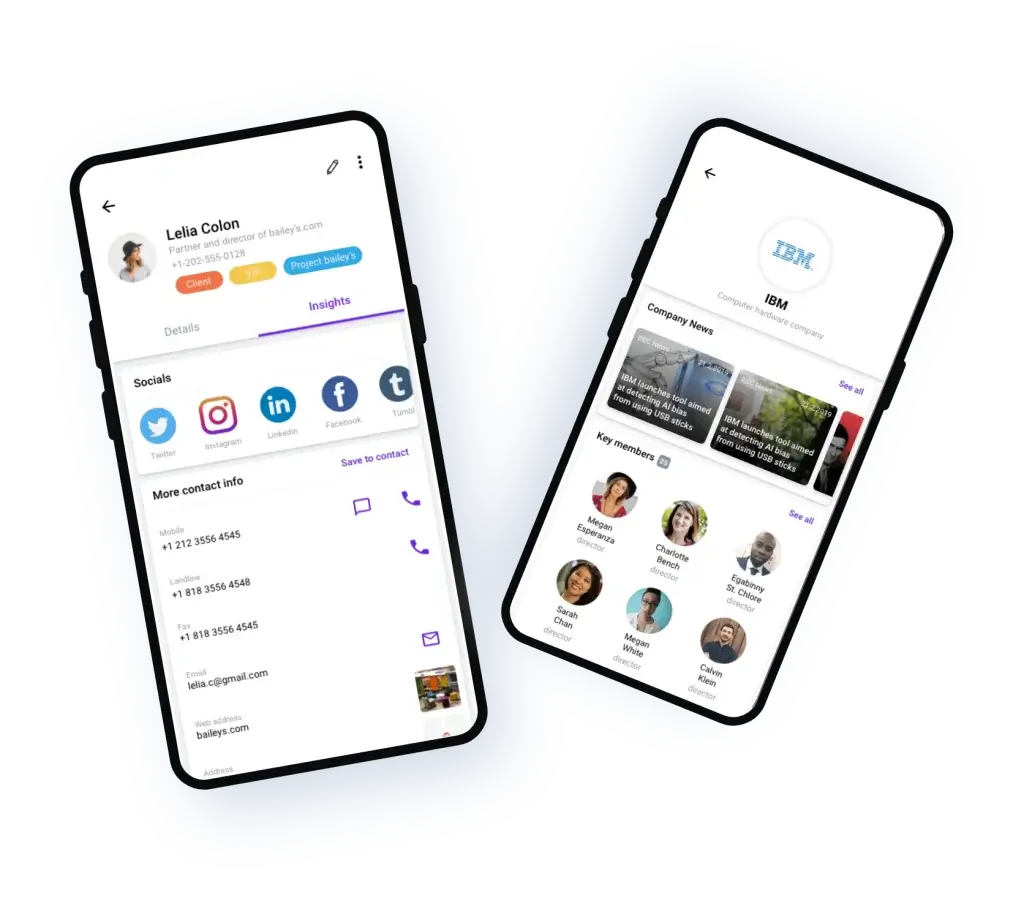
Leader’s caller ID does more than show a name – it pulls data from social networks, employment histories, and public databases to give you context about the person contacting you. When a lead calls, you can instantly see their role, company information, mutual connections, and recent news about their business. These insights help you tailor your pitch and build rapport quickly.
Beyond individual contacts, Leader provides company intelligence. Search for a business, and the CRM returns details like revenue range, industry, location, and key executives. You can filter contacts by tags, job titles, or notes to identify decision‑makers and segment your outreach. For teams working across multiple industries, this “people intelligence” reduces research time and improves engagement.
Task Management & Reminders
A successful sales process depends on disciplined follow‑up. Leader CRM includes a built‑in task manager that lets you create one‑off or recurring reminders for calls, meetings, proposals, or administrative work. Each task can be assigned to a team member, given a due date, and linked to a specific contact or deal. Because tasks appear on your pipeline cards and in a consolidated task list, there’s no need for separate to‑do apps.
You can also set automated reminders triggered by call events. For example, if you miss a call from a hot lead, Leader can automatically send that person a text or email to schedule a call. The CRM’s automation tools ensure that no opportunity slips through the cracks, even when you’re juggling numerous prospects at once.
Digital Business Card & Quotes
Leader includes a digital business card feature that makes follow‑ups more polished. After a call, you can send a personalised card containing your logo, company details, contact information, and availability. Leads can book meetings directly from the card without needing to search for your number. The card can be updated with new promotions or hours, ensuring that your brand always looks professional.
Another useful tool is instant quote generation. You can build branded quotes and proforma invoices from templates, add line items, prices, logos, and notes, then send them straight from the CRM. Recipients can sign digitally, speeding up approvals. This is particularly valuable for freelancers and agencies that need to deliver quotes quickly after a discovery call.
AI‑Powered Insights & Search Tools
Leader’s AI engine provides insights into your pipeline and your contacts. For instance, it can suggest optimal times to call a prospect based on their past behaviour or flag contacts who haven’t been contacted recently. AI also summarises key information about a company or contact, so you don’t have to scroll through long histories.
The search tools in Leader are powerful. You can search across notes, tags, job titles, and even external sources. The system auto‑updates contact details by pulling data from social networks, ensuring your records stay current. If you use Calendar.AI – Leader’s scheduling product – cross‑app search synchronises your meetings and contacts, creating a seamless workflow.

Pros and Cons
Advantages and Limitations
Positive
✅ Rapid setup and ease of use
✅ Affordable all‑inclusive pricing
✅ Automatic lead capture
✅ Integrated quoting and digital business cards
Negative
❌ Limited marketing automation
❌ iOS limitations for call automation
❌ Smaller ecosystem
❌ Newer player
Every CRM has strengths and weaknesses. Here’s a balanced view of what users appreciate about Leader CRM and where it might fall short.
✅ Pros
- Rapid setup and ease of use: Leader has a minimalist interface with drag‑and‑drop pipelines and intuitive navigation. You can onboard in minutes without special training.
- Affordable all‑inclusive pricing: At $12.5 per user per month on the annual plan ($15 when billed monthly), the platform includes all features – there are no locked tiers or hidden fees.
- Automatic lead capture: Calls are captured automatically with caller identification and data enrichment, saving time and ensuring accurate records.
- Integrated quoting and digital business cards: Built‑in tools help you send proposals and follow‑up documents without relying on third‑party apps.
- Mobile apps: Leader offers native apps for iOS and Android, so you can manage leads, make calls and update tasks on the go.
- International and multilingual support: With over 20 languages supported and data compliance across regions, Leader is accessible globally.
❌ Cons
- Limited marketing automation: Unlike HubSpot or Salesforce, Leader focuses solely on sales; it lacks advanced marketing automation like email drip campaigns or social media scheduling.
- iOS limitations for call automation: Some call‑logging and automation features are restricted on iOS due to Apple’s operating system, which may affect teams using iPhones.
- Smaller ecosystem: Leader doesn’t have as many third‑party integrations as bigger platforms. If you rely on dozens of apps, integration workarounds might be needed.
- Newer player: With fewer public reviews than long‑standing CRMs, Leader’s community and knowledge base aren’t as extensive. That said, the company offers strong support and is growing rapidly.
User Experience
User Interface and Experience
Ease of Use and Interface
Leader CRM is built with simplicity in mind. The dashboard centres around your visual sales pipeline, with each stage clearly labelled and colour‑coded. You can create pipelines for different products or teams, and customise the stages to match your sales process. Adding contacts or deals is straightforward: the CRM automatically pulls caller information, and you can manually create records from the dashboard or import them via CSV.
Within each contact record, the layout is clean. Call logs, messages, notes, and tasks appear in chronological order. A sidebar displays AI insights and people information, while quick action buttons allow you to send a message, add a task, or generate a quote. Thanks to the mobile apps, the interface is equally responsive on tablets and phones. Salespeople can update deals during a meeting or log notes while commuting, ensuring real‑time collaboration.
Performance and Reliability
Because Leader is hosted on Amazon Web Services (AWS), performance is robust. Pages load quickly, and call pop‑ups display instantly, even when working with a large database of contacts. The CRM runs in the cloud, so you don’t need to maintain servers. Automated backups and redundant data centres minimise downtime. In independent reviews, some users mention occasional glitches with the iOS app, but Leader’s customer support responds promptly. Android users experience smoother call logging due to fewer operating system restrictions.
Mobile and Collaboration Features
Leader’s mobile apps mirror the desktop experience. You can answer calls, view caller details, convert them into leads, add tasks, and send digital business cards directly from your phone. Collaboration features allow teammates to assign leads, share call notes, and view each other’s tasks. A feed displays updates in real time, giving everyone visibility into pipeline activities. These collaboration tools help small teams stay aligned without endless emails or Slack messages.

Business size fit
Leader CRM for Different Business Sizes
Leader CRM caters primarily to freelancers, solopreneurs, and small to midsize businesses seeking a cost‑effective way to manage leads. However, its features scale well for larger teams that need an integrated calling solution and AI insights. Let’s examine who benefits most from Leader.
Freelancers and Solo Entrepreneurs
Freelancers often juggle multiple clients across industries. Leader’s AI‑powered caller recognition and digital business card simplify client communication. It automatically organises calls and tasks, so you don’t have to use separate tools for contact management, reminders, and quoting. The low monthly cost is attractive for individuals who need professional CRM capabilities without enterprise pricing.
Small and Midsize Teams
For sales teams of up to a few dozen people, Leader offers visual pipelines, team collaboration tools, and automation. Everyone can see where deals stand, and managers can assign leads based on workload. The platform’s flat pricing means you won’t pay extra to unlock features as you add more users. Teams that make many phone calls or operate in industries like real estate, consulting, or B2B services will appreciate the caller ID and call notes.
Enterprises and Large Organisations
Leader CRM may not suit complex enterprise sales operations that require advanced marketing, reporting, or custom integrations across dozens of systems. Enterprises might prefer CRMs with extensive API ecosystems like Salesforce or Dynamics 365. However, if a department within a larger organisation wants a nimble tool for lead capture and quoting, Leader can still play a role. Its open API and webhooks enable integration with other business applications for custom workflows.
Pricing and Plans
How much does Leader CRM cost?
Leader CRM takes a straightforward approach to pricing: there are only two options, and both include access to the entire feature set.
Annual plan: $12.50 per user per month, billed annually.
Monthly plan: $15 per user per month, billed monthly.
With either plan, you receive unlimited tasks, notes, and labels, unlimited quote generation, 1 GB of file storage, AI‑powered people and company insights, calendar and meeting scheduling, and integrations. There are no tiers with restricted features; every subscriber gets full access from day one. Discounts for teams aren’t provided because the base price is already designed to be among the lowest in the CRM market. Enterprise‑level customers who need custom configurations can request a bespoke quote.
Tip: Choosing the annual plan reduces your per‑user cost by approximately 17 %. If you’re confident that Leader CRM will be a long‑term solution, opting for annual billing is the most economical choice.
Security and Compliance
Protection for Your Data
Data security is critical when storing customer information. Leader CRM implements several measures to protect your business data and comply with international standards.
Encryption & Data Protection
Leader CRM encrypts all data both in transit and at rest. This means that when you communicate with the platform through the mobile apps or web interface, your information is encrypted end‑to‑end. Sensitive details such as call logs, quotes, and notes cannot be intercepted or altered by unauthorized parties. The CRM also conducts automated backups and maintains multiple redundant copies of data across geographically distributed data centres. If a server fails, your information remains available and recoverable.
Hosting & Compliance
Leader hosts its platform on Amazon Web Services (AWS), a cloud provider with certifications such as ISO 27001 and SOC 2. AWS is trusted by governments and financial institutions, ensuring your data is stored in a secure environment with strict access controls. Leader CRM complies with the General Data Protection Regulation (GDPR) and other international data protection laws. You can export or delete your data at any time, which aligns with GDPR’s “right to be forgotten” requirements. Together, these safeguards offer enterprise‑grade security without the complexity of managing your own servers.
Support & Availability
Ongoing support is included with every subscription. Customers can reach the Leader team via email or in‑app chat, with most queries answered within 24 hours. A comprehensive Help Center provides guides, video tutorials, and FAQs covering pipeline creation, AI insights, tagging, and quoting. The support team also offers multilingual assistance, ensuring that language barriers don’t hinder adoption. Because the service is cloud‑based, uptime is high; any rare outages are addressed quickly.
Alternatives
Leader CRM vs Top Competitors
When selecting a CRM, it’s helpful to see how Leader stacks up against bigger names. Below is a comparison of key features among Leader, monday CRM, and Salesforce. Monday CRM is known for its project management roots and visual dashboards, while Salesforce dominates the enterprise market with a vast ecosystem. Leader occupies a niche focused on call management and ease of use.
| Feature Type | Leader CRM | Salesforce |
| AI Capabilities | Built‑in caller insights & people intelligence included | Added cost, starts at Enterprise tier |
| Storage Overage | 1 GB included (can purchase more) | $125/month per 500 MB |
| 24/7 Support | Included for all plans | +20 % of license cost |
| Mobile Access | Full-featured iOS & Android apps | Some features require +$50/user/month |
Comparing Leader vs monday CRM
While monday CRM excels at project‑style workflows and cross‑team collaboration, its CRM module has fewer sales‑specific tools and charges separately for advanced AI. Leader CRM focuses more narrowly on sales tasks such as call capture, quotes, and people intelligence. If your team already uses monday for project management, its CRM add‑on might suffice. Otherwise, Leader provides sales‑focused automations at a lower entry price.
Comparing Leader vs Salesforce
Salesforce offers a vast marketplace of integrations, customizable modules, and advanced analytics – but this power comes with higher costs and a steeper learning curve. Leader provides a streamlined alternative for SMBs that don’t require enterprise‑grade complexity. Salesforce may be overkill if you simply want to manage calls, send quotes, and automate follow‑ups. However, large organisations that need marketing automation, extensive reporting, and custom development will find Salesforce more flexible.
Conclusion
Final thoughts
Leader CRM carves out a unique position in the crowded CRM landscape. Instead of trying to be everything to everyone, it focuses on simplifying lead management, phone calls, and follow‑up tasks for small and midsize businesses. Its strengths lie in automatic caller recognition, AI‑powered people insights, straightforward pricing, and an intuitive interface that requires minimal onboarding. Built‑in quoting and digital business cards add professionalism without extra software. At $12.50 per user per month (annual billing), Leader delivers impressive value compared with traditional CRMs that charge extra for automation and support.
There are trade‑offs: Leader CRM lacks advanced marketing automation, has fewer third‑party integrations, and experiences occasional iOS limitations. But if your primary goal is to manage leads efficiently, close deals faster, and keep your team aligned, Leader CRM is a compelling option. With robust security, GDPR compliance, multilingual support, and a strong mobile experience, it stands out as a modern, AI‑powered solution for businesses that value simplicity and speed.
Frequently Asked Questions
Have more questions?
1. What types of businesses benefit most from Leader CRM?
Leader CRM is ideal for freelancers, solo entrepreneurs and small to midsize teams that rely heavily on phone calls and need a simple way to capture, organize and follow up on leads. Industries like consulting, real estate, professional services and agencies can quickly implement Leader without extensive training.
2. Does Leader CRM integrate with other tools?
Yes. Leader includes native integrations for calendar scheduling, email and document storage, and it offers an open API with webhooks. While its ecosystem is smaller than Salesforce’s, you can connect common apps like Google Workspace, Microsoft 365, Slack and Zapier to automate workflows.
3. How does Leader handle caller identification?
When a call comes in, Leader’s AI cross-references the phone number with social networks, company databases and online sources to display the caller’s name, job title and company information. You can immediately add notes, tag the caller and classify them as a lead, customer or vendor.
4. Can I create custom pipelines in Leader CRM?
Absolutely. You can build multiple sales pipelines with custom stages to reflect your sales process. Pipelines are drag-and-drop, allowing you to move deals between stages, assign owners and set deadlines quickly.
5. Is there a free trial?
Leader offers a free trial period, typically 30 days, so you can test the platform before committing. During the trial you have access to all features, including caller ID, quote generation and AI insights.
6. Does Leader CRM offer discounts for large teams?
No. Pricing is already kept low to provide value without complex tiers. Both the annual and monthly plans include all features for every user. For very large organisations, custom pricing can be discussed directly with Leader.
7. How secure is my data with Leader CRM?
Leader uses end-to-end encryption and hosts data on Amazon Web Services. All information is encrypted in transit and at rest, with regular backups and multi-layer redundancy. The platform complies with GDPR and other global data privacy regulations.
8. What are Leader’s main limitations compared to competitors?
Leader focuses on sales automation and lacks advanced marketing tools like drip campaigns or social media management. It also offers fewer third-party integrations than platforms like Salesforce. On iOS, some call-logging features are limited due to operating system restrictions.
9. Can I export my data if I decide to leave Leader CRM?
Yes. Leader allows you to export your contacts, call logs and deal information in CSV format. If you cancel your subscription, you can download your data to migrate to another system.
10. How does Leader’s AI help with sales?
The AI analyses contact data to provide insights on when to call, which prospects are most engaged and what information to mention during follow-ups. It also enriches contact records with social profiles, employment history and company details, saving you research time and improving the quality of your outreach.








