
Introduction
If you are researching Zendesk Sell as a sales CRM, the most important thing to know is this: Zendesk Sell is no longer a simple “yes or no” CRM decision.
Zendesk Sell is still a capable sales CRM with pipeline tracking, contact management, task automation, email tools, mobile access, and strong alignment with Zendesk Support. But Zendesk has officially announced that Sell will be retired on August 31, 2027.
That changes how you should evaluate it in 2026. If you already use Zendesk Sell, this review will help you understand what still works well and how to prepare for migration. If you are choosing a new CRM, this review will help you decide whether Zendesk Sell is still worth considering or whether a long-term alternative makes more sense.
Quick Overview
Zendesk Sell is best understood as a simple, sales-focused CRM built for teams that want clean pipeline visibility, easy communication tracking, and close alignment with Zendesk’s customer service tools.
Its biggest strength is usability. Your sales team can manage leads, deals, tasks, emails, calls, and customer context without needing a complicated CRM setup.
Its biggest weakness is now strategic rather than functional. Because the product has a retirement date, it is no longer the safest long-term CRM choice for new buyers.
| Category | Zendesk Sell Review |
| Best for | Existing Zendesk Sell users and Zendesk Support customers needing short-term sales CRM continuity |
| Not ideal for | New buyers looking for a long-term CRM investment |
| Starting price | $19 per user/month when billed annually |
| Free plan | No permanent free plan, but a free trial is available |
| Main concern | Zendesk Sell will be retired on August 31, 2027 |
| Best alternative path | Pipedrive for pipeline-focused sales teams, or HubSpot and Zoho CRM for broader CRM needs |
Important update: Zendesk Sell will be retired on August 31, 2027. Existing customers can continue using it until then, but new buyers should compare long-term CRM alternatives before committing.
What changed?
Zendesk Sell Retirement Update
Zendesk has announced that Zendesk Sell will be retired on August 31, 2027. Until that date, current customers can continue using the product as usual.
Zendesk also says it will no longer provide a sales CRM solution after Sell is retired. That means Zendesk Sell should now be viewed as a transition-stage product, not a future-proof CRM for new sales teams.
For existing users, the goal should be to protect your sales data, document your workflows, and plan a clean migration before the deadline. Zendesk has partnered with Pipedrive to support customers moving from Sell to another sales CRM.
What this means for you
- If you already use Zendesk Sell: You can keep using it while preparing your migration.
- If you are buying a new CRM: You should compare alternatives before choosing Sell.
- If you rely on Zendesk Support: Look for a CRM that keeps sales and support context connected.
- If you manage a larger team: Start migration planning early to avoid data and workflow disruption.
Software Specification
Zendesk Sell Key Features
Zendesk Sell is a sales CRM built around pipeline visibility, productivity, and customer context. It gives your team practical tools for managing leads, contacts, deals, communications, and sales activities in one workspace.
The feature set is not as deep as Salesforce or as marketing-heavy as HubSpot, but it is easy to understand. For many sales teams, that simplicity is exactly what drives adoption.
Unified Customer View
Zendesk Sell helps you see customer information across sales and service. This is especially useful if your company already uses Zendesk Support because sales reps can understand what is happening before contacting a prospect or customer.
Instead of working from scattered notes, email inboxes, and disconnected support tickets, your team can view a clearer customer timeline. That context helps reps avoid awkward outreach, duplicate communication, and missed relationship signals.
CRM expert note: This is one of Zendesk Sell’s strongest advantages. It is not just a CRM database. It works best when customer support context matters to the sales process.
Built-in Communication Tools
Zendesk Sell includes tools for managing sales conversations from inside the CRM. Your reps can work with emails, calls, tasks, notes, and activity tracking without jumping between too many tabs.
This helps sales teams maintain cleaner records. When activity is logged inside the CRM, managers get better visibility and reps spend less time updating deal notes manually.
- Track emails and customer communication history
- Log calls, notes, and follow-up activities
- Keep deal conversations connected to CRM records
- Reduce manual updates across separate sales tools
Sales Automation
Zendesk Sell gives sales teams automation tools for reducing repetitive admin work. You can use triggers, tasks, reminders, and workflow rules to keep deals moving through the pipeline.
This is helpful for teams that struggle with inconsistent follow-up. If reps forget next steps or managers do not have visibility into stalled opportunities, automation can create a more disciplined sales process.
Where it helps: Zendesk Sell is most useful for practical sales automation, such as task creation, follow-up reminders, lead routing, and pipeline updates.
Reporting and Pipeline Visibility
Zendesk Sell gives you a clear view of your pipeline, sales activities, and deal movement. You can track performance, monitor opportunities, and understand where revenue may be blocked.
The dashboards are easy to read, which makes them useful for small and mid-sized teams that need quick sales visibility without building complex reports from scratch.
For larger teams, reporting may feel more limited compared with enterprise CRMs. If you need advanced forecasting models, multi-layer reporting, or complex revenue operations analytics, you may need a more robust CRM.
Lead and Deal Scoring
Higher-tier Zendesk Sell plans include lead and deal scoring. This helps your team focus on the opportunities that are most likely to move forward.
Scoring can improve sales prioritization, especially when reps manage many leads at once. Instead of treating every opportunity equally, your team can focus on accounts with stronger engagement and better fit.
What to watch: Lead scoring is useful, but it should not replace sales judgment. Your team still needs a clear qualification process and clean CRM data.
Integrations and Marketplace Apps
Zendesk Sell connects with apps and integrations that help your team extend its CRM workflow. You can connect sales data with tools for marketing, billing, productivity, communication, and customer service.
Zendesk’s Marketplace is useful if your team already works inside the broader Zendesk ecosystem. You can add apps without rebuilding your entire stack from scratch.
- Connect sales and support workflows
- Use marketplace apps for extra functionality
- Integrate with communication and productivity tools
- Use APIs for custom sales workflow connections
Mobile App
Zendesk Sell has long been one of the stronger mobile-first CRMs. The mobile app is useful for outside sales teams, account managers, and reps who need to update deals while traveling.
Your team can access contacts, deals, tasks, and activities from the mobile app. That makes it easier to keep CRM data fresh after meetings, calls, and field visits.
Best for: Sales teams that need quick CRM updates from the road, not just desktop-based pipeline management.
Custom Fields and Smart Lists
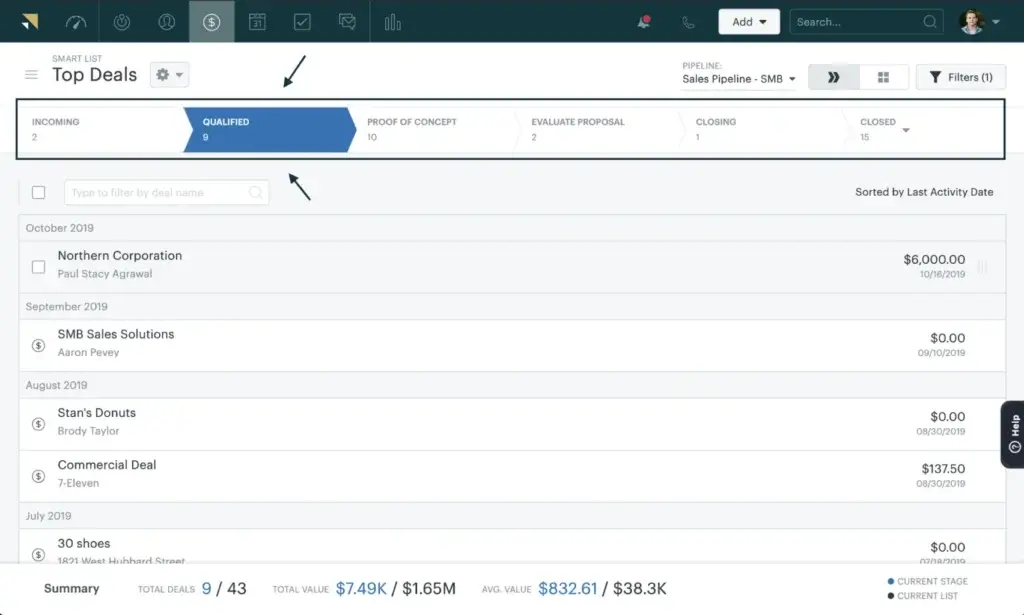
Zendesk Sell lets you customize records and organize pipeline views with Smart Lists. This helps reps focus on specific groups of leads, deals, contacts, and tasks.
Smart Lists are useful for day-to-day sales management. You can create focused views for hot leads, stalled deals, upcoming follow-ups, or opportunities by pipeline stage.
Zendesk Sell is flexible enough for standard sales workflows, but it is not as customizable as Salesforce or Microsoft Dynamics 365 Sales. If your CRM needs complex objects, custom modules, or highly advanced process design, you may outgrow it.

Pros and Cons
Zendesk Sell Pros, Cons, and Benefits
Zendesk Sell has always been strongest when simplicity, adoption, and sales-service alignment matter more than deep enterprise customization.
However, the retirement announcement changes the buying decision. The product may still work well for existing customers, but it is harder to recommend as a new long-term CRM investment.
Positive
✅ Easy-to-use sales CRM
✅ Strong Zendesk Support alignment
✅ Good mobile experience
✅ Clear pipeline visibility
✅ Practical sales automation
Negative
❌ Retiring on August 31, 2027
❌ Not ideal for new CRM buyers
❌ Limited marketing automation
❌ Less customizable than enterprise CRMs
❌ Some data may require careful export planning
✅ Pros
- Easy to adopt: The interface is clean, direct, and less intimidating than many enterprise CRMs.
- Good for Zendesk users: Sales and support teams can work with more shared customer context.
- Strong mobile usability: Reps can manage contacts, deals, and activities while away from their desks.
- Clear pipeline management: Smart Lists and deal views make pipeline tracking easier.
- Useful automation: Teams can reduce repetitive admin work and standardize follow-up tasks.
❌ Cons
- Scheduled retirement: Zendesk Sell will be retired on August 31, 2027.
- Risky for new buyers: New CRM buyers may not want to implement a product with a set end date.
- Limited marketing tools: It is not a full marketing automation platform like HubSpot.
- Less advanced customization: Complex sales operations may need Salesforce, Zoho CRM, or Dynamics 365.
- Migration planning required: Existing users need to export and move data before the retirement deadline.
🌟 Main Benefits You’ll Experience
The biggest benefit of Zendesk Sell is that it keeps your sales process simple. Reps can manage their daily work without fighting the system.
For support-heavy businesses, the value is even clearer. If your customer support history matters to sales conversations, Zendesk Sell can help your reps understand customer context before outreach.
That said, the biggest benefit now applies mostly to existing users. If your team already works in Zendesk Sell, you can continue using it while preparing a thoughtful migration instead of rushing into a new CRM.
User Experience
User Interface and Experience
Zendesk Sell is built for sales teams that want a CRM they can actually use every day. The interface is clean, the navigation is simple, and core sales actions are easy to find.
This matters because CRM adoption is often the real problem. A platform can have hundreds of features, but if reps avoid using it, your data quality and forecasting accuracy will suffer.
🖥️ Clean, Minimal Interface
The layout is focused around sales activity. Leads, contacts, deals, tasks, and communications are organized in a way that feels approachable for new users.
You do not need a technical admin to understand the basics. Smaller teams can get started quickly, while growing teams can add more structure as their process matures.
⚡ Fast Day-to-Day Workflow
Zendesk Sell works well for common CRM tasks such as updating deal stages, logging notes, creating tasks, checking pipeline views, and reviewing recent communication.
The experience feels practical rather than overloaded. That is a strength for teams that want a CRM to support selling, not slow it down.
📱 Strong Mobile Experience
The mobile app is one of Zendesk Sell’s more valuable usability strengths. Reps can manage sales activity from the field, which is useful for outside sales, account management, and customer visits.
- Access contacts and deals from mobile
- Log notes after meetings
- Review tasks and upcoming activities
- Update opportunities without waiting to return to a desk
🔍 Smart Lists and Focused Views
Smart Lists let your team create focused CRM views. For example, you can monitor deals expected to close this month, leads not contacted recently, or opportunities stuck in a specific stage.
This improves sales discipline. Reps can start their day from a prioritized list instead of scanning the entire database.
🤝 Sales and Support Collaboration
If your company uses Zendesk Support, Zendesk Sell can help your sales team avoid working without a customer service context. This is valuable for renewals, expansion conversations, and customer success handoffs.
For example, a rep can see that a customer has unresolved support issues before trying to upsell. That prevents poor timing and creates a better customer experience.
Business Size Fit
Zendesk Sell for Different Business Sizes
Zendesk Sell can still fit certain teams, but the right answer depends heavily on whether you are an existing customer or a new buyer.
For existing users, Zendesk Sell can remain useful while you plan your next CRM move. For new buyers, the retirement timeline makes it harder to justify unless you have a very specific short-term need.
| Business Type | Fit for Zendesk Sell | Why |
| Existing Zendesk Sell users | ⭐⭐⭐⭐☆ | Still usable until retirement, but migration planning should start early. |
| New small business buyers | ⭐⭐☆☆☆ | Simple CRM needs may be better served by Pipedrive, HubSpot, or Zoho CRM. |
| Zendesk Support customers | ⭐⭐⭐☆☆ | Useful for short-term sales-service alignment, but not a long-term CRM plan. |
| Growing sales teams | ⭐⭐☆☆☆ | Retirement risk makes it less suitable for teams building a scalable CRM foundation. |
| Enterprise sales teams | ⭐☆☆☆☆ | Large teams usually need deeper customization, governance, and long-term CRM stability. |
My recommendation is simple: if you already use Zendesk Sell, use the remaining time wisely. If you are starting fresh, compare it against CRM platforms that have a clearer long-term roadmap.
Pricing and Plans
How Much Does Zendesk Sell Cost?
Zendesk Sell pricing starts at $19 per user/month when billed annually. The plans move up based on sales team size, reporting needs, automation, permissions, and enterprise requirements.
However, price should not be your only deciding factor. Because Zendesk Sell is scheduled for retirement, the real cost includes migration planning, data cleanup, workflow rebuilding, and team retraining before August 31, 2027.
💰 Zendesk Sell Pricing Table (2026)
| Plan Name | Best For | Monthly Price Per User |
| Sell Team | Small teams that need basic lead, contact, and deal management | $19/month, billed annually |
| Sell Growth | Growing teams that need a fuller sales process with forecasting and analytics | $55/month, billed annually |
| Sell Professional | Scaling teams that need task automation, scoring, permissions, and roles | $115/month, billed annually |
| Sell Enterprise | Multi-department sales teams with more advanced CRM needs | $169/month, billed annually |
📌 Key Pricing Takeaways
- Sell Team is the entry-level plan for basic sales CRM needs.
- Sell Growth is better for teams that want stronger pipeline management and reporting.
- Sell Professional adds more advanced sales operations features.
- Sell Enterprise is aimed at larger teams with more advanced needs.
The pricing is competitive compared with many sales CRMs. Still, the retirement timeline should be part of your ROI calculation.
If you are comparing CRM costs, it may help to review our best CRM software guide and compare Zendesk Sell against long-term alternatives.
What should you consider instead?
Zendesk Sell Alternatives
Because Zendesk Sell is being retired, this section is no longer optional. If you are a new buyer or an existing customer planning migration, you should compare alternatives before making your next CRM decision.
The best replacement depends on what you liked about Zendesk Sell. Some teams need a visual pipeline. Others need marketing automation, enterprise customization, or a more affordable all-in-one CRM.
| CRM Alternative | Best For | Why Consider It |
| Pipedrive | Sales pipeline management | Zendesk’s recommended migration path and a strong fit for visual sales teams. |
| HubSpot CRM | Sales and marketing alignment | Better if you need CRM, marketing automation, forms, email campaigns, and service tools. |
| Zoho CRM | Cost-conscious growing teams | Strong customization and automation at a competitive price point. |
| Salesforce Sales Cloud | Enterprise sales operations | Best for complex workflows, advanced customization, and large sales organizations. |
| Freshsales | Small and mid-sized sales teams | Combines CRM, communication tools, automation, and AI features in one platform. |
For most sales-focused teams leaving Zendesk Sell, Pipedrive is the most natural comparison because it is built around pipeline management. For teams that want broader marketing and sales alignment, HubSpot CRM may be a better long-term fit.
If you need deeper customization, compare Zoho CRM and Salesforce before deciding.
Plan your next move
Zendesk Sell Migration Checklist
If you already use Zendesk Sell, do not wait until the retirement deadline is close. CRM migrations often take longer than expected because sales data is messy, workflows are undocumented, and teams need time to adapt.
Start with a clean audit of your current setup. Then choose the CRM that can support your sales process for the next several years.
✅ Migration Checklist
- Export leads, contacts, deals, notes, tasks, Smart Lists, and sales reports.
- Identify data that may not export cleanly, such as email history, call logs, and documents.
- Map your current pipelines, stages, custom fields, owners, and permissions.
- Review which automations need to be rebuilt in the new CRM.
- Check whether your new CRM integrates with Zendesk Support.
- Clean duplicate contacts and outdated deal records before importing.
- Run a test migration before moving your full sales database.
- Train your sales team before switching systems fully.
The best migration is not just a data transfer. It is a chance to improve your CRM structure, remove outdated workflows, and rebuild your sales process around cleaner data.
Security and Compliance
Protection for Your Data
Zendesk is built on enterprise-grade cloud infrastructure and provides security controls designed to protect customer data. This matters because CRM systems store sensitive sales conversations, contact details, activity history, and customer relationship data.
For Zendesk Sell users, security is not the main concern. The bigger concern is making sure your data is exported and migrated correctly before the product retirement date.
🔐 Key Security Features
- ✅ Encryption at rest: Zendesk encrypts service data at rest using AES-256 key encryption.
- ✅ Cloud infrastructure: Zendesk hosts service data primarily in AWS data centers.
- ✅ Security monitoring: Zendesk uses monitoring and alerting systems to detect suspicious activity.
- ✅ Access controls: Teams can manage permissions and user access based on roles.
- ✅ System availability: Zendesk maintains public system status information.
📋 Compliance and Governance
- ✅ GDPR support: Zendesk provides tools and agreements to support customer privacy obligations.
- ✅ SOC 2 and ISO-aligned infrastructure: Zendesk uses AWS data centers with recognized security certifications.
- ✅ Data locality options: Zendesk offers regional hosting options for certain plans and products.
- ✅ HIPAA configuration options: Certain Zendesk solutions can be configured for HIPAA-related needs where eligible.
If you operate in a regulated industry, review Zendesk’s Trust Center and your contract terms before relying on any compliance claim. You should also check whether your next CRM provides the same level of security, data residency, and access governance.
Conclusion
Final Thoughts
⭐ Overall Rating: 8.0/10
Choosing a solution like Zendesk Sell is no longer just about managing contacts, tracking deals, or improving sales productivity. It is also about planning around the product’s official retirement timeline.
Zendesk Sell still has real strengths. It is easy to use, strong for pipeline visibility, useful on mobile, and valuable for teams that already rely on Zendesk Support.
But because Zendesk Sell will be retired on August 31, 2027, you should not evaluate it the same way you would evaluate a CRM with a long-term product roadmap.
🔍 What You’re Really Getting
Here’s a quick recap of what Zendesk Sell offers:
- A simple sales CRM for leads, contacts, deals, and activities
- Clear pipeline visibility for sales reps and managers
- Built-in communication tracking for sales conversations
- Useful mobile access for reps working outside the office
- Strong customer context when paired with Zendesk Support
- A transition window for current customers before retirement
For existing users, Zendesk Sell can still serve as your sales command center while you prepare your next move. For new buyers, however, the retirement date makes it difficult to recommend as a long-term CRM investment.
👥 Is It the Right Fit?
If you already use Zendesk Sell, the right move is not panic. The right move is planning. Audit your data, document your workflows, compare CRM alternatives, and give your team enough time to migrate carefully.
If you are a new CRM buyer, I would only consider Zendesk Sell in rare short-term cases. Most teams will be better served by a CRM with a clearer future, such as Pipedrive, HubSpot CRM, Zoho CRM, Salesforce, or Freshsales.
Still comparing? Explore our best CRM software guide to see how Zendesk Sell compares with other leading CRM platforms.
🧠 Final Word from a CRM Expert
After working with many CRM platforms, one thing is clear: the best CRM is not always the one with the longest feature list. It is the one your team can trust, use consistently, and build around for the future.
Zendesk Sell used to be a strong option for teams that wanted a clean, practical sales CRM connected to Zendesk’s service ecosystem. In 2026, it is better viewed as a CRM for existing customers who need a careful transition plan.
If you are starting fresh, choose a CRM that will support your sales process beyond 2027.
Frequently Asked Questions
Have more questions?
Is Zendesk Sell being discontinued?
Yes. Zendesk Sell will be retired on August 31, 2027. Existing customers can continue using the product until that date, but they should start planning migration to another CRM before the deadline.
What is Zendesk Sell used for?
Zendesk Sell is a sales CRM used to manage leads, contacts, deals, tasks, sales activity, communication history, pipeline visibility, and sales reporting in one workspace.
Can I still use Zendesk Sell?
Yes. Current Zendesk Sell customers can continue using the platform until August 31, 2027. However, you should export your data and prepare a CRM migration plan well before the retirement date.
Should new customers choose Zendesk Sell?
In most cases, no. Zendesk Sell may still work for existing users, but new CRM buyers should usually choose a platform with a clearer long-term roadmap, such as Pipedrive, HubSpot CRM, Zoho CRM, Salesforce, or Freshsales.
How much does Zendesk Sell cost?
Zendesk Sell pricing starts at $19 per user/month when billed annually. Higher plans include Sell Growth at $55, Sell Professional at $115, and Sell Enterprise at $169 per user/month when billed annually.
Does Zendesk Sell integrate with Zendesk Support?
Yes. Zendesk Sell can connect sales and support context, which is one of its strongest advantages for teams already using Zendesk Support to manage customer service conversations.
What is the best Zendesk Sell alternative?
Pipedrive is a strong alternative for sales pipeline management and is Zendesk’s recommended migration path. HubSpot CRM, Zoho CRM, Salesforce, and Freshsales are also worth comparing depending on your needs.
Is Zendesk Sell good for small businesses?
Zendesk Sell can be easy for small businesses to use, especially if they already use Zendesk Support. However, new small business buyers should be cautious because Zendesk Sell is scheduled for retirement.
Does Zendesk Sell include marketing automation?
Zendesk Sell includes sales-focused tools, but it is not a full marketing automation platform. If you need landing pages, nurture campaigns, ad tracking, and lifecycle marketing, HubSpot CRM or Zoho CRM may be a better fit.
What data can I export from Zendesk Sell?
Zendesk says users can export data such as leads, contacts, deals, notes, tasks, Smart Lists, full account data, and total sales reports. Some activity history, call logs, emails, appointments, and documents may require extra planning.