
Introduction
Choosing payroll and HR software is not only about making sure people get paid on time. It affects how easily you can hire employees, stay compliant, track hours, manage benefits, and reduce administrative work as your business grows. In this Gusto review, you will get a practical look at what Gusto does well, where it falls short, and which types of businesses are most likely to benefit from it.
Gusto has built a strong reputation by focusing on what many small businesses need most – payroll, benefits, hiring and onboarding, time tracking, and HR tools that are easy to use without requiring a large HR team. That practical, small-business-first approach is a major reason why Gusto remains one of the most relevant payroll and HR platforms in 2026.
What Is Gusto?
Gusto is a payroll and HR platform designed primarily for small and growing businesses. You can use it to run payroll, file payroll taxes, onboard employees, manage benefits, track time, store employee information, and handle a range of compliance-related tasks from one system.
Its biggest strength is accessibility. Many payroll systems can feel rigid, outdated, or overly complicated for smaller teams. Gusto takes a more modern approach, with a cleaner interface and a product that is easier for non-HR specialists to manage.
Background and Positioning
Gusto positions itself as an all-in-one platform for payroll, benefits, and HR. While payroll is still the core of the product, the platform now reaches further into benefits administration, hiring and onboarding, time and attendance, performance management, compensation, compliance support, and employee financial tools. In practice, that means Gusto is no longer just a payroll processor. It is increasingly a lightweight people operations platform for SMBs.
Target Users and Use Cases
Gusto is especially relevant for several buyer types:
- Small businesses – You get payroll, HR, and benefits in one approachable platform.
- Growing companies without a large HR team – Gusto helps automate processes that would otherwise stay manual.
- Businesses hiring hourly and salaried staff – Payroll, PTO, and time tracking work well together.
- Companies that want benefits built into payroll – Health insurance, 401(k), and workers’ comp are meaningful advantages.
- Employers switching from spreadsheets or older payroll systems – Gusto is a strong upgrade in usability.
That said, Gusto is not the best fit if you need highly complex enterprise HCM functionality, deeper global payroll coverage, or advanced workforce planning features built for multinational organizations. It is strongest when you want easy-to-manage payroll and HR for a U.S.-focused small or mid-sized business.
Core Features of Gusto
How Does Gusto Work?
Gusto stands out because it ties payroll, time, benefits, onboarding, and basic HR tools together in one system. For most small businesses, that is exactly the value. You are not just buying payroll runs. You are buying a simpler way to manage people operations without piecing together multiple systems.
Payroll and Tax Filing
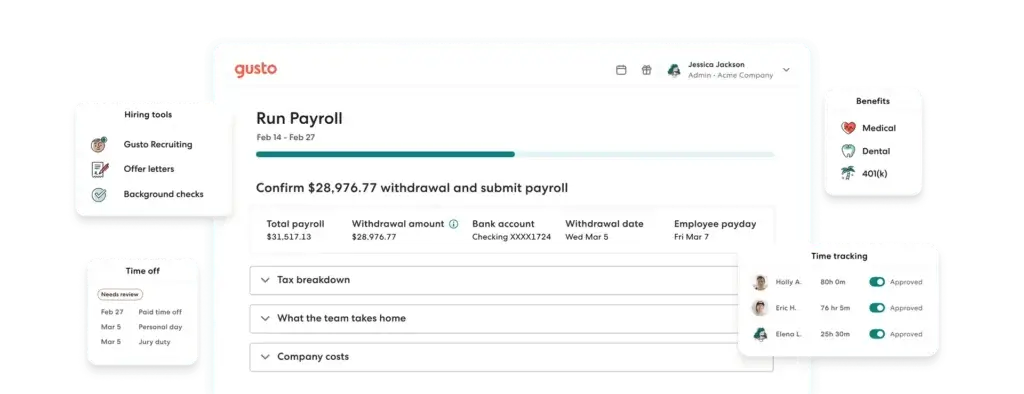
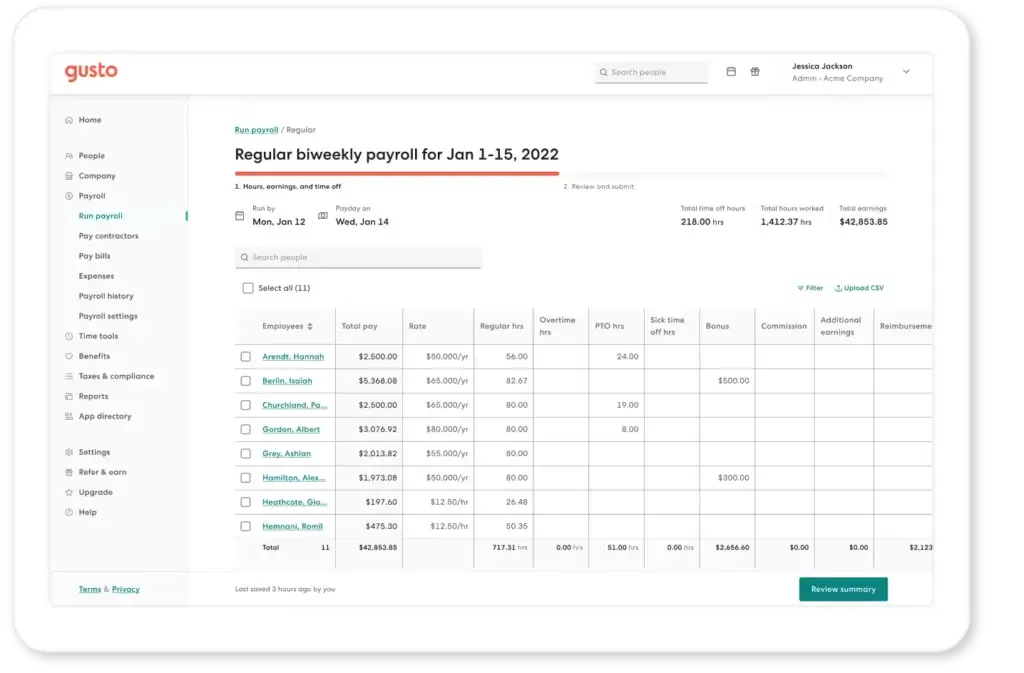
Payroll is still Gusto’s strongest feature. The platform is designed to automate payroll calculations, tax filings, and payments, helping employers reduce manual work and lower the risk of compliance mistakes. It also supports unlimited payrolls per month, which is especially useful for businesses that need flexibility around bonus runs, corrections, or off-cycle payroll.
Employee Self-Onboarding
Gusto makes onboarding relatively painless. You enter a new employee’s basic information, choose the documents they need to complete, and invite them to self-onboard. Employees can then fill out and e-sign new hire paperwork, such as W-4s and I-9s, online. This is one of the product’s clearest advantages for small businesses that want to cut paperwork and back-and-forth emails.
Benefits Administration
Benefits are a major part of Gusto’s value proposition. The platform supports health insurance, 401(k), workers’ compensation, HSAs, dental and vision, commuter benefits, and other add-ons. Employees can enroll online, add dependents, and review plan details directly from their accounts, which makes Gusto more complete than many payroll-first tools.
Performance and Employee Feedback
Gusto has also expanded into talent management. Its performance tools are built around check-ins, real-time feedback, and structured assessments that help managers support development without adopting a separate HR platform. These features are useful, but they are still more lightweight than specialized performance management software.
Compensation and Reporting
For growing businesses, Gusto’s compensation and reporting capabilities add practical depth. Compensation benchmarking uses Gusto payroll data to help employers understand pay ranges by role, location, and company size. Reporting is helpful for everyday payroll and workforce visibility, though it is not as advanced as what you would expect from a larger HCM platform.
Contractor Payments
Gusto is also a strong option for companies working with contractors. It offers a contractor-only plan, domestic contractor payments, and 1099 creation and filings. This makes it a practical choice for startups, agencies, and lean businesses that are not yet managing a large W-2 workforce.
Compliance Support
Another reason Gusto remains popular is compliance guidance. The system helps with payroll taxes, state registration workflows, time-off rules, and other common requirements that can overwhelm smaller employers. It is not a substitute for legal advice, but it does reduce the amount of compliance work you have to manage manually.
Time Tracking and PTO
Gusto also brings time tracking into payroll, which is a meaningful operational benefit. Employees can track hours, request time off, and sync approved time directly with payroll. PTO balances update automatically, and the system can help businesses apply state-specific policies for breaks, sick leave, and holidays. For smaller teams, this kind of built-in connection is often more valuable than a separate best-of-breed time app.
Business Operations Features
Gusto Benefits, Time, and HR Tools
Gusto’s product is more useful than a basic payroll engine because the surrounding HR tools are tightly connected to the payroll system. That connection is what makes the platform more efficient in day-to-day operations.
Health Insurance and Broker Integration
Gusto offers health insurance administration and can also integrate an existing broker in many cases. That flexibility matters because many small businesses do not want to rebuild their benefits setup from scratch. If Gusto acts as your broker, health insurance administration is included at no extra cost beyond premiums, which is a strong value point.
401(k) and Financial Benefits
Through its Guideline-powered 401(k), Gusto helps employers offer retirement benefits with automated payroll-connected administration. This is one of the areas where Gusto feels more mature than entry-level payroll providers, since retirement benefits are often outsourced or handled through a disconnected vendor.
Workers’ Compensation
Gusto also supports pay-as-you-go workers’ compensation through partners, syncing premiums with payroll to reduce estimation errors and simplify audits. This is a practical feature for employers with changing payroll totals or seasonal staffing patterns.
Time Tracking and Workforce Costing
Time tracking on Gusto’s Plus and Premium plans includes project tracking, workforce cost reports, and syncing with payroll. It also supports integrations with tools like QuickBooks Online, Xero, Homebase, Deputy, Connecteam, and 7shifts. For employers that care about job costing or labor reporting, this is a stronger offering than Gusto sometimes gets credit for.
Hiring and Onboarding
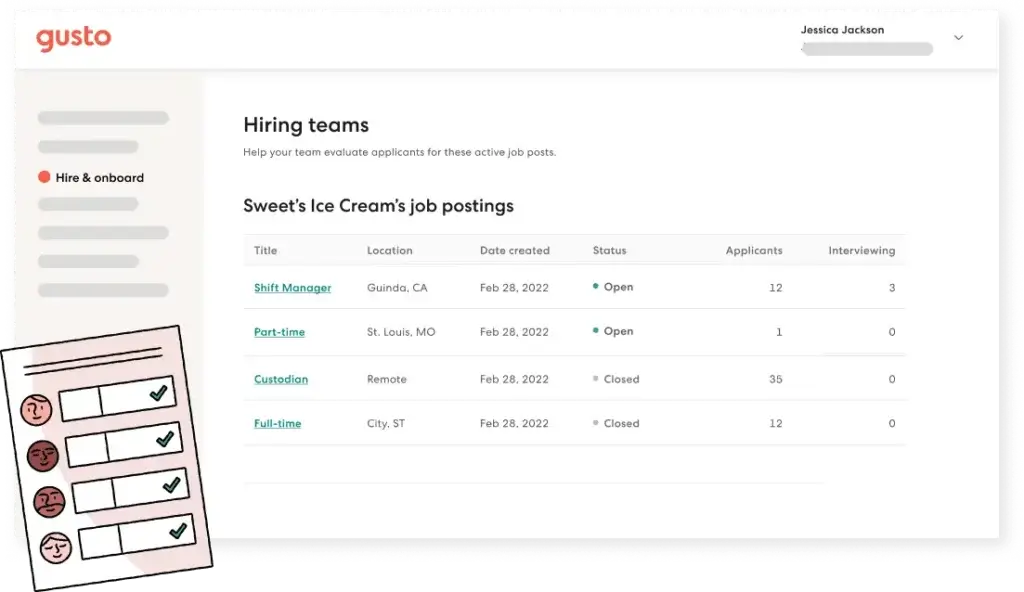
Gusto’s hiring and onboarding workflows are especially attractive for businesses that do not have a formal HR operations team. The self-onboarding flow saves time, improves data accuracy, and makes the new hire process feel more modern. For many SMBs, that alone can be a compelling reason to adopt the platform.
Pros and Cons
Benefits and Limitations of Using Gusto
Positive
✅ Payroll is genuinely easy to run
✅ Very easy to use for small businesses
✅ Benefits are a real differentiator
✅ Onboarding is efficient
✅ Transparent pricing for main plans
Negative
❌ HR depth is still mid-market light
❌ Add-ons can increase total cost
❌ International needs are limited
❌ Mobile and desktop parity is not perfect
Strengths & Benefits
Gusto gets a lot right if your business wants payroll and HR software that is powerful enough to be useful, but simple enough to manage without a specialist team.
- Payroll is genuinely easy to run – This is the platform’s clearest strength.
- Very easy to use for small businesses – You get more than payroll without jumping into enterprise-level cost or complexity.
- Benefits are a real differentiator – Health insurance, 401(k), and workers’ comp make the platform feel complete.
- Onboarding is efficient – Self-onboarding reduces paperwork and saves admin time.
- Transparent pricing for main plans – Gusto is easier to budget than many custom-quote payroll competitors.
Limitations & Drawbacks
Gusto is strong overall, but it is not the ideal platform for every buyer.
- HR depth is still mid-market light – It covers common needs well, but not advanced HCM use cases.
- Add-ons can increase total cost – Performance, support, and some HR features may require upgrades.
- International needs are limited – Gusto is much stronger for U.S.-centric employers than for global payroll complexity.
- Mobile and desktop parity is not perfect – Some users say certain features are easier to manage in-browser.
Operational Fit
Gusto User Experience, Support, and Security
Software fit is not only about features. It also depends on how easy it is to adopt, whether support is reliable, and whether the vendor can be trusted with sensitive payroll and employee data.
Ease of Use
Ease of use is one of Gusto’s biggest strengths. Public review patterns consistently highlight the platform’s intuitive interface, simple payroll workflow, and accessible onboarding experience. This is especially valuable for business owners, office managers, and admins who are handling payroll and HR as only one part of their job.
Implementation Experience
Implementation is usually more manageable than with larger payroll or HCM systems. Gusto is designed for smaller businesses, so setup tends to be more straightforward, especially if you are moving from spreadsheets or a basic payroll provider. That said, more complex tax setups, multi-state payroll, benefits transitions, and time-tracking policies still require careful configuration.
Customer Support
Support is a mixed but generally positive area. Many users speak well of the onboarding experience and say support is helpful, especially for payroll basics and compliance setup. At the same time, G2 review summaries also show that inconsistent customer support is one of the recurring complaints. I would not call support a deal-breaker, but I would not call it a flawless strength either.
Security and Compliance
Gusto presents a credible security profile for a payroll platform. The company says it maintains SOC 1 and SOC 2 reports updated annually and has a dedicated security team, formal security policies, and trust-center access for customers under NDA. For most SMB buyers, that is the kind of baseline security transparency you want to see from a payroll vendor handling sensitive employee data.
Compliance Guidance
Gusto is not just strong in payroll automation. It also helps with compliance workflows tied to time off, payroll taxes, benefits administration, and onboarding documentation. That practical compliance layer is a big reason why so many small businesses view Gusto as more than a payroll tool.
Pricing
Gusto Pricing & Plans
Gusto pricing is one of the more transparent parts of the buying process. Unlike many payroll providers that rely on custom quotes, Gusto publishes its main pricing tiers publicly. That is a meaningful advantage if you want to compare options before talking to sales.
Contractor-Only Plan
Gusto offers a contractor-only plan for businesses that have not hired W-2 employees yet. At the time of writing, it is listed as a limited-time offer at $0 per month plus $6 per contractor for the first six months, with features such as domestic contractor payments, four-day pay, and 1099 creation and filings. This makes Gusto one of the more appealing payroll options for contractor-heavy startups and lean businesses.
Simple Plan
The Simple plan starts at $49 per month plus $6 per person. It is designed for small businesses that need single-state payroll, unlimited payroll runs, tax filings and payments, and basic PTO policies. This is the most affordable entry point for employers with straightforward payroll needs.
Plus Plan
The Plus plan starts at $80 per month plus $12 per person. It adds multi-state payroll, next-day pay, and built-in time tracking. For many growing businesses, this is the most practical tier because it starts to connect payroll with broader workforce operations.
Premium Plan
The Premium plan starts at $180 per month plus $22 per person. It includes dedicated support, access to certified HR experts, performance and compensation management, custom reports, priority support, and payroll migration assistance. If you want a more guided experience and stronger HR support, this is the tier that makes the most sense.
Add-Ons and Extra Costs
Some features sit outside the main plan bundle. Gusto offers add-ons such as Priority Support, HR Resources, Performance, Time & Attendance Plus, and other financial or tax-related services. This means Gusto’s pricing is transparent, but your full monthly cost can still rise as your needs become more advanced.
Pricing Table
The table below gives a practical overview of how Gusto’s pricing works today.
| Feature Type | Gusto | What it means for buyers |
| Contractor-only plan | $0/mo for 6 months + $6 per contractor | Strong option for contractor-first businesses |
| Simple plan | $49/mo + $6 per person | Best for single-state payroll and basic HR needs |
| Plus plan | $80/mo + $12 per person | Best for multi-state payroll and built-in time tracking |
| Premium plan | $180/mo + $22 per person | Best for added HR support, reporting, and guidance |
| Benefits administration | Included if Gusto is your broker | Can improve value if you want payroll and benefits together |
For many SMB buyers, Gusto’s pricing is one of its strongest competitive advantages. It is not the cheapest payroll software on the market, but it is often easier to justify because you can clearly see what each tier includes and how the product expands as your business grows.
Use Cases
Who Should Use Gusto?
Gusto is not for every company, but it fits several buyer groups especially well.
Small Businesses That Need Payroll Plus HR
If your business wants more than payroll, but not the complexity of a full enterprise HCM, Gusto is a strong fit. It gives you payroll, onboarding, benefits, and time tools in one place without becoming overwhelming.
Startups and Lean Teams
If your company does not have a dedicated HR department, Gusto makes a lot of sense. The product is approachable enough for founders, office managers, finance admins, and operations leads to manage confidently.
Contractor-Heavy Businesses
Gusto deserves serious consideration if you primarily pay contractors. The contractor-only plan is practical, affordable, and easier to manage than many traditional payroll services.
Growing Employers With Benefits Needs
If you want payroll tied closely to health insurance, retirement benefits, and employee self-service, Gusto is more compelling than a payroll-only tool. This is one of the main areas where it stands apart from simpler competitors.
When Gusto Might Not Be Right
Gusto may not be the best choice if you need broader international payroll, highly complex enterprise compliance requirements, or deeper workforce planning and HCM functionality. In those cases, a platform like Rippling, Paychex, or Workday may fit more naturally depending on your priorities.
User Feedback
Gusto Customer Reviews
Gusto reviews are strong overall. Current public review snapshots show about 4.6 out of 5 on G2 from more than 9,000 reviews, while Capterra also shows very strong user sentiment with thousands of reviews and repeated praise for ease of use, value, and payroll simplicity. That review volume gives Gusto more credibility than smaller payroll tools with limited feedback.
What Users Like Most
The most common positives are consistent. Users regularly praise Gusto for its clean interface, easy payroll runs, digital onboarding, employee self-service, time tracking, benefits access, and the fact that it reduces paperwork for both admins and employees. Many reviewers also say it is a major upgrade over older payroll systems and manual processes.
Common Complaints
The most recurring drawbacks are support inconsistency, limited customization in some reports, and the fact that certain features are easier to manage on a desktop than on mobile. Some buyers also feel that costs rise as they move into higher plans or add-on modules.
Editor’s Take on the Review Pattern
The review pattern is very clear. Gusto is not loved because it is the deepest HR platform in the market. It is loved because it solves everyday payroll and people operations problems with much less friction than many alternatives. That is exactly why it continues to perform so well with small business buyers.
Competitors
Competitor Alternatives to Gusto
Gusto is most often compared with platforms like Rippling, BambooHR, ADP Run, and Paychex Flex. The right alternative depends on whether you care most about SMB simplicity, broader IT and HR operations, deeper HR structure, or more traditional payroll support.
| Feature Type | Gusto | Rippling | BambooHR | ADP Run |
| Core angle | Payroll, benefits, and HR for SMBs | HR, payroll, IT, and device management | HR software with payroll add-ons | Traditional payroll and HR platform |
| Best for | Small and growing businesses | Ops-heavy businesses needing more control | HR-centric SMB teams | Businesses wanting a large payroll provider |
| User experience | Very intuitive and approachable | Modern but more operationally dense | Clean and HR-friendly | Less modern than newer rivals |
| Benefits strength | Strong for SMBs | Strong but broader platform focus | More HR-first than payroll-first | Varies by package and setup |
| Payroll depth | Excellent for SMB payroll | Strong with broader admin tools | More limited as a payroll-first choice | Strong traditional payroll coverage |
| Overall angle | Best balance of simplicity and value | Best for broader operational control | Best for HR process structure | Best for buyers comfortable with legacy payroll vendors |
Compared with Rippling, Gusto is usually easier to adopt and better focused for businesses that mainly need payroll, onboarding, benefits, and basic HR. Rippling is stronger if you want deeper IT management and a more operations-heavy platform. Compared with BambooHR, Gusto is usually the better pick when payroll is central to your buying decision, while BambooHR tends to appeal more to HR teams that want people management first. Compared with ADP Run, Gusto often feels more modern, transparent, and user-friendly for smaller employers.
To summarize it simply, Gusto is one of the best payroll and HR platforms for small businesses that want to keep things simple without settling for bare-bones functionality.
Best Practices
Getting Started with Gusto
To get the most out of Gusto, you should make a few smart decisions early.
Choose the Right Plan for Your Complexity
Do not evaluate Gusto only on its base price. Think about whether you need multi-state payroll, built-in time tracking, certified HR support, or performance tools. For many growing teams, the Plus plan is where Gusto becomes much more useful.
Map Payroll and Time Together
One of Gusto’s biggest strengths is the connection between time tracking, PTO, and payroll. If you are using hourly workers, contractors, or project-based billing, set those workflows up carefully from the start so you get the full automation benefit.
Use Self-Onboarding Properly
Gusto’s self-onboarding can save a lot of time, but only if your document workflow is structured well. Standardize your hiring documents, onboarding steps, and employee communications early, so your team has a smoother experience.
Review Add-Ons Before Committing
Gusto’s pricing is transparent, but the total cost still depends on what you add. Review support, performance, benefits, and time-tracking needs before rollout, so your actual monthly spend does not surprise you later.
Think Beyond Payroll
If you choose Gusto, use it as more than a payroll processor. The platform becomes much more valuable when you also use benefits, onboarding, time off, and employee self-service in a connected way.
Conclusion
Final Thoughts
Gusto remains one of the strongest payroll and HR platforms for small businesses because it solves a very common problem in the market. Many employers want more than basic payroll, but they do not want the complexity, cost, or implementation burden of a larger HCM suite. Gusto fits that middle ground extremely well.
Its biggest strengths are payroll automation, ease of use, onboarding, benefits administration, and strong overall value for small and growing businesses. Its biggest drawbacks are that advanced HR depth is still limited, some features sit behind higher plans or add-ons, and support feedback is not uniformly perfect.
Overall, Gusto is a strong recommendation for small businesses that want payroll and HR software that is easy to use, practical to implement, and broad enough to support growth. If your company is U.S.-focused and wants to simplify payroll, benefits, and people operations without taking on enterprise complexity, Gusto is well worth considering.
Have more questions?
Frequently Asked Questions
What is Gusto best used for?
Gusto is best used for payroll, tax filing, employee onboarding, benefits administration, time tracking, and basic HR management for small businesses.
Is Gusto good for small businesses?
Yes. Gusto is one of the best payroll and HR platforms for small businesses because it combines ease of use with practical payroll, benefits, and onboarding features.
Does Gusto include payroll tax filing?
Yes. Gusto automates payroll calculations, filings, and payments, which is one of its biggest strengths for smaller employers.
How much does Gusto cost?
Gusto’s main pricing starts at $49 per month plus $6 per person for Simple, $80 plus $12 per person for Plus, and $180 plus $22 per person for Premium. It also offers a contractor-only option.
Does Gusto support benefits administration?
Yes. Gusto supports health insurance, 401(k), workers’ compensation, HSAs, dental, vision, and other employee benefits.
Does Gusto have time tracking?
Yes. Time tracking is available on Plus and Premium plans and includes PTO management, project tracking, and payroll syncing.
Is Gusto easy to use?
Yes. Ease of use is one of the platform’s most consistent strengths in public customer reviews.
What are the main Gusto alternatives?
The main alternatives usually include Rippling, BambooHR, Paychex Flex, and ADP Run, depending on whether you prioritize HR depth, operations control, or traditional payroll support.
Does Gusto work for contractors?
Yes. Gusto offers contractor payments, 1099 filings, and even a contractor-only plan for businesses that are not yet paying W-2 employees.
Is Gusto worth it overall?
Yes, for the right buyer. If your business wants user-friendly payroll and HR software with strong onboarding, benefits, and time tools, Gusto is absolutely worth serious consideration.