Introduction
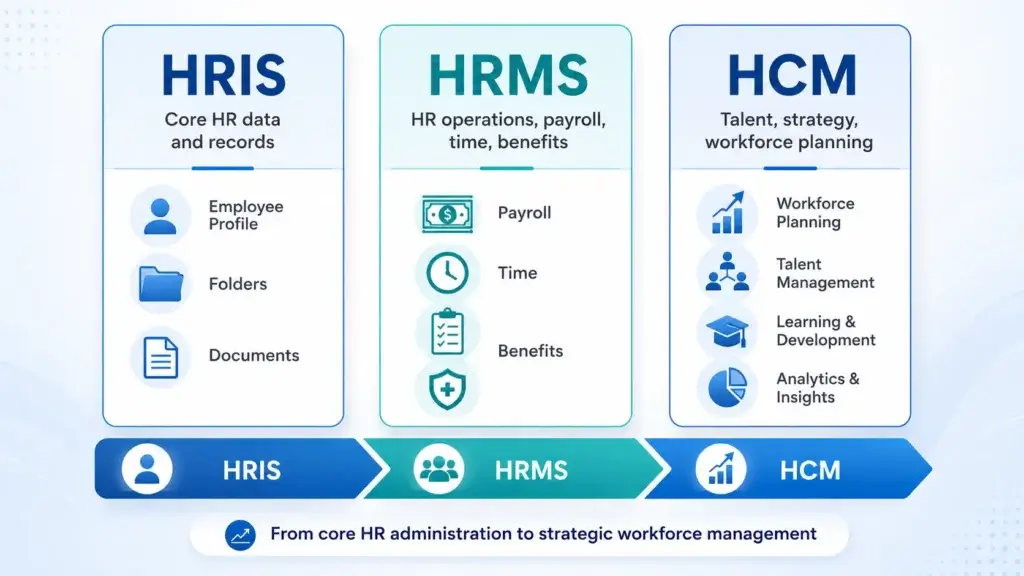
HR software terminology can be confusing because many vendors use the terms HRIS, HCM, and HRMS as if they mean the same thing. They do overlap, but they are not always identical. An HRIS usually focuses on employee records and core HR administration, an HRMS often adds more operational HR processes such as payroll, time tracking, benefits, and workflow management, while an HCM is usually the broadest category, covering the full employee lifecycle, talent strategy, workforce planning, performance, learning, analytics, and sometimes global workforce management.
That distinction matters when you are choosing HR software. If your company only needs a reliable employee database, time off tracking, onboarding, and reporting, a lightweight HRIS may be enough. If you also need payroll, benefits, compliance, scheduling, and day-to-day HR operations, an HRMS may be more practical. If your business is scaling, hiring internationally, developing talent, planning headcount, and connecting HR data to leadership decisions, an HCM platform may be the stronger fit.
In this guide, you will learn what HRIS, HCM, and HRMS mean, how they differ, which system your business needs, which features to compare, and which platforms fit each category. You will also see practical examples from platforms like BambooHR, HiBob, Rippling, Workday, and other leading HR systems.
What Is an HRIS?
An HRIS, or Human Resources Information System, is software used to store, manage, update, and report on employee information. You can think of an HRIS as the core system of record for HR because it gives your team one central place to manage employee profiles, job details, documents, time off, organizational structure, basic workflows, and HR reporting.
For many small and mid-sized companies, an HRIS is the first serious HR system they buy after outgrowing spreadsheets, shared folders, email-based approvals, and disconnected payroll records. It helps HR teams reduce manual admin, improve data accuracy, and give employees a better experience when they need to update personal details, request time off, find documents, or complete onboarding tasks.
HRIS in one sentence
An HRIS is the central database and administrative system your company uses to manage employee data and core HR processes.
What an HRIS usually includes
Most HRIS platforms focus on the everyday foundation of people operations. They help HR teams organize employee information, standardize basic processes, and make common HR tasks easier for employees and managers.
- Employee records and profiles
- Digital documents and e-signatures
- Time off requests and approvals
- Employee self-service
- Org charts and reporting lines
- Onboarding checklists
- Basic HR workflows and approvals
- HR reports and compliance records
Some HRIS platforms also offer payroll, benefits administration, time tracking, performance reviews, and applicant tracking. This is where the terminology starts to overlap with HRMS and HCM, so it is important to compare the actual features instead of relying only on the category name.
Who needs an HRIS?
An HRIS is usually the right starting point if your business needs more structure around employee data, but does not yet need a full enterprise HR suite. For example, a 30-person company may not need complex succession planning or workforce modeling, but it probably does need accurate employee records, onboarding tasks, PTO tracking, document storage, and reporting.
In my view, BambooHR is one of the clearest examples of an HRIS that works well for small and mid-sized businesses because it focuses on usability, core HR structure, onboarding, reporting, and employee self-service without overwhelming smaller HR teams.

What Is an HCM?
HCM stands for Human Capital Management. It is both a business approach and a software category. As a business approach, HCM focuses on managing employees as a strategic asset. As a software category, HCM platforms help companies recruit, manage, develop, pay, engage, and plan their workforce.
An HCM platform usually includes the core HR functions of an HRIS, but it goes further into talent management, workforce planning, skills, learning, performance, compensation, succession, analytics, and employee experience. The strongest HCM platforms help HR move from administration to strategy by connecting people data to workforce decisions.
HCM in one sentence
An HCM is a broader HR platform designed to manage the full employee lifecycle and support strategic workforce decisions.
What an HCM usually includes
HCM platforms are often built for companies that have moved beyond basic HR administration. They are especially relevant when leadership wants to understand not only who works at the company, but how people are performing, where skills gaps exist, how headcount is changing, which teams need support, and how workforce decisions affect business growth.
- Core HR and employee records
- Recruiting and applicant tracking
- Onboarding and employee lifecycle workflows
- Payroll and benefits administration
- Performance management
- Learning and development
- Compensation planning
- Succession planning
- Workforce analytics and planning
- Employee engagement and experience tools
Instead of only answering “Who is employed here?”, an HCM helps answer “Do we have the right people, skills, structure, compensation, and leadership pipeline to support the business?” This is the main reason HCM platforms are usually more relevant for growing, mid-market, and enterprise organizations.
Who needs an HCM?
An HCM is usually the better fit when your company has more complex people management needs. This may include multiple locations, international hiring, advanced compliance requirements, formal performance programs, learning initiatives, compensation cycles, workforce planning, or executive-level people analytics.
Large companies often choose platforms like Workday, Oracle Fusion Cloud HCM, SAP SuccessFactors, ADP, UKG, or Dayforce because these systems are built for scale, complex workforce structures, and deeper HR operations. Mid-market companies may prefer modern HCM-style platforms like HiBob or Rippling if they want broad HR capabilities but do not want the implementation weight of a traditional enterprise suite.
HRIS vs HCM in practical terms
The easiest way to separate HRIS from HCM is to look at the goal. An HRIS helps you manage HR data and processes more efficiently, while an HCM helps you manage your workforce more strategically. That does not mean an HRIS is basic or weak, it means its main value is operational clarity. HCM platforms add more strategic layers around talent, performance, planning, analytics, and long-term workforce development.
What Is an HRMS?
HRMS stands for Human Resource Management System. An HRMS usually sits between HRIS and HCM, although some vendors use HRMS and HCM almost interchangeably. In practical buying terms, an HRMS is often a more complete HR operations system than a basic HRIS because it usually includes employee data management plus payroll, time and attendance, benefits, compliance, scheduling, reporting, and workflow automation.
HRMS in one sentence
An HRMS is an operational HR system that combines employee data with tools for managing payroll, time, benefits, compliance, and HR workflows.
What an HRMS usually includes
An HRMS is useful when HR needs more than an employee database, but the company may not need a full enterprise HCM suite. It is especially relevant for companies that need to manage recurring HR processes accurately, such as payroll, time tracking, scheduling, compliance records, benefits workflows, and approvals.
- Employee records and HR database
- Payroll processing or payroll integrations
- Benefits administration
- Time and attendance tracking
- Scheduling and workforce management
- Compliance documentation
- Policy acknowledgments and documents
- Employee and manager self-service
- HR workflow automation
- Operational reporting
For example, a retail business, healthcare provider, agency, construction company, or distributed service business may need accurate time tracking, PTO, payroll, scheduling, approvals, and compliance records. That is a classic HRMS use case.
HRMS vs HRIS in practical terms
An HRIS is usually the system of record, while an HRMS is usually the system of record plus more day-to-day HR operations. If your current problem is messy employee data, scattered documents, and manual onboarding, start with HRIS requirements. If your problem also includes payroll errors, time tracking gaps, benefits workflows, compliance tracking, and recurring approvals, you are probably looking for HRMS functionality.
HRMS vs HCM in practical terms
An HRMS is more operational, while an HCM is more strategic. An HRMS helps you run HR processes accurately, and an HCM helps you connect HR operations to workforce planning, talent development, skills, compensation strategy, and leadership decisions. The overlap is real, so the best way to compare systems is not only by acronym, but by the specific capabilities you need.
HRIS vs. HCM vs. HRMS: Side-by-Side Comparison
The difference between HRIS, HCM, and HRMS becomes easier to understand when you compare scope, use case, and buyer fit side by side. Use this table as a practical decision guide, not as a strict dictionary, because vendor terminology varies and many modern HR platforms include features from more than one category.
| Category | HRIS | HRMS | HCM |
| Main purpose | Manage employee data and core HR administration | Manage HR operations, payroll, time, benefits, and workflows | Manage the full workforce lifecycle and strategic people decisions |
| Typical scope | Core HR system of record | Core HR plus operational HR management | Core HR, operations, talent, planning, analytics, and workforce strategy |
| Best for | Small and mid-sized businesses needing HR structure | Companies needing payroll, time, benefits, compliance, and workflows | Scaling, global, mid-market, and enterprise organizations |
| Common features | Employee records, documents, PTO, onboarding, self-service, reporting | HRIS features plus payroll, time tracking, benefits, scheduling, compliance | HRMS features plus recruiting, performance, learning, compensation, succession, planning |
| Strategic depth | Low to moderate | Moderate | High |
| Implementation complexity | Usually lower | Moderate | Moderate to high |
| Example platforms | BambooHR, Zoho People, Personio, HiBob | Rippling, Paycor, Paylocity, UKG Ready, Odoo HR | Workday, Oracle Cloud HCM, SAP SuccessFactors, Dayforce, UKG Pro |
The simplest way to remember the difference
HRIS stores and organizes people data, HRMS runs day-to-day HR operations, and HCM connects HR operations to broader workforce strategy. That simple distinction will help you avoid buying a system that is either too small for your needs or too complex for your current stage.
Why the terms overlap
The HR software market has changed quickly. Older systems were often built around separate modules for personnel records, payroll, time tracking, and benefits. Modern cloud platforms now bundle many of these capabilities into one product, which is why one vendor may describe its product as an HRIS, another may call a similar product an HRMS, and another may position itself as an HCM suite.
Instead of relying only on the label, compare what the system actually does. Look at your required workflows, countries, payroll needs, reporting needs, compliance requirements, integrations, employee self-service, and talent management goals.
Which System Does Your Business Need?
The right system depends on your company size, HR maturity, workforce complexity, payroll requirements, and growth plans. You do not need the biggest HR platform. You need the one that solves your current HR problems while giving you enough room to grow.
Choose an HRIS if you need core HR structure
An HRIS is the best fit if your company is moving away from spreadsheets, shared folders, and manual HR admin. You probably need an HRIS if your main challenges include employee data accuracy, onboarding, PTO tracking, document management, basic reporting, and employee self-service.
This is common for small businesses, startups, agencies, professional services firms, and growing teams that want a clean HR foundation. For this stage, BambooHR is usually one of the strongest options because it is easy to adopt, HR-focused, and practical for teams that want structure without enterprise complexity.
Choose an HRMS if HR operations are becoming harder to manage
An HRMS makes more sense when your HR team needs to manage employee data plus payroll, time, benefits, compliance, approvals, and recurring workflows. You may need an HRMS if payroll is becoming more complex, managers need better self-service, compliance records are harder to maintain, or manual approvals are slowing HR down.
This is common for companies with hourly employees, multiple departments, location-based work, shift-based teams, or a growing number of HR policies. Rippling is a strong example of an HRMS-style platform because it connects HR, payroll, IT, apps, devices, and workflows in one operational system.
Choose an HCM if workforce strategy matters
An HCM is the right fit when HR is no longer only administrative. You may need an HCM if your company is managing talent strategy, performance cycles, skills, learning, workforce planning, compensation, succession, global teams, or executive people analytics.
This is common for mid-market and enterprise organizations where HR data needs to support business planning. Workday, Oracle Cloud HCM, SAP SuccessFactors, Dayforce, and UKG Pro are common enterprise HCM examples. HiBob can also fit modern mid-market HCM needs, especially when employee experience, workflows, analytics, and global readiness matter.
Small business recommendation
Most small businesses should not start with a heavy HCM suite. Start with a strong HRIS that can centralize records, onboarding, PTO, documents, and reporting. If payroll is a priority, choose a platform with payroll built in or a reliable payroll integration.
For many smaller teams, an HRIS with the right add-ons is more useful than an enterprise HCM that takes months to implement and requires more administrative ownership.
Growing business recommendation
Growing companies should think one stage ahead. If you are already adding departments, hiring managers, formal policies, performance reviews, and multiple locations, a basic HRIS may feel limited quickly. In that case, choose a platform with stronger workflow automation, reporting, integrations, payroll support, and talent features.
HiBob, Rippling, BambooHR, and other modern HR platforms can work well here, depending on whether your priority is HR experience, operational automation, payroll, or global growth.
Enterprise recommendation
Enterprise buyers should focus on scalability, governance, configurability, security, global compliance, workforce planning, analytics, and integration depth. At this level, the buying decision is less about whether the system is called HRIS, HRMS, or HCM. It is about whether the platform can support complex organizational structures, global policies, payroll requirements, reporting models, data permissions, and long-term workforce planning.
Key Features to Look For in Each
The most important HR software features depend on which category you are buying. An HRIS should make employee data clean, accessible, and reliable. An HRMS should make HR operations easier to run. An HCM should help leadership make better workforce decisions.
Key HRIS features
When evaluating an HRIS, prioritize ease of use and data quality. Your HRIS will become the foundation for employee information, so the system should be simple enough for HR, managers, and employees to keep updated.
- Central employee database
- Employee self-service portal
- Digital document management
- Onboarding and offboarding checklists
- PTO and absence management
- Org charts and reporting lines
- Basic workflow approvals
- Custom fields and reporting
- Payroll and benefits integrations
- Role-based permissions
The best HRIS should reduce repetitive HR admin without creating a complicated system that employees avoid using.
Key HRMS features
When evaluating an HRMS, look at operational depth. The system should help HR, finance, managers, and employees handle recurring people operations with fewer manual handoffs.
- Payroll processing or payroll sync
- Time and attendance tracking
- Benefits administration
- Compliance workflows
- Scheduling and labor tracking
- Manager self-service
- Approval routing
- Policy acknowledgments
- Audit trails and reporting
- Automation for recurring HR tasks
An HRMS should be especially strong at accuracy, repeatability, and operational control.
Key HCM features
When evaluating an HCM platform, look beyond HR administration. The platform should help your business understand workforce trends, develop people, plan future roles, manage performance, and connect HR strategy to company goals.
- Recruiting and talent acquisition
- Performance management
- Learning and development
- Compensation planning
- Succession planning
- Workforce planning
- Skills and career development
- Employee engagement tools
- Advanced people analytics
- Global HR and compliance support
A strong HCM platform should help HR become a strategic partner to leadership, not only an administrative department.
Security, compliance, and integrations
No matter which category you choose, security and integrations are essential. HR systems contain sensitive employee data, compensation details, tax information, identity details, documents, and sometimes health or benefits-related information. At a minimum, check whether the platform supports role-based access, single sign-on, audit logs, data encryption, secure document storage, compliance reporting, and permission controls.
You should also review integrations with payroll, accounting, ATS, benefits, identity management, time tracking, collaboration tools, and business intelligence systems. The more your HR system connects to other business systems, the more important clean data governance becomes.
| Feature Area | Most Important for HRIS | Most Important for HRMS | Most Important for HCM |
| Employee data | Employee records, profiles, documents, org charts | Employee records connected to payroll, time, and benefits | Employee data connected to analytics, planning, and talent strategy |
| Payroll | Optional or integrated | Often central | Often included or integrated across regions |
| Talent management | Basic onboarding or performance add-ons | Some performance and development tools | Recruiting, performance, learning, succession, skills, and compensation |
| Analytics | Basic HR reports | Operational reports for payroll, time, and compliance | Advanced workforce analytics and planning |
| Best buying priority | Simplicity and data accuracy | Operational control and automation | Scalability and strategic workforce insight |
Examples of HRIS, HCM & HRMS Platforms
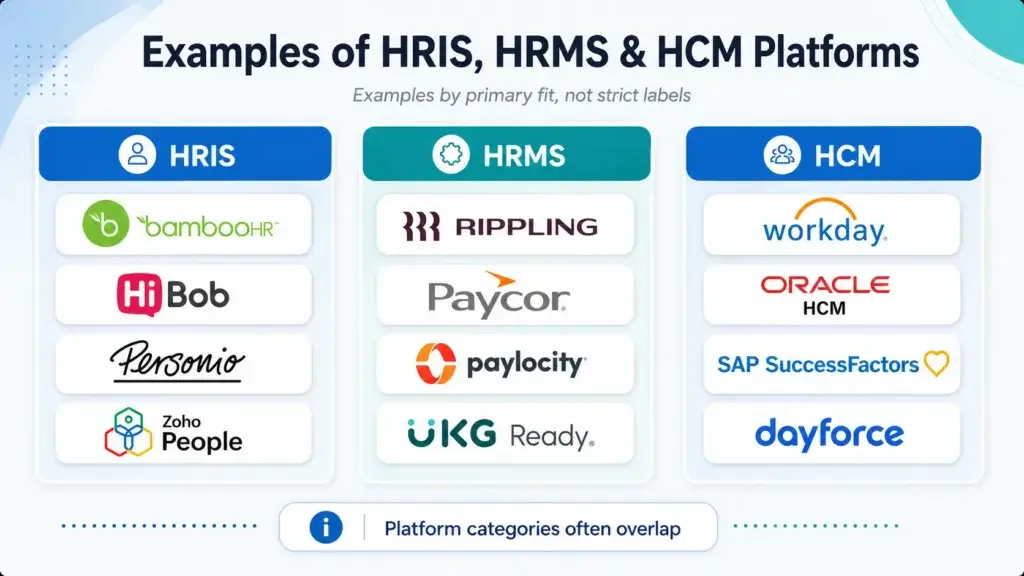
Many HR platforms can fit more than one category. For example, BambooHR is often described as an HRIS, but it can also support payroll, benefits, performance, and hiring workflows. Rippling can function as an HRIS, HRMS, and broader workforce management system. Workday is clearly positioned as a full HCM suite, but it also contains core HRIS and HRMS capabilities.
That is why the examples below are best understood by primary fit, not rigid labels.
HRIS platform examples
HRIS platforms are usually best when your main need is centralizing employee records and standard HR workflows. BambooHR is a strong HRIS example for small and mid-sized businesses because it is especially practical for employee data, onboarding, time off, documents, reporting, and employee self-service.
HiBob can work as a modern HRIS for growing companies that want stronger employee experience, workflows, people analytics, and global readiness. Personio is another common HRIS option for European small and mid-sized businesses, especially when core HR, recruiting, payroll-related workflows, and employee records need to be centralized. Zoho People can be a good fit for companies already using the Zoho ecosystem and looking for a cost-conscious HR database with time, leave, and workflow tools.
HRMS platform examples
HRMS platforms are usually best when HR needs to manage core employee data plus more operational processes. Rippling is one of the strongest examples because it combines HR, payroll, benefits, identity, devices, apps, workflow automation, and finance tools in one connected workforce system.
Paycor and Paylocity are common HRMS-style options for companies that need payroll, workforce management, benefits, time, talent, and reporting. UKG Ready can fit companies that need HR, payroll, time, scheduling, and workforce management in a connected system, while Odoo HR can fit businesses that want HR modules connected to broader ERP functions.
HCM platform examples
HCM platforms are usually best for larger or more complex organizations that need enterprise HR capabilities. Workday HCM is one of the leading HCM platforms for enterprise organizations that need HR, talent, payroll-related capabilities, workforce planning, analytics, and finance alignment.
Oracle Fusion Cloud HCM is a major enterprise HCM suite built around a unified HR data model, global HR processes, talent, workforce management, and AI-supported HR workflows. SAP SuccessFactors is a strong enterprise HCM option for companies that need core HR, payroll, talent management, learning, workforce analytics, and integration with SAP business systems. Dayforce and UKG Pro are also widely used HCM platforms, especially where payroll, workforce management, compliance, scheduling, and employee lifecycle processes are central.
Global workforce platforms
Some platforms do not fit neatly into only HRIS, HRMS, or HCM because their primary value is global employment infrastructure. Deel, Remote, Oyster HR, and Papaya Global are examples of global workforce platforms often used for international hiring, Employer of Record services, contractor management, global payroll, and cross-border compliance.
These tools may include HRIS features, but their main value is different from a traditional domestic HRIS. They are especially relevant when international payroll, employment compliance, and contractor management are central to the buying decision. You can compare broader options in our guide to the best HR software.
| Platform | Best Category Fit | Best For | Good Fit When |
| BambooHR | HRIS | Small and mid-sized businesses | You need easy core HR, onboarding, PTO, documents, and reporting |
| HiBob | HRIS / HCM-style | Growing and mid-market companies | You want modern HR workflows, employee experience, and people analytics |
| Rippling | HRMS / Workforce management | Operationally complex teams | You want HR, payroll, IT, devices, apps, and workflows connected |
| Workday | HCM | Enterprise organizations | You need deep workforce planning, HR, talent, analytics, and scalability |
| Oracle Cloud HCM | HCM | Large and global organizations | You need enterprise HR processes, talent, payroll alignment, and global scale |
| SAP SuccessFactors | HCM | SAP-centered enterprises | You need HR, talent, learning, workforce analytics, and SAP ecosystem fit |
| Deel | Global workforce platform | International teams | You need EOR, contractor management, global payroll, and compliance |
How to compare platform examples fairly
Do not compare platforms only by feature count. A system with more features is not always better because it may be harder to implement, more expensive, and less practical for your current team. Instead, compare platforms by fit.
- Choose BambooHR if you want simple and reliable HRIS functionality.
- Choose HiBob if you want a modern HR platform for growing teams.
- Choose Rippling if you want HR connected to payroll, IT, apps, and automation.
- Choose Workday if you need enterprise HCM depth and scalability.
- Choose Deel if global hiring, EOR, contractors, and international payroll are core needs.
The best HR system is the one your team can actually implement, maintain, and trust.
Final Thoughts
HRIS, HCM and HRMS are different levels of HR software maturity
HRIS, HCM, and HRMS are related terms, but they are not always interchangeable. An HRIS gives your company a reliable foundation for employee data and core HR processes. An HRMS adds more operational control across payroll, time, benefits, compliance, and workflows. An HCM goes further by connecting HR data to talent strategy, workforce planning, performance, learning, compensation, and long-term business decisions.
If you are a small business, start with the basics. Choose an HRIS that employees will actually use and that gives HR a clean source of truth. If your company is growing and HR operations are becoming more complex, consider an HRMS-style platform that can handle payroll, approvals, time tracking, reporting, and integrations. If your business is scaling across teams, locations, countries, or talent programs, an HCM platform may be the better long-term investment.
The most important lesson is simple: do not buy based on acronyms alone. Buy based on your workforce complexity, your HR maturity, your payroll and compliance needs, your integration requirements, and the decisions you want HR data to support. In 2026, the best HR software decision is not choosing the biggest platform. It is choosing the right system for the way your company manages people now, while leaving enough room for where your workforce is going next.
FAQs
What is the difference between HRIS and HCM?
The main difference is scope. An HRIS usually focuses on employee data, core HR administration, documents, time off, onboarding, and reporting. An HCM is broader and usually includes HRIS capabilities plus talent management, performance, learning, compensation, workforce planning, analytics, and strategic people management.
Does my small business need an HRIS or an HCM?
Most small businesses should start with an HRIS unless they already have advanced talent, workforce planning, or global HR needs. A good HRIS can centralize employee records, onboarding, PTO, documents, self-service, and reporting without the cost and complexity of a full HCM suite.
What are examples of HRMS platforms?
Examples of HRMS-style platforms include Rippling, Paycor, Paylocity, UKG Ready, Odoo HR, and some BambooHR configurations with payroll, benefits, time tracking, and operational HR workflows. The exact category depends on which modules are used.
Can an HRIS handle payroll?
Yes, some HRIS platforms can handle payroll directly, while others connect to third-party payroll providers. Payroll is not always included in every HRIS plan, so you should confirm whether payroll is native, available as an add-on, or supported through integrations.
When should a company upgrade from HRIS to HCM?
A company should consider upgrading from HRIS to HCM when it needs more advanced talent management, performance reviews, learning, compensation planning, workforce analytics, succession planning, global HR support, or strategic headcount planning.
Is HRMS the same as HRIS?
Not exactly. An HRIS is usually the core system for employee data and HR administration. An HRMS typically includes HRIS features plus more operational tools, such as payroll, time tracking, benefits, scheduling, compliance workflows, and manager self-service.
Is Workday an HRIS, HRMS, or HCM?
Workday is best described as an HCM platform. It includes core HR and operational HR features, but its broader value is in enterprise human capital management, workforce planning, talent management, analytics, and scalable HR processes.
Is BambooHR an HRIS or HRMS?
BambooHR is commonly considered an HRIS because it is strong for employee records, onboarding, time off, documents, reporting, and employee self-service. With payroll, benefits, time tracking, and performance features, it can also support some HRMS-style needs.
What is the best HR system for a growing company?
The best HR system for a growing company depends on its priorities. BambooHR is strong for simple HRIS needs, HiBob is strong for modern mid-market HR, Rippling is strong for HR operations connected to IT and payroll, and Workday is stronger for enterprise HCM requirements.
Do HRIS, HCM and HRMS platforms replace payroll software?
Sometimes. Some HRIS, HRMS, and HCM platforms include native payroll, while others integrate with payroll providers. If payroll accuracy, tax compliance, multi-state payroll, or global payroll is important, check payroll capabilities before choosing the system.