Introduction
Setting up an effective employee onboarding process is one of the most important things you can do after making a hire. A strong onboarding experience helps new employees understand their role, meet the right people, complete required paperwork, access the tools they need, and start contributing with confidence.
Too many companies still treat onboarding as a one-day orientation. The new hire gets a welcome email, signs a few forms, attends a company presentation, and is then expected to figure out the rest alone. That approach creates confusion, slows productivity, and can damage the employee experience before the person has even settled into the role.
A better onboarding process is structured, intentional, and measurable. It starts before day one, continues through the first week, supports the employee during the first 30, 60, and 90 days, and gives managers a clear framework for coaching, feedback, and role clarity.
In this guide, you will learn how to set up an employee onboarding process step by step. You will also get a practical employee onboarding checklist, a 30-60-90 day onboarding plan, remote onboarding considerations, and guidance on how HR software can automate the process. If you are comparing platforms, you can also review our guide to the best HR software for broader HR system options.

Why Employee Onboarding Matters
Employee onboarding matters because the first weeks shape how a new hire understands your company, their role, their manager, and their future in the organization. When onboarding is organized, employees know what to do, where to find information, who to ask for help, and how success will be measured.
When onboarding is weak, the opposite happens. New employees may feel unsure, isolated, overloaded, or disconnected from the team. That can lead to slower ramp-up, avoidable mistakes, poor engagement, and early turnover.
Onboarding affects retention and engagement
Onboarding is not only an administrative HR process. It is a retention strategy. A new hire is still evaluating the company after accepting the offer, and the onboarding experience either confirms that they made the right decision or creates doubt.
During onboarding, employees form early opinions about your culture, communication style, manager quality, internal organization, and growth opportunities. If the company appears disorganized during this stage, it can weaken trust quickly.
Onboarding reduces time to productivity
Every new employee needs time to understand the role, tools, workflows, team expectations, and company context. A structured onboarding process reduces the amount of time spent searching for answers and waiting for access.
For example, if a new hire receives system access, training materials, role expectations, and a first-week agenda before starting, they can focus on learning and contributing instead of chasing basic information.
Onboarding improves consistency across teams
Without a documented onboarding process, the experience depends too heavily on the individual manager. One employee may receive detailed guidance and regular check-ins, while another may get only a laptop and a few links.
A consistent onboarding framework helps every new hire receive the essentials, regardless of department, location, seniority, or manager style. It also gives HR a way to track completion, identify gaps, and improve the experience over time.
Onboarding protects compliance
Onboarding also includes important compliance steps, such as employment forms, tax documents, policy acknowledgments, payroll setup, benefits enrollment, security training, and required workplace training. Missing these steps can create legal, financial, or operational risk.
That is why a good onboarding process should combine employee experience with administrative accuracy. You want the process to feel welcoming, but also complete, documented, and reliable.
The 4 Phases of Effective Onboarding
An effective onboarding process is easier to manage when you break it into phases. Instead of treating onboarding as one long checklist, you can organize the experience around what the employee needs at each stage.
The four most useful onboarding phases are pre-boarding, orientation, role enablement, and ongoing integration. Together, they help the employee move from candidate to confident team member.
Phase 1: Pre-boarding
Pre-boarding starts after the candidate accepts the offer and continues until their first day. This phase is often overlooked, but it is one of the best opportunities to build excitement and reduce first-day friction.
During pre-boarding, you should complete paperwork, send welcome information, prepare equipment, schedule meetings, assign onboarding tasks, and make sure the employee knows what to expect on day one.
- Send a welcome email with start date, schedule, and contact details
- Collect required employee documents and payroll information
- Prepare laptop, software access, email, and security permissions
- Share company handbook, policies, and benefits information
- Assign a manager, onboarding buddy, or mentor
- Prepare the first-week agenda
The goal is simple: the employee should arrive on day one feeling expected, prepared, and welcomed.
Phase 2: Orientation
Orientation is the formal introduction to the company. It usually covers company values, culture, structure, policies, benefits, security, compliance, and practical information about how the organization works.
Orientation should not be overloaded with every detail the employee might need in the future. It should give them the essential foundation and point them toward the resources they can use later.
This is also where many companies make a common mistake. They use orientation as a replacement for onboarding. Orientation is only one part of onboarding. Onboarding is the broader process of helping an employee integrate into the company and become successful in the role.
Phase 3: Role enablement
Role enablement is where the employee starts learning the specific responsibilities, workflows, tools, performance expectations, and team processes connected to their job.
This phase should be led mainly by the manager, with support from HR, IT, learning teams, and peers. It should include role-specific training, job shadowing, product or service education, process walkthroughs, and early assignments.
The goal is not to overwhelm the employee with everything at once. The goal is to create a clear learning path that helps them build confidence gradually.
Phase 4: Ongoing integration
Ongoing integration covers the first 30, 60, and 90 days, and often extends beyond that for complex roles. This phase helps the employee build relationships, receive feedback, understand performance expectations, and become fully embedded in the team.
Regular manager check-ins are essential here. The employee should have a safe place to ask questions, discuss challenges, clarify priorities, and understand what good performance looks like.
By the end of onboarding, the employee should understand their role, know how to work with the team, have access to the right tools, and feel connected to the company culture.
Building a 30-60-90 Day Onboarding Plan
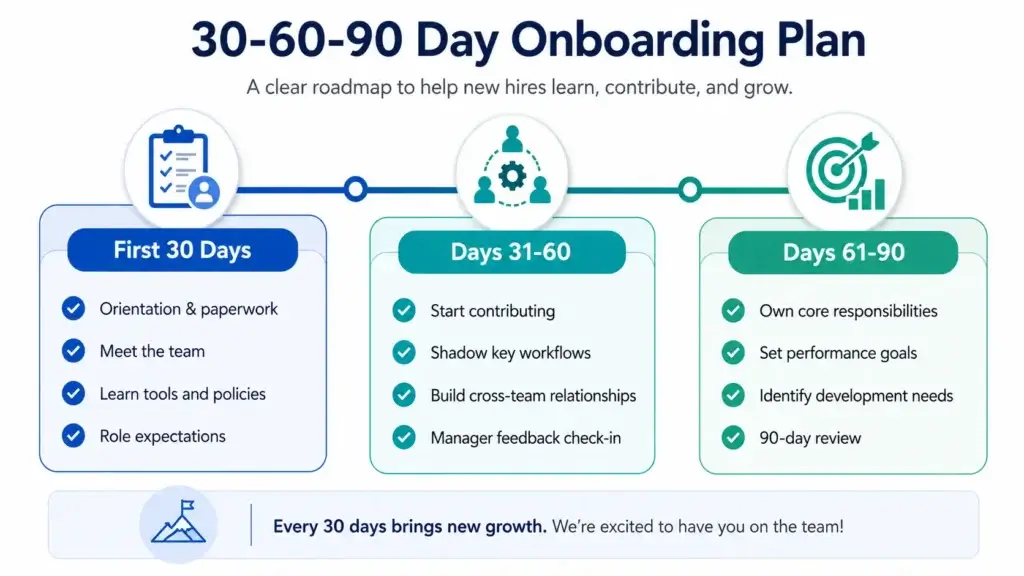
A 30-60-90 day onboarding plan gives structure to the employee’s first three months. It helps the manager define what the employee should learn, complete, and achieve at each stage.
This plan should not be treated as a rigid performance test. It should be a practical roadmap that gives the employee clarity and helps the manager provide the right level of support.
First 30 days: learn, observe, and connect
The first 30 days should focus on learning. The employee needs to understand the company, team, tools, workflows, expectations, and role context. This is the time to ask questions, meet stakeholders, review documentation, and complete foundational training.
For most roles, the first month should include a balance of company onboarding, role-specific training, and relationship building. The employee should not be expected to deliver full productivity immediately, especially in complex or cross-functional roles.
- Complete HR paperwork, compliance training, and benefits setup
- Meet the manager, team members, and key stakeholders
- Review role responsibilities, KPIs, and success expectations
- Learn core tools, systems, and workflows
- Complete product, service, or process training
- Start with small, low-risk assignments
By the end of the first 30 days, the employee should understand the role, know where to find information, and feel comfortable asking for help.
First 60 days: contribute and build confidence
Days 31 to 60 should focus on contribution. The employee should start taking more ownership, completing meaningful work, and applying what they learned during the first month.
This is also the stage where managers should identify whether the employee needs more training, clearer priorities, better documentation, or additional support from peers.
Good 60-day goals may include completing a defined project, managing a recurring workflow, participating in cross-functional meetings, handling customer or internal requests, or presenting early findings to the team.
First 90 days: own outcomes and plan forward
By days 61 to 90, the employee should begin moving from learning mode to ownership mode. They may not be fully expert yet, but they should be able to manage core responsibilities with increasing independence.
The 90-day review is an important milestone. It should not be only a performance evaluation. It should also be a structured conversation about role clarity, support, manager communication, workload, goals, and next steps.
By the end of the first 90 days, the employee should have clear priorities for the next quarter and understand how their work contributes to the team and company goals.
30-60-90 day onboarding plan example
The table below gives you a simple structure you can adapt by role, department, seniority, and company size.
| Timeframe | Main Goal | Key Activities | Expected Outcome |
| First 30 days | Learn and connect | Complete HR tasks, meet the team, review tools, learn workflows, understand role expectations | The employee understands the company, role, tools, and first priorities |
| First 60 days | Contribute with support | Take on role-specific tasks, join recurring workflows, receive feedback, complete first project | The employee starts contributing meaningful work and building confidence |
| First 90 days | Own outcomes | Manage core responsibilities, review performance, clarify next-quarter goals, identify development needs | The employee can work with more independence and has a clear growth path |
Pre-Boarding: What to Do Before Day One
Pre-boarding is the part of onboarding that happens before the employee officially starts. It is one of the easiest ways to improve the new hire experience because it removes uncertainty before the first day.
A strong pre-boarding process makes the employee feel welcomed and reduces the amount of administration that would otherwise slow down day one.
Send a clear welcome email
The welcome email should confirm the start date, time, location or remote login details, first-day schedule, manager name, HR contact, and any preparation needed before the first day.
Keep the message warm, but practical. The employee should know exactly what will happen next and who to contact if they have questions.
Prepare paperwork and compliance tasks
Many HR tasks can be completed before day one, including tax forms, direct deposit information, policy acknowledgments, identity verification steps, employment agreements, confidentiality agreements, and benefits documents.
Using digital forms and e-signatures can reduce manual work and prevent the employee from spending the first morning filling out documents.
Set up tools and access
Few things create a worse first impression than a new hire who cannot log in, access email, join meetings, or use the tools needed for the role. HR and IT should coordinate before the start date to prepare the employee’s workspace and permissions.
This includes laptop delivery, email access, HRIS login, communication tools, project management software, payroll access, security permissions, and role-specific platforms.
Prepare the manager and team
Onboarding is not only an HR responsibility. The hiring manager should know the employee’s start date, first-week schedule, initial tasks, training plan, and check-in cadence.
The team should also know when the new hire is joining, what the person will do, and how they can help. A simple internal announcement can make the employee feel expected and included.
Assign an onboarding buddy
An onboarding buddy helps the new hire understand informal processes, team norms, communication habits, and everyday questions that may feel too small to ask a manager.
This is especially useful in remote and hybrid teams, where casual learning does not happen as naturally as it does in an office.
How HR Software Automates Onboarding
HR software can make employee onboarding more consistent, scalable, and easier to manage. Instead of relying on email threads, spreadsheets, and manual reminders, HR teams can use software to assign tasks, collect documents, trigger workflows, track completion, and coordinate HR, IT, payroll, and managers.
The best onboarding software does not replace human connection. It removes repetitive administration so HR and managers can spend more time helping the employee succeed.
What onboarding automation can handle
Onboarding automation is especially useful for repeatable steps that must happen for every employee. These steps often involve multiple teams, which makes manual tracking difficult as the company grows.
- Offer acceptance workflows and pre-boarding emails
- Digital forms, e-signatures, and document collection
- Task assignments for HR, IT, managers, and new hires
- Automated reminders for incomplete onboarding tasks
- Payroll, benefits, and direct deposit setup
- Software access, app provisioning, and equipment requests
- Policy acknowledgments and compliance training
- 30-60-90 day check-ins and manager reminders
Automation is particularly valuable when you onboard employees frequently, hire across locations, manage remote employees, or need better compliance visibility.
Best HR software tools for onboarding
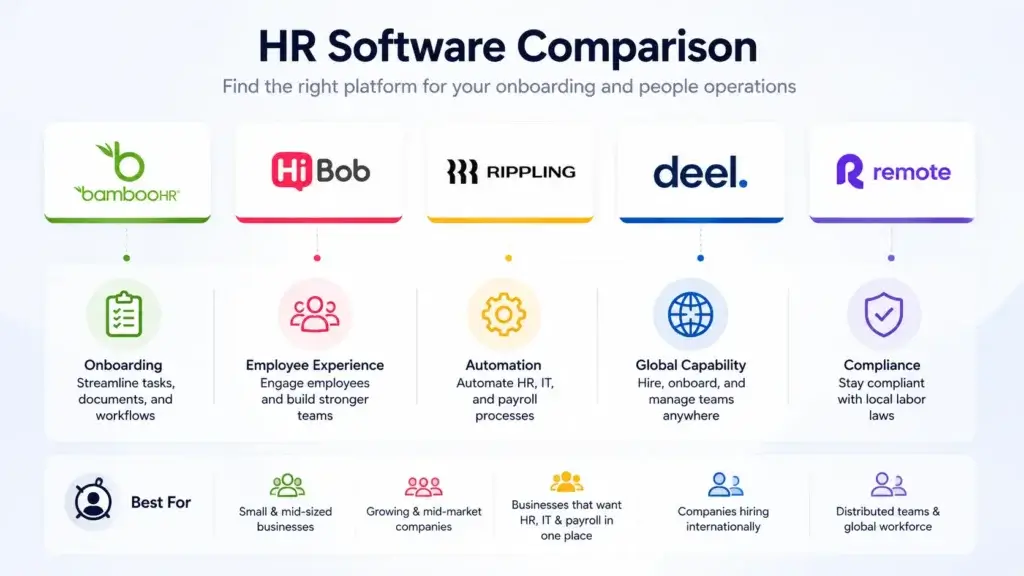
Several HR platforms can support employee onboarding, but the right choice depends on your company size, workflow complexity, payroll needs, and global hiring plans.
BambooHR is one of the strongest options for small and mid-sized businesses that want a clean, easy-to-use HRIS with onboarding checklists, employee records, document management, time off, reporting, and employee self-service. It is a practical choice when your main goal is to organize HR processes without creating an overly complex system.
HiBob is a strong fit for growing and mid-market companies that want a more modern employee experience. It is useful when onboarding needs to connect with workflows, people analytics, company culture, employee engagement, and global team management.
Rippling is especially strong when onboarding requires both HR and IT automation. It can help connect employee data with payroll, benefits, app access, device setup, approvals, and workflow automation. This makes it a good fit for companies that want to reduce manual handoffs between HR, IT, and finance.
Deel and Remote are more relevant when onboarding includes international hiring, Employer of Record services, contractor management, global payroll, and country-specific employment compliance. These platforms are useful when your onboarding process needs to support employees or contractors across multiple countries.
How to choose onboarding software
Before choosing a platform, map your current onboarding process. Identify where delays happen, which tasks are repeated, which teams are involved, and which steps create the most risk.
Then choose software based on the workflows you actually need. A small company may only need onboarding checklists, documents, time off, and employee records. A scaling company may need deeper workflow automation, payroll, IT provisioning, and reporting. A global company may need country-specific compliance and international employment support.
| Tool | Best Fit | Onboarding Strength | Best For |
| BambooHR | HRIS for SMBs | Onboarding checklists, employee records, documents, and self-service | Small and mid-sized businesses that want simple HR structure |
| HiBob | Modern HR platform | Workflows, employee experience, people analytics, and culture-focused onboarding | Growing and mid-market companies |
| Rippling | HR, IT, and payroll automation | App access, devices, payroll, benefits, and onboarding workflow automation | Companies that need HR and IT onboarding connected |
| Deel | Global workforce platform | International hiring, EOR onboarding, contractor setup, and global payroll support | Companies hiring across countries |
| Remote | Global HR and employment | Global employee onboarding, contractor management, compliance, and payroll support | Distributed teams with international hiring needs |
Remote Onboarding: Special Considerations
Remote onboarding requires more structure than office-based onboarding because new hires cannot rely on casual conversations, desk-side help, or in-person observation. Without a clear process, remote employees can feel disconnected quickly.
The key is to be intentional. Remote onboarding should include clear communication, documentation, access setup, relationship building, and frequent manager check-ins.
Send equipment early
Remote employees should receive their laptop, accessories, login instructions, and setup guidance before the first day. If the employee starts without the right equipment, the first experience becomes frustrating and unproductive.
IT should confirm delivery, test access where possible, and provide a clear support channel for setup issues.
Create a structured first-week schedule
Remote employees need a visible schedule that shows meetings, training sessions, self-guided learning, team introductions, and focus time. A full week of back-to-back video calls can be exhausting, so balance live interaction with independent learning.
A good remote onboarding schedule should include manager check-ins, team introductions, HR orientation, tool training, and time to review documentation.
Document everything clearly
Remote onboarding depends heavily on documentation. New employees should know where to find company policies, team processes, role expectations, project documentation, tool guides, and communication norms.
Documentation should be easy to scan, current, and organized by topic. If the employee has to search through scattered documents, onboarding will feel harder than it needs to be.
Build social connection intentionally
Remote employees do not naturally meet people in hallways, lunch breaks, or informal office conversations. You need to create connection deliberately.
This may include a virtual welcome meeting, onboarding buddy, small group introductions, team coffee chats, manager check-ins, and cross-functional stakeholder meetings.
Clarify communication norms
Remote employees need to know how your company communicates. Explain which tools are used for urgent messages, project updates, documentation, meetings, decisions, and social communication.
You should also clarify expectations around response times, meeting etiquette, working hours, calendar visibility, and async communication.
Free Onboarding Checklist Template
You can use the checklist below as a starting point for your employee onboarding process. Adapt it by role, location, department, seniority, and employment type.
The best onboarding checklist should be detailed enough to prevent missed steps, but not so long that it becomes difficult to use. Keep it practical, assign clear owners, and track completion in your HR software or project management system.
Pre-boarding checklist
- Send offer confirmation and welcome email
- Collect signed employment agreement and required documents
- Set up payroll, tax, and direct deposit information
- Prepare laptop, equipment, email, and app access
- Share handbook, policies, benefits, and first-day details
- Assign manager, buddy, and onboarding owner
- Prepare first-week schedule and training plan
- Announce the new hire internally
Day one checklist
- Welcome the employee and confirm the day-one agenda
- Complete HR orientation and required paperwork
- Review company mission, values, structure, and policies
- Introduce the employee to the manager and team
- Confirm system access, tools, and equipment setup
- Review role expectations and first-week priorities
- Schedule recurring manager check-ins
First week checklist
- Complete role-specific training and tool walkthroughs
- Meet key stakeholders and cross-functional partners
- Review team workflows, communication norms, and documentation
- Assign first small project or learning task
- Confirm benefits enrollment and payroll setup
- Hold end-of-week manager check-in
First 30 days checklist
- Complete required compliance and security training
- Review progress against 30-day onboarding goals
- Clarify role responsibilities, KPIs, and success measures
- Collect feedback on the onboarding experience
- Identify any training, access, or support gaps
- Set goals for days 31 to 60
First 60 days checklist
- Review progress on role-specific responsibilities
- Assign more independent tasks or projects
- Provide manager feedback and coaching
- Confirm the employee understands team workflows
- Discuss collaboration, workload, and communication
- Set goals for days 61 to 90
First 90 days checklist
- Conduct a 90-day onboarding review
- Review achievements, challenges, and development needs
- Confirm long-term role priorities and expectations
- Discuss performance goals for the next quarter
- Collect feedback to improve the onboarding process
- Transition from onboarding plan to regular performance management
Simple onboarding checklist table
If you want a shorter template, you can use this table as a high-level checklist inside your HR software, project management tool, or shared onboarding document.
| Stage | Tasks | Owner | Status |
| Pre-boarding | Welcome email, paperwork, payroll setup, equipment, system access, first-week schedule | HR, IT, Manager | Not started / In progress / Complete |
| Day one | Orientation, team introduction, tool access check, role expectations, first check-in | HR, Manager | Not started / In progress / Complete |
| First week | Training, stakeholder meetings, team workflows, first assignment, benefits confirmation | Manager, Buddy, HR | Not started / In progress / Complete |
| First 30 days | Role learning, compliance training, feedback, first goals, support gaps | Manager, Employee | Not started / In progress / Complete |
| First 60 days | Contribution, project ownership, coaching, workflow confidence, next goals | Manager, Employee | Not started / In progress / Complete |
| First 90 days | 90-day review, performance goals, development plan, onboarding feedback | Manager, HR, Employee | Not started / In progress / Complete |
Final Thoughts
A strong onboarding process is structured, personal, and measurable
An effective employee onboarding process gives new hires the clarity, support, and confidence they need to succeed. It also gives HR and managers a repeatable system for handling paperwork, tools, training, introductions, compliance, and early performance conversations.
The best onboarding processes start before day one, continue through the first 90 days, and combine structure with human connection. A checklist is important, but it should not become the entire experience. Employees also need manager support, team relationships, role clarity, feedback, and a clear path toward contribution.
If you are building your onboarding process from scratch, start with the basics. Define the stages, assign owners, create a 30-60-90 day plan, document the checklist, and use HR software to automate repeatable tasks. Then review feedback from new hires and managers so you can improve the process over time.
In 2026, onboarding is no longer only about paperwork and orientation. It is part of employee experience, retention, productivity, and workforce planning. When you get it right, new hires do not just start faster. They feel more prepared, more connected, and more confident about building a future with your company.
FAQs
What should be included in an employee onboarding checklist?
An employee onboarding checklist should include pre-boarding tasks, paperwork, payroll setup, benefits enrollment, equipment, software access, company orientation, policy acknowledgments, role-specific training, team introductions, manager check-ins, 30-60-90 day goals, and onboarding feedback.
How can HR software automate the onboarding process?
HR software can automate onboarding by sending welcome emails, assigning tasks, collecting documents, managing e-signatures, triggering IT access requests, tracking checklist completion, reminding managers about check-ins, supporting payroll and benefits setup, and storing employee records in one system.
What is the difference between onboarding and orientation?
Orientation is usually a formal introduction to the company, policies, benefits, structure, and basic procedures. Onboarding is the broader process of helping a new employee integrate into the company, understand the role, build relationships, complete training, and become productive over time.
How long should employee onboarding take?
Employee onboarding should usually last at least 30 to 90 days, depending on the role. Simple roles may need a shorter onboarding period, while complex, senior, technical, or cross-functional roles often need a longer ramp-up period with structured training and manager support.
What are the biggest onboarding mistakes companies make?
The biggest onboarding mistakes include treating onboarding as a one-day orientation, failing to prepare tools before day one, overloading employees with information, not involving the manager, skipping role-specific training, ignoring remote onboarding needs, and failing to collect feedback after the first 30, 60, and 90 days.